7 Operational Failure Modes

More
Depth: Practitioner
Progress saves as you read. Mark sections complete as you go; your progress appears in the sidebar.
Before applying the specification, inspect the real rotary potentiometer below: its package, terminals, scale, and installation context are part of the engineering evidence.

Carry those visible constraints into the surrounding analysis; the abstract symbol or capability name does not capture mounting, wiring, protection, or service access.
Prove the Site Fails in a Defined Way
Picture a site that loses its upstream link, fills a queue, and then sends old commands after reconnection. Local operation is safe only when degraded behavior and recovery order are explicit.
A gateway means the boundary system that joins local devices to another network or service. Give it a buffer limit, retry rule, time source, local service rule, and named owner.
Run outage, burst, full-buffer, restart, late-data, and recovery cases. Keep inputs, queue state, dropped items, commands, clock, operator signal, and final order so another team can repeat the drill.
This check covers selected failures and one recovery window, not every combined incident. The deeper sections examine ownership, retries, buffering, trust, updates, and observability.
Edge and fog deployments fail when teams treat local infrastructure as a small cloud instead of a distributed system with physical constraints. The common failure modes are unclear decision ownership, synchronized retries, weak buffering, untested failover, drifting clocks, unmanaged devices, exposed trust boundaries, and cloud-only observability. The fix is to define data, control, management, and failure paths before deployment, then test those paths under outage, burst, update, and recovery conditions.
7.1 Start Simple
This section: Start Simple — Imagine a site gateway loses its upstream link during a busy hour.
Imagine a site gateway loses its upstream link during a busy hour. The visible failure may be a missed alert, a duplicate command, a full buffer, or an operator who cannot tell which tier owns the next action. Everyday IoT reliability starts by drawing the data, control, management, and failure paths before the system is under stress. Start with one failure drill, one expected local behavior, one reconciliation rule, and one signal that tells the team the design is no longer safe.
7.2 Learning Objectives
This section: Learning Objectives
By the end of this chapter, you will be able to:
- Identify eight practical failure modes in edge and fog computing deployments.
- Explain why retry storms, missing local buffers, and weak failover damage production systems.
- Design retry, buffering, clock, and management controls that preserve local service during disruption.
- Distinguish an architecture diagram from the operational contracts needed to run it.
- Write a pitfall review record that captures symptoms, owner, mitigation, and verification evidence.
7.3 Why Edge-Fog Pitfalls Are Different
This section: Why Edge-Fog Pitfalls Are Different — Cloud-only systems can often centralize failure handling.
Cloud-only systems can often centralize failure handling. Edge and fog systems cannot. A device may be in a vehicle, factory cell, clinic, farm field, building closet, or roadside cabinet. The system may need to keep acting while the cloud link is down, while a fog node is rebooting, or while a certificate update is rolling out across only part of the fleet.
Do not ask only whether edge or fog can process the workload. Ask what the system does when one tier is slow, unreachable, stale, compromised, or being updated.
7.3.1 Edge Risk
The device has the physical context, but limited memory, power, storage, clock quality, and update access.
7.3.2 Fog Risk
The gateway has site context, but it can become a hidden single point of failure or a backlog amplifier.
7.3.3 Cloud Risk
The cloud has fleet history and governance, but it should not be required for immediate local safety or continuity.
7.4 Pitfall Map
This section: Pitfall Map — Inspect Figure 7.1 before continuing.
Inspect Figure 7.1 before continuing. A happy-path architecture hides the operational defects most likely to invalidate its placement. Figure 7.1 organises the failure questions and the proof required to close them.
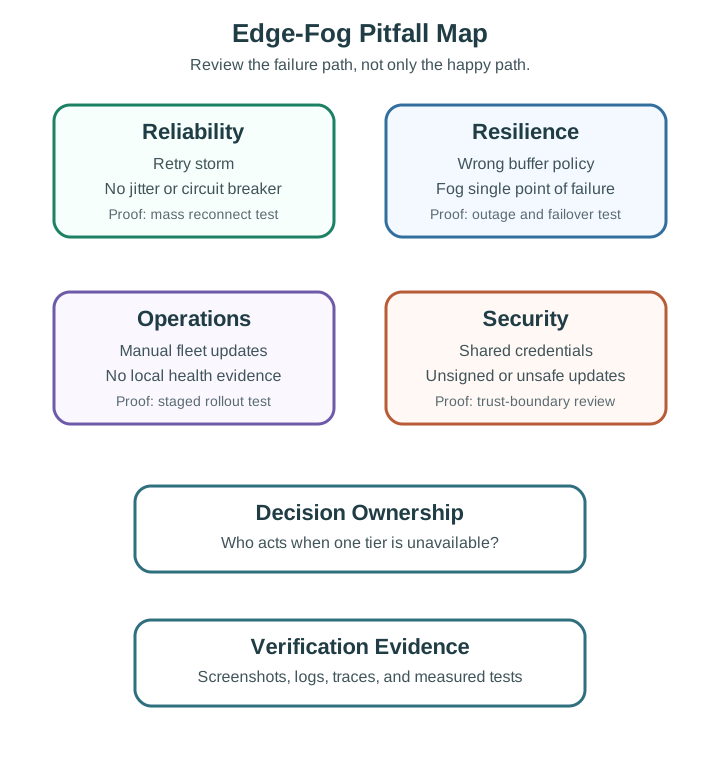
In the diagram Figure 7.1, under Reliability, a retry storm is tested with mass reconnect rather than assumed away. Resilience pairs wrong buffer policy and a fog single point of failure with outage and failover tests; Operations checks manual updates and missing health evidence through staged rollout; Security examines shared credentials and unsafe updates at the trust boundary. The final Decision Ownership and Verification Evidence boxes require an owner plus logs, traces, screenshots, or measurements for each failure path.
Use this map as a review checklist. A chapter, design review, or lab report is not complete just because it names the pitfall. It should also name the owner, the mitigation, and the test evidence.
7.5 Failure Contract Drill
This section: Failure Contract Drill — For one critical workload, name the degraded states before the design review ends: slow, unreachable, stale, overloaded, compromised, and updating.
For one critical workload, name the degraded states before the design review ends: slow, unreachable, stale, overloaded, compromised, and updating. A named failure mode can become a bounded design. An unnamed failure mode becomes an outage.
Paper ownership is not enough. Run the drill with cables unplugged, clocks skewed, queues filled, and updates interrupted so the contract proves what operators will see.
7.5.1 Data Path
How readings, events, batches, summaries, and retained evidence move when links are healthy and when links fail.
7.5.2 Control Path
Which tier can command actuators, reject unsafe states, or make local decisions without waiting upstream.
7.5.3 Management Path
How devices receive configuration, credentials, firmware, container updates, and rollback instructions.
7.5.4 Failure Path
What the system does during gateway failure, cloud disconnection, clock drift, overload, or partial rollout.
7.6 Pitfall 1: Decision Ownership Is Ambiguous
This section: Pitfall 1: Decision Ownership Is Ambiguous — The first failure mode is not a code bug.
The first failure mode is not a code bug. It is an ownership bug. A device waits for a fog node for an immediate action, the fog node waits for the cloud for policy, and the cloud waits for a batch upload that never arrives during an outage.
7.6.1 Symptoms
First, Local action stops during cloud or gateway disruption. Next, Operators cannot tell which tier owns a command. Then, Logs show repeated handoffs rather than a clear decision. After that, A “local” feature still depends on an upstream round trip.
7.6.2 Mitigation
First, Assign immediate safety and continuity decisions to the closest tier that has enough context. Next, Keep fog and cloud in the evidence, review, and policy path when they are not needed for the immediate action. Then, Document degraded-mode behavior for every critical workflow.
7.6.3 Review Test
Disconnect the cloud path and then the fog path. The review should record:
First, Which local decisions continue. Next, Which decisions degrade to a safer rule set. Then, Which decisions stop deliberately. After that, Which evidence is buffered for later reconciliation.
7.7 Pitfall 2: Retry Logic Creates a Recovery Storm
This section: Pitfall 2: Retry Logic Creates a Recovery Storm — Retries are necessary, but identical retry schedules can create a second outage.
Retries are necessary, but identical retry schedules can create a second outage. If 10,000 devices reconnect at the same deterministic intervals, a fog broker that just recovered can be overloaded again by the recovery traffic.
7.7.1 Symptoms
First, Broker load spikes immediately after a network or power event. Next, Recovery takes longer than the outage itself. Then, Battery devices wake repeatedly during a failed connection window. After that, Logs show retries at the same timestamps across many devices.
7.7.2 Mitigation
First, Use capped exponential backoff with full jitter. Next, Add a circuit breaker after repeated failure. Then, Separate urgent alarms from background telemetry. After that, Test simultaneous reconnect after site power recovery.
7.7.3 Retry Pattern
Use the pattern, not the exact constants, as the review target:
import random
import time

def retry_delay(base, attempt, cap):
    window = min(cap, base * 2 ** attempt)
    return random.uniform(0, window)

def send_with_backoff(send_once, attempts=8):
    base = 1.0
    cap = 60.0
    for attempt in range(attempts):
        try:
            return send_once()
        except NetworkError:
            time.sleep(retry_delay(base, attempt, cap))
    raise RetryBudgetExhausted()
Full jitter means the retry is sampled from the whole current backoff window. Equal jitter keeps a minimum delay and samples from only the upper half of the window. Either is better than no jitter, but a large fleet usually needs maximum spreading during mass recovery.
7.8 Pitfall 3: The Buffer Preserves the Wrong Data
This section: Pitfall 3: The Buffer Preserves the Wrong Data — In the two halves of this picture, compare what happens to alerts when raw samples fill the local buffer.
In the two halves of this picture, compare what happens to alerts when raw samples fill the local buffer.
-

Wrong: Any local buffer protects what matters. Raw data can push out alerts, so save by priority.
On the left, raw sample cards crowd the bin while the alert is pushed out. On the right, the smaller store keeps alert and failure cards ahead of routine samples. The drawing makes the rule concrete: a local buffer needs a retention policy, or a long disconnection can erase what operators most need.
Inspect Figure 7.2 before continuing. A buffer policy should be judged inside the wider failure response, because retaining the wrong records can undermine recovery even when storage itself works. Figure 7.2 shows where prioritisation and quarantine belong.
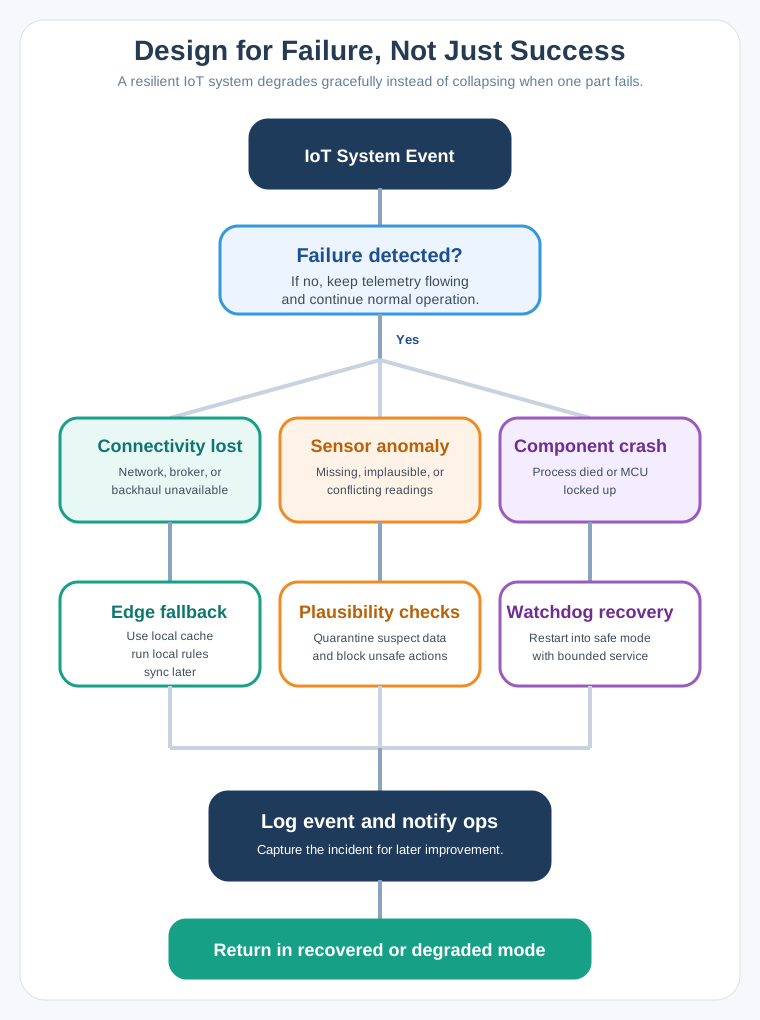
In the diagram Figure 7.2, after IoT System Event, Failure detected? separates normal telemetry from three responses. Connectivity lost leads to Edge fallback, local cache, local rules, and later sync; Sensor anomaly invokes plausibility checks and quarantines suspect data; Component crash uses watchdog recovery into safe mode. Every branch reaches Log event and notify ops. For the buffer design, that means alerts, failure state, and replay identity must outrank undifferentiated raw telemetry during a long outage.
7.8.1 Symptoms
First, A local disk fills with raw samples. Next, Alarms are missing after an outage. Then, Reconnect floods the fog node with stale low-priority events. After that, Replay order corrupts downstream analytics.
7.8.2 Mitigation
First, Tag records by priority before they enter the queue. Next, Store critical events durably when memory is not enough. Then, Drop or aggregate low-priority telemetry first. After that, Flush high-priority records before routine batches.
7.8.3 Buffer Review Record
7.8.4 Capacity
State the expected data rate, record size, available memory or disk, and target outage duration.
7.8.5 Eviction
State which records are dropped first and which records are never dropped without an explicit alarm.
7.8.6 Replay
State the order used after reconnect and how duplicate or stale records are detected.
7.9 Pitfall 4: Clock Discipline Is Treated as Optional
This section: Pitfall 4: Clock Discipline Is Treated as Optional — Edge and fog logs are useful only when events can be ordered.
Edge and fog logs are useful only when events can be ordered. Cheap oscillators drift, devices reboot without network time, and gateways may receive delayed batches after connectivity returns.
7.9.1 Symptoms
First, Events from nearby devices appear out of order. Next, A replayed batch looks newer than live events. Then, Root-cause analysis cannot align sensor, gateway, and cloud logs. After that, The system silently trusts timestamps from unsynchronized nodes.
7.9.2 Mitigation
First, Record both event time and ingest time. Next, Include sync status and clock offset when known. Then, Use monotonic timers for local duration measurement. After that, Use NTP for general monitoring and PTP-class designs where sub-millisecond alignment is required.
7.9.3 Timestamp Contract
For every retained record, decide which of these fields are required:
7.11 Pitfall 6: Fleet Management Is Added After Deployment
This section: Pitfall 6: Fleet Management Is Added After Deployment — Small pilots can be managed manually.
Small pilots can be managed manually. Production fleets cannot. Once devices are distributed, each update, credential rotation, configuration change, and rollback becomes an operational path.
7.11.1 Symptoms
First, Operators do not know which firmware version is running at each site. Next, Configuration changes are made manually and drift across devices. Then, Failed updates require physical visits. After that, Devices stop checking in without an alert.
7.11.2 Mitigation
First, Maintain inventory, version, configuration, and owner metadata. Next, Use heartbeat and health checks that identify silent devices. Then, Roll updates out in stages with automatic rollback. After that, Keep update and recovery instructions independent from the workload being updated.
7.11.3 Minimum Management Contract
Identity Each device, gateway, and service has a unique identity and a documented owner.
Health Each node reports version, configuration hash, uptime, resource pressure, and last successful sync.
Update Each rollout has rings, pause criteria, signature verification, and rollback behavior.
Recovery Each site has a path for re-enrollment, credential rotation, and device replacement.
7.12 Pitfall 7: Security Stops at the Cloud Boundary
This section: Pitfall 7: Security Stops at the Cloud Boundary — Edge and fog nodes often sit in physically exposed places and bridge protocols that were never designed for internet-scale trust.
Edge and fog nodes often sit in physically exposed places and bridge protocols that were never designed for internet-scale trust. A cloud dashboard with strong authentication does not secure a gateway running default credentials, exposed services, or unsigned update packages.
7.12.1 Symptoms
First, Shared credentials are copied across a fleet. Next, Local device-to-gateway traffic is unauthenticated. Then, Debug services remain open after commissioning. After that, Update packages are not signed or rollback-protected.
7.12.2 Mitigation
First, Use unique device identity and mutual authentication. Next, Limit local services and firewall exposed interfaces. Then, Store secrets in hardware-backed or OS-protected storage where available. After that, Verify boot and update artifacts before execution.
7.12.3 Trust Boundary Review
For each boundary, document the credential, validation, revocation, and logging mechanism:
7.12.4 Device to Fog
Mutual identity, least privilege topics or endpoints, replay protection, and local service hardening.
7.12.5 Fog to Cloud
Managed credentials, outbound-only connectivity where possible, certificate rotation, and policy separation.
7.12.6 Update Channel
Signed artifacts, staged rollout, health gate, rollback, and audit trail.
7.12.7 Physical Access
Tamper response, secure erase needs, debug-port policy, and asset replacement process.
7.13 Pitfall 8: Observability Ends at the Cloud Dashboard
This section: Pitfall 8: Observability Ends at the Cloud Dashboard — If monitoring only starts after data reaches the cloud, the team cannot see the failures that edge and fog were introduced to survive.
If monitoring only starts after data reaches the cloud, the team cannot see the failures that edge and fog were introduced to survive. Local queues, retry schedules, failover transitions, clock sync, update status, and gateway resource pressure all need visibility.
7.13.1 Symptoms
First, Cloud metrics look normal because failed local records never arrived. Next, Operators see data gaps but not queue depth, retry state, or local errors. Then, A gateway is overloaded before the dashboard alarms. After that, Debugging requires physical access to a node.
7.13.2 Mitigation
First, Emit local health records even when application telemetry is delayed. Next, Keep bounded local logs for outage periods. Then, Track queue depth, oldest buffered record, retry attempt, clock sync state, and failover state. After that, Reconcile local and cloud evidence after reconnect.
7.14 End-to-End Pitfall Review
This section: End-to-End Pitfall Review
Use this compact record before production:
7.15 References
This section: References — First, NIST SP 500-325, Fog Computing Conceptual Model.
First, NIST SP 500-325, Fog Computing Conceptual Model. Next, NIST SP 800-82, Guide to Operational Technology Security. Then, AWS Architecture Blog, Exponential Backoff and Jitter. After that, IEEE 1588, Precision Clock Synchronization Protocol for Networked Measurement and Control Systems. Finally, AWS IoT Greengrass and Azure IoT Edge documentation for managed edge runtime, deployment, and offline operation patterns.
7.16 Summary
This section: Summary — Edge and fog pitfalls are usually contract failures before they are code failures.
Edge and fog pitfalls are usually contract failures before they are code failures. A production-ready design assigns immediate local decisions, spreads retries with jitter, protects critical buffered evidence, records clock state, removes hidden fog single points of failure, manages devices as a fleet, secures local trust boundaries, and exposes local health before records reach the cloud. The core review habit is simple: for each workload, state what happens when each tier is slow, unreachable, stale, overloaded, compromised, or being updated.
7.17 What’s Next?
This section: What’s Next? — First, Edge-Fog Labs to practice local fallback, buffering, and measurement workflows.
Continue with:
First, Edge-Fog Labs to practice local fallback, buffering, and measurement workflows. Next, Edge-Fog Simulator to explore placement and failure behavior interactively. Then, Edge-Fog Use Cases to compare these pitfalls across practical domains. After that, Edge-Fog Architecture to connect the pitfall review to tier roles and data paths.
7.18 Key Takeaway
This section: Key Takeaway — Most edge-fog failures are governance failures: unclear ownership, overloaded gateways, weak security, missing observability, unmanaged updates, and optimistic assumptions about field networks.
Most edge-fog failures are governance failures: unclear ownership, overloaded gateways, weak security, missing observability, unmanaged updates, and optimistic assumptions about field networks.
Find help
3 reviewed answers.
Where should I start in a module?
Open the module page from the sidebar to see its chapters in order. Use the module map to return to a topic you need.
Modules and pathsReviewed
What can I try when a project does not work?
Check the symptom, then work through the diagnostic steps. Keep the error message and the smallest example that reproduces it.
When you are stuckReviewed
How do interactive examples work?
Use the interactive guide to check how examples and simulations work before changing your project.
Interactive examples guideReviewed