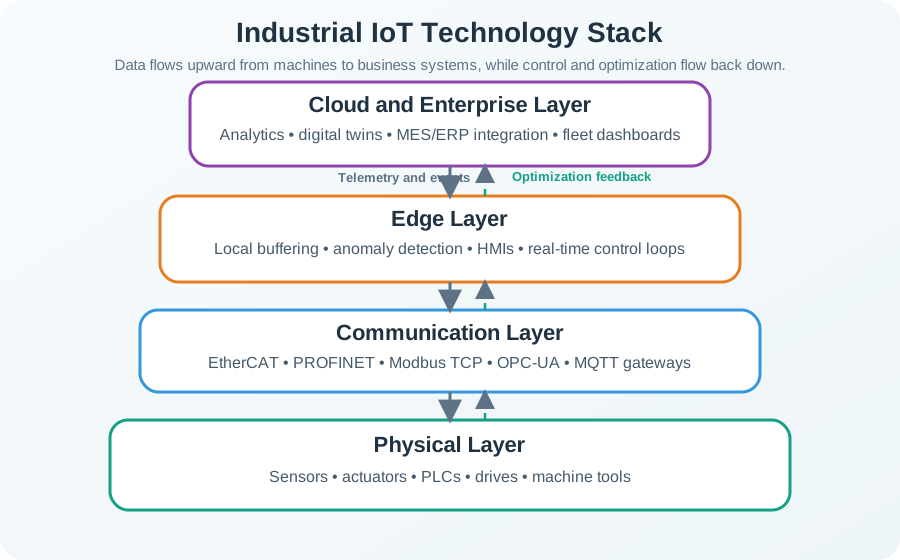
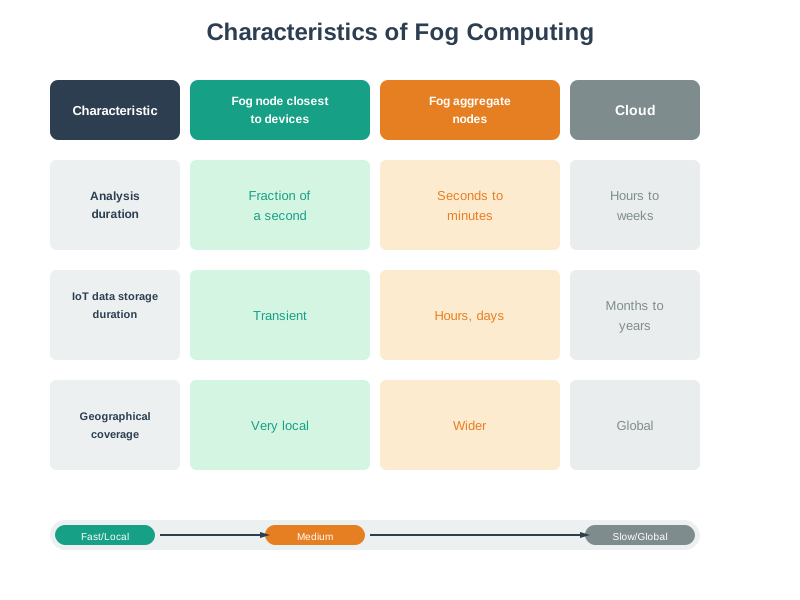
28  Fog Computing Fundamentals

Understanding the intermediate processing tier that makes IoT systems faster, cheaper, and more resilient

In 60 Seconds

Fog computing adds an intermediate processing tier between edge devices (1-10ms latency) and cloud data centers (100-500ms), achieving 10-100ms response times while reducing cloud-bound data by 90-99%. Four pillars drive fog adoption: latency (sub-10ms for safety-critical), bandwidth (fog filtering), privacy (GDPR/HIPAA local processing), and reliability (local autonomy during outages) – but workloads with fewer than 100 sensors and hourly reporting often work better with cloud-only.

28.1 Learning Objectives

By the end of this section, you will be able to:

  • Analyze the three-tier architecture (edge, fog, cloud) and evaluate how each tier transforms data as it flows from 1 GB/s raw sensor streams to 1 MB/s cloud-bound insights
  • Compare fog computing with edge and cloud computing using the OpenFog/IEEE reference architecture, distinguishing scope, latency profiles (1-10ms vs. 10-100ms vs. 100-500ms), and resource characteristics
  • Evaluate processing placement decisions by applying the four-pillar framework (latency, bandwidth, privacy, reliability) to determine whether a given IoT workload belongs at the edge, fog, or cloud tier
  • Calculate bandwidth savings from hierarchical data aggregation, quantifying the 90-99% reduction achieved by fog-tier filtering before cloud transmission
  • Design a priority-based synchronization strategy for fog nodes recovering from cloud connectivity loss, classifying buffered data into immediate, summary, and background tiers
  • Assess cost trade-offs between fog infrastructure investment ($2,000+ gateway hardware plus maintenance) and cloud-only operation for workloads with varying data rates and latency requirements
Minimum Viable Understanding
  • Fog computing is an intermediate processing tier: positioned between resource-constrained edge devices (1-10ms latency) and distant cloud data centers (100-500ms latency), fog nodes on gateways and local servers achieve 10-100ms response times
  • Four pillars drive fog adoption: latency (safety-critical systems need sub-10ms), bandwidth (fog reduces cloud-bound data by 90-99%), privacy (GDPR/HIPAA require local processing), and reliability (local autonomy during network outages)
  • Not every IoT system needs fog: workloads with fewer than 100 sensors, hourly reporting intervals, and no real-time requirements are often better served by cloud-only at a fraction of the cost

Sammy the sound sensor was getting worried. Every time something loud happened in the factory, he had to send his recording alllll the way to the Cloud Castle far away before anyone could react. By the time the message got there and back, the loud noise was already over!

Lila the light sensor had the same problem. She noticed the lights flickering dangerously, but waiting for the Cloud Castle to respond took so long that the workers had already stumbled in the dark.

Then Max the motion detector had a brilliant idea. “What if we build a helper station right here in our factory? Like a mini-castle!” he said. They called it a fog node — not as big as the Cloud Castle, but close enough to help right away.

Now when Max detects someone entering a dangerous zone, the fog helper station sounds the alarm in 10 milliseconds — no waiting for the faraway castle! When Sammy hears a machine making a strange noise, the fog helper station can shut it down immediately. And Lila? When she spots flickering lights, the helper station switches to backup power before anyone notices.

Bella the button sensor loves the fog helper station too. “The best part,” she says, “is that when the road to the Cloud Castle gets blocked by a storm, our helper station keeps everything running! It saves up all our messages and sends them later when the road is clear again.”

What the squad learned: Fog computing means having a smart helper nearby that can make fast decisions, save bandwidth by summarizing messages, and keep working even when the internet goes down.

Imagine you have a smart home with 20 sensors (temperature, motion, cameras, door locks). Every second, these sensors generate data. You have two choices for what to do with that data:

Option A — Cloud only: Send everything over the internet to a powerful computer in a data center hundreds of miles away. The data center processes it and sends back instructions. This works, but it is slow (at least 100 milliseconds round trip) and uses a lot of internet bandwidth. If your internet goes down, nothing works.

Option B — Fog computing: Put a small computer (like a Raspberry Pi or a gateway box) right in your home. This local computer handles the urgent stuff immediately — if the smoke detector triggers, it sounds the alarm in 5 milliseconds without waiting for the internet. It also collects data from all 20 sensors, throws away the boring repetitive readings, and sends only a small summary to the cloud once per hour.

Fog computing is Option B. It is the idea of placing computing power between your devices and the cloud, so you get fast responses locally while still using the cloud for things that need massive computing power (like training an AI model on years of data).

Three things to remember:

  1. Fog is not a replacement for cloud — it works together with the cloud, each handling what it does best
  2. Fog saves bandwidth — instead of sending 1 GB/s of raw camera footage to the cloud, a fog node sends a 1 KB alert saying “person detected at front door”
  3. Fog keeps working offline — if your internet goes down, the fog node continues operating your smart home locally

28.2 Most Valuable Understanding (MVU)

MVU: Fog Computing Closes the Gap Between Edge Devices and the Cloud

Core Concept: Fog computing provides an intermediate processing tier between resource-constrained edge devices and latency-distant cloud data centers, enabling IoT systems to process data at the most appropriate location based on latency, bandwidth, privacy, and reliability requirements.

Why It Matters: Pure edge computing lacks the resources for complex analytics, while pure cloud computing introduces unacceptable latency for real-time applications. Fog computing resolves this tension by placing compute, storage, and networking services closer to data sources — typically on gateways, routers, or local servers — achieving 10-100ms response times while reducing cloud-bound bandwidth by 90-99%.

Key Takeaway: The central design question in fog architecture is “Where should this computation happen?” The answer depends on four factors: how fast the response must be (latency), how much data is involved (bandwidth), who can see the data (privacy), and what happens if the network fails (reliability). Master this decision framework and you can architect IoT systems that are fast, cost-effective, and resilient.

The Challenge: Edge is Limited, Cloud is Far

The Problem: Neither pure edge nor pure cloud architectures fully meet IoT requirements:

  • Edge devices: Physically close to sensors but severely limited in compute power, memory, and storage
  • Cloud data centers: Virtually unlimited resources but 100-500ms away, creating unacceptable latency for real-time applications
  • The gap: Many IoT tasks need more processing than edge devices can provide, yet less latency than cloud can deliver
  • Data aggregation: Raw sensor streams must be filtered and consolidated before transmission to reduce bandwidth costs

Why This Is Hard:

  • Workload varies dramatically over time (rush hour traffic vs midnight)
  • Different applications have conflicting requirements (video analytics vs temperature monitoring)
  • Resource allocation across tiers requires dynamic optimization
  • State migration between edge, fog, and cloud adds complexity and overhead

What We Need:

  • An intermediate compute tier positioned between edge devices and cloud data centers
  • Dynamic workload distribution based on latency requirements and resource availability
  • Hierarchical data aggregation to reduce raw data volume by 90-99%
  • Graceful degradation that maintains critical functions when cloud connectivity fails

The Solution: Fog computing creates a hierarchical continuum—local fog nodes process time-sensitive data in 10-100ms while aggregating and filtering streams before cloud transmission, achieving the best of both worlds.

Key Takeaway

In one sentence: Fog computing bridges the gap between resource-limited edge devices and latency-distant cloud data centers, providing an intermediate processing tier for time-sensitive IoT applications.

Remember this rule: Process locally what must be fast (real-time control, safety), aggregate at fog what generates too much data (video, high-frequency sensors), and send to cloud what benefits from scale (analytics, long-term storage).

28.3 Formal Definition and Origins

Fog computing was formally introduced by Cisco in 2012. Flavio Bonomi and colleagues defined it as:

“A highly virtualized platform that provides compute, storage, and networking services between end devices and traditional Cloud Computing Data Centers, typically, but not exclusively located at the edge of network.” — Bonomi et al., “Fog Computing and Its Role in the Internet of Things” (2012)

The OpenFog Consortium (now merged with the Industrial Internet Consortium under IEEE) refined this definition in their 2017 Reference Architecture, establishing fog computing as a system-level horizontal architecture that distributes resources and services along the continuum from the data source to the cloud.

Key distinction: While “edge computing” and “fog computing” are sometimes used interchangeably, they differ in scope:

  • Edge computing focuses on processing at or on the device itself (sensor, actuator, microcontroller)
  • Fog computing encompasses the entire intermediate layer between edge and cloud, including gateways, routers, switches, and local servers that coordinate multiple edge devices

In practice, fog computing subsumes edge computing as one tier within a broader hierarchical architecture.

28.4 Edge and Fog Computing

Key Concepts
  • Edge Computing: Processing data at or near the source (sensors, gateways) rather than transmitting raw data to distant cloud data centers
  • Fog Computing: Distributed computing paradigm extending cloud capabilities to the network edge, providing intermediate processing between edge and cloud
  • Fog Nodes: Intermediate devices (gateways, routers, switches) with computational capabilities performing local processing and data aggregation
  • Latency Reduction: Edge/fog processing enables real-time or near-real-time responses by avoiding round-trip delays to cloud data centers
  • Bandwidth Optimization: Processing data locally reduces data volume transmitted to cloud, saving bandwidth costs and reducing network congestion
  • Hierarchical Processing: Tiered architecture distributing computation across edge devices, fog nodes, and cloud based on latency, bandwidth, and computational requirements

28.4.1 The Four Pillars of Fog Computing

Understanding why fog computing exists requires examining the four fundamental drivers that push processing closer to data sources:

Mindmap diagram showing the four pillars of fog computing: Latency (real-time control, safety systems, 1-10ms requirement), Bandwidth (data reduction 90-99%, cost savings, network congestion relief), Privacy (data sovereignty, GDPR compliance, sensitive data stays local), and Reliability (offline operation, graceful degradation, local autonomy during outages)

Pillar 1 — Latency: Safety-critical and real-time applications (autonomous vehicles, robotic surgery, industrial control) require responses within 1-10ms. Cloud round-trips of 100-500ms are 10-100x too slow.

Pillar 2 — Bandwidth: A single HD camera produces approximately 1.5 Gbps of raw data. Transmitting raw data from thousands of sensors to the cloud is prohibitively expensive. Fog nodes filter and aggregate data, typically reducing volume by 90-99%.

Pillar 3 — Privacy: Regulations like GDPR and HIPAA restrict where personal and health data can be processed. Fog computing enables local processing that keeps sensitive data within jurisdictional boundaries.

Pillar 4 — Reliability: Cloud connectivity is not guaranteed. Fog nodes provide local autonomy, ensuring that critical systems (building HVAC, industrial safety, patient monitoring) continue operating during network outages.

28.5 Knowledge Check

Test your understanding of fundamental concepts with these questions.

Scenario: Commercial Office Building Fog Gateway Recovery

You manage the fog computing infrastructure for a 15-story commercial office building with 200 connected devices: - HVAC: 60 thermostats + 15 air handlers - Lighting: 100 smart fixtures with occupancy sensors - Security: 20 door access readers + 5 cameras

The System Architecture:

  • Fog Gateway: Intel NUC with 16 GB storage, running local control logic
  • Cloud Platform: AWS IoT Core for analytics, dashboards, remote access
  • Normal Operation: Fog gateway sends device state every 60 seconds to cloud (200 devices × 100 bytes = 20 KB/min)

The Incident:

Friday 2 PM: Internet service provider fiber cable is accidentally cut during construction. Your fog gateway loses cloud connectivity but continues local operation: - Autonomous control continues: HVAC maintains temperatures, lights respond to occupancy, doors unlock for authorized badges - Data buffering active: Fog gateway stores all device state changes locally (InfluxDB time-series database) - Duration: 6 hours (until 8 PM when ISP repairs fiber)

The Synchronization Challenge:

When connectivity restores at 8 PM, the fog gateway has accumulated: - Detailed time-series: 200 devices × 100 bytes/min × 360 minutes = 7.2 MB of sensor readings - Critical events: 3 security alarm triggers (door forced), 1 HVAC failure (compressor overtemp), 2 fire alarm tests - State changes: 847 events (lights on/off, temperature adjustments, door access)

Your Network Constraints:

  • Available bandwidth: 5 Mbps uplink (shared with 500 office workers resuming evening work)
  • Cloud ingestion rate: AWS IoT Core can handle 1,000 messages/second, but costs $1/million messages
  • Business requirement: Real-time building operations must not be impacted by sync traffic

Think About:

  1. If you immediately upload all 7.2 MB as fast as possible, what happens to real-time traffic (workers accessing cloud apps)?
  2. Are 6-hour-old temperature readings as critical as the 3 security alarms that occurred during the outage?
  3. What if you discard the historical data and only sync current state - what compliance/audit problems might arise?

Key Insight:

Not all data has equal urgency. A security alarm from 4 hours ago still requires investigation today. A temperature reading from 4 hours ago is valuable for energy analytics but doesn’t need instant upload.

The Solution - Priority-Based Synchronization:

Tier 1: Immediate Priority Sync (T+0 to T+30 seconds) Upload critical events first (3 security alarms + 1 HVAC failure):

Total: 4 events × 500 bytes = 2 KB
Time: 0.003 seconds at 5 Mbps
Result: Operators see critical alerts within 10 seconds of connectivity restoration

Tier 2: Fast Summary Sync (T+30 seconds to T+5 minutes) Upload aggregated summaries (not raw data):

Energy consumption per floor (15 floors × 50 bytes = 750 bytes)
Occupancy patterns (100 zones × 100 bytes = 10 KB)
Door access summary (20 doors × 100 bytes = 2 KB)
Total: 12.75 KB
Result: Operators get "what happened" overview in 5 minutes

Tier 3: Background Historical Sync (T+1 hour to T+8 hours) Upload detailed time-series during off-peak (10 PM to 6 AM):

7.2 MB over 8 hours = 0.9 MB/hour ≈ 15 KB/minute ≈ 0.26 KB/s ≈ 2 kbps
Network impact: ~0.04% of 5 Mbps uplink (negligible)
Cost: 7.2 MB ÷ 128 bytes/message = 56,250 messages × $1/million = $0.056
Result: Complete audit trail recovered without impacting operations

Calculate the buffer storage requirements and bandwidth allocation for a fog gateway handling a 6-hour outage with 200 devices.

Buffer Storage Calculation:

During 6-hour outage, 200 devices report at different frequencies:

\[\text{HVAC (75 devices)} = 75 \times 100 \text{ bytes} \times 60 \text{ samples/hour} \times 6 \text{ hours} = 2.7 \text{ MB}\]

\[\text{Lighting (100 devices)} = 100 \times 50 \text{ bytes} \times 120 \text{ samples/hour} \times 6 \text{ hours} = 3.6 \text{ MB}\]

\[\text{Security (25 devices)} = 25 \times 200 \text{ bytes} \times 36 \text{ samples/hour} \times 6 \text{ hours} = 1.08 \text{ MB}\]

\[\text{Total Buffer Needed} = 2.7 + 3.6 + 1.08 = 7.38 \text{ MB}\]

With 10x safety margin for metadata and compression inefficiency: 74 MB buffer (trivial on a 16 GB storage device).

Tiered Sync Bandwidth Allocation:

Available bandwidth: 5 Mbps shared uplink. Allocate 10% to fog sync = 500 kbps:

\[\text{Tier 1 (Critical Events)} = \frac{2 \text{ KB} \times 8}{500 \text{ kbps}} = 0.032 \text{ seconds}\]

\[\text{Tier 2 (Summaries)} = \frac{12.75 \text{ KB} \times 8}{500 \text{ kbps}} = 0.204 \text{ seconds}\]

\[\text{Tier 3 (Historical)} = \frac{7.38 \text{ MB} \times 8}{500 \text{ kbps}} = 118 \text{ seconds (spread over 8 hours)}\]

By rate-limiting Tier 3 to 2 kbps (0.4% of uplink), total sync completes in 8 hours without impacting real-time operations:

\[\text{Tier 3 Time} = \frac{7.38 \text{ MB} \times 8}{2 \text{ kbps}} = 29,520 \text{ seconds} = 8.2 \text{ hours}\]

Key Insight: With intelligent tiering, critical alerts surface in <1 second, summaries in 5 minutes, and full historical audit trail recovers overnight—all while consuming <1% of available bandwidth.

Performance Comparison:

Approach Time to Critical Alerts Network Impact Data Loss Cost
Immediate Full Sync 10 seconds Saturates link (7.2 MB ÷ 5 Mbps = 12 seconds congestion) 0% $0.056
Priority-Based 10 seconds Negligible (2 KB) 0% $0.056
Discard Historical 10 seconds Minimal 100% historical loss $0.002
Manual Intervention Hours (waiting for operator) Variable 0% Variable

Verify Your Understanding:

Why is priority-based synchronization superior? - Immediate full sync: Congests network during critical recovery period, overwhelms cloud ingestion (potentially causing new failures) - Discard historical data: Loses compliance audit trail (building codes require HVAC logs), can’t perform root cause analysis on why HVAC failed during outage - Manual intervention: Delays critical alert delivery (security team doesn’t know about forced door for hours)

Real-World Impact: This fog computing resilience pattern is critical for: - Healthcare: Patient monitoring continues during network outages, data syncs after restoration for medical records - Industrial: Production lines maintain operation, quality logs sync after connectivity restored - Retail: Point-of-sale continues during outages, transaction history syncs to accounting systems - Smart Cities: Traffic lights function locally, synchronize timing analytics later

The key principle: Local autonomy + intelligent synchronization = resilient systems that survive network failures without data loss.
28.6 Prerequisites

Before diving into this chapter, you should be familiar with:

  • Wireless Sensor Networks (WSN): Understanding how distributed sensor nodes communicate and organize provides foundation for comprehending edge computing data collection and processing patterns
  • IoT Architecture Components: Familiarity with the traditional cloud-centric IoT architecture helps appreciate why edge/fog computing emerged and where it fits in the overall system design
  • Data Analytics Basics: Knowledge of data processing, filtering, and aggregation techniques is essential since edge/fog computing moves these operations closer to data sources
  • Networking Fundamentals: Understanding latency, bandwidth, network topologies, and communication protocols contextualizes the performance benefits of edge/fog architectures

28.7 Getting Started (For Beginners)

What is Edge and Fog Computing? (Simple Explanation)

Analogy: Think about ordering food at a restaurant vs. cooking at home:

  • ☁️ Cloud Computing = Ordering from a restaurant 10 miles away (takes time to deliver)
  • 🌫️ Fog Computing = A neighborhood kitchen that prepares some dishes locally
  • Edge Computing = Cooking in your own kitchen (fastest, right where you need it)

28.7.1 Why Not Send Everything to the Cloud?

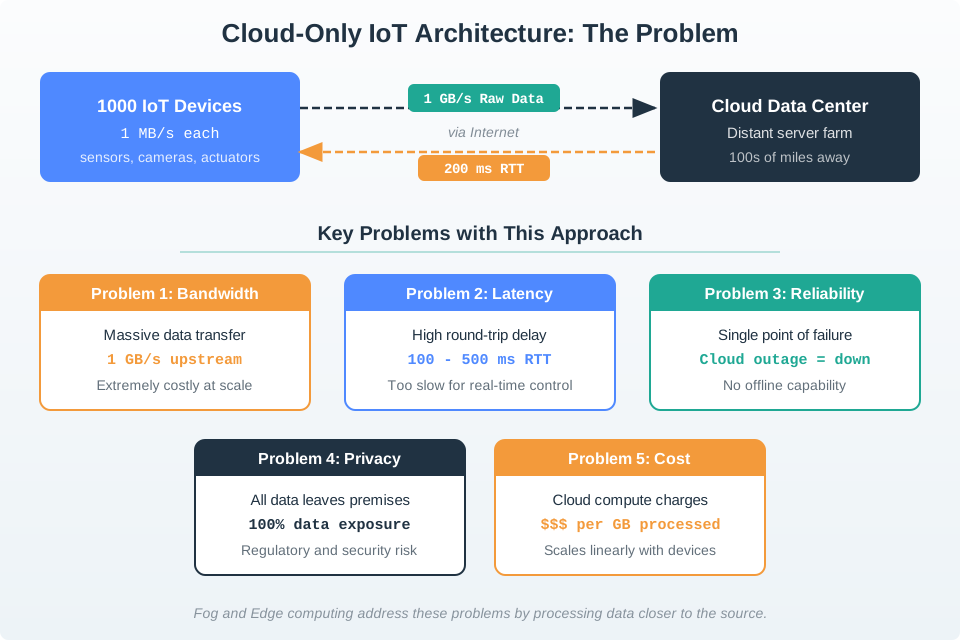
Cloud-only IoT architecture diagram showing sensors and IoT devices sending all raw data through the internet to distant cloud data centers, with annotations highlighting the problems: 100-500ms round-trip latency, high bandwidth consumption, single point of failure at internet connection, and privacy concerns from all data leaving the premises

Cloud-only IoT architecture showing all data flowing from sensors through the internet to distant cloud data centers, highlighting latency bottlenecks and bandwidth costs when no intermediate processing exists
Figure 28.1: Cloud-only IoT architecture showing all data flowing from sensors through the internet to distant cloud data centers, highlighting latency bottlenecks and bandwidth costs when no intermediate processing exists.

Cloud-Only Problem: Sending all raw data to distant cloud centers creates latency and bandwidth costs.

28.7.2 The Solution: Process Data Closer

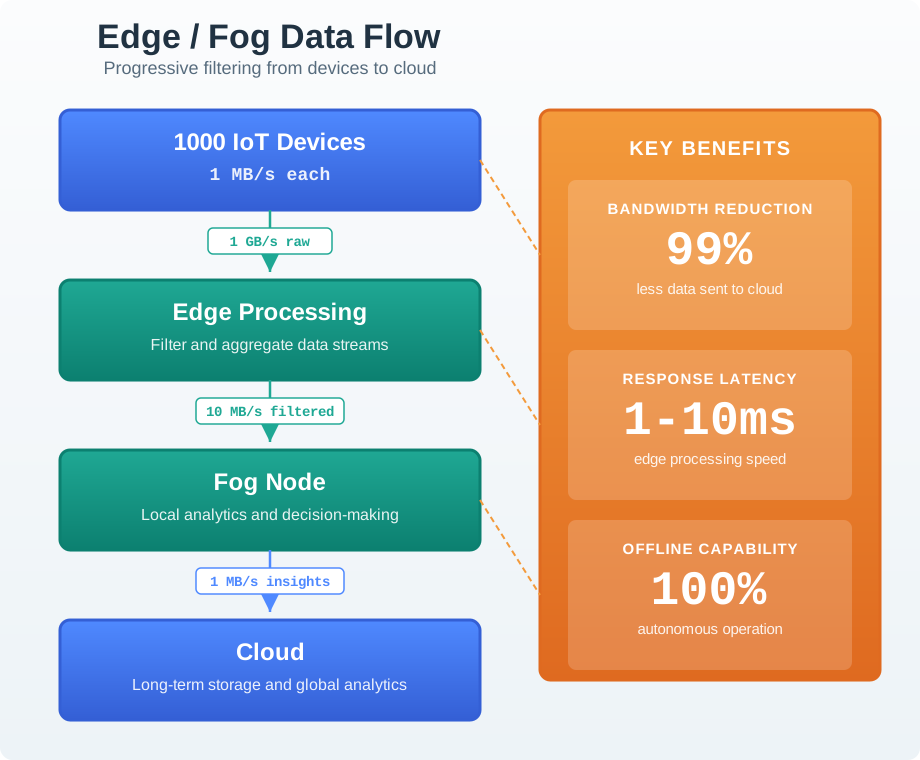
Hierarchical data flow diagram: 1000 IoT devices generating 1 GB/s raw data flow to Edge Processing which filters and aggregates to 10 MB/s, then to Fog Node for local analytics reducing to 1 MB/s insights sent to Cloud for long-term storage - benefits box highlights 99% bandwidth reduction, 1-10ms latency, and offline capability

Hierarchical data flow diagram: 1000 IoT devices generating 1 GB/s raw data flow to Edge Processing which filters and aggregates to 10 MB/s, then to Fog Node for local analytics reducing to 1 MB/s insights sent to Cloud for long-term storage - benefits box highlights 99% bandwidth reduction, 1-10ms latency, and offline capability
Figure 28.2: Edge/fog processing showing data flow from 1000 IoT devices through edge filtering (1 GB/s raw to 10 MB/s filtered), fog analytics (to 1 MB/s insights), to cloud storage, achieving 99% bandwidth reduction and 1-10ms latency with offline capability.

Alternative View:

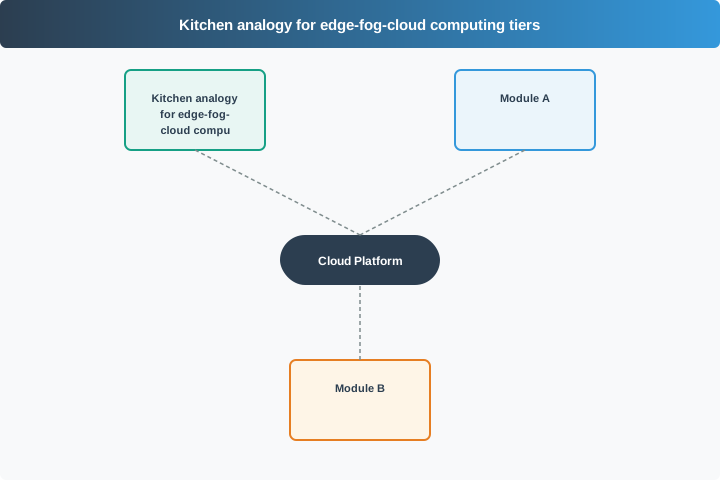
Three-panel comparison using kitchen analogy: Cloud-Only (gray) shows ordering from restaurant 10 miles away with 45-60 minute delivery representing 100-500ms latency through order-pickup-cook-drive-eat sequence; Fog (orange) shows neighborhood kitchen with 15-20 minute prep and delivery representing 10-100ms latency; Edge (teal) shows cooking in your own kitchen with 5-minute total time representing 1-10ms latency - illustrating how proximity reduces wait time just as edge/fog reduces data processing latency

Kitchen analogy for edge-fog-cloud computing tiers
Figure 28.3: Kitchen Analogy View: Cloud-only is like ordering from a distant restaurant — convenient menu options but slow delivery (45-60 min = 100-500ms latency). Fog is like a neighborhood kitchen that preps locally and delivers quickly (15-20 min = 10-100ms). Edge is your own kitchen — limited options but instant results (5 min = 1-10ms). The best approach often combines all three: edge for emergencies, fog for daily decisions, cloud for complex recipes (analytics).

Edge/Fog Solution: Processing data closer to the source reduces latency to real-time and cuts bandwidth by 99%.

28.7.3 Edge vs Fog vs Cloud: Quick Comparison

Layer Location Latency Use Case
Edge On the sensor/device 1-10 ms Emergency shutoffs, instant responses
Fog Local gateway/server 10-100 ms Real-time dashboards, local decisions
Cloud Remote data center 100-500 ms Big data analytics, long-term storage

28.7.4 Real-World Example: Self-Driving Car

Situation: Pedestrian steps into road

Approach Step 1 Step 2 Step 3 Total Time Result at 60 mph
Cloud Send video to cloud (100 ms) Cloud analyzes (200 ms) Response returns (100 ms) 400 ms Car travels 35 feet!
Edge Local AI detects pedestrian (10 ms) Car brakes immediately (5 ms) - 15 ms Car travels 1.3 feet ✓

28.7.5 Quick Self-Check

Before continuing, make sure you understand:

  1. What is the main benefit of edge computing? — Low latency (fast responses)
  2. What is fog computing? — An intermediate layer between edge and cloud
  3. When must you use edge computing? — When responses need to be real-time (ms)
  4. Why still use the cloud? — For big data analytics and long-term storage

28.8 In Plain English: What Is Fog Computing?

Think of Fog Computing Like a City’s Infrastructure

Imagine you’re running a massive city with millions of people (IoT devices):

Without Fog Computing (Cloud-Only):

  • Every decision must go to City Hall (cloud data center) downtown
  • A traffic light needs permission? Call City Hall. (200ms delay = traffic accident!)
  • A water pipe bursts? Call City Hall. (By the time they respond, your street is flooded!)
  • If phone lines to City Hall go down? The entire city freezes. Nothing works.

With Fog Computing:

  • Edge: Traffic lights have local sensors that detect cars and change immediately (1-5ms)
  • Fog: Neighborhood substations coordinate local traffic lights, water systems, power grids (10-100ms)
  • Cloud: City Hall analyzes citywide patterns, plans long-term improvements, stores historical data (100-500ms)

28.8.1 The Key Insight

Fog computing = Having mini data centers close to where data is generated

Instead of sending everything to a distant cloud server: - Process data locally when speed matters - Filter out noise before sending data (99% reduction!) - Keep working even if the internet goes down - Send only insights to the cloud, not raw data

28.8.2 Real Numbers That Matter

Scenario Cloud-Only With Fog Computing
Latency 200ms (too slow for safety) 5ms (safe and responsive)
Bandwidth 1 GB/second ($$$ expensive!) 1 MB/second (99% cheaper!)
Reliability Fails if internet is down Keeps working offline
Privacy All data leaves your building Sensitive data stays local

Bottom line: Fog computing makes IoT faster, cheaper, more reliable, and more private by processing data close to where it’s created.

28.8.3 Three-Tier Architecture Overview

The following diagram shows how the three tiers relate, what hardware typically exists at each tier, and how data flows and transforms as it moves upward:

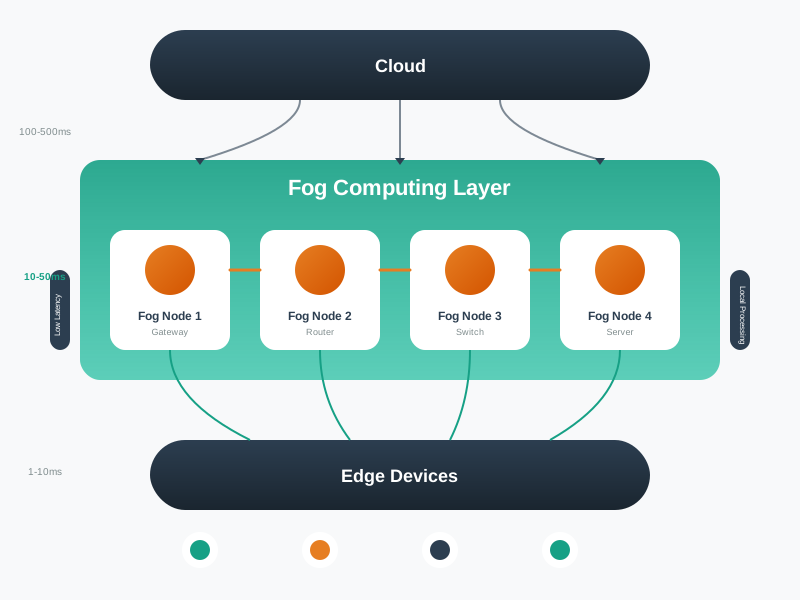
Three-tier fog computing architecture diagram showing the Edge Tier at bottom with IoT sensors, actuators, and microcontrollers providing 1-10ms latency and raw data collection; the Fog Tier in the middle with gateways, local servers, and routers providing 10-100ms latency for data filtering, aggregation, and local decision-making; and the Cloud Tier at top with data centers providing 100-500ms latency for big data analytics, machine learning, and long-term storage. Arrows show data volume reduction from 1 GB/s raw at edge to 10 MB/s filtered at fog to 1 MB/s insights at cloud, achieving 99% bandwidth reduction.

Data volume at each tier: Raw sensor data (1 GB/s at the edge) is filtered and aggregated at the fog tier (10 MB/s), with only refined insights (1 MB/s) transmitted to the cloud — a 99% reduction in bandwidth.

Artistic visualization of fog computing characteristics including low latency, location awareness, wide-spread geographical distribution, mobility support, real-time interactions, heterogeneity, interoperability with cloud, and support for online analytics, presented as a conceptual diagram showing the fog layer between edge devices and cloud

Fog computing characteristics visualization
Figure 28.4: Fog computing exhibits distinctive characteristics that differentiate it from both edge and cloud computing. The fog layer provides location-aware services, supports device mobility, enables real-time interactions, and seamlessly interoperates with cloud infrastructure while maintaining the flexibility to handle heterogeneous devices and protocols.

Geometric diagram of fog layer architecture showing hierarchical structure with IoT devices at the bottom tier, fog nodes in the middle providing local processing and storage, and cloud services at the top for global analytics and long-term storage, with bidirectional data flows and control paths

Fog layer architecture
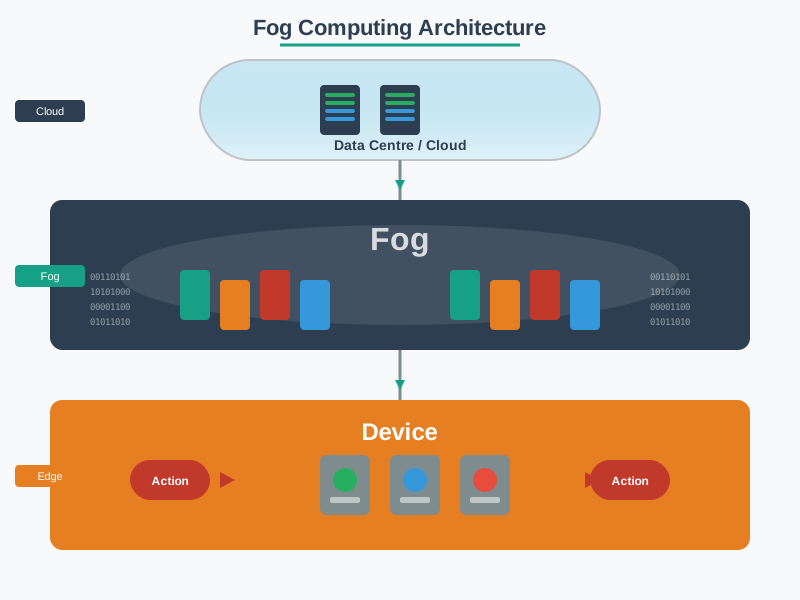
Figure 28.5: The fog layer architecture positions computing resources strategically between edge devices and cloud data centers. This hierarchical structure enables flexible workload placement, where latency-sensitive processing happens at fog nodes close to data sources, while computationally intensive and historical analytics migrate to cloud infrastructure.

28.9 Common Misconceptions

Pitfalls to Avoid

Misconception 1: “Fog computing replaces the cloud.” Fog computing complements the cloud — it does not replace it. Cloud remains essential for large-scale analytics, machine learning model training, long-term storage, and global coordination. Fog handles what the cloud cannot do fast enough or cheaply enough.

Misconception 2: “Edge and fog computing are the same thing.” Edge computing refers to processing on the device itself (sensor, microcontroller). Fog computing encompasses the broader intermediate tier including gateways, local servers, and network equipment that coordinate multiple edge devices. Fog subsumes edge as one layer within a larger hierarchy.

Misconception 3: “Fog computing always reduces costs.” Deploying fog infrastructure (gateways, local servers) adds hardware, power, and maintenance costs. Fog computing reduces costs only when the savings from bandwidth reduction and avoided cloud compute exceed the cost of local infrastructure. For low-data-rate applications with relaxed latency requirements, cloud-only may be more cost-effective.

Misconception 4: “More processing at the edge is always better.” Moving all processing to the edge eliminates the benefits of centralized coordination, cross-device analytics, and economies of scale. The optimal architecture distributes workloads across all three tiers based on actual requirements, not a blanket “edge-first” policy.

Misconception 5: “Fog nodes are just small cloud servers deployed locally.” Fog nodes differ fundamentally from cloud servers in their operational model. Fog nodes must handle heterogeneous protocols (BLE, Zigbee, Z-Wave, MQTT), operate with constrained resources (4-16 GB RAM vs. terabytes in cloud), tolerate intermittent connectivity, and support real-time local control loops. Treating fog nodes as miniature cloud instances leads to over-provisioning, missed protocol translation requirements, and architectures that fail during network outages.

Scenario: A smart building HVAC system must respond to temperature changes. Calculate which tier should handle control decisions.

Given:

  • 500 temperature sensors reporting every 30 seconds
  • HVAC control requirement: Adjust within 5 minutes of temperature deviation
  • Edge: Sensor with ARM Cortex-M0 @ 48 MHz
  • Fog: Gateway with Intel i5 @ 2.4 GHz
  • Cloud: AWS IoT + Lambda

Step 1: Analyze latency requirements

  • Control requirement: 5 minutes (300,000 ms)
  • Sensor sampling: 30-second intervals
  • Acceptable delay: 300 seconds (plenty of time)

Step 2: Calculate processing capabilities

Tier Processing Latency Meets Requirement?
Edge Simple threshold (temp > 72°F?) <1ms
Fog Multi-sensor averaging + ML comfort model 50ms
Cloud Historical analysis + energy optimization 500ms

All tiers meet the latency requirement!

Step 3: Evaluate data volume

500 sensors × 4 bytes × 2 readings/min = 4,000 bytes/min = 5.7 MB/day
Monthly: 173 MB/month
Cloud cost: 0.173 GB × $0.09 = $0.016/month (negligible)

Step 4: Optimal architecture decision

Given: - Latency: All tiers acceptable (5-minute budget) - Data volume: Tiny (173 MB/month) - Complexity: Need multi-sensor coordination and energy optimization

Recommendation: Hybrid fog-cloud - Edge: Basic threshold alerts (temp >80°F emergency) - Fog: Multi-zone coordination (balance temperature across floors) - Cloud: Energy optimization using historical patterns and weather forecasts

Key insight: When latency is relaxed (minutes), architecture choice depends on coordination needs and data volume. This building needs fog for real-time multi-sensor coordination, not because of latency pressure.

Apply this framework to any IoT deployment:

Pillar Edge Fog Cloud Your Score
Latency Required: <10ms? Required: <100ms? Acceptable: >100ms? __ / 10
Bandwidth >1 GB/day per device? >100 MB/day per site? <100 MB/day? __ / 10
Privacy PII processed on-device? Local network boundary? Data can leave premises? __ / 10
Reliability Must work offline indefinitely? Must work offline 24h? Reliable connectivity? __ / 10

Scoring:

  • Edge scores >25: Edge processing mandatory
  • Fog scores >25: Fog tier needed
  • Cloud scores >30: Cloud-only viable

Example: Smart home thermostat

  • Latency: 1-second response acceptable → Cloud: 5/10
  • Bandwidth: 100 bytes/30 sec = 288 KB/day → Cloud: 10/10
  • Privacy: Temperature data not sensitive → Cloud: 8/10
  • Reliability: Works offline 1 hour → Cloud: 6/10
  • Cloud total: 29/40 → Cloud-only recommended

28.9.1 Interactive: Fog vs. Cloud Cost-Benefit Calculator

Use this calculator to explore when fog infrastructure investment pays off compared to cloud-only operation. Adjust the number of devices, data rate, and cloud costs to see the break-even point.

Common Mistake: “Fog-Washing” Every IoT Gateway

The mistake: Calling any device between sensors and cloud a “fog node” even when it only forwards data without processing.

Example: IoT gateway that only does protocol translation

# This is NOT fog computing:
def gateway():
    mqtt_data = subscribe_mqtt()
    send_to_cloud(mqtt_data)  # Just forwarding, no processing

# This IS fog computing:
def fog_gateway():
    mqtt_data = subscribe_mqtt()
    filtered = apply_threshold_filter(mqtt_data)  # Local processing
    aggregated = combine_sensors(filtered)  # Local aggregation
    if anomaly_detected(aggregated):  # Local decision
        trigger_local_alarm()
    send_to_cloud(aggregated)  # Only summaries

True fog requirements:

  • Local data processing (filtering, aggregation, ML inference)
  • Local decision-making (can act without cloud)
  • Bandwidth reduction (outputs less data than inputs)

Rule of thumb: If the gateway just relays packets unchanged, it’s a bridge, not a fog node.

28.10 Summary and Key Takeaways

Chapter Summary

What you learned in this chapter:

  1. Fog computing defined: An intermediate processing tier between edge devices and cloud data centers that extends cloud capabilities closer to data sources, as formalized by Bonomi et al. (2012) and the OpenFog Consortium/IEEE reference architecture.

  2. Three-tier architecture: IoT systems distribute processing across edge (1-10ms, on-device), fog (10-100ms, local gateways/servers), and cloud (100-500ms, remote data centers) based on application requirements.

  3. Four pillars driving adoption:

    • Latency — safety-critical systems need sub-10ms responses
    • Bandwidth — fog reduces cloud-bound data by 90-99%
    • Privacy — regulations require local processing of sensitive data
    • Reliability — local autonomy ensures operation during outages
  4. Processing placement: The central design question is “Where should this computation happen?” — not all workloads benefit from fog; simple, low-volume, latency-tolerant applications may be better served by cloud-only.

  5. Fog is not edge: Edge computing processes on the device itself; fog computing encompasses the broader intermediate tier coordinating multiple edge devices through gateways, routers, and local servers.

28.10.1 Key Formulas and Numbers

Metric Typical Value Significance
Edge latency 1-10 ms Required for safety-critical control loops
Fog latency 10-100 ms Sufficient for real-time dashboards and local decisions
Cloud latency 100-500 ms Acceptable for analytics and batch processing
Bandwidth reduction 90-99% Fog aggregation dramatically cuts cloud transfer costs
Data volume example 1 GB/s raw to 1 MB/s insights Three orders of magnitude reduction through hierarchical filtering

Common Pitfalls

Fog and edge are not synonymous: edge means on or immediately adjacent to the sensor device; fog means a broader network tier that can include gateway servers, campus networks, and cloudlets. Misidentifying the tier leads to misconfigured deployments — expecting 1ms edge latency from a fog node 3 hops away or over-engineering a device that only needs 500ms response time.

Fog adds infrastructure (hardware procurement, configuration management, security hardening, ongoing maintenance) to every deployment site. For applications with adequate connectivity and latency tolerance, cloud-only is simpler and cheaper. Always quantify the latency requirement and bandwidth cost before introducing fog — the justification must be explicit and measurable.

Teams plan fog deployments assuming reliable WAN connectivity, then discover during commissioning that the deployment site has 2-4 hours of daily WAN outages. Designing fog fallback logic (local decision rules, data buffering, manual override) after hardware installation costs 3-5x more than designing it in from the start.

Each fog node is a managed compute device requiring firmware updates, certificate rotation, log rotation, health monitoring, and eventual hardware replacement. At 50+ fog nodes, this creates significant operational overhead unless automated with Infrastructure-as-Code (Ansible, Terraform) and centralized management from day one.

28.11 What’s Next

Now that you understand the fundamentals of fog/edge computing, continue to:

Topic Chapter Description
Real-World Scenarios Fog Scenarios Explore overload scenarios and common deployment mistakes
Core Concepts Fog Concepts Dive deeper into fog computing theory and academic foundations
Requirements Analysis Fog Requirements Determine when fog computing is the right architectural choice