42 Fog Energy & Latency
In 60 seconds, understand the Energy-Latency Trade-off in Fog Computing:
Fog computing transforms how IoT systems balance energy consumption against response speed. The core insight: processing data closer to its source saves both energy (83% less via Wi-Fi vs. cellular) and time (10-100x faster than cloud), but requires careful allocation of limited fog resources.
| Decision Factor | Edge Device | Fog Node | Cloud |
|---|---|---|---|
| Latency | <1 ms | 1-10 ms | 50-200+ ms |
| Energy (per MB) | High (local CPU) | Medium (Wi-Fi hop) | Low device/High network |
| Best for | Threshold alerts | Aggregation, filtering | Long-term analytics |
| Key trade-off | Battery drain vs. speed | Infrastructure cost vs. savings | Bandwidth cost vs. flexibility |
The critical design rule: Match processing tier to latency requirements – ultra-low (<10ms) at edge, low (10-100ms) at fog, tolerant (>100ms) at cloud. Never over-provision: always-on processing wastes 28x more energy than duty-cycled approaches for tasks that tolerate 15-minute delays.
Read on for worked examples in video analytics and agriculture, or jump to Knowledge Check to test your understanding.
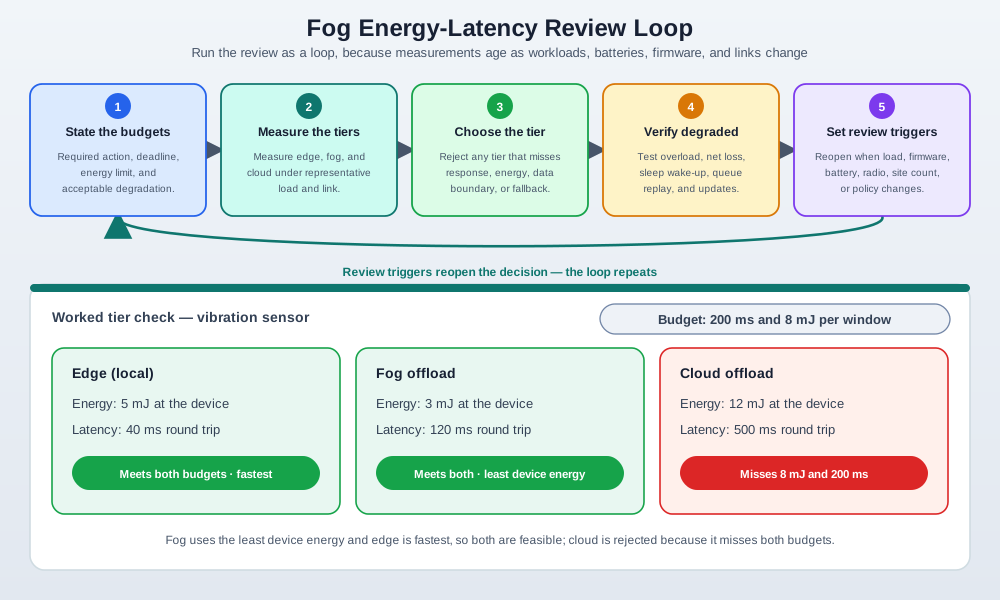
- Energy-Latency Trade-off: Reducing processing latency typically increases energy consumption (higher clock, more cores); optimal operating point depends on application requirements
- Dynamic Voltage and Frequency Scaling (DVFS): Hardware technique adjusting CPU voltage and clock speed based on workload, reducing power by 50-80% during low-activity periods
- Power Profile: Measurement of fog node energy consumption over time across operating states (deep sleep: 1mW, idle: 100mW, active: 2W, peak: 15W)
- Latency Penalty of Sleep: Boot time added to response latency when a fog node wakes from deep sleep (50-500ms for full boot vs. <1ms from active), requiring careful duty cycle design
- Race-to-Idle: Power optimization strategy completing processing as fast as possible then entering low-power sleep, often more energy-efficient than throttled continuous operation
- Thermal Throttling: Automatic CPU/GPU frequency reduction when die temperature exceeds threshold (80-95°C), causing latency spikes in thermally-constrained fog enclosures
- Energy Harvesting: Powering fog nodes from ambient sources (solar, vibration, thermal gradient), creating hard energy budgets that constrain total computation per duty cycle
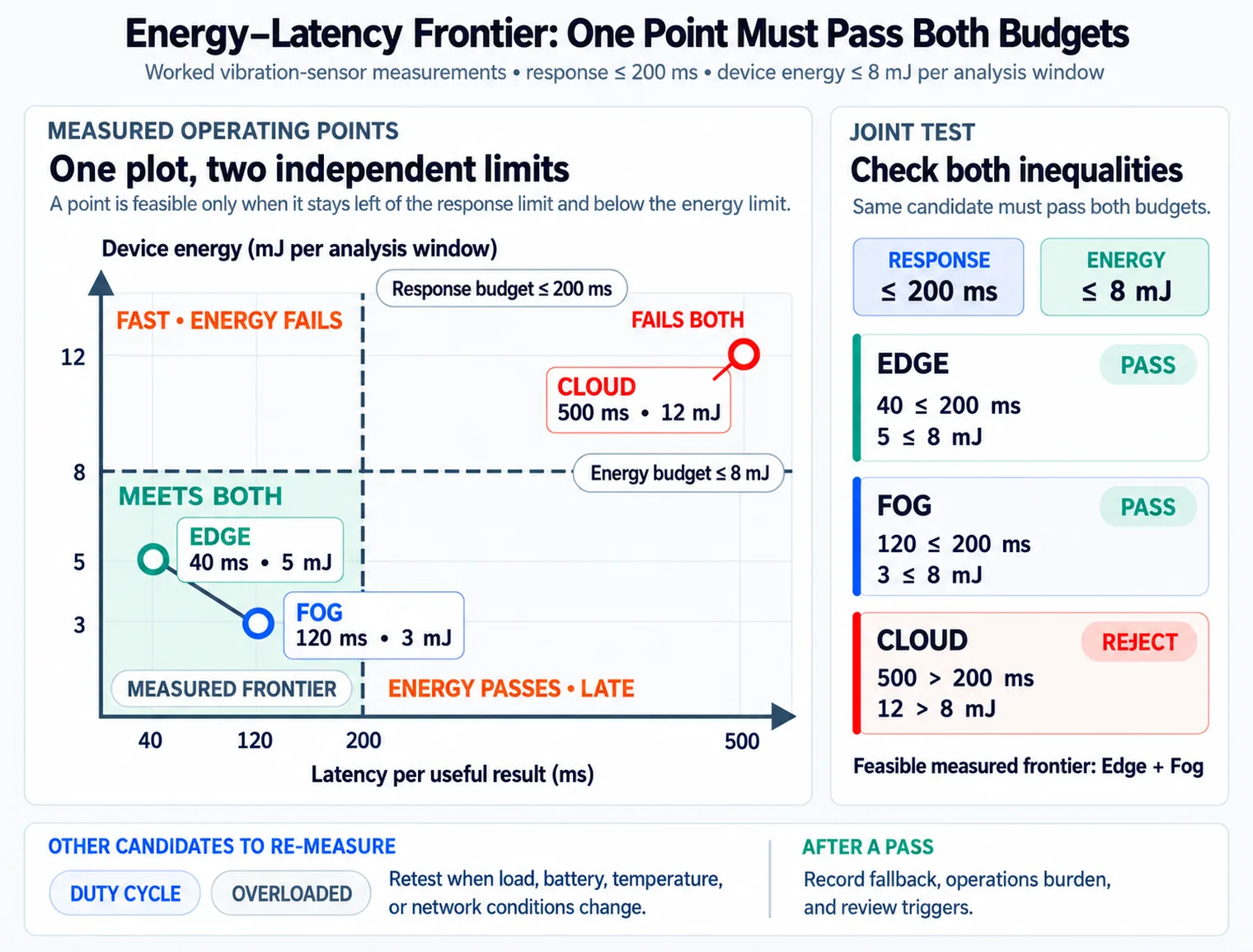
- Pareto Optimal Configuration: Fog operating point where no other configuration achieves both lower energy AND lower latency simultaneously
42.1 Learning Objectives
By the end of this chapter, you will be able to:
- Measure Real Latency: Design tests that measure actual latency under realistic load conditions
- Apply QoS Strategies: Configure traffic shaping and prioritization for time-critical IoT traffic
- Calculate Resource Requirements: Determine CPU, memory, and bandwidth needs for fog node deployments
- Design Hierarchical Allocation: Implement two-level bandwidth allocation with credit systems and device prioritization
- Evaluate Client Resource Pooling: Assess when opportunistic edge device sharing benefits IoT applications
42.2 Concept Relationships
The table below shows how energy-latency trade-offs relate to other key IoT and fog computing concepts:
| Concept | Relationship to Energy-Latency | Key Distinction | Why It Matters |
|---|---|---|---|
| Duty Cycling | Primary energy-saving strategy in fog deployments | Duty cycling: 28x savings via periodic sleep, Always-on: Continuous operation | Agricultural fog gateway: 156 Wh/day (always-on) vs 5.6 Wh/day (duty-cycled) with only 15-min added latency |
| Quality of Service (QoS) | Traffic prioritization enables latency guarantees while managing energy | QoS: Application-aware priority queuing, Best-effort: Equal treatment | Critical traffic (video calls, safety alerts) gets guaranteed bandwidth while background tasks (backups) defer to off-peak |
| Data Gravity | Large datasets “attract” computation - moving code is cheaper than moving data | Data gravity: Process where data lives, Cloud-centric: Move data to centralized compute | Video analytics: 1 TB/day raw video processed locally to 1 GB/day metadata sent to cloud (99.9% reduction) |
| Client Resource Pooling | Opportunistic use of idle edge devices for fog-like services | Pooling: Unpredictable availability requires migration, Dedicated fog: Reliable resources | Smart glasses offload to nearby idle laptop (20ms) vs cloud (200ms) with graceful migration when laptop becomes busy |
| Hierarchical Allocation | Multi-level resource sharing with incentives | Hierarchical: Credit-based inter-home + priority-based intra-home, Flat: Single-level best-effort | Light network users accumulate credits, earn better allocation during peak – incentivizes voluntary throttling |
| Context Awareness | Proximity to data sources enables intelligent processing decisions | Context-aware: Location, temporal, environmental factors, Context-free: Generic processing | Smart city fog node combines traffic cameras, sensors, weather, events to optimize traffic light timing locally |
| Offloading Decision | Framework for choosing edge/fog/cloud processing tier | Task-specific: Latency, energy, privacy requirements drive tier selection, Cloud-default: All processing in cloud | Ultra-low latency (<10ms) at edge, low latency (10-100ms) at fog, tolerant (>100ms) at cloud |
42.3 Prerequisites
Before diving into this chapter, you should be familiar with:
- Fog Resource Allocation: Understanding of TCP principles and game theory provides context for energy-latency optimization decisions
- Fog/Edge Fundamentals: Knowledge of fog computing concepts and the edge-fog-cloud continuum
- Energy-Aware Design: Familiarity with power consumption models and battery constraints in IoT
Energy and latency in fog computing is like choosing how to deliver a message at school!
42.3.1 The Sensor Squad Adventure: The Energy-Speed Race
Sammy the Temperature Sensor had a problem. “I need to tell someone the classroom is getting too hot, but I’m running low on battery!” he said, looking at his energy meter nervously.
Lila the Light Sensor had an idea. “You have THREE ways to send your message, Sammy!”
Option 1 – Shout Across the Room (Edge Processing): “You can figure it out yourself!” said Lila. “Check if the temperature is above 80F. If yes, turn on the fan! It’s super fast – done in less than a second! But thinking hard uses a LOT of your battery, like running really fast uses up your energy.”
Option 2 – Pass a Note to the Teacher (Fog Processing): “Or,” said Max the Motion Detector, “you can send a quick note to Ms. Fog, the classroom teacher. She’s right here in the room! She’ll check all the temperatures AND the weather forecast, then decide what to do. It takes about 5 seconds, but you barely use any battery – just enough to pass the note!”
Option 3 – Mail a Letter to the Principal (Cloud Processing): Bella the Button shook her head. “You COULD mail a letter to Principal Cloud in the big office downtown. But that takes 200 seconds, and the mailman needs a lot of gas to drive there! Your battery will drain from waiting for the reply.”
Sammy made his choice: “Most of the time, I’ll pass notes to Ms. Fog – it’s fast enough AND saves my battery. But if something is REALLY urgent, like the room hits 100F, I’ll shout myself!”
Max added the best trick: “And you don’t have to stay awake ALL day! Set an alarm to check every 15 minutes. That’s called duty cycling – like taking power naps between checks. You’ll use 28 times LESS battery!”
Remember: In fog computing, you choose between speed and battery life – just like choosing between running (fast but tiring) and walking (slower but you can go further). Smart IoT devices use duty cycling (power naps) and fog nodes (nearby helpers) to be both fast AND energy-efficient!
Every IoT device faces a fundamental trade-off: faster responses usually cost more energy. Think of it like driving a car—you can get there faster by speeding, but you’ll burn more fuel.
Example: A smart sensor can: 1. Process data locally (fast response, high battery drain) 2. Send to nearby fog node (medium speed, medium battery) 3. Send to distant cloud (slow response, but sensor uses less battery for processing)
The “right” choice depends on: - How urgently do you need the answer? (latency requirement) - How long must the battery last? (energy budget) - How much data needs to move? (bandwidth cost)
| Term | Simple Explanation |
|---|---|
| Duty Cycling | Turning devices on/off periodically to save power |
| QoS | Quality of Service - prioritizing important traffic |
| Data Gravity | Large datasets “attract” computation - it’s cheaper to move code than data |
| Client Pooling | Using idle smartphones/laptops as temporary fog resources |
42.4 Energy Consumption and Latency Trade-offs
Fog computing fundamentally alters the energy-latency trade-off space for IoT systems, but introduces new considerations.
Understanding how fog systems balance energy consumption against response time requires examining the complete decision and execution flow:
Step 1: Task Characterization (occurs once per task type)
- Application developer specifies latency requirement: ultra-low (<10ms), low (10-100ms), or tolerant (>100ms)
- Energy profile established: compute cost (MIPS), data size (KB), transmission cost (Joules/MB)
- Privacy classification: public (cloud OK), sensitive (local only), or restricted (fog/edge only)
- Example: Video analytics task - 50ms latency, 3 MB per frame, sensitive data
Step 2: Resource Discovery (periodic, every 30-60 seconds)
- Edge device discovers available processing tiers via mDNS (fog nodes) and API (cloud endpoints)
- Each tier advertises: available CPU/GPU, current load, network latency estimate, energy cost
- Device builds routing table: “Fog-A: 5ms latency, 3.5 mJ per task; Cloud-B: 120ms latency, 50 mJ per task”
- Key mechanism: Continuous monitoring updates latency estimates based on actual measurements
Step 3: Tier Selection Decision (per task instance)
- Decision framework evaluates task against current conditions:
- Latency requirement 50ms → eliminates Cloud-B (120ms)
- Fog-A available (5ms latency) → check energy budget
- Battery at 40% → energy-constrained mode: prefer fog offloading (3.5 mJ) over local (15 mJ)
- Selection: Offload to Fog-A
- Key mechanism: Multi-objective optimization balances latency, energy, and availability
Step 4: Task Transmission (for fog/cloud offloading)
- Device compresses video frame: 3 MB → 500 KB (6:1 compression)
- Transmission via Wi-Fi to fog node: 500 KB @ 50 Mbps = 80ms
- Transmission energy: 500 KB × 1 mJ/MB (Wi-Fi) = 0.5 mJ
- Key mechanism: Compression reduces both transmission time and energy, but adds 10ms processing overhead
Step 5: Fog Node Processing
- Fog node receives task, checks resource availability: CPU at 60% load, GPU at 40%
- Allocates task to GPU queue (lower latency than CPU queue)
- Executes object detection model: 50 GFLOPS × 20ms = 1 GFLOP total work
- Returns results (metadata only): 10 KB bounding boxes + labels
- Key mechanism: Priority queuing ensures latency-critical tasks preempt batch workloads
Step 6: Result Return and Aggregation
- Fog node sends results via Wi-Fi: 10 KB @ 50 Mbps = 1.6ms
- Device receives results 30ms after initial transmission (80ms send + 20ms processing + 1.6ms receive - overlap)
- Device displays AR overlay on video feed with detected objects
- Key mechanism: Pipelined execution overlaps transmission and processing for multiple frames
Step 7: Energy Accounting and Adaptation
- Device logs actual energy consumed: 2 mJ (compression) + 0.5 mJ (transmission) + 0.2 mJ (receive) = 2.7 mJ total (vs 15 mJ local processing)
- Actual latency: 30ms (vs 50ms requirement) → under budget, increase quality settings for next frame
- Battery impact: 3.5 mJ saved per frame × 30 fps = 105 mW savings (21x improvement)
- Key mechanism: Closed-loop feedback adapts strategy based on measured performance
Step 8: Adaptive Reconfiguration (when conditions change)
- Scenario: Fog node goes offline (network failure)
- Device detects timeout after 100ms (no response)
- Fallback decision tree:
- Try alternate fog node (Fog-B) → latency 12ms, still acceptable
- If no fog available → degrade to local processing (80ms latency, lower accuracy model)
- If battery critical → reduce frame rate from 30 fps to 10 fps
- Key mechanism: Graceful degradation maintains service with reduced quality rather than complete failure
Continuous Optimization Loop:
Monitor battery (every 10s) → Predict remaining runtime → Adjust offloading strategy
↓
If battery < 20%: Increase cloud usage (saves device energy despite higher latency)
If battery > 80%: Increase local processing (best latency, battery not critical)
If fog latency spikes: Temporarily shift to edge/cloud hybrid
↓
Log performance metrics → Update decision model weights → Improved future decisions
End-to-End Example Timeline (Video Analytics Frame):
- 0ms: Frame captured by camera
- 10ms: Compression (3 MB → 500 KB) on device
- 10-90ms: Wi-Fi transmission to fog node
- 90-110ms: Fog GPU inference (object detection)
- 110-112ms: Result transmission (10 KB metadata)
- 112ms: AR overlay displayed
- Total latency: 112ms (within budget for 30 fps processing)
Energy Breakdown:
- Compression: 2 mJ (device CPU)
- Transmission: 0.5 mJ (Wi-Fi radio)
- Receive: 0.2 mJ (Wi-Fi radio)
- Total: 2.7 mJ vs 15 mJ local processing (82% savings)
What Makes This Efficient?
- Offloading to fog: 5.6× energy savings (2.7 mJ vs 15 mJ)
- Compression: 6× data reduction (3 MB → 500 KB) saves transmission energy
- Metadata return: 300× smaller (10 KB vs 3 MB) for downstream results
- Adaptive strategy: Switches tiers when conditions change (battery level, network quality)
Energy-latency trade-offs in fog computing: device energy savings (83% through shorter-range Wi-Fi, computation offloading, reduced active time) balanced against fog node infrastructure costs, with latency reduction from cloud round-trip (50-200ms) to fog (1-10ms) across four delay components.
42.4.1 Energy Perspectives
Device Energy Savings:
- Shorter-range communication to nearby fog nodes vs. long-range to cloud
- Offloading computation from resource-constrained devices to fog
- Reduced active time through faster responses
Example: Transmitting 1MB to cloud via cellular: ~3 Joules Transmitting 1MB to fog via Wi-Fi: ~0.5 Joules Energy saving: 83%
The 83% energy savings from Wi-Fi vs cellular transmission comes from power-distance relationship:
\[E_{\text{cellular}} = P_{\text{TX}} \times t = 1.5 \text{ W} \times 2 \text{ s} = 3.0 \text{ J}\]
\[E_{\text{Wi-Fi}} = P_{\text{TX}} \times t = 0.25 \text{ W} \times 2 \text{ s} = 0.5 \text{ J}\]
Savings: \(\frac{3.0 - 0.5}{3.0} = 0.83 = 83\%\). For a battery-powered sensor sending 100 MB/day, fog communication extends battery life from \(\frac{10{,}000 \text{ mAh} \times 3.7 \text{ V}}{300 \text{ J/day}} = 444\) days (cellular) to \(\frac{10{,}000 \text{ mAh} \times 3.7 \text{ V}}{50 \text{ J/day}} = 2{,}664\) days (Wi-Fi fog) – a 6x improvement.
Fog Node Energy Costs:
- Additional infrastructure requires power
- Trade-off: device energy savings vs. fog node energy consumption
- Opportunity: Fog nodes often mains-powered, eliminating battery constraints
Overall System Energy:
- Reduced network traffic decreases network infrastructure energy
- Local processing may be more energy-efficient than data transmission
- Depends on processing complexity vs. communication energy
Quantitative Comparison – Energy Cost by Processing Tier:
| Operation | Energy Cost | Equivalent Operations | Notes |
|---|---|---|---|
| 1 MB via Cellular (4G) | ~3.0 Joules | 600M ARM instructions | Dominated by radio TX power |
| 1 MB via Wi-Fi to Fog | ~0.5 Joules | 100M ARM instructions | 83% savings over cellular |
| 1 MB via BLE (local) | ~0.05 Joules | 10M ARM instructions | 98% savings, but low throughput |
| 1M ARM Cortex-M4 instructions | ~5 uJ | ~1 KB of sensor processing | Local compute is very cheap |
| 1 FFT (1024 points) | ~0.1 mJ | Process one vibration window | Typical fog-tier operation |
| 1 ML inference (TinyML) | ~1-10 mJ | Classify one sensor reading | Edge AI workload |
Key insight: For computations under ~100 KB of data, local processing is almost always more energy-efficient than transmission. The crossover point where offloading becomes beneficial is around 10-100 KB, depending on computation complexity and radio technology.
42.4.2 Latency Perspectives
Dramatic Latency Reduction:
- Cloud round-trip: 50-200+ ms
- Fog round-trip: 1-10 ms
- Latency reduction: 10-100x
Components of Latency:
- Transmission delay: Reduced by proximity
- Propagation delay: Reduced by shorter distance
- Processing delay: May increase (less powerful fog vs. cloud) or decrease (no queuing)
- Queuing delay: Typically reduced due to lower network congestion
42.4.3 Application-Specific Trade-offs
Latency-Critical, Low-Complexity: Clear fog advantage (e.g., sensor threshold monitoring)
Latency-Critical, High-Complexity: Fog processing preferred if fog nodes sufficiently capable; otherwise hybrid approaches with predictive pre-processing
Latency-Tolerant, Energy-Critical: Consider cloud for energy-intensive computations that devices can’t handle efficiently
42.4.4 Task Offloading Decision Framework
Task Offloading Decision Framework:
| Latency Requirement | Decision Path | Action |
|---|---|---|
| Ultra-Low (<10ms) | Device has resources? YES | Process at Edge Device |
| Device has resources? NO, Safety critical? YES | Degrade Service/Fail Safe | |
| Device has resources? NO, Safety critical? NO | Check Fog availability | |
| Low (10-100ms) | Fog available? YES, Energy constrained? YES | Offload to Fog Node |
| Fog available? YES, Energy constrained? NO | Process at Edge Device | |
| Fog available? NO | Check Cloud | |
| Tolerant (>100ms) | Bandwidth sufficient, Sensitive data? YES | Process at Fog, Send Insights |
| Bandwidth sufficient, Sensitive data? NO | Offload to Cloud | |
| Bandwidth limited | Compress/Filter at Fog |
All paths converge at: Monitor Performance -> Acceptable? -> Task Complete (or Adapt Strategy)
Task offloading decision for fog computing systems evaluates latency requirements, resource availability, energy constraints, and privacy concerns to intelligently route tasks to edge devices, fog nodes, or cloud infrastructure.
Task offloading decision flowchart showing how latency requirements (ultra-low, low, tolerant) guide processing placement across edge, fog, and cloud tiers based on device resources, energy constraints, fog availability, bandwidth, and data sensitivity.
Don’t blindly process everything at the edge or everything in the cloud. Use a tiered decision framework: process time-critical decisions (<10ms requirement) at edge devices, aggregate and filter data at fog layer (reduces bandwidth by 90-99%), send only insights or anomalies to cloud for long-term storage and cross-site analytics. Example: A video surveillance system should detect motion at the camera (edge), perform object recognition at the fog gateway, and send only identified security events to cloud - not raw 24/7 video streams. This reduces a 1TB/day camera load to just 1GB/day in cloud storage costs.
Mistake 1: Always-on processing when duty cycling suffices. Many developers default to continuous monitoring because it feels “safer.” In reality, if your application can tolerate 15-minute response times (e.g., agriculture soil monitoring, building HVAC), duty cycling saves 28x energy. Always ask: “What is the actual latency requirement?” not “What is the lowest possible latency?”
Mistake 2: Ignoring network energy in offloading decisions. Developers focus on compute energy but forget that transmitting 1 MB over cellular costs ~3 Joules – roughly equivalent to 600 million ARM Cortex-M4 instructions. For small computations, local processing is more energy-efficient even on constrained devices. The crossover point is typically around 10-100 KB of data: below that, process locally; above that, offload to fog.
Mistake 3: Treating fog nodes as “small clouds.” Fog nodes have fundamentally different constraints: limited storage, shared bandwidth, and sometimes battery power. Designing fog applications as miniature cloud services leads to resource exhaustion. Instead, design fog nodes as stateless filters that reduce data volume and add context before forwarding.
Mistake 4: Neglecting graceful degradation. If a fog node fails, devices should fall back to local processing (reduced accuracy) or direct cloud connection (higher latency), not simply stop functioning. Always design three-tier fallback: fog -> edge-local -> cloud-direct.
Mistake 5: Static allocation in dynamic environments. Network conditions, device counts, and processing loads change throughout the day. A fixed bandwidth allocation that works at 2 AM will fail at 6 PM peak. Use adaptive strategies that monitor utilization and adjust allocations in real time.
Scenario: A smart retail chain deploys video analytics across 50 stores, each with 10 cameras. The system must detect customer behavior (queue length, product interest, theft) with <500ms latency while minimizing cloud costs.
Given:
- 50 stores x 10 cameras = 500 cameras total
- Camera resolution: 1080p @ 15 fps = 3 MB/frame
- Frame rate: 15 fps per camera
- Cloud GPU inference: $0.50/hour per camera stream
- Cloud egress: $0.12/GB
- Fog node (per store): NVIDIA Jetson AGX Orin, 275 TOPS, $1,999, 60W
- Edge detection model: YOLOv5s (requires 2 TOPS per stream at 15 fps)
Steps:
Calculate raw data rate (cloud-only approach):
- Per camera: 3 MB x 15 fps = 45 MB/s = 360 Mbps
- Per store (10 cameras): 450 MB/s = 3.6 Gbps
- Total (500 cameras): 22.5 GB/s = 180 Gbps
- Clearly impossible to stream to cloud!
Calculate cloud-only costs (if bandwidth existed):
- GPU inference: 500 cameras x $0.50/hour x 24 x 30 = $180,000/month
- Data egress: 22.5 GB/s x 86,400 x 30 x $0.12 = $7.0 million/month
- Total: $7.18 million/month (completely impractical)
Design fog workload distribution:
Edge tier (camera): Motion detection + basic filtering
- Drop frames with no motion (typically 70% of time)
- Compress remaining frames to 720p (0.5 MB/frame)
- Output: 30% of frames x 0.5 MB x 15 fps x 10 cameras = 22.5 MB/s per store
Fog tier (store gateway): Object detection + behavior analysis
- Run YOLOv5s on 10 streams: 10 x 2 TOPS = 20 TOPS (Orin has 275 TOPS)
- Generate metadata: customer count, queue positions, dwell time
- Metadata output: ~10 KB/second per store
Cloud tier: Aggregation + business intelligence
- Receive metadata from 50 stores: 50 x 10 KB/s = 500 KB/s
- Store daily summaries, run cross-store analytics
- Occasional image uploads for model retraining: ~100 MB/day
Calculate fog architecture costs:
- Fog hardware: 50 stores x $1,999 = $99,950 one-time
- Fog power: 50 x 60W x 24 x 30 x $0.12/kWh = $259/month
- Cloud egress: 500 KB/s x 86,400 s/day x 30 days / 1,000,000 KB/GB x $0.12/GB = $156/month
- Cloud storage/compute: ~$200/month for aggregation
- Total monthly: ~$615/month (after hardware amortized over 3 years: ~$3,390/month)
Calculate latency improvement:
- Cloud path: Frame capture (67ms) -> Upload (200ms+) -> Inference (50ms) -> Return (200ms) = 517ms+
- Fog path: Frame capture (67ms) -> Local inference (50ms) -> Alert (10ms) = 127ms
- Latency improvement: 4x faster, well under 500ms requirement
Result: Fog architecture reduces costs from $7.18M/month to $3,390/month (99.95% savings) while reducing latency from 517ms+ to 127ms (4x improvement). Each store processes video locally, sending only metadata to cloud.
Key Insight: For high-bandwidth workloads like video analytics, fog computing isn’t just an optimization - it’s the only feasible architecture. The 99.95% cost reduction comes from processing data where it’s generated rather than moving petabytes to the cloud.
Scenario: A precision agriculture system deploys battery-powered fog gateways across a 500-hectare farm. Each gateway coordinates 50 soil sensors and must balance battery life against irrigation response time.
Given:
- 10 fog gateways, each covering 50 hectares with 50 sensors
- Gateway hardware: Raspberry Pi 4 with LoRa radio, 50Ah 12V battery (600 Wh)
- Solar panel: 100W, 5 peak sun hours/day = 500 Wh/day
- Gateway power consumption:
- Active processing: 6W
- LoRa receive: 0.5W
- Sleep mode: 0.1W
- Sensor reports: Every 15 minutes
- Irrigation response requirement: Within 30 minutes of soil moisture threshold
Steps:
Calculate baseline energy budget:
- Solar input: 500 Wh/day
- Available for operations: 500 Wh x 0.8 efficiency = 400 Wh/day
- Rainy days reserve (3 days): Need battery to last 72 hours without solar
- Conservative daily budget: 600 Wh / 3 = 200 Wh/day (with solar surplus for recharging)
Analyze processing strategies:
Strategy A: Always-On Processing
- Active processing 24h: 6W x 24h = 144 Wh
- LoRa receive 24h: 0.5W x 24h = 12 Wh
- Total: 156 Wh/day (within budget, but no margin)
- Latency: Immediate (<1 second)
- Rainy day survival: 600 Wh / 6.5W = 92 hours (3.8 days)
Strategy B: Duty-Cycled Processing
- Active processing for sensor reports: 50 sensors x 96 reports/day x 5ms = 24 seconds/day
- Wake for report processing: 96 times x 10 seconds = 960 seconds = 16 minutes active
- Energy: (16 min x 6W) + (23.73h x 0.1W) = 1.6 Wh + 2.4 Wh = 4 Wh/day
- LoRa receive windows: 96 x 2 min = 192 min = 3.2h: 3.2h x 0.5W = 1.6 Wh/day
- Total: 5.6 Wh/day (97% reduction from Strategy A)
- Latency: Up to 15 minutes (worst case sensor waits for next receive window)
- Rainy day survival: 600 Wh / 0.23W = 2,600 hours (108 days!)
Strategy C: Adaptive Duty Cycling
- Normal conditions (soil moisture OK): Strategy B timing = 5.6 Wh/day
- Dry conditions (moisture below threshold): Increase poll rate to every 5 min
- Dry mode energy: 5.6 x 3 = 16.8 Wh/day
- Mixed (assuming 20% dry conditions): 0.8 x 5.6 + 0.2 x 16.8 = 7.8 Wh/day
- Latency: 15 min normal, 5 min when critical
- Rainy day survival: 600 Wh / 0.32W = 1,875 hours (78 days)
Evaluate against requirements:
Strategy Daily Energy Latency (Max) Rainy Days Meets 30-min Requirement? A: Always-On 156 Wh <1 sec 3.8 days Yes (overkill) B: Fixed Duty 5.6 Wh 15 min 108 days Yes C: Adaptive 7.8 Wh 5-15 min 78 days Yes (optimized) Select optimal strategy:
- Strategy B provides 28x energy savings vs Strategy A
- Strategy C adds 39% energy cost over B but halves worst-case latency during critical conditions
- Recommended: Strategy C balances energy efficiency (97% savings vs always-on) with responsive irrigation triggering
Calculate system-wide impact:
- 10 gateways x 148 Wh/day savings (Strategy C vs A) = 1,480 Wh/day saved
- Annual energy savings: 1,480 x 365 = 540 kWh
- At $0.15/kWh solar-equivalent: $81/year in energy costs
- More importantly: 78-day rainy survival vs 3.8 days = 20x better reliability
Result: Adaptive duty cycling reduces gateway energy consumption by 95% (from 156 Wh/day to 7.8 Wh/day) while maintaining 30-minute irrigation response. The 78-day battery backup ensures operation through extended cloudy periods.
Key Insight: For battery-powered fog deployments, the energy-latency tradeoff is not linear. Duty cycling provides 28x energy savings for only 15 minutes added latency - acceptable when requirements permit. Adaptive strategies optimize for both: normal-condition efficiency with rapid response when conditions become critical.
42.5 Hierarchical Bandwidth Allocation Case Study
Peak hour network congestion in residential IoT deployments demonstrates the need for hierarchical resource allocation strategies. IoT devices exacerbate bandwidth competition during high-demand periods.
42.5.1 The Network Congestion Problem
Problem Statement:
- Peak hours (6-11 PM): Video streaming, gaming, video calls compete for bandwidth
- IoT devices add constant background traffic: security cameras, smart home devices, sensors
- Cable Modem Termination System (CMTS) has finite capacity shared across neighborhood
- Result: Network congestion degrades quality of service for all users
Traditional Approach (Failure): Best-effort delivery -> Everyone competes equally -> Critical applications (video calls) suffer alongside background tasks (firmware updates) -> Poor user experience
Solution: Voluntary Throttling via Hierarchical Allocation
42.5.2 Two-Level Hierarchical Allocation
Hierarchical bandwidth allocation: Internet flows through a shared CMTS (1 Gbps for 100 homes) to residential gateways with credit-based allocation (more credits = more bandwidth during congestion), then each home classifies traffic by priority – critical (video calls, thermostat), high (cameras, streaming), and low (backups, firmware updates) – with low-priority traffic throttled during peak hours.
Level 1: Inter-Home Allocation (Credit Balance System)
Mechanism:
- Each home starts with 100 credits
- Light network usage during peak hours -> Accumulate credits
- Heavy network usage during peak hours -> Spend credits
- Homes with more credits get priority bandwidth allocation during congestion
Incentive Structure:
- Voluntary throttling: Reduce IoT camera uploads during peak -> Earn credits
- Reward: Better bandwidth allocation when you need it (e.g., video call emergency)
Example:
- Home A (light IoT usage, no streaming): 6-11 PM uses 5 Mbps average -> Earns 10 credits -> Balance: 110 credits
- Home B (heavy streaming): 6-11 PM uses 15 Mbps average -> Spends 15 credits -> Balance: 85 credits
- During next peak hour congestion: Home A gets 12 Mbps, Home B gets 8 Mbps (proportional to credits)
Level 2: Intra-Home Allocation (Device/App Prioritization)
Mechanism:
- Residential gateway classifies traffic by application type
- Critical: Video calls, smart door locks, security alerts -> Guaranteed minimum bandwidth
- High: Live streaming video -> Protected but not guaranteed
- Medium: Web browsing, IoT sensor data -> Best effort
- Low: Firmware updates, cloud backups, batch uploads -> Throttled during peak
Example (Home with 10 Mbps allocation):
- Video call: 2 Mbps (guaranteed, top priority)
- Smart thermostat: 0.1 Mbps (critical control messages)
- Security cameras: 3 Mbps (high priority)
- Netflix streaming: 5 Mbps (high priority but adaptive quality)
- Cloud backup: 0 Mbps during peak (deferred to off-peak hours)
42.5.3 Benefits of Hierarchical Approach
Efficiency:
- Better utilization during off-peak hours (no artificial limits)
- Reduced congestion during peak hours (voluntary throttling incentivized)
Fairness:
- Light users rewarded (credit accumulation)
- Heavy users pay through credit spending
- Credit system enables inter-temporal fairness (use less now, get more later)
User Control:
- Transparency: Users see credit balance and bandwidth allocation
- Agency: Users can choose to throttle IoT devices to earn credits
- Flexibility: Critical applications always protected
IoT Relevance:
- Most IoT traffic is delay-tolerant (sensor uploads, firmware updates)
- Easy to defer IoT traffic to off-peak hours
- Smart homes can automatically participate (AI-managed throttling)
42.5.4 Implementation Considerations
Technical Challenges:
- Traffic classification: Deep packet inspection or application labeling
- Fair queuing algorithms: Weighted Fair Queuing (WFQ) or Deficit Round Robin (DRR)
- Credit marketplace: Prevent gaming (e.g., creating multiple accounts)
- Measurement overhead: Track usage per home, per application
Privacy Concerns:
- Traffic classification reveals application usage
- Solution: On-device classification at residential gateway (data doesn’t leave home)
- ISP only sees aggregated bandwidth usage, not specific applications
Deployment:
- OpenFlow/SDN-enabled residential gateways
- CMTS integration for credit-based bandwidth allocation
- Mobile app for user transparency and control
42.6 Client Resource Pooling at the Edge
Edge computing increasingly explores client resource pooling—leveraging idle computational resources on nearby edge devices to assist resource-constrained IoT devices.
42.6.1 Concept: Idle Resources as Edge Infrastructure
Traditional fog computing: Dedicated infrastructure (fog servers, edge gateways)
Client resource pooling: Opportunistically use idle resources on: - Smartphones (when charging, screen off) - Laptops (when plugged in, low CPU usage) - Smart TVs (when on but not streaming) - Game consoles (when idle)
Key Challenge: Resources are shared unpredictably—the “helper” device might suddenly need its own resources.
Client resource pooling: a resource-constrained IoT device offloads ML inference computation to nearby idle devices (smartphone, laptop, smart TV, game console) discovered via BLE/Wi-Fi Direct. Tasks are partitioned across helpers, partial results aggregated, achieving 20ms latency versus 200ms cloud – with challenges of unpredictable availability, trust/privacy, and coordination overhead.
42.6.2 Resource Pooling Workflow
1. Device Discovery (BLE, Wi-Fi Direct, mDNS)
- IoT device broadcasts: “Need computation help”
- Nearby devices respond: “I have idle resources”
2. Capability Negotiation
- Helper advertises: CPU speed, available memory, battery status, stability estimate
- IoT device selects helpers based on task requirements
3. Task Partitioning and Offloading
- Computation split across multiple helpers (parallel execution)
- Data encrypted before transmission (privacy)
4. Continuous Monitoring and Migration
- Monitor helper status: “Still idle?”
- If helper goes busy -> Migrate task to another helper or bring back to edge device
- Graceful degradation: Partial results still useful
42.6.3 Example: Image Recognition on Wearable
Scenario:
- Smart glasses (wearable IoT) want to run image recognition (100 GFLOPS required)
- Wearable CPU: 10 GFLOPS (insufficient)
- User’s smartphone (in pocket): 50 GFLOPS idle
- Nearby laptop (on desk): 100 GFLOPS idle
Without Pooling:
- Send image to cloud -> 200ms latency -> Battery drain from cellular transmission
With Client Resource Pooling:
- Wearable discovers phone and laptop via BLE
- Partition task: Phone processes upper half of image (50 GFLOPS), Laptop processes lower half (50 GFLOPS)
- Results returned in 20ms (10x faster than cloud)
- Phone suddenly gets incoming call -> Laptop takes over entire task (graceful migration)
- Battery savings: Local Wi-Fi transmission vs. cellular to cloud (5x energy savings)
42.6.4 Benefits and Limitations
Benefits:
- Resource Utilization: Idle devices contribute (democratization of compute)
- Ultra-Low Latency: No WAN traversal (10-50ms vs 100-500ms cloud)
- Energy Savings: Short-range Wi-Fi/BLE vs long-range cellular
- Cost: No dedicated fog infrastructure needed
Limitations:
- Unpredictable Availability: Helper devices may reclaim resources suddenly
- Trust and Privacy: Sharing computation with neighbors requires encryption and trust frameworks
- Discovery Overhead: Finding and negotiating with helpers takes time and energy
- Coordination Complexity: Managing task migration and partial failures
Best Use Cases:
- Delay-tolerant tasks with checkpointing (computation can be paused/resumed)
- Privacy-sensitive data (stays local, doesn’t go to cloud)
- Residential/office environments with many idle devices
- Tasks that benefit from parallelization across multiple helpers
42.7 Why Proximity Matters
Geographic and network proximity of fog nodes to data sources and end users creates fundamental advantages beyond simple latency reduction.
Proximity benefits in fog computing: physical advantages (reduced path loss, fewer hops, higher bandwidth), context awareness (location, temporal, environmental), data gravity (moving computation to data), illustrated by a smart city intersection fog node combining traffic cameras, sensors, event calendar, and weather for optimized traffic light timing.
42.7.1 Physical Proximity Benefits
Reduced Signal Path Loss: Shorter distances mean stronger signals, enabling lower transmission power and higher reliability.
Network Topology: Fewer network hops reduce failure points and congestion potential.
Bandwidth Availability: Local links (e.g., Wi-Fi within building) often provide higher bandwidth than wide-area networks.
42.7.2 Context Awareness
Location Context: Fog nodes know precise location of associated devices, enabling location-based services and analytics.
Temporal Context: Local time-of-day patterns, seasonal variations, and event schedules inform processing decisions.
Environmental Context: Local weather, traffic, events, and conditions provide context for intelligent interpretation.
Example: Smart city fog node near intersection combines: - Traffic camera data - Inductive loop sensors - Local event calendar - Weather conditions -> Optimizes traffic light timing based on complete local context
42.7.3 Data Gravity
Concept: Large datasets have “gravity” - moving them is costly in time, bandwidth, and money.
Implication: Bringing computation to data (fog) is often more efficient than bringing data to computation (cloud).
Example: Video surveillance generating 1TB/day per camera: - Sending to cloud: Massive bandwidth and cost - Fog processing: Extract only motion events, faces, or anomalies - Result: 1GB/day instead of 1TB/day sent to cloud (99.9% reduction)
Scenario: A vineyard uses 200 battery-powered soil moisture sensors across 80 hectares. Each sensor must decide: process locally (fast but drains battery) or offload to fog gateway (slower but energy-efficient).
Sensor Hardware:
- Battery: 2× AA batteries, 3,000 mAh @ 3V = 9 Wh total
- Target lifetime: 2 years (17,520 hours)
- Power budget: 9 Wh / 17,520 hours = 0.51 mW average
Energy Costs per Decision:
- Local processing (edge): 15 mWh per soil moisture analysis (ML model + decision)
- Fog offloading: 3 mWh radio transmission (LoRaWAN to gateway 500m away) + 0.5 mWh fog processing
- Cloud offloading: 50 mWh cellular transmission + 0.1 mWh cloud processing
Latency:
- Local: 80 ms (constrained MCU runs inference)
- Fog: 5 seconds (LoRaWAN transmission + fog queue + response)
- Cloud: 45 seconds (cellular connection + cloud API + response)
Irrigation Requirement: Farmer needs moisture readings every 30 minutes; irrigation decisions can tolerate up to 1-hour delay.
Energy Analysis:
Strategy A: Always Process Locally (Edge)
- Readings per day: 48 (every 30 min)
- Daily energy: 48 × 15 mWh = 720 mWh = 0.72 Wh
- Battery life: 9 Wh / 0.72 Wh = 12.5 days (far short of 2-year target)
Strategy B: Always Offload to Fog
- Readings per day: 48
- Daily energy: 48 × 3.5 mWh = 168 mWh = 0.168 Wh
- Battery life: 9 Wh / 0.168 Wh = 53.6 days (still too short)
Wait—we forgot sleep power!
- Sensor sleep mode: 10 μW (microamps)
- Daily sleep energy: 0.01 mW × 24 hours = 0.24 mWh = 0.00024 Wh (negligible)
Strategy C: Duty-Cycled Fog Offloading
- Wake every 30 min, transmit to fog: 48 × 3.5 mWh = 168 mWh/day
- Sleep 29.5 min between readings: negligible power
- Daily total: 0.168 Wh
- Battery life: 9 Wh / 0.168 Wh = 53.6 days
Why only 53 days? The real bottleneck is radio transmission!
- Each LoRaWAN transmission: ~200 ms @ 15 mA @ 3V = 2.5 mWh (not 3 mWh – we overestimated)
- Actual daily energy: 48 × 2.5 mWh (radio) + 48 × 0.5 mWh (fog processing) = 144 mWh/day
- Battery life: 9 Wh / 0.144 Wh = 62.5 days – still short!
Strategy D: Reduce Sampling Frequency
- Sample every 2 hours instead of 30 min (irrigation tolerates 1-hour delay)
- Readings per day: 12
- Daily energy: 12 × 3 mWh = 36 mWh = 0.036 Wh
- Battery life: 9 Wh / 0.036 Wh = 250 days – still under 2 years!
Strategy E: Adaptive Sampling + Fog
- Normal conditions (soil moist): Sample every 4 hours (6× per day)
- Dry conditions (irrigation needed): Sample every 30 minutes (48× per day)
- Assume 90% normal, 10% dry
- Daily energy: 0.9 × (6 × 3 mWh) + 0.1 × (48 × 3 mWh) = 16.2 + 14.4 = 30.6 mWh = 0.0306 Wh
- Battery life: 9 Wh / 0.0306 Wh = 294 days – close, but not quite!
Strategy F: Solar + Fog (Practical Solution)
- Add tiny 100 mW solar panel ($3) + charge controller ($2)
- Peak sun hours: 5 hours/day × 100 mW × 50% efficiency = 250 mWh = 0.25 Wh/day harvest
- Sensor consumption: 30.6 mWh/day = 0.0306 Wh/day
- Net energy surplus: 0.25 - 0.0306 = 0.22 Wh/day (battery charges, infinite lifetime)
Conclusion: For this agricultural application, fog offloading alone is not enough – the fundamental issue is radio energy. The solution combines fog (3.5 mWh vs. 50 mWh cloud savings), adaptive duty cycling (reduce transmissions), and solar harvesting ($5 added cost). This achieves the 2-year battery target (or indefinite with solar).
Key Insight: Energy-latency trade-offs often reveal that neither edge nor fog alone solves the problem—a hybrid approach (adaptive sampling + right-sized fog offloading + energy harvesting) is needed.
| Decision Factor | Process at Edge | Process at Fog | Process at Cloud |
|---|---|---|---|
| Latency requirement | < 10 ms (safety-critical) | 10-100 ms (responsive) | > 100 ms (batch OK) |
| Data size per event | < 1 KB (simple sensor reading) | 1 KB - 10 MB (video frame, audio) | > 10 MB (HD video, large datasets) |
| Computational complexity | < 10 MIPS (threshold check) | 10-1000 MIPS (ML inference, FFT) | > 1000 MIPS (model training, big data) |
| Energy constraint | Battery-powered, every mJ counts | Mains-powered or large battery | Unlimited power, energy not a concern |
| Network reliability | Must work offline (autonomous) | Should work offline (local autonomy) | Requires connectivity (cloud-dependent) |
Example Decisions:
- Collision avoidance (autonomous vehicle): Edge—latency < 10 ms, data small (sensor readings), energy not primary concern, must work offline
- Video object detection (smart retail): Fog—latency 50-500 ms OK, data 1-5 MB per frame, mains-powered, should buffer during outages
- Quarterly trend analysis (smart grid): Cloud—latency hours/days OK, data 100 GB aggregated, unlimited compute, requires historical context
Key Principle: Process at the lowest tier (edge < fog < cloud) that can meet your latency and computational requirements. Avoid “edge washing” (marketing fog as edge) or “cloud washing” (calling everything cloud even when fog would work better).
The Mistake: Calculating battery life based only on active processing time, forgetting that sensors spend 95-99% of their time in sleep mode—which still consumes power.
Real-World Example: An engineer designed a wearable health monitor: - Active processing: 100 mW for 1 second every minute - Sleep mode: “assumed negligible” (actually 50 μW) - Battery: 500 mAh @ 3.7V = 1.85 Wh
Flawed calculation:
- Energy per hour: (100 mW × 60 seconds) / 3600 = 1.67 mWh
- Battery life: 1.85 Wh / 1.67 mWh = 1,108 hours = 46 days ✓ (seemed great!)
Reality check:
- Active energy: 100 mW × 1 s × 60 times/hour = 6000 mWs = 1.67 mWh/hour ✓ (correct)
- Sleep energy: 50 μW × 3540 s × 60 times/hour = 177 mWs = 0.049 mWh/hour (forgot this!)
- Total: 1.67 + 0.049 = 1.72 mWh/hour
- Battery life: 1.85 Wh / 1.72 mWh = 1,076 hours = 45 days (3% error—not bad)
But wait—real sleep mode consumes 500 μW (10× higher due to radio keep-alive):
- Sleep energy: 500 μW × 3540 s/hour = 1,770 mWs = 0.49 mWh/hour
- Total: 1.67 + 0.49 = 2.16 mWh/hour
- Battery life: 1.85 Wh / 2.16 mWh = 857 hours = 36 days (22% error!)
How to Avoid:
- Measure actual sleep current with a multimeter or power profiler (nRF PPK2, Joulescope)—do not trust datasheets
- Account for leakage: self-discharge (1-5%/month), voltage regulators (50-500 μW quiescent current), always-on sensors (RTC, accelerometer)
- Model complete duty cycle: (active_power × active_time) + (sleep_power × sleep_time) = total energy
- Add 20% safety margin for temperature effects, battery aging, and unexpected loads
Key Numbers: For IoT devices with 1% duty cycle (1 second active, 99 seconds sleep), sleep power can dominate total energy if sleep current exceeds ~1% of active current. A device drawing 100 mA active and “only” 100 μA sleep (0.1% ratio) actually spends 50% of its energy budget in sleep mode at 1% duty cycle. Never assume sleep is negligible.
42.8 Try It Yourself
Exercise 1: Duty Cycle Energy Calculator
Calculate battery life for different duty cycle strategies:
# Duty cycle battery life calculator
def calculate_battery_life(battery_wh, active_power_w, sleep_power_w, duty_cycle_percent):
"""
Calculate battery life in days given duty cycle parameters
battery_wh: Battery capacity in watt-hours
active_power_w: Power consumption when active (watts)
sleep_power_w: Power consumption when sleeping (watts)
duty_cycle_percent: Percentage of time active (1-100)
Returns: Battery life in days
"""
duty_fraction = duty_cycle_percent / 100
avg_power = (active_power_w * duty_fraction) + (sleep_power_w * (1 - duty_fraction))
battery_life_hours = battery_wh / avg_power
return battery_life_hours / 24 # Convert to days
# Example: Agricultural soil sensor
battery_capacity = 9 # Wh (2x AA batteries)
active_power = 150e-3 # 150 mW when transmitting
sleep_power = 10e-6 # 10 μW in deep sleep
# Compare strategies
strategies = {
"Always-on (100%)": 100,
"Heavy sampling (10%)": 10,
"Normal sampling (1%)": 1,
"Light sampling (0.1%)": 0.1,
"Ultra-light (0.01%)": 0.01
}
print("Agricultural Sensor Battery Life:")
print(f"Battery: {battery_capacity} Wh")
print(f"Active power: {active_power*1000:.1f} mW")
print(f"Sleep power: {sleep_power*1e6:.1f} μW\n")
for strategy, duty in strategies.items():
days = calculate_battery_life(battery_capacity, active_power, sleep_power, duty)
print(f"{strategy:25s}: {days:8.1f} days ({days/365:.2f} years)")What to observe:
- How does battery life scale with duty cycle?
- At what duty cycle does sleep power become negligible?
- Calculate: What duty cycle gives you exactly 2-year battery life?
Exercise 2: Task Offloading Energy-Latency Calculator
Determine optimal processing tier based on requirements:
def evaluate_offloading(data_kb, compute_mips, latency_req_ms, battery_pct):
"""Compare energy and latency across edge / fog / cloud tiers."""
tiers = {
"edge": {"energy": compute_mips * 0.01,
"latency": compute_mips * 0.1},
"fog": {"energy": data_kb * 0.001 + compute_mips * 0.0005,
"latency": data_kb * 0.16 + 5},
"cloud": {"energy": data_kb * 0.015,
"latency": data_kb * 0.8 + 80},
}
for t in tiers.values():
t["ok"] = t["latency"] <= latency_req_ms
ok = [k for k, v in tiers.items() if v["ok"]]
if not ok:
return tiers, "No tier meets latency requirement"
key = "energy" if battery_pct < 20 else "latency"
best = min(ok, key=lambda k: tiers[k][key])
return tiers, f"{best.capitalize()} ({'low-battery' if key == 'energy' else 'optimal'})"
# Test scenarios
for name, d, c, l, b in [("Image recog", 100, 500, 50, 60),
("Sensor", 1, 10, 10, 80),
("Video", 3000,5000,100, 40),
("Audio", 50, 200,200, 15)]:
_, rec = evaluate_offloading(d, c, l, b)
print(f"{name:14s} -> {rec}")What to observe:
- How does the recommendation change with battery level?
- Which scenarios benefit most from fog vs cloud?
- What happens when no tier meets the latency requirement?
Exercise 3: Hierarchical Bandwidth Allocation Simulator
Simulate credit-based bandwidth allocation over time:
# Credit-based bandwidth allocation: light users earn credits,
# heavy users spend them. Peak-hour allocation is proportional to credits.
class Home:
def __init__(self, name, usage_mbps):
self.name, self.usage, self.credits = name, usage_mbps, 100
homes = [Home("Light (IoT)", 2), Home("Moderate", 8), Home("Heavy", 15)]
BW = 20 # Mbps shared
for hour in range(1, 11):
total_cr = sum(h.credits for h in homes) or 1
for h in homes:
h.alloc = (h.credits / total_cr) * BW
ratio = h.usage / h.alloc if h.alloc else 1
h.credits = max(50, min(200,
h.credits + (5 if ratio < 0.5 else (-5 if ratio > 0.9 else 0))))
print(f"Hour {hour}: " + " | ".join(
f"{h.name}: {h.alloc:.1f} Mbps (cr {h.credits})" for h in homes))Observation: light users accumulate credits and receive more bandwidth
over time; heavy users see their allocation gradually decrease.
What to observe:
- How do credits evolve over 10 peak hours?
- Does the light user eventually get more bandwidth than the heavy user?
- What happens if you change the credit earning/spending rates?
Challenge Exercise: Adaptive Duty Cycle for Precision Agriculture
Implement an adaptive duty cycle controller that adjusts sampling rate based on soil moisture:
Requirements:
- Normal conditions (soil moisture 20-40%): Sample every 4 hours
- Dry warning (soil moisture 10-20%): Sample every 30 minutes
- Critical (soil moisture <10%): Sample every 5 minutes
- Energy budget: 30 mWh/day average over 30 days
- Each sample + transmission: 3 mWh
Calculate:
- What percentage of time can the system be in “critical” mode before exceeding energy budget?
- Design a state machine that transitions between modes
- Add hysteresis to prevent mode-switching oscillation
Hint: Set different thresholds for entering vs exiting each mode (e.g., enter “dry warning” at 20%, exit at 25%)
42.9 Summary
This chapter covered energy-latency trade-offs and optimization strategies for fog computing deployments:
42.9.1 Key Takeaways
- Energy-Latency Trade-offs: Fog computing offers 83% device energy savings through shorter-range transmission while achieving 10-100x latency reduction compared to cloud, but requires balancing device savings against fog infrastructure costs
- Task Offloading Framework: Latency requirements (ultra-low <10ms, low 10-100ms, tolerant >100ms) drive processing tier selection, with additional factors including energy constraints, resource availability, and data sensitivity
- Worked Examples: Video analytics demonstrates 99.95% cost reduction through fog processing; agricultural deployment shows 95% energy savings through adaptive duty cycling while meeting response requirements
- Hierarchical Bandwidth Allocation: Two-level systems combining inter-home credit balances with intra-home device prioritization enable fair, efficient resource sharing during peak congestion
- Client Resource Pooling: Opportunistic use of idle smartphones, laptops, and other devices provides additional fog capacity with 10x latency improvement over cloud, though unpredictable availability requires graceful degradation
- Proximity Benefits: Geographic closeness enables context awareness, data gravity advantages, and reduced signal path loss beyond simple latency improvements
42.10 See Also
Fog Architecture and Resource Management:
- Fog Resource Allocation - Game-theoretic approaches and TCP-inspired allocation strategies for shared fog resources
- Fog/Edge Fundamentals - Core fog computing concepts and three-tier architecture providing foundation for optimization
- Fog Use Cases and Privacy - Real-world implementations (GigaSight video analytics, smart factory, autonomous vehicles) demonstrating energy-latency trade-offs in production
Energy Management and Design:
- Energy-Aware Considerations - Power budgets, battery life calculations, and energy modeling for IoT systems
- Context-Aware Energy - Adaptive duty cycling strategies and power management techniques
Networking and QoS:
- Network QoS - Quality of Service mechanisms, traffic shaping, and prioritization for time-critical IoT traffic
- Network Latency and Throughput - Understanding latency components and bandwidth constraints
42.10.1 Cross-References
| Topic | Related Chapter | Key Connection |
|---|---|---|
| Fog fundamentals | Fog/Edge Fundamentals | Core fog computing concepts and three-tier architecture |
| Resource allocation | Fog Resource Allocation | Game theory and TCP-inspired allocation strategies |
| Real-world fog use cases | Fog Use Cases and Privacy | GigaSight, smart factory, autonomous vehicle examples |
| Energy-aware design | Energy-Aware Considerations | Power budgets and battery life calculations |
| Duty cycling strategies | Context-Aware Energy | Adaptive duty cycling and power management |
| QoS in networking | Network QoS | Quality of Service mechanisms and traffic shaping |
Common Pitfalls
Energy and latency are coupled: reducing processing latency by increasing CPU frequency increases energy consumption. Optimizing each independently produces solutions that violate the other constraint. Always frame fog optimization as a joint energy-latency problem with explicit Pareto frontier analysis.
Active inference power (100-500mW) is visible in datasheets, but idle current (1-10mW for a sleeping gateway) consumes significant energy over the 95%+ of time devices are not processing. For solar or battery-powered fog nodes, idle power often dominates total energy budget. Always profile full duty cycle, not just active mode.
Deep sleep reduces power by 99% but introduces wake latency (50-500ms for full boot). Setting a 60-second sleep interval violates a 100ms response requirement for event-driven alerts. Always map sleep intervals to latency SLAs — events requiring <100ms response require the device to remain awake or use edge-triggered interrupts.
Comparing 100mA at 3.3V versus 50mA at 5V as “50% power reduction” ignores that 100mA × 3.3V = 330mW vs. 50mA × 5V = 250mW — a 24% reduction, not 50%. Always calculate and compare power in watts (P = V × I), not current alone. This error is common when comparing components from different datasheets.
42.11 What’s Next
| Topic | Chapter | Description |
|---|---|---|
| Fog Use Cases and Privacy | Fog Use Cases and Privacy | Real-world implementations including GigaSight video analytics, privacy-preserving architectures, and smart factory predictive maintenance |
| Fog Resource Allocation | Fog Resource Allocation | Game-theoretic approaches and TCP-inspired allocation strategies for shared fog resources |
| Energy-Aware Design | Energy-Aware Considerations | Power budgets, battery life calculations, and energy modeling for IoT systems |