16 Cloudlets: Local Compute Pools

More
Depth: Practitioner
Progress saves as you read. Mark sections complete as you go; your progress appears in the sidebar.
16.1 Start Simple
This section: Start Simple — Imagine a phone, robot, or local sensor that needs more compute than it carries but cannot wait for a distant cloud path.
Imagine a phone, robot, or local sensor that needs more compute than it carries but cannot wait for a distant cloud path. The core idea is nearby, trusted, temporary compute with a clean boundary around state. Everyday IoT cloudlet design starts by deciding what must be cached locally, what must remain durable elsewhere, and what must be deleted when the session ends. Build one session path first, then test startup, isolation, synchronization, and cleanup.
Follow the camera task from the street to nearby compute. Compare the distant cloud route with the local session and its data stores.
-
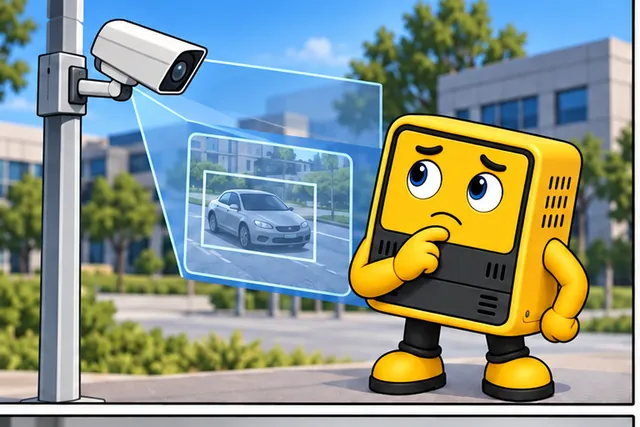
A small device needs nearby computing but cannot wait for the cloud.
-

Fast local work can leave unsafe or stale session data.
-
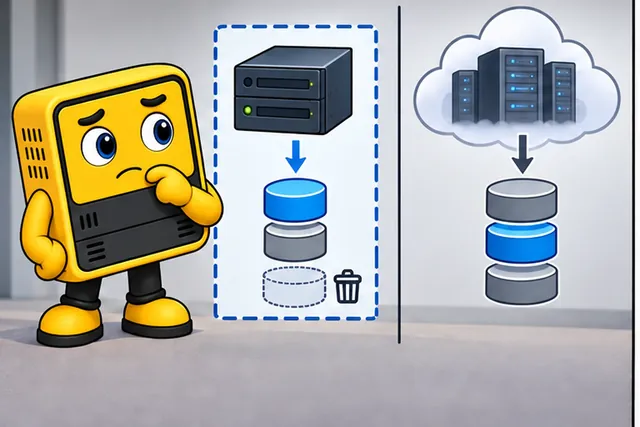
Name what stays nearby, what lasts elsewhere, and what gets deleted.
-
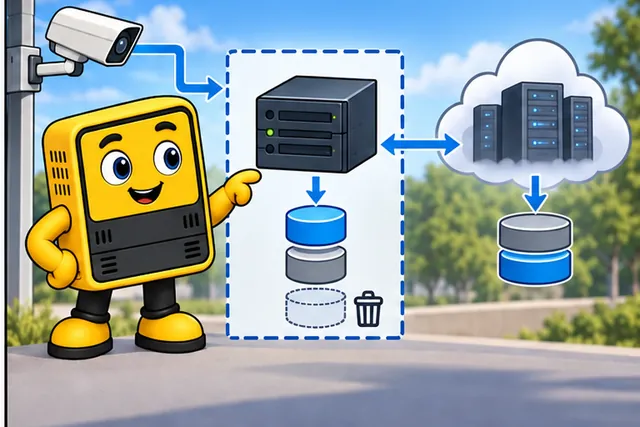
Use the cloudlet only after startup, isolation, sync, and cleanup pass.
The car image gives the local task; the long red path in the next panel shows why a distant result might arrive too late. The third panel separates short-lived local data from records kept elsewhere and marks data to discard. The final panel connects the camera, local compute, remote store, and cleanup. The session rules below turn those drawn paths into startup, isolation, sync, and deletion checks.
16.2 Learning Objectives
This section: Learning Objectives
By the end of this chapter, you will be able to:
- Explain how cloudlets differ from remote cloud services, general fog nodes, and simple edge gateways.
- Describe a cloudlet session lifecycle from discovery through cleanup.
- Evaluate when a workload should run on the device, cloudlet, fog node, or cloud.
- Explain why VM synthesis, container layering, and model pre-positioning all solve the same startup problem.
- Identify operational risks in cloudlet fleets, including stale base images, weak admission control, discovery failure, state leakage, and update drift.
- Write a cloudlet placement and session record for a realistic site.
A cloudlet is not just a smaller cloud. It is a nearby, locally operated execution point whose value depends on proximity, pre-positioned runtime layers, short-lived isolated sessions, and clear state ownership.
16.3 Prerequisites
This section: Prerequisites
- Fog Three-Tier Design: Review edge, fog, and cloud responsibilities.
- Fog Challenges and Failure Scenarios: Review local capacity, state, security, and operations failures.
- Edge, Fog, and Cloud Overview: Review placement trade-offs across the wider architecture.
16.4 Cloudlets: Local Compute Pools
This section: Cloudlets: Local Compute Pools — Cloudlets were introduced to make powerful computation available one local network hop from mobile users.
Cloudlets were introduced to make powerful computation available one local network hop from mobile users. In IoT and cyber-physical systems, the same idea also supports temporary site-scoped workloads: mixed-reality maintenance, local video analysis, emergency response, laboratory experiments, training rooms, inspection stations, and other applications where a nearby compute pool improves responsiveness or keeps data local.
Inspect Figure 16.1 before continuing. A cloudlet is more than a nearby server; its usefulness depends on how a mobile client discovers, provisions, runs, and retires local compute. Figure 16.1 follows that lifecycle.
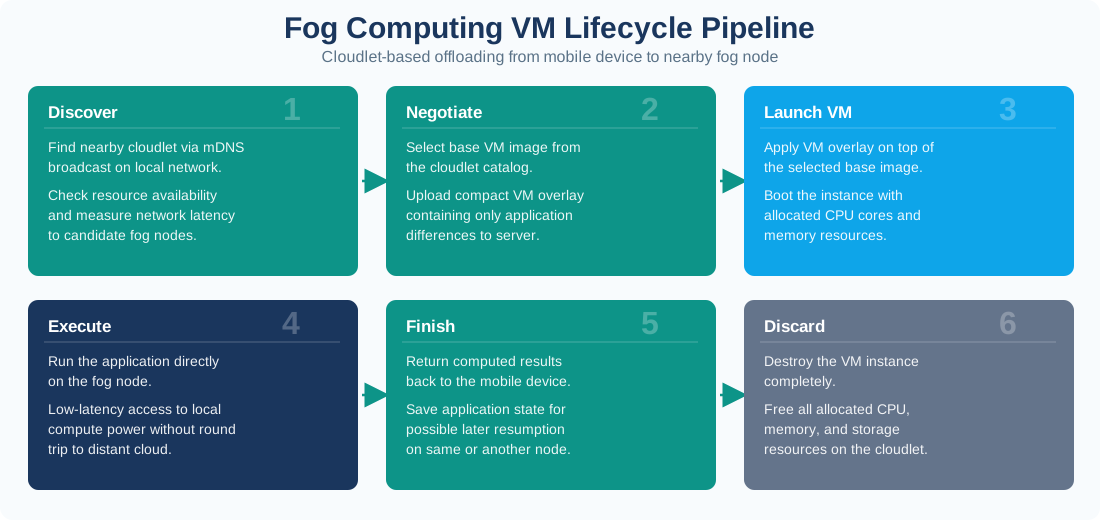
In the diagram Figure 16.1, 1 Discover finds candidate cloudlets through mDNS and measures latency and resources. 2 Negotiate selects a base VM and uploads the compact overlay, after which 3 Launch VM applies it with assigned CPU and memory. 4 Execute keeps application work on the fog node, and 5 Finish returns results and records state for cleanup or reuse. This ordered path exposes the launch overhead and state-management responsibilities that a cloudlet placement must include.
16.4.1 Device
Captures data, provides the user interface, and keeps a minimum local mode. It should not depend on unlimited battery, memory, or radio capacity.
16.4.2 Cloudlet
Runs nearby isolated sessions, caches common runtime layers, applies local policy, and performs compute-heavy or latency-sensitive work.
16.4.3 Cloud
Keeps durable accounts, long-term records, fleet governance, model training pipelines, software distribution, and cross-site analytics.
The placement question is not “is the cloudlet faster?” in the abstract. The better question is: which part of the workload must be local, which part can be delayed, which state must survive cleanup, and which evidence proves the local execution point is trustworthy?
16.5 How Cloudlets Differ
This section: How Cloudlets Differ — Cloudlets overlap with fog and edge computing, but they emphasize a specific pattern: nearby shared compute for temporary sessions.
Cloudlets overlap with fog and edge computing, but they emphasize a specific pattern: nearby shared compute for temporary sessions.
16.5.1 Compared with Remote Cloud
The cloud is best for durable state, broad elasticity, central governance, long-running training, and cross-site coordination. A cloudlet is best for work that must happen near the user, equipment, or site.
16.5.2 Compared with a Fog Gateway
A fog gateway often coordinates fixed local devices and may run one persistent application stack. A cloudlet usually serves multiple transient users or workloads and needs stronger admission, isolation, and cleanup behavior.
16.5.3 Compared with the Device
The device owns sensing, interaction, and minimum fallback behavior. The cloudlet can add compute, memory, accelerators, and local storage without draining the device or exposing every raw stream to a remote service.
16.5.4 Compared with an Edge Cache
A cache stores content close to users. A cloudlet executes workload logic close to users. It may cache layers and data, but its main purpose is local computation.
16.6 Cloudlet Session Architecture
This section: Cloudlet Session Architecture — A production cloudlet architecture needs more than a server placed near users.
A production cloudlet architecture needs more than a server placed near users. It needs a session contract.
16.6.1 Discovery and Admission
Clients discover nearby cloudlets through an approved discovery channel. The cloudlet admits a session only if it has capacity, compatible runtime layers, current policy, and a trusted identity path.
16.6.2 Runtime and Isolation
The session runs in a VM, container, sandbox, or other isolated environment. The important property is not the brand of runtime; it is that one user’s workload cannot read or corrupt another user’s session.
16.6.3 Offload Interface
The device sends tasks, streams, frames, features, or commands to the cloudlet through a defined API. The API should state deadlines, data handling rules, fallback behavior, and result validity.
16.6.4 State Boundary
Temporary session state can live on the cloudlet. Durable user records, audit data, model provenance, and fleet configuration need an assigned source of truth outside the disposable session.
16.6.5 Observability
Operators need local evidence: active sessions, admission failures, runtime versions, cache status, queue depth, resource use, clock state, certificate status, and cleanup results.
16.6.6 Cleanup
When the user leaves, the task ends, or health checks fail, the cloudlet should stop the session, preserve required evidence, wipe temporary state, and release capacity for the next workload.
A nearby server is not automatically trusted. Cloudlets can sit in classrooms, shops, vehicles, clinics, factory floors, or temporary field sites. Use strong identity, signed runtime layers, least-privilege service accounts, encrypted channels, and cleanup evidence.
16.7 VM Synthesis, Containers, and Pre-Positioned Layers
This section: VM Synthesis, Containers, and Pre-Positioned Layers — Classic cloudlet literature emphasized VM synthesis: a cloudlet keeps a base VM image locally, and the client or management system supplies a smaller overlay that personalizes the runtime.
Classic cloudlet literature emphasized VM synthesis: a cloudlet keeps a base VM image locally, and the client or management system supplies a smaller overlay that personalizes the runtime. Many modern implementations use container layers, application bundles, model caches, or sandbox snapshots instead. The durable principle is the same:
Put common layers near the user before the session starts. Move only the session-specific delta at request time. Destroy or reset the session after use.
Inspect Figure 16.2 before continuing. VM synthesis is useful because it moves only the application difference to a nearby compute pool, but that claim depends on a precise launch sequence. Figure 16.2 names the components and transfers involved.
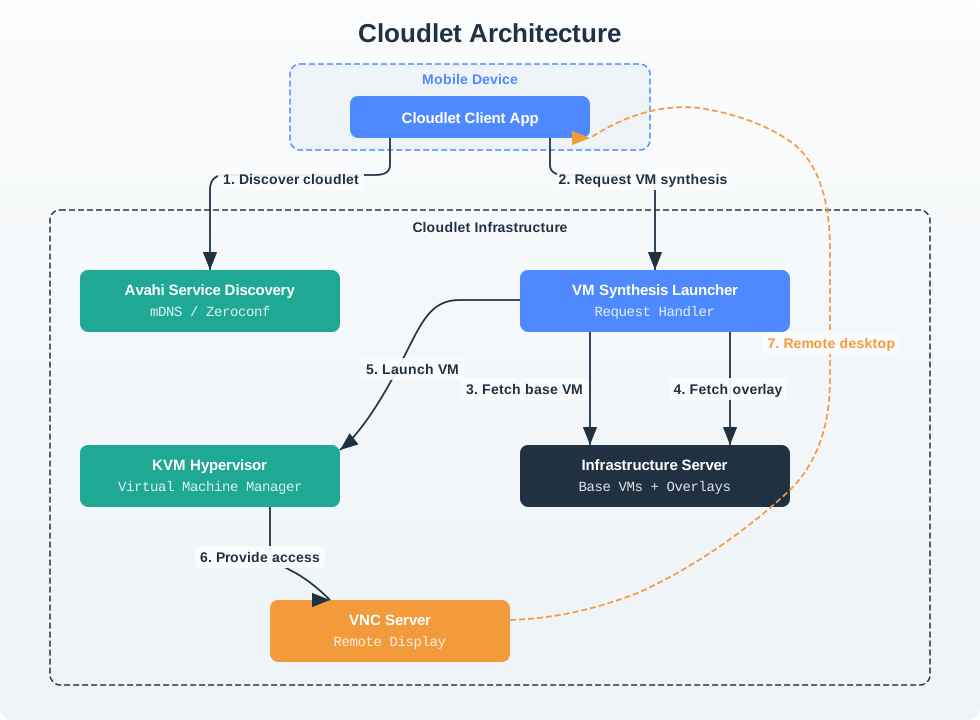
In the diagram Figure 16.2, the Cloudlet Client App first uses Avahi Service Discovery over mDNS or Zeroconf. Its request reaches the VM Synthesis Launcher, whose handler fetches a Base VM and then an overlay from the Infrastructure Server; KVM Hypervisor launches the combined instance. Finally, VNC Server provides remote display access. Those labelled steps identify what must be pre-positioned, what crosses the local network, and where launch-time evidence should be collected.
1. Discover a candidate cloudlet. The device or local controller finds an approved nearby cloudlet and learns which runtimes, models, policies, and services are available.
2. Admit the session. The cloudlet checks identity, policy, capacity, compatible base layers, accelerator availability, and current health before accepting work.
3. Send only the session layer. The device or orchestrator transfers user-specific code, model deltas, configuration, secrets handles, or task context. Large common layers should already be cached.
4. Start an isolated runtime. The cloudlet creates a VM, container, sandbox, or process group with declared CPU, memory, storage, network, and accelerator limits.
5. Execute and synchronize. The session handles nearby work. Durable outputs, audit evidence, and model feedback move to the assigned system of record through a controlled sync path.
6. Clean up and prove it. The cloudlet stops the session, wipes temporary state, releases resources, records cleanup evidence, and keeps only the data the design explicitly requires.
This section:
This section:
16.8 Workload Fit
This section: Workload Fit — Cloudlets are most valuable when the workload has a local reason to exist.
Cloudlets are most valuable when the workload has a local reason to exist. A cloudlet is rarely justified by fashion alone.
16.8.1 Good Fit: Interactive Local Perception
Augmented reality, cognitive assistance, inspection guidance, room-scale collaboration, and local video interpretation often need nearby results while raw streams remain local.
16.8.2 Good Fit: Site-Scoped Autonomy
Emergency response kits, mobile labs, field operations, and temporary venues may need useful compute even when the WAN is weak or unavailable.
16.8.4 Weak Fit: Durable Central Workflow
Batch analytics, long-term user records, cross-site reports, global model training, and compliance archives usually belong in cloud or enterprise systems, with the cloudlet acting only as a local execution point.
16.9 Choosing Device, Cloudlet, Fog, or Cloud
This section: Choosing Device, Cloudlet, Fog, or Cloud — Use the smallest placement that satisfies the consequence of the work.
Use the smallest placement that satisfies the consequence of the work. Do not route every task through the most powerful tier by default.
16.9.1 Keep on the Device
Use the device when the task is safety-minimum behavior, privacy-critical interaction, offline fallback, low compute, or too tightly coupled to local sensors and actuators to tolerate offload.
16.9.2 Run on the Cloudlet
Use the cloudlet when the task needs nearby compute, local data handling, temporary session isolation, shared accelerators, or site-specific context.
16.9.3 Use a General Fog Node
Use a persistent fog node when the workload coordinates fixed devices, gateways, local control loops, protocol translation, buffering, or site operations rather than transient mobile sessions.
16.9.4 Send to the Cloud
Use the cloud for long-term records, global identity, fleet policy, cross-site analytics, model training, business reporting, durable storage, and software distribution.
This section:
For every cloudlet workload, record four things: the local reason for cloudlet placement, the runtime layers already present, the state that survives cleanup, and the fallback path when no cloudlet is available.
This section:
16.10 Operational Responsibilities
This section: Operational Responsibilities — Cloudlets fail when teams focus only on the first successful demo.
Cloudlets fail when teams focus only on the first successful demo. A useful cloudlet fleet needs lifecycle control.
16.10.1 Base Layer Management
First, Maintain approved VM images, container layers, models, and policy bundles. Next, Track version compatibility between session layers and base layers. Then, Stage updates and keep rollback options. After that, Verify integrity with signatures or trusted hashes.
16.10.2 Capacity and Admission
First, Reserve capacity for critical sessions. Next, Reject or redirect work before overload corrupts service. Then, Separate interactive traffic from bulk synchronization. After that, Monitor accelerator, memory, storage, queue, and network pressure.
16.10.3 Identity and Secrets
First, Authenticate devices, users, and cloudlet services. Next, Avoid placing raw secrets in disposable session layers. Then, Rotate certificates and service credentials without breaking offline behavior. After that, Record who started, changed, or ended sessions.
16.10.4 Data Handling and Cleanup
First, Classify raw streams, derived features, logs, results, and audit evidence. Next, Wipe temporary session state after completion or failure. Then, Preserve only approved records. After that, Test cleanup with real failure modes, not just normal exits.
16.11 Deployment Checklist
This section: Deployment Checklist — Use this checklist before approving a cloudlet design or major change.
Use this checklist before approving a cloudlet design or major change.
16.11.1 Placement and Fallback
First, The local reason for a cloudlet is stated. Next, The device has a minimum fallback mode. Then, Cloud fallback is defined only for tasks that can tolerate it. After that, Admission failure produces a clear user or operator response.
16.11.2 Runtime and State
First, Base layers are pre-positioned and versioned. Next, Session layers are small enough for the deployment context. Then, Isolation boundaries are documented and tested. After that, Durable state ownership is explicit.
16.11.3 Trust and Privacy
First, Devices and sessions authenticate to the cloudlet. Next, Raw data handling rules are written down. Then, Secrets are not embedded in disposable images. After that, Cleanup and wipe evidence is captured.
16.11.4 Operations and Updates
First, Image, model, and policy updates are staged. Next, Capacity limits and rejection behavior are tested. Then, Health checks include discovery, runtime start, sync, and cleanup. After that, Operators can see active sessions and failed admissions.
16.12 Worked Example: Mixed-Reality Maintenance Room
This section: Worked Example: Mixed-Reality Maintenance Room — The same structure applies to clinics, factories, transport hubs, retail venues, emergency sites, and field research.
16.12.1 Scenario
A university engineering lab uses smart glasses to guide students through equipment maintenance. The room has a local cloudlet with approved models, safety policy, and a mixed-reality runtime. The campus cloud keeps student accounts, lab records, and model release history.
The same structure applies to clinics, factories, transport hubs, retail venues, emergency sites, and field research. Replace the example domain with measured local constraints, but keep the record format.
16.13 Worked Example: GigaSight Privacy-Preserving Video Analytics
This section: Worked Example: GigaSight Privacy-Preserving Video Analytics — Proximity is not only a speed argument.
Proximity is not only a speed argument. A nearby cloudlet can also cut the bandwidth a fleet of IoT sensors needs and enforce a privacy policy before any data leaves the site, and it can mask a cloud outage by continuing to serve local results when the wide-area path or the cloud service itself is unavailable.
16.13.1 Scenario
A campus or neighborhood runs video cameras, motion sensors, thermal sensors, and utility meters that stream continuously. Satyanarayanan’s GigaSight architecture (M. Satyanarayanan, “The Emergence of Edge Computing,” Computer, vol. 50, no. 1, pp. 30-39, Jan. 2017) puts a cloudlet at the first point of contact for that raw data, so the cloud only ever sees what the cloudlet decides to release.
The same pattern generalizes past video: any high-bandwidth, sensitive IoT stream, such as audio, location, or biometric data, can use a cloudlet as the first point of contact, trading a larger local compute footprint for a much smaller, already-governed upload.
16.14 Common Anti-Patterns
This section: Common Anti-Patterns
16.14.1 Cloudlet as Permanent Database
Temporary session VMs become the only place where important records live. When cleanup, failure, or replacement happens, the records disappear or leak.
16.14.2 Demo-Only Startup Path
The demo works because the base image is already correct, but the production design has no versioning, cache warmup, compatibility checks, or rollback.
16.14.3 Unlimited Admission
Every nearby client is accepted until CPU, memory, storage, network, or accelerator capacity collapses. Good designs reject, queue, or degrade before overload.
16.14.4 Weak Cleanup
Sessions stop normally in tests, but crashes, radio loss, power cuts, and operator restarts leave data or resources behind.
16.14.5 No Non-Cloudlet Mode
The application is unusable when the cloudlet is full, out of range, updating, or failed. A minimum local path should be part of the product behavior.
16.14.6 Local But Unmanaged
The cloudlet is physically nearby but operationally invisible. No one can see image versions, active sessions, failed admissions, resource pressure, or cleanup failures.
16.15 Latency Budget and Handoff Trace
This section: Latency Budget and Handoff Trace — The reason to pay for a cloudlet is not “nearby” as a slogan.
The reason to pay for a cloudlet is not “nearby” as a slogan. It is a measured path where wide-area delay or jitter would consume the interaction budget before useful work begins. Split the trace into device capture, local radio, discovery and admission, cloudlet queue, runtime start, inference or rendering, response transfer, and display update. Then compare that end-to-end path with the remote cloud path.
16.15.1 Trace Record
This trace also prevents a common mistake: treating accelerator speed as the whole decision. A cloud GPU that runs a kernel in 12 ms is still a poor fit for a tight interaction loop if the network path adds 80 ms or more before inference starts. A cloudlet GPU that takes 18 ms may deliver a better experience when the local network path adds only a few milliseconds and the session can be admitted, isolated, synchronized, and cleaned up predictably.
16.16 Summary
This section: Summary — Cloudlets are specialized fog resources for nearby, session-oriented compute.
Cloudlets are specialized fog resources for nearby, session-oriented compute. Their strength is not merely low distance from the user; it is the combination of local placement, pre-positioned runtime layers, isolated temporary sessions, explicit state ownership, and reliable cleanup. Use cloudlets when the workload has a real local reason: responsiveness, raw-data locality, shared accelerators, offline operation, or site-specific context. Keep durable records, governance, and cross-site learning in the system that owns them.
The durable rule is: run nearby when the consequence of remoteness is unacceptable, but design every cloudlet session as disposable unless the architecture explicitly says otherwise.
16.17 Concept Relationships
This section: Concept Relationships
16.17.1 VM Synthesis
The classic cloudlet startup mechanism. It applies a session-specific overlay to a pre-cached base image so the full runtime does not have to move at session start.
16.17.2 Container Layering
A modern implementation pattern with the same goal: keep common layers near the workload and move only the task-specific layer when needed.
16.17.3 Soft State
The principle that local session state can be removed and rebuilt. Durable state must have a named owner elsewhere.
16.17.4 Admission Control
The control that keeps a cloudlet from accepting more work than it can run safely or securely.
This section:
This section:
16.18 What’s Next
This section: What’s Next
16.18.1 Fog Architecture and Applications
Connects the architecture choices in this chapter to broader application families.
16.18.2 Fog Fundamentals Requirements
Turns placement constraints, latency needs, state ownership, and operations needs into requirements.
16.18.3 Fog Resource Allocation
Explores how limited local compute capacity is assigned among competing workloads.
16.18.4 Fog Energy and Latency
Deepens the trade-off between device energy, network path, and local compute placement.
16.19 Key Takeaway
This section: Key Takeaway — Cloudlets are useful when applications need local compute stronger than a gateway but closer than a regional cloud.
Cloudlets are useful when applications need local compute stronger than a gateway but closer than a regional cloud. They also need discovery, session handoff, security, lifecycle, and operations plans.
Find help
3 reviewed answers.
Where should I start in a module?
Open the module page from the sidebar to see its chapters in order. Use the module map to return to a topic you need.
Modules and pathsReviewed
What can I try when a project does not work?
Check the symptom, then work through the diagnostic steps. Keep the error message and the smallest example that reproduces it.
When you are stuckReviewed
How do interactive examples work?
Use the interactive guide to check how examples and simulations work before changing your project.
Interactive examples guideReviewed