33 Fog Exercises & Examples
Hands-On Practice with Fog Node Placement, Cost Analysis, and Architecture Design
What you need to know before starting these exercises:
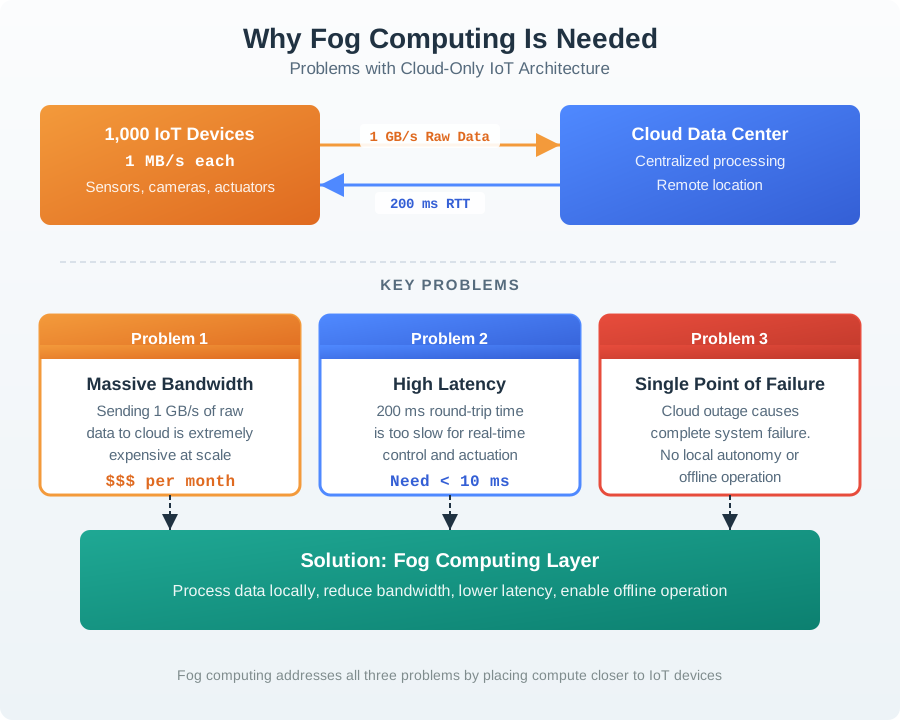
- Fog computing places processing power between edge devices and the cloud to reduce latency and bandwidth
- Edge = on-device processing (fastest, most constrained); Fog = local gateway/server (medium latency, moderate resources); Cloud = remote data center (highest latency, unlimited resources)
- Key tradeoff: Moving processing closer to the source reduces latency and bandwidth but increases hardware deployment complexity and cost
- Data reduction: Fog nodes aggregate and filter raw sensor data before sending summaries to the cloud (often 1,000x to 100,000x reduction)
If you are not yet comfortable with these concepts, review the Introduction and Fundamentals chapter first.
33.1 Learning Objectives
By the end of this section, you will be able to:
- Apply fog computing concepts to practical scenarios involving latency, bandwidth, and cost constraints for real-world IoT deployments
- Calculate fog vs cloud tradeoffs quantitatively using latency budgets, bandwidth computations, and TCO (total cost of ownership) analysis
- Design optimal fog node placement strategies with resource allocation and N+1 failure domain redundancy
- Evaluate fog architectures for specific use cases including smart factories, autonomous vehicles, wildlife tracking, and industrial control by comparing edge, fog, and cloud cost-performance tradeoffs
These exercises help you practice designing systems where computers are placed close to sensors and machines instead of far away in the cloud. Think of it like placing a librarian (fog node) in every classroom instead of making every student walk to a central library (cloud) for every question.
What you will practice:
- Choosing where to put computers – near the sensors that need fast responses
- Calculating costs – how much money does the hardware and network cost?
- Planning for failures – what happens when a computer breaks?
- Comparing options – is it better to process data locally or in the cloud?
Each worked example walks you through a real scenario step-by-step with actual numbers, so you can see exactly how engineers make these decisions.
33.2 Fog Architecture Decision Framework
Before diving into the worked examples, it is helpful to understand the decision process that guides fog architecture design. The following diagram shows the key decision points when determining where to place processing.
33.3 Worked Example: Fog Node Placement Optimization
Scenario: You are designing the fog computing infrastructure for a smart factory with 1,000 sensors distributed across a 50,000 m² manufacturing floor. The factory has 10 production lines, each with 100 sensors monitoring vibration, temperature, power consumption, and quality metrics. You need to determine optimal fog node placement to meet latency requirements while minimizing infrastructure costs.
Goal: Design a fog node placement strategy that achieves <20ms local processing latency, handles peak data rates, provides N+1 redundancy, and stays within budget constraints.
What we do: Map out the latency requirements for each sensor type and identify which operations must stay local.
Why: Not all data has the same urgency. Safety-critical operations need sub-10ms response; quality analytics can tolerate 100ms+. This determines where fog nodes must be placed.
Latency classification by sensor type:
| Sensor Type | Count | Sample Rate | Latency Requirement | Processing Need |
|---|---|---|---|---|
| Vibration (safety) | 200 | 10 kHz | <10ms | Real-time FFT, anomaly detection |
| Emergency stop | 50 | Event-based | <5ms | Immediate relay to actuators |
| Temperature | 300 | 1 Hz | <100ms | Threshold alerting |
| Power meters | 150 | 10 Hz | <50ms | Load balancing decisions |
| Quality cameras | 100 | 30 fps | <30ms | Defect detection inference |
| Environmental | 200 | 0.1 Hz | <1s | Aggregation only |
Key finding: Vibration and emergency stop sensors require fog nodes within network proximity to achieve <10ms. Each fog node can cover approximately a 30m radius with wired connections (assuming 1ms per 100m copper + 2-5ms processing).
What we do: Compute raw data rates and determine aggregation ratios to size network links and fog node storage.
Why: Underestimating bandwidth causes packet loss and missed events. Overprovisioning wastes capital. Accurate sizing ensures reliable operation.
Raw bandwidth per production line (100 sensors):
Vibration (20 sensors × 10 kHz × 4 bytes):     800 KB/s
Quality cameras (10 sensors × 30 fps × 500 KB): 150 MB/s
Temperature (30 sensors × 1 Hz × 4 bytes):     120 B/s
Power meters (15 sensors × 10 Hz × 8 bytes):   1.2 KB/s
Environmental (25 sensors × 0.1 Hz × 20 bytes): 50 B/s
────────────────────────────────────────────────
Total per production line:                    ~150.8 MB/s raw
Aggregation strategy at fog tier:
| Data Type | Raw Rate | Fog Processing | Aggregated Rate | Reduction |
|---|---|---|---|---|
| Vibration | 800 KB/s | FFT → spectral bins | 8 KB/s | 100× |
| Cameras | 150 MB/s | ML inference → results | 1 KB/s | 150,000× |
| Temperature | 120 B/s | 60s averages | 2 B/s | 60× |
| Power | 1.2 KB/s | 10s aggregates | 120 B/s | 10× |
| Environmental | 50 B/s | Pass-through | 50 B/s | 1× |
Result per line: 150 MB/s raw → ~10 KB/s to cloud (15,000× reduction)
What we do: Select fog node specifications based on compute requirements, memory for buffering, and storage for local persistence.
Why: Undersized nodes cause processing delays and data loss. Oversized nodes waste budget. Match hardware to workload.
Compute requirements per fog node (covers 2 production lines):
| Workload | CPU Requirement | Memory Need | Storage Need |
|---|---|---|---|
| FFT processing (40 vibration sensors) | 2 cores @ 2 GHz | 512 MB | - |
| ML inference (20 cameras) | 4 cores + NPU | 2 GB | 500 MB models |
| Data aggregation | 0.5 cores | 256 MB | - |
| MQTT broker | 0.5 cores | 256 MB | - |
| 24h local buffer | - | - | 50 GB |
| OS and overhead | 1 core | 1 GB | 20 GB |
| Total per node | 8 cores + NPU | 4 GB RAM | 70 GB SSD |
Selected hardware: Intel NUC 12 Pro (i7-1260P, 12 cores) with Coral M.2 TPU, 16 GB RAM, 256 GB NVMe SSD - Unit cost: $850 (NUC) + $60 (TPU) + $80 (RAM/SSD upgrade) = $990 - Headroom: 50% CPU margin for burst loads, 4× memory for growth
What we do: Map fog nodes to failure domains ensuring no single point of failure affects safety-critical operations.
Why: A fog node failure shouldn’t halt a production line. N+1 redundancy means operations continue even when one node fails.
Failure domain architecture:
Redundancy design:
- Primary: Each fog node serves 2 production lines (200 sensors)
- Failover: Cross-zone connections allow any fog node to serve neighboring lines
- Heartbeat: Nodes exchange health status every 1s; failover triggers in 3s
- Data sync: Critical state replicated across zone pairs (250 MB/s inter-zone links)
What we do: Ensure fog nodes have redundant power and network connectivity.
Why: A fog node with single power feed fails when that circuit trips. Network redundancy ensures sensors always have a path to processing.
Power infrastructure:
| Component | Primary Power | Backup Power | Hold-up Time |
|---|---|---|---|
| Fog nodes (8) | UPS per zone | Generator | 30 min UPS → unlimited |
| Network switches | Same UPS | Same generator | 30 min UPS |
| Sensors | PoE from switches | Switch UPS | 30 min |
Network topology:
Key decisions:
- Ring topology at core: Any single link failure doesn’t isolate zones
- Dual-homed fog nodes: Each fog node connects to two core switches
- 10 Gbps backbone: Handles peak aggregate (8 nodes × 150 MB/s = 1.2 Gbps) with 8× headroom
What we do: Sum all infrastructure costs including installation, configuration, and 3-year support.
Why: Budget approval requires complete cost picture. Hidden costs (cabling, configuration, training) often exceed hardware costs.
Capital expenditure (CapEx):
| Item | Quantity | Unit Cost | Total |
|---|---|---|---|
| Fog nodes (NUC + TPU) | 8 primary + 2 spare | $990 | $9,900 |
| Industrial enclosures | 10 | $200 | $2,000 |
| Core switches (10 Gbps) | 3 | $3,500 | $10,500 |
| Access switches (PoE) | 20 | $800 | $16,000 |
| UPS systems (3 kVA) | 4 | $1,200 | $4,800 |
| Network cabling | 5,000m | $3/m | $15,000 |
| Installation labor | 80 hours | $150/hr | $12,000 |
| Configuration/testing | 120 hours | $200/hr | $24,000 |
| Total CapEx | $94,200 |
Operating expenditure (OpEx per year):
| Item | Annual Cost |
|---|---|
| Power (fog nodes + network) | $2,400 |
| Support contracts | $8,000 |
| Spare parts reserve | $3,000 |
| Total OpEx | $13,400/year |
3-year TCO: $94,200 + (3 × $13,400) = $134,400 Cost per sensor: $134.40 (over 3 years)
Outcome: A fog infrastructure supporting 1,000 sensors with <20ms processing latency, N+1 redundancy, and 24-hour offline operation capability.
Architecture summary:
- 8 fog nodes (Intel NUC + Coral TPU) in 4 zones
- 2 spare nodes for rapid replacement
- Ring network topology with dual-homed fog nodes
- UPS + generator backup at each zone
- 15,000× data reduction (1.5 GB/s raw → 100 KB/s to cloud)
Key decisions made and rationale:
Intel NUC over Raspberry Pi: Higher reliability, ECC memory support, better I/O bandwidth. $600 more per node justified by 99.9% uptime requirement.
Coral TPU over GPU: Lower power (2W vs 15W), sufficient for inference-only workloads, 10× better $/TOPS for int8 models.
2 production lines per fog node: Balances cost (fewer nodes) vs risk (smaller blast radius). 3+ lines per node would exceed compute budget.
Cross-zone failover over hot standby: Active-active utilization (all 8 nodes working) vs wasting 4 nodes as hot standbys. Failover adds 3s delay, acceptable for non-emergency operations.
24-hour local buffer over 1-hour: Factory operates 24/7; weekend cloud outages shouldn’t cause data loss. 50 GB SSD handles 24h at aggregated rates.
Ring topology over star: Single point of failure unacceptable for safety-critical operations. Ring adds $10,500 in switch costs but eliminates factory-wide outage scenarios.
Scenario: You are designing an autonomous vehicle fleet management system with 500 vehicles. Each vehicle has 8 cameras generating video for collision detection. The system must decide: should collision detection run on the vehicle (edge), at a regional fog node, or in the cloud? Calculate the latency, bandwidth, and cost tradeoffs.
Given:
- 500 vehicles, each with 8 cameras at 30 fps, 720p resolution
- Collision detection must respond in <100ms to trigger emergency braking
- Cellular connectivity: 50 Mbps average, 150ms average latency to cloud
- Regional fog node: 20ms latency from vehicle (5G/LTE)
- Cloud compute cost: $0.10/hour per GPU instance
- Fog compute cost: $500/month per regional node (serves 100 vehicles)
- Edge compute cost: $200 per vehicle (one-time hardware)
Step 1: Calculate Raw Data Volumes
Determine bandwidth requirements for each processing location:
Per camera: 1280×720 × 3 bytes × 30 fps = 79 MB/s raw
Per vehicle (8 cameras): 79 × 8 = 632 MB/s raw
Fleet total: 632 × 500 = 316 GB/s raw

With H.264 compression (100:1): 6.32 MB/s per vehicle
Fleet compressed: 3.16 GB/s
Step 2: Analyze Latency by Processing Location
Break down end-to-end latency for each tier:
| Processing Location | Capture | Encode | Network | Inference | Response | Total |
|---|---|---|---|---|---|---|
| Edge (in-vehicle) | 33ms | 0ms* | 0ms | 15ms | 2ms | 50ms |
| Fog (regional) | 33ms | 10ms | 20ms | 15ms | 20ms | 98ms |
| Cloud | 33ms | 10ms | 150ms | 15ms | 150ms | 358ms |
*Edge uses raw frames directly without encoding
Result: Only edge and fog meet the <100ms requirement. Cloud is 3.5× too slow.
Step 3: Calculate Bandwidth Costs
Determine monthly data transfer costs for each architecture:
Edge Processing (no video leaves vehicle):
Telemetry only: 1 KB/s per vehicle × 500 vehicles = 500 KB/s
Monthly: 500 KB/s × 2.6M seconds = 1.3 TB/month
Cost at $0.09/GB egress: $117/month
Fog Processing (compressed video to regional node):
Per vehicle to fog: 6.32 MB/s
500 vehicles to 5 fog regions: 3.16 GB/s
Monthly: 3.16 GB/s × 2.6M seconds = 8.2 PB/month
Cost at $0.02/GB (private network): $164,000/month
Cloud Processing (compressed video to cloud):
Same raw volume: 8.2 PB/month
Cost at $0.09/GB (internet egress): $738,000/month
Step 4: Calculate Compute Costs
Compare processing costs at each tier:
Edge Computing:
Hardware: $200/vehicle × 500 = $100,000 (one-time)
Power: 15W × 500 × 24h × 30 days × $0.12/kWh = $648/month
Amortized (3 years): $100,000/36 + $648 = $3,426/month
Fog Computing:
5 regional nodes × $500/month = $2,500/month
Handles inference for all 500 vehicles
Cloud Computing:
GPU instances: 500 vehicles ÷ 10 vehicles/GPU = 50 GPUs
50 × $0.10/hour × 720 hours = $3,600/month
Step 5: Total Cost Comparison
Summarize monthly costs for each architecture:
| Cost Component | Edge | Fog | Cloud |
|---|---|---|---|
| Compute | $3,426 | $2,500 | $3,600 |
| Bandwidth | $117 | $164,000 | $738,000 |
| Total/Month | $3,543 | $166,500 | $741,600 |
Step 6: Decision Matrix
Evaluate against all requirements:
| Requirement | Edge | Fog | Cloud |
|---|---|---|---|
| Latency <100ms | Yes (50ms) | Yes (98ms) | No (358ms) |
| Monthly cost | $3,543 | $166,500 | $741,600 |
| Works offline | Yes | No | No |
| Model updates | Slow (OTA) | Fast | Instant |
| Fleet-wide learning | Limited | Yes | Yes |
Result: Edge processing is the clear winner for this use case.
Final Architecture Recommendation
Hybrid Edge-Cloud Architecture:
- Edge (in-vehicle): Real-time collision detection using on-device ML accelerator
- Processes raw video locally
- Triggers emergency braking in <50ms
- Stores last 30 seconds of video locally
- Cloud (deferred): Model training and improvement
- Vehicles upload incident clips (30-sec videos) after parking
- Cloud trains improved models on aggregated fleet data
- OTA updates push new models monthly
Cost summary:
- Edge hardware: $100,000 (one-time)
- Cloud training: $500/month (batch processing)
- Bandwidth: $200/month (incident clips only)
- Total: $3,878/month vs $741,600 for pure cloud (191× cheaper)
Key insight: The 100ms latency requirement immediately eliminates cloud-only processing. The bandwidth cost of streaming video ($738,000/month) dwarfs compute costs ($3,600/month), making edge processing essential for video-intensive IoT applications. Fog is viable for applications where devices lack ML acceleration, but the private network costs are substantial. The winning architecture processes time-critical decisions at the edge while leveraging cloud for fleet-wide learning that doesn’t have real-time constraints.
Verify the autonomous vehicle bandwidth cost calculation driving the edge vs cloud architecture decision.
Raw Video Generation Rate:
Each vehicle has 8 cameras at 720p, 30 fps (matching the worked example parameters):
\[\text{Uncompressed Rate} = 8 \times 1280 \times 720 \times 3 \text{ bytes} \times 30 \text{ fps} = 663 \text{ MB/s per vehicle}\]
With H.264 compression (100:1 for 720p):
\[\text{Compressed Rate} = \frac{663}{100} = 6.63 \text{ MB/s per vehicle}\]
Fleet-Wide Monthly Data Volume:
\[V_{\text{month}} = 500 \text{ vehicles} \times 6.63 \text{ MB/s} \times 86,400 \text{ s/day} \times 30 \text{ days}\]
\[V_{\text{month}} = 500 \times 6.63 \times 2,592,000 = 8.59 \times 10^9 \text{ MB} = 8,590 \text{ TB} \approx 8.4 \text{ PB}\]
Cloud Bandwidth Cost:
At $0.09/GB internet egress:
\[C_{\text{bandwidth}} = 8,590,000 \text{ GB} \times \$0.09/\text{GB} = \$773,100/\text{month}\]
This is consistent with the $738,000 figure in the worked example (difference due to rounding in the main example’s 6.32 MB/s vs our 6.63 MB/s from exact calculation).
Edge Processing Alternative:
Edge computes collision risk scores (100 bytes/second) instead of streaming video:
\[V_{\text{edge}} = 500 \times 100 \text{ bytes/s} \times 2,592,000 = 129.6 \text{ GB/month}\]
\[C_{\text{edge}} = 129.6 \times \$0.09 = \$11.66/\text{month}\]
Bandwidth Reduction: 8,590 TB to 130 GB = 66,077x reduction, saving $773,088/month.
33.3.1 Knowledge Check: Fog Node Placement and Cost Analysis
In the factory worked example, the design uses N+1 redundancy (8 active + 2 spare) rather than N+N (8 active + 8 standby). Which of the following BEST explains this design choice?
A. N+N is technically impossible with fog computing hardware B. N+1 balances cost efficiency against reliability, with cross-zone failover covering single-node failures while keeping 4 spare nodes worth of budget for other infrastructure C. The factory only has 10 production lines, so 8 nodes already provide full redundancy D. N+N would require double the network cabling, which exceeds the physical space available
Answer: B. N+1 redundancy is a deliberate cost-reliability tradeoff. With cross-zone failover, any single fog node failure is covered by neighboring nodes taking over additional lines within 3 seconds. N+N (fully redundant) would add $9,900 in hardware (8 more nodes) but only protects against the unlikely scenario of multiple simultaneous failures. The savings are better invested in network redundancy (ring topology) and UPS systems, which address more common failure modes.
Looking at the vehicle fleet worked example, the monthly cost difference between edge ($3,543) and cloud ($741,600) is dominated by which factor?
A. Compute costs – GPU instances are far more expensive than edge hardware B. Bandwidth costs – streaming compressed video over the internet costs $738,000/month C. Maintenance costs – cloud requires more staff to operate D. Latency penalty costs – cloud failures cause more vehicle accidents, increasing insurance premiums
Answer: B. Bandwidth is the dominant cost. Cloud compute ($3,600/month) is actually comparable to edge compute ($3,426/month). The 209x cost difference is almost entirely bandwidth: transmitting 8.2 PB/month of compressed video at $0.09/GB internet egress costs $738,000/month, versus $117/month for edge telemetry-only uploads. This illustrates a critical fog computing principle: for high-bandwidth sensor data (video, audio, vibration), the network cost often exceeds compute cost by 100x or more.
A smart factory has 100 vibration sensors sampling at 10 kHz with 4-byte readings. The fog node performs FFT analysis and sends only the top 10 spectral bins (each 4 bytes) once per second to the cloud. What is the data reduction ratio?
A. 100x B. 1,000x C. 10,000x D. 100,000x
Answer: B. 1,000x.
Calculation: Raw data rate per sensor = 10,000 samples/sec x 4 bytes = 40,000 bytes/sec = 40 KB/s. After FFT processing, each sensor produces 10 bins x 4 bytes = 40 bytes per second. Per-sensor reduction: 40,000 / 40 = 1,000x. Since this ratio applies identically to each sensor, the aggregate reduction is also 1,000x: total raw = 100 sensors x 40 KB/s = 4 MB/s; total processed = 100 sensors x 40 bytes/s = 4 KB/s; ratio = 4,000 KB / 4 KB = 1,000x.
Why not higher? The fog sends per-sensor FFT results individually. If the fog additionally aggregated across all 100 sensors (e.g., sending only factory-wide anomaly alerts instead of per-sensor bins), the ratio could reach 10,000x to 100,000x. The key lesson: each processing stage provides multiplicative reduction, and multi-tier architectures compound these ratios.
An industrial control system has a total latency budget of 5ms. The sensor sampling takes 0.1ms and the actuator response takes 1ms. You allocate 1ms safety margin. If the FFT processing takes 0.8ms, how much time remains for network communication (sensor-to-fog and fog-to-actuator combined)?
A. 0.1ms B. 1.1ms C. 2.1ms D. 3.1ms
Answer: C. Latency budget calculation: Total budget (5ms) - Sensor sampling (0.1ms) - Actuator response (1ms) - Safety margin (1ms) - FFT processing (0.8ms) = 2.1ms remaining for network. This 2.1ms must cover both the sensor-to-fog link and the fog-to-actuator link. With wired Ethernet (approximately 0.2ms per hop), this is achievable. With wireless (5-10ms per hop), it would NOT fit, which is why industrial fog architectures typically require wired connections for safety-critical control loops.
A wildlife tracking collar has a 3,000 mAh battery and consumes ~16 mAh/day with fog-assisted operation. Without fog assistance (naive cloud approach), the GPS must stay active continuously, consuming 600 mAh/day for GPS alone. What is the approximate battery life improvement factor from using fog offloading?
A. 5x improvement B. 13x improvement C. 20x improvement D. 37x improvement
Answer: D. With fog: 3,000 mAh / 16 mAh/day = 186 days. Without fog (GPS only component): 600 mAh/day for GPS + at least 16 mAh/day for other components = 616 mAh/day minimum, giving 3,000 / 616 = approximately 4.9 days. Improvement factor: 186 / 4.9 = approximately 37x. The fog gateway enables this by (1) providing GPS almanac data to eliminate cold starts, (2) enabling on-device activity classification so GPS only activates when the animal moves, and (3) aggregating data to minimize radio transmissions.
33.4 Practice Exercises
Objective: Measure and understand computational capabilities and constraints of fog node hardware to design appropriate workloads.
Tasks:
- Select a fog device (Raspberry Pi 4, Intel NUC, or industrial gateway) and profile its resources: CPU cores/speed, RAM, storage, network interfaces
- Benchmark performance using sysbench or stress-ng:
sysbench cpu --threads=4 runandsysbench memory --memory-total=1G run - Deploy a sample fog workload (MQTT broker + data aggregation script) and measure resource utilization:
htop,iostat,iftop - Determine maximum sustainable load: how many sensor streams (samples/sec) can the fog node handle before CPU/memory saturation?
Expected Outcome: Understand hardware limitations (Raspberry Pi 4: ~20-30% CPU for 100 MQTT messages/sec, ~200 MB RAM for broker). Learn to size fog deployments based on device count and data rates. Document thermal throttling, storage wear on SD cards, and network bottlenecks. Create capacity planning guidelines for fog hardware selection.
Objective: Build a fog gateway that translates between heterogeneous IoT protocols to enable device interoperability.
Tasks:
- Set up fog node with multiple protocol handlers: Modbus (pymodbus), Zigbee (zigbee2mqtt), MQTT (Mosquitto)
- Implement protocol translation layer: Modbus sensor readings → MQTT topics, Zigbee events → MQTT messages
- Create unified data model: standardize JSON schema for all devices regardless of source protocol (e.g., {“device_id”, “timestamp”, “value”, “unit”})
- Test end-to-end: Modbus temperature sensor → fog gateway → MQTT broker → cloud subscriber
Expected Outcome: Successfully translate between 3+ protocols with <100ms additional latency. Understand gateway responsibilities (protocol conversion, data normalization, error handling). Document challenges: Modbus polling overhead, Zigbee pairing complexity, MQTT QoS trade-offs. Learn when to use fog gateways versus native IP devices.
Objective: Implement store-and-forward capabilities to ensure zero data loss during cloud connectivity outages.
Tasks:
- Create a fog data buffer using SQLite or time-series database (InfluxDB): schema with
timestamp,device_id,value,syncedflag - Implement buffering logic: when cloud reachable, send data directly and mark
synced=true; when unreachable, store locally withsynced=false - Simulate 1-hour cloud outage: disconnect internet, accumulate 3,600 sensor samples (1 sample/sec from single sensor)
- Restore connectivity: implement priority sync (send critical alerts immediately, batch historical data in 100-record chunks)
Expected Outcome: Verify zero data loss during outage with correct temporal ordering after sync. Measure sync performance: how long to upload 3,600 records? (typical: 30-60 seconds). Understand buffer sizing: 1 GB storage = ~10 million records at 100 bytes each. Document buffer overflow handling and data retention policies for extended outages.
Objective: Design data flow architecture that optimally distributes processing across three tiers based on data characteristics.
Reference architecture for this exercise:
Tasks:
- Classify data by time sensitivity: critical (<10ms: collision detection), real-time (10-100ms: HVAC control), interactive (100ms-1s: dashboards), batch (>1s: analytics)
- Map processing to tiers: critical goes to edge (on-device), real-time goes to fog (gateway), interactive goes to fog or cloud, batch goes to cloud
- Implement example: smart factory with vibration sensors (edge FFT), temperature aggregation (fog statistics), production analytics (cloud ML)
- Measure data reduction at each tier: edge (10 kHz raw to 10 Hz FFT bins = 1,000x reduction), fog (100 sensors to 10 aggregates = 10x reduction)
Expected Outcome: Achieve 10,000x total data reduction through hierarchical processing while maintaining detection accuracy. Understand when to move processing: if edge cannot handle FFT (CPU limited), do it at fog. Document bandwidth savings: 100 sensors x 10 kHz x 4 bytes = 4 MB/s raw versus 400 bytes/s aggregated. Learn to balance latency, accuracy, and resource constraints across tiers.
Deep Dives:
- Fog Production and Review - Production fog architectures and case studies
- Fog Optimization - Task offloading and performance optimization
- Edge Compute Patterns - Local processing techniques
Comparisons:
- Edge-Fog-Cloud Overview - When to use each tier
- Cloud Computing - Cloud vs fog trade-offs
- Wireless Sensor Networks - Distributed sensing foundations
Products:
- Application Domains - Industrial fog deployments
Learning:
- Simulations Hub - Fog architecture simulators
- Videos Hub - Fog computing tutorials
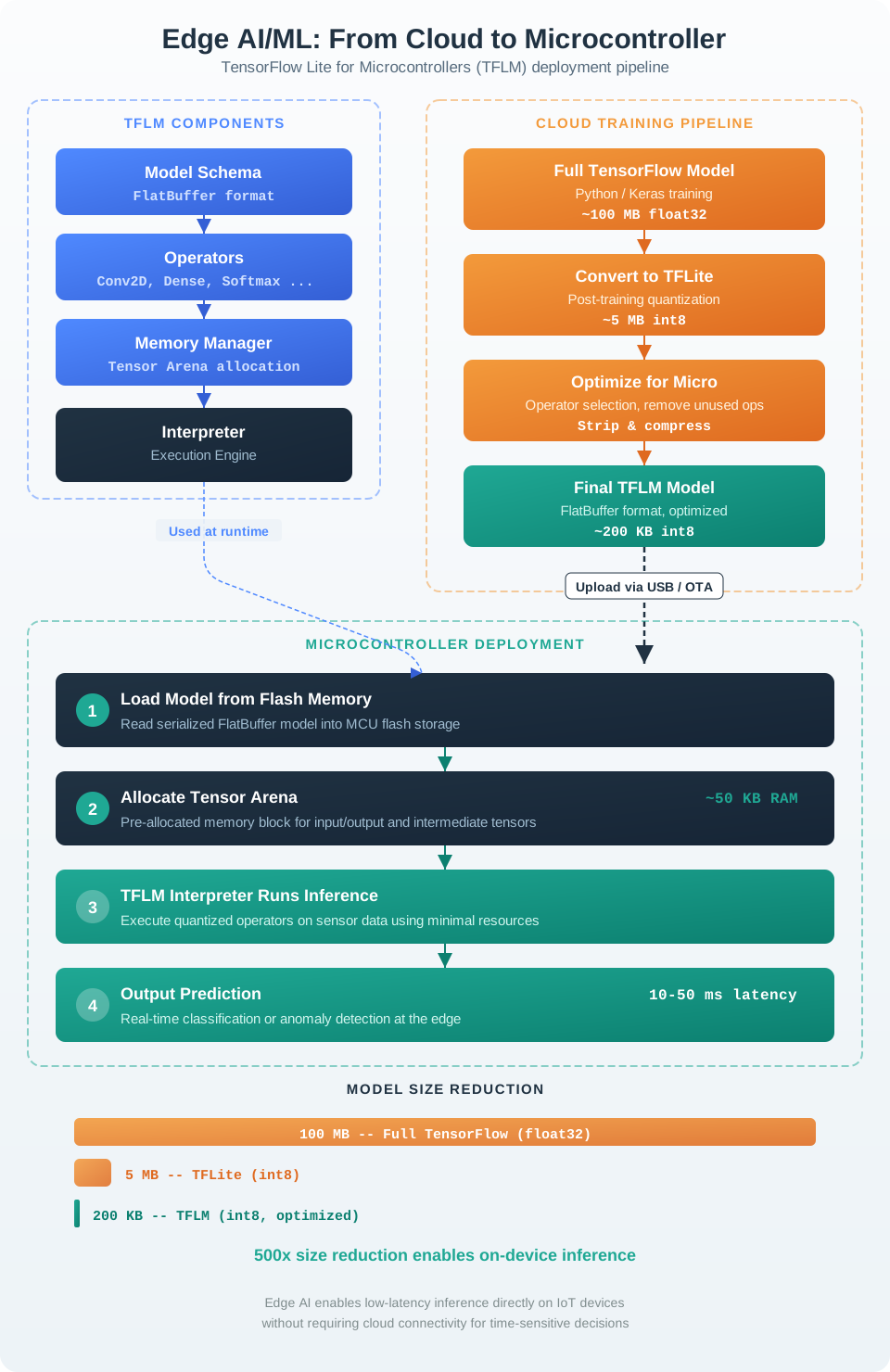
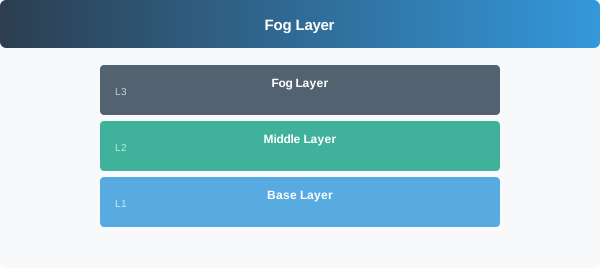
The following AI-generated figures provide alternative visual representations of concepts covered in this chapter. These “phantom figures” offer different artistic interpretations to help reinforce understanding.
33.4.1 Fog Characteristics
33.4.2 Fog Node Architecture
33.4.3 Reference Materials
Scenario: You are designing a wildlife tracking collar for endangered species monitoring in a remote forest. The collar includes a GPS receiver, accelerometer, temperature sensor, and LoRa radio. Battery replacement requires capturing the animal, so maximizing battery life is critical. A fog gateway (solar-powered) is installed at the forest edge, 2km from the typical animal range.
Given:
- Battery capacity: 3,000 mAh at 3.7V = 11.1 Wh
- GPS acquisition: 25 mA active, 50ms per fix (cold start: 150 mA, 30s)
- Accelerometer: 0.5 mA continuous, 15 mA for on-device activity classification
- LoRa transmission: 120 mA for 200ms per packet (50 bytes payload)
- MCU: 5 mA active, 10 uA sleep
- Location update requirement: Every 15 minutes when moving, every 4 hours when stationary
- Activity classification: Required to determine moving vs stationary state
Steps:
Calculate baseline power (cloud-centric approach):
- All processing in cloud: collar transmits raw accelerometer data (100 Hz x 3 axes x 2 bytes = 600 bytes/sec)
- LoRa payload per 15 min: 600 x 900 = 540 KB (impossible - LoRa max ~50 bytes/packet)
- Must sample and send summaries: 1 packet every 15 min + GPS = 96 packets/day
- GPS always on for 15-min intervals: 25 mA x 24h = 600 mAh/day (unrealistic)
Design fog-assisted approach:
- Edge (collar): Run lightweight activity classifier locally
- Fog (gateway): Aggregate multi-collar data, run advanced analytics, relay to cloud
- Cloud: Historical analysis, population modeling
Calculate edge processing power:
- Accelerometer continuous: 0.5 mA x 24h = 12 mAh/day
- MCU active for classification: 8,640 events/day x 15 mA x 0.1s per event = 12,960 mAs/day = 3.6 mAh/day
- MCU sleep remaining time: 0.01 mA x 23.76h = 0.24 mAh/day
Calculate adaptive GPS power (fog-assisted warm start: 25 mA for 50ms per fix):
- Moving (8h/day, every 15 min): 32 fixes x 25 mA x 0.05s = 40 mAs = 0.011 mAh/day
- Stationary (16h/day, every 4h): 4 fixes x 25 mA x 0.05s = 5 mAs = 0.001 mAh/day
- Total GPS: ~0.01 mAh/day (negligible thanks to fog-provided almanac enabling warm starts)
Calculate transmission power:
- Moving: 32 packets x 120 mA x 0.2s = 768 mAs = 0.21 mAh/day
- Stationary: 4 packets x 120 mA x 0.2s = 96 mAs = 0.027 mAh/day
- Total TX: 0.24 mAh/day
Calculate total daily consumption:
Accelerometer:    12.00 mAh/day
MCU (active):      3.60 mAh/day
MCU (sleep):       0.24 mAh/day
GPS:               0.01 mAh/day
LoRa TX:           0.24 mAh/day
─────────────────────────────────
Total:            16.09 mAh/day
Calculate battery life:
Battery life = 3,000 mAh / 16.09 mAh/day = 186 days
With 20% reserve: 149 days (~5 months)
Result: The fog-assisted design achieves ~5 months battery life compared to <1 week with naive cloud-centric approach.
Key Insight: Edge intelligence (local activity classification) enables adaptive sensing – reducing GPS and transmission when stationary. The fog gateway provides GPS almanac data (enabling warm start at 0.05s instead of cold start at 30s) and aggregates multiple collars’ data before cloud upload. This hierarchical approach extends battery life by approximately 37x compared to always-on sensing.
Scenario: You are designing a precision CNC milling machine control system. The spindle speed must be adjusted in real-time based on vibration sensor readings to prevent tool breakage and ensure surface quality. The control loop must respond within 5ms to maintain machining tolerance of 0.01mm.
Given:
- Vibration sensor: 10 kHz sampling rate, 16-bit ADC
- Spindle speed range: 1,000 - 24,000 RPM
- Current control approach: Sensor data sent to cloud PLC, commands returned
- Cloud round-trip latency: 80-150ms (unacceptable)
- Tool breakage cost: $500 per incident + 2 hours downtime ($200/hour)
- Current breakage rate: 3 per week due to delayed response
Steps:
Calculate latency budget:
- Total allowable: 5ms
- Sensor sampling + ADC: 0.1ms (10 kHz = 100us period)
- Signal processing (FFT for frequency analysis): ?
- Control decision: ?
- Actuator response (spindle motor): 1ms
- Safety margin: 1ms
- Available for compute: 5 - 0.1 - 1 - 1 = 2.9ms
Analyze cloud latency breakdown:
Sensor to gateway:     2ms (wired Ethernet)
Gateway to internet:  10ms (firewall, NAT)
Internet to cloud:    40ms (geographic distance)
Cloud processing:     20ms (queue + compute)
Cloud to internet:    40ms (return path)
Internet to gateway:  10ms
Gateway to actuator:   2ms
─────────────────────────────────────────────
Total:               124ms (25x over budget)
Design fog-based architecture:
- Edge (sensor module): ADC + basic filtering
- Fog (local industrial PC): FFT analysis + control algorithm
- Cloud: Historical logging, maintenance prediction, parameter optimization
Calculate fog latency budget:
Sensor to fog (direct wire):  0.2ms
FFT processing (1024-point):  0.8ms (on Intel i5 @ 3GHz)
Control algorithm:            0.3ms
Fog to actuator:              0.2ms
─────────────────────────────────────────────
Total:                        1.5ms (within budget!)
Validate FFT processing time:
- 1024-point FFT on ARM Cortex-M7 @ 400 MHz: ~2.5ms (too slow)
- 1024-point FFT on Intel i5 with SIMD: ~0.3ms (acceptable)
- 1024-point FFT on FPGA: ~0.05ms (best for hard real-time)
- Selected: Intel i5-based industrial PC for cost-effectiveness
Calculate bandwidth savings:
Raw data rate: 10 kHz x 2 bytes = 20 KB/s
Daily upload to cloud: 20 KB/s x 86,400s = 1.73 GB/day

Fog-processed data to cloud:
- FFT summary: 512 bins x 4 bytes = 2 KB every 100ms = 20 KB/s
- Alerts: ~1 KB per incident
- Aggregated stats: 100 bytes every 10 seconds
- Total: ~25 KB/s (similar but processed, not raw)

Alternative: Send only alerts + hourly summaries = 1 MB/day
Bandwidth reduction: 1,730 MB / 1 MB = 1,730x reduction
Calculate ROI:
Current weekly cost (3 breakages):
  Tools: 3 x $500 = $1,500
  Downtime: 3 x 2h x $200 = $1,200
  Total: $2,700/week = $140,400/year

Fog solution cost:
  Industrial PC: $2,000 (one-time)
  Installation: $500
  Annual maintenance: $500
  Total Year 1: $3,000

Expected breakage reduction: 90% (based on 5ms vs 124ms response)
New breakage rate: 0.3/week
New annual cost: $14,040

Annual savings: $140,400 - $14,040 - $3,000 = $123,360
ROI: 4,112% Year 1
Result: Fog computing reduces control loop latency from 124ms to 1.5ms (83x improvement), enabling real-time vibration compensation that prevents 90% of tool breakages.
Key Insight: For hard real-time industrial control (<10ms), fog computing is not optional - it’s mandatory. Cloud latency physics (speed of light + routing + queueing) make sub-10ms impossible over internet. The fog node acts as a local control authority while still enabling cloud-based analytics, predictive maintenance, and remote monitoring for non-time-critical functions.
Scenario: Calculate battery life for a wildlife tracking collar using fog-assisted GPS and activity detection.
Given:
- Battery: 3,000 mAh @ 3.7V
- GPS: 25 mA active, 50ms per fix
- Accelerometer: 0.5 mA continuous
- LoRa transmission: 120 mA for 200ms
- MCU: 5 mA active, 10 µA sleep
- Fog gateway provides GPS almanac (reduces cold start from 30s to warm start 50ms)
- Activity classifier determines motion state every 10 seconds
Step 1: Calculate activity classification power
Accelerometer continuous: 0.5 mA × 24h = 12 mAh/day
MCU wakes for classification: 5 mA × 0.1s × 6/min × 1,440 min
  = 4,320 mA·s ÷ 3,600 s/h = 1.2 mAh/day
Step 2: Calculate adaptive GPS power Fog-assisted warm start: 25 mA × 0.05s = 1.25 mA·s = 0.000347 mAh per fix
Moving (8h/day): GPS every 15 min
32 fixes × 0.000347 mAh = 0.011 mAh/dayStationary (16h/day): GPS every 4 hours
4 fixes × 0.000347 mAh = 0.001 mAh/dayStep 3: Calculate transmission power
Moving: 32 packets × 120 mA × 0.2s = 768 mA·s ÷ 3600 = 0.21 mAh/day
Stationary: 4 packets × 120 mA × 0.2s = 96 mA·s ÷ 3600 = 0.027 mAh/day
Step 4: Total daily consumption
Accelerometer:          12.00 mAh
Activity classification: 1.20 mAh
GPS:                     0.01 mAh
LoRa TX:                 0.24 mAh
MCU sleep:               0.24 mAh
──────────────────────────────────
Total:                  13.69 mAh/day
Step 5: Battery life
3,000 mAh / 13.69 mAh = 219 days (~7 months)Without fog assistance (GPS cold start every time):
GPS cold start: 150 mA × 30s = 4,500 mA·s = 1.25 mAh per fix
36 fixes/day × 1.25 mAh = 45 mAh/day for GPS alone
Total without fog: ~60 mAh/day → 50 days battery life
Key insight: Fog gateway providing GPS almanac reduces each GPS fix from 1.25 mAh (cold start, 30s) to 0.000347 mAh (warm start, 50ms) – a 3,600x power reduction per fix. Combined with activity-based adaptive sensing, this extends battery life from ~50 days to ~219 days, making long-term wildlife tracking viable. The dominant power consumer is the always-on accelerometer (12 mAh/day), not GPS or radio.
| Resource | Edge Sufficient | Fog Needed | Fog Example |
|---|---|---|---|
| Processing | Simple thresholds, basic filtering | ML inference, FFT, aggregation | Fog runs TensorFlow Lite model; edge only captures data |
| Memory | <64 KB RAM | >256 KB RAM | Fog stores 24h data buffer; edge has 2 KB ringbuffer |
| Storage | <512 KB flash | >4 MB storage | Fog archives week of data; edge has no persistent storage |
| Connectivity | Once/hour reports | Continuous streaming | Fog aggregates 100 devices; edge sends hourly summaries |
| Power | <10 mW average | >100 mW | Fog is AC-powered gateway; edge is coin-cell sensor |
Rule of thumb: If edge device runs on battery and has <1 MB RAM, offload all non-trivial processing to fog tier.
The mistake: Adding expensive CPU/GPU to edge devices to avoid fog dependency, even when devices are battery-powered or cost-sensitive.
Example: Smart doorbell design
Over-provisioned approach:
- Edge device: Jetson Nano ($99) with GPU
- Power: 10W continuous
- Runs full ML model on-device
- Battery life: 4 hours (impractical)
- Cost: $99 per device × 10,000 units = $990,000
Fog-assisted approach:
- Edge device: ESP32 ($4) with camera
- Power: 0.5W average (sleep between captures)
- Sends images to fog gateway only when motion detected
- Fog gateway: Single Jetson Xavier ($500) serves 100 doorbells
- Battery life: 30 days (practical)
- Cost: ($4 × 10,000) + ($500 × 100) = $90,000
Savings: $900,000 by using fog aggregation instead of over-provisioning edge.
33.5 Exercise Solutions Summary
The following diagram summarizes the key quantitative results from all four worked examples in this chapter, providing a quick reference for comparing fog, edge, and cloud architectures.
33.6 Key Takeaways
33.7 Summary
Core principles demonstrated in these exercises:
Latency determines architecture: Sub-10ms requirements mandate edge or fog processing. Cloud latency physics (speed of light plus routing plus queueing) make internet round-trips fundamentally incompatible with real-time control.
Bandwidth cost dominates: For high-data-rate sensors (video, vibration, audio), network transfer costs typically exceed compute costs by 100x or more. Data reduction at the fog tier is essential for cost-effective IoT.
Data reduction is multiplicative: Edge reduces 1,000x (raw to features), fog reduces another 10-100x (aggregation across devices), yielding 10,000-100,000x total reduction before cloud upload.
Redundancy design is a cost-risk tradeoff: N+1 with cross-zone failover provides excellent reliability at lower cost than N+N. Ring network topologies eliminate single points of failure.
Battery life scales with intelligence: On-device classification (edge intelligence) enables adaptive sensing, reducing power consumption by 20-40x compared to always-on approaches.
ROI calculation clinches the argument: Translating latency improvements into business metrics (prevented tool breakages, extended battery life, reduced bandwidth bills) makes the case for fog computing investment.
Design methodology: Start with latency requirements, then calculate bandwidth, then size hardware, then design failure domains, then compute total cost of ownership. This systematic approach applies to any fog architecture design.
Hey Sensor Squad! Let us look at what these exercises teach us using everyday examples!
Sammy the Sensor says: “The factory exercise is like planning where to put teachers in a school. You need one teacher (fog node) for every two classrooms (production lines). If a teacher gets sick, the teacher next door can cover – that is N+1 redundancy!”
Lila the Light Sensor adds: “The car exercise is like choosing where to grade homework. Should students mail their homework to a faraway city (cloud)? That takes too long if they need answers RIGHT NOW for a test! Better to have the teacher grade it in class (edge) and send only the final grades home (cloud).”
Max the Motion Sensor explains: “The wildlife collar is like a pedometer that is really smart. Instead of recording every single step (which uses up the battery fast), it just checks ‘Am I walking or sitting?’ If sitting, it takes a nap and saves energy. The fog gateway is like a ranger station that helps the collar know what time it is and where the sun is (GPS almanac), so it does not have to figure everything out on its own!”
Bella the Buzzer concludes: “The CNC machine exercise is like catching a ball. If someone throws you a ball, you need to react in milliseconds – you cannot phone a friend for advice first! The fog node is like your brain – it is right there, making quick decisions. The cloud is like calling an expert who gives great advice but takes too long for catching balls!”
Remember: The closer the computer is to the sensor, the faster it can react – but you need more computers! The exercises teach you how to find the perfect balance.
33.8 Knowledge Check
Common Pitfalls
Jumping directly to calculations without sketching the three-tier architecture leads to incorrect assumptions about which tier processes which data. Before calculating latency or bandwidth, always draw the data flow: device → fog → cloud, labeling what processing happens at each step. This prevents the common error of calculating cloud-only latency for a workload that the exercise intends to run at fog.
Fog sizing exercises often specify peak event rates (1000 events/second during factory shift change) that are much higher than average (100 events/second). Using average values to calculate fog node CPU requirements produces under-provisioned hardware that drops events at peak. Always read the problem statement for peak vs. average specifications and size for peak.
Converting between Mbps, KB/s, events/second, and bytes/event across multiple steps creates unit errors that produce answers off by 1000x. In each exercise step, explicitly track units and verify dimensional consistency before proceeding. A “bandwidth savings” calculation that produces megabytes when gigabytes are expected indicates a unit conversion error.
Multi-step fog exercises have intermediate answers that are reused in subsequent calculations. An error in step 2 propagates through steps 3 and 4, producing a final answer that appears consistent with itself but is fundamentally wrong. After completing each step, sanity-check whether the intermediate result makes physical sense before proceeding.
33.9 What’s Next
You have completed the fog computing exercises and worked examples. Continue learning:
| Topic | Chapter | Description |
|---|---|---|
| Architecture and Applications | Fog Architecture | Deployment patterns, resource management, and real-world fog implementations |
| Optimization | Fog Optimization | Task offloading, energy-latency tradeoffs, and performance tuning techniques |
| Edge-Fog-Cloud Overview | Computing Tiers | Comprehensive comparison of when to use edge, fog, or cloud processing |
| Fundamentals Index | Fog Fundamentals | Return to the main fog fundamentals chapter for navigation across all topics |