13 Hardware Accelerators for Edge AI
More
Depth: Practitioner
Progress saves as you read. Mark sections complete as you go; your progress appears in the sidebar.
13.1 Start Simple
This section: Start Simple — Start with the model and sensor path, not the accelerator brochure.
Start with the model and sensor path, not the accelerator brochure. The core idea is that hardware is correct only if it runs the real workload inside the latency, memory, power, thermal, software, and update constraints. Everyday IoT hardware selection begins with one benchmark on the target class of device and one failure mode, such as unsupported operators or thermal throttling. Build the hardware record before ranking boards, chips, or accelerators.
13.2 Learning Objectives
This section: Learning Objectives
By the end of this chapter, you will be able to:
- Compare microcontrollers, neural accelerators, edge GPUs, and FPGAs by workload fit rather than headline specifications.
- Identify the hardware requirements created by model size, operators, input rate, memory, latency, power, and thermal limits.
- Explain why TOPS, GFLOPS, frame-rate demos, and vendor benchmarks cannot be compared without workload context.
- Design a benchmark plan that measures the complete edge inference path.
- Evaluate software ecosystem, update path, lifecycle support, and team expertise as hardware-selection criteria.
- Write a hardware decision record that can survive design review.
Choose edge AI hardware from evidence. If the real model, real preprocessing, real sensor rate, and real enclosure have not been benchmarked, the hardware decision is still a hypothesis.
13.3 Prerequisites
This section: Prerequisites
- Edge AI Fundamentals: Review placement drivers and target validation.
- Edge AI Applications and Deployment Pipeline: Review the deployment loop and application families.
- Edge AI Optimization: Review quantization, pruning, distillation, and conversion.
- TinyML on Microcontrollers: Review constrained inference on small devices.
13.4 Start With Requirements
This section: Start With Requirements — Do not begin with a board name.
Do not begin with a board name. Begin with the constraints that the board must satisfy.
Model artifact: architecture, file size, precision, input shape, operator set, activation memory, and postprocessing.
Sensor path: camera, microphone, vibration, radar, or other input rate; preprocessing cost; data movement; and synchronization.
Decision deadline: the full sensor-to-action time budget, including acquisition, preprocessing, inference, postprocessing, output, and logging.
Power and heat: battery, wall power, duty cycle, enclosure, ambient temperature, cooling, and throttling behavior.
Software stack: supported runtime, compiler, delegate, driver, operating system, update mechanism, observability, and team expertise.
Deployment scale: supply availability, manufacturability, certification, maintenance, replacement, and support lifetime.
Inspect Figure 13.1 before continuing. Hardware selection starts with the workload envelope because model size alone does not choose a viable device. Figure 13.1 gives a compact route from sensing, timing, and power requirements to candidates that still need measurement.
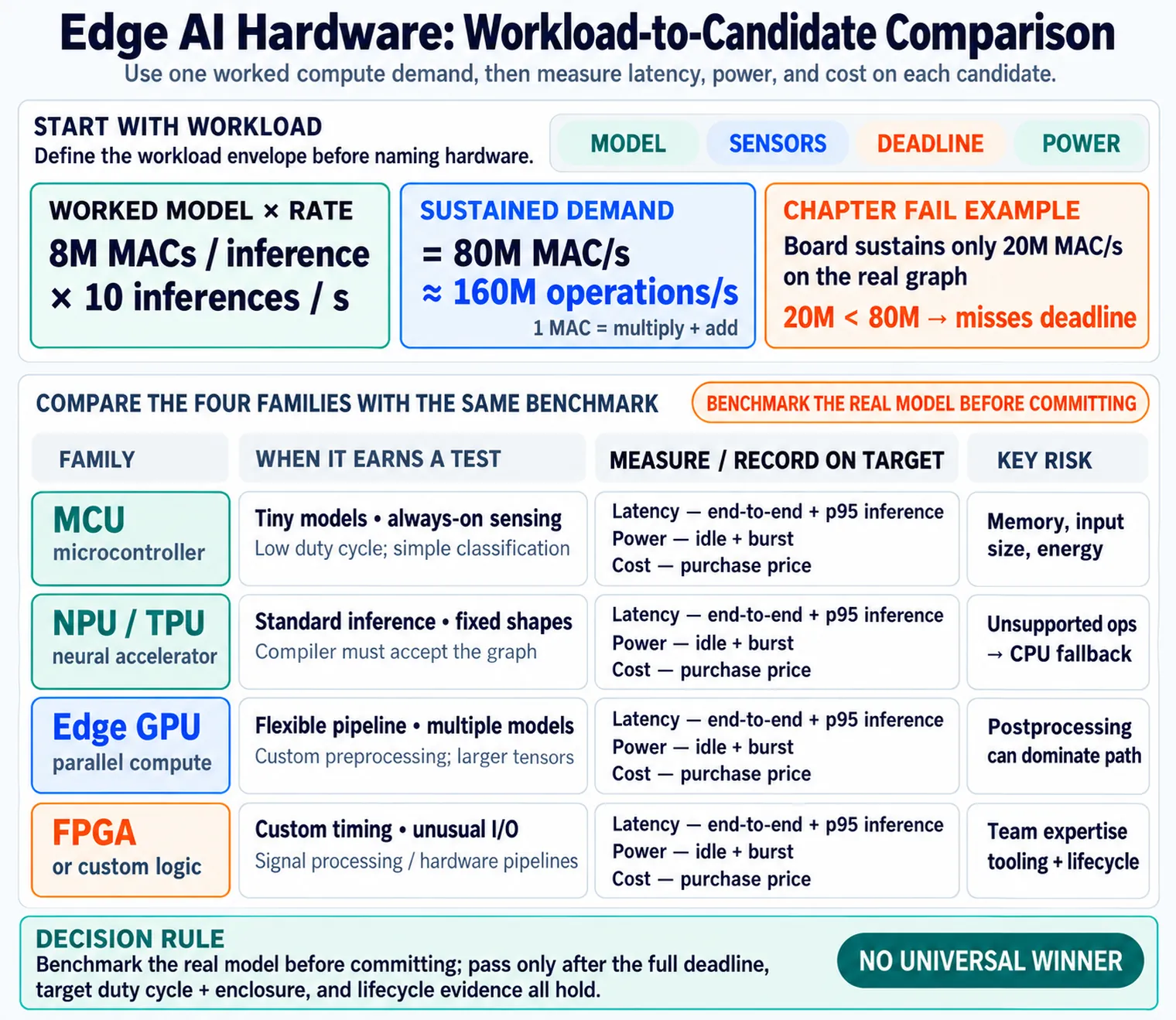
In the diagram Figure 13.1, the route begins at Start with workload, whose labels call out model, sensors, deadline, and power. A tiny model can point toward MCU; standard inference may suit an NPU or TPU; a flexible pipeline can justify an Edge GPU; and custom timing may lead to FPGA. The instruction Benchmark the real model before committing keeps these branches provisional: the map narrows candidates, while the whole-path test makes the purchase decision.
13.5 Hardware Families
This section: Hardware Families — Each hardware family solves a different class of edge AI problem.
Each hardware family solves a different class of edge AI problem.
13.5.1 Microcontroller
Best for tiny models, always-on sensing, low duty cycle, simple classification, anomaly detection, keyword spotting, and local thresholds. The main constraints are memory, input size, and energy budget.
13.5.2 Neural Accelerator
Best for optimized inference with supported operators and fixed input shapes. It can be efficient for classification, detection, and embeddings when the model compiler accepts the graph.
13.5.3 Edge GPU
Best for flexible pipelines, multiple models, custom preprocessing, larger input tensors, development velocity, and frameworks that need general parallel compute.
13.5.4 FPGA or Custom Logic
Best for custom signal processing, deterministic timing, unusual I/O, and hardware pipelines where software scheduling jitter is unacceptable.
There is no single “best” edge AI device. A wearable event detector, a warehouse camera, a vibration gateway, and a robotic safety controller need different tradeoffs.
13.6 Metrics Without Traps
This section: Metrics Without Traps — Accelerator datasheets often emphasize peak compute.
Accelerator datasheets often emphasize peak compute. Peak metrics are useful for filtering candidates, but they do not prove deployment readiness.
13.6.1 TOPS
Usually describes integer neural operations per second. It is most relevant when the deployed model uses the supported precision, tensor shapes, and operator set.
13.6.2 GFLOPS or TFLOPS
Usually describes floating-point math throughput. It is useful for flexible compute, research workloads, or models that cannot be reduced to fixed-function inference.
13.6.3 Frames per Second
Can hide preprocessing, camera transfer, batching, postprocessing, thermal throttling, or different input sizes.
13.6.4 Latency
Must be measured end to end. A fast model invocation is not enough if capture, preprocessing, and action exceed the deadline.
Use peak metrics to shortlist candidates. Use your real benchmark to choose the device.
13.7 Operator and Runtime Fit
This section: Operator and Runtime Fit — A model that performs well in training may fail to map cleanly to hardware.
A model that performs well in training may fail to map cleanly to hardware. Runtime fit is often the deciding factor.
13.7.1 Compiler Support
Some accelerators require a model compiler. Unsupported layers may fall back to CPU, fail conversion, or change latency unpredictably.
13.7.2 Data Types
The hardware may favor integer, floating-point, or mixed-precision inference. Validation must use the final converted artifact.
13.7.3 Preprocessing
Image resize, color conversion, feature extraction, filtering, FFT, windowing, and normalization can cost more than expected.
13.7.4 Postprocessing
Non-maximum suppression, tracking, voting, smoothing, thresholding, and local policy can dominate a vision or signal pipeline.
If unsupported operations silently run on the CPU, the model may appear to “work” but miss latency or power targets. Inspect runtime logs and measure operator placement.
13.8 Benchmark the Whole Path
This section: Benchmark the Whole Path — Hardware evaluation should be a repeatable experiment.
Hardware evaluation should be a repeatable experiment. The benchmark must use representative input and measure the complete deployed path.
Inspect Figure 13.2 before continuing. A board-level benchmark is useful only when it exercises the same path and limits as the intended product. Figure 13.2 frames the evidence needed before a hardware candidate can advance from a promising data sheet to a deployment decision.
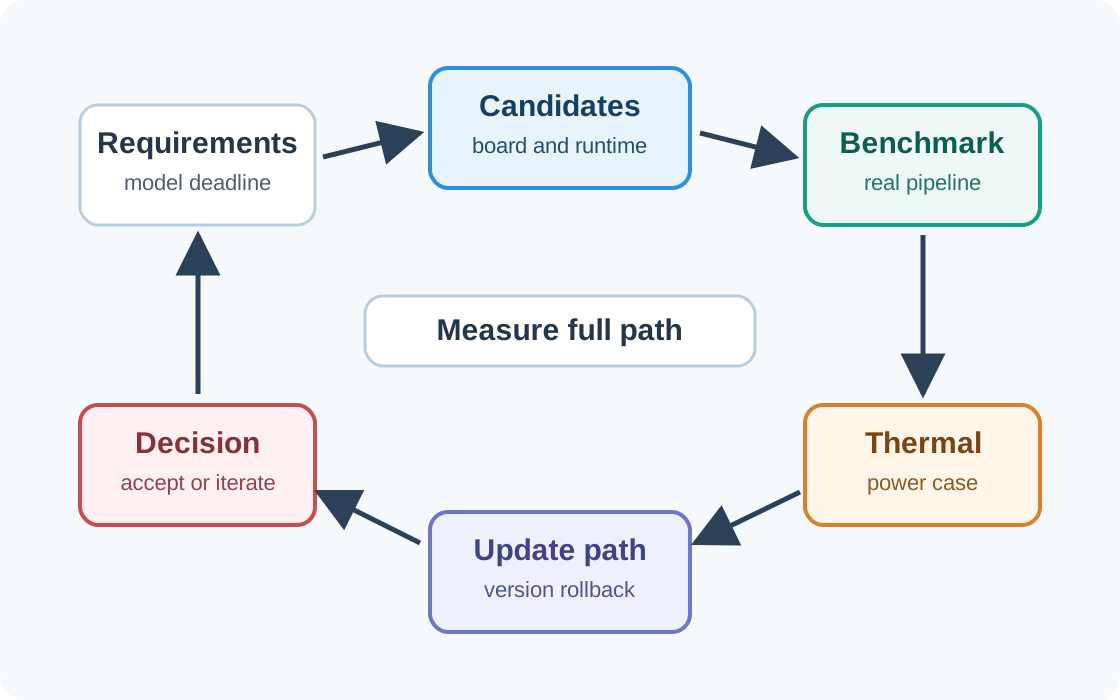
In the diagram Figure 13.2, the loop opens at Requirements, including the model deadline, and sends those constraints to Candidates defined by both board and runtime. Benchmark measures the real pipeline; Thermal repeats the work in the power case; and Update path checks version and rollback support. Capture model and runtime versions, sensor acquisition and preprocessing time, tensor-arena and peak memory, p95 inference latency, idle and burst power, sustained case temperature, throttling behavior, update duration, and rollback recovery. Run the same record at nominal and worst-case voltage, ambient temperature, input rate, and radio activity so a board does not pass only under a bench-friendly workload. The final Decision is therefore fed by end-to-end measurements and lifecycle evidence, not inference speed alone, and a failed gate sends the team back to iterate.
1. Freeze the candidate model Use the model architecture, input shape, precision, and postprocessing expected for deployment.
2. Convert for each runtime Use the real compiler, delegate, firmware, driver, and runtime version for each candidate.
3. Measure the full pipeline Include sensor capture, preprocessing, inference, postprocessing, action, logging, and network reporting.
4. Test thermal and power behavior Run the expected duty cycle in the target enclosure or a realistic thermal setup.
5. Check update and rollback Confirm how models, drivers, firmware, and runtime libraries are updated and reverted.
6. Record the decision Document accepted risk, measured evidence, alternatives rejected, and next validation gate.
13.9 Power, Thermal, and Enclosure Reality
This section: Power, Thermal, and Enclosure Reality — Power and heat shape hardware choices as much as raw compute.
Power and heat shape hardware choices as much as raw compute.
13.9.1 Average vs Peak
Peak inference power may be acceptable if the duty cycle is low. Continuous inference needs sustained thermal testing.
13.9.2 Enclosure
Outdoor boxes, sealed industrial enclosures, wearable housings, and drones have different cooling paths and ambient conditions.
13.9.3 Throttling
A board that meets latency when cool can miss deadlines after sustained load or high ambient temperature.
13.9.4 Radio and I/O
Camera buses, storage writes, radios, and displays can add heat and power beyond the accelerator itself.
13.10 Software Ecosystem and Lifecycle
This section: Software Ecosystem and Lifecycle — Hardware that is excellent on paper can be a poor choice if the software path is fragile.
Hardware that is excellent on paper can be a poor choice if the software path is fragile.
13.10.1 Runtime Maturity
Check supported model formats, delegates, compilers, firmware, drivers, kernel versions, and deployment tooling.
13.10.2 Team Skill
GPU programming, accelerator compilers, embedded C, Linux packaging, and FPGA development require different expertise.
13.10.3 Update Path
Models, firmware, drivers, and runtime libraries must be staged, monitored, and rollback-capable.
13.10.4 Supply and Support
Availability, vendor lifecycle, security advisories, certification, and replacement strategy can dominate production risk.
13.11 Common Pitfalls
This section: Common Pitfalls
13.11.1 Buying Before Benchmarking
Evaluation kits are cheaper than a fleet mistake. Test the real pipeline before choosing the production target.
13.11.2 Treating Peak Metrics as Guarantees
Peak compute numbers do not include memory bottlenecks, unsupported operators, preprocessing, thermals, or I/O.
13.11.3 Ignoring CPU Fallback
Unsupported operations may run on the CPU and quietly break latency or power assumptions.
13.11.4 Forgetting the Enclosure
Desk performance can fail in heat, dust, vibration, sealed housings, or battery-powered duty cycles.
13.11.5 No Update Plan
Hardware choice must include model and runtime update strategy, health telemetry, and rollback.
13.11.6 Underestimating Team Skills
The best technical fit can still fail if the team cannot build, debug, package, and maintain it.
13.12 Implementation Sketch
This section: Implementation Sketch — A hardware decision can be represented as a scored record.
A hardware decision can be represented as a scored record. The goal is not to automate judgment away; it is to make assumptions visible.
def score_candidate(candidate, requirements):
    score = 0
    risks = []

    if candidate.supports(requirements.model_operators):
        score += 2
    else:
        risks.append("unsupported model operators")

    if candidate.memory_headroom >= requirements.memory_headroom:
        score += 2
    else:
        risks.append("insufficient memory headroom")

    if candidate.measured_latency_ms <= requirements.deadline_ms:
        score += 2
    else:
        risks.append("misses end-to-end latency deadline")

    if candidate.thermal_test_passed and candidate.update_path.has_rollback:
        score += 2
    else:
        risks.append("thermal or update validation incomplete")

    return {"candidate": candidate.name, "score": score, "risks": risks}
The important part is the evidence behind each field: measured latency, real operator support, memory headroom, sustained thermal behavior, and update readiness.
13.13 Deep Dive: Sizing Hardware From Workload Evidence
This section: Deep Dive: Sizing Hardware From Workload Evidence — There is no single “edge AI chip.” The useful sizing question is whether the target can sustain the model’s compute, memory movement, I/O, and update path inside the power and thermal budget.
There is no single “edge AI chip.” The useful sizing question is whether the target can sustain the model’s compute, memory movement, I/O, and update path inside the power and thermal budget. Compute starts with the converted model: multiply-accumulate operations per inference, multiplied by the required inferences per second. Memory starts with weights, activations, tensor arena, input buffers, runtime libraries, and whether the accelerator can keep data close enough to its arithmetic units.
13.13.1 Operations and Memory
If a converted model needs 8 million MACs per inference and the application needs 10 inferences per second, the sustained demand is 80 million MACs per second. If one MAC is counted as a multiply plus an add, that is roughly 160 million operations per second. A board that can only sustain 20 million MACs per second on the real graph will miss the deadline even if its sleep current looks attractive. A neural accelerator with ample TOPS may meet the compute target, but only if the model’s operators and tensors stay on the accelerated path.
Memory can be the harder constraint. A small model may fit in flash but still fail if activation buffers, input frames, tensor arena, and runtime memory exceed available RAM. A vision target must also move camera frames through resize, normalization, inference, postprocessing, action, and logging. The hardware decision should therefore record both compute demand and memory headroom for the final converted artifact, not the training model.
13.13.2 Evidence Ledger
Run the actual sensor path on every candidate: capture representative input, resize and normalize it with deployed libraries, execute the converted model, run postprocessing, trigger the local action, write the log entry, and report the event. The winning board is the one that meets the full sensor-to-action deadline under the target duty cycle and enclosure conditions.
| Check | Evidence To Record | Failure Signal |
|---|---|---|
| Operator placement | Runtime/compiler logs for the converted graph | Unsupported layer or CPU fallback |
| Compute demand | MACs per inference times inferences per second | Missed deadline despite good peak metrics |
| Memory headroom | Weights, activations, input buffers, tensor arena, runtime | Allocation failure, swapping, or smaller batch/window than required |
| Sustained operation | Power, thermals, and enclosure run under expected duty cycle | Throttling, resets, battery miss, or heat limit |
| Lifecycle support | Model/runtime update path, monitoring, rollback | Manual updates or unobservable fleet state |
13.13.3 Why INT8 NPUs Can Be Efficient
Neural-network inference is dominated by MAC work: for every output it multiplies inputs by weights and sums them. A general-purpose CPU core executes only a limited number of MACs per cycle. A dedicated NPU or TPU packs a large array of MAC units, often arranged so data streams through many multipliers with high reuse. Moving from FP32 to INT8 makes each arithmetic unit smaller and cheaper, so more fit on the chip and each consumes less energy.
The catch is that raw MAC throughput is only useful if the array stays fed. The frequent bottleneck is memory bandwidth: getting weights and activations to the MAC units fast enough. On-chip SRAM, weight reuse, quantized weights, and clean operator mapping matter as much as the headline TOPS number. If an unsupported resize, activation, or custom layer falls back to the CPU, tensors move between memory regions and the CPU can gate the entire path.
This section:

This section:
13.14 Summary
This section: Summary
- Edge AI hardware selection starts with workload and deployment requirements, not a board name.
- Microcontrollers, neural accelerators, edge GPUs, and FPGAs each fit different model, power, operator, and timing constraints.
- TOPS, GFLOPS, frame-rate demos, and isolated model latency are not substitutes for full-path benchmarking.
- Operator support, CPU fallback, preprocessing, postprocessing, memory movement, and runtime maturity can dominate performance.
- Thermal behavior, power duty cycle, enclosure, update strategy, monitoring, and rollback are part of hardware readiness.
13.15 Knowledge Check
This section: Knowledge Check
13.16 Try It Yourself: Hardware Decision Record
This section: Try It Yourself: Hardware Decision Record — Complete a hardware decision record before committing to a production target.
Complete a hardware decision record before committing to a production target.
application: warehouse-package-reader
local_decision: detect package label and route item at conveyor station
model:
  artifact: quantized vision model plus OCR postprocessing
  risks: [unsupported_ops, preprocessing_cost, postprocessing_cost]
sensor_path:
  input: fixed camera
  timing_risks: [motion_blur, exposure_time, transfer_latency]
requirements:
  deadline: must decide before item reaches diverter
  power: wall powered but passively cooled enclosure preferred
  memory: model, runtime, buffers, logs, and rollback image fit with headroom
candidates:
  - neural_accelerator_gateway
  - edge_gpu_gateway
  - fpga_gateway
benchmark_plan:
  measure: [capture, preprocess, inference, postprocess, action, logging]
  include: [ambient_temperature, sustained_load, update_test, rollback_test]
decision:
  chosen: edge_gpu_gateway
  reason: supports OCR postprocessing and passes full-path benchmark
  rejected:
    neural_accelerator_gateway: unsupported postprocessing caused CPU fallback
    fpga_gateway: development cost not justified for this pipeline
Use this record to force evidence into the decision: what was measured, what failed, and what remains risky.
13.17 References
This section: References
13.18 What’s Next
This section: What’s Next
13.18.1 Edge AI Lab
Apply hardware-selection and benchmarking thinking in a practical deployment workflow.
13.18.2 Edge AI Optimization
Study the model changes that often determine whether a hardware target is viable.
13.18.3 TinyML on Microcontrollers
Go deeper on constrained inference where memory and power dominate.
13.18.4 Edge AI Applications
Connect hardware choice back to application families and deployment pipeline decisions.
13.20 Key Takeaway
This section: Key Takeaway — Choose edge AI hardware from the workload backward: model size, operations, memory, latency, power, thermal limits, accelerator support, and deployment lifetime.
Choose edge AI hardware from the workload backward: model size, operations, memory, latency, power, thermal limits, accelerator support, and deployment lifetime. The best board is the one that can sustain the target model under field constraints.
Find help
3 reviewed answers.
Where should I start in a module?
Open the module page from the sidebar to see its chapters in order. Use the module map to return to a topic you need.
Modules and pathsReviewed
What can I try when a project does not work?
Check the symptom, then work through the diagnostic steps. Keep the error message and the smallest example that reproduces it.
When you are stuckReviewed
How do interactive examples work?
Use the interactive guide to check how examples and simulations work before changing your project.
Interactive examples guideReviewed