11 TinyML on Microcontrollers
More
Depth: Practitioner
Progress saves as you read. Mark sections complete as you go; your progress appears in the sidebar.

11.1 Start Simple
This section: Start Simple — Picture a battery-powered sensor that has to recognize one pattern without asking the network every time.
Picture a battery-powered sensor that has to recognize one pattern without asking the network every time. The core idea is that the model, firmware, sensor sampling, memory budget, and sleep policy all ship together. Everyday IoT TinyML work starts with one constrained microcontroller, one input window, and one acceptance test. Build the smallest classifier that fits, then prove its latency, SRAM, flash, energy, update, and fallback behavior before adding more classes.
11.2 Learning Objectives
This section: Learning Objectives
By the end of this chapter, you will be able to:
- Build a TinyML deployment budget that separates flash, SRAM, latency, energy, and update headroom.
- Explain how TensorFlow Lite Micro, vendor runtimes, CMSIS-NN kernels, and Edge Impulse-style workflows fit into the deployment path.
- Decide whether an application is suitable for microcontroller inference or should move to a gateway, accelerator, or cloud tier.
- Identify common failures caused by unsupported operators, activation memory, sensor mismatch, and unmeasured power policy.
- Write a TinyML decision record that can survive hardware, firmware, and model revisions.
TinyML succeeds when the whole embedded system is measured together: sensor input, preprocessing, model invocation, memory peak, clock state, radio behavior, and update path. A small model file alone is not proof that the product will work.
11.3 Prerequisites
This section: Prerequisites
- Edge AI Fundamentals: Review edge placement and data minimization.
- Model Optimization for Edge AI: Review quantization, calibration, and validation gates.
- Edge AI Hardware: Review runtime, operator, thermal, and lifecycle constraints.
11.4 TinyML Fit Gate
This section: TinyML Fit Gate — Start with a fit gate before selecting a board or framework.
Start with a fit gate before selecting a board or framework.
Task fit: The inference output is local, narrow, and stable enough for a compact model: wake word, gesture, anomaly score, simple classification, or thresholded event detection.
Memory fit: Model weights, firmware, runtime code, tensor arena, feature buffers, stack, logs, and update staging all fit with deliberate headroom.
Runtime fit: The target runtime supports the converted model operators, tensor shapes, quantization mode, and any optimized kernels used in production.
Sensor fit: Training and validation data come from the same sensor path, sampling policy, preprocessing code, and mounting conditions expected in the field.
Power fit: Sleep state, sensing cadence, inference duty cycle, wake sources, and radio transmissions meet the battery or thermal budget under real workloads.
Operations fit: The product has a model version, signed update path, rollback plan, threshold tuning process, and field monitoring signal.
Inspect Figure 11.1 before continuing. A small model is not necessarily a deployable TinyML system. Figure 11.1 lets the reader test the model together with firmware, sensing, power, and fleet operations before choosing a device path.
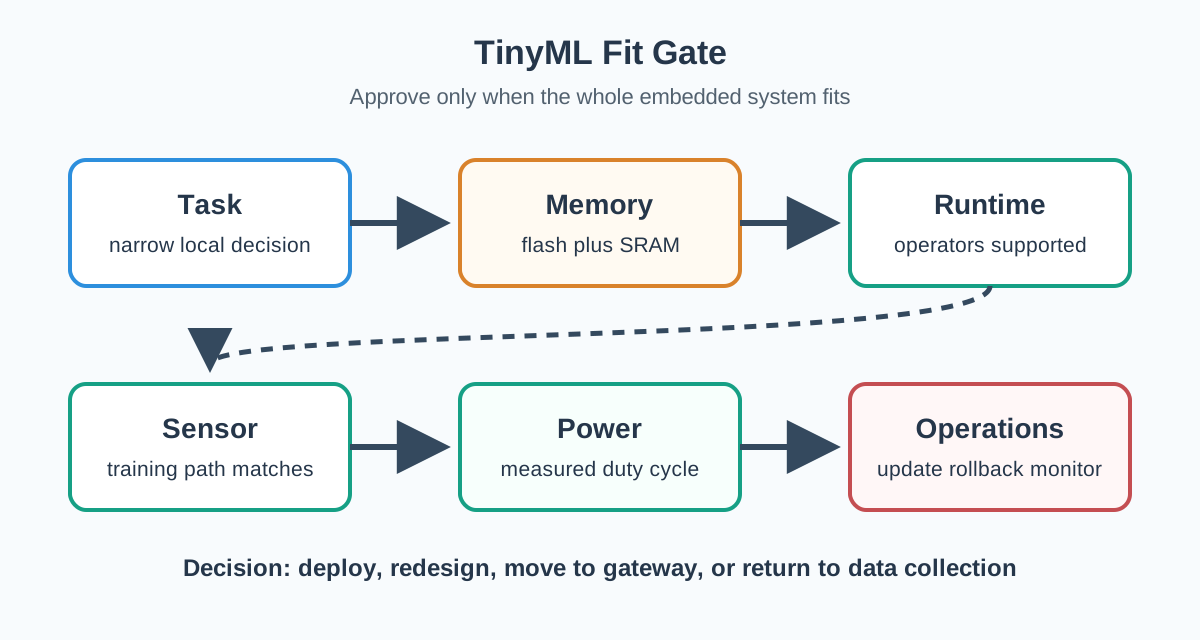
In the diagram Figure 11.1, the Task gate asks for a narrow local decision and known failure cost; Memory reserves flash, tensor arena, buffers, and update room. Runtime checks operators and quantized kernels, while Sensor insists on the field hardware and mounting conditions. Power adds cadence, burst current, radio, and thermal limits, and Operations requires signed update, rollback, and monitoring. Record the measured flash and arena headroom, worst-case inference time, sampled field condition, energy per decision, thermal limit, update signature, rollback test, and owner beside each gate. Only All gates measured? reaches Deploy pilot; the other exits deliberately redirect the design to a model redesign, gateway, or better data.
11.4.1 Interactive: Choose a Quantization Path
This section:
11.5 What Fits on a Microcontroller?
This section: What Fits on a Microcontroller? — Microcontrollers vary by family and board configuration, so always check the exact datasheet and firmware build.
Microcontrollers vary by family and board configuration, so always check the exact datasheet and firmware build. The patterns below are useful starting points.
11.5.1 Small Sensor Models
Simple anomaly detection, gesture windows, and low-rate sensor classification often fit when the model, feature buffer, and tensor arena are intentionally small.
11.5.2 Audio Event Models
Keyword spotting and audio-event detection usually spend significant memory on feature extraction and frame buffers, not only the neural network.
11.5.3 Tiny Vision Models
Image tasks are possible on selected MCUs, but input resolution, color format, camera buffer, and activation memory usually dominate the budget.
11.5.4 Budget Components
| Component | Usually Stored In | What to Measure |
|---|---|---|
| Model weights | Flash | Converted model size, alignment, and embedded C array overhead. |
| Runtime and operators | Flash | Only include operators used by the model; unused kernels waste program memory. |
| Tensor arena | SRAM | Peak activation memory after allocation on the actual runtime build. |
| Sensor and feature buffers | SRAM | Audio frames, FFT/MFCC buffers, image buffers, accelerometer windows, and preprocessing scratch space. |
| Firmware state | Flash and SRAM | Drivers, protocol stacks, logging, stack/heap, safety state, and application code. |
| Update staging | Flash or external storage | Room for signed firmware or model updates, rollback image, and version metadata. |
Use two separate equations during design review:
Flash needed = firmware code + runtime kernels + model weights + metadata + update headroom.
SRAM needed = tensor arena + feature buffers + input/output tensors + stack + heap + communication buffers + logging headroom.
11.5.5 Example Memory Review
Suppose a gesture classifier has a 42 kB int8 model, a measured 58 kB tensor arena, a 16 kB accelerometer window and feature buffer, and firmware that uses 170 kB flash plus 52 kB SRAM. The flash budget is not the main concern if the board has 1 MB of program flash. The SRAM budget is the tighter gate:
Tensor arena 58 kB measured after allocation
Feature buffers 16 kB input window and preprocessing scratch
Firmware SRAM 52 kB stack, heap, drivers, and application state
Decision 126 kB before logs, radio buffers, and safety headroom
The example may fit a 256 kB SRAM device, but it should still be measured with logging, radio traffic, and worst-case sensor windows enabled.
11.6 Runtime Choices
This section: Runtime Choices — Different TinyML workflows solve different parts of the deployment problem.
Different TinyML workflows solve different parts of the deployment problem.
11.6.1 TensorFlow Lite Micro
Use it when you need a portable C++ inference runtime for microcontrollers without a full operating system. The deployment work is explicit: convert the model, include only required operators, allocate the tensor arena, and validate on the target.
11.6.2 CMSIS-NN and Vendor Kernels
Use optimized kernels when the target processor and model operators match the library. They can reduce latency and energy, but only the supported operations benefit.
11.6.3 Edge Impulse-Style Workflow
Use an integrated platform when the project needs fast data collection, labeling, feature extraction, model training, quantization, and firmware export. Validate the generated code like any other production dependency.
11.6.4 Vendor Code Generators
Use board-vendor tools when they match your MCU family and production toolchain. They can simplify integration, but they can also increase lock-in around model format, compiler, or board support package.
11.7 Deep Dive: Runtime and Memory Fit
This section: Deep Dive: Runtime and Memory Fit — TinyML is machine-learning inference on microcontroller-class devices: kilobytes to a few megabytes of memory, milliwatt power budgets, often no operating system, and sometimes no floating-point unit.
TinyML is machine-learning inference on microcontroller-class devices: kilobytes to a few megabytes of memory, milliwatt power budgets, often no operating system, and sometimes no floating-point unit. That is different from an edge gateway with Linux, large RAM, and a filesystem. On an MCU, the model must be self-contained with its runtime, sensor buffers, tensor arena, firmware stack, and update path. The product constraint, not the demo model, decides feasibility.
A concrete budget pass turns that constraint into numbers. On a board with 256 kB flash and 64 kB SRAM, a 60,000-weight INT8 model consumes about 60 kB of flash. If the runtime and required operators take 92 kB, the application and radio stack take 74 kB, and update metadata takes 12 kB, the flash total is 238 kB, leaving 18 kB of headroom. SRAM is separate: an 18 kB tensor arena plus an 8 kB audio feature buffer and 12 kB for stack, logs, and radio state uses 38 kB, leaving 26 kB. That deployment is plausible; doubling the feature buffer requires a new fit check even though the model file did not change.
11.7.1 TensorFlow Lite Micro Fit Ledger
| Runtime Piece | Role | Fit Evidence |
|---|---|---|
| Model FlatBuffer | Stores the trained graph and quantized weights in flash. | Converted artifact size, checksum, operator list, and version metadata. |
| Interpreter | Walks the graph and calls each operator kernel in order. | Exact runtime build, compiler flags, and target-board initialization result. |
| Tensor arena | Pre-allocated SRAM used for tensors and intermediate activations. | Smallest successful arena plus headroom for stack, logs, buffers, and radio state. |
| Operator resolver | Registers only the kernels the model needs. | Required kernels included; unused kernels excluded to save flash. |
Under the hood, flash and SRAM are separate release gates. An INT8 model with 80,000 weights needs roughly 80 kB of flash for those weights because each weight is one byte. Peak live activations drive the tensor arena in SRAM; that peak is not the same as the weight count. Pruning or quantizing weights can reduce flash pressure while leaving the activation peak unchanged. Changing an input window, layer shape, or feature buffer can increase RAM even when the model file gets smaller.
weights: 80,000 INT8 params -> about 80 KB in flash
peak live activations       -> tensor arena in SRAM
sensor and feature buffers  -> additional SRAM outside the arena
release decision            -> approve only if both budgets keep headroom
On Arm Cortex-M devices, CMSIS-NN kernels can accelerate supported INT8 operators by using the core’s SIMD and multiply-accumulate instructions. That benefit is not automatic: the converted model must use supported operators, the resolver must include the right kernels, and the measured firmware build must still fit flash and SRAM with the sensor path enabled.
11.7.2 TensorFlow Lite Micro Skeleton
This simplified structure shows the runtime pieces to review. Production code should add return-code checks, watchdog behavior, version reporting, and target-specific memory profiling.
#include "model_data.h"
#include "tensorflow/lite/micro/micro_interpreter.h"
#include "tensorflow/lite/micro/micro_mutable_op_resolver.h"
#include "tensorflow/lite/schema/schema_generated.h"

constexpr int kTensorArenaSize = 70 * 1024;
alignas(16) static uint8_t tensor_arena[kTensorArenaSize];

tflite::MicroMutableOpResolver<4> resolver;

void setup_inference() {
  resolver.AddConv2D();
  resolver.AddDepthwiseConv2D();
  resolver.AddFullyConnected();
  resolver.AddSoftmax();

  const tflite::Model* model = tflite::GetModel(g_model_data);
  static tflite::MicroInterpreter interpreter(
    model, resolver, tensor_arena, kTensorArenaSize);

  TfLiteStatus status = interpreter.AllocateTensors();
  if (status != kTfLiteOk) {
    report_fatal_error("tensor allocation failed");
  }
}
The tensor arena value is not a universal constant. Measure it for the exact converted model, operator resolver, compiler flags, and firmware build.
11.8 TinyML Development Loop
This section: TinyML Development Loop — A production TinyML loop ties data, model, firmware, and measurement together.
A production TinyML loop ties data, model, firmware, and measurement together.
Inspect Figure 11.2 before continuing. TinyML iteration crosses boundaries between data science, firmware, and device operations. Figure 11.2 makes those hand-offs visible so a promising notebook result cannot skip target measurement.
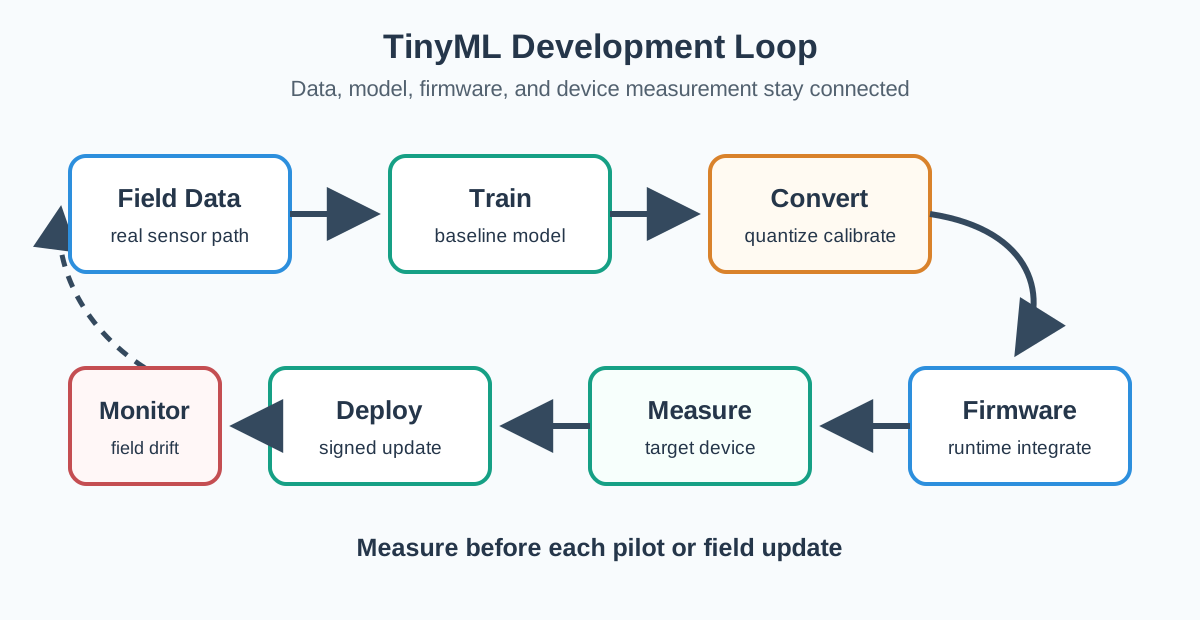
In the diagram Figure 11.2, Field Data from the real sensor path enters Train as a baseline, then Convert performs quantization and calibration. Firmware integrates the runtime before Measure exercises the target device; only then does Deploy use a signed update. Monitor watches field drift and returns evidence to the next data cycle. The instruction to measure before every pilot or update is the loop’s control point, keeping model, firmware, and observed device behaviour aligned.
Collect Use production-like sensors, mounting, firmware timing, and environmental variation.
Train Keep a baseline model and validation set before compression or architecture changes.
Convert Quantize with representative calibration data and record the exact converter settings.
Integrate Build firmware with the real drivers, communication stack, watchdog, and update path.
Measure Record accuracy, latency, peak SRAM, flash size, energy, and failure modes on the target device.
11.9 Sensor Data Quality
This section: Sensor Data Quality — TinyML failures often come from the input path rather than the neural network.
TinyML failures often come from the input path rather than the neural network.
11.9.1 Distribution Shift
A model trained on clean lab data can fail when deployed with a different microphone, ADC, accelerometer mounting, enclosure, vibration profile, or temperature range.
11.9.2 Feature Mismatch
If training uses one FFT window, mel filter bank, normalization rule, image crop, or sensor axis order, firmware must implement the same rule.
11.9.3 Label Ambiguity
Small models cannot repair inconsistent labeling. Define unknown, transition, and background classes deliberately.
11.9.4 Threshold Drift
Confidence thresholds that work in a notebook may fail when quantized, duty-cycled, or exposed to field noise.
11.10 Power and Duty Cycle
This section: Power and Duty Cycle — Avoid quoting one power number for a TinyML product.
Avoid quoting one power number for a TinyML product. Build a duty-cycle budget.
11.10.1 Sleep
How long does the MCU spend in its lowest useful state, and which wake sources remain active?
11.10.2 Sense
Which sensors stay powered, at what sampling rate, and with what analog front-end cost?
11.10.3 Infer
How often does the model run, at what clock speed, and with which optimized kernels?
11.10.4 Act
What local action happens after a positive detection, and how long does it keep peripherals awake?
11.10.5 Transmit
How frequently does the radio send telemetry, alerts, logs, or model-health summaries?
11.10.6 Update
Can the device download, verify, stage, and roll back firmware or model updates within its energy and storage budget?
Battery review should use measured current traces from the target board. Development-board LEDs, debug UARTs, USB power paths, and unused peripherals can hide the production power profile.
11.11 Application Fit Guide
This section: Application Fit Guide — TinyML is a strong fit when the decision is local, the model is compact, data privacy matters, connectivity is intermittent, or the radio would cost more energy than inference.
TinyML is a strong fit when the decision is local, the model is compact, data privacy matters, connectivity is intermittent, or the radio would cost more energy than inference. It is a weak fit when the task needs large context, frequent model changes, high-resolution perception, heavy postprocessing, or continuous learning on the device.
11.11.1 Good TinyML Candidates
- Wake-word or audio-event trigger.
- Gesture and motion classification.
- Industrial anomaly score from a fixed sensor.
- Low-resolution presence or state detection.
- Sensor-quality checks and local filtering.
11.11.2 Move Up the Stack
- Large language, vision, or multimodal models.
- Tasks needing broad world knowledge or changing labels.
- High-resolution object detection with tight accuracy requirements.
- Workloads that require full Linux, GPU/NPU drivers, or large memory.
- Applications without a safe update and monitoring path.
11.12 Implementation Checklist
This section: Implementation Checklist — Use this checklist before moving a TinyML design from prototype to pilot.
Use this checklist before moving a TinyML design from prototype to pilot.
Model artifact recorded: source model, converter version, quantization mode, calibration data, operator list, and checksum.
Memory measured: flash size, tensor arena allocation, feature buffers, stack/heap high-water marks, and update storage.
Latency measured: sensor capture, preprocessing, inference, postprocessing, local action, and telemetry path.
Power measured: sleep, sensing, inference burst, radio transmission, update flow, and representative duty cycle.
Data validated: production sensor data, edge cases, background class, threshold behavior, and field replay tests.
Operations ready: model version in telemetry, rollback plan, failure reporting, and safe degraded mode.
11.13 TinyML Decision Record
This section: TinyML Decision Record
A short decision record makes TinyML choices maintainable:
- Use case: local decision, response time, privacy or connectivity driver, and failure cost.
- Target hardware: MCU, clock policy, flash, SRAM, sensors, radio, and update storage.
- Model contract: input shape, output semantics, precision, operators, and confidence threshold.
- Memory budget: flash and SRAM measured values with headroom.
- Power budget: measured duty cycle and expected deployment profile.
- Validation evidence: dataset split, target-device replay, field edge cases, and acceptance gates.
- Lifecycle plan: versioning, signed update, rollback, monitoring, and retraining trigger.
11.14 Common Pitfalls
This section: Common Pitfalls
A 40 kB model can still fail if activations, feature buffers, communication buffers, or stack growth exceed SRAM. Approve the measured firmware build, not the model file.
Desktop audio, clean CSV files, or lab-mounted accelerometers may not match the field enclosure, ADC, sampling rate, axis orientation, or environmental noise. Collect representative data early.
A broad operator resolver increases flash usage and attack surface. Register the kernels the model actually uses and document the operator list.
Battery life depends on the full duty cycle: sleep, sensor front end, clock changes, inference bursts, local action, radio use, logs, and updates.
TinyML still needs versioning, monitoring, signed updates, rollback, and a retraining trigger. A model that cannot be updated safely becomes a field liability.
11.15 Reference Path
This section: Reference Path
Use these primary references when implementing a real TinyML deployment:
- TensorFlow Lite for Microcontrollers: runtime concepts and microcontroller examples.
- TensorFlow Lite model optimization: quantization and optimization entry points.
- TensorFlow Lite Micro build and convert guide: converting models for microcontroller use.
- Arm CMSIS-NN: optimized neural-network kernels for Arm Cortex-M processors.
- Edge Impulse documentation: data collection, signal processing, model training, and deployment workflow.
- MLCommons Tiny benchmark: benchmark suite for tiny inference workloads.
11.16 Summary
This section: Summary — TinyML is the microcontroller form of edge AI.
TinyML is the microcontroller form of edge AI. It is useful when a compact local decision saves latency, privacy exposure, radio energy, or dependency on connectivity. The hard part is system fit: flash, SRAM, operators, sensor data, duty cycle, and update operations must all be measured on the target device. Use TinyML when the local decision is narrow and stable; move to a gateway or accelerator when the model needs more memory, compute, context, or lifecycle flexibility.
11.17 What’s Next
This section: What’s Next
Continue through the edge AI sequence:
- Edge AI Overview: Connect TinyML to the broader edge AI architecture.
- Model Optimization for Edge AI: Review quantization, pruning, and validation choices.
- Edge AI Hardware: Compare MCU, gateway, accelerator, and server-class deployment targets.
- Edge AI Lab: Practice measurement gates in a TinyML-style gesture classification workflow.
11.18 Key Takeaway
This section: Key Takeaway — TinyML works when the model, sensor loop, memory budget, power budget, and update process fit the device.
TinyML works when the model, sensor loop, memory budget, power budget, and update process fit the device. Plan validation and drift handling early because field data rarely behaves like a clean training set.
Find help
3 reviewed answers.
Where should I start in a module?
Open the module page from the sidebar to see its chapters in order. Use the module map to return to a topic you need.
Modules and pathsReviewed
What can I try when a project does not work?
Check the symptom, then work through the diagnostic steps. Keep the error message and the smallest example that reproduces it.
When you are stuckReviewed
How do interactive examples work?
Use the interactive guide to check how examples and simulations work before changing your project.
Interactive examples guideReviewed