10 Edge AI Fundamentals: Why and When
10.1 Start Simple
Imagine a camera, microphone, or vibration sensor that can make one useful local classification. The core idea is not “AI everywhere”; it is whether that one prediction improves the workflow when it happens near the event. Everyday IoT edge AI starts with a narrow decision, a safe fallback, and a measured target-device run. Build one inference record first: input window, model size, latency, uncertainty handling, rollback path, and the reason cloud-only inference is not enough.
Follow the opening case from its first sign to a careful next step.
-

A local sensor must make one useful prediction near an event.
-
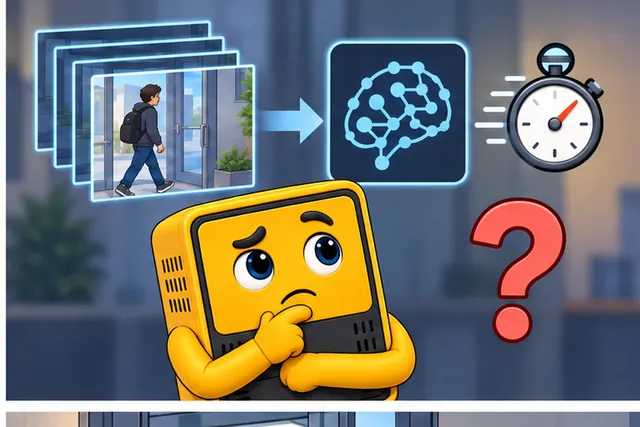
A vague promise of smart features does not prove value.
-
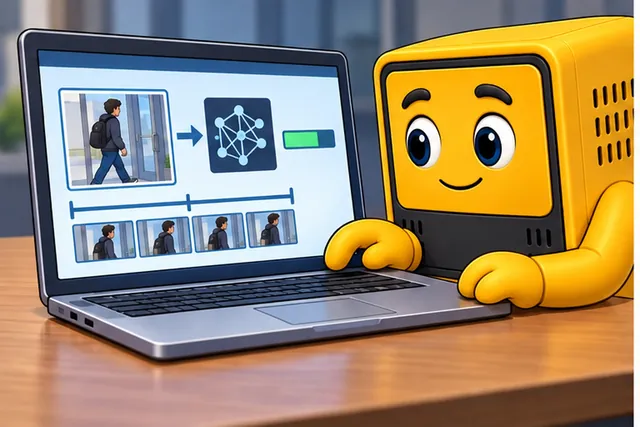
Measure the input, model size, delay, doubt, and safe fallback.
-

Keep local prediction only when that bounded test helps the work.
10.2 Learning Objectives
By the end of this chapter, you will be able to:
- Explain the difference between model training, model optimization, and edge inference.
- Identify the placement drivers that make edge AI useful: latency, bandwidth, data minimization, resilience, and local control.
- Compare device, gateway, and cloud roles in a production edge AI system.
- Describe the lifecycle from representative data to baseline model, optimization, target-device validation, monitoring, and update.
- Recognize common edge AI failure modes before they become deployment failures.
- Write a short decision record for when edge inference is justified.
Read this chapter as a placement decision in four passes:
- First separate training, optimization, edge inference, and fleet learning so “edge AI” does not become a vague label.
- Then test the placement drivers: latency, bandwidth, data minimization, resilience, and local control.
- Next follow the lifecycle from representative data through baseline modeling, target optimization, hardware validation, monitoring, and update.
- Finally write the decision record that proves why the final artifact belongs on the device, gateway, cloud, or a hybrid split.
The checkpoints below keep the design tied to the chapter’s own evidence: the local decision, the device role, the target-runtime constraints, and the operational fallback path.
Edge AI is an architecture choice, not a feature label. A strong design explains what decision must happen locally, what evidence proves a deployable model can make that decision, what the device does when the model is uncertain, and how the fleet will be monitored and updated after deployment.
10.3 Prerequisites
- Edge AI Applications and Deployment Pipeline: Review application families and the deployment loop.
- Edge and Fog Computing: Review why placement matters across device, gateway, fog, and cloud tiers.
- Modeling and Inferencing: Review the difference between trained models and live predictions.
- SOA Resilience Patterns: Connect local inference to fallback, retry, and safe degradation.
10.4 What Edge AI Means
Edge AI places a trained model near the sensor, machine, user, vehicle, room, gateway, or local process. The model reads local input and produces a score, class, detection, embedding, anomaly flag, or control hint without waiting for a remote inference call.
10.4.1 Training
Uses labeled or reviewed data to create a model. This usually needs development machines, cloud services, managed datasets, and repeatable evaluation.
10.4.2 Optimization
Adapts a model for the target runtime. This can include quantization, smaller architectures, pruning, distillation, conversion, and input pipeline changes.
10.4.3 Edge Inference
Runs the optimized model on the device or gateway. This is where live latency, memory, thermal, power, and sensor behavior are measured.
10.4.4 Fleet Learning
Uses monitoring, evidence review, labels, and field failures to improve later model versions without losing rollback control.
Do not describe edge AI as “cloud AI but smaller.” The target hardware, sensor path, update policy, and failure behavior change the architecture.
10.5 Placement Drivers
Edge inference is worth testing early when one or more placement drivers are strong enough to change the design.
Inspect Figure 10.1 before continuing. Placement should follow the condition that actually constrains the decision, not a preference for edge or cloud. Figure 10.1 makes those forcing conditions explicit before the chapter develops a hybrid design.

In the diagram Figure 10.1, the EDGE REQUIRED column ties sub-second response, safety control, offline operation, and privacy to local ownership. HYBRID SPLIT keeps filtering at the edge while the cloud reviews evidence, retrains, and rolls out, whereas CLOUD FITS suits batch planning, rich history, and low urgency. The lower questions—Latency, Safety, Network, and Data Volume among them—are the review prompts that justify one of those three outcomes for a specific workload.
10.5.1 Latency
The decision must happen before a physical process, user action, vehicle state, or safety condition changes.
10.5.2 Bandwidth
The raw stream is large, frequent, or expensive to upload, while the useful result is a compact event or summary.
10.5.3 Data Minimization
Raw images, audio, location, health signals, or occupancy data should be processed locally so only necessary results leave the site.
10.5.4 Resilience
The site must keep detecting, filtering, or protecting equipment when connectivity is delayed, intermittent, or unavailable.
Thresholds such as a specific latency, data volume, or hardware price are context-dependent. Treat them as design inputs to measure, not universal rules to copy into a proposal.
 Checkpoint: Placement Decision
You now know:
- Edge AI is strongest when local inference improves latency, bandwidth, data minimization, resilience, or local control.
- Training, optimization, edge inference, and fleet learning are separate jobs, even when they belong to the same model lifecycle.
- Fixed thresholds are weaker than measured workflow evidence: the decision record must name the local action, deadline, data exposure, network dependency, and fallback path.
With the placement driver bounded, the next question is where each responsibility belongs across the device, gateway, and cloud.
10.6 Device, Gateway, and Cloud Roles
Edge AI is usually distributed. The device, gateway, and cloud each do what they are best positioned to do.
10.6.1 Device
Owns sensor timing, preprocessing, lightweight inference, local action, local buffer, watchdog behavior, and immediate fallback.
10.6.2 Gateway
Aggregates multiple devices, runs heavier inference when needed, manages site policy, buffers events, and coordinates local updates.
10.6.3 Cloud
Stores fleet metadata, reviewed evidence, training datasets, model registry, deployment history, monitoring dashboards, and rollback policy.
10.7 Edge AI Lifecycle
Edge AI quality comes from the full lifecycle, not from exporting a model file once.
Inspect Figure 10.2 to ask how the local choice, its data, the model on the device, and later field results stay linked after export.
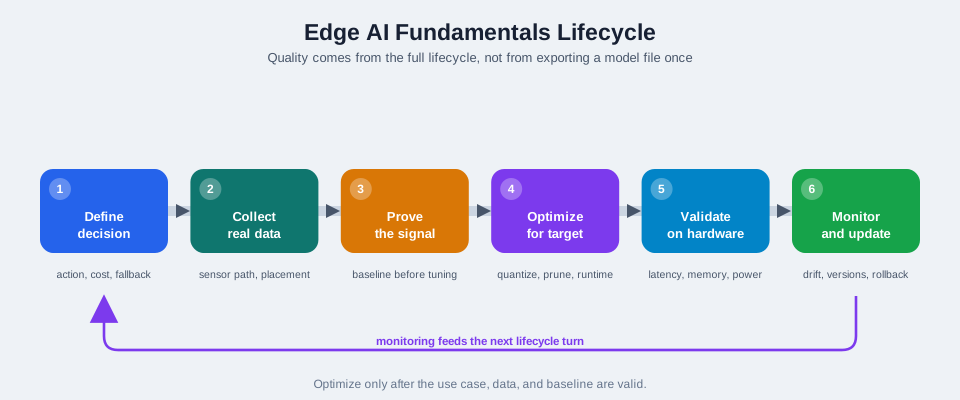
Read Figure 10.2 down its numbered spine. Define states the action, cost, and safe fallback. Collect uses the real sensor path, and Prove checks the signal against a base case. Only then should Optimize change model size or run time. Validate tests delay, memory, and power on the target board. Monitor and update watches drift and supports rollback. Keep the data slice, base result, model and code versions, board results, owner, drift limit, and rollback result. The return arrow shows that field data starts the next review; ownership does not end at launch.
1. Define the local decision Name the action, user impact, false-positive cost, missed-event cost, and fallback path.
2. Collect representative data Use the real sensor path, placement, firmware, environment, and operating modes.
3. Prove the signal Train a baseline model before spending time on conversion or accelerator tuning.
4. Optimize for the target Select architecture, quantization, pruning, and runtime only after the use case is valid.
5. Validate on hardware Measure accuracy, latency, memory, power, thermal behavior, startup, and failure handling.
6. Monitor and update Track drift, errors, evidence samples, model versions, and rollback readiness.
Deployment is the gated handoff between hardware validation and fleet monitoring. The release flow below expands that handoff into qualification, a small-cohort rollout, field observation, evidence recording, revision, and rollback.
10.8 Optimization Basics
Optimization adapts a model to the target environment. The goal is not simply to make the file smaller; the goal is to preserve the useful decision while meeting device constraints.
10.8.1 Quantization
Uses lower-precision numbers for weights and activations. It can reduce memory and improve runtime efficiency, but the quantized model must be tested because scores can shift.
10.8.2 Pruning
Removes less useful connections or channels. It may help with size or speed when the runtime and hardware can benefit from the sparse or smaller structure.
10.8.3 Distillation
Trains a smaller model to imitate a larger model or a reviewed decision process. It can help when the edge device cannot run the larger model.
10.8.4 Feature Engineering
Transforms raw signals into compact inputs, such as windows, spectra, embeddings, counts, or summary statistics. This can be as important as the neural network itself.
Do not assume the optimized model is equivalent to the development model. Validate preprocessing, input scale, class thresholds, memory use, latency, and confidence behavior on the deployed device class.
10.9 Runtime Constraints
An edge model can fail even when its accuracy looks good in a notebook. Runtime constraints define whether the model is deployable.
Flash and storage: Model file, runtime libraries, metadata, rollback image, logs, and local evidence must fit with headroom.
RAM: Input buffers, tensor arena, activation buffers, preprocessing state, networking, and application logic must fit at the same time.
Latency: Sensor acquisition, preprocessing, inference, postprocessing, local action, and logging must meet the workflow deadline.
Power and thermal behavior: Inference duty cycle, accelerator use, radio use, enclosure, ambient conditions, and battery strategy must be measured.
Reliability: The device needs explicit behavior for low confidence, sensor faults, model load failure, memory pressure, and lost connectivity.
Update safety: Model versions should be controlled, staged, observable, and rollback-capable.
Checkpoint: Lifecycle Evidence
You now know:
- The lifecycle runs through local-decision definition, representative data, baseline signal proof, target optimization, hardware validation, and monitoring.
- Optimization changes model behavior, so quantization, pruning, distillation, and feature engineering must be checked against the final device and sensor path.
- Runtime evidence must cover flash, RAM, latency, power, thermal behavior, reliability, and update safety, not only notebook accuracy.
Once the deployable artifact is measurable, decide whether local processing also changes the privacy, data-retention, or cloud-split responsibilities.
10.10 Data Minimization and Privacy
Edge AI can reduce raw data exposure, but it does not automatically solve privacy or governance. Logs, debug samples, labels, timestamps, telemetry, and retained evidence can still reveal sensitive behavior.
10.10.1 Good Pattern
Process raw data locally, upload compact events, sample only necessary evidence, redact when possible, and document retention rules.
10.10.2 Risk Pattern
Run inference locally but upload raw debug clips, full logs, or unreviewed evidence by default.
10.10.3 Review Question
What is the minimum data the cloud needs to monitor quality, diagnose failures, improve the model, and satisfy the user workflow?
10.10.4 Ownership Question
Who approves evidence collection, label review, retention, access control, and deletion policy?
10.11 When Cloud or Hybrid Is Better
Edge AI is not always the best placement. A cloud or hybrid design may be better when the decision is not urgent, connectivity is reliable, raw data is already acceptable to transmit, the model is too large for local devices, or centralized review is the main value.
10.11.1 Cloud-Friendly
Batch analytics, exploratory modeling, long-horizon forecasting, heavy generative tasks, broad fleet training, and workflows where minutes of delay are acceptable.
10.11.2 Edge-Friendly
Local safety gates, high-volume sensor filtering, wake-word or event detection, private media processing, offline operation, and actuator decisions near a machine.
10.11.3 Hybrid-Friendly
Local first-stage filtering with cloud review, gateway inference for multiple sensors, periodic retraining in the cloud, and staged model rollout from a central registry.
10.11.4 Bad Fit
A workload is a bad edge fit when local inference does not create a timely local decision, when failure has no safe fallback, or when the target lacks measured memory, power, thermal, or latency margin. Review those conditions in that order before optimizing the model. If the decision can wait for a reliable remote service, or if a gateway can serve several constrained devices, moving the workload up the stack may be simpler and safer. This judgment reconnects placement to the chapter’s central rule: put inference where measured requirements and operational evidence justify it.
Checkpoint: Architecture Split
You now know:
- Local inference can reduce raw data movement, but logs, debug samples, labels, timestamps, telemetry, retention, and access still need governance.
- Cloud and platform analytics remain better for centralized, non-urgent decisions, larger models, long-horizon forecasting, and planner review.
- Hybrid designs are valid when the edge handles fast filtering and the cloud handles evidence review, registry control, retraining, and staged rollout.
With the split chosen, use the common pitfalls as a checklist before the first release candidate becomes field behavior.
10.12 Common Pitfalls
10.12.1 Starting With Hardware
Choosing a board or accelerator before defining the local decision leads to mismatched memory, power, update, and cost assumptions.
10.12.2 Treating Conversion as Deployment
A converted model file is not a production system. It still needs target validation, fallback, monitoring, and update control.
10.12.3 Ignoring Preprocessing
Training and deployment must use the same input scaling, filtering, windowing, and feature extraction.
10.12.4 Lab-Only Evaluation
Clean test data can hide lighting, vibration, noise, sensor aging, placement, and environmental changes.
10.12.5 No Evidence Loop
Without reviewed samples and operator feedback, the model becomes hard to debug or improve.
10.12.6 No Rollback
Model updates need staged rollout, version inventory, health checks, and a safe way to revert.
10.13 Implementation Sketch
The application should keep inference and safety policy separate. This makes it easier to update thresholds, evidence collection, and fallback behavior without hiding model uncertainty.
def evaluate_edge_sample(sample, model, policy, device):
    features = device.preprocess(sample)
    result = model.predict(features)

    event = {
        "model_version": model.version,
        "label": result.label,
        "confidence": result.confidence,
        "device_id": device.id,
    }

    if not device.sensor_is_healthy():
        device.store_evidence(sample, reason="sensor_fault")
        return device.safe_fallback("sensor_fault", event)

    if result.confidence < policy.minimum_confidence:
        device.store_evidence(sample, reason="low_confidence")
        return device.safe_fallback("needs_review", event)

    if result.label in policy.local_action_labels:
        device.act(result.label)

    device.report_event(event)
    return event
The important design choice is not the exact Python API. It is the structure: consistent preprocessing, model version reporting, health checks, uncertainty handling, compact event reporting, and explicit fallback behavior.
10.14 Deep Dive: Edge Inference Evidence and Artifact Sizing
Underneath the placement decision is the core split: train in the cloud or development environment, then infer at the edge. Training is heavy, batch-oriented, and usually GPU-bound. The field device runs a frozen model artifact; on-device learning exists, but it is the advanced exception, not the default pattern.
For example, a vibration sensor on a remote pump may sample continuously but only report a short evidence window when the vibration pattern changes. Local inference avoids streaming every waveform, keeps the pump protected during a WAN outage, and gives maintenance staff a compact alert to review later. The cloud still matters because it stores the model version, receives reviewed alert windows, tracks site drift, and coordinates the next rollout.
The mathematical gist. A 1200 Hz fault band needs at least 2400 samples/s. At 1600 samples/s, a 2000 Hz component folds to 400 Hz. Separately, the pump sensor’s , 12-bit ADC has , , and an ideal 74.0 dB quantisation ceiling. Sampling protects frequency identity; ADC resolution protects amplitude detail.
A practical review starts by naming the action, not the model. Figure 10.3 provides the map for that review by separating the cloud training path from the edge inference path. If a camera must stop a conveyor, the deadline, false-stop cost, missed-hazard cost, fallback behavior, and local evidence path matter more than benchmark accuracy. If a planner reads a weekly demand forecast, a cloud job with a larger model and richer history is usually simpler. For hybrid systems, document the split: the edge model handles fast common cases, while the cloud model reviews uncertain samples and produces the next training set.
Do the arithmetic before choosing a tier. A raw inspection stream at 2 Mbps sends about 250 kB every second. If local inference reports a 200-byte event every 10 seconds, the uplink is roughly 160 bits per second, more than 10000 times smaller than the raw stream. That bandwidth saving is meaningful only if local false-positive and false-negative behavior is acceptable for the physical process.
The edge does not run the full training pipeline. Before inspecting Figure 10.3, keep that boundary explicit: a trained network is converted to an inference format such as TensorFlow Lite, LiteRT, or ONNX, quantized when useful, compiled or packaged for the target runtime, and deployed as a frozen graph. What ships is weights plus operations for inference, with no optimizer, no gradient state, and no training loop.
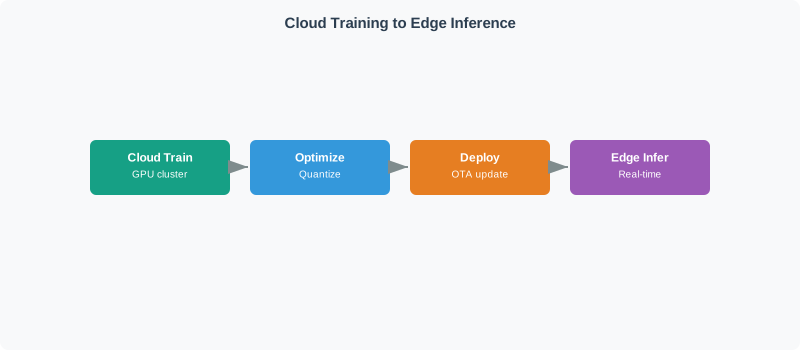
Read Figure 10.3 from cloud training through optimization and deployment, then follow the optimized artifact into real-time edge inference. The return path is operational evidence: confidence scores, input statistics, sampled hard cases, and model health reveal when the frozen model no longer matches the changing world. Those signals trigger review and retraining, after which a newly versioned artifact is optimized and rolled out with rollback support. The diagram therefore connects placement to the lifecycle that keeps the deployed decision trustworthy.
A sizing check keeps the release honest. A model with 5 million weights is about 20 MB if each weight is stored as FP32 and about 5 MB after INT8 quantization, before runtime overhead. On a gateway with 16 MB available for the inference process, that can leave room for a 4 MB tensor arena, a 2 MB input buffer, and logging. On a smaller microcontroller, the same artifact may still be too large, so the design must move to a smaller architecture, a shorter input window, or a different target.
Target testing must include the code around the graph. A fall detector depends on sensor sampling, windowing, normalization, tensor allocation, inference, confidence policy, alert timing, battery impact, and a safe fallback if the model cannot load. A converted model file that passes a desktop test is not enough. The release gate is the final artifact on the wearable class, with memory headroom, battery duty cycle, low-confidence behavior, local alert behavior during network loss, and exact model plus preprocessing versions recorded.
Checkpoint: Release Record
You now know:
- A practical edge AI record starts with the action, false-positive cost, missed-event cost, fallback behavior, and local evidence path.
- Training stays outside the device in the default pipeline; the device runs a frozen, optimized inference artifact with exact preprocessing and model versions recorded.
- Sizing and target testing must include model file size, tensor arena, input buffers, latency, battery or power behavior, low-confidence handling, network-loss behavior, monitoring, and rollback.
Use the summary to compress that record into the few claims a reviewer should be able to verify quickly.
10.15 Summary
- Edge AI places inference near the sensor when a local decision improves latency, bandwidth, data minimization, resilience, or control.
- Training, optimization, edge inference, monitoring, and updates are different parts of one lifecycle.
- Optimization techniques help only when the final artifact is validated on the target device and sensor path.
- Edge AI does not eliminate cloud services; it changes the cloud role toward evidence, monitoring, registry, rollout, and retraining.
- Cloud and hybrid architectures remain valid when the workflow does not require an immediate local decision.
10.16 Knowledge Check
10.17 Try It Yourself: Edge AI Decision Record
Write a short decision record before choosing hardware or model architecture.
application: machine-vibration-monitor
local_decision: classify normal, watch, or inspect-soon from a vibration window
why_edge:
  - high-rate raw signal should not stream continuously
  - device should keep monitoring during network outages
sensor_path:
  input: accelerometer window
  environment_risks: [mounting_change, temperature, process_speed]
model_plan:
  baseline: prove signal with representative field data
  optimization: convert only after baseline is meaningful
  target_validation: measure latency, memory, power, and fallback behavior
data_policy:
  upload: compact events and selected evidence windows
  avoid: raw continuous stream by default
fallback:
  low_confidence: store evidence and request review
  sensor_fault: report health event and use safe state
monitoring:
  track: [model_version, confidence_distribution, alert_rate, sensor_health]
update:
  strategy: staged rollout with rollback
Review the record with operations, privacy, security, and maintenance owners. If the local decision is not clear, edge AI is probably not ready to specify.
10.18 References
10.19 What’s Next
10.19.1 Edge AI Hardware
Compare device, gateway, accelerator, memory, and power tradeoffs for target deployment.
10.19.2 Edge AI Optimization
Study quantization, pruning, distillation, conversion, and validation in more depth.
10.19.3 TinyML on Microcontrollers
Apply edge AI concepts to constrained microcontroller deployments.
10.19.4 Edge AI Lab
A single-board computer makes the edge boundary physical: acquisition, inference, storage, power, and networking share one deployable device.

Use the photograph to challenge any assumption that the logical block alone captures the complete field system.
Practice an end-to-end workflow with deployment and target validation thinking.
10.21 Key Takeaway
Move inference to the edge only when the application needs local response, privacy, bandwidth reduction, or offline autonomy. Edge ML still needs representative data, measured accuracy, drift monitoring, and a realistic update path.