Resource model
Devices expose named resources. Clients use URI paths, methods, response codes, and representations to read or change state.
3 reviewed answers.
Open the module page from the sidebar to see its chapters in order. Use the module map to return to a topic you need.
Modules and pathsReviewed
Check the symptom, then work through the diagnostic steps. Keep the error message and the smallest example that reproduces it.
When you are stuckReviewed
Use the interactive guide to check how examples and simulations work before changing your project.
Interactive examples guideReviewed

Progress saves as you read. Mark sections complete as you go; your progress appears in the sidebar.
This section: Start With the Decision — A packet trace records messages seen on a link.
A packet trace records messages seen on a link. A byte is eight bits of data. A message drill checks how each byte of a CoAP message is read. Diagram labels and drills expose mistakes before firmware, the program stored on the device, ships.
This section: Route Overview — This is part 3 of 3.
This is part 3 of 3. Review CoAP Messages: Codes, Tokens, and Options for the preceding evidence.
This section: Learning Objectives
This section: Chapter Roadmap
This section: CoAP Fundamentals
Follow One Request to a Physical Result
Picture a battery sensor that sleeps, wakes to report a leak, and receives a command to close a valve. A web-like request is useful only if the device can handle it within its power and link limits.
A protocol means shared rules for an exchange. Hypertext Transfer Protocol (HTTP) means a request-and-response format used by web systems. Constrained Application Protocol (CoAP) means a compact request method for small devices. User Datagram Protocol (UDP) means sending separate messages without a lasting connection. A gateway means the bridge between local devices and a wider network. An actuator means a part that creates a physical action.
Read the leak state, repeat the request, delay the reply, send a wrong command, and restart the gateway. The valve should reach one named safe state. The receiver should distinguish no reply, refusal, and completed action.
This runway does not prove that the valve moved or that the sender was trusted. The deeper sections explain resources, methods, message types, discovery, and the evidence needed across the full path.
Imagine a soil sensor that wakes for a few milliseconds, reports moisture, listens for a new sampling interval, and goes back to sleep. HTTP can describe the same resources, but its connection setup and verbose headers waste the radio time the device is trying to save.
CoAP starts from that everyday constraint. The protocol keeps the resource model familiar, then trims the exchange down to compact UDP messages, tokens, discovery records, and delivery choices that can be tested on a lossy link.
The Constrained Application Protocol keeps the resource model that makes HTTP easy to reason about: a client sends a request to a URI, chooses a method such as GET or PUT, and receives a response code plus a representation. The difference is the operating environment. CoAP is built for small devices and constrained networks, so it runs over UDP and keeps the base message compact.
The practical value is not that CoAP imitates the web. The value is that it lets a sensor, actuator, or local gateway expose a small resource interface without carrying a full web stack on every exchange. A temperature sensor can expose /sensors/temp. A valve controller can accept a PUT to /actuators/valve. A commissioning tool can discover resources before it writes a control rule.
For example, a cold-room node might report /temp every minute with non-confirmable readings because the next sample replaces a lost one, while a maintenance tablet sends a confirmable PUT to /defrost because a missed command changes equipment behavior. Both exchanges use the same resource model, but the message type, retry expectation, and review evidence differ. That is the core CoAP habit: keep the API small, then choose reliability per consequence.
If you only need the intuition, remember this: use CoAP when a constrained node needs REST-like request and response behavior, UDP is acceptable, and the system can make reliability choices per message.
Before separating CoAP’s layers, inspect Figure 4.1 to connect its delivery choices to the compact header that carries them. This is the bridge between the sleeping-sensor scenario and the protocol details that follow.
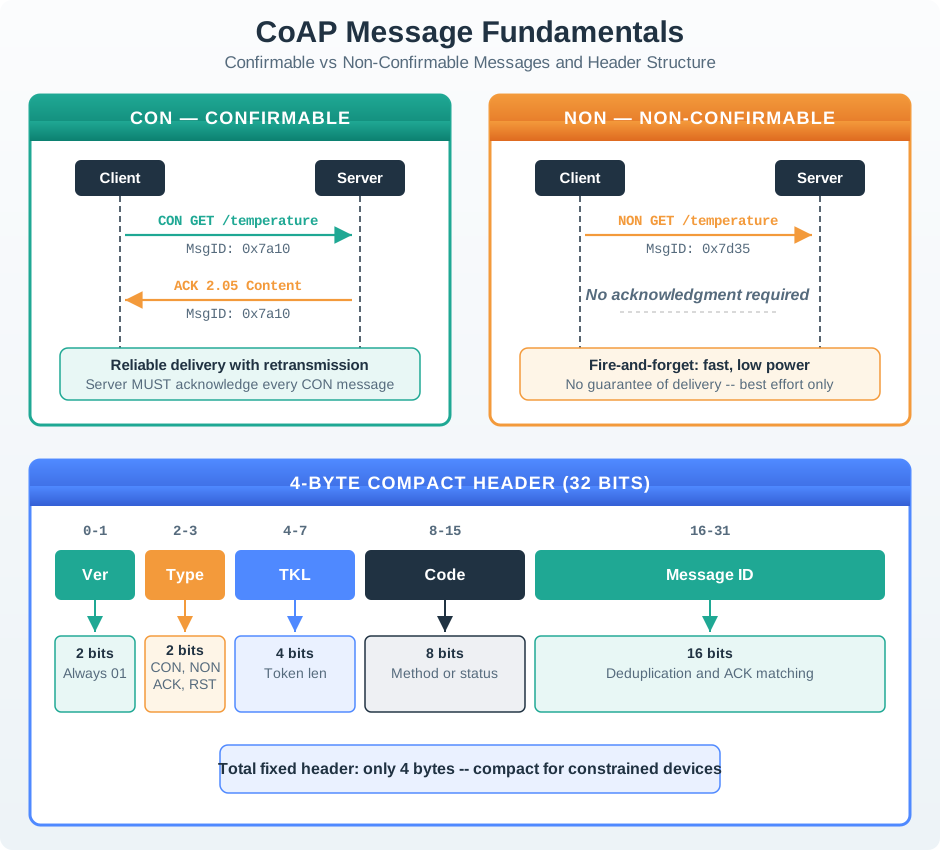
On the left of Figure 4.1, CON — CONFIRMABLE sends CON GET /temperature and matches the reply by MsgID: 0x7a10; the ACK 2.05 Content return is why that branch can support retransmission. The NON — NON-CONFIRMABLE branch instead labels the exchange Fire-and-forget and No guarantee of delivery, making it suitable only when the next reading can replace a loss. The lower 4-BYTE COMPACT HEADER then locates Type, Code, and Message ID, tying those delivery semantics to the bytes the rest of the chapter decodes.
Devices expose named resources. Clients use URI paths, methods, response codes, and representations to read or change state.
The base message is small and binary. The Code byte encodes the method, while the Token and numbered Options carry correlation, URI, content format, caching, and other metadata.
CoAP avoids connection setup, but the application must choose where it needs acknowledgments, retries, security, and duplicate handling.
CoAP fits constrained request-response and local control. MQTT fits brokered telemetry streams. HTTP fits broad web and cloud integration.
A CoAP design should be reviewed as an exchange record, not just as a protocol name. The record names the resource, method, payload format, expected response, message type, security boundary, and the evidence that the exchange works under expected loss and latency.
This keeps design conversations concrete. A team can argue about whether a valve command should be confirmable, whether a temperature reading may be cached, whether a gateway may proxy the request, and whether the payload belongs in JSON, CBOR, SenML, or another representation.
/sensors/air/tempGET, PUT, or POSTReview the exchange from application meaning down to wire evidence. Name a resource path that operators can connect to a device state, command endpoint, or collection, then choose the method before the payload so read, replace, and create semantics remain unambiguous. Select CON or NON from the consequence of loss, not habit. Next, document server authentication, operation authorization, and any gateway that terminates security. Finish with a packet trace or gateway log showing the request and response codes, token correlation, retransmission behavior, and payload format.
CoAP has two important layers of meaning. The request-response layer says what the client wants: a method, URI options, payload, and expected response. The messaging layer says how the datagram exchange behaves: confirmable, non-confirmable, acknowledgment, reset, message ID, and token.
The message ID helps detect duplicates at the message layer. The token correlates a response with the request that caused it, which matters when several requests are in flight. A confirmable message asks for an acknowledgment and may be retransmitted if no acknowledgment arrives. A non-confirmable message avoids that exchange when loss is acceptable or the next reading will replace the old one.
To diagnose an exchange, Figure 4.2 keeps application intent, duplicate detection, and request correlation visible at the same time.
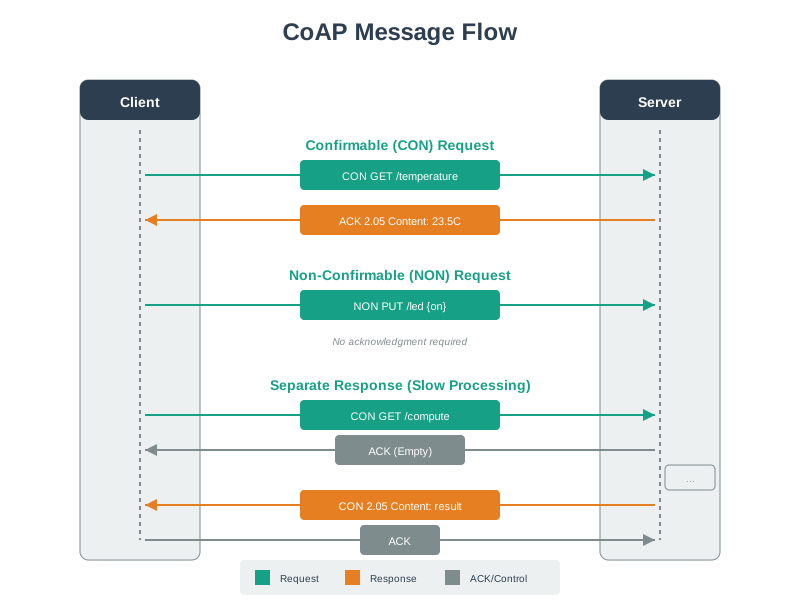
Follow Figure 4.2 from header to Token, options, and payload, then across the client-server boundary. The Message ID belongs to message-layer acknowledgment and duplicate handling, whereas the Token reconnects a response—including a delayed one—to its request. Options carry resource and representation metadata. Keeping those roles separate makes later failure analysis precise instead of treating every identifier as a request ID.
Used by endpoints to match acknowledgments and suppress duplicates at the message exchange boundary.
Chosen by the client to correlate a response with the original request, especially when several requests are outstanding.
Carry URI path, content format, caching, observe registration, block-wise transfer, and other structured metadata; the method is in the Code byte.
UDP can lose, reorder, or duplicate datagrams. CoAP handles selected cases, but the application still defines acceptable consequences.
Make the delivery decision first: commands or configuration writes whose silent loss would leave incorrect device state need confirmable messages, while frequent replaceable readings can use non-confirmable delivery when freshness matters more than every sample. For a large representation, block-wise transfer limits the work repeated after loss. If clients need change-driven updates, add Observe only with explicit notification rate limits and cancellation. Finally, protect any exchange crossing an untrusted network with DTLS or an equivalent deployment security plan; compact messaging does not remove the trust boundary.
CoAP is a constrained-device application protocol for resource-oriented request and response exchanges. It keeps familiar REST ideas such as resources, methods, response codes, and representations, but carries them in compact UDP messages with explicit reliability choices.
Use CoAP when a small device or local gateway needs a lightweight resource interface and the deployment can reason about message loss, duplicate handling, caching, discovery, security, and proxy behavior. Do not choose it only because it sounds smaller than HTTP. Choose it when the exchange record proves that its resource model and failure boundaries match the system.
Key Takeaway
CoAP is the right default for constrained REST-style device exchanges only when the resource contract, reliability choice, security boundary, and runtime evidence are all explicit.
Use this next to study confirmable, non-confirmable, acknowledgment, and reset exchanges in more detail.
Use this when you need to inspect header fields, tokens, options, payload markers, and parser evidence.
Use this to connect GET, POST, PUT, DELETE, multicast, Observe, and confirmable choices to practical methods.
Use this for URI shape, response-code discipline, payload design, caching, and gateway boundaries.
This section: Summary — Understanding this format is essential for debugging network captures, implementing CoAP libraries, and optimizing message sizes for constrained networks.
The CoAP message format achieves remarkable efficiency:
/sensors is 14 CoAP bytes (4-byte header + 2-byte Token + 8-byte Uri-Path option), versus 39 bytes for the literal HTTP/1.1 request GET /sensors HTTP/1.1\r\nHost: server\r\n\r\n; transport overhead and 6LoWPAN fragmentation depend on the linkUnderstanding this format is essential for debugging network captures, implementing CoAP libraries, and optimizing message sizes for constrained networks.
This section: How It Works: Option Delta Encoding Saves Bytes — Delta encoding is a brilliant space-saving technique.
Delta encoding is a brilliant space-saving technique. Here’s why it matters:
Without delta encoding (naive approach):
Each option would need to specify its full option number:
Option 1: Number=11 (Uri-Path), Value="sensors" → 1 byte (number) + 1 byte (length) + 7 bytes (value) = 9 bytes
Option 2: Number=11 (Uri-Path), Value="temp"    → 1 byte (number) + 1 byte (length) + 4 bytes (value) = 6 bytes
Total: 15 bytes
With delta encoding (CoAP’s approach):
Each option specifies only the difference from the previous option number:
Option 1: Delta=11 (first option, so 0+11=11), Value="sensors" → 1 byte (delta+length) + 7 bytes = 8 bytes
Option 2: Delta=0 (11+0=11, same option type), Value="temp"    → 1 byte (delta+length) + 4 bytes = 5 bytes
Total: 13 bytes (2 bytes saved)
Why this matters for /sensors/temp/reading/current:
Without packed option headers (4 Uri-Path segments):
With CoAP encoding (4 segments, all consecutive option 11):
Extended savings with long URIs:
For a resource like /api/v2/devices/sensor42/temperature/readings/latest:
Why sorting matters:
Options must be sorted by number for delta to work:
Uri-Path (11), Uri-Path (11), Content-Format (12) produces deltas 11, 0, 1Content-Format (12), Uri-Path (11), Uri-Path (11) would require delta -1, which is invalidCoAP mandates sorted options so delta is always non-negative, enabling compact 4-bit delta fields.
This section: Concept Relationships — Review why CoAP uses a compact message, then revisit binary representation to decode its fields.
This chapter connects binary protocol details to practical implementation:
Foundation Knowledge:
Review why CoAP uses a compact message, then revisit binary representation to decode its fields.
Message Structure:
Related Protocols:
Compare HTTP headers with CoAP binary fields. Then look at the MQTT format.
Implementation:
Use the implementation lab to build messages, then inspect them in Wireshark to check the encoded fields.
This section: See Also — Read the message format rules first.
Specifications:
Read the message format rules first. Then look up each option number in the registry.
Tools:
Use the Wireshark reference to inspect captured fields, then try a CoAP client to produce traffic.
Binary Encoding:
Review CBOR for payload encoding, then variable length encoding for the option deltas in the message.
Debugging:
Check common response errors first, then trace token matching when a response cannot be paired with its request.
This section: What’s Next
Now that you can decode and construct CoAP messages, these chapters build directly on that foundation:
| Chapter | Focus | Why Read It |
|---|---|---|
| CoAP Message Types | CON, NON, ACK, RST reliability mechanics | Understand exactly how retransmission timers, exponential backoff, and duplicate detection operate at the message level |
| CoAP Observe Extension | Server-push subscription model | See how a single GET with the Observe option transforms CoAP into a pub/sub system for real-time sensor streaming |
| CoAP Block-Wise Transfers | Fragmentation of large payloads | Learn the Block1/Block2 options that split firmware images and large datasets across multiple CoAP messages |
| CoAP Implementation Labs | Hands-on Python/ESP32 coding | Apply the binary format knowledge by sending and receiving real CoAP messages with aiocoap and MicroPython |
| CoAP Security with DTLS | Encryption and authentication | Secure the tokens and payloads you now understand at the binary level using DTLS record layer wrapping |
| CoAP Fundamentals and Architecture | Full CoAP chapter index | Navigate all CoAP topics in sequence or jump to the specific area you need |
This section: Continue Your Route — This is the last part of this chapter.
This is the last part of this chapter. Return to CoAP Messages: Codes, Tokens, and Options or continue from the coap module index.
3 reviewed answers.
Open the module page from the sidebar to see its chapters in order. Use the module map to return to a topic you need.
Modules and pathsReviewed
Check the symptom, then work through the diagnostic steps. Keep the error message and the smallest example that reproduces it.
When you are stuckReviewed
Use the interactive guide to check how examples and simulations work before changing your project.
Interactive examples guideReviewed