16 CoAP Advanced Features
More
Depth: Practitioner
Progress saves as you read. Mark sections complete as you go; your progress appears in the sidebar.
16.1 Start With the Almost-Too-Large Update
This section: Start With the Almost-Too-Large Update — Picture a street sensor that needs a software fix over a weak radio link.
Prove the Update Through a Broken Link
Picture a street sensor that needs a software fix over a weak radio link. The update is too large for one message, and the device may sleep before every part arrives. A safe release needs a clear final result, not a pile of successful sends.
Follow the opening case from its first sign to a careful next step.
-
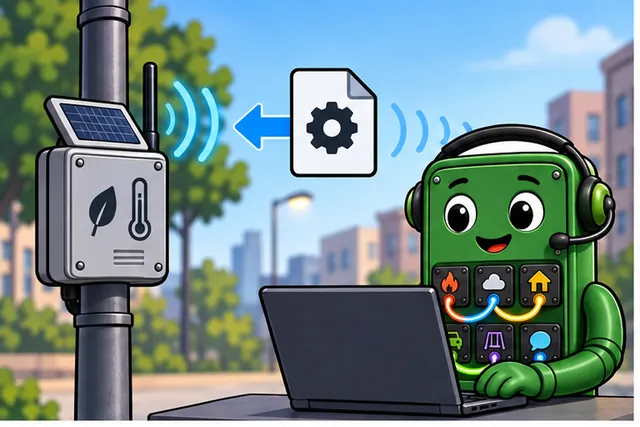
A street sensor needs a large software fix over a weak link.
-
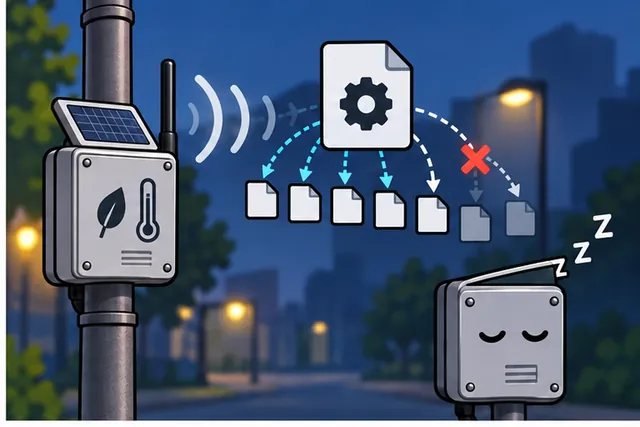
The device may sleep before every packet arrives.
-
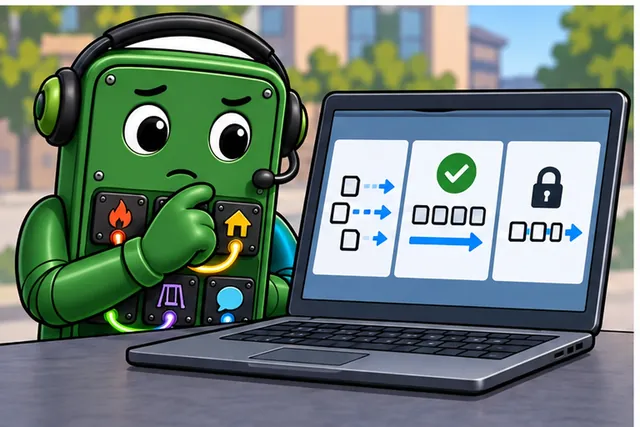
Split the update, lose a part, resume, and verify the final image.
-
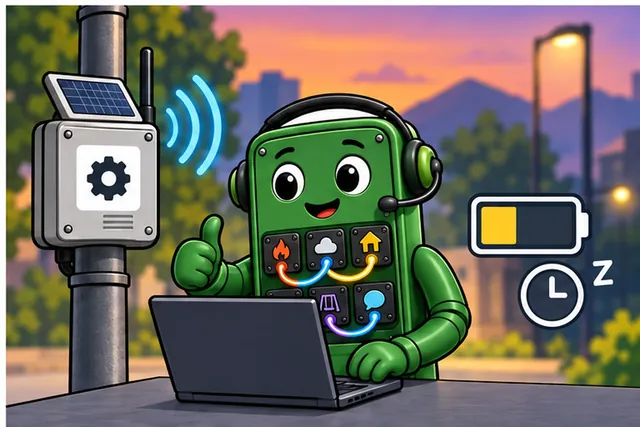
Approve only a complete, authentic update with a safe fallback.
A protocol means shared rules for an exchange. Constrained Application Protocol (CoAP) means a compact request method for small devices. User Datagram Protocol (UDP) means sending separate messages without a lasting connection. Transmission Control Protocol (TCP) means a stream that checks order and delivery. Transport layer security means protection for a network exchange. Datagram Transport Layer Security (DTLS) applies it to separate messages. Firmware means software stored on a device. An over-the-air update means replacing that software through the network; it is called OTA.
Start an update, lose one block, repeat another, delay the last block, and restart the device. It must keep the old safe version or accept one complete new version. The service must show which outcome occurred.
This runway does not choose block sizes or prove the radio budget. The deeper features show observation, block transfer, discovery, protection, and the tests that turn them into a release path.
A street-light controller can use basic CoAP for a temperature reading, but firmware chunks, resource discovery, proxies, multicast, and alternate transports all appear as soon as the deployment grows. The advanced features are not extras for their own sake; each one solves a constraint that a plain request-response exchange cannot handle alone.
Use this chapter as a set of escalation stories: when the payload is too large, split it; when devices must be found, discover them; when values are reused, cache them; when topology changes, consider proxies or transport alternatives.
First, use Block1 and Block2 for payloads that do not fit one datagram. Then use /.well-known/core instead of hard-coded resources. Next, decide when UDP, TCP, WebSockets, or DTLS changes the design. Finally, pressure-test NAT, timeout, proxy, and OTA evidence. Checkpoints summarize each layer; Deep-dive sections are optional.
16.2 Learning Objectives
This section: Learning Objectives
By the end of this chapter, you will be able to:
- Implement Block-wise Transfer: Apply RFC 7959 to handle large payloads (firmware updates) over CoAP’s UDP transport
- Configure Resource Discovery: Construct
.well-known/coreendpoints with CoRE Link Format attributes - Evaluate CoAP Transport Options: Select between UDP, TCP, and WebSockets based on network constraints and device requirements
- Analyze DTLS Security Overhead: Calculate handshake RTT costs and justify security mode selection for constrained deployments
- Diagnose Block Transfer Failures: Distinguish between timeout cascade, packet loss, and NAT expiry failure modes
- CoAP: Constrained Application Protocol — REST-style request/response protocol using UDP instead of TCP
- Confirmable Message (CON): Requires ACK from recipient — provides reliable delivery over UDP at the cost of one roundtrip
- Non-confirmable Message (NON): Fire-and-forget UDP datagram — lowest latency, no delivery guarantee
- Observe Option: CoAP extension enabling publish/subscribe: client registers to receive notifications on resource changes
- Block-wise Transfer: Fragmentation mechanism for transferring payloads larger than a single CoAP datagram
- Token: Client-generated value matching responses to requests — enables concurrent request/response pairing
- DTLS: Datagram TLS — CoAP’s security layer providing encryption and authentication over UDP
16.3 For Beginners: CoAP Advanced Features
Beyond basic request-response messaging, CoAP offers features like resource observation (automatic notifications when data changes), block transfers (sending large data in chunks), and resource discovery (finding what services a device offers). These features make CoAP a powerful, lightweight communication tool for constrained IoT devices.
“I thought CoAP was just simple request-response,” said Temperature Terry. “But it can do way more!”
the microcontroller grinned. “You discovered Observe! Instead of the dashboard asking you for temperature every 10 seconds — which wastes energy — you register once and then automatically send updates whenever the temperature changes. It’s like subscribing to a newsletter instead of checking the mailbox every day.”
“And what about when I need to send a big firmware update?” asked the LED. “That’s Block Transfer!” said Max. “CoAP breaks the big file into small blocks, like cutting a pizza into slices. Each slice gets its own delivery confirmation, so if one slice gets lost, you only resend that one — not the whole pizza.”
the battery was most excited about Resource Discovery: “New devices can ask ‘hey, what services do you offer?’ and get back a list — like a phone directory. So when I join a network, I don’t need to be pre-configured. I just ask around and find out who does what. It’s plug-and-play for IoT!”
16.4 Prerequisites
This section: Prerequisites — Before choosing an extension, use Figure 16.1 to separate the three problems that advanced CoAP features solve: repeated updates, payloads too large for one datagram, and one-to-many operations.
Before diving into this chapter, you should be familiar with:
- CoAP Introduction - CoAP basics and design goals
- CoAP Message Format - Header structure and options
- CoAP Observe Extension - Server push notifications
Before choosing an extension, use Figure 16.1 to separate the three problems that advanced CoAP features solve: repeated updates, payloads too large for one datagram, and one-to-many operations.
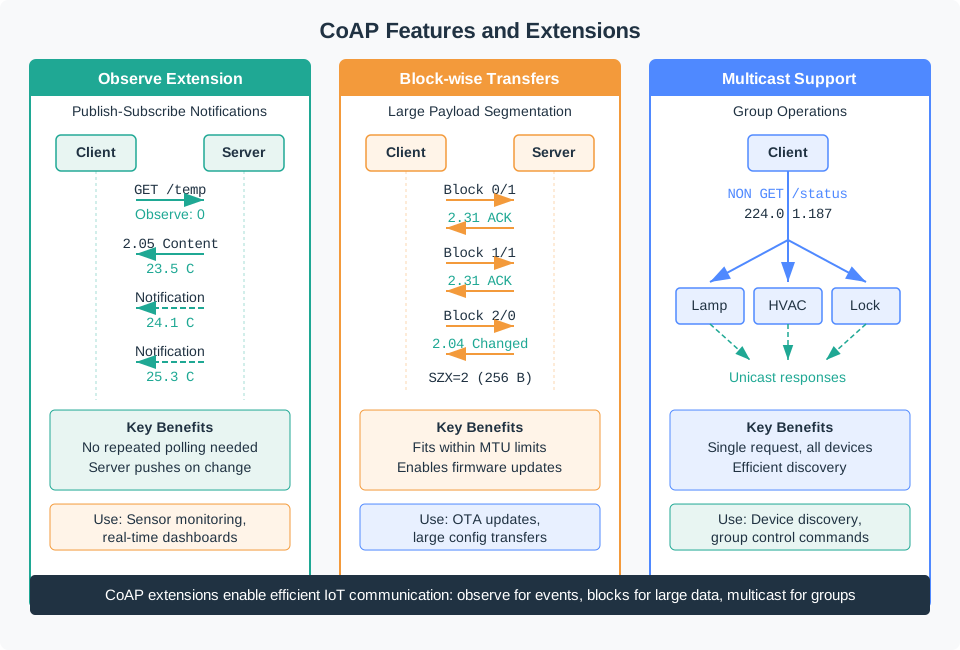
In Figure 16.1, the Observe branch replaces repeated polling with change-driven notifications; block-wise transfer divides a large representation into bounded pieces; multicast sends one request towards a group. These are independent extensions, so a design should select the branch that matches its traffic problem rather than treating “advanced CoAP” as one feature bundle. The chapter now follows those branches in that order.
16.5 Continue: CoAP Block Transfer and Discovery Contracts
This section: Continue: CoAP Block Transfer and Discovery Contracts — The main chapter below stays focused on the advanced-feature tour.
The main chapter below stays focused on the advanced-feature tour. For the deeper contract behind Block1 and Block2 sizing, NUM/M/SZX encoding, retry and resume evidence, CoRE Link Format discovery, Max-Age, ETag revalidation, and proxy caching, continue to CoAP Block Transfer and Discovery Contracts.
16.6 Block-wise Transfer (RFC 7959)
This section: Block-wise Transfer (RFC 7959) — The first problem is size.
The first problem is size. CoAP exchanges are intentionally small, so firmware images and log uploads need reviewable pieces.
Core Concept: CoAP messages are limited by UDP MTU (1280-1500 bytes), but firmware updates or images require 100KB+ payloads. Block-wise transfer splits large payloads into sequential blocks with automatic reassembly.
Why It Matters: Without block transfer, CoAP couldn’t handle firmware OTA updates, large configuration files, or image uploads - essential for production IoT deployments.
Key Takeaway: Use Block2 for large response payloads (downloads), Block1 for large request payloads (uploads). Each block includes block number, more-flag, and size.
16.6.1 Block2: Large Response Payloads
A large server response, such as a firmware image, cannot safely be treated as one oversized datagram. Use Figure 16.2 to see which state must survive while the client assembles that representation piece by piece.
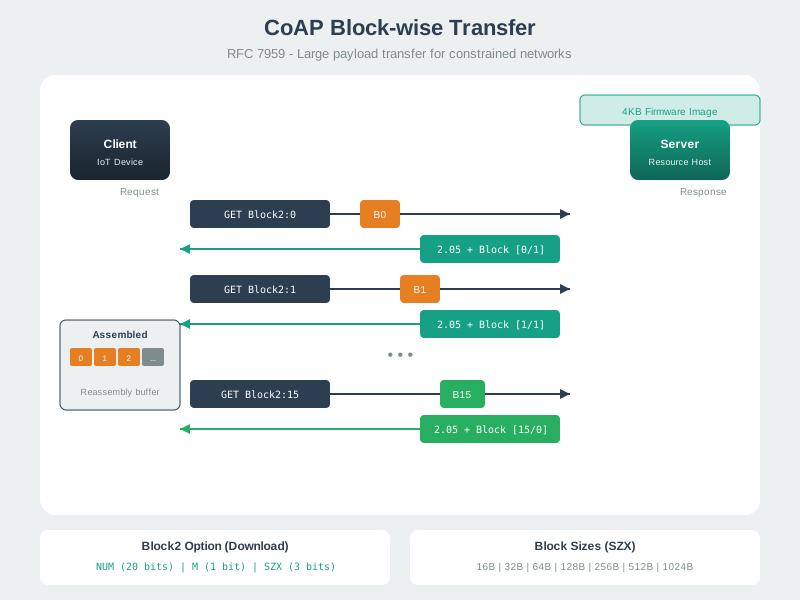
Trace Figure 16.2 from each request’s NUM, M, and SZX fields through token, ETag, and content-format continuity. A retry may repeat a block and reordering may change arrival order, so the receiver must append each block exactly once and accept the result only after final length and hash checks. That evidence contract turns the option fields below into a reliable reconstruction procedure.
Block2 option format:
- NUM: Block number (0-based sequence)
- M: More flag (1 = more blocks follow, 0 = last block)
- SIZE: Block size in bytes (16, 32, 64, 128, 256, 512, 1024)
16.6.2 Block1: Large Request Payloads
Used when client sends large data to server (e.g., uploading logs):
Client -> Server: PUT /logs/daily
                  Block1: NUM=0, M=1, SIZE=512
                  Payload: [first 512 bytes]

Server -> Client: 2.31 Continue
                  Block1: NUM=0, M=1, SIZE=512

Client -> Server: PUT /logs/daily
                  Block1: NUM=1, M=1, SIZE=512
                  Payload: [next 512 bytes]

... until final block with M=0 ...

Server -> Client: 2.04 Changed
16.6.3 Implementation with Reliability
async def download_firmware(uri, output_file):
    block_num = 0
    block_size = 1024
    consecutive_failures = 0

    with open(output_file, 'wb') as f:
        while True:
            # Adaptive timeout with exponential backoff
            timeout = min(2.0 * (1.5 ** consecutive_failures), 30.0)

            try:
                request = Message(
                    code=GET,
                    uri=uri,
                    msg_type=CON,  # Reliable for each block
                    block2=(block_num, False, block_size)
                )
                response = await protocol.request(request, timeout=timeout).response

                # Write block to file
                f.write(response.payload)
                consecutive_failures = 0

                # Check if more blocks available
                if response.opt.block2.more:
                    block_num += 1
                else:
                    break  # Last block received

            except TimeoutError:
                consecutive_failures += 1
                if consecutive_failures > 10:
                    raise TransferFailed(f"Failed at block {block_num}")

    print(f"Downloaded {block_num + 1} blocks")
16.6.4 Performance Analysis
Scenario: 256 kB firmware update over LoRaWAN (10% packet loss)
| Approach | Blocks | Retransmissions | Time | Success Rate |
|---|---|---|---|---|
| Single 256 KiB payload | Not a valid LoRaWAN application payload; split into regional-size fragments | — | Depends on regional data rate and duty restrictions | — |
| 1 KiB blocks (NON) | Each 1 KiB block must be further fragmented to fit the regional LoRaWAN application-payload limit | No CoAP retransmission | Calculate from fragmentation and radio schedule | Incomplete if fragments are lost |
| 1 KiB blocks + CON | Each block requires further LoRaWAN fragmentation | Depends on fragment retries | Calculate from regional payload and radio schedule | Depends on retry and integrity policy |
| 512 byte blocks + CON | Each block still requires LoRaWAN fragmentation | Depends on fragment retries | Calculate from regional payload and radio schedule | Depends on retry and integrity policy |
The success rate for block-wise transfer can be calculated using probability theory. With packet loss rate , the probability of successful delivery for blocks is:
For 1KB blocks (256 blocks total) without confirmations (NON):
For 1KB blocks with CON (each block confirmed), the expected number of transmissions per block is:
Total time for 256 blocks at 200 ms per confirmed block:
For 512-byte blocks (512 blocks total), the per-block success probability is the same ( per individual block), requiring the same expected retransmissions per block ( attempts). However, the overall transfer success is higher because each individual lost block wastes only 512 bytes instead of 1024 bytes. This RTT-only product excludes LoRaWAN fragmentation, airtime, duty limits, receive windows, and retransmissions, so it is not a LoRaWAN transfer-time estimate.
Key insight: Without retries, more fragments mean more chances for loss. With capped retries, compute completion probability from all radio fragments and the retry policy; smaller blocks can reduce bytes retransmitted after a loss.
This section:
 Checkpoint: Block-wise Transfer
You now know:
- Block2 handles large responses; Block1 handles large requests.
- The block option carries NUM, M, and a block size such as 512 or 1024 bytes. In the 256 KiB, 10% packet-loss example, both 1 KiB and 512-byte CoAP blocks require smaller LoRaWAN fragments; transfer time must be recalculated for the chosen region, data rate, duty limit, acknowledgments, and retry policy.
Try It: Adjust the firmware size, block size, packet loss rate, and round-trip time to see how they affect transfer time and reliability. Notice how smaller blocks improve success rate at the cost of more overhead.
Key Principle: Block size should balance MTU constraints (avoid IP fragmentation), packet loss recovery (smaller blocks waste less bandwidth on retry), and overhead (fewer blocks = less header overhead).
-
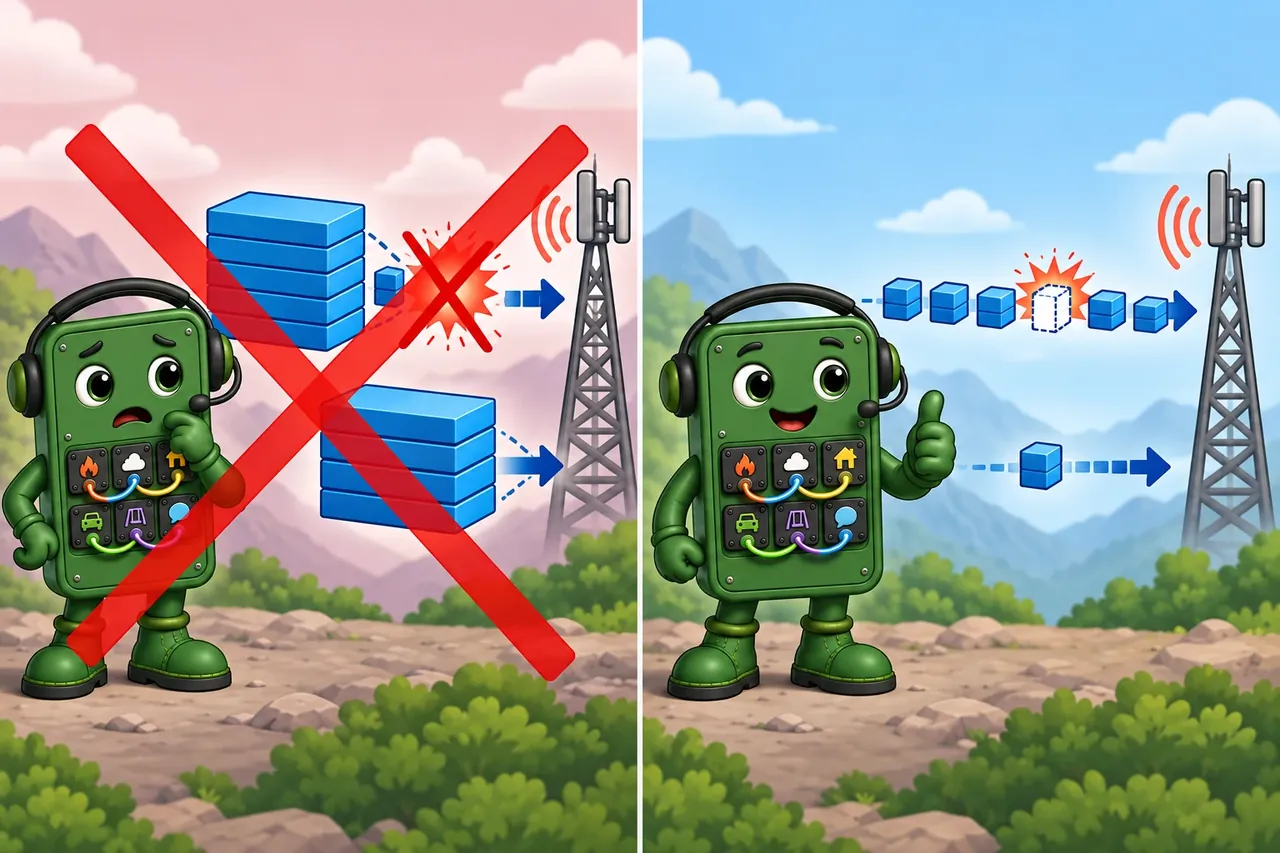
Wrong idea: use the largest confirmed blocks on a lossy link. It fails because one lost block forces a full large retry, while smaller blocks waste less.
16.7 Resource Discovery (RFC 6690)
This section: Resource Discovery (RFC 6690) — Once payloads can move safely, the next question is how a client knows which resources exist.
Once payloads can move safely, the next question is how a client knows which resources exist. Discovery replaces guessed URIs with an inventory.
Core Concept: A CoAP server that implements RFC 6690 discovery exposes /.well-known/core, which returns selected resource links in CoRE Link Format. The server chooses which links and attributes to include.
Why It Matters: Resource discovery enables true plug-and-play IoT - new devices can be added to a network and automatically discovered by clients without manual configuration.
Key Takeaway: Implement /.well-known/core (RFC 7252 §7.2 says servers SHOULD) and tag links with rt= (resource type), if= (interface) and obs (observable, RFC 7641 §6).
16.7.1 Discovery Request-Response
Client Request:
GET coap://sensor.local/.well-known/core

Server Response (Link Format, Content-Format: 40):
</sensors/temp>;rt="temperature";if="sensor";obs,
</sensors/humidity>;rt="humidity";if="sensor";obs,
</sensors/pressure>;rt="pressure";if="sensor",
</actuators/led>;rt="light";if="actuator",
</config/interval>;rt="config";if="parameter"
16.7.2 Link Format Attributes
| Attribute | Meaning | Example |
|---|---|---|
| rt | Resource Type | rt="temperature" |
| if | Interface | if="sensor" |
| ct | Content Format | ct=50 (JSON) |
| sz | Max Size | sz=256 |
| obs | Observable | obs (flag) |
| title | Human Name | title="Room Temp" |
16.7.3 Filtered Discovery
Request only specific resource types:
# Find all temperature sensors
GET coap://sensor.local/.well-known/core?rt=temperature

Response:
</sensors/temp>;rt="temperature";if="sensor";obs,
</sensors/temp_outdoor>;rt="temperature";if="sensor";obs

# Find all observable resources
GET coap://sensor.local/.well-known/core?obs
16.7.4 Multicast Discovery
Multicast discovery asks every eligible node the same resource question without sending one request per address. Send a NON GET to the link-local CoAP multicast group and /.well-known/core; each server then returns its own unicast response after a randomized Leisure delay. NON avoids an acknowledgment storm, while the delayed unicast replies reduce collisions and let the client associate each discovery record with one endpoint. The result is efficient inventory evidence, not reliable group command delivery.
GET coap://[FF02::FD]/.well-known/core

# All CoAP devices respond with their resource list
Device 1: </temp>;rt="temperature"
Device 2: </humidity>;rt="humidity"
Device 3: </pressure>;rt="pressure"You now know:
/.well-known/corereturns CoRE Link Format instead of guessed paths.rt,if,ct,sz,obs, andtitledescribe resources and behavior.- Multicast discovery can query
coap://[FF02::FD]/.well-known/core, but the client still initiates the request.
16.8 CoAP over TCP (RFC 8323)
This section: CoAP over TCP (RFC 8323)
16.8.1 Why CoAP-over-TCP?
Problem: UDP works great for constrained devices, but some networks:
- Block UDP entirely (corporate firewalls)
- Have asymmetric NAT breaking UDP return paths
- Require guaranteed ordering (financial transactions)
Solution: RFC 8323 defines CoAP over reliable transports (TCP, TLS, WebSockets).
16.8.2 Protocol Differences
| Feature | CoAP/UDP | CoAP/TCP |
|---|---|---|
| Transport | Unreliable UDP | Reliable TCP |
| Message Types | CON, NON, ACK, RST | No message type field; requests, responses, and signaling messages |
| Reliability | Application (CON/ACK) | Transport (TCP) |
| Message ID | Required | Absent |
| Connection | None | TCP 3-way handshake |
| Default Port | 5683 (coap://) | 5683 (coap+tcp://) |
| Secure Port | 5684 (coaps://) | 5684 (coaps+tcp://) by default |
16.8.3 Header Format Changes
CoAP/UDP header (4 bytes):
|Ver| T | TKL | Code | Message ID |CoAP/TCP framing (at least 2 bytes before any token/options):
| Len | TKL | Extended Length (if any) | Code | Token (if any) |Key changes:
- No Message ID (TCP sequence numbers handle ordering)
- No Type field (TCP reliability eliminates CON/NON/ACK)
- Length field (for framing over stream)
This section:
Decision Framework: Select your network constraints, requirements, and device characteristics to see which CoAP transport is recommended for your use case.
16.8.4 When to Use
Use CoAP/TCP when:
- Corporate/enterprise networks block UDP
- Web dashboard integration (WebSockets)
- Guaranteed ordering requirements
- Long-lived bidirectional streams
Avoid CoAP/TCP when:
- Battery-powered sensors (UDP more efficient)
- Multicast scenarios (TCP is unicast only)
- Intermittent communication (connection overhead wasteful)
16.9 DTLS Security
This section: DTLS Security — Transport and security choices are connected.
Transport and security choices are connected. TCP can solve firewall or NAT pressure; DTLS keeps UDP deployments encrypted.
CoAP uses DTLS (Datagram TLS) for security over UDP:
16.9.1 Security Modes
| Mode | Description | Use Case |
|---|---|---|
| NoSec | No security | Development only |
| PreSharedKey | Symmetric keys pre-installed | Factory provisioning |
| RawPublicKey | Asymmetric without certificates | Lightweight devices |
| Certificate | Full X.509 certificates | Enterprise deployments |
16.9.2 DTLS Handshake
Securing a datagram transport requires a handshake that can tolerate loss without letting an unauthenticated sender consume unlimited server state. Figure 16.3 shows where the DTLS cookie challenge fits before keys protect application traffic.
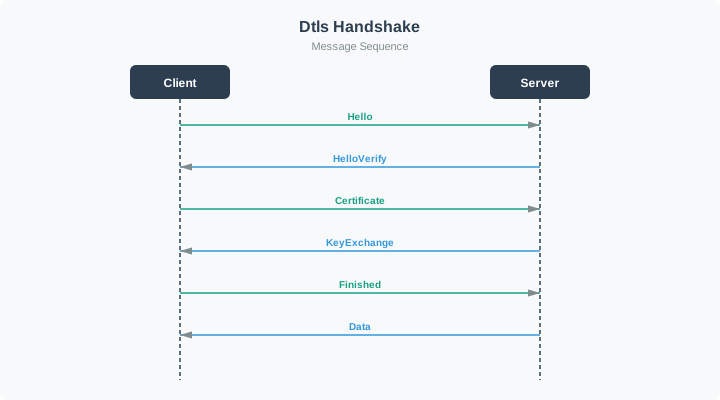
Follow Figure 16.3 downward. The first ClientHello prompts a stateless cookie challenge; the client proves return reachability by repeating ClientHello with that cookie. Only then do the server parameters, certificate and key exchange, and Finished messages establish the protected session. Encrypted application data starts after this exchange, which explains the setup cost explored by the calculator next.
Key Insight: DTLS setup cost varies with cookie exchange, profile, and loss. The calculator uses deployment-measured full-handshake and resumed-handshake setup RTTs; message-flight counts are not RTT counts. Measure both paths on the target link before estimating reconnection cost.
This section:
Checkpoint: Transport and Security
You now know:
- CoAP/UDP uses CON, NON, ACK, RST, and Message IDs; CoAP/TCP removes those message types.
- CoAP/TCP helps when UDP is blocked, strict ordering is required, or WebSocket integration matters; avoid it for multicast and many battery sensors.
- DTLS modes run from NoSec through PreSharedKey, RawPublicKey, and Certificate; setup RTT cost varies with cookie exchange, profile, and loss, so measure full and resumed handshakes on the target link.
16.10 Common Pitfalls
This section: Common Pitfalls
The mistake: Using fixed CoAP timeout settings for a long block-wise transfer can cause repeated retries or an abandoned transfer on a lossy link.
Why It Happens: CoAP’s 2-second ACK timeout works for single messages but fails for multi-block transfers. Any single timeout can cause restart.
The Fix: Implement adaptive timeouts and resumable transfers:
def download_with_resume(uri, resume_from=0):
    block_num = resume_from
    consecutive_failures = 0
    base_timeout = 2.0

    while True:
        timeout = min(base_timeout * (1.5 ** consecutive_failures), 30.0)

        try:
            response = coap_get(uri, block2=(block_num, 0, 1024), timeout=timeout)
            save_progress(block_num, response.payload)
            consecutive_failures = 0

            if response.block2.more:
                block_num += 1
            else:
                return assemble_firmware()

        except TimeoutError:
            consecutive_failures += 1
            if consecutive_failures > 10:
                save_resume_point(block_num)
raise TransferSuspended(block_num)The Mistake: Deploying CoAP devices behind NAT gateways without considering that UDP NAT mappings expire quickly (30-120 seconds).
The Fix:
- Test UDP connectivity before design
- Implement NAT keepalive (send messages every 25 seconds)
- Consider CoAP over TCP for NAT-hostile networks
- Use DTLS session resumption for faster reconnects
16.11 Worked Example: OTA Firmware Update for 500 Street Lights
This section: Worked Example: OTA Firmware Update for 500 Street Lights — The pieces now meet one operational question: can block transfer, frame limits, packet loss, and gateway parallelism finish inside a fixed maintenance window?
The pieces now meet one operational question: can block transfer, frame limits, packet loss, and gateway parallelism finish inside a fixed maintenance window?
Scenario: A city council needs to push a 128 kB firmware update to 500 CoAP-enabled LED street lights over a LoRaWAN network. Each light has a Semtech SX1276 radio module with a 242-byte maximum application payload per LoRaWAN uplink/downlink. The network experiences 8% average packet loss. The council wants to complete the rollout within a single maintenance window (4 AM to 6 AM, 2 hours).
Step 1: Calculate block count and transfer time per device
Firmware size: 128 KB = 131,072 bytes
Block size: 128 bytes (leaving room for CoAP headers within 242-byte limit)
  CoAP header + Block2 option: ~12 bytes
  Total per-message payload: 128 + 12 = 140 bytes (fits in 242-byte LoRaWAN frame)

Block count: 131,072 / 128 = 1,024 blocks per device
Each block requires a CON request (device requests block) and a 2.05 Content response (server sends block). On LoRaWAN Class C (continuous receive), the round-trip is approximately 1-2 seconds per block:
Optimistic transfer time: 1,024 blocks x 1.5 seconds = 1,536 seconds = 25.6 minutes
With 8% packet loss and 1 retry per loss:
  Expected retransmissions: 1,024 x 0.08 = ~82 extra blocks
  Adjusted time: (1,024 + 82) x 1.5 = 1,659 seconds = 27.7 minutes per device
Step 2: Assess parallelism constraints
LoRaWAN gateways can handle approximately 8 simultaneous downlinks on different channels (EU868 has 8 channels). Each device update occupies one channel for ~28 minutes:
Devices per gateway: 8 parallel streams
Time per batch: 28 minutes
Batches needed: 500 / 8 = 62.5 -> 63 batches
Total time with 1 gateway: 63 x 28 = 1,764 minutes = 29.4 hours
This far exceeds the 2-hour window. The council needs more gateways:
Available time: 120 minutes
Batches possible per gateway: 120 / 28 = 4.3 -> 4 batches
Devices per gateway: 4 batches x 8 channels = 32 devices
Gateways needed: 500 / 32 = 15.6 -> 16 gateways
Step 3: Design the update strategy with CoAP Block-wise features
| Design Decision | Choice | Rationale |
|---|---|---|
| Block size | 128 bytes | Fits LoRaWAN frame with CoAP headers |
| Message type | CON | ACK and bounded retry improve delivery; final hash and install checks still decide integrity |
| Resume support | Yes (save block_num to flash) | Device can resume after power cycle or temporary failure |
| Integrity check | SHA-256 hash verified after final block | Corrupted firmware bricks the light |
| Rollback plan | Keep previous firmware in secondary flash partition | Failed update reverts automatically |
Step 4: Cost analysis
Option A: Sequential update (1 gateway, no parallelism)
  Time: 500 devices x 28 min = 14,000 minutes = 9.7 days
  Gateway cost: 1 x $1,500 = $1,500
  Labor: 0 (unattended)
  Risk: Very slow, devices run outdated firmware for days

Option B: Parallel update (16 gateways, 2-hour window)
  Time: 2 hours (single maintenance window)
  Gateway cost: 16 x $1,500 = $24,000 (but gateways serve normal traffic too)
  Labor: 1 technician x 2 hours = $100
  Risk: Low, all devices updated simultaneously

Option C: Incremental rollout (4 gateways, 4 nights)
  Time: 4 maintenance windows x 2 hours = 8 hours total
  Gateway cost: 4 x $1,500 = $6,000
  Devices per night: 128
  Risk: Medium -- staged rollout catches firmware bugs before full deployment
Recommendation: Option C (incremental rollout). While slower overall, updating 128 devices on night 1 provides a live validation of the firmware. If the update causes issues (dimming failures, communication bugs), only 25% of lights are affected. The city saves $18,000 on gateways compared to Option B and gains the safety net of staged deployment. CoAP’s Block-wise resume capability means any interrupted transfers pick up where they left off the next night.
This section:
Checkpoint: OTA Rollout Evidence
You now know:
- The 128 kB firmware image becomes 1,024 blocks at 128 bytes each.
- One gateway cannot finish 500 lights in 2 hours: 63 batches at 28 minutes is about 29.4 hours.
- The accepted design is not just faster transfer; it needs resume state, SHA-256 verification, rollback, staged rollout, and gateway capacity evidence.
This section:
This section:
Match each CoAP advanced feature concept to its correct definition or use case.
This section:
This section:
This section:
This section:
This section:
This section:
This section: — Bridge a constrained observation into enterprise work without merging protocol guarantees in the diagram Figure 16.4.
Bridge a constrained observation into enterprise work without merging protocol guarantees in the diagram Figure 16.4.
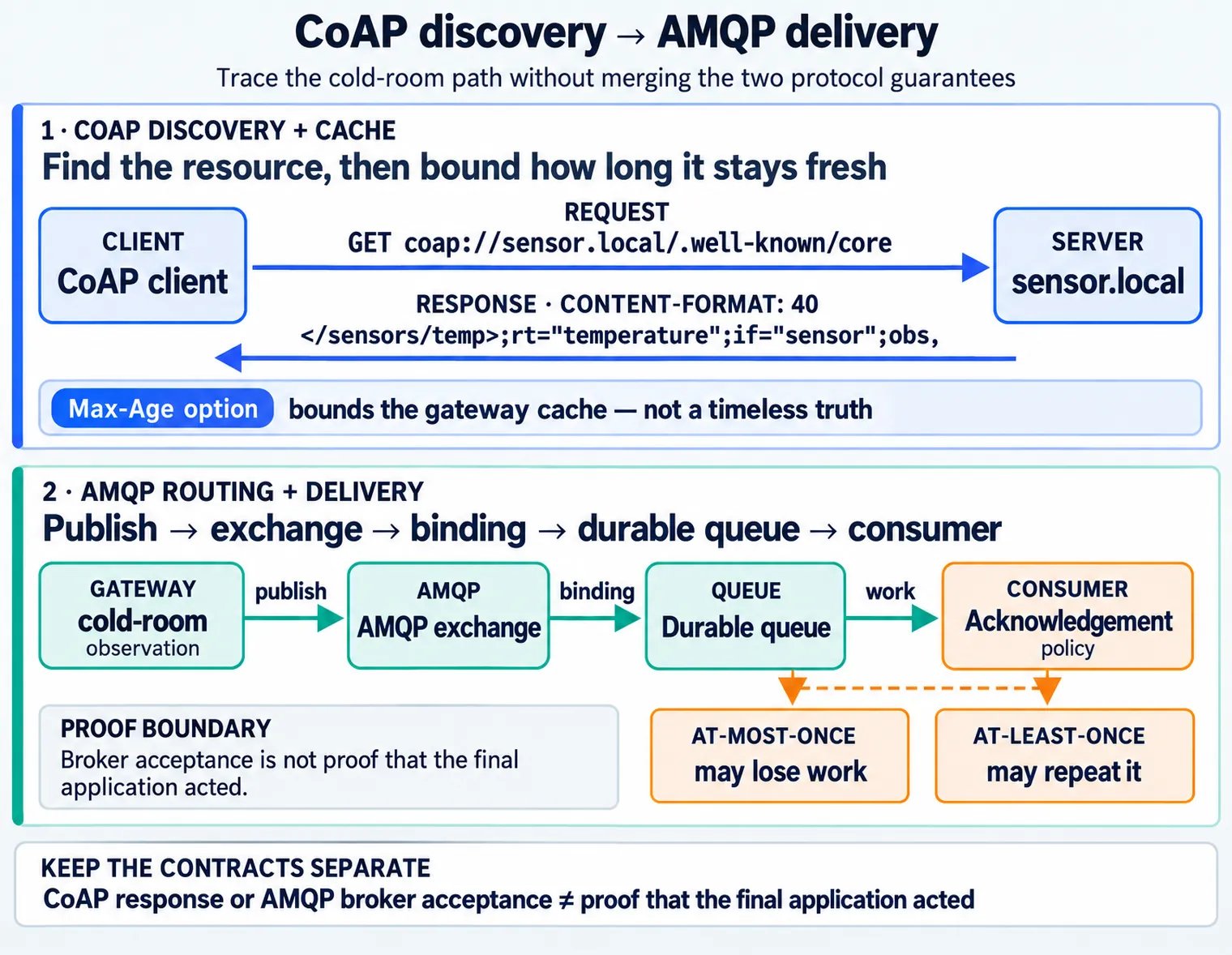
Read Figure 16.4 from the cold-room sensor to the edge. CoAP discovery finds the resource, and Max-Age gives the gateway a bounded cache rather than a timeless truth. The gateway then publishes into an AMQP exchange whose binding selects a durable queue for enterprise work. At the consumer, acknowledgement policy defines the remaining failure trade: at-most-once may lose work, while at-least-once may repeat it. The bridge preserves both contracts explicitly, so a CoAP response or AMQP broker acceptance is not mistaken for proof that the final application acted.
16.12 Summary
This section: Summary
CoAP’s advanced features enable production IoT deployments:
- Block-wise transfer: Split large payloads into reliable blocks
- Resource discovery: Standardized
.well-known/corewith Link Format - CoAP/TCP: Firewall-friendly alternative when UDP is blocked
- DTLS security: Encryption and authentication for constrained devices
Key decisions:
- Use smaller blocks (256-512 bytes) on lossy networks
- Always implement resource discovery with semantic attributes
- Choose UDP for battery efficiency, TCP for NAT/firewall traversal
- Use PSK for constrained devices, certificates for enterprise
16.13 Concept Relationships
This section: Concept Relationships — Review the message format first to locate the block options and payload marker, then compare Observe as a different way to move resource data.
Advanced CoAP features connect to:
Foundation Concepts:
Review the message format first to locate the block options and payload marker, then compare Observe as a different way to move resource data.
- CoAP Message Format - Options and payload marker used in block transfer
- CoAP Observe Extension - Related push notification pattern
- CoAP Fundamentals - Basic architecture that advanced features extend
Practical Applications:
Start with firmware updates to see where block transfer is used, then examine 6LoWPAN to place CoAP on a constrained network.
- OTA Firmware Updates - Block-wise transfer for production updates
- 6LoWPAN Integration - CoAP over constrained networks
- Thread Networking - CoAP as application layer
Security:
Read the DTLS guide for transport protection, then compare the security modes available to a CoAP deployment.
- DTLS for IoT - Securing CoAP communications
- CoAP Security Modes - NoSec, PSK, certificates
16.14 See Also
This section: See Also — Read the block transfer rules first.
Standards:
Read the block transfer rules first. Then use the link format rules to find resources.
- RFC 7959: Block-Wise Transfer - Official specification
- RFC 6690: CoRE Link Format - Resource discovery
- RFC 8323: CoAP over TCP - Firewall-friendly alternative
Implementation:
Use the block and discovery contracts for the detailed rules, then try the lab to trace those rules on a device.
- CoAP Block Transfer and Discovery Contracts - Deep block option, retry, discovery, cache, ETag, and proxy evidence.
- CoAP Advanced Features Lab - Hands-on ESP32 implementation
- aiocoap Examples - Python code samples
Comparison:
Compare CoAP with HTTP for the transport choice, then read the chunking rationale for the large payload case.
- CoAP vs HTTP - When to use CoAP over HTTP
- Block Transfer vs HTTP Chunking - Design rationale
16.15 What’s Next
This section: What’s Next
| Chapter | Focus | Why Read It |
|---|---|---|
| CoAP Block Transfer and Discovery Contracts | Block option encoding, per-block retries, discovery metadata, and proxy cache evidence | Turn the feature overview into a reviewable implementation contract |
| CoAP API Design | RESTful resource modeling and URI design | Apply the resource discovery patterns from this chapter to design well-structured CoAP APIs |
| CoAP Decision Framework | When to use CoAP vs MQTT vs HTTP | Evaluate trade-offs using the transport and security knowledge built here |
| CoAP Fundamentals and Architecture | Core CoAP message model and architecture | Reinforce the foundation that all advanced features extend |
| OTA Firmware Updates | Production firmware update workflows | See Block-wise Transfer applied end-to-end in a real OTA update pipeline |
| DTLS and Security | DTLS handshake mechanics and cipher suites | Deepen understanding of the security modes introduced in this chapter |
| 6LoWPAN Overview | IPv6 adaptation for constrained networks | Understand the network layer that CoAP block transfer and discovery operate over |
Find help
3 reviewed answers.
Where should I start in a module?
Open the module page from the sidebar to see its chapters in order. Use the module map to return to a topic you need.
Modules and pathsReviewed
What can I try when a project does not work?
Check the symptom, then work through the diagnostic steps. Keep the error message and the smallest example that reproduces it.
When you are stuckReviewed
How do interactive examples work?
Use the interactive guide to check how examples and simulations work before changing your project.
Interactive examples guideReviewed