19 CoAP Security: Implementation and Operations
More
Depth: Practitioner
Progress saves as you read. Mark sections complete as you go; your progress appears in the sidebar.
19.1 Start With the Decision
This section: Start With the Decision — CoAP is a compact request-and-response protocol for constrained devices.
CoAP is a compact request-and-response protocol for constrained devices. A token matches a response to its request. A CON retransmission repeats a message when its acknowledgment is missing; an application may separately retry an unanswered request. A resource is the named item the client asks about, and an error response explains why a request failed. A sound CoAP design can still fail when tokens or retries are loose. The team needs clear rules for each resource and error.
19.2 Route Overview
This section: Route Overview — This is part 1 of 2.
This is part 1 of 2. Continue with CoAP Security: CON and NON Trade-Offs.
19.3 Part Objectives
This section: Part Objectives
- Test coap implementation patterns with a concrete scenario and pass criteria.
- Validate troubleshooting common issues with a concrete scenario and pass criteria.
19.4 Start With the Situation
This section: Start With the Situation — The security mode and application fit are clear, but a deployment still fails if tokens, retransmissions, resources, or error responses are handled loosely.
The security mode and application fit are clear, but a deployment still fails if tokens, retransmissions, resources, or error responses are handled loosely. The team now turns the design into bounded implementation and operating checks.
19.5 Overview
This section: Overview — This route applies implementation patterns, practical resources, response-code tools, debugging records, and common-failure controls.
This route applies implementation patterns, practical resources, response-code tools, debugging records, and common-failure controls.
This is part 2 of 2. Review CoAP Security: Protection and Application Fit when you need the first route.
19.6 Learning Objectives
This section: Learning Objectives
By the end of this chapter, you will be able to:
- implement CoAP token, retransmission, and resource patterns
- prevent open-server reflection and retry failures
- build an operational debugging record from response evidence
19.7 Chapter Roadmap
This section: Chapter Roadmap
- Start With the Situation
- Overview
- CoAP Implementation Patterns
- Practical CoAP Implementation Resources
- Checkpoint: Operational Debugging
- Try It: CoAP Response Code Reference
- Troubleshooting Common Issues
- Common Problems and Solutions
- Common Pitfalls
- Common Pitfall: CoAP Message Size Exceeds MTU
- Common Pitfall: Misusing CON vs NON Message Types
19.8 CoAP Implementation Patterns
This section: CoAP Implementation Patterns — A CoAP implementation keeps resource intent, message delivery, and observation continuity as distinct parts of the same exchange.
A CoAP implementation keeps resource intent, message delivery, and observation continuity as distinct parts of the same exchange. GET, POST, PUT, and DELETE describe operations on resources rather than the delivery policy. CON and NON select exchange behavior, while Token and Observe state preserve the application relationship. A performance comparison must therefore account for the combined pattern instead of treating a short header as the entire implementation.
An implementation combines three contracts that are easy to learn separately but must cooperate in code. Inspect Figure 19.1 to connect message delivery, REST operations, and long-lived observation before comparing performance.
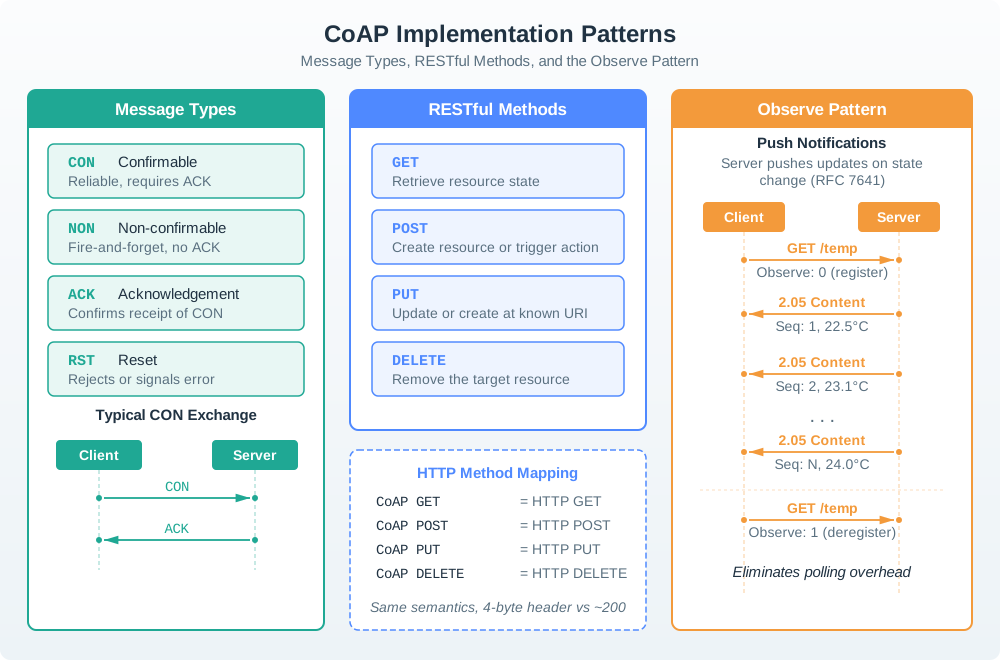
In Figure 19.1, begin with the message types that control delivery behavior, move to GET, POST, PUT, and DELETE as operations on resources, and finish with Observe registration plus ordered notifications. A stack must keep those layers distinct: the method states intent, the message type chooses an exchange policy, and the Token and Observe state preserve application continuity. The performance comparison below then evaluates the cost of that combined pattern.
19.8.1 CoAP vs HTTP vs MQTT: Performance Comparison
Illustrative application-header comparison (20-byte reading; CoAP over UDP, HTTP/1.1 and MQTT over TCP; transport bytes, security, topic/URI, and options excluded):
Read these points as one illustrative scenario: CoAP over UDP has a 4-byte fixed header, 24 bytes with this payload, and 16.7% application-header share; HTTP/1.1 over TCP assumes 200 bytes of headers, 220 bytes total, and 90.9%; MQTT over TCP assumes only its 2-byte minimum fixed header, 22 bytes total, and 9.1%. Actual requests add fields and transport costs; latency depends on the network and connection state.
- CoAP over UDP: 4-byte fixed header + 20-byte payload = 24 bytes; 4/24 = 16.7% application-header share
- HTTP/1.1 over TCP: assumed 200-byte headers + 20-byte payload = 220 bytes; 200/220 = 90.9% header share
- MQTT over TCP: 2-byte minimum fixed header + 20-byte payload = 22 bytes; 2/22 = 9.1% fixed-header share (a PUBLISH needs a topic and may need other fields)
Energy Consumption (24 hours, readings every 30s):
Read these points as one illustrative radio-energy model with assumed costs per message: CoAP: 2,880 messages/day × 153 mJ = 122.4 mWh/day; HTTP: × 190 mJ = 152.0 mWh/day (24.2% more message energy); MQTT: × 163 mJ = 130.4 mWh/day (6.5% more message energy). These figures do not predict total device battery life.
- CoAP assumption: 2,880 messages/day, 153 mJ per message, 122.4 mWh/day of message energy
- HTTP assumption: 2,880 messages/day, 190 mJ per message, 152.0 mWh/day (24.2% more than CoAP)
- MQTT assumption: 2,880 messages/day, 163 mJ per message, 130.4 mWh/day (6.5% more than CoAP)
Official Libraries and Tools:
Compare the Python and ESP32 implementation resources before choosing a library for the device.
- Python:
aiocoapviapip install aiocoapwith docs at aiocoap.readthedocs.io - Arduino/ESP32: CoAP Simple Library via Arduino Library Manager with docs at GitHub: coap-simple
- Node.js:
coapvianpm install coapwith docs at npmjs.com/package/coap - Java: Eclipse Californium via Maven dependency with docs at eclipse.org/californium
- C/C++: libcoap via system package with docs at libcoap.net
Testing and Debugging Tools:
Keep one practical point in view: coap-client (libcoap): Command-line CoAP client for testing.
-
coap-client(libcoap): Command-line CoAP client for testing# GET request coap-client -m get coap://localhost/temperature # POST with payload coap-client -m post coap://localhost/sensor -e "22.5" # Observe resource coap-client -m get -s 60 coap://localhost/temperature -
Copper (Cu): Firefox/Chrome plugin for CoAP browsing (deprecated but useful for learning)
-
Wireshark: CoAP dissector included (filter:
coap) -
nRF Connect CoAP: Mobile app for testing CoAP servers
Example Implementation Patterns:
Pattern 1: Sensor Reading (NON message)
Sensor → Gateway:  CON GET /temperature
Gateway → Sensor:  ACK 2.05 Content
                   Payload: 22.5°C

Overhead: 2 messages, ~50 bytes total
Latency: 1 RTT (~20-50ms on local network)
Reliability: Guaranteed (CON requires ACK)
Pattern 2: Frequent Updates (Observe)
Client → Server:   CON GET /temperature, Observe: 0
Server → Client:   ACK 2.05 Content, Observe: 12
                   Initial value: 22.5°C

[30 seconds later]
Server → Client:   CON 2.05 Content, Observe: 13
                   Updated value: 23.1°C

[30 seconds later]
Server → Client:   CON 2.05 Content, Observe: 14
                   Updated value: 22.9°C

Overhead: 1 subscribe + N notifications
Battery savings: Avoid polling every 30s
Pattern 3: Multicast Discovery
Client → FF02::FD: NON GET /.well-known/core
Device1 → Client:  NON 2.05 Content
                   </temperature>,</humidity>
Device2 → Client:  NON 2.05 Content
                   </pressure>,</light>

Use case: Discover all CoAP devices on local network
Result: List of available resources from all devices
This section:
 Checkpoint: Operational Debugging
You now know:
- Observe clients must map each 0-8 byte token to the resource being observed, or concurrent notifications can be misattributed.
- CON retransmission uses ACK_TIMEOUT 2 s, ACK_RANDOM_FACTOR 1.5, and MAX_RETRANSMIT 4 by default: 45 s maximum span from first to last send, and 93 s maximum wait for ACK or RST.
- Response code classes divide the first digit by role: 2.xx success, 4.xx client error, and 5.xx server error.
This section:
19.8.2 CoAP Response Code Categories
- Success (2.xx): 2.01-2.05, meaning the request succeeded. Examples:
2.05 Contentfor a successful GET and2.04 Changedfor a successful PUT. - Client Error (4.xx): 4.00-4.15, meaning the client made an error. Examples:
4.04 Not Foundfor a bad URI and4.01 Unauthorizedwhen authentication is required. - Server Error (5.xx): 5.00-5.05, meaning the server failed. Examples:
5.00 Internal Server Errorand5.03 Service Unavailable.
The troubleshooting material below reuses the same pattern: identify the failed layer first, then choose the smallest fix that matches that layer.
19.8.3 Hands-On Learning Resources
Interactive Tutorials:
-
Eclipse Californium CoAP Demo Server:
coap://californium.eclipseprojects.io:5683/- Try:
coap-client -m get coap://californium.eclipseprojects.io:5683/.well-known/core
- Try:
-
CoAP.me Public Test Server:
coap://coap.me:5683/- Test GET, POST, PUT, DELETE without setting up your own server
Code Examples:
Start with the CoAP examples repository, then use the aiocoap tour to follow a Python implementation.
Video Tutorials:
- Building IoT with CoAP - IoT Developer Conference
- CoAP Deep Dive - Eclipse Foundation
- Constrained Devices and CoAP - IETF Educational Series
19.9 Troubleshooting Common Issues
This section: Troubleshooting Common Issues
A CoAP failure needs a diagnosis at the boundary where the observed behavior stops matching the request. A timeout can involve packet loss, acknowledgement behavior, or an unavailable endpoint rather than a wrong resource path. A failed DTLS handshake instead calls for key or certificate checks before resource handling can succeed. Response codes then distinguish a missing resource from a method that the resource does not support.
- Request times out: UDP packet loss or no ACK. Increase retransmission timeout, use CON messages instead of NON, and check network quality.
- Confirmable message never acknowledged: Server down or wrong endpoint. Verify the server is running and confirm the CoAP URI format
coap://host:port/path. - Block transfer fails mid-stream: MTU too large or packet fragmentation. Reduce block size from 1024 bytes to 512 or 256 and check network MTU settings.
- Observe notifications stop: Server crashed or network partition. Re-establish the observe relationship and add client-side timeout detection.
- Multicast discovery finds no devices: Wrong multicast address or routing. Use FF02::FD for link-local or FF05::FD for site-local and check IPv6 multicast routing.
- DTLS handshake fails: PSK mismatch or certificate error. Verify pre-shared keys match exactly and check certificate validity for certificate mode.
- Response code 4.04 Not Found: Wrong resource path. Check URI case sensitivity and verify the resource exists on the server.
- Response code 4.05 Method Not Allowed: Unsupported method on the resource. Confirm that the resource supports GET, POST, PUT, or DELETE as expected.
Debug Checklist:
-
Connection and Discovery Issues:
- Verify server is reachable on UDP port 5683 (or 5684 for DTLS)
- Test with
pingto confirm basic network connectivity - Check firewall allows UDP traffic on CoAP port
- For multicast: verify IPv6 multicast is enabled on network interface
- Use CoAP client tool to test server response (e.g.,
coap-client,libcoap)
-
Request/Response Problems:
- Confirm CoAP URI format:
coap://server-ip:5683/resource/path - Check message type (CON requires ACK, NON does not)
- Verify token in response matches token in request
- Review response code (2.xx success, 4.xx client error, 5.xx server error)
- Monitor retransmission attempts (exponential backoff 2s, 4s, 8s, 16s)
- Confirm CoAP URI format:
-
Observe and Block Transfer Issues:
- For Observe: confirm observe option set in request (observe=0)
- Check server sends notifications with observe option and increasing sequence numbers
- For Block transfers: verify block size negotiation (Block1/Block2 options)
- Monitor block number sequence (must be consecutive)
- Test smaller block sizes if large transfers fail
Read these points as one sequence: start with Performance and Reliability; then measure UDP packet loss and its effect on CoAP retries and latency; then check network latency, server capacity, deduplication, and congestion.
-
Performance and Reliability:
- Measure UDP packet loss and whether it causes unacceptable CoAP retries or delay for this workload.
- Monitor network latency (affects retransmission timing)
- Verify server can handle request rate (no overload)
- Review message deduplication (servers drop duplicate message IDs)
- Check for network congestion (CoAP includes congestion control)
-
Security (DTLS) Issues:
- Verify DTLS version compatibility (DTLSv1.2 recommended)
- Check pre-shared key encoding (must be exact byte match)
- For certificates: verify CA chain and server certificate validity
- Monitor DTLS session timeouts and renegotiation
- Test with plain CoAP first, then add DTLS layer
Common Error Codes:
- 2.01 Created: Resource successfully created (POST response)
- 2.02 Deleted: Resource successfully deleted
- 2.03 Valid: Resource still valid (cache validation)
- 2.04 Changed: Resource successfully updated (PUT response)
- 2.05 Content: Resource content returned (GET response)
- 4.00 Bad Request: Malformed request or invalid options
- 4.01 Unauthorized: Authentication required or failed
- 4.04 Not Found: Resource does not exist
- 4.05 Method Not Allowed: HTTP method not supported on resource
- 5.00 Internal Server Error: Server encountered error processing request
- 5.03 Service Unavailable: Server temporarily unable to handle request
Tools for Debugging:
- libcoap tools:
coap-clientandcoap-serverfor testing - Copper (Cu): Firefox/Chrome plugin for CoAP browsing (deprecated but useful)
- Wireshark: CoAP dissector for packet analysis (filter:
coap) - tcpdump: Capture UDP packets (
tcpdump -i any port 5683 -vv) - Eclipse Californium: Java-based CoAP library with extensive logging
- aiocoap: Python library with good debugging output
19.10 Common Pitfalls
This section: Common Pitfalls
A CoAP payload that works on local Wi-Fi can fail on a constrained network when its transfer exceeds the available packet budget. Fragment loss can prevent the receiver from reconstructing the complete message even though other fragments arrived. Block-wise transfer supports larger configurations, firmware, and files without treating them as one oversized payload. The acceptance test must use the actual constrained path because Wi-Fi success does not establish that path’s behavior.
The mistake: Sending CoAP payloads larger than the network MTU (typically 1280 bytes for IPv6, often much smaller for constrained networks like 6LoWPAN with 127-byte frames), causing silent packet drops or fragmentation failures.
Symptoms:
- Large GET responses never arrive at the client
- PUT/POST requests with substantial payloads fail intermittently
- Works on local Wi-Fi but fails over 6LoWPAN or constrained networks
- Wireshark shows fragmented packets but no reassembled response
Why it happens: CoAP runs over UDP, which doesn’t handle fragmentation gracefully:
- IPv6 minimum MTU: 1280 bytes, but CoAP payload should be much smaller
- 6LoWPAN frame: 127 bytes maximum, ~80 bytes after headers
- UDP fragmentation: If any fragment is lost, entire message is lost
- No automatic retransmission of individual fragments
The fix:
# Use CoAP Block-wise Transfer (RFC 7959) for large payloads
from aiocoap import Message, Context
from aiocoap.numbers.codes import GET

async def get_large_resource(uri):
    context = await Context.create_client_context()

    # Request with Block2 option - library handles chunking
    request = Message(code=GET, uri=uri)
    # Block size: 64 bytes (szx=2), 128 bytes (szx=3), 256 bytes (szx=4)
    # Smaller blocks = more round trips but works on constrained networks

    response = await context.request(request).response
    return response.payload  # Library reassembles blocks automatically
// Embedded C: Check payload size before sending
#define COAP_MAX_PAYLOAD_6LOWPAN 64 // Safe for 802.15.4
#define COAP_MAX_PAYLOAD_UDP 1024 // Safe for most networks
size_t max_payload = is_constrained_network() ?
COAP_MAX_PAYLOAD_6LOWPAN : COAP_MAX_PAYLOAD_UDP;
if (payload_len > max_payload) {
// Use Block1 (request) or Block2 (response) transfer
return coap_send_blockwise(payload, payload_len, max_payload);
}Prevention: Design payloads to fit in 64-128 bytes for 6LoWPAN networks. Use Block-wise Transfer for firmware updates, large configurations, or file downloads. Test on the actual constrained network, not just Wi-Fi.
A battery sensor needs different exchange policies for routine measurements and important control messages. Repeated confirmable exchanges add acknowledgements and retry work that may be unnecessary when the next reading replaces a missed one. Non-confirmable delivery does not supply the failure-detection behavior required by the command path in this example. A hybrid policy ties confirmation to message importance instead of treating telemetry, alarms, and device commands as equivalent.
The mistake: Using Confirmable (CON) messages for all communications because “reliability is important,” leading to excessive battery drain and network congestion, or using Non-Confirmable (NON) for critical commands where delivery must be guaranteed.
Symptoms:
- Battery-powered sensors lasting weeks instead of years
- Unnecessary retransmission storms when network is lossy
- Commands occasionally not reaching actuators (lights, locks)
- High latency due to waiting for ACKs on every message
Why it happens: Developers often misunderstand the trade-offs:
- CON overuse: HTTP background makes developers expect reliability for everything
- NON overuse: Trying to maximize battery life without considering message importance
- No hybrid strategy: Treating all messages the same regardless of criticality
The fix:
from aiocoap import Message, Context
from aiocoap.numbers.codes import GET, PUT
from aiocoap.numbers.types import CON, NON

# NON for periodic telemetry (loss acceptable, battery critical)
async def send_temperature_reading(temp):
    request = Message(
        code=PUT,
        mtype=NON,  # Fire-and-forget, ~5x better battery life
        uri='coap://server/sensors/temp',
        payload=f'{temp}'.encode()
    )
    await context.request(request).response

# CON for critical commands (must know if it worked)
async def unlock_door():
    request = Message(
        code=PUT,
        mtype=CON,  # Need acknowledgment for security
        uri='coap://door/lock',
        payload=b'unlock'
    )
    try:
        response = await context.request(request).response
        return response.code.is_successful()
    except Exception:
        return False  # Command failed, alert user

# CON for configuration changes (must be applied)
async def update_reporting_interval(seconds):
    request = Message(
        code=PUT,
        mtype=CON,  # Config must be confirmed
        uri='coap://sensor/config/interval',
        payload=str(seconds).encode()
    )
    return await context.request(request).response
Decision matrix:
- Periodic sensor readings: Use NON for routine telemetry; do not use CON.
- Alert or alarm notifications: Use CON so the receiver must acknowledge delivery.
- Device commands (on/off): Use CON because actuation commands need confirmation.
- Configuration updates: Use CON so applied settings are confirmed.
- Status queries: Depends on how critical the response is.
- Firmware chunks: Use CON with Block2 acknowledgements.
Prevention: Default to NON for periodic telemetry. Use CON only for commands, configurations, and alerts. Implement a message priority system that selects type based on criticality.
19.11 Continue to the Next Part
This section: Continue to the Next Part — Carry this evidence into CoAP Security: CON and NON Trade-Offs, which begins with Try It: CON vs NON Message Type Advisor.
Carry this evidence into CoAP Security: CON and NON Trade-Offs, which begins with Try It: CON vs NON Message Type Advisor.
Find help
3 reviewed answers.
Where should I start in a module?
Open the module page from the sidebar to see its chapters in order. Use the module map to return to a topic you need.
Modules and pathsReviewed
What can I try when a project does not work?
Check the symptom, then work through the diagnostic steps. Keep the error message and the smallest example that reproduces it.
When you are stuckReviewed
How do interactive examples work?
Use the interactive guide to check how examples and simulations work before changing your project.
Interactive examples guideReviewed