13 CoAP Observe: Subscriptions and Updates
More
Depth: Practitioner
Progress saves as you read. Mark sections complete as you go; your progress appears in the sidebar.
13.1 Start With the Decision
This section: Start With the Decision — CoAP is a compact request-and-response protocol for constrained devices.
CoAP is a compact request-and-response protocol for constrained devices. Observe lets a client register interest in a resource. An Observe relation records that registration; a notification is a later response carrying updated resource state. A thermostat needs fresh changes, not a flood of copies after a link returns. Observe must bind each update to one live relation.
13.2 Route Overview
This section: Route Overview — This is part 1 of 2.
This is part 1 of 2. Continue with CoAP Observe: Efficiency and Lifecycle.
13.3 Part Objectives
This section: Part Objectives
- Trace registration, notification, token, and sequence state.
- Set update pace and recovery rules for a CoAP observer.
13.4 Start With the Quiet Thermostat
This section: Start With the Quiet Thermostat — A thermostat does not need to ask a room sensor the same question every ten seconds when the temperature barely changes.
A thermostat does not need to ask a room sensor the same question every ten seconds when the temperature barely changes. It needs one registration, then a trustworthy update only when the value crosses a meaningful boundary.
Observe is that subscription story for CoAP. The chapter builds from the simple “tell me when it changes” promise into registries, notification pacing, cleanup, edge cases, and evidence that the push stream saves energy instead of creating a flood.
- In 60 Seconds
- Start With the Quiet Thermostat
- Phoebe’s Field Notes: Why 89% Less Traffic Is Not 89% More Battery
- Phoebe’s Field Notes: Count Radio Wakes, Not Only Bytes
- Quick Check: Observe Fit
- Prerequisites
- Continue: CoAP Observe Registration and Freshness Contracts
- The Observe Extension (RFC 7641)
- Minimum Viable Understanding: CoAP Observe
- Smart Updates Without Asking!
- For Beginners: Understanding Observe vs Polling
- Putting Numbers to It
- Checkpoint: Push or Poll?
- Interactive Calculator: Polling vs Observe Bandwidth
- Observe Protocol Flow
- Try It: Deregistration Method Advisor
- Observer Management Implementation
- Try It: Observer Registry Simulator
- Putting Numbers to It
- Interactive: CoAP Congestion Control
- Interactive Calculator: Rate Limiting Configuration
- Checkpoint: Registry Discipline
- Deep Dive: Observe Internals
- Deep Dive: Observe Sequence Numbers and Ordering
- Interactive Tool: Sequence Number Freshness Checker
- Deep Dive: Observer Removal Conditions
- Try It: CON Retransmission Timeline Simulator
- Edge Cases and Gotchas
13.5 Learning Objectives
This section: Learning Objectives
By the end of this chapter, you will be able to:
- Implement Server Push: Configure and build CoAP Observe for real-time notifications using RFC 7641
- Design Observer Registries: Construct server-side data structures to manage registration, notifications, and deregistration lifecycle
- Calculate Bandwidth Savings: Apply formulas to quantify Observe benefits over traditional polling for specific IoT scenarios
- Diagnose Edge Cases: Identify and resolve NAT timeout, token reuse, and ghost observer problems in deployed systems
- Evaluate Protocol Trade-offs: Justify selecting Observe versus polling versus MQTT based on resource change rate and energy constraints
- Apply Rate Limiting: Configure change-threshold and interval parameters to prevent notification floods on rapidly-changing resources
13.6 Prerequisites
This section: Prerequisites
Before diving into this chapter, you should be familiar with:
- CoAP Introduction - CoAP basics and design goals
- CoAP Message Types - CON vs NON and reliability patterns
13.7 Continue: CoAP Observe Registration and Freshness Contracts
This section: Continue: CoAP Observe Registration and Freshness Contracts — The main chapter below stays focused on Observe as a server-push pattern and implementation workflow.
The main chapter below stays focused on Observe as a server-push pattern and implementation workflow. For the deeper contract behind registration-token binding, Max-Age freshness, Confirmable liveness probes, notification ordering, wraparound, and stale-update handling, continue to CoAP Observe Registration and Freshness Contracts.
13.8 The Observe Extension (RFC 7641)
This section: The Observe Extension (RFC 7641)
Core Concept: Observe transforms CoAP from pure request-response into a publish-subscribe pattern. A client registers interest in a resource once, then receives automatic notifications whenever the resource changes - no repeated polling needed.
Why It Matters: Polling wastes energy and bandwidth. Polling every ten seconds sends 8,640 GET requests per day. Observe can reduce request traffic when changes are infrequent; measure the actual saving.
Key Takeaway: Register with Observe: 0 in your GET request, receive notifications with incrementing sequence numbers, and deregister with Observe: 1 or RST when done.
Meet our friends: Temperature Terry, Lila the Light, and the microcontroller!
Sammy says: “Imagine you want to know the temperature in your room. You could keep asking me every minute - ‘What’s the temperature? What’s the temperature?’ - but that’s SO tiring for both of us!”
Lila explains: “With CoAP Observe, it’s like subscribing to a YouTube channel! You subscribe ONCE, and then you automatically get notified whenever there’s a new video - or in our case, a new temperature reading!”
Real-world example: Think about getting text messages from your favorite pizza place. You don’t call them every 5 minutes asking “Is my pizza ready?” - that would be annoying! Instead, they TEXT YOU when it’s ready. That’s exactly what Observe does for IoT devices!
Max’s tip: “Observe is like a magic subscription service:
- Subscribe once (I want to know about temperature)
- Relax while the sensor does its job
- Get notified only when something changes
- Unsubscribe when you’re done - no more messages!”
Why it’s awesome: Less talking = more battery life! Your smart devices can last much longer because they’re not constantly asking “Any updates? Any updates?” - they just wait patiently for news!
What is polling? Polling is like repeatedly asking “Are we there yet?” on a road trip. You keep asking the same question over and over, even if the answer hasn’t changed.
What is Observe? Observe is like asking your parent to tell you when you arrive. You ask once, then relax - they’ll let you know when something changes.
Why does this matter for IoT?
- Battery life: Every time a device sends a message, it uses power. Fewer messages = longer battery life.
- Network traffic: If 1,000 sensors all poll every second, that’s 1,000 messages per second! With Observe, you might only send 10 messages when values actually change.
- Speed: With polling, you might not know about changes for up to your polling interval. With Observe, you know immediately.
Simple rule: Use Observe when you want real-time updates without wasting energy.
13.8.1 Traditional Polling vs. Observe
The energy question is not simply “push or poll”; it is how many exchanges occur when a resource changes less often than a client would ask for it. The timelines in Figure 13.1 show the exchanges generated when client requests outpace changes to a resource.
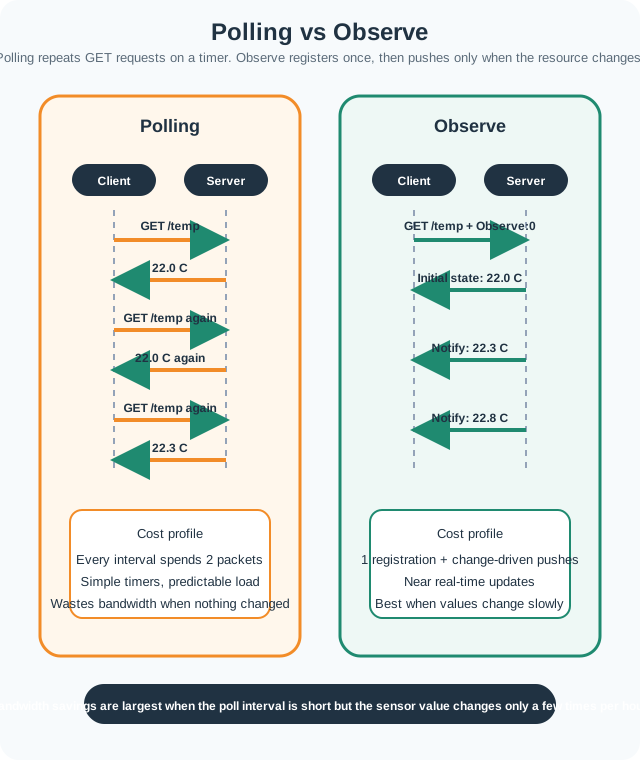
Read Figure 13.1 from left to right along each lane. Polling repeats a GET and response even when the value has not changed; Observe pays once to register, then the server emits notifications when the representation changes. The diagram explains the message-count difference, while the figures below quantify it for one assumed polling interval and change rate rather than claiming the same saving for every workload.
Traffic comparison for 24 hours of temperature monitoring:
- Polling (every 60 seconds): 1,440 requests + 1,440 responses, about 61.9 KiB, high battery impact.
- Observe (10 changes/hour): 1 registration + 240 notifications, about 6.6 KiB, about 89% less traffic.
We can quantify the exact bandwidth savings. For polling every 60 seconds over 24 hours:
With CoAP request (16 bytes) + response (28 bytes) = 44 bytes per exchange:
For Observe with 10 changes/hour over 24 hours:
The bandwidth reduction is:
13.8.2 Observer Architecture Overview
Before treating notifications as isolated responses, inspect Figure 13.2 to see the state that the client, wire exchange, and server must preserve together.
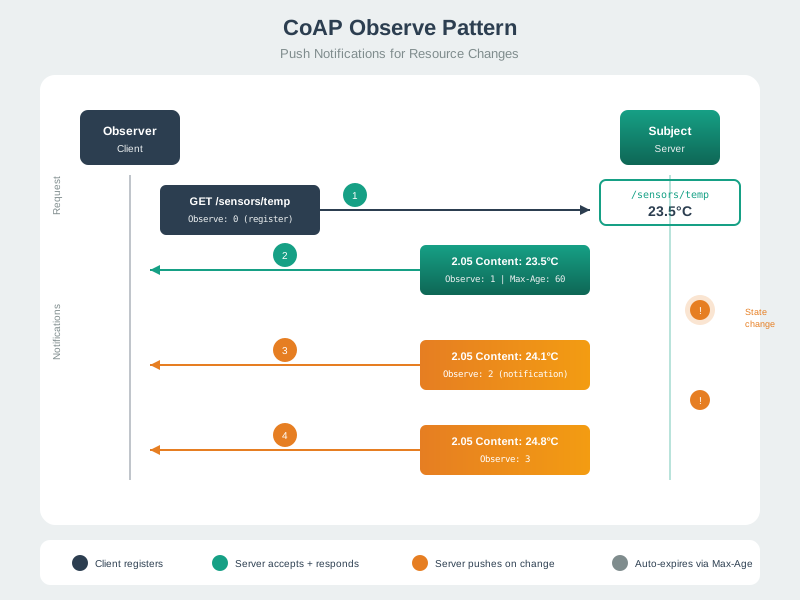
Start with one client. Track its own saved state. Read the architecture in Figure 13.2 from client state through Token and Observe ordering on the wire to the server’s observer registry. Then follow failure ownership and the bounded evidence required before the application accepts a notification. Multiple clients can observe one resource, but each relationship needs its own retained state; the next sections trace registration and notification behavior inside that contract.
 Checkpoint: Push or Poll?
- You now know why polling every 60 seconds creates 1,440 requests and 1,440 responses over 24 hours.
- You now know how Observe reduces that same example to one registration plus 240 notifications, about 89% less traffic.
- You now know the first design question: whether the resource changes far less often than the client would poll it.
13.9 Observe Protocol Flow
This section: Observe Protocol Flow
13.9.1 Registration
Client sends GET with Observe: 0 to register:
Request
Client -> Server: GET /temperatureToken: 0xAB12Observe: 0(register)Accept: text/plain
Response
Server -> Client: 2.05 ContentToken: 0xAB12Observe: 1(sequence number)Max-Age: 60Payload: "23.5"
13.9.2 Notifications
Inspect Figure 13.3 to see how a client proves that each notification belongs to its observation and is fresher than the value already accepted.
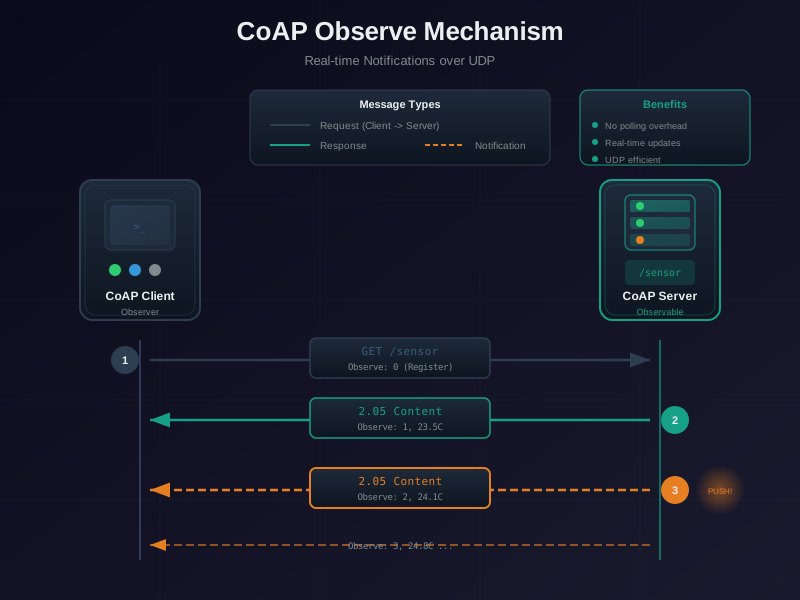
Watch one subscription from start to end. Track its state. Trace Figure 13.3 from registration through successive notifications. Token continuity identifies the observation, while Observe values and freshness rules help reject stale or reordered updates; a transport ACK confirms delivery but does not by itself prove that the application accepted the value. Cancellation or relationship loss ends that state, and re-registration requires reconciliation. That lifecycle frames the sequence-number knowledge check next.
13.9.3 Deregistration
Three ways to stop receiving notifications:
1. Explicit deregistration (GET with Observe: 1):
Client -> Server: GET /temperatureToken: 0xAB12Observe: 1(deregister)
2. RST response to unwanted notification:
Server -> Client: NON 2.05 Content (notification)Client -> Server: RST(stop this observation)
3. Timeout (Max-Age expiration):
Keep one practical point in view: If the client does not refresh the observation within Max-Age,.
- If the client does not refresh the observation within
Max-Age, the server removes that observer entry.
The protocol flow gives the client-side contract: register with Observe: 0, accept ordered notifications, and leave cleanly with Observe: 1 or RST. The next layer is the server-side contract that remembers each observer without letting stale entries accumulate.
13.10 Observer Management Implementation
This section: Observer Management Implementation
13.10.1 Server-Side Observer Registry
from collections import defaultdict
from dataclasses import dataclass
import time

@dataclass
class Observer:
    client_addr: object
    token: bytes
    request_options: dict  # Effective GET options that select/cache the representation.
    registered_at: float
    last_notification: float
    timeout: float

class ObserverRegistry:
    def __init__(self):
        # Map: resource_uri -> list of Observer objects
        self.observers = defaultdict(list)
        self.observer_timeout = 86400  # 24 hours default

    def register_observer(self, resource_uri, client_addr, token, request_options,
                          lease_seconds=None):
        # Include effective Accept and other representation-selecting GET options.
        options_snapshot = dict(request_options)
        # RFC 7641 §4.1: refresh an existing endpoint/token pair, do not append it twice.
        for existing in self.observers[resource_uri]:
            if existing.client_addr == client_addr and existing.token == token:
                existing.registered_at = time.time()
                existing.timeout = lease_seconds or self.observer_timeout
                existing.request_options = options_snapshot
                return existing
        observer = Observer(
            client_addr=client_addr,
            token=token,
            request_options=options_snapshot,
            registered_at=time.time(),
            last_notification=time.time(),
            timeout=lease_seconds or self.observer_timeout  # application policy, not Max-Age
        )
        self.observers[resource_uri].append(observer)
        return observer

    def notify_all(self, resource_uri):
        """Send notification to all observers of a resource"""
        expired = []

        for observer in self.observers[resource_uri]:
            # Check if observation expired
            if time.time() - observer.registered_at > observer.timeout:
                expired.append(observer)
                continue

            # Re-evaluate this observer's selected representation using its GET options.
            value, content_format = self.select_representation(
                resource_uri, observer.request_options
            )
            self.send_notification(observer, value, content_format)

        # Clean up expired observers
        for observer in expired:
            self.observers[resource_uri].remove(observer)

    def remove_observer(self, resource_uri, client_addr, token):
        """Remove observer on explicit deregistration or RST received"""
        self.observers[resource_uri] = [
            o for o in self.observers[resource_uri]
            if not (o.client_addr == client_addr and o.token == token)
]13.10.2 Notification Rate Limiting
Prevent notification floods on rapidly-changing resources:
class RateLimitedResource:
    def __init__(self, min_interval=1.0, change_threshold=0.5,
                 urgent_alarm_threshold=None):
        self.min_interval = min_interval    # Minimum seconds between notifications
        self.change_threshold = change_threshold  # Minimum change to trigger notification
        self.urgent_alarm_threshold = urgent_alarm_threshold
        self.last_notify_time = {}          # Per-observer last notification time
        self.last_notified_value = {}       # Per-observer last sent value

    def on_value_change(self, new_value):
        now = time.time()

        for observer in self.observers:
            last_time = self.last_notify_time.get(observer.token, 0)
            last_value = self.last_notified_value.get(observer.token, None)

            # Routine readings obey both gates; an alarm crossing bypasses the time gate.
            routine_notify = (
                last_value is None or
                (abs(new_value - last_value) >= self.change_threshold and
                 (now - last_time) >= self.min_interval)
            )
            urgent_alarm = (
                self.urgent_alarm_threshold is not None and
                new_value >= self.urgent_alarm_threshold and
                (last_value is None or last_value < self.urgent_alarm_threshold)
            )

            if routine_notify or urgent_alarm:
                self.send_notification(observer, new_value)
                self.last_notify_time[observer.token] = now
self.last_notified_value[observer.token] = new_valueThe rate limiting logic above combines two thresholds to prevent notification storms. For a sensor with value at time , a notification is sent when:
where is the value change and is time since last notification.
For example, a temperature sensor monitoring a boiler room:
- Change threshold:
- Time threshold:
If a routine reading jumps from 80°C to 82°C in 10 seconds:
If 82°C is configured as an urgent alarm threshold, crossing it sends an immediate alarm notification even inside that 60-second interval. Alarm handling is a separate path; routine updates retain the cap.
If temperature drifts slowly from 80.0°C to 80.3°C over 65 seconds:
This dual-threshold policy caps the notification rate and ignores small changes. To bound staleness, schedule a separate refresh before the advertised Max-Age expires.
This section:
Checkpoint: Registry Discipline
- You now know the registry must keep endpoint, token, resource, and relevant request options; an application lease is optional.
- You now know rate limiting combines a value threshold such as 0.5 degrees C with a time threshold such as 60 seconds.
- You now know 100 observers at 10 changes per second would create 1,000 notifications per second without pacing.
This section:
13.11 Deep Dive: Observe Internals
This section: Deep Dive: Observe Internals — Deep internals explain why the same notification stream can survive UDP reordering and unreachable clients.
The Observe option value is a sequence number that helps clients detect:
- Out-of-order notifications (UDP doesn’t guarantee ordering)
- Notification freshness (which update is newer)
Client Ordering Rules (RFC 7641 Section 3.4):
def is_notification_fresh(current_seq, new_seq, elapsed_seconds=0):
    """
    Determine if new notification is fresher than current.
    Handles 24-bit wraparound.
    """
    # Sequence numbers are 24-bit (0 to 16,777,215)
    MAX_SEQ = (1 << 24) - 1

    # Calculate difference handling wraparound
    diff = (new_seq - current_seq) % (MAX_SEQ + 1)

    # Within 128 s, use the serial half-range (positive diff below 2^23).
    # After 128 s, accept by arrival time even if the sequence goes backward.
    return elapsed_seconds > 128 or 0 < diff < (1 << 23)
Example scenario:
Notification 1: Observe=100, temp=22.5
Notification 2: Observe=102, temp=23.0  (arrived out of order)
Notification 3: Observe=101, temp=22.8

Client receives: 100 -> 102 -> 101
Client should display: 22.5 -> 23.0 (ignore 101, it's older than 102)Automatic observer removal triggers:
- RST received: Client sends RST in response to notification
- Application lease: No renewal within a configured server-side lease
- CON notification fails: After 4 retransmissions without ACK
- Resource deleted: Server removes all observers when resource gone
Retransmission behavior for CON notifications:
Server sends CON notification
Wait 2–3 seconds for ACK (RFC default randomization)
Retransmit with same Message ID
Wait 4–6 seconds (exponential backoff)
Retransmit
Wait 8–12 seconds
Retransmit
Wait 16–24 seconds
Final retransmission
Wait 32–48 seconds for ACK; if none arrives, remove observerDeep internals explain why the same notification stream can survive UDP reordering and unreachable clients. Now apply those mechanics to deployment failures, where restarts, NAT mappings, and stale tokens are the usual reasons Observe looks unreliable.
13.12 Edge Cases and Gotchas
This section: Edge Cases and Gotchas
13.12.1 Token Reuse After Client Restart
Problem:
- Client registers observation with Token=0x42
- Client crashes and restarts
- Server sends notification with Token=0x42
- Client doesn't recognize token (state lost) -> sends RST
- Server removes observer
Solutions:
- Server MUST remove observer when RST received
- Client should re-register observations after restart
- Consider persisting observation state to flash
13.12.2 NAT Timeout Issue
Problem:
UDP NAT mapping lifetime varies by network; this example assumes 45 seconds
- Client behind NAT registers observation
- Server tries to push notification 5 minutes later
- NAT mapping expired -> notification never reaches client
Solutions:
- Client sends periodic traffic before its measured NAT mapping expires
- Client sends periodic re-registration (GET with Observe=0)
- Use Max-Age to bound representation freshness; plan notifications or re-registration accordingly
- Consider CoAP over TCP for NAT-hostile networks
13.13 Continue to the Next Part
This section: Continue to the Next Part — Carry this evidence into CoAP Observe: Efficiency and Lifecycle, which begins with Interactive Calculator: NAT Keep-Alive Interval.
Carry this evidence into CoAP Observe: Efficiency and Lifecycle, which begins with Interactive Calculator: NAT Keep-Alive Interval.
Find help
3 reviewed answers.
Where should I start in a module?
Open the module page from the sidebar to see its chapters in order. Use the module map to return to a topic you need.
Modules and pathsReviewed
What can I try when a project does not work?
Check the symptom, then work through the diagnostic steps. Keep the error message and the smallest example that reproduces it.
When you are stuckReviewed
How do interactive examples work?
Use the interactive guide to check how examples and simulations work before changing your project.
Interactive examples guideReviewed