5 Modern HTTP: HTTP/2, HTTP/3, and Selection
More
Depth: Practitioner
Progress saves as you read. Mark sections complete as you go; your progress appears in the sidebar.
Inspect Figure 5.1 to see which parts of HTTP stay fixed and where each version places its ordering and loss boundary.
Read Figure 5.1 down each column. All three versions preserve HTTP requests and responses over IP, but their framing and transport differ. HTTP/1.1 sends textual messages through TCP and may make later work wait. HTTP/2 adds multiplexed streams, yet one missing TCP segment can still delay the shared byte stream. HTTP/3 carries HTTP frames on QUIC over UDP, with TLS 1.3 built into QUIC, so loss can remain isolated to one stream. The useful upgrade question is therefore not whether HTTP semantics change, but whether the new loss boundary fits the link.
5.1 Overview
This section: Overview — This first route compares HTTP/2 and HTTP/3 mechanics, calculates their consequences, and turns the evidence into a protocol selection.
This first route compares HTTP/2 and HTTP/3 mechanics, calculates their consequences, and turns the evidence into a protocol selection.
This is part 1 of 2. Continue with Modern HTTP: Implementation and Deployment for the second focused route.
First, separate the gateway case for HTTP/2 from the mobile-cellular case for HTTP/3. Then, use the calculators to connect 50 sensor uploads, 100 ms cellular RTT, 96 wake cycles, and 0-RTT resumption to latency and energy choices. Next, choose among HTTP/2, HTTP/3, MQTT, and CoAP with the memory and network decision guide. Finally, translate the choice into library support, keep-alive settings, and production pitfalls. Checkpoints summarize each cluster; deep-dive material and experiments are optional.
5.2 Learning Objectives
This section: Learning Objectives
By the end of this chapter, you will be able to:
- Explain HTTP/2 Multiplexing: Describe how binary framing, stream multiplexing, and HPACK header compression reduce repeated connection and header work in the chapter’s gateway example
- Evaluate HTTP/3 vs HTTP/2: Compare QUIC transport benefits against TCP-based HTTP/2 for mobile and cellular IoT deployments, justifying the choice based on network conditions
- Select the Appropriate Protocol: Distinguish between HTTP/1.1, HTTP/2, and HTTP/3 based on device RAM constraints, network stability, and firewall policies
- Configure Modern HTTP: Implement HTTP/2 and HTTP/3 settings for IoT gateways and cloud backends, including keep-alive tuning and QUIC server configuration
- Calculate Protocol Overhead: Assess bandwidth and latency costs for each HTTP version and apply the correct formula to estimate cellular radio active time and battery impact
- Diagnose Head-of-Line Blocking: Analyze why HTTP/2 over TCP suffers transport-layer HOL blocking under packet loss, and demonstrate how HTTP/3 QUIC streams solve this
5.3 Prerequisites
This section: Prerequisites
Before diving into this chapter, you should be familiar with:
- HTTP Connection Pitfalls: Common HTTP mistakes in IoT
- Application Protocols Overview: Basic understanding of IoT application protocols
HTTP/2 and HTTP/3 make existing HTTP infrastructure efficient for gateways and mobile devices, rather than replacing MQTT or CoAP on constrained devices (typically 32 KB+ RAM for TLS + HTTP/2). The 50× comparison below uses a sequential HTTP/1.1 baseline; the energy example counts connection setup only.
Explore Related Learning Resources:
Use the videos to see each tool. Test delay in the simulations. Then check what you may have missed.
- Video Library: Watch tutorials on HTTP/2 and QUIC protocol implementations
- Interactive Simulations: Try the Protocol Comparison Tool and Latency Calculator
- Knowledge Gaps: Learn about common protocol selection mistakes
- Self-Assessment Quizzes: Test your understanding of application protocols
Cross-Reference with Other Topics:
CoAP and MQTT move messages in other ways. Compare them with HTTP, then check the mobile link.
- See CoAP Overview for constrained device alternatives
- Review MQTT Fundamentals for pub-sub messaging patterns
- Explore Cellular IoT Fundamentals for mobile IoT connectivity
Meet the Sensor Squad! Temperature Terry needs to send LOTS of messages to the Cloud Castle, but the old road is SO SLOW!
The Problem: Sammy and 49 other sensors all want to send their readings to the Cloud Castle using HTTP/1.1. But the old road only has ONE lane!
“We have to wait in line FOREVER!” complains Sammy. “By the time my message arrives, the temperature has already changed!”
Light Lucy has an idea: “What if we could all travel on the SAME road at the SAME time? That’s what HTTP/2 does - it’s like a multi-lane highway!”
Max the Motion Sensor explains HTTP/2:
HTTP/1.1 (Old Single-Lane Road):
Sammy -> [Wait] -> [Wait] -> [Wait] -> Cloud Castle
Lila  -> [Wait] -> [Wait] -> [Wait] -> Cloud Castle
Max   -> [Wait] -> [Wait] -> [Wait] -> Cloud Castle
Time: 10 seconds for everyone!

HTTP/2 (Multi-Lane Highway):
Sammy -> Cloud Castle
Lila  -> Cloud Castle     ALL AT ONCE!
Max   -> Cloud Castle
Time: Just 200 milliseconds!
Bella the Button is amazed: “Wow, 50 times faster! But what about when the road has potholes?”
Max explains HTTP/3: “HTTP/3 uses magic flying cars (QUIC)! If one car hits a pothole, the others just fly over it. Nobody has to wait!”
Sammy’s Rules for Choosing Roads:
| Situation | Best Road | Why |
|---|---|---|
| Tiny sensors with small batteries | Use the bicycle path (CoAP/MQTT) | Less energy needed! |
| Gateway sending many messages | Use the multi-lane highway (HTTP/2) | All messages travel together! |
| Car tracker on bumpy cellular | Use the flying cars (HTTP/3) | Doesn’t get stuck in potholes! |
The Happy Ending: Sammy and all 50 sensors now share one HTTP/2 connection through the gateway. What took 10 seconds one-by-one now takes about 200 milliseconds! And when Carla the Car Tracker drives through bumpy cellular coverage, HTTP/3 keeps her other messages moving even when one packet gets lost.
The Lesson: Modern HTTP is like upgrading from a single-lane country road to a superhighway - perfect for when you have lots of data to move quickly!
Key Concepts
This section: Key Concepts — Use the concepts below to connect the design principle, measurable performance, and tradeoff in modern HTTP deployments.
Use the concepts below to connect the design principle, measurable performance, and tradeoff in modern HTTP deployments.
- Core Concept: Fundamental principle underlying Modern HTTP for IoT — understanding this enables all downstream design decisions
- Key Metric: Primary quantitative measure for evaluating Modern HTTP for IoT performance in real deployments
- Trade-off: Central tension in Modern HTTP for IoT design — optimizing one parameter typically degrades another
- Protocol/Algorithm: Standard approach or algorithm most commonly used in Modern HTTP for IoT implementations
- Deployment Consideration: Practical factor that must be addressed when deploying Modern HTTP for IoT in production
- Common Pattern: Recurring design pattern in Modern HTTP for IoT that solves the most frequent implementation challenges
- Performance Benchmark: Reference values for Modern HTTP for IoT performance metrics that indicate healthy vs. problematic operation
5.4 Introduction: Beyond HTTP/1.1
This section: Introduction: Beyond HTTP/1.1 — While HTTP/1.1 is often dismissed as too heavyweight for IoT, the newer HTTP/2 and HTTP/3 protocols offer significant improvements that make HTTP more viable for certain IoT applications.
While HTTP/1.1 is often dismissed as too heavyweight for IoT, the newer HTTP/2 and HTTP/3 protocols offer significant improvements that make HTTP more viable for certain IoT applications.
Think of HTTP/1.1 like a single-lane road where cars (requests) must wait for each other. HTTP/2 is like a multi-lane highway where many cars travel simultaneously. HTTP/3 goes further - it’s like having flying cars that don’t get stuck in traffic jams caused by road damage (packet loss).
For IoT devices that need to send lots of small messages or work over unreliable cellular networks, these improvements can mean:
- Faster data delivery
- Less battery drain
- More reliable connections
5.5 HTTP/2: Multiplexing and Header Compression
This section: HTTP/2: Multiplexing and Header Compression — HTTP/2 addresses many HTTP/1.1 limitations with binary framing, multiplexed streams, and header compression.
HTTP/2 addresses many HTTP/1.1 limitations with binary framing, multiplexed streams, and header compression.
5.5.1 Key Improvements Over HTTP/1.1
| Feature | HTTP/1.1 | HTTP/2 | IoT Benefit |
|---|---|---|---|
| Connections | Multiple TCP connections needed | Single connection, multiplexed streams | Reduced handshake overhead |
| Headers | Repeated in full each request | HPACK compression (savings depend on header repetition) | Smaller packet sizes |
| Server Push | Not supported | Optional HTTP/2 feature, only if both endpoints enable it | Do not assume it for firmware delivery; use a requested download |
| Binary Protocol | Text-based (verbose) | Binary framing | Faster parsing on MCUs |
| Stream Priority | None | Priority hints for streams | Critical data first |
Figure 5.2 puts the connections needed for three jobs alongside the ordering constraint that multiplexing retains.
In Figure 5.2, the HTTP/1.1 side either serializes work or opens several TCP and TLS connections, repeating setup and consuming sockets. The HTTP/2 side assigns telemetry, configuration, and firmware to separate logical streams whose frames share one secure connection. That removes application-level queueing between requests, but the final note preserves an important limit: all frames still travel through one ordered TCP byte stream. This distinction prepares the later comparison with QUIC.
5.5.2 Header Compression with HPACK
One of HTTP/2’s most impactful features for IoT is HPACK header compression:
The repeated authorization and representation fields below can outweigh a tiny sensor value. Inspect Figure 5.3 to see when HPACK pays the initial metadata cost and when later requests can reuse it.
HTTP/1.1 headers (repeated every request):
Content-Type: application/json
Authorization: Bearer eyJhbGciOiJIUzI1NiIsInR5cCI6IkpXVCJ9...
User-Agent: IoT-Sensor/1.0
Accept: application/json
Host: api.example.com
(~350 bytes per request)

HTTP/2 with HPACK:
First request: ~350 bytes (headers indexed)
Subsequent requests: ~15-30 bytes (index references only)
Savings: 90%+ for repeated headers
Read Figure 5.3 by comparing the first two bars before the small third bar. HTTP/1.1 repeats the example fields on every request; the first HTTP/2 request still sends them because both endpoints must establish matching table state. A later request can name indexed fields instead, reducing the example to roughly 15–30 bytes. The saving therefore depends on connection reuse and repeated headers, linking HPACK’s benefit to the session choices in this chapter rather than to every isolated request.
This section:
 Checkpoint: header compression
You now know:
- HPACK sends full repeated headers once, then reuses index references around 15-30 bytes instead of retransmitting about 350 bytes.
- HPACK header compression matters most when a gateway repeatedly sends the same
Host,Authorization, andContent-Typefields; the reduction depends on the header mix. - Header compression only pays off when the connection stays alive long enough for the shared table to be reused.
With header cost under control, the next question is what happens when the gateway has many readings ready at the same time.
5.5.3 Multiplexing Benefits for IoT Gateways
Hold the 50-sensor workload constant while comparing the connection strategy. In the HTTP/1.1 branch, notice the choice between 50 sequential requests and six to eight parallel connections, with TCP and TLS setup repeated across those connections. The HTTP/2 branch instead amortises one TCP-plus-TLS setup and carries 50 independent streams over it. The illustrative times below depend on the stated RTT and setup assumptions; the architectural conclusion is that connection reuse and multiplexing remove serial waiting, not that every gateway is exactly 50 times faster.
Scenario: Gateway aggregating 50 sensors, sending to cloud

HTTP/1.1 approach:
- 50 sequential requests OR 6-8 parallel connections
- Each connection: TCP handshake (1.5 RTT) + TLS (2 RTT)
- Illustrative elapsed time with sequential requests: 50 x 200ms = 10 seconds

HTTP/2 approach:
- Single TCP+TLS connection (1 RTT handshake, amortized)
- 50 multiplexed streams in parallel
- Illustrative elapsed time: ~200ms when requests overlap and the connection is reused
- 50x less elapsed time than the sequential example above; parallel HTTP/1.1 is a different baselineThis section:
Checkpoint: multiplexed gateways
You now know:
- HTTP/1.1 can force 50 sequential requests or multiple connection waves; HTTP/2 sends the same gateway batch over one multiplexed connection.
- The chapter’s gateway example compresses the delay from about 10 seconds to about 200 ms when the cloud API can keep one HTTP/2 session open.
- HTTP/2 is a gateway and cloud-integration tool, not a replacement for MQTT or CoAP on the smallest sensors.
HTTP/2 removes the gateway queue at the HTTP layer. The next section asks what still goes wrong when the transport underneath that queue is lossy or mobile.
5.6 HTTP/3: QUIC Transport for Unreliable Networks
This section: HTTP/3: QUIC Transport for Unreliable Networks — HTTP/3 replaces TCP with QUIC (UDP-based), offering advantages for IoT deployments with unstable connectivity.
HTTP/3 replaces TCP with QUIC (UDP-based), offering advantages for IoT deployments with unstable connectivity.
5.6.1 Key Features for IoT
| Feature | HTTP/2 (TCP) | HTTP/3 (QUIC) | IoT Use Case |
|---|---|---|---|
| Connection establishment | 3-way handshake + TLS | 0-RTT or 1-RTT | Mobile/cellular IoT |
| Head-of-line blocking | Stream blocked by packet loss | Independent streams | Lossy wireless links |
| Connection migration | Breaks on IP change | Survives network switch | Vehicle telematics |
| Congestion control | Per TCP connection | Per QUIC connection | Both share capacity across streams; test mixed traffic |
5.6.2 0-RTT Connection Resumption
The following comparison shows the dramatic difference in connection establishment time:
Scenario: Cellular IoT device waking from sleep

TCP + TLS 1.3:
1. TCP SYN                           (1 RTT)
2. TCP SYN-ACK + TLS ClientHello
3. TLS ServerHello + Application data (1 RTT)
Total: 2 RTT before sending data (~200-400ms on cellular)

QUIC (HTTP/3) with 0-RTT:
1. ClientHello + Encrypted data       (0 RTT!)
2. Server response
Total: 0 RTT for resumed connections
Potential saving: fewer setup round trips on resumed sessions; total radio time depends on the workloadOn a typical LTE link (RTT ≈ 100 ms):
Compare the wait for new and resumed links. Then check how setup time affects radio use.
- HTTP/1.1 + TLS 1.2: ~350-400 ms before first data (radio active for 400 ms)
- HTTP/2 + TLS 1.3: ~250-300 ms before first data (25% improvement)
- HTTP/3 + QUIC 0-RTT: ~100 ms for resumed connections (70% improvement)
For a device waking 96 times per day (every 15 minutes), this translates to: The daily estimate uses request count and setup time. It does not show total battery life.
- HTTP/1.1: 33.6 seconds of radio time/day (96 × 3.5 RTTs × 100 ms)
- HTTP/3: 9.6 seconds of radio time/day (96 × 1.0 RTT × 100 ms)
- Connection-setup radio-time reduction in this model: ~71%; this is not a total battery-life estimate
Connection latency directly translates to radio active time. For wake cycles per day with RTT milliseconds:
where is the RTT multiplier: , , .
For this cellular device with wakes/day and RTT:
- HTTP/1.1:
- HTTP/2:
- HTTP/3 (0-RTT):
At 300mA radio draw and 3.7V supply: Daily energy .
- HTTP/1.1:
- HTTP/3:
Savings: of this model’s connection-setup radio energy, before payload transfer, idle tails, sleep current, failed 0-RTT, and retries.
5.6.3 Handling Packet Loss Gracefully
Compare the two cases at the moment the firmware packet is lost. Under HTTP/2, both telemetry and firmware share TCP’s ordered byte stream, so the missing bytes hold later data until retransmission repairs the gap. Under HTTP/3, QUIC keeps those application streams independent, allowing telemetry to progress while the firmware stream waits. This matters when urgent state and bulk transfer share a gateway connection; it does not eliminate congestion, radio loss, or the need to measure recovery on the deployed network.
HTTP/2 (TCP): Sensor telemetry + firmware chunk in same connection
- Firmware packet lost -> later bytes behind the TCP gap wait for retransmit
- Later telemetry bytes wait for retransmission (delay depends on path)

HTTP/3 (QUIC): Independent stream handling
- Firmware stream waits for its missing bytes
- Telemetry can progress; shared congestion or radio loss can still slow it
- Critical for real-time + bulk data mixing
This section:
Checkpoint: mobile HTTP/3
You now know:
- QUIC 0-RTT lets resumed HTTP/3 sessions send encrypted data immediately instead of waiting through the TCP and TLS setup path.
- With 96 wakes per day, 100 ms RTT, 300mA radio draw, and 3.7V supply, the chapter’s arithmetic reduces connection overhead from 37.3J/day to 10.7J/day.
- Independent QUIC streams keep telemetry moving when a firmware stream waits for retransmission.
Those savings are compelling only when the device, network, and firewall can actually support HTTP/3, so selection comes before implementation.
5.7 Protocol Selection Guide
This section: Protocol Selection Guide — Read the decision strip as a three-step discipline: define the exchange, eliminate paths that fail its constraints, and test the survivor on the real network.
Read the decision strip as a three-step discipline: define the exchange, eliminate paths that fail its constraints, and test the survivor on the real network.
-

Start with the device and the kind of exchange.
-

Rule out paths that fail its real network needs.
-

Test the remaining choice on that network.
In the first panel, Bex starts with the endpoint and asks whether its exchange is one-way or two-way. The middle panel applies concurrency, mobility, and network support as rejection tests, because a protocol that fails one of those needs should leave the shortlist. The last panel returns the remaining choice to the actual device and network. That final test prevents a paper comparison from becoming a deployment promise, and it sets up the more detailed branch choices in the flowchart below.
Inspect Figure 5.4 to eliminate unsuitable paths before comparing headline performance. Begin with device constraint and interaction pattern, then test concurrency, mobility, and network support.
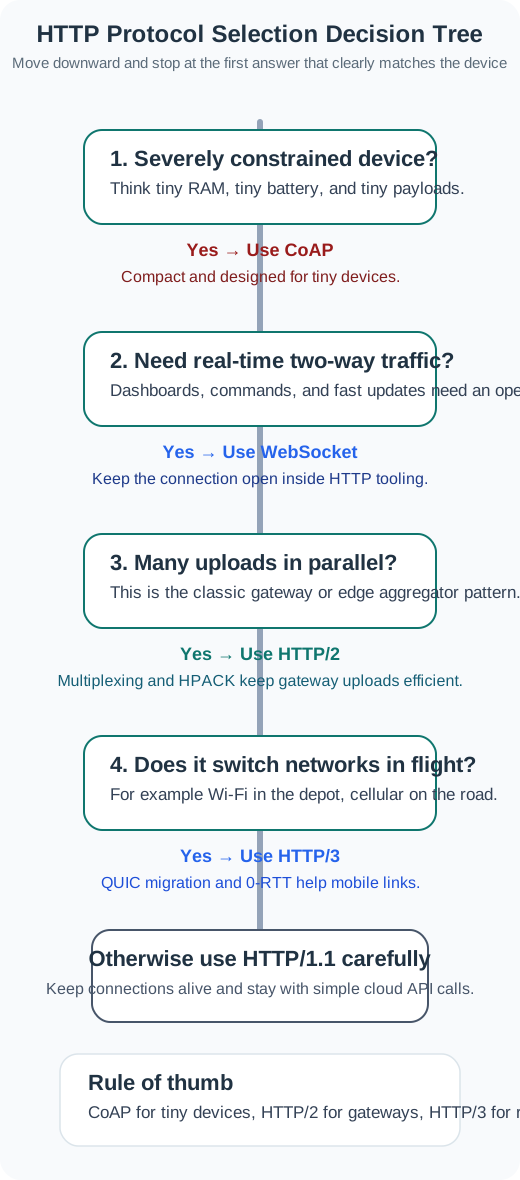
Follow Figure 5.4 from the root. A severely constrained endpoint exits toward CoAP before advanced HTTP features matter, while bidirectional realtime traffic points to WebSocket. For an HTTP workload, many parallel exchanges favor HTTP/2 multiplexing; a client that changes networks in flight creates a specific case for HTTP/3 connection migration. The remaining stable, simple path can use HTTP/1.1 with keep-alive. The tree frames the detailed recommendations below as consequences of workload evidence.
5.7.1 When to Use HTTP/2
Choose HTTP/2 when:
HTTP/2 fits a gateway that can reuse a connection and has room for TLS and multiplexed requests to an existing API.
- IoT gateway aggregating many device messages to cloud
- Existing HTTP/REST infrastructure must be preserved
- Devices have enough RAM for TLS + HTTP/2 (typically 32 KB+)
- Connection reuse is possible (persistent connection to backend)
- Example: Smart building gateway sending HVAC data to cloud API
5.7.2 When to Use HTTP/3
Choose HTTP/3 when:
HTTP/3 may help on moving or lossy links. Check whether QUIC adds value beyond reuse.
- Cellular IoT with frequent sleep/wake cycles
- Mobile assets changing networks (vehicles, drones, wearables)
- Lossy wireless links (satellite, rural cellular)
- Mixing real-time telemetry with bulk transfers
- Example: Fleet tracking devices on LTE/5G
5.7.3 When to Avoid HTTP/2/3
Avoid HTTP/2/3 when:
Check memory and network support first; a tiny sensor or blocked UDP path may rule out these HTTP versions.
- Extremely constrained devices (<16KB RAM)
- Simple request-response suffices (use CoAP instead)
- UDP is blocked by network (enterprise firewalls)
- Battery sensors with infrequent transmissions (MQTT over TCP simpler)
This section:
The flowchart above (Figure 5.4) guides you through selecting the appropriate HTTP version based on:
Check device memory before preserving an HTTP API, then use network stability and UDP access to distinguish HTTP/2 from HTTP/3.
- Device RAM constraints - Determines if HTTP is feasible
- Infrastructure requirements - Whether existing HTTP/REST APIs must be used
- Network stability - Stable vs. cellular/mobile networks
- UDP availability - Some networks block UDP (required for HTTP/3)
This section:
Checkpoint: selection constraints
You now know:
- Under ~32 KB RAM the practical answer is usually CoAP or MQTT; 32–128 KB typically fits HTTP/2 gateways; >128 KB leaves room for HTTP/3 on mobile or lossy links — rules of thumb; check your library.
- Verify the actual secured stack, buffers and stream count on the target hardware.
- UDP blocking turns an otherwise attractive HTTP/3 design back into an HTTP/2-over-TCP deployment.
Once the protocol choice is defensible, implementation work shifts from diagrams to libraries, server limits, and connection reuse.
5.8 Continue to Part 2
This section: Continue to Part 2 — Continue with Modern HTTP: Implementation and Deployment.
Continue with Modern HTTP: Implementation and Deployment.
Find help
3 reviewed answers.
Where should I start in a module?
Open the module page from the sidebar to see its chapters in order. Use the module map to return to a topic you need.
Modules and pathsReviewed
What can I try when a project does not work?
Check the symptom, then work through the diagnostic steps. Keep the error message and the smallest example that reproduces it.
When you are stuckReviewed
How do interactive examples work?
Use the interactive guide to check how examples and simulations work before changing your project.
Interactive examples guideReviewed