13 Realtime Protocols: Messaging Foundations
More
Depth: Practitioner
Progress saves as you read. Mark sections complete as you go; your progress appears in the sidebar.
Start with the story: A realtime protocol carries updates soon enough for the task. A camera view may carry video, while a door-station call may carry sound and video. Media transport carries those tracks; signaling sets up the session. A live dashboard or control path can instead use a browser stream of messages. This chapter tests each path’s delay and health.
13.1 Start With the Decision
This section: Start With the Decision — A dashboard that updates every second is not always realtime.
A dashboard that updates every second is not always realtime. The message path must meet a stated delay and loss budget.
13.2 Route Overview
This section: Route Overview — This is part 1 of 3.
This is part 1 of 3. Continue with Realtime Protocols: WebRTC and WebSocket Operations.
13.3 Part Objectives
This section: Part Objectives
- Separate realtime latency claims from update frequency.
- Compare polling, streaming, and publish-subscribe message paths.
13.4 Chapter Roadmap
This section: Chapter Roadmap
- Realtime Protocol Route
- In 60 Seconds
- Key Concepts
- What Realtime Means Here
- Realtime Protocol Roles
- Media Session Architecture
- Messaging and Realtime Together
13.5 Learning Objectives
This section: Learning Objectives — A protocol is a set of rules for exchanging data.
Set the Deadline Before Naming the Method
A protocol is a set of rules for exchanging data. Latency is the time a message takes to arrive. Packet loss means that some sent units never reach the other end. Telemetry is a time-linked record from a device. A WebSocket is a long-lived two-way link between a browser and a service.
Picture a door intercom. Live speech, the call button, the door command, and the event log do not have the same timing or safety needs. Late speech may sound poor. A late unlock command may be unsafe. A delayed record may still be useful.
Write a deadline and failure response for each flow. Test delay, loss, changed order, a broken link, and a restart. Check who may start the session, how each side knows it ended, and what the user sees when live service fails.
No single method makes every flow real time. The deeper sections separate media, session control, browser updates, and durable records so each job gets evidence that matches its risk.
By the end of this chapter, you will be able to:
- Explain what realtime means for application protocols in IoT media and control paths.
- Distinguish media transport, session signaling, stream control, browser transport, and event updates.
- Compare RTP, RTCP, SIP, SRTP, RTSP, WebRTC, and WebSocket by role.
- Decide when messaging protocols should remain separate from media-session protocols.
- Review latency, jitter, packet loss, security, and observability evidence for realtime paths.
- Build a protocol evidence record for an IoT camera, intercom, dashboard, or live operations view.
13.6 Realtime Protocol Route
This section: Realtime Protocol Route — The duplicate realtime chapter is consolidated here.
The duplicate realtime chapter is consolidated here. Use this route when an application needs live media, session setup, browser state, operator feedback, or event streams with timing expectations.
Keep these roles separate:
Start with who may talk. Then give media, browser state, and stored messages their own paths.
- Session signaling decides who may talk and how the session starts.
- Media transport carries timed frames and quality feedback.
- Browser channels carry dashboard state and commands.
- Messaging protocols still handle telemetry, notifications, history, and durable workflows.
13.7 Key Concepts
This section: Key Concepts
Deadline Over Arrival
A late media frame can be less useful than the next fresh frame. Realtime paths review delay, jitter, and loss together.
Control Is Separate
Signaling protocols set up who talks, which media is used, and when a session starts or ends.
Transport Is Continuous
Media transport carries timed audio, video, or sensor streams with sequence and timestamp context.
Prove the Path
Measure latency, jitter, packet loss, encryption, identity, fallback, and recovery behavior under expected load.
13.8 What Realtime Means Here
This section: What Realtime Means Here — Realtime does not mean every message is instant or guaranteed.
Realtime does not mean every message is instant or guaranteed. In application-protocol design, realtime means the system has a timing target and must keep media, interaction, or live state useful while the network changes.
Before naming a protocol, inspect Figure 13.1 to turn the vague word “realtime” into reviewable constraints. Begin with the media or state being carried, then follow the timing and session questions toward security, network evidence, and fallback.
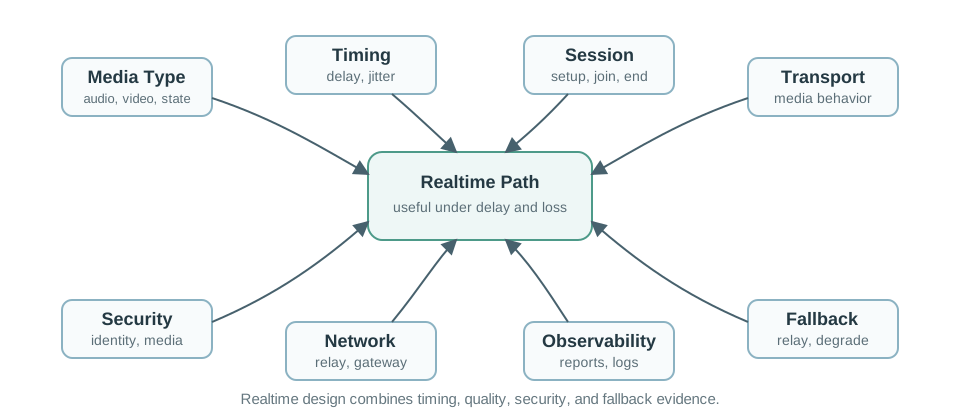
In Figure 13.1, first identify whether the flow is timed media, interactive control, or live state, because each tolerates delay and loss differently. Next establish who creates and ends the session and what transport behavior preserves usefulness. Then read the security, path, observability, and fallback inputs as proof obligations. This decision surface supplies the constraints used to assign protocol roles in the next section.
Use a realtime protocol review when the flow includes:
- Live audio, video, or screen sharing.
- Interactive control where stale commands should not be replayed blindly.
- A dashboard that should receive live updates without repeated polling.
- A local operations view that must show current state and connection quality.
- A gateway that bridges notifications, session setup, media, and recorded data.
13.9 Realtime Protocol Roles
This section: Realtime Protocol Roles — The protocol names are easier to use when their roles are separated.
The protocol names are easier to use when their roles are separated. One IoT product may use several of them in the same workflow.
Use Figure 13.2 to assign one responsibility at a time rather than asking a single protocol to carry signaling, media, quality feedback, and dashboard events.
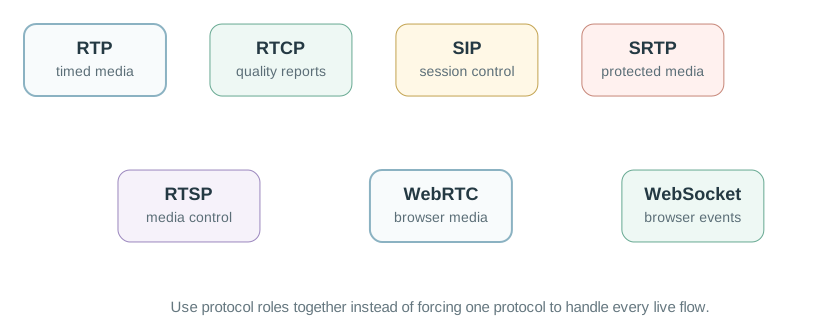
Read Figure 13.2 from coordination to delivery. SIP or WebRTC signaling establishes the session; RTP carries timed media; RTCP reports how that delivery is behaving; and SRTP protects the media packets. Then place RTSP with media control and WebSocket with bidirectional application events rather than raw video. This role split becomes the vocabulary for the hybrid workflow below.
Timed Media Transport
Carries audio, video, or other realtime payloads with sequence numbers and timestamps.
Quality Feedback
Reports reception quality, participant information, sender reports, receiver reports, and stream health.
Session Signaling
Establishes, modifies, and ends communication sessions. It does not carry the media frames.
Protected Media
Adds confidentiality, message authentication, and replay protection to RTP media streams.
Browser Media Path
Combines browser APIs, secure media, negotiation, and network traversal behavior for peer connections.
Live Event Channel
Keeps a bidirectional browser connection for status updates, commands, and dashboards, not raw video transport.
13.10 Media Session Architecture
This section: Media Session Architecture — Realtime media systems often separate the signaling path from the media path.
Realtime media systems often separate the signaling path from the media path. This avoids forcing the same protocol to do both coordination and timed delivery.
The split matters because:
Signal the session first. Then trace timed media and quality reports. Check each gateway and security role.
- Session signaling handles identity, invitation, negotiation, authorization, and teardown.
- Media transport handles timed packets and receiver playback.
- Quality reporting helps detect jitter, loss, and receiver health.
- Security may protect signaling and media through different mechanisms.
- A gateway may terminate signaling but relay, mix, transcode, or record media separately.
13.11 Messaging and Realtime Together
This section: Messaging and Realtime Together — MQTT, CoAP, HTTP, AMQP, RTP, SIP, and WebRTC should not be forced into one role.
MQTT, CoAP, HTTP, AMQP, RTP, SIP, and WebRTC should not be forced into one role. A door station, operations panel, or camera can use message protocols for events and realtime protocols for live interaction.
Inspect Figure 13.3 to see where an event-driven IoT path hands over to a timed media path and where recorded data leaves both.
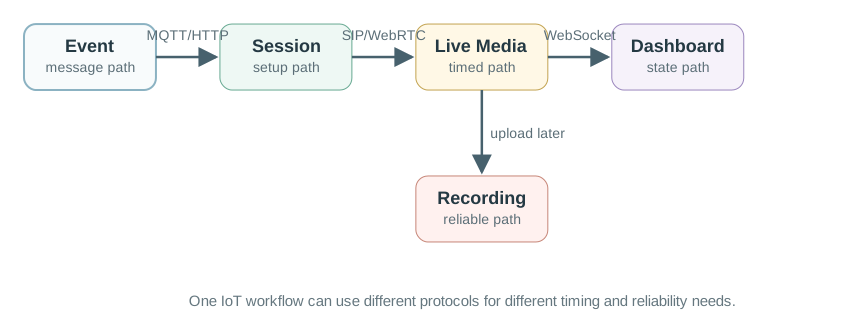
Separate the live path from the stored path. Test both. Follow Figure 13.3 from the initial notification to session setup, then along the protected live-media path. MQTT, AMQP, or HTTP can announce the event without carrying the call; SIP or WebRTC coordinates participants and route; SRTP carries the time-sensitive audio or video. Finally, the recorded clip moves through a reliable upload and storage boundary with its own access and retention policy. That separation prevents a convenience protocol from silently inheriting responsibilities it was not chosen to meet.
Keep these boundaries clear:
- Notification: message protocol such as MQTT, HTTP callback, or AMQP event.
- Session setup: SIP, WebRTC signaling, RTSP control, or application-specific negotiation.
- Live media: RTP/SRTP, WebRTC media, or another timed media transport.
- Recorded media: reliable upload or retrieval path such as HTTPS or managed storage workflow.
- Control and state: WebSocket, MQTT, HTTP, or CoAP depending on the endpoint and dashboard.
Telephony gateways add a few older names to the same boundary. The PSTN is the traditional circuit-switched phone network. VoIP carries voice over IP networks instead, usually with SIP or another signaling path to set up the session and RTP or SRTP to carry media. An analog telephone adapter, or ATA, is the bridge box that lets an analog handset or fax device join that IP workflow. At the media edge, ADC and DAC stages convert between microphone/speaker analog signals and digital samples; SDP describes session parameters such as codecs and addresses; SCTP can carry ordered data channels in WebRTC; and MSML is a media-server control language used to manipulate audio or video streams. Keep these terms attached to their layer: access device, signaling description, media transport, data channel, or media-server control.
Implementation examples make the same split easier to inspect. An open-source softphone such as Linphone is useful because the repository exposes the objects that own account setup, signaling, media negotiation, calls, video, and messaging instead of hiding them behind a finished app. Treat that code as a map of responsibilities, not as proof that the stack is safe for a device. A deployment still has to decide whether the endpoint is an ATA converting an analog handset, an IP phone attached directly to Ethernet or Wi-Fi, or a computer or mobile softphone, and then prove power behavior, emergency-service assumptions, directory or provisioning support, codec compatibility, and fallback. Peer-to-peer calling systems can also route media or discovery through other clients, so the design record should say when traffic is direct, relayed, or service-mediated. The same openness that made early ARPANET-era VoIP experiments and later user-run services possible also means policy reviews must account for unmanaged softphones, gaming voice channels, or disguised traffic that may bypass ordinary telephone controls.
A hands-on softphone exercise should make those responsibilities visible in settings, not only in source code. Installing a mobile app or a Linux package is just the entry point; the useful review asks which SIP identity and domain are registered, which server and port settings are used, whether TLS protects signaling and SRTP (with an appropriate key agreement such as DTLS-SRTP or ZRTP where supported) protects media, which audio and video codecs are enabled, and what debug or advanced options expose call setup failures. Features such as multiple calls, call transfer, conferencing, messaging, file sharing, address-book integration, call history, echo cancellation, low-bandwidth mode, ICE support, push notifications, Bluetooth headset support, and quality-of-service statistics are design choices that must be kept or removed according to the device role.
Legacy Android SIP examples use SipProfile.Builder, SipManager, SipAudioCall, and SipSession; Android deprecated these APIs in API level 31 and says they should not be the basis of future VoIP apps. They still illustrate the role split: identity and registration, signaling, and media/call state. For a current SDK, inspect its supported APIs and record both ends of the call, the server or peer used for registration, negotiated codecs, RTP or SRTP media, network permissions, failure logs, and fallback when Wi-Fi, NAT traversal, or credentials fail.
For SIP itself, read packets as session-control messages rather than as the call audio. A SIP request is shaped like an HTTP-style message: it has a method, a request URI that names the target SIP resource, a SIP version, headers, and sometimes a body with session details such as SDP. A typical SIP URI looks like sip:user@host:port; RFC 3261 discourages putting passwords in URI userinfo. SIP can run over UDP, TCP, or SCTP; common deployments use port 5060 for SIP and port 5061 for SIP over TLS. The voice or video stream still belongs on RTP or SRTP after the session has been negotiated.
The network elements explain many call failures. A user agent is the endpoint that sends requests and returns responses; in practice it may be an IP phone, a softphone, or a device gateway. A proxy server forwards requests on behalf of clients and can enforce routing, policy, and permissions while moving the request closer to the target user. A registrar accepts REGISTER requests and updates the location service that maps a user’s SIP identity to the current reachable address. A redirect server tells the requester or proxy where to try next instead of forwarding the call itself. A session border controller sits at the boundary to control VoIP signaling during setup, teardown, and inter-domain traversal. A gateway connects the SIP/RTP world to other networks such as the PSTN. Inspect Figure 13.4 to see how the user agent and registrar establish one authenticated binding before a call exists.

Read Figure 13.4 from the first unauthenticated REGISTER to the 401 challenge, then to the credential-bearing retry and final 200 OK. The exchange authenticates and records where the user agent can be reached; it does not carry call audio or start a media session. The method names are a useful checklist during troubleshooting. REGISTER binds a user agent to a registrar. INVITE starts a media session. ACK confirms reliable message exchanges. BYE terminates an existing session. CANCEL stops a pending request. OPTIONS asks about capabilities without opening a session. REFER tells a recipient to contact a third party, and PRACK acknowledges provisional responses. Responses should be read by class: provisional responses mean the request is still being processed, success means the action was understood and accepted, redirection points to another completion path, client errors usually mean the request cannot be fulfilled at this server, server errors mean this server failed an apparently valid request, and global failures mean no server can fulfill the request.
13.12 Continue to the Next Part
This section: Continue to the Next Part — Carry this evidence into Realtime Protocols: WebRTC and WebSocket Operations, which begins with WebRTC and WebSocket Are Different.
Carry this evidence into Realtime Protocols: WebRTC and WebSocket Operations, which begins with WebRTC and WebSocket Are Different.
Find help
3 reviewed answers.
Where should I start in a module?
Open the module page from the sidebar to see its chapters in order. Use the module map to return to a topic you need.
Modules and pathsReviewed
What can I try when a project does not work?
Check the symptom, then work through the diagnostic steps. Keep the error message and the smallest example that reproduces it.
When you are stuckReviewed
How do interactive examples work?
Use the interactive guide to check how examples and simulations work before changing your project.
Interactive examples guideReviewed