14 Realtime Protocols: WebRTC and WebSocket Operations
More
Depth: Practitioner
Progress saves as you read. Mark sections complete as you go; your progress appears in the sidebar.
Start with the story: A realtime protocol is a set of rules for messages that must arrive soon enough for the job. A camera or door-station call needs media transport for sound and video plus signaling to set up the session. A live dashboard or remote-control path may instead use browser streams of messages, such as SSE or WebSocket. The team also needs evidence that each live path is healthy.
14.1 Start With the Decision
This section: Start With the Decision — WebRTC carries media while WebSocket carries an ordered byte stream.
WebRTC carries media while WebSocket carries an ordered byte stream. Mixing their roles can hide relay cost, jitter, and recovery work.
14.2 Route Overview
This section: Route Overview — This is part 2 of 3.
This is part 2 of 3. Review Realtime Protocols: Messaging Foundations for the preceding evidence.
14.3 Learning Objectives
This section: Learning Objectives
- Compare WebRTC and WebSocket transport behavior.
- Budget latency, jitter, loss, and relay fallback.
14.4 Chapter Roadmap
This section: Chapter Roadmap
- WebRTC and WebSocket Are Different
- Latency, Jitter, and Loss Review
- Security Review
- Worked Review: Door Station With Live View
- Realtime Selection Workflow
- Learning Route
- Knowledge Check: Real-Time Protocol Workflows
- Quiz: Media or Signaling?
- Match the Realtime Role
- Order the Realtime Review
- Quiz: WebRTC or WebSocket?
- Common Pitfalls
- Pitfall 1: Calling Every Fast Update Realtime
- Pitfall 2: Sending Media Through the Notification Channel
- Pitfall 3: Ignoring Jitter
- Pitfall 4: Treating Relay Fallback as Policy-Free
14.5 WebRTC and WebSocket Are Different
This section: WebRTC and WebSocket Are Different — Browser support can make WebRTC and WebSocket look interchangeable, but their payload and timing contracts differ.
Browser support can make WebRTC and WebSocket look interchangeable, but their payload and timing contracts differ. Use Figure 14.1 to compare the paths before assigning either one to a camera or control surface.
Both names often appear in browser-based IoT systems, but they solve different problems. Inspect Figure 14.1 first as two paths with different payload contracts.
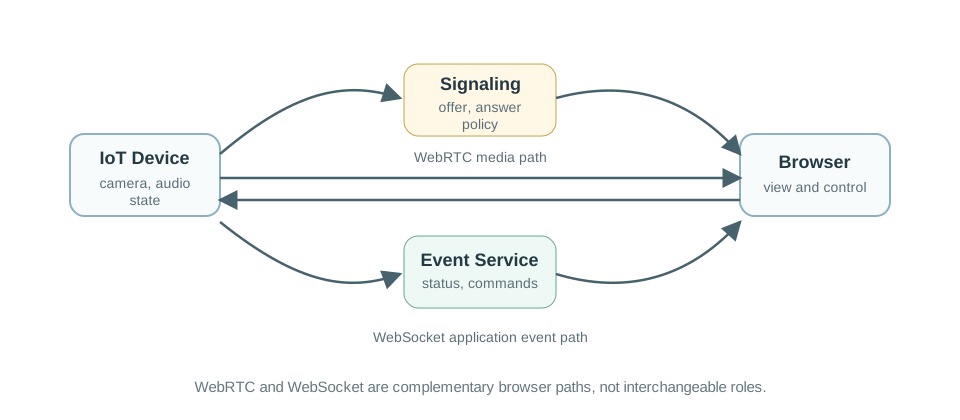
In Figure 14.1, trace WebRTC through negotiation and secure timed media, then trace WebSocket through one persistent application channel. The WebRTC side owns media-specific concerns such as codecs and changing network routes; the WebSocket side carries ordered messages such as status and commands. A product may use both, but the diagram keeps their roles from collapsing into “live browser traffic.”
Use WebRTC when the browser needs a secure media session or peer connection behavior. Use WebSocket when the browser needs a persistent bidirectional application channel for events, commands, and state updates. A browser dashboard may use both: WebRTC for live camera/audio and WebSocket for device status, alarms, and operator commands.
WebSocket connection narrated tour
Play silently with captions on provisional storyboard timing; narration audio is pending. Production pacing is not protocol time. Choose Reduced motion for a complete still at each beat.
Play the tour to open the workbench. Pause, replay a beat, or read the full transcript below. Situations marked CANNOT SHOW keep the existing frame and provide captions only.
Full transcript — WebSocket connection (8 beats)
B1 — Open channel question
You are the operator using a building dashboard to follow device alarms and send commands. Your connection says open, but a quiet network path can fail before the browser realizes it. Can you trust that open label when your next command needs to reach the device?
Model caption: You operate a building dashboard for device alarms and commands. An open browser connection can outlast a failed quiet path.
B2 — Bidirectional messages
WebSocket gives the browser a persistent channel: a connection that stays available for messages. Bidirectional means messages can travel both ways. For your dashboard, that means device status can arrive while operator commands travel toward the application server, using the same connection.
Model caption: WebSocket keeps a persistent channel for messages in both directions: device status and operator commands.
B3 — HTTP upgrade exchange
Start with the opening exchange. Hypertext Transfer Protocol, or HTTP, version one point one carries the browser's request to upgrade the connection. The server accepts with status one hundred one, Switching Protocols. After acceptance, the connection carries WebSocket frames, which hold the messages.
Model caption: Hypertext Transfer Protocol, or HTTP, carries the upgrade request. Status one hundred one accepts it; WebSocket frames follow.
B4 — Heartbeat purpose
Once open, either side can send when it has data, without a new HTTP request for every update. During quiet periods, browser applications commonly send heartbeat messages to check whether the path responds. The time between heartbeats matters because a network intermediary can expire an idle path.
Model caption: Either side can send without a new HTTP request per update. Browser applications commonly use heartbeat messages to test the path during quiet periods; an intermediary can expire an idle path.
B5 — Healthy timing margin
Take the workbench example: a heartbeat every twenty five seconds, a path idle timeout of sixty seconds, and a response delay of one hundred twenty milliseconds. Compare twenty five with sixty: the heartbeat comes sooner than the idle timeout. With that response delay, the model reports a healthy keepalive margin.
Model caption: Heartbeat: twenty five seconds. Idle timeout: sixty seconds. Response: one hundred twenty milliseconds. Twenty five is less than sixty; the model reports a healthy keepalive margin.
B6 — Idle timeout risk
Now keep the sixty second timeout and the same response delay, but move the heartbeat interval to seventy seconds. Compare seventy with sixty: the heartbeat comes later than the timeout. The model reports idle timeout risk because the path can close before the application checks it.
Model caption: Heartbeat: seventy seconds. Idle timeout: sixty seconds. Response: one hundred twenty milliseconds. Seventy is greater than sixty; the path can close before the heartbeat.
B7 — Local open misconception
The misconception is that an open connection guarantees the next command will arrive. An idle path can already have failed while the browser still reports open. A later heartbeat or send can expose the dead connection. The open label describes local state, so it cannot make that delivery promise.
Model caption: The path has already failed, but the browser still reports open. A later heartbeat or send exposes the failure. Open alone cannot guarantee the next command arrives.
B8 — Closure and reconnect
The failure sequence ends with abnormal closure, without a graceful close frame. Reconnecting creates a fresh WebSocket object. For your dashboard, remember: an open label describes the browser's state; a heartbeat tests whether the path still responds.
Model caption: The failed connection closes abnormally without a graceful close frame. Reconnecting creates a fresh WebSocket object. An open label describes the browser's state; a heartbeat tests whether the path still responds.
14.6 Latency, Jitter, and Loss Review
This section: Latency, Jitter, and Loss Review — Average latency alone cannot prove a usable media session.
Average latency alone cannot prove a usable media session. Inspect Figure 14.2 in sequence—end-to-end delay, variation between arrivals, loss handling, and evidence—so each symptom leads to a measurable control.
RTP does not guarantee timely delivery or network quality by itself. Inspect Figure 14.2 for the sequence numbers and timestamps receivers can use and the thresholds the system must still supply.
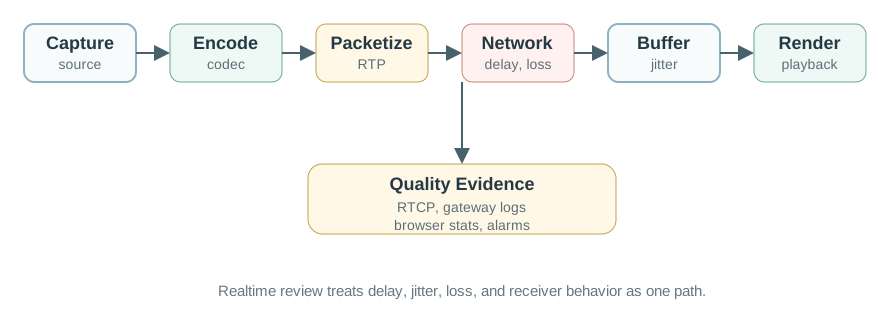
Read Figure 14.2 from sender to receiver. First allocate the delay budget across capture, network, buffering, decoding, and playback. Next examine arrival variation and the receiver buffer: more buffering can hide jitter but consumes latency budget. Then connect packet loss and audio-video synchronization to RTCP, browser statistics, or gateway logs. Those measurements turn “the call felt bad” into thresholds the running design review can test under load and path changes.
Review the path in terms of:
- Capture and encode: time before packets are available.
- Packetization: frame size, audio interval, and payload format.
- Network delay: one-way delay, routing changes, wireless contention, and gateway queues.
- Jitter: variation in packet arrival that the receiver must smooth.
- Loss and reordering: missing or late packets that affect media continuity.
- Receiver buffer: delay added to make playback stable.
- Reports: RTCP, gateway logs, browser stats, or application telemetry that shows path quality.
For voice or video media, the packet stack is part of the timing budget. Codec frames may be wrapped in RTP, UDP, IP, and link-layer headers before they reach the radio or wire, so small payloads can lose useful goodput to overhead and fragmentation. Robust Header Compression, or ROHC, can reduce repeated IP/UDP/RTP header fields to a few bytes on suitable links, but the evidence record should prove the compressor context, loss behavior, round-trip assumptions, and recovery after silence or reordering rather than quoting a best-case header size. The receiver should also name the synchronization window, not only the average delay. A review note might set asymmetric bounds, such as keeping video no more than about 80 ms behind audio and 140 ms ahead (audio arriving early is noticed sooner). These are product acceptance limits, not imperceptibility thresholds: ITU-R BT.1359-1 reports detectability around 45 ms when audio leads video (video behind) and 125 ms when audio lags video (video ahead). Test the chosen bounds with the intended users and media alongside RTP timestamps, jitter buffers, and RTCP reports.
14.7 Security Review
This section: Security Review — Realtime IoT traffic can carry private audio, video, and operational state.
Realtime IoT traffic can carry private audio, video, and operational state. Security review must cover signaling, media, identity, authorization, and storage boundaries.
Use Figure 14.3 to follow one session across its trust boundaries before approving its performance design.
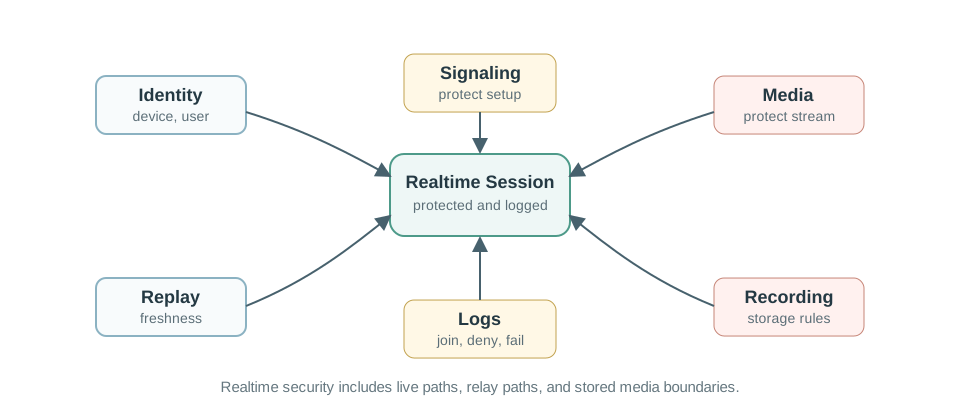
In Figure 14.3, begin with the identities allowed to create or join the session. Then verify signaling protection and media protection separately, because encrypting one does not secure the other. Continue through authorization and replay control to relay and fallback paths, and finish at logs and recording storage. The result connects the earlier role split to an end-to-end policy rather than a list of protocol acronyms.
Check:
- Identity: device, gateway, service, browser user, and operator identities.
- Signaling protection: session setup should be protected against interception and tampering.
- Media protection: use protected media transport for sensitive audio or video.
- Authorization: restrict who can start, join, view, record, or control a session.
- Replay control: stale media or commands should not be accepted as current action.
- Fallback: relay paths and degraded modes should preserve policy and logging.
- Recording boundary: live stream rules may differ from stored clip rules.
14.8 Worked Review: Door Station With Live View
This section: Worked Review: Door Station With Live View — A building door station needs a visitor button, live video, two-way audio, status updates, and recorded clips for review.
A building door station needs a visitor button, live video, two-way audio, status updates, and recorded clips for review. The team wants realtime media without losing reliable notifications.
Inspect Figure 14.4 to apply the chapter’s role split to one running system. Follow the visitor event first, then the live session, and finally the recorded evidence path.
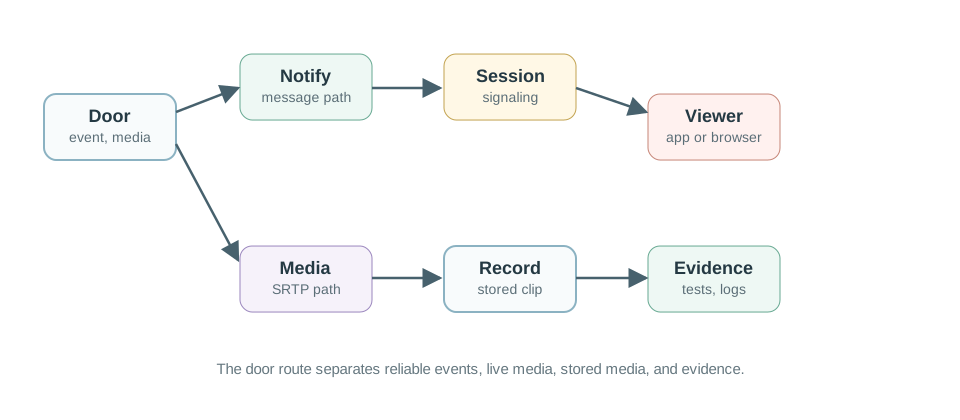
Read Figure 14.4 from the door station outward. A reliable notification wakes the application, session signaling negotiates who may join, and protected timed transport carries audio and video while a separate state channel updates the dashboard. After the interaction, the clip follows a reliable upload into controlled storage. The evidence records alongside those branches—delivery, latency, loss, authorization, and retention—show how the abstract review becomes an acceptance test.
14.8.1 Step 1: Name the Flows
Visitor Event
A button press or motion event needs reliable delivery to an app, dashboard, or service.
Live Call Setup
The system negotiates participants, media, codecs, permissions, and route.
Audio and Video
Timed packets carry live media while the receiver handles jitter, loss, and synchronization.
Clip Storage
Recorded media uses a reliable storage path with its own retention and access rules.
14.8.2 Step 2: Select Protocol Roles
One defensible route is:
Use separate paths for alerts, session setup, live media, status, and clips. Each has a different need.
- Notification and device state: MQTT, HTTP, or AMQP event path.
- Browser or app session setup: WebRTC signaling, SIP, or an application signaling service.
- Live media: SRTP or WebRTC media path with quality monitoring.
- Dashboard status: WebSocket or message subscription for current state and control feedback.
- Recorded clip: reliable upload and access-control path.
14.8.3 Step 3: Keep the Evidence Record
Realtime Protocol Evidence Record
Flows: notification, session setup, media, dashboard state, command, and recording.
Timing: target delay, jitter budget, receiver buffer, loss behavior, and degraded mode.
Security: identity, authorization, signaling protection, media protection, relay policy, and storage boundary.
Tests: allowed join, denied join, packet loss, network delay, relay fallback, recording access, and recovery after disconnect.
14.9 Realtime Selection Workflow
This section: Realtime Selection Workflow — Use this workflow before choosing a realtime protocol.
Use this workflow before choosing a realtime protocol.
14.10 Learning Route
This section: Learning Route — Use this chapter after the application-protocol overview and before worked examples that combine several protocol roles.
Use this chapter after the application-protocol overview and before worked examples that combine several protocol roles.
Use Figure 14.5 as a deliberate pass through the chapter rather than a list of related pages. Start with the application flow, then add protocol roles, timing evidence, and security proof in that order.
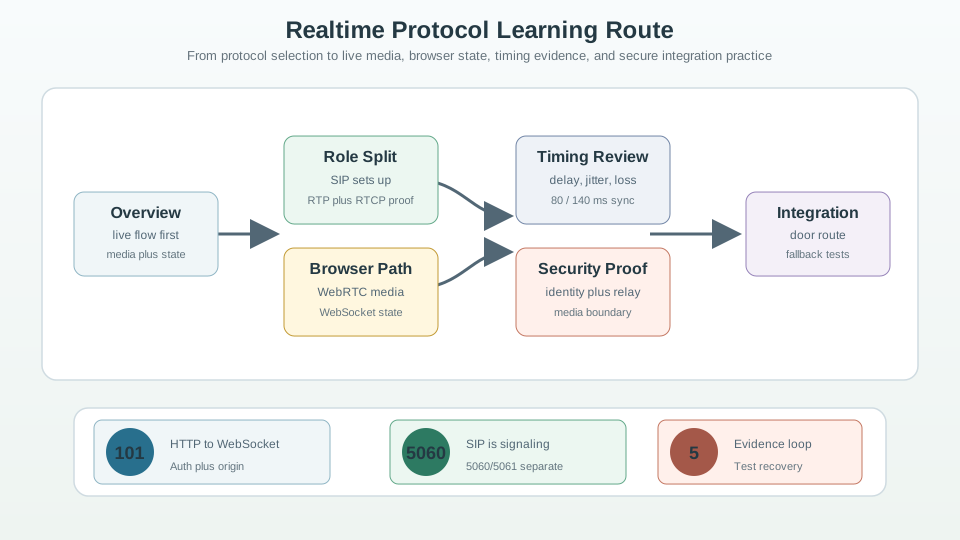
Follow Figure 14.5 from flow selection through the SIP/RTP role split and the WebRTC/WebSocket browser paths. The next stop adds latency, jitter, loss, and synchronization limits; the security stop then tests identity, protected signaling and media, relay, and recording boundaries. Finish with integration practice, where those separate observations become one evidence record. This route preserves the running narrative from need to proof.
Application Protocols Overview
Review protocol-selection basics before specializing in realtime paths.
Application Realtime Chapter
Compare this route with the related realtime chapter in the same module.
Worked Examples
Apply protocol role separation to realistic gateway and media designs.
Security and Transport
Deepen the network and security foundations behind realtime behavior.
14.11 Knowledge Check: Real-Time Protocol Workflows
This section: Knowledge Check: Real-Time Protocol Workflows
14.12 Common Pitfalls
This section: Common Pitfalls
A live dashboard update, a media session, and deterministic machine control have different timing models. Name the actual deadline and failure behavior.
The path that reliably delivers an event is not automatically suitable for live media. Separate notification, session setup, media, and recording flows.
Average delay can look acceptable while arrival variation makes playback unstable. Review jitter, buffers, and loss together.
TURN relays, gateways, media servers, and recorders are security boundaries. Include them in authorization, logging, and recovery tests.
14.13 Continue to the Next Part
This section: Continue to the Next Part — Carry this evidence into Realtime Protocols: Transport Selection, which begins with Deep Dive: How “Live” Rides On (and Escapes) HTTP.
Carry this evidence into Realtime Protocols: Transport Selection, which begins with Deep Dive: How “Live” Rides On (and Escapes) HTTP.
Find help
3 reviewed answers.
Where should I start in a module?
Open the module page from the sidebar to see its chapters in order. Use the module map to return to a topic you need.
Modules and pathsReviewed
What can I try when a project does not work?
Check the symptom, then work through the diagnostic steps. Keep the error message and the smallest example that reproduces it.
When you are stuckReviewed
How do interactive examples work?
Use the interactive guide to check how examples and simulations work before changing your project.
Interactive examples guideReviewed