14 Nursery Monitoring: Care Workflow
More
Depth: Practitioner
Progress saves as you read. Mark sections complete as you go; your progress appears in the sidebar.
- Podcast audio coming soon
- Character narration audio coming soon
14.1 Respond to the Nursery Alert
A nursery monitor supports a caregiver; it does not replace one. Smart baby monitoring uses connected sensors to observe an infant and the room, analyze signals, and bring potential concerns to a parent. Systems have evolved from audio intercoms to wearable sensors, environmental controls, and machine learning analytics. Their value depends on how those signals support care, not simply on how many measurements they collect.
Imagine a tired carer hears an alert at night. The carer must decide whether to check the child, change the room, seek help, or dismiss a bad reading. The room may be loud or dark, the device low on power, and the link intermittent. Two records may arrive out of order. The first screen needs to show what happened, when it happened, and what is known now without making the carer decode a long list.
The problem is uncertainty at the moment of action. An alert must identify the changed body or room signal, whether the sensor is working, and how recent the observation is. A quiet screen must not conceal a failed sensor. A single reading cannot establish a diagnosis, and a consumer device must not invite caregivers to outsource judgment or safe sleep practice.
This chapter maps the caregiver workflow before selecting sensors, then separates routine room correction from concerns that need human attention. We will follow device state, breathing evidence, and oxygen-trend alert limits through that workflow, examine the power and sensing chains behind them, and check what the evidence can support. This is the first of two nursery chapters; the related Baby Monitoring: Diapers, Privacy, and Trade-offs route extends the discussion of diaper events and family data choices.
KEY CONCEPTS
- Nursery alert
Check the sensor evidence before making a care claim.
- Caregiver handoff
A missed acknowledgement needs a timed second contact.
- Privacy boundary
Retain only the evidence needed for the care response.
14.2 Part Objectives
- Map the caregiver workflow before selecting sensors.
- Define safe nursery-monitoring claims and escalation paths.
14.3 Separate Comfort From Concern
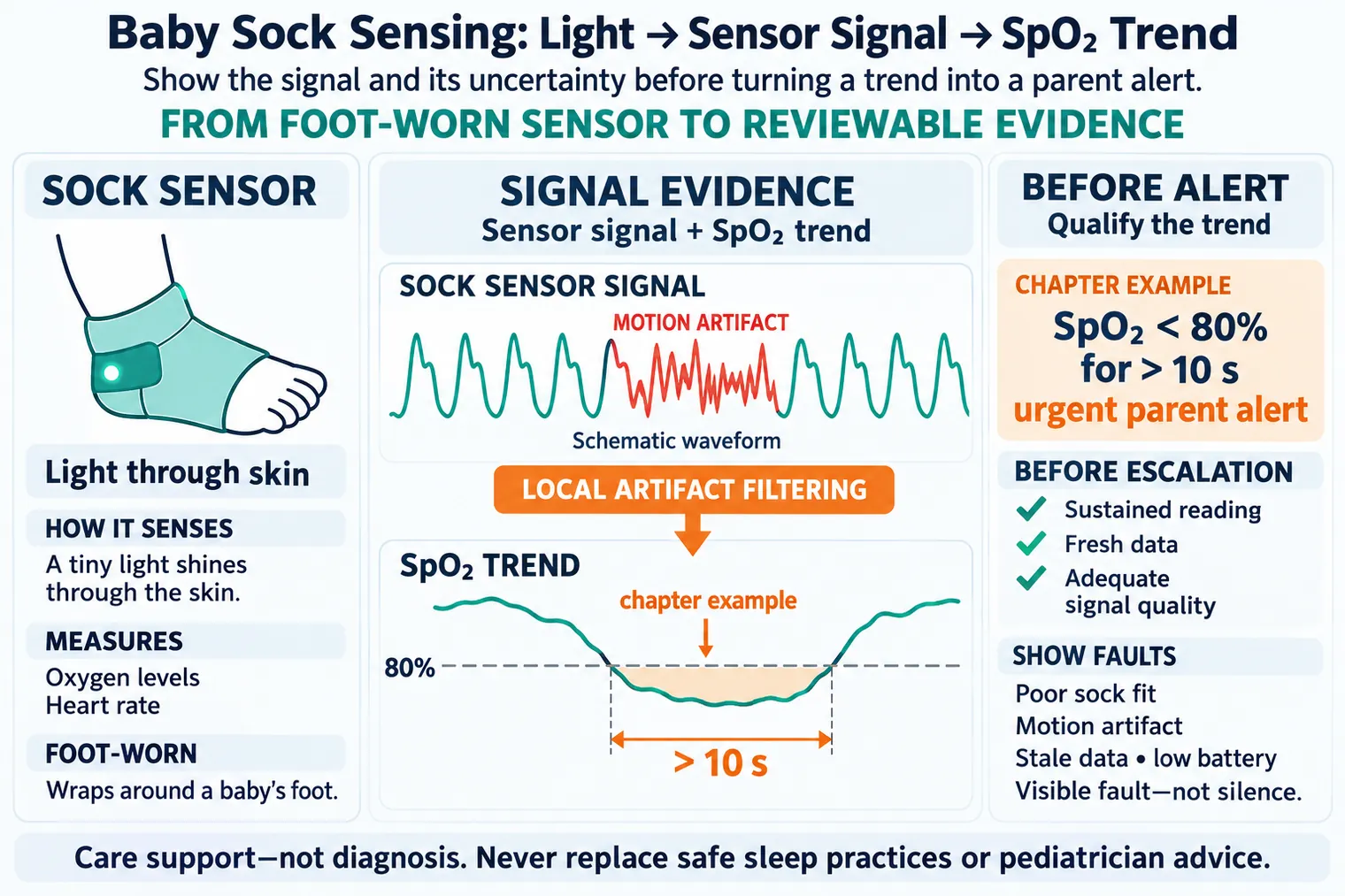
A smart nursery combines infant-facing sensors, room sensors, a local hub, cloud services, and parent-facing alerts. A sock may estimate oxygen levels and heart rate, a pad under the mattress detects breathing movements, and room sensors track temperature and humidity. An edge device or phone app checks the data every few seconds for unusual patterns. The system forms a closed loop: sense, analyze, and act, with alerts or environmental adjustments completing the loop within seconds rather than minutes.
Read this as two connected loops. The comfort loop handles temperature, humidity, light, noise, and routine settling. A thermostat can turn on cooling when the room gets too hot; a white noise machine may activate when the baby cries. The concern loop handles wearable fit, breathing motion, SpO2 (an estimate of blood oxygen saturation), heart-rate trend, diaper events, camera status, and parent acknowledgement. Keep room correction and uncertain vital-sign readings in separate paths.
If temperature exceeds the care plan’s safe limit or correction fails, notify the caregiver. A poor-quality breathing signal needs a separate visible fault. The engineering goal is to make useful signals visible, correct the environment when automation can do so safely, and route concerns to a person without hiding uncertainty. It is not to promise that the product prevents SIDS or diagnoses disease.
An audio monitor lets a parent hear a cry. Connected monitoring can also expose subtle changes in breathing or oxygen trends and adjust room conditions without constant manual checking. Those capabilities do not guarantee advance warning of distress. In the fictional workflow here, a clinician-set sustained oxygen threshold triggers a parent alert; the device cannot promise advance warning of a breathing emergency. Environmental automation likewise needs the care plan’s limits rather than a claim that it always maintains ideal sleep conditions.
14.3.1 When the Home Monitor Cannot Tell
Check Food and Drug Administration (FDA) authorization and intended use for infant vital-sign monitors: some devices are authorized and some are not. No monitor is authorized to prevent SIDS or replace safe sleep practices recommended by the AAP. Wellness devices can inform parents, but their role does not replace pediatrician advice, emergency care, or safe sleep setup. Distinguish wellness claims from medical-grade intended use before choosing either the device or the wording on its screen.
Follow the concern loop across the top of Figure 1. Before the app escalates, the reading has to be sustained, fresh, and clean enough to trust. The dashed branch makes poor sock fit or a flat battery a visible fault. The response stage then names the class, from routine status to clinical follow-up, and waits for acknowledgement. The comfort loop below asks the thermostat first when the room is warm. That separation keeps a room-control result from being mistaken for evidence about the infant.
The boundaries also give the screen a practical vocabulary. The care boundary says that the product supports caregiver awareness and safe sleep practices. The signal boundary makes a disconnected hub, low battery, or loose sock as visible as a measured trend. The response boundary distinguishes an automatic correction from an advisory, urgent attention, or care-plan escalation. A parent should be able to recognize which boundary applies without interpreting a raw sensor value alone.
14.4 Choose Sensors Around the Caregiver
With the two loops separated, map who will use each signal. A parent needs to know what happened, how certain the system is, what changed automatically, and what action is expected. A pediatrician or support team needs enough history to distinguish a real pattern from a loose sock, dead battery, Wi-Fi loss, blocked camera, or thermostat problem. More measurements alone do not create safer monitoring.
Start with the existing care setting: a healthy full-term infant at home, a former preterm infant following a clinician-approved plan, a travel crib, shared caregiver handoff, a night nanny, or a daycare nap room. Each changes consent, alert routing, retention, and acceptable sensor burden. Name the need before the sensor, and state whether the product aids daily care or makes a medical claim.
A BLE wearable may suit trend monitoring. A Wi-Fi camera or mattress pad may suit non-contact observation and parent reassurance. Thread, Zigbee, or Matter room devices may handle environmental correction without streaming infant health data. Each source has a blind spot: a room sensor shows heat or damp, a mat shows motion, a worn device shows a body signal, and a camera shows a scene. Room temperature does not directly measure infant oxygen, and a diaper event is not a continuous breathing measurement.
The link must also fit the job. Bandwidth is how much data a link carries in a set time. Latency is the wait from an event to an alert or response. For a wearable SpO2 trend, BLE GATT notifications may carry readings to a phone or hub. Local artifact filtering checks disturbances in the signal before the app escalates a sustained, fresh reading of adequate quality.
For room temperature, the hub may ask a thermostat to correct first, keep observing heart-rate and motion trends, and send an advisory rather than a critical alarm. For smart diapers, the event window follows diaper changes, so a low-friction risk or care reminder fits better than continuous surveillance. Wearable and non-contact options therefore need different claims and response paths, even when their results appear in the same app.
A change in the measurement goal can change the appropriate sensor. If parents consent to a skin patch for infant body temperature during sleep, use a validated skin-temperature patch with its limits stated. Room air temperature is not a direct body-temperature measurement, and camera pixels do not provide the stated calibrated contact measurement. Conversely, a family asking for non-contact crib observation does not need a wearable forced into the workflow. A camera or pad can fit that request when the limits of its signal remain explicit.
Power can constrain that choice before battery-life arithmetic begins. The following detail preserves the electrical example; the separate Math Bridge develops it further.
At 3.0 V, the 10 mW BLE state draws 3.33 mA. A 15 ohm coin cell then sags only 0.050 V and holds 2.95 V. A 300–500 mW Wi-Fi state asks for 100–167 mA, causing 1.50–2.50 V of sag. The same charged cell falls to 1.50–0.50 V, so Wi-Fi can brown out before battery-life arithmetic even begins. These are the stated radio-state and cell assumptions, rather than a promise for every wearable.
14.5 Make the Alert Actionable
Now return to the tired carer. Keep the alert’s source, quality, observation time, device state, and plain reason together. Identify which child or room condition triggered it and whether the body, sound, video, nappy, or room sensor is usable now. Show a failed or disconnected sensor as unavailable so silence cannot be mistaken for safety. Low battery, motion artifact, camera obstruction, stale hub data, and poor sock fit are product states that must remain visible.
Name which sign starts the alert, how long it must last, and which poor readings are rejected. Separate routine status, sensor-quality warning, comfort correction, urgent parent attention, and clinical follow-up advice before choosing tones, colors, or push messages. Explain whether the cause is a sustained SpO2 trend, absent breathing motion, elevated room temperature, a diaper pattern, low signal quality, or a missed heartbeat. A room correction and a wearable warning require different responses.
14.5.1 Before Clearing an Alert
Before clearing an alert, check the child and room against its specific reason. A weak radio or battery changes how much trust to place in silence. Keep the observed condition, the carer’s follow-up, and any medical judgment separate. The screen should make it easy to check the right device and place, the event time, source health, stated measurement range, missing inputs, and whether an old rule shaped the result. It should also make help, safe fallback, and a later review possible.
Plan the handoff explicitly: primary parent, secondary caregiver, shared account, quiet hours, acknowledgement timeout, escalation channel, and support contact path. A missed acknowledgement needs a timed second contact. If a retry repeats an event ID after acknowledgement, retain that history and show retry status without treating the delivery as a new urgent event. If fresh, high-quality SpO2 readings pass the infant-specific clinician-reviewed threshold for the required interval, escalate through the reviewed care plan with that qualified evidence; escalation still does not establish a diagnosis.
Trust also depends on testing the hard night. Lower power, cover the sensor, break the link, delay a cloud reply, send the same event twice, and let two sources disagree. Check that the alert remains clear, that muting noise does not hide risk, and that a local safe path remains. Show old values, weak sources, and mode changes; keep raw evidence long enough for the appropriate review and let people correct bad states. Retest after changes to the device, site, rule, link, or owner.
Keep the review short enough for the difficult moment but complete enough to explain the next step. The carer should see what to check and when to seek human help. A later reviewer should be able to follow the human need through the source, quality check, and response, including the limits at each stage. That record ties reassurance to evidence rather than to an apparently normal screen.
Privacy is part of that care workflow. Gather only what the job needs, limit access, give the family clear control, and set a retention period. Prefer edge cry detection, local video masking, short retention windows, role-based access, and explicit sharing controls before storing nursery audio or video in the cloud. Protect data on the device and link, and make owner changes and resets safe. The record should support the care response without turning a private room into unnecessary surveillance.
14.6 Follow a Diaper Signal to Its Evidence
The diaper case shows why a sensing chain and a care claim must remain distinct. Self-powered smart diapers use urine-activated biofuel cells generating approximately 0.5 V DC. Removing the battery avoids the button-battery ingestion hazard and charging burden associated with that power source, enabling disposable sensing. A possible UTI risk pattern still needs prospective validation, including any claimed lead time.
In one self-powered UTI-monitoring design, urine activates a paper battery and reaches a paper-based colorimetric nitrite sensor. An LED, urine-absorbing strip, reagent strip, active photodiode, and reference photodiode form the sensing chain. The circuit converts the optical reading to a PWM waveform, and a BLE module sends it to the caregiver. This is sensing and communication, not diagnosis: device state and uncertainty still belong in the caregiver workflow.
Multi-sensor pattern analysis and an early-detection algorithm need performance evidence as well as a plausible architecture. The worked example below separates detection performance from assumed clinical benefit, so that a risk reminder does not become an unsupported outcome claim.
Sensitivity is true positives divided by true positives plus false negatives. Specificity is true negatives divided by true negatives plus false positives.
Consider the hypothetical clinical-trial cohort of 1,000 infants over 180 days with 82 actual UTIs. The algorithm flags 103 alerts: 71 correct (true positives), 32 wrong (false positives), and 11 missed UTIs (false negatives). It flags 71 of 82 UTI episodes, giving 86.6% episode-level sensitivity. Of 103 alerts, 71 match an episode, giving 68.9% positive predictive value. Daily specificity needs the number of UTI-positive infant-days, which is not supplied.
The 48-hour lead time and clinical benefit are model assumptions, not demonstrated outcomes. Under the stated risk assumptions, only the 71 alerted cases are modeled as benefiting: 71 × (12.5% − 4%) = 6.04 expected fewer pyelonephritis cases. This is not an observed clinical result, and any cost estimate depends on the assumed per-case cost.
Summary
Start with the child, caregiver, and expected action, then choose sensors and links. Separate comfort correction from concerns about infant signals. A useful alert combines fresh, sustained evidence with signal quality, device state, a plain reason, and an identified responder. Faults must be visible, and acknowledgement and escalation must survive a difficult night.
Wearable, non-contact, and diaper sensing each have limits. Radio power can constrain a wearable; a working sensing chain does not establish a diagnosis; an algorithm’s detection metrics do not prove clinical benefit. Keep intended use, safe sleep practices, human care, and family privacy explicit throughout the design.
Ask whether the design complements safe care practices. Connect each trustworthy observation to an owned care action, and show clearly when the system cannot tell.
Carry this workflow into Nursery Monitoring: Reliability and Validation, beginning with reliability, state, and timing.