15 Nursery Monitoring: Reliability and Validation
15.1 Start With the Decision
A quiet room can mean sleep, a dead sensor, or a lost link. State and timing rules must tell those cases apart.
15.2 Route Overview
This is part 2 of 2. Review Nursery Monitoring: Care Workflow for the preceding evidence.
15.3 Learning Objectives
- Model nursery monitor state, timeout, and alert rules.
- Test sensor, network, power, and notification failures.
15.4 Chapter Roadmap
- Reliability Needs State and Timing
- Checkpoint: Care Support Boundaries
- For Kids: Meet the Sensor Squad!
- Video: Baby Monitoring with IoT
- The Closed-Loop Smart Nursery
- Checkpoint: Nursery Architecture
- SIDS Prevention and Breathing Monitoring
- SpO2 Alert Logic Walkthrough
- Wellness vs Medical Device
- Checkpoint: SpO2 Alert Limits
- Continue to Part 2
15.5 Reliability Needs State and Timing
A robust baby-monitoring pipeline records more than readings. The wearable firmware should publish SpO2, pulse rate, accelerometer motion, sensor-fit status, battery level, firmware version, sampling interval, sequence number, clock source, and signal-quality indicator. The hub should track BLE GATT connection state, RSSI, missed packets, retry counts, Wi-Fi status, local queue depth, and last successful cloud sync.
The backend should model monitoring as a state machine. Paired, warming up, baseline learning, normal, poor signal, comfort correction, parent advisory, urgent alert, acknowledged, resolved, device offline, and support-needed are separate states. Each transition needs a timestamp, source device, confidence score, data-quality flag, actor, and notification channel such as local chime, app banner, APNs, FCM, SMS fallback, or caregiver dashboard.
For video and audio paths, design privacy and availability together. A camera stream may use WebRTC or SRTP for live viewing, local inference for cry or motion detection, TLS for API traffic, and short-lived tokens for shared access. If the camera is unplugged, blocked, muted, or unable to upload, the app should say so directly instead of continuing to display stale “all clear” status.
Clinical-sounding numbers also need metadata. SpO2 and heart-rate values should carry averaging window, motion quality, sensor fit, algorithm version, baseline period, and whether the reading is suitable for trend display. Smart diaper events should separate moisture detection, pH or biomarker interpretation, elapsed time since wetting, and whether a caregiver confirmed the diaper change. Without this metadata, a support team cannot tell the difference between a real trend, a noisy sensor, a late notification, and an app display bug.
- Device state: Pairing state, wearable fit, battery, firmware, calibration, sampling rate, signal quality, clock skew, hub connectivity, and heartbeat age.
- Alert state: Event id, sensor sources, threshold window, confidence, data freshness, parent acknowledgement, escalation timeout, and resolution reason.
- Privacy state: Account role, consent version, video retention, recording permission, export/delete request, shared caregiver access, and cloud-processing setting.
 Checkpoint: Care Support Boundaries
You know:
- A smart nursery has at least two loops: comfort correction for room conditions and concern escalation for wearable, breathing, diaper, camera, and acknowledgement signals.
- Device, alert, and privacy state are part of the monitoring result; loose wearable fit, stale hub data, blocked camera, low battery, and consent version cannot be hidden behind an “all clear” screen.
- The product supports caregiver awareness and safe sleep practice, but it must not imply that a notification replaces a pediatrician, emergency care, or a safe crib setup.
15.6 For Kids: Meet the Sensor Squad!
The Sensor Squad goes on a nighttime mission to protect Baby Maya while she sleeps!
15.6.1 Baby Maya Night Monitoring
It was bedtime at Maya’s house, and four members of the Sensor Squad were getting ready for the most important job of all — watching over baby Maya while she slept!
Oxy the Oxygen Sensor was snuggled into a tiny sock on Maya’s foot. “I’m like a tiny flashlight! I shine a red light and an invisible light through Maya’s skin. When her blood carries lots of oxygen — which is good! — the lights come back looking one way. If the oxygen starts going down, the lights change, and I send an alert IMMEDIATELY. I check hundreds of times every minute!”
Lila asked, “How can light tell you about oxygen?”
Oxy explained: “Blood with oxygen is bright red, and blood without oxygen is dark red. My lights can see the difference! It’s like how a ripe red apple looks different from a green one — color tells you what’s inside!”
Breathy the Mattress Sensor was hidden under Maya’s mattress pad, flat as a pancake. “I can feel Maya’s tiny chest going up and down with every breath — even through the mattress! If she stops breathing for 20 seconds, I sound the alarm. I don’t even need to touch her — I can feel the pressure changes!”
Max whispered, “That’s like feeling footsteps on the floor from another room!”
Thermo the Room Sensor hung on the nursery wall, keeping watch on the whole room. “Babies need the room to be JUST right — between 68 and 72 degrees. If it gets too warm, overheating can be dangerous. If it gets too cold, Maya might wake up crying. I tell the smart thermostat to fix the temperature before Maya even notices!”
Wetty the Diaper Sensor was the most amazing one. “I don’t even need a battery! When Maya’s diaper gets wet, the liquid itself makes electricity — like a tiny science experiment! That electricity powers me up just long enough to send a message to Maya’s parents’ phones: ‘Time for a diaper change!’ And I can even check if the wetness pattern is unusual, which might mean Maya has an infection.”
Bella was amazed: “The pee makes its OWN electricity?!”
“Exactly!” said Wetty. “Scientists call it a biofuel cell. The special chemicals in urine react with tiny electrodes and — ZAP! — just enough energy to send one message!”
By morning, Maya had slept perfectly. Oxy reported normal oxygen all night. Breathy counted every breath. Thermo kept the room at exactly 70 degrees. And Wetty sent just two diaper alerts.
Maya’s parents smiled at their phones: “Everything green. Maya slept great!”
15.6.2 Key Words for Kids
| Word | What It Means |
|---|---|
| Pulse Oximeter | A sensor that uses light to measure how much oxygen is in your blood |
| SpO2 | Short for “blood oxygen saturation” — it should be 95-100% for healthy people |
| SIDS | Sudden Infant Death Syndrome — a scary thing that can happen to babies during sleep, which monitors try to help prevent |
| Biofuel Cell | A tiny battery that makes electricity from body fluids like urine |
| Closed-Loop System | A system that senses a problem, figures out what to do, and fixes it automatically |
| Wellness Device | A gadget that helps you stay healthy but is NOT a medical tool — it helps but doesn’t replace doctors |
15.7 Video: Baby Monitoring with IoT
Learn how connected baby monitors and smart diapers use IoT sensors to track infant health metrics, detect early signs of urinary tract infections, and provide parents and healthcare providers with actionable insights for proactive care.
The care boundaries above now turn into a system architecture question: which signals stay local, which alerts reach a parent, and which actions can the nursery safely automate?
15.8 The Closed-Loop Smart Nursery
Modern baby monitoring has evolved from simple audio monitors to comprehensive closed-loop systems that sense, analyze, and act on infant health data. The architecture follows a continuous sense-analyze-act cycle with latency requirements measured in seconds for safety-critical alerts:
Figure 15.1 shows where the loop closes, and where this chapter insists it must not.
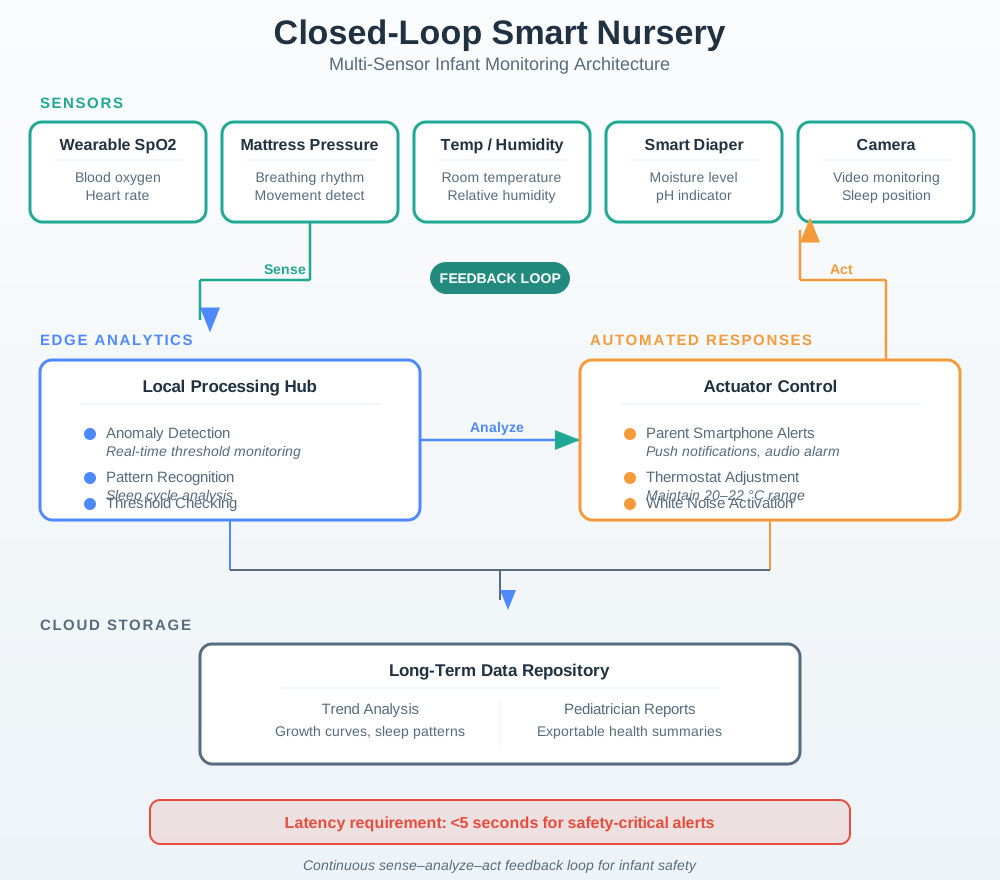
Read the three numbered stages left to right. The sense column mixes very different signals, from a wearable reading blood oxygen to a camera, so the first design job is deciding which of them may ever raise an alarm. The analyse column does more than threshold checking. Alongside pattern detection it tracks signal quality, freshness, and device state, which is how the system tells a real event from a loose sensor. The act column then splits, and the split is the point. Comfort corrections close a loop back to the room, while a concern escalates to a parent and waits for acknowledgement. The footer of Figure 15.1 keeps that boundary explicit: the loop supports care, it does not replace it.
15.8.1 Data Flow Architecture
The smart nursery data pipeline shows how raw sensor readings transform into actionable parent alerts and automated environmental responses:
Figure 15.2 adds what the previous diagram left out: how often each sensor speaks, over which radio, and how quickly its output must arrive.
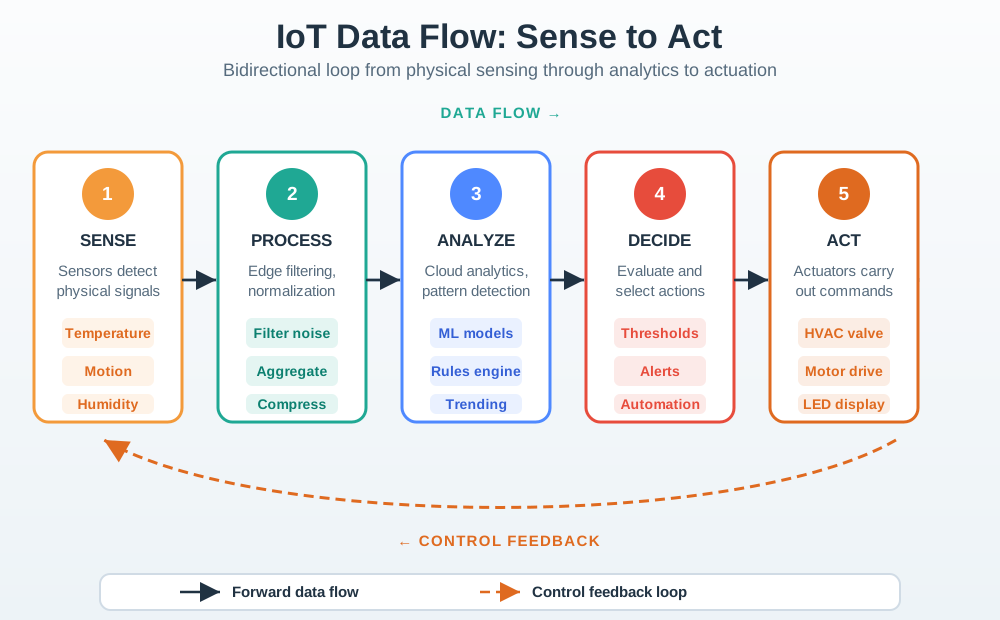
Start on the left and compare the rates. A room sensor reports once every ten seconds, a mattress pad ten times a second, and a camera up to thirty frames a second, so they cannot share one radio or one power budget. The figure names a different link for each. In the middle, the gateway runs its checks locally, and beside them it keeps a health record of connection state, missed packets, and last cloud sync. The right-hand column is where that work pays off. Only a critical alert takes the fast path to a phone, under five seconds, while trend data goes to the cloud at its own pace. Figure 15.2 makes latency a design input rather than an afterthought.
15.8.2 Smart Nursery Sensor Integration
Figure 15.3 shows why one row of the table below needs no wearable at all.

The shape is the argument. The unit is a flat disc, thin enough to lie under a mattress without being felt through it, which is what lets it observe breathing motion and bed exit while staying out of the cot itself. Its face carries only a brand mark, with no display, because nobody looks at it once it is placed. A small port and a pair of buttons on the rim are the only controls, so setup happens once and the device then disappears. Read Figure 15.3 as a reminder that placement is a design decision. This sensor buys contact-free coverage and pays for it by depending on how the bed is made.
| Device | Primary Sensors | Data Collected | Sampling Rate | Parent Value |
|---|---|---|---|---|
| Wearable (sock/band) | Pulse oximeter (SpO2), accelerometer | Blood oxygen, heart rate, movement, sleep position | 1 Hz (SpO2), 25 Hz (accel) | Breathing monitoring, SIDS risk reduction |
| Mattress Pad | Piezoelectric pressure array | Breathing motion, sleep position, bed exit | 10 Hz | Contact-free monitoring, no wearable needed |
| Smart Diaper | Moisture, temperature, pH | Wetness, diaper rash risk, hydration | Event-driven | Reduce unnecessary changes, early UTI detection |
| Room Sensors | Temp, humidity, sound, light | Sleep environment quality | 0.1 Hz (env), 16 kHz (audio) | Optimal sleep conditions |
| Camera | HD video + IR night vision | Visual monitoring, movement detection | 15-30 fps | Remote visual check, recording |
| White Noise Machine | Microphone (feedback) | Cry detection, ambient noise levels | 16 kHz | Automated soothing response |
Figure 15.4 turns that table into one screen, and shows what has to sit beside the numbers on it.
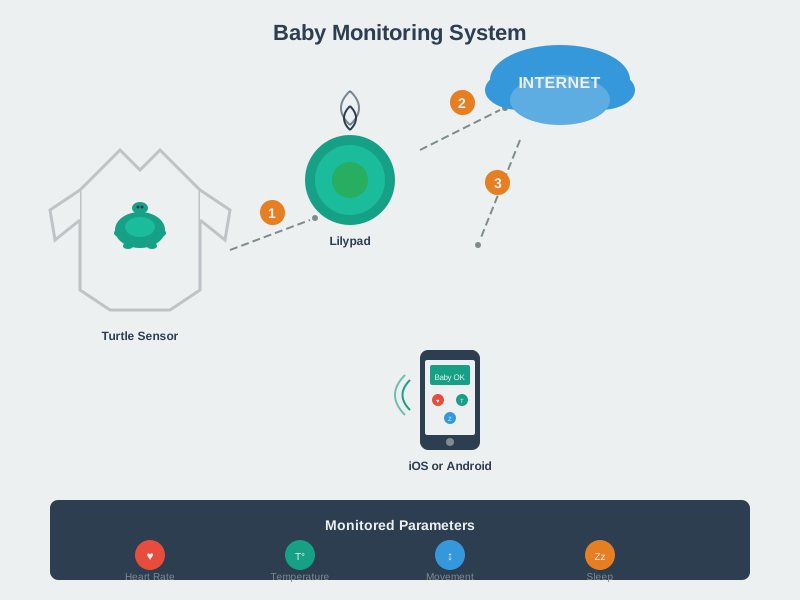
Follow the arrows from left to right. Five different sensors feed one hub, so the parent never has to watch five apps, and that consolidation is the product. Inside the hub, notice that device state sits next to the analytics rather than inside a settings menu. Signal quality, wearable fit, battery, and hub connectivity are treated as readings in their own right. The parent view on the right then shows a sample of vital signs, and the figure immediately labels them as example readings rather than an all-clear. Figure 15.4 makes the point about honest interfaces. A dashboard that cannot show why a number might be wrong will be read as reassurance whether it has earned it or not.
15.8.3 Communication Protocols in the Nursery
Different sensors use different wireless protocols based on their data rate and power requirements:
| Sensor Type | Protocol | Why This Protocol | Power Profile |
|---|---|---|---|
| Wearable SpO2 | BLE 5.0 | Low power, short range, continuous streaming | ~10 mW active, coin cell battery |
| Mattress Pad | BLE or Zigbee | Moderate data rate, always-on | ~5 mW, wall-powered |
| Smart Diaper | BLE beacon | Minimal data (event only), ultra-low power | Self-powered (~0.5V from biofuel cell) |
| Room Sensors | Zigbee/Thread | Mesh capability for whole-room coverage | ~3 mW, wall-powered |
| Camera | Wi-Fi (2.4/5 GHz) | High bandwidth for video streaming | ~500 mW, wall-powered |
| Hub/Gateway | Wi-Fi + BLE/Zigbee | Aggregates all sensor data, cloud upload | ~2W, wall-powered |
Checkpoint: Nursery Architecture
You know: Begin with closed-loop monitoring is a sense-analyze-act cycle, not a dashboard alone; critical alerts need seconds-level latency while room corrections can be advisory first. Next consider sensor choice follows data shape: SpO2 at 1 Hz, mattress pressure at 10 Hz, room environment at 0.1 Hz, audio at 16 kHz, and video at 15-30 fps. Then test protocol choice follows power and payload: a wearable can use BLE around 10 mW, while a camera uses Wi-Fi because video needs far more bandwidth and wall power.
15.9 SIDS Prevention and Breathing Monitoring
Sudden Infant Death Syndrome (SIDS) remains a leading cause of infant mortality, driving demand for continuous monitoring:
| Statistic | Value | Implication for IoT |
|---|---|---|
| SIDS deaths (US annual) | ~3,400 | Large addressable market for monitoring |
| Peak risk age | 1-4 months | Critical monitoring window |
| Back sleeping reduction | 50% SIDS decrease | Position monitoring valuable |
| Breathing cessation threshold | 20 seconds (apnea) | Real-time detection required |
15.9.1 How Breathing Monitors Work
Wearable pulse oximeters (e.g., Owlet Smart Sock) use photoplethysmography (PPG) to measure blood oxygen saturation:
Figure 15.5 traces one blood-oxygen reading from two LEDs to an alarm decision, and shows how much processing sits between them.
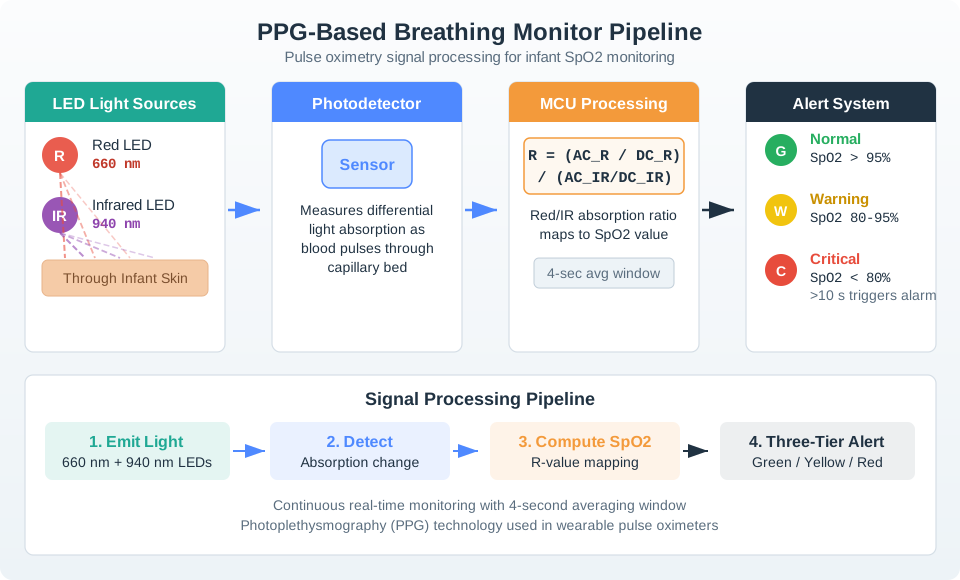
Read the row from the left. Two LEDs, one red and one infrared, shine through the skin, and the choice of two wavelengths is the whole trick, because blood carrying oxygen absorbs them differently from blood that is not. The photodetector beside them does not measure oxygen at all. It measures how absorption changes as blood pulses. The processing block turns that pair of changing signals into a ratio, then averages it over four seconds, which is why a monitor cannot react instantly. Only then do the three alert bands on the right apply their thresholds. Figure 15.5 shows why the critical band also demands that the reading persist. Step-by-step PPG process:
- LED Light Source: Red (660nm) and infrared (940nm) LEDs shine through skin
- Photodetector: Measures light absorption changes with each heartbeat
- SpO2 Calculation: Ratio of red/IR absorption correlates to oxygen saturation
- Algorithm: Continuous monitoring with 4-second averaging window
- Alert Threshold: SpO2 < 80% for > 10 seconds triggers notification
15.10 SpO2 Alert Logic Walkthrough
The monitor combines an oxygen threshold with a time window so it reacts to sustained desaturation rather than brief noise spikes.
| Time Window | Example SpO2 | System Interpretation | Action |
|---|---|---|---|
| 0-15 s | 97-98% | Normal baseline | Continue monitoring |
| 16-24 s | 90-94% | Early decline but still above the alert threshold | Highlight as warning trend only |
| 25-34 s | 78-79% for 10 s | Below the 80% threshold long enough to confirm a real event | Trigger urgent parent alert |
| 35-45 s | 75-77% | Ongoing critical desaturation | Maintain alert and keep sampling |
| 46-60 s | 82-95% | Recovery after intervention or repositioning | Clear alert after the safe window is restored |
Design takeaway: A 4-second averaging window plus a 10-second alert duration reduces false alarms from motion or short-lived signal dropouts.
15.10.1 Accuracy vs. Medical Grade
Understanding the accuracy gap is critical for setting appropriate expectations:
| Metric | Consumer Monitor | Medical Pulse Oximeter | Clinical Impact |
|---|---|---|---|
| SpO2 Accuracy | +/- 3% | +/- 2% (FDA Class II) | Consumer detects trends, not absolutes |
| Heart Rate Accuracy | +/- 5 BPM | +/- 1 BPM | Sufficient for anomaly detection |
| Motion Artifact Rejection | Basic (accelerometer) | Advanced (adaptive filtering) | False alarms during movement |
| Response Time | 4-8 second averaging | 2-4 second averaging | Medical devices respond faster |
| False Alarm Rate | ~5-15% of nights | < 1% | Consumer devices cause parent anxiety |
Critical insight: Consumer monitors detect desaturation trends, not absolute values. A reading of “92% SpO2” from a consumer device could actually be anywhere from 89-95% — the value is in detecting a DROP from the infant’s personal baseline, not in the absolute number.
15.11 Wellness vs Medical Device
Consumer baby monitors (Owlet, Snuza, Miku) are marketed as wellness devices, not medical devices. They are NOT FDA-cleared for SIDS prevention or apnea detection. Parents should never rely solely on these devices for infant safety. The American Academy of Pediatrics recommends safe sleep practices (back sleeping, firm mattress, no loose bedding) over electronic monitoring.
Regulatory context: In 2021, the FDA issued a warning letter to Owlet regarding the Smart Sock, leading to its temporary withdrawal. The product returned as a “wellness” device with modified marketing claims. This illustrates the regulatory sensitivity around infant health monitoring devices.
Checkpoint: SpO2 Alert Limits
You know:
- A sustained alert combines value and time: this chapter’s example waits for SpO2 below 80% for more than 10 seconds, after a 4-second averaging window.
- Consumer +/- 3% SpO2 accuracy overlaps medical +/- 2% readings often enough that the safer interpretation is trend change, not diagnosis from one number.
- False alarms matter operationally: a 5-15% nightly false-alarm rate can teach caregivers to silence alerts, so sensor quality and multi-signal confirmation are safety features.
15.12 Continue to Part 2
Continue with Baby Monitoring: Diapers, Privacy, and Trade-offs.
15.13 Continue Your Route
This final part closes the route from Reliability Needs State and Timing through Continue to Part 2. Return to Nursery Monitoring: Care Workflow or continue from the applications module index.