19 Python BLE: Runtime Boundaries and Positioning
More
Depth: Practitioner
Progress saves as you read. Mark sections complete as you go; your progress appears in the sidebar.
19.1 Start With the Decision
This section: Start With the Decision — Bleak is the Python tool used here for Bluetooth Low Energy (BLE).
Bleak is the Python tool used here for Bluetooth Low Energy (BLE). Its scanner finds devices; its client connects to one and subscribes to notifications, updates the device sends. Measure each role’s connection, scan, and notification timing limits, including how it recovers after a dropped connection. Keep those limits visible before using signal readings to estimate position.
19.2 Route Overview
This section: Route Overview — This is part 3 of 3.
This is part 3 of 3. Review Python BLE: RSSI Smoothing and Zones for the preceding evidence.
19.3 Learning Objectives
This section: Learning Objectives
- Separate Bleak scanner, client, and notification roles.
- Choose a BLE positioning method from measured runtime limits.
19.4 Chapter Roadmap
This section: Chapter Roadmap
- Deep Dive: Bleak Role Boundaries and Runtime Limits
- Reference: BLE Quick Reference Card
- Indoor Positioning with BLE Beacons
- Summary
- Worked Example: RSSI-to-Distance Calculation and Zone Classification
- Decision Framework: Choosing BLE Python Library (bleak vs alternatives)
- Common Mistake: Not Handling BLE Disconnections in Long-Running Scripts
- Common Pitfalls
- 1. Not Awaiting bleak Coroutines
- 2. Scanning by Name in Noisy Environments
- 3. Blocking the asyncio Event Loop in Notification Callbacks
- 4. Assuming Consistent Service/Characteristic Handle Order
- What’s Next
- Key Takeaway
19.5 Deep Dive: Bleak Role Boundaries and Runtime Limits
This section: Deep Dive: Bleak Role Boundaries and Runtime Limits — Bleak is a Central/client API.
Bleak is a Central/client API. A modern BLE controller can time-slice more than one role, but Bleak exposes the Python host as the scanner, initiator, and GATT client. If the same product also needs a phone to discover the Python host or read a characteristic served by it, that Peripheral/server role needs firmware support or a platform-specific peripheral stack.
The scaling constraint is usually scheduling, not Python byte throughput. A gateway subscribed to 12 peripherals sending one 20 byte notification each second handles only about 240 payload bytes per second, but the controller still schedules every connection event and the OS backend still delivers every callback. Keep notification callbacks short: decode the packet, attach a timestamp, enqueue the record, and return. File writes, MQTT publishes, and database retries belong outside the BLE callback path.
ATT framing also changes what a successful trace proves. With the default ATT MTU, a notification commonly carries up to 20 application bytes after overhead. A 38 byte sensor report needs MTU negotiation or application-level chunking with an order field and a missing-chunk timeout. Otherwise a clean connection log can still hide truncated data.
| Runtime concern | Evidence to keep in the review log |
|---|---|
| Role fit | Python host is named as Central/GATT client; firmware tag is named as Peripheral/GATT server. |
| Callback pressure | Notification handler returns quickly and pushes timestamped records into an async queue. |
| Payload size | MTU or chunking plan covers records larger than one notification payload. |
| Disconnection policy | Disconnect callback, bounded backoff, reconnect/rescan policy, and stale-sensor interval are recorded. |
Disconnects are normal events. For a 2 second sample period, marking a sensor stale after 10 seconds means five missed samples; that explicit timing assumption is easier for the rest of the IoT pipeline to reason about than a generic “retry forever” loop.
19.6 Reference: BLE Quick Reference Card
This section: Reference: BLE Quick Reference Card
19.6.1 BLE Cheat Sheet
19.7 Indoor Positioning with BLE Beacons
This section: Indoor Positioning with BLE Beacons
19.7.1 Start With the Story
Test One Doorway Claim Before Acting on It
Picture a cart reported on the wrong side of a fire door because a person blocked one beacon. A location estimate must carry its uncertainty into the decision.
Bluetooth Low Energy is the short-range radio system used by the beacons; it is shortened to BLE. Received signal strength means the radio power that arrives at a receiver. RSSI means received signal strength indicator, the radio’s reported estimate of that power.
Walk a marked route twice, then repeat it with a blocked beacon. Keep anchor positions, time, BLE readings, RSSI filter settings, estimated position, residual error, and the action that would follow.
This route test does not prove room-level accuracy everywhere. The deeper sections cover calibration, distance models, trilateration, filtering, error, and fallback rules.
A beacon signal near a doorway is not yet a position. RSSI, calibration, anchor placement, filtering, movement, walls, and uncertainty decide whether a location claim is useful or misleading.
Read this chapter from the final decision backward. Ask what the system will do with the position, then check whether the beacon evidence is strong enough for that action.

19.7.2 From Beacons to a Position
In Building BLE Apps on ESP32 you built a scanner, a GATT temperature server, and an iBeacon transmitter. This chapter takes those beacons and answers a bigger question: can a device work out where it is indoors, where GPS cannot reach? The answer is yes — with three beacons, their signal strengths, and some honest math about how approximate radio distance really is.
19.7.3 Build the Positioning System, Step by Step
Before writing the solver, inspect Figure 19.1 to see what three fixed beacons contribute and why one RSSI reading cannot produce a two-dimensional position. The picture frames the result as an estimate from noisy distance proxies, not as GPS-like ground truth.
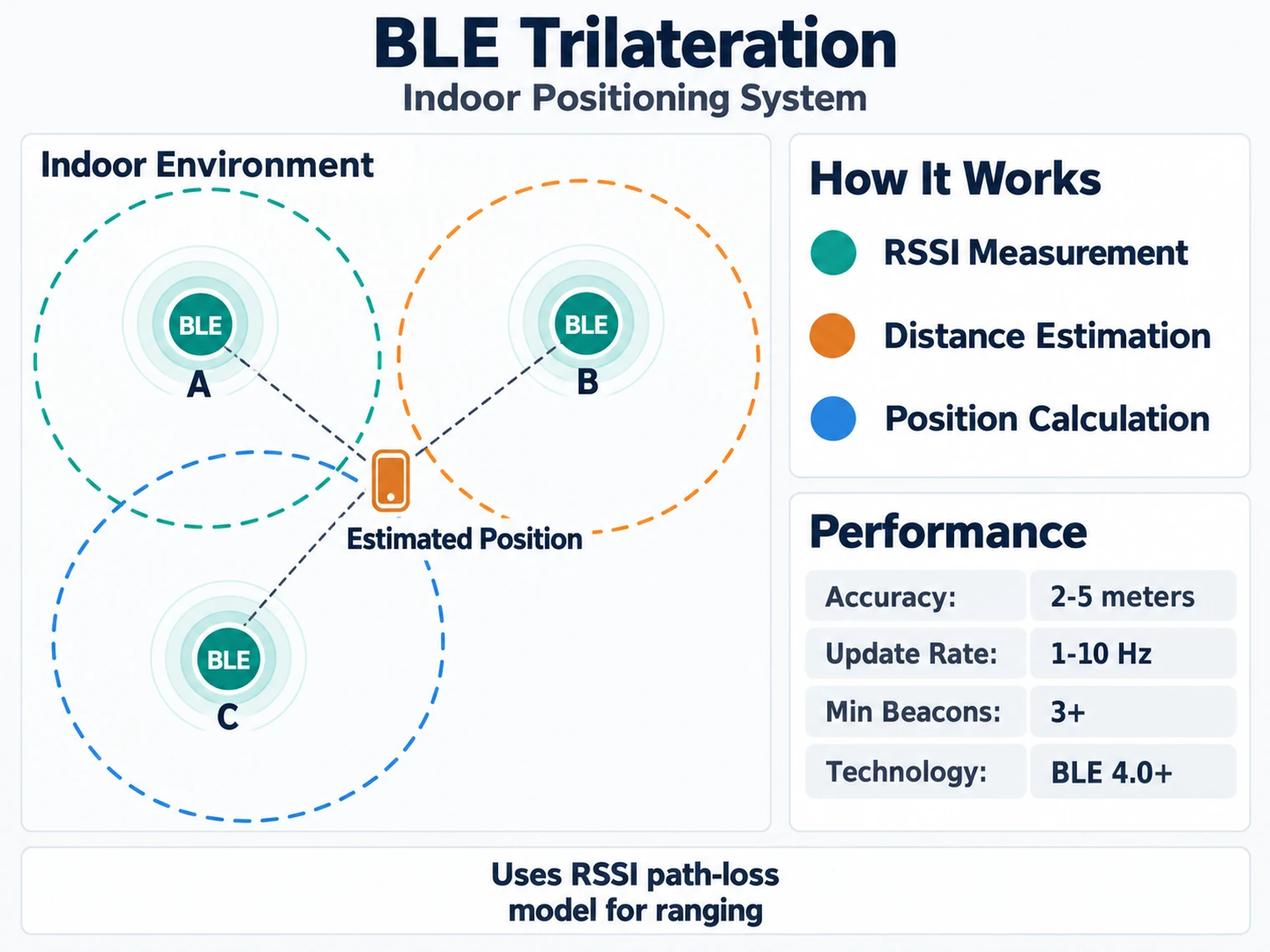
Read Figure 19.1 from each known beacon position to its RSSI-derived range circle, then inspect the region where all three circles come closest to intersecting. A single beacon can only suggest “near” or “far”; three constraints allow a best-fit (x, y) estimate. The imperfect overlap is meaningful: multipath, body shadowing, antenna orientation, and the path-loss model create residual error, which the implementation must retain rather than hiding behind an exact coordinate.
| System element | Role in the positioning lab | What the code uses |
|---|---|---|
| Beacon 1 | Fixed anchor at (0, 0) | RSSI converted to distance d1 |
| Beacon 2 | Fixed anchor at (5, 0) | RSSI converted to distance d2 |
| Beacon 3 | Fixed anchor at (0, 5) | RSSI converted to distance d3 |
| Mobile device | Unknown point being estimated | Best-fit (x, y) position |
| Residual error | Quality check for the estimate | Larger error means noisy RSSI or a poor path-loss model |
Think of each distance as drawing a circle around a beacon. The estimated position is where the three circles overlap most closely.
import numpy as np
from scipy.optimize import least_squares

def trilaterate(beacons, distances):
    """
    Calculate position from beacon positions and distances.

    Args:
        beacons: List of (x, y) beacon positions
        distances: List of distances to each beacon

    Returns:
        (x, y) estimated position
    """
    def residuals(point, beacons, distances):
        return [
            np.sqrt((point[0] - b[0])**2 + (point[1] - b[1])**2) - d
            for b, d in zip(beacons, distances)
        ]

    # Initial guess: centroid of beacons
    x0 = np.mean([b[0] for b in beacons])
    y0 = np.mean([b[1] for b in beacons])

    result = least_squares(
        residuals,
        [x0, y0],
        args=(beacons, distances)
    )

    return tuple(result.x)

# Example usage
beacons = [(0, 0), (5, 0), (0, 5)]
distances = [1.78, 4.47, 2.82]  # From RSSI
position = trilaterate(beacons, distances)
print(f"Estimated position: {position}")Checkpoint: you should now be able to explain why three noisy distances produce a best-fit position rather than a guaranteed exact location. The residual error tells you whether the three circles agree.
Check: RSSI Distance Estimation
Check: Why Three Beacons Still Miss
19.8 Summary
This section: Summary
This chapter covered production Python BLE implementations:
- Scanner with Filtering: RSSI thresholds and name pattern matching for targeted device discovery
- GATT Explorer: Enumerating services and characteristics on connected devices
- Beacon Management: Parsing iBeacon and Eddystone advertisement formats
- Proximity Detection: Zone-based presence detection with exponential smoothing
- Power Optimization: Decision framework for connection intervals and advertising parameters
Scenario: A Python BLE proximity system measures RSSI from iBeacons to determine customer location in a retail store. Calculate distance and classify into zones.
Given beacon parameters:
- TX Power at 1 meter: -59 dBm (assumed calibrated value for this example)
- Path loss exponent (n): 2.5 (typical retail environment with shelves)
- RSSI measurements (5-sample moving average): [-68, -72, -65, -70, -66] dBm
Step 1: Calculate smoothed RSSI using exponential moving average
alpha = 0.3  # EMA smoothing factor
rssi_samples = [-68, -72, -65, -70, -66]

smoothed = rssi_samples[0]  # Initialize with first sample
for rssi in rssi_samples[1:]:
    smoothed = alpha * rssi + (1 - alpha) * smoothed
    print(f"RSSI {rssi} → Smoothed {smoothed:.1f}")
Output:
RSSI -72 → Smoothed -69.2
RSSI -65 → Smoothed -67.9
RSSI -70 → Smoothed -68.6
RSSI -66 → Smoothed -67.8
Smoothed RSSI: -67.8 dBm
Step 2: Calculate distance using log-distance path loss model
Formula: d = 10 ^ ((TxPower - RSSI) / (10 * n))
Where:
- TxPower = -59 dBm (calibrated at 1 meter)
- RSSI = -67.8 dBm (smoothed)
- n = 2.5 (path loss exponent)
import math

tx_power = -59
rssi = -67.8
n = 2.5

distance = 10 ** ((tx_power - rssi) / (10 * n))
print(f"Distance: {distance:.2f} meters")
Calculation:
- (−59 − (−67.8)) / (10 × 2.5) = 8.8 / 25 = 0.352
- 10^0.352 = 2.25 meters
Step 3: Classify into proximity zones
def classify_zone(rssi):
    if rssi > -55:
        return "immediate", "< 0.5m"
    elif rssi > -70:
        return "near", "0.5 - 3m"
    else:
        return "far", "> 3m"

zone, range_desc = classify_zone(-67.8)
print(f"Zone: {zone} ({range_desc})")
Result: Zone = “near” (0.5 - 3m), calculated distance = 2.25m.
Step 4: Account for uncertainty
Representative RSSI variance in retail-like environments:
- Illustrative RSSI variation: ±6 dB from the point reading (not a statistical confidence bound)
- Distance range at 2.25m, from the log-distance model with n = 2.5 (not a symmetric +/-meters band, because distance is an exponential, not linear, function of RSSI): a 6 dB weaker reading scales distance by 10^(6/25) = 1.74x, to about 3.91m; a 6 dB stronger reading scales it by 10^(-6/25) = 0.575x, to about 1.29m
Conclusion: Under the assumed path-loss model and ±6 dB variation, the estimate spans 1.3 to 3.9 meters around a 2.25m point estimate. The sample is classified “near” by the chosen RSSI threshold, but that label does not guarantee a 0.5-3m physical range. Zone-based decisions need site calibration; applications requiring sub-meter accuracy should compare RSSI with a ranging technology such as UWB.
For new BLE GATT work, start with bleak unless you have a specific platform or Classic Bluetooth requirement.
Library fit:
- bleak: Cross-platform BLE GATT scanning, connection, read, write, notify, and indicate workflows with native
asyncio. - bluepy: Linux-focused synchronous BLE code. Treat it mainly as a legacy-code dependency unless your deployment already standardizes on it.
- pybluez: Useful for Classic Bluetooth workflows such as Serial Port Profile, but not a replacement for a BLE GATT library.
- pygatt: Can support simple BLE workflows, but is usually less flexible for cross-platform async gateway code.
Decision path:
- Need cross-platform BLE scanning or GATT access: choose bleak.
- Need an async gateway or UI-backed application: choose bleak and keep BLE work off blocking callbacks.
- Maintaining an existing Linux-only script: keep the existing library only if the support burden is acceptable.
- Need Classic Bluetooth rather than BLE: use a Classic Bluetooth library or platform API instead of a BLE GATT library.
- Before production use: check the project’s current release history, supported Python versions, and operating-system backend notes.
Minimal bleak scanner:
import asyncio
from bleak import BleakScanner

async def scan():
    devices = await BleakScanner.discover(timeout=10)
    for dev in devices:
        print(dev.address, dev.rssi)

asyncio.run(scan())The error: A Python script using bleak connects to a BLE temperature sensor, reads data in a loop, but doesn’t handle disconnections. After 15 minutes, the script crashes when the sensor goes to sleep.
What happens:
import asyncio
from bleak import BleakClient

async def monitor_temperature():
    address = "A4:CF:12:34:56:78"
    async with BleakClient(address) as client:
        while True:
            # Read temperature characteristic
            temp_bytes = await client.read_gatt_char("0x2A6E")
            temp = int.from_bytes(temp_bytes, 'little') / 100.0
            print(f"Temperature: {temp}°C")
            await asyncio.sleep(60)  # Read every minute

asyncio.run(monitor_temperature())
Failure scenario:
- Script connects successfully
- Reads temperature for 15 minutes
- Sensor enters low-power mode (connection supervision timeout)
- Line
temp_bytes = await client.read_gatt_char()raisesBleakError: Not connected - Script crashes with unhandled exception
The fix (production-grade with reconnection):
import asyncio
from bleak import BleakClient
from bleak.exc import BleakError

async def monitor_temperature():
    address = "A4:CF:12:34:56:78"

    while True:  # Outer loop for reconnection
        try:
            async with BleakClient(address, timeout=20) as client:
                print(f"Connected to {address}")

                while True:  # Inner loop for reading
                    try:
                        temp_bytes = await client.read_gatt_char("0x2A6E")
                        temp = int.from_bytes(temp_bytes, 'little') / 100.0
                        print(f"Temperature: {temp}°C")
                        await asyncio.sleep(60)

                    except BleakError as e:
                        print(f"Read error: {e}, will reconnect")
                        break  # Exit inner loop to trigger reconnect

        except BleakError as e:
            print(f"Connection failed: {e}, retrying in 5s")
            await asyncio.sleep(5)
        except KeyboardInterrupt:
            print("Stopped by user")
            break

asyncio.run(monitor_temperature())
What this adds:
- Outer while loop: Retries connection if it fails initially or drops
- Inner try/except: Catches read errors, triggers reconnection
- Timeout parameter: Prevents hanging on slow connections
- KeyboardInterrupt: Allows graceful shutdown with Ctrl+C
- Backoff delay: 5-second wait between reconnect attempts (prevents busy loop)
Production enhancement (exponential backoff):
retry_delay = 5
max_delay = 60

while True:
    try:
        async with BleakClient(address) as client:
            retry_delay = 5  # Reset on successful connect
            # ... reading loop ...
    except BleakError:
        print(f"Retrying in {retry_delay}s")
        await asyncio.sleep(retry_delay)
        retry_delay = min(retry_delay * 2, max_delay)  # Exponential backoff
Measured reliability improvement:
A data logging project ran for 30 days:
- Without reconnection logic: 12 crashes (script stopped after first disconnect)
- With reconnection in this illustrative 30-day run: 0 script crashes, 99.2% modeled uptime (0.8% assigned to sensor reboot time)
Rule of thumb: All production BLE scripts need reconnection logic. BLE is wireless and inherently unreliable—disconnections are normal, not exceptions.
Common Pitfalls
This section: Common Pitfalls
bleak is fully asynchronous; calling client.read_gatt_char(uuid) without await returns a coroutine object, not the data. Comparing a coroutine object to expected values always produces False. Every bleak operation must use await: data = await client.read_gatt_char(uuid). If you see
Using BleakScanner.find_device_by_name(“MySensor”) in an environment with many BLE devices is slow and unreliable — it scans until timeout if the device is temporarily out of range. Use BleakScanner.find_device_by_filter() with a service UUID filter instead: scanner.find_device_by_filter(lambda d, adv: SERVICE_UUID in adv.service_uuids). This is more specific and faster than name-matching.
bleak notification callbacks run in the asyncio event loop thread. Calling blocking operations (time.sleep(), file.write() with large payloads, synchronous DB writes) inside callbacks freezes BLE processing and causes missed notifications. Use asyncio.create_task() to schedule data processing, or write to an asyncio.Queue() and process in a separate coroutine.
GATT service discovery order is not guaranteed to be consistent across firmware versions or device resets. Caching the handle integer directly (e.g., handle = 0x000E) and using it in subsequent sessions is fragile. Always use UUID-based access: client.read_gatt_char(“0000xxxx-0000-1000-8000-00805f9b34fb”). Let bleak resolve the handle internally on each connection.
19.9 What’s Next
This section: What’s Next
Prioritize these follow-up chapters based on the implementation problem you are solving:
- BLE code examples: bt-impl-code-examples.html for foundational scanner, GATT client, and notification patterns.
- BLE hands-on labs: bt-impl-labs.html for complete projects that combine scanning, services, proximity, and mesh concepts.
- Bluetooth security: bluetooth-security.html for pairing, bonding, encryption, and threat modeling before production deployment.
- BLE pairing methods: bt-security-pairing-methods.html for authenticated subscriptions and bonded devices.
- BLE encryption keys: ble-key-management.html for LTK, IRK, CSRK, and re-connection behavior.
- Bluetooth applications: bluetooth-applications.html for deployment scenarios that use BLE gateways, beacons, and wearables.
- UWB positioning systems: ../rfid-nfc-uwb/uwb-positioning-systems.html when BLE RSSI zones are not accurate enough.
- Bluetooth fundamentals and architecture: bluetooth-fundamentals-and-architecture.html to connect Python API behavior back to GAP, GATT, ATT, and link-layer concepts.
19.10 Key Takeaway
This section: Key Takeaway — Python BLE code must handle asynchronous discovery, connection loss, notification callbacks, and platform differences.
Python BLE code must handle asynchronous discovery, connection loss, notification callbacks, and platform differences. Keep scripts event-driven and defensive rather than assuming every peripheral behaves like a stable serial port.
19.11 Continue Your Route
This section: Continue Your Route — This is the last part of this chapter.
This is the last part of this chapter. Return to Python BLE: RSSI Smoothing and Zones or continue from the bluetooth-ble module index.
Find help
3 reviewed answers.
Where should I start in a module?
Open the module page from the sidebar to see its chapters in order. Use the module map to return to a topic you need.
Modules and pathsReviewed
What can I try when a project does not work?
Check the symptom, then work through the diagnostic steps. Keep the error message and the smallest example that reproduces it.
When you are stuckReviewed
How do interactive examples work?
Use the interactive guide to check how examples and simulations work before changing your project.
Interactive examples guideReviewed