13 BLE Encryption: Key Management

More
Depth: Practitioner
Progress saves as you read. Mark sections complete as you go; your progress appears in the sidebar.
13.1 Start With the Decision
This section: Start With the Decision — Bluetooth encryption scrambles data so only a device with the right key can read it.
Bluetooth encryption scrambles data so only a device with the right key can read it. A key is a secret value used for that protection. During pairing, devices establish encryption key material; the method affects whether they authenticate each other. Think of encryption keys as the secret decoder ring that two devices share during pairing.
13.2 Route Overview
This section: Route Overview — This is part 1 of 2.
This is part 1 of 2. Continue with BLE Encryption: Secure Pairing.
13.3 Part Objectives
This section: Part Objectives
- Test ble key management pattern with a concrete scenario and pass criteria.
- Validate best practices with a concrete scenario and pass criteria.
13.4 Chapter Roadmap
This section: Chapter Roadmap
- In 60 Seconds
- Quick Check: Bluetooth Security Boundary
- Minimum Viable Understanding
- For Beginners: Bluetooth Encryption and Keys
- BLE Key Management Pattern
- Prerequisites
- BLE Encryption Architecture
- BLE Key Hierarchy
- Security Decision Framework
- Putting Numbers to It
- Interactive: BLE Brute-Force Attack Time Calculator
- Best Practices
- Common Pitfalls
13.5 Minimum Viable Understanding
BLE encryption uses AES-CCM with 128-bit keys, but the real security depends on how those keys are generated during pairing. LE Legacy pairing uses a Temporary Key (TK) to derive a Short Term Key (STK), then distributes a Long Term Key (LTK); LE Secure Connections derives the LTK from an ECDH shared secret without an STK. IRK supports address privacy and CSRK supports data signing. Choose a pairing method from the required authentication strength and the devices’ input, display, and out-of-band capabilities; do not rely on unauthenticated Just Works pairing for sensitive data.
13.6 Learning Objectives
This section: Learning Objectives
By the end of this chapter, you will be able to:
- Explain BLE Encryption Architecture: Describe how AES-CCM-128 encryption and key generation methods work together in BLE
- Analyze Key Hierarchy: Distinguish the roles of LTK, IRK, and CSRK in BLE security and justify when each is applied
- Apply Security Decision Framework: Select appropriate security levels for different IoT application contexts
- Implement Best Practices: Configure secure pairing and key storage for IoT deployments
Bluetooth encryption protects data by scrambling it so that only devices with the right key can read it. Think of encryption keys as the secret decoder ring that two devices share during pairing. Without the key, intercepted Bluetooth data looks like random noise to an eavesdropper.
Treat BLE security as a key lifecycle problem, not just an encryption switch.
- Pairing chooses how trustworthy the generated keys are.
- Encryption protects traffic only after the link has agreed on keys.
- Bonding stores long-term keys so devices can reconnect without repeating pairing.
- IRK supports privacy by resolving rotating private addresses for bonded devices.
- CSRK supports signed data on unencrypted links, but it does not replace encryption for sensitive traffic.
- Stored keys need protection, revocation, and re-authentication policies for high-risk commands.
13.7 Prerequisites
This section: Prerequisites
Before diving into this chapter, you should be familiar with:
- Bluetooth Security: Pairing Methods: Understanding BLE pairing process and method comparison
- Basic Cryptography Concepts: Familiarity with AES encryption and key exchange (ECDH)
13.8 BLE Encryption Architecture
This section: BLE Encryption Architecture — BLE supports multiple encryption architectures depending on pairing method and Bluetooth version.
BLE supports multiple encryption architectures depending on pairing method and Bluetooth version. Inspect Figure 13.1 to compare Legacy Pairing, LE Secure Connections, and BR/EDR Secure Connections without collapsing their different derivation inputs into one generic “Bluetooth key.”
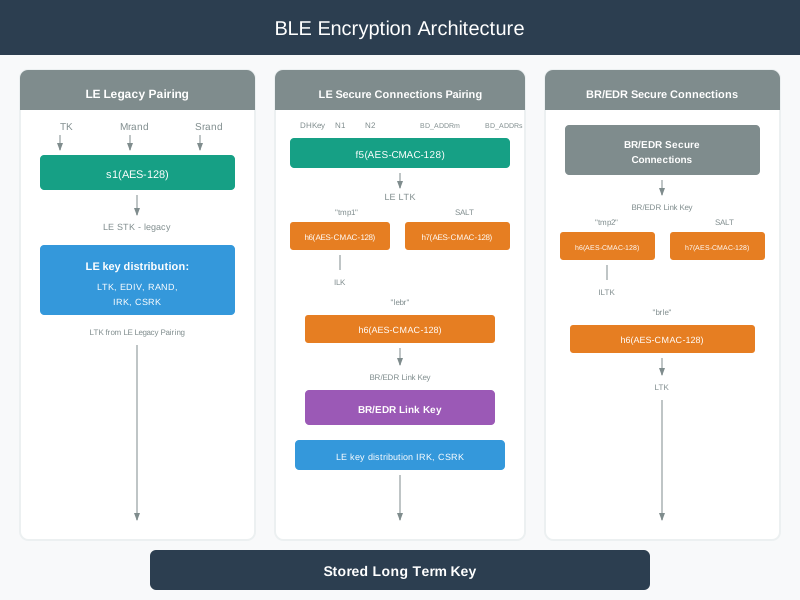
Read Figure 13.1 from the Legacy branch, where TK and two random values feed s1 to form the initial STK, to the Secure Connections branch, where ECDH-derived DHKey, nonces, and addresses feed f5. Then inspect the cross-transport h6/h7 paths and the stored long-term result. The comparison connects protocol choice to threat evidence: modern derivation protects against passive capture, while MITM resistance still depends on the authenticated association method.
Key Generation Methods:
- LE Legacy: Uses
s1(AES-128)withTK,Mrand, andSrand. This provides basic protection but can be vulnerable if the temporary key has low entropy or the pairing exchange is captured. - LE Secure Connections: Uses
f5(AES-CMAC-128)withDHKey, nonces, and device addresses. P-256 ECDH protects the pairing exchange against passive eavesdropping. - BR/EDR Secure Connections: Uses
h6andh7based on AES-CMAC-128 to derive cross-transport keys from the BR/EDR link key and salt material.
13.9 BLE Key Hierarchy
This section: BLE Key Hierarchy — To decide what must be stored after pairing, inspect Figure 13.2 to separate temporary session material from keys that support later encryption, identity resolution, and signed data.
To decide what must be stored after pairing, inspect Figure 13.2 to separate temporary session material from keys that support later encryption, identity resolution, and signed data. The hierarchy prevents the misleading assumption that every key performs the same security job.

Read Figure 13.2 from the legacy branch first: TK and the two random values feed s1 to create the short-lived STK, after which bonding distributes longer-lived material. Then trace the Secure Connections branch from the ECDH-derived DHKey and nonces through f5 to the LTK. Both paths end in reconnection keys, but only IRK resolves private identities and only CSRK verifies signed, unencrypted data. Those distinct destinations define the inventory and deletion rules below.
Treat the following key list as a role summary after that derivation walk-through. In an implementation record, map each role to its actual storage owner, creation event, allowed use, reset behavior, and deletion proof. That prose-to-inventory connection is what prevents a technically correct key name from becoming an unmanaged credential.
Key Types Explained:
- TK (Temporary Key): Generated during pairing, depends on pairing method
- STK (Short Term Key): Session encryption key derived from TK using the s1 function with AES-128; used only for the initial encrypted session in legacy pairing, then replaced
- LTK (Long Term Key): 128-bit key stored after bonding; enables reconnection without re-pairing. In legacy pairing, identified by the EDIV (Encrypted Diversifier) and Rand (64-bit random number) values
- IRK (Identity Resolving Key): Enables private address resolution for privacy; allows a bonded device to resolve resolvable private addresses back to the known identity
- CSRK (Connection Signature Resolving Key): Signs unencrypted data packets to verify integrity and authenticity over unencrypted LE links
- DHKey: In LE Secure Connections (BLE 4.2+), the Diffie-Hellman shared secret computed from P-256 ECDH; the basis for deriving MacKey and LTK via the f5 function
13.10 Security Decision Framework
This section: Security Decision Framework
-

First, ask what harm a false device could cause.
-

Public, read-only data may accept a simple path.
-

Sensitive actions need stronger proof from the user.
13.10.1 Choosing the Right BLE Security Level
Use “Just Works” ONLY when:
- Public beacon data (no sensitive information)
- Read-only sensor broadcasting (weather station)
- Device has no display, keyboard, or NFC
- Data is already encrypted at application layer
- Example: Public temperature beacon in park
- Risk acceptance: Anyone can read data (that’s the intent)
Use Passkey Entry when:
- Device has display OR keyboard (not both)
- Static PIN acceptable (e.g., printed on device)
- Moderate security sufficient
- Example: Wireless keyboard (displays 6-digit PIN)
- Security: 1 million possible six-digit passkeys (about 20 bits when freshly random)
- Weakness: Static PIN vulnerable if observed
Use Numeric Comparison when:
- Both devices have displays
- User can verify 6-digit code
- High security required
- Example: Smartphone pairing with tablet
- Security: 1 million codes + user comparison (provides MITM protection when the numeric-comparison procedure is used correctly; pairing-method confusion can still expose it).
- Best for: Consumer IoT (phones, smartwatches, tablets)
Use Out-of-Band (OOB) when:
- Maximum security required
- Device has NFC or can display QR code
- Medical, financial, or industrial applications
- Example: Payment terminal with NFC
- Security: Attacker must compromise both channels (Bluetooth + NFC/QR)
- Best for: Smart locks, medical devices, payment systems
Method selection begins with the consequence of impersonation and the I/O that both endpoints can actually support. Public, read-only broadcasts may accept an unauthenticated path; owner control, safety-relevant commands, or sensitive records need user-authenticated proof. A printed static value also has a different observation and reuse risk from a fresh displayed passkey, a two-display comparison, or a protected out-of-band channel. Record that reasoning before treating the checklist as approval.
Displayless products still need an authenticated commissioning choice. Inspect Figure 13.3 to compare three ways of moving setup proof outside the BLE radio exchange, and ask which physical action an installer can perform reliably without exposing a reusable secret.
Read Figure 13.3 from the uncommissioned device toward NFC tap, QR scan, and the time-bounded button path. Each branch supplies evidence through a channel or physical event separate from ordinary radio discovery, and each rejoins the encrypted bonding step. The figure connects capability-based method selection to an operational question: who can perform the action, how long it remains valid, and how the device returns safely to an unpaired state after failure.
13.10.2 Security Method Comparison
- Just Works: Provides no user-authenticated verification and no MITM protection. Use it only when the data is public or already protected above the BLE link.
- Passkey Entry: A 6-digit passkey gives about 20 bits of user-authenticated entropy when the passkey is random and protected from observation.
- Numeric Comparison: Both users verify the same displayed code, giving strong MITM protection when users actually compare the values.
- Out of Band (OOB): Moves the pairing secret to a separate channel such as NFC or QR. Security depends on that channel being hard for the attacker to observe or modify.
Numbers explained:
- 0 bits (Just Works): No user-authenticated verification - vulnerable to active MITM during pairing
- ~20 bits (6-digit PIN): About 1,000,000 possibilities - treat as modest entropy
- OOB: Security depends on the out-of-band channel and the secret you exchange
The brute-force attack time against a passkey depends on entropy and attack rate:
where is the number of pairing attempts per second (factor 0.5 assumes average case).
Example: A 6-digit PIN (000000-999999) provides:
- Entropy: bits
- If attacker attempts 10 pairings/second: seconds ≈ 13.9 hours
For LE Secure Connections with rate limiting (1 attempt per 30 seconds after 3 failures):
- Effective rate: 0.033 attempts/second
- seconds ≈ 174 days
Rate limiting transforms a short practical attack window into a much longer one. Production BLE devices should implement retry delays and lockout behavior for repeated failed pairing attempts.
13.10.3 Security Decision Matrix
- Public data: Link encryption may be optional when the information is intentionally public. Sign data if integrity matters.
- Personal data: Use AES-CCM link encryption, LE Secure Connections, bonding, and privacy addresses.
- Medical or safety data: Use authenticated pairing such as Numeric Comparison or OOB, protect firmware updates, and establish a strong device identity.
- Financial or high-value data: Prefer OOB pairing where possible, hardened key storage, and application-layer authentication and authorization.
- Industrial control data: Add application-layer integrity checks, logging, and lifecycle key management on top of link-layer encryption.
Note: Compliance requirements vary by jurisdiction and product. Link-layer encryption is important, but it is not sufficient on its own for most regulated systems.
13.11 Best Practices
This section: Best Practices
Do:
- Pair in a controlled environment when the device protects sensitive data.
- Use Numeric Comparison or OOB when the device capability and risk model allow it.
- Store bonded keys in the strongest available platform keystore or secure element.
- Update firmware regularly and protect update packages with signatures.
- Remove unused pairings and provide a clear revocation path.
Don’t:
- Use “Just Works” for sensitive data.
- Pair unknown devices into a trusted fleet.
- Assume short radio range is a security boundary.
13.12 Common Pitfalls
This section: Common Pitfalls
13.13 Continue to the Next Part
This section: Continue to the Next Part — Carry this evidence into BLE Encryption: Secure Pairing, which begins with Pitfall: Using “Just Works” Pairing Because the Device Has No Display.
Carry this evidence into BLE Encryption: Secure Pairing, which begins with Pitfall: Using “Just Works” Pairing Because the Device Has No Display.
Find help
3 reviewed answers.
Where should I start in a module?
Open the module page from the sidebar to see its chapters in order. Use the module map to return to a topic you need.
Modules and pathsReviewed
What can I try when a project does not work?
Check the symptom, then work through the diagnostic steps. Keep the error message and the smallest example that reproduces it.
When you are stuckReviewed
How do interactive examples work?
Use the interactive guide to check how examples and simulations work before changing your project.
Interactive examples guideReviewed