8 Piconets, Scatternets and Power Classes
More
Depth: Practitioner
Progress saves as you read. Mark sections complete as you go; your progress appears in the sidebar.
8.1 Start With the Story
This section: Start With the Story — Picture a sports hall with thirty heart sensors, one coach’s tablet, and a display by the door.
Picture a sports hall with thirty heart sensors, one coach’s tablet, and a display by the door. Some data belongs in a private link. Some may be sent to many listeners. Other devices may need a relay to reach the edge of the hall.
Start with the conversation, not the Bluetooth label. Mark who sends, who listens, how often data moves, and which device may make a decision. Then choose a network shape that fits those roles. Test it when the room is busy, a relay leaves, or the tablet sleeps.
Record range, delay, battery use, and recovery. A link that works with two devices on a desk does not prove that thirty devices can share the air. A mesh can extend a path, but it adds relay work and delay. A broadcast can reach many listeners, but it does not create a private reply path by itself.
Go deeper in two steps. The Practitioner section builds the Bluetooth Architecture Record. Under the Hood explains scheduling, range, and the changes that should trigger a new test.
Make a role card for each device. Mark send, listen, relay, sleep, and control. A device may hold more than one role, but each role uses time and power. Draw the normal path in one colour. Draw the recovery path in another.
Now make a short test list. Start with one sender. Add the expected group. Add a busy nearby radio. Move a listener to the edge. Turn off a relay. Let a phone sleep and wake. Record loss, delay, join time, and battery cost for each step.
Review the shape when the space changes. A new wall, more tags, a new phone model, or a moved gateway can change the result. Keep a trigger beside the design record. That trigger tells the team when old proof is no longer enough.
A room full of tags, phones, gateways, and relays can look simple on a diagram while failing in motion. The architecture choice decides who initiates, who listens, who relays, who sleeps, and what happens when the space changes.
Read this chapter as a shape decision. Start with the installed environment, then choose central/peripheral roles, broadcast behavior, piconets, or mesh only after the reliability, power, and maintenance evidence fits the job.

8.2 Choose the Bluetooth Shape That Matches the Job
This section: Choose the Bluetooth Shape That Matches the Job — Bluetooth network architecture review starts by naming the communication shape.
Bluetooth network architecture review starts by naming the communication shape. Classic Bluetooth piconets use one controller to schedule a small set of active devices. BLE central-peripheral links are usually better for phone-to-device setup, small sensor reads, notifications, and duty-cycled local exchange. Bluetooth Mesh is a managed many-node control architecture with provisioning, relay, security, and operations requirements.
The architecture decision is only valid inside its evidence boundary. A piconet diagram does not prove capacity. A phone connection does not prove fleet behavior. A mesh label does not prove relay placement, low-power node support, or maintainability after a device moves.
Radio Remi
“Range, power, and data-rate is a triangle — pick two honestly, then measure the third in the real room.”
Through this chapter, Remi tags each topology claim with its band, its trade, and the room measurement that proves it.
Worked example - clinic temperature tags. Suppose twenty BLE temperature tags report every five minutes, two hallway gateways are mains-powered, and nurses occasionally use tablets for setup. The smallest credible shape is not a Classic piconet: the tags do not need a Classic profile and should not stay scheduled as active members of one controller. It is also not automatically Bluetooth Mesh: the tags only publish small readings, and making battery tags participate in mesh roles would add provisioning and friend/low-power evidence before the team has proved it needs building-wide relay.
A stronger first architecture is BLE collection. Tags advertise or connect briefly; gateways scan known rooms, de-duplicate readings, and forward data upstream; tablets use local BLE setup only during commissioning. The review then asks measurable questions: how long does discovery take at the far room, how many duplicate readings are tolerated, what advertising interval meets the battery target, who owns gateway replacement, and which site change forces a retest? If later requirements add room-to-room group control for mains-powered devices, that is a new mesh claim with its own relay, key, and operations evidence.
For a Classic design, inspect Figure 8.1 to ask which devices share one piconet schedule and which bridge creates a second failure boundary between piconets.
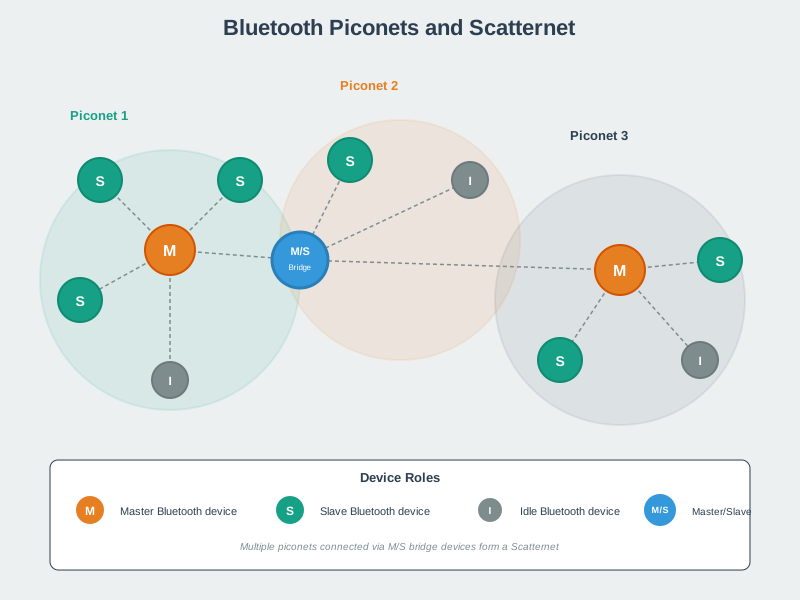
Begin Figure 8.1 at Piconet 1 and use the role legend to decode its M, S, and I nodes. One master schedules participating slaves; an idle device may be nearby without becoming an active scheduled member. Move to Piconet 2 and find the M/S bridge. It belongs to more than one piconet and must time-share those memberships, so it joins networks without merging their slot schedules. Compare Piconet 3 last, then read the scatternet definition. The topology now raises useful questions about controller dependency, active membership, bridge delay, and recovery. It must not be used as the capacity model for BLE gateways or Bluetooth Mesh.
If you only need the intuition, this layer is enough: approve the topology behavior that was observed, not the topology name. Then write the role, capacity, range, power, owner, and retest trigger.
8.2.1 Architecture Choices
Review the controller role, active-device limit, time-slot scheduling, profile fit, range expectation, and whether the product really needs Classic behavior.
Review who advertises, who scans, who connects, how long the connection stays open, and what GATT behavior supports the product claim.
Review bridge custody, time-sharing, latency, failure behavior, and why a legacy bridge is better than simpler gateways or BLE Mesh.
Review provisioning, relay behavior, friend and low-power roles, message scope, key ownership, monitoring, and operations support.
8.2.2 Beginner Examples
- A small gateway collecting occasional BLE sensor readings does not need a Classic piconet just because both technologies are Bluetooth.
- A Classic piconet can be acceptable for a bounded legacy profile, but the active-device limit and controller dependency should be explicit.
- A mesh claim is strongest when relay placement, low-power node behavior, message scope, and recovery ownership are recorded.
8.2.3 Overview Knowledge Check
8.3 Build the Bluetooth Architecture Record
This section: Build the Bluetooth Architecture Record — A practical Bluetooth architecture record starts from the product job: local setup, sensor collection, audio or legacy profile, gateway handoff, room-scale control, building automation, or diagnostics.
A practical Bluetooth architecture record starts from the product job: local setup, sensor collection, audio or legacy profile, gateway handoff, room-scale control, building automation, or diagnostics. It then chooses the smallest Bluetooth shape that supports that job and records the evidence that would make the decision stale.
The record should be specific about roles. Classic Bluetooth uses a scheduled piconet model. BLE connected operation has central and peripheral roles. BLE advertising has broadcaster and observer behavior. Mesh adds provisioner, relay, friend, low-power, and managed key roles. Mixing those roles in one claim makes the review hard to maintain.
8.3.1 Architecture Evidence Ledger
8.3.2 Worked Review: Room Sensors and Gateways
A clinic wants room-level temperature tags, staff tablets, and a few mains-powered hallway gateways. The tags send small readings and do not need direct tag-to-tag communication. A BLE gateway collection pattern is a stronger first decision than a Classic piconet: tags can advertise or connect briefly, gateways can own nearby rooms, and the review can focus on discovery latency, duplicate readings, battery draw, and gateway coverage.
Bluetooth Mesh may still be useful for mains-powered infrastructure if room-to-room relay behavior or group control becomes part of the job. It should not be approved simply because the tag count is large. Mesh adds provisioning, relay, key, and operations evidence that small battery tags may not be suited to carry.
8.3.3 Worked Review: Legacy Piconet Boundary
A legacy peripheral may require Classic Bluetooth profile behavior. The architecture record can accept a bounded piconet claim when the controller role, active-device count, profile behavior, range expectation, and failure recovery are known. The record should state what happens when the active-device count grows, a controller is replaced, or the product needs peer-to-peer or many-node behavior outside the piconet.
Older material may describe this as a master/slave piconet. The useful engineering point is the scheduling boundary: the controller owns the clock, hopping sequence, and transmission opportunities, so active devices synchronize to that schedule and do not get arbitrary direct slave-to-slave traffic. That makes the seven-active-device limit, the controller dependency, and bridge or scatternet behavior part of the capacity claim rather than trivia.
Remi’s Signal Check
- Band: a Classic piconet schedules up to seven active devices under one controller’s clock and hopping sequence.
- Trade: that scheduling buys synchronized slots, not arbitrary slave-to-slave traffic — capacity is a controller-dependency claim, not trivia.
- Room test: record what happens when the active-device count grows or the controller is replaced — that is the retest trigger.
8.3.4 Practitioner Knowledge Check
8.4 Scheduling, Range, and Architecture Drift
This section: Scheduling, Range, and Architecture Drift — Under the hood, Bluetooth architecture is shaped by scheduling and duty cycle.
Under the hood, Bluetooth architecture is shaped by scheduling and duty cycle. Classic piconets are controlled by a central scheduler, so active member count and controller dependency matter. BLE devices can spend much of their life advertising, scanning, connecting briefly, or sleeping, so connection parameters and retry behavior matter. Mesh nodes add relay and managed-flood behavior, so message scope and relay placement matter.
Inspect Figure 8.2 to ask how walls, bodies, equipment, the case, antenna angle, other radios, and the receiver change the rough range implied by each class.

Read Figure 8.2 from Class 1 to Class 3. For Class 1, 10^(20 dBm / 10) = 100 mW, which links the two power units in the card. Then look at the rough clear-path range for each class. Those values are only a start. A case, a person’s body, other radios, antenna angle, receiver design, and retries can change the real result. The design record therefore needs a measured walk through the site and a checked security boundary. A power class alone cannot promise useful or safe range.
Remi’s Signal Check
- Band: Class 1 ~+20 dBm / 100 mW / ~100 m; Class 2 ~+4 dBm / 2.5 mW / ~10 m; Class 3 ~0 dBm / 1 mW for very short links.
- Trade: a power class is a planning input, not acceptance proof — the catalog number and the installed link are different claims.
- Room test: log the transmit setting and the measured range together before approving the site.
8.4.1 Drift and Retest Triggers
8.4.2 Diagnosis Pattern
- Name the architecture claim. Separate Classic piconet capacity, BLE collection, gateway handoff, and mesh relay claims.
- Preserve the role evidence. Record controller, central, peripheral, broadcaster, observer, provisioner, relay, friend, and gateway roles before changing firmware.
- Retest the changed boundary. A moved gateway, new enclosure, changed connection interval, phone OS update, or mesh relay removal invalidates different evidence.
- Narrow the approval. Approve the tested topology behavior and record which scale, range, power, recovery, or ownership claim remains unproven.
8.4.3 Under-the-Hood Knowledge Check
8.5 Summary
This section: Summary
- Bluetooth network architecture review starts by naming the topology behavior: Classic piconet, BLE central-peripheral, advertising collection, bridge, gateway, or mesh.
- Classic piconet claims need controller, active-device, scheduling, profile, range, and recovery evidence.
- BLE collection claims need advertising, scanning, connection timing, GATT path, battery, gateway, and phone-scope evidence.
- Bluetooth Mesh claims need provisioning, relay, key, message-scope, low-power node, and operations evidence.
- Installed range and power evidence should be retested after enclosure, placement, firmware, gateway, phone, traffic, or ownership changes.
8.6 Key Takeaway
This section: Key Takeaway
Approve a Bluetooth architecture only when the reviewed roles, topology, capacity, timing, range, power behavior, ownership, and retest triggers match the product job.
8.7 See Also
This section: See Also
Review the broader Bluetooth fit decision across Classic, BLE, roles, profiles, security, power, and evidence boundaries.
Connect architecture decisions to Classic, BLE, advertising, connection, GATT, security, and recovery fundamentals.
Follow services, characteristics, notifications, indications, permissions, and app meaning after the link shape is chosen.
Review advertising, scanning, connection setup, pairing, bonding, parameters, and reconnection evidence in detail.
Find help
3 reviewed answers.
Where should I start in a module?
Open the module page from the sidebar to see its chapters in order. Use the module map to return to a topic you need.
Modules and pathsReviewed
What can I try when a project does not work?
Check the symptom, then work through the diagnostic steps. Keep the error message and the smallest example that reproduces it.
When you are stuckReviewed
How do interactive examples work?
Use the interactive guide to check how examples and simulations work before changing your project.
Interactive examples guideReviewed