11 Pairing Methods and MITM Protection

More
Depth: Practitioner
Progress saves as you read. Mark sections complete as you go; your progress appears in the sidebar.
11.1 Start With the Story
This section: Start With the Story
11.1.1 Make the User Confirm the Right Partner
A resident pairs a phone with a new door lock while another person waits in the hallway. Both devices report success. The important question is whether the resident confirmed the intended lock or merely accepted the first nearby request. A secure link cannot repair a weak choice of partner made at the start.
List what each device can show or accept. Can both show the same number? Can one scan a trusted code? Can the user type a value? Does either have no input or display? Match the method to the harm of choosing the wrong partner, not to the shortest setup flow. State whether the relationship should remain for later use.
Then test the ceremony. Start two nearby locks. Enter the wrong number. Copy an old setup code. Reset one device. Remove the old owner’s phone. Try to reconnect with saved state. Check that the user can identify the right device, that mismatches stop setup, and that removal or transfer has a clear record.
This test does not protect a device whose screen, code, or stored keys are already under an attacker’s control. It proves the pairing decision and its recovery boundary. The deeper sections compare the available methods, user confirmation, saved relationships, device limits, and the threats each choice can and cannot resist.
A door lock, a phone, and an attacker in the hallway make pairing method selection concrete. “It connected” is not enough; the review has to know what the user could confirm, what the attacker could imitate, and which keys remain afterward.
Use this chapter by starting with device I/O and threat model. Choose Just Works, passkey, Numeric Comparison, or OOB only after the MITM claim, bonding decision, and recovery path are visible.
- OOB (Out-Of-Band) Pairing Data: Cryptographic confirmation values exchanged over NFC, QR code, or other side-channels before BLE connection; prevents MITM by authenticating the BLE channel setup
- Numeric Comparison (NC): BLE 4.2+ LESC pairing method displaying a 6-digit number on both devices; user confirms they match, providing MITM protection
- Passkey Entry Display: One device shows a 6-digit passkey; user enters it on the other device; LE Secure Connections resists passive key recovery, while legacy pairing remains vulnerable during a captured pairing; one random online guess has a 1-in-10^6 chance
- IO Capability Matrix: Pairing uses both devices’ I/O, OOB, and MITM requirements; e.g., DisplayYesNo + KeyboardOnly can use Passkey Entry, while NoInputNoOutput without usable OOB yields Just Works only if unauthenticated pairing is allowed
- LE Secure Connections Confirmation: LESC pairing sends a cryptographic commitment (EC-DAKE protocol) before revealing the confirmation value, preventing the TK=0 attack that breaks legacy Just Works
- Authentication Requirements Bitmask: GAP security parameters field specifying: MITM protection (bit 2), Secure Connections (bit 3), Keypress notification (bit 4), CT2 (bit 5)
- Key Distribution Phase: After phase-2 key generation, devices may distribute IRK (Identity) and CSRK (Signing); an LTK may also be distributed for LE legacy pairing, but is derived locally in LE Secure Connections
- Bonding Flag: An authentication-requirements field requesting retention of pairing keys for future encrypted reconnections; IRK and CSRK are stored only if those keys were negotiated and distributed
11.2 Learning Objectives
This section: Learning Objectives
By the end of this chapter, you will be able to:
- Explain the BLE Pairing Protocol: Describe the three-phase pairing sequence and what keys are exchanged in each phase
- Compare Pairing Methods: Analyze Just Works, Passkey Entry, Numeric Comparison, and OOB pairing across security level and I/O requirements
- Diagnose Just Works Vulnerabilities: Justify why TK=0 in legacy Just Works provides no MITM protection and when it is acceptable
- Select Appropriate Pairing: Evaluate device capabilities and threat model to choose and configure the correct pairing method
Pairing is how two Bluetooth devices establish trust and agree on encryption keys. There are several methods: Just Works (automatic, no user input), Numeric Comparison (confirm matching numbers on both screens), and Passkey Entry (type a PIN). Each method offers a different balance of security and convenience.
Use this chapter as a design checklist:
- Start from the threat model: public telemetry, private data, physical access, medical control, or payment flow.
- List the device I/O capabilities: display, Yes/No button, keyboard, NFC, QR label, or no user interface.
- Choose the strongest pairing method the hardware can support.
- Add application-layer authorization for sensitive commands after pairing.
- Decide whether bonding is worth the stored-key risk, then plan key revocation and factory reset.
11.3 Prerequisites
This section: Prerequisites
Before diving into this chapter, you should be familiar with:
- Bluetooth Fundamentals and Architecture: Understanding BLE connection establishment and protocol stack
- Basic Cryptography Concepts: Familiarity with encryption and key exchange principles (AES, ECDH)
11.4 Minimum Viable Understanding
BLE security is determined by the pairing method, not the encryption cipher. “Just Works” pairing provides zero man-in-the-middle (MITM) protection, making it suitable only for public data. Numeric Comparison and Out-of-Band (OOB) pairing provide strong MITM resistance and should be used for security-sensitive devices. After pairing, bonding stores keys for convenient reconnection, but stored keys become a risk if devices are physically compromised.
In one sentence: BLE security depends on the pairing method, not just encryption - “Just Works” provides no MITM protection, while Numeric Comparison and Out-of-Band pairing defend against active attackers during setup.
Remember this: Always match pairing method to threat model: use OOB or Numeric Comparison for security-critical devices (locks, medical, payments).
11.5 Why Bluetooth Security Matters
This section: Why Bluetooth Security Matters — Analogy: Bluetooth security is like locking your front door.
Analogy: Bluetooth security is like locking your front door.
- No security = Leaving door wide open (anyone can walk in)
- Weak security = Cheap lock with key under mat (looks secure, but not really)
- Strong security = Deadbolt + verified keys (only authorized people enter)
Common failure patterns:
- Access-control devices: Just Works pairing can allow an attacker nearby during setup to become the trusted device.
- Wearables: unencrypted or weakly authenticated links can expose private health or location-adjacent data.
- Medical devices: default or static passkeys weaken the pairing ceremony and can put treatment workflows at risk.
- Vehicles and tags: weak bonding or revocation logic can leave cloned or stolen devices trusted for too long.
11.6 BLE Pairing Methods Comparison
This section: BLE Pairing Methods Comparison
BLE supports four pairing methods with different security levels:
11.6.1 Four Pairing Methods (Weakest to Strongest)
- Just Works: no user verification. It is acceptable only when the data and commands are low risk, because it provides no MITM protection.
- Passkey Entry: one device shows a fresh 6-digit passkey and the user enters it on the other device. It is useful when one side has a display and the other has input.
- Numeric Comparison: both devices show the same 6-digit value and the user confirms the match. It is the preferred LE Secure Connections choice when both devices can display and confirm.
- Out of Band (OOB): authentication data is exchanged through a separate channel such as NFC or QR. It is strongest when physical presence should be part of setup.
11.7 “Just Works” Pairing: A Critical Security Flaw
This section: “Just Works” Pairing: A Critical Security Flaw — BLE’s “Just Works” pairing mode provides zero authentication and is vulnerable to Man-in-the-Middle (MITM) attacks.
BLE’s “Just Works” pairing mode provides zero authentication and is vulnerable to Man-in-the-Middle (MITM) attacks. In Legacy Pairing, Just Works sets the Temporary Key (TK) to zero, meaning the Short Term Key (STK) derivation has no user-supplied entropy. In LE Secure Connections, no user confirmation occurs, so there is still no MITM protection despite the improved ECDH key exchange:
How the attack works:
- Legitimate device advertises BLE service (smart lock, medical device)
- Attacker intercepts pairing request before legitimate user connects
- Attacker completes “Just Works” pairing (no user verification required)
- Attacker gains a bond and can access data or commands permitted to that bond unless application authorization blocks them
Real consequences:
- Smart lock: A weak app policy may let an unauthorized bond unlock a door
- Medical device: A weak app policy may expose health data or treatment controls
- Payment terminal: A weak app policy may expose transaction data
- Industrial sensor: A weak app policy may allow false data or commands
Solution: Avoid Just Works for security-sensitive applications. Prefer:
- Numeric Comparison (BLE 4.2+): Users verify 6-digit code on both devices
- Passkey Entry: Device displays PIN, user enters on phone
- Out-of-Band: Exchange keys via NFC tag or QR code
Think of pairing methods as concentric security layers. “Just Works” is an unlocked door - attackers walk right through. Each stronger method (Passkey, Numeric Comparison, OOB) adds a verification barrier that creates progressively more resistance to MITM attackers.
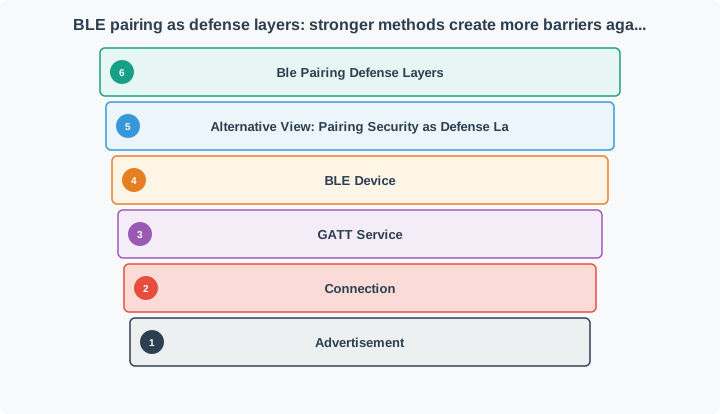
Read Figure 11.1 from Just Works, which supplies no user verification, outward through fresh Passkey Entry and two-display Numeric Comparison to a protected out-of-band setup path. The layers represent increasing authentication evidence, not increasing radio encryption strength: all may establish an encrypted link, but only the authenticated methods resist an active relay when performed correctly. This prepares the three-phase protocol below by separating association-method trust from later key storage.
11.8 BLE Pairing Process
This section: BLE Pairing Process — The BLE pairing process establishes secure communication through distinct decisions.
The BLE pairing process establishes secure communication through distinct decisions. Inspect Figure 11.2 as a legacy-pairing illustration, and keep feature negotiation, authentication and session protection, and long-term key distribution separate; a device that reaches one phase has not automatically completed the next.
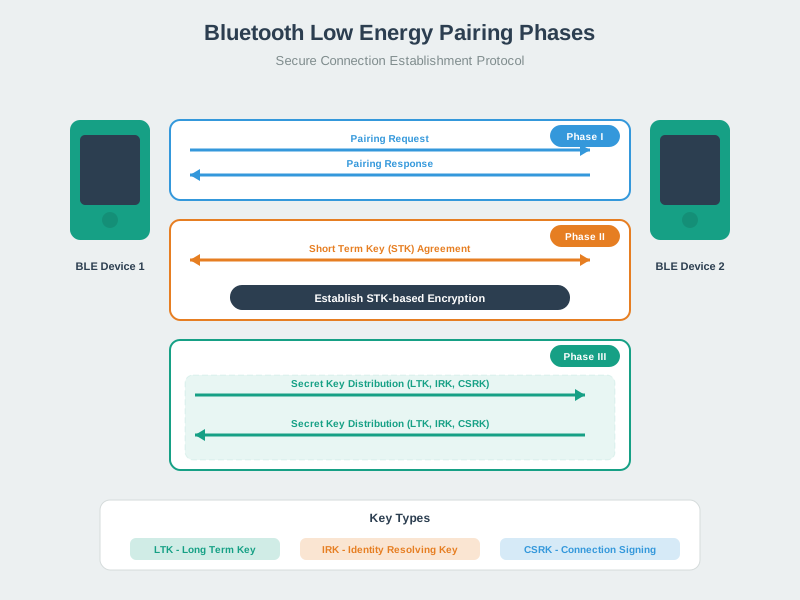
Read Figure 11.2 as a legacy-pairing illustration, from the Pairing Request and Response in Phase I, where I/O capabilities and requested security features determine the association method. Phase II authenticates according to that method and establishes protection for the current exchange. Optional Phase III distributes negotiated keys such as IRK and CSRK, and a legacy-pairing LTK when requested; LE Secure Connections derives its LTK in Phase II. This order connects the method choice above to the key roles below and shows why “paired” is too vague for an audit record.
Phase I - Feature Exchange:
- Devices exchange pairing capabilities (I/O capabilities, bonding flags)
- Determines which pairing method will be used (Just Works, Passkey, Numeric Comparison, OOB)
Phase II - STK (LE legacy) or LTK (LE Secure Connections) Generation:
- Phase II establishes the key used to encrypt this connection: an STK for legacy pairing or an LTK for LE Secure Connections
- Key generation and authentication depend on the selected pairing method
Phase III - Optional Key Distribution:
- LTK (Long Term Key): Distributed in Phase III when negotiated for LE legacy pairing; derived in Phase II for LE Secure Connections
- IRK (Identity Resolving Key): Enables MAC address privacy
- CSRK (Connection Signature Resolving Key): For signed data verification
11.8.1 Pairing Security (v4.2+)
Work through Pairing Security (v4.2+) as a connected sequence. Start with ECDH key exchange (LE Secure Connections) — replaces STK derivation in Legacy Pairing with a P-256 Diffie-Hellman exchange. Next, AES-CCM (128-bit) link-layer encryption for confidentiality/integrity. Then, MITM resistance depends on the pairing method (e.g., Numeric Comparison/Passkey/OOB vs Just Works). Then, Numeric Comparison is exclusive to LE Secure Connections (BLE 4.2+) — it is not available in Legacy Pairing. Then, OOB authentication works in both Legacy Pairing and LE Secure Connections. Then, Passkey Entry and Just Works are available in both Legacy Pairing and LE Secure Connections. Finally, Optional privacy features (e.g., resolvable private addresses via IRK) to reduce tracking.
To see where the human comparison enters the cryptographic exchange, trace Figure 11.3 before reducing Numeric Comparison to “check six digits.” The sequence binds the displayed result to both devices’ public keys and fresh nonces.
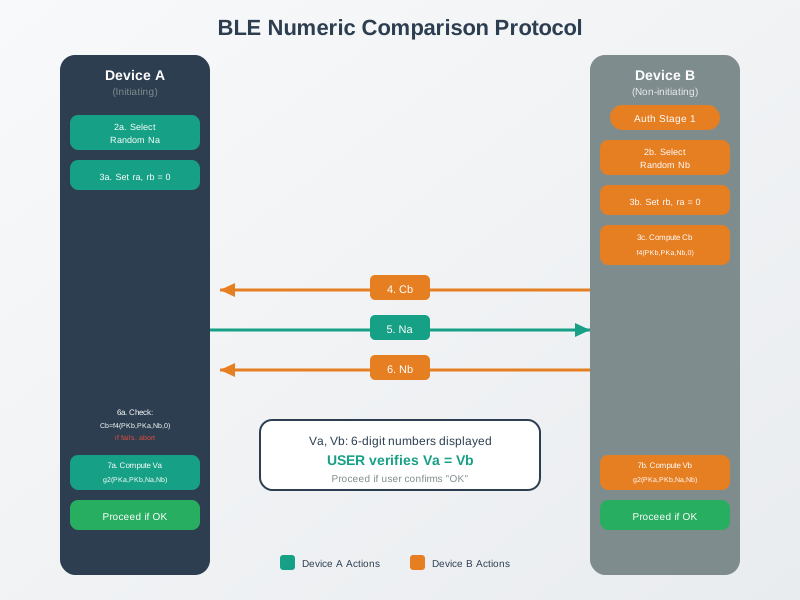
Read Figure 11.3 from public-key exchange to fresh nonces and the confirmation value, then follow the nonce exchange into the independently calculated six-digit values. Pairing proceeds only after the user verifies that the displays match. An active relay establishing two different key exchanges cannot silently make both authenticated transcripts agree. The connection to the chapter’s running argument is operational: the method resists MITM only when both devices can display the value and the user actually compares it.
Source: University of Edinburgh - IoT Systems Security Course
Classic Bluetooth’s pairing ceremony, Secure Simple Pairing (SSP), is a different procedure from the BLE pairing phases above, though it converges on the same idea: an ECDH exchange followed by mutual authentication before either side trusts a shared key. SSP runs five phases, and only Phase 2 varies by association model:
- Public key exchange — each device generates its own Elliptic Curve Diffie-Hellman (ECDH) public-private key pair. The initiating device sends its public key, the receiving device replies with its own, and both sides compute the same shared secret. A device may discard and regenerate its key pair after some time rather than reusing one indefinitely.
- Authentication stage 1 — the association-model-specific step that confirms both devices hold the same shared secret. This is the phase where Just Works, Numeric Comparison, Passkey Entry, and OOB each behave differently, in the same spirit as the BLE association models above.
- Authentication stage 2 — a second confirmation exchange that commits both devices to the values used in stage 1 before any key material is derived from them.
- Link key calculation — both devices derive the Bluetooth Classic link key from the shared ECDH secret and the authentication stage evidence.
- LMP authentication and encryption — the link key is verified at the Link Manager Protocol level and the connection is switched into encrypted mode.
The practical reading for a review record is the same discipline as BLE pairing: SSP’s ECDH exchange defeats passive eavesdropping on its own, but the association model chosen in Phase 2 still determines whether an active attacker can be detected. Classic’s Just Works is exactly as unauthenticated as BLE’s, for the same reason — the stronger math in Phase 1 does not rescue a weak Phase 2.
Source: University of Edinburgh — IoT Systems Security Course
11.9 Bonding: Remembering Trusted Devices
This section: Bonding: Remembering Trusted Devices — Simple explanation: After pairing, devices can “remember” each other (like saving a contact in your phone).
Simple explanation: After pairing, devices can “remember” each other (like saving a contact in your phone).
Trade-off:
- Convenience (no re-pairing)
- Risk (if device stolen, attacker has saved keys)
11.10 Common Beginner Mistakes
This section: Common Beginner Mistakes
Mistake 1: “My device has Bluetooth, so it’s secure”
- Wrong! Many BLE devices use “Just Works” pairing (no MITM protection during setup)
- Check: Does it require PIN or code verification during pairing?
Mistake 2: “I set a strong password, so I’m safe”
- Wrong! If pairing mode is “Just Works”, password doesn’t help
- Check: Pairing method matters more than password strength
Mistake 3: “Bluetooth only works 10 meters, so I’m safe from hackers”
- Wrong! Range depends on environment and hardware; directional antennas can extend it
- Solution: Use secure pairing regardless of “expected” range
Mistake 4: “My smart lock app requires a password, so it’s secure”
- Wrong! App password is not equal to Bluetooth pairing security
- Check: Pairing/transport security and app login are separate controls
11.11 Dig Deeper and Practice
This section: Dig Deeper and Practice — This chapter now stays focused on the pairing-method decision.
This chapter now stays focused on the pairing-method decision. Use the child chapters for the deeper protocol mechanics and exercises:
- Dig deeper -> BLE Pairing Deep Dive: MITM and Key Derivation: active MITM vs passive ECDH, Numeric Comparison transcripts, Passkey Entry bit commitments, and the
f5key-derivation step. - Practice -> BLE Pairing Practice and Review: the MITM risk calculator, displayless lock case pattern, pairing-method label quiz, code challenge, workbench, and ordering review.
11.11.1 Summary
- BLE pairing security is a setup ceremony, not just a cipher choice.
- Just Works can encrypt a link but gives no user-authenticated MITM protection.
- LE Secure Connections uses P-256 ECDH to protect against passive key recovery, while Numeric Comparison, Passkey Entry, or OOB evidence is still needed for active MITM resistance.
- Bonding requests retention of pairing keys for reconnection; IRK and CSRK are retained only when negotiated and distributed, so stored-key protection and revocation are part of the pairing design.
- High-impact products should reject silent fallback to Just Works and explain pairing-security mismatches to users.
11.12 What’s Next
This section: What’s Next
Prioritize these follow-up chapters based on what you need next:
- BLE Pairing Deep Dive: MITM and Key Derivation: learn why Numeric Comparison catches active relays, how Passkey Entry commits bits, and how
f5derives keys from the ECDH result. - BLE Pairing Practice and Review: test the pairing decision with cases, widgets, and review activities.
- Bluetooth Security: Encryption and Key Management: learn how LTK, IRK, CSRK, AES-CCM, and LE Secure Connections support the pairing method you selected here.
- Bluetooth Security: Labs and Defense-in-Depth: apply pairing decisions in ESP32 security demonstrations and layered BLE defenses.
Find help
3 reviewed answers.
Where should I start in a module?
Open the module page from the sidebar to see its chapters in order. Use the module map to return to a topic you need.
Modules and pathsReviewed
What can I try when a project does not work?
Check the symptom, then work through the diagnostic steps. Keep the error message and the smallest example that reproduces it.
When you are stuckReviewed
How do interactive examples work?
Use the interactive guide to check how examples and simulations work before changing your project.
Interactive examples guideReviewed