6 Bluetooth Profiles: Classic and GATT
More
Depth: Practitioner
Progress saves as you read. Mark sections complete as you go; your progress appears in the sidebar.
6.1 Overview
This section: Overview — This first route builds a profile, a shared rule for how Bluetooth devices use a service.
This first route builds a profile, a shared rule for how Bluetooth devices use a service. Classic services cover uses such as audio; Bluetooth Low Energy (BLE) serves low-power sensors here. GATT is BLE’s structure for named services and values. The route compares those structures before a device pair is called compatible.
This is part 1 of 2. Continue with Bluetooth Profiles: Selection and Implementation for the second focused route.
- Bluetooth Profile: A standardized specification defining how two or more Bluetooth devices implement a specific use case (e.g., hands-free calling, heart rate monitoring)
- GATT-Based Profile: Modern BLE profile built on the Generic Attribute Profile; defines specific service and characteristic UUIDs, mandatory operations, and data formats
- A2DP (Advanced Audio Distribution Profile): Classic Bluetooth profile for stereo audio streaming over ACL; SBC is mandatory, while codecs such as AAC and aptX are optional. A 328 kbps SBC stream is one possible setting, not an A2DP maximum.
- HFP (Hands-Free Profile): Classic Bluetooth profile for phone calls via headsets; uses a synchronous SCO or eSCO audio link for the call
- Heart Rate Profile (HRP): BLE profile using Heart Rate Service (0x180D) with Heart Rate Measurement characteristic (0x2A37); specifies notification-based operation
- Battery Service (BAS): BLE service (UUID 0x180F) with Battery Level characteristic (0x2A19, 0–100%); clients can interpret it when both devices support the service (Bluetooth Core Specification).
- OTA DFU Profile: Over-the-air firmware update profile (Nordic NRF DFU, TI OAD, Silicon Labs OTA); allows field firmware updates via BLE without physical cable access
- Adopted vs Custom Profile: SIG-adopted profiles specify interoperable behavior and often use adopted 16-bit service UUIDs; custom services commonly use vendor-specific 128-bit UUIDs. Both peers must still implement compatible behavior.
6.2 Learning Objectives
This section: Learning Objectives
By the end of this chapter, you will be able to:
- Explain the role of Bluetooth profiles in enabling interoperability across devices from different manufacturers
- Implement Serial Port Profile (SPP) for wireless UART communication in embedded systems
- Configure Human Interface Device (HID) profile for keyboards, mice, and game controllers
- Apply Advanced Audio Distribution Profile (A2DP) for high-quality audio streaming with appropriate codec selection
- Select the right profile and justify your choice for different IoT application requirements
Read this chapter as a profile-selection path:
- First separate Classic, BLE GATT, proximity, and Mesh profile families.
- Then compare SPP, HID, A2DP, AVRCP, and HFP by job and evidence.
- Next use the comparison table and earbud case study to decide when dual-mode support is needed.
- Finally use the worked examples to defend throughput, latency, battery, and compatibility trade-offs.
Checkpoint callouts mark the moments where your design record should be strong enough to move on.
Bluetooth profiles define what a device can do — there are profiles for audio streaming, file transfer, heart rate monitoring, and dozens more. Think of profiles as job descriptions: when two devices meet, they check each other’s profiles to see what they have in common, then use the matching profile to communicate.
If you only have 5 minutes, here’s what you need to know about Bluetooth Profiles:
- Profiles = Interoperability Standards - They define HOW devices communicate for specific use cases (audio, input, data)
- Classic vs BLE Profiles - Audio profiles (A2DP, HFP) use Classic Bluetooth; sensor/health profiles use BLE GATT
- SPP = Wireless Serial Cable - Use Serial Port Profile to replace RS-232 UART connections wirelessly
- HID = Input Devices - Keyboards, mice, and game controllers use Human Interface Device profile
- A2DP = Quality Audio - Advanced Audio Distribution Profile with codecs like SBC, AAC, aptX, LDAC
Bottom line: Choose Classic Bluetooth profiles (A2DP, SPP) for high data rate applications like audio streaming. Choose BLE GATT profiles for low-power sensors, health devices, and smart home applications.
Bluetooth profiles are like standardized recipes that tell devices exactly how to communicate for specific tasks. Without profiles, every Bluetooth headphone manufacturer would invent their own audio format, and your phone wouldn’t be able to play music on any of them.
Why it matters: When you connect a new wireless keyboard to your laptop, it “just works” because both devices speak the same HID profile language. Profiles enable the plug-and-play experience we expect from Bluetooth devices.
Hey there, future inventors! Let’s learn about Bluetooth profiles with the Sensor Squad!
Meet the Squad:
- Temperature Terry - loves measuring things
- Lila the Lightbulb - lights up when she learns something new
- Max the Motor - always moving and doing
- the battery - keeps track of energy
The Walkie-Talkie Story:
Imagine the Sensor Squad wants to share information, but they each speak different languages!
- Sammy speaks in numbers: “Temperature: 72, Humidity: 45”
- Lila speaks in colors: “Red, Blue, Green!”
- Max speaks in commands: “Go Forward! Turn Left!”
The Problem:
If everyone speaks differently, nobody understands each other! It’s like trying to order pizza in a country where nobody speaks your language.
Bluetooth Profiles to the Rescue!
Profiles are like universal translators:
- A2DP (Audio Profile) = The “Music Language” - Everyone agrees how to share songs
- HID (Input Profile) = The “Button Language” - Everyone agrees how to say “I pressed a button!”
- SPP (Serial Profile) = The “Text Message Language” - Everyone agrees how to send text
Real-World Examples:
- Your wireless earbuds use A2DP to play music
- Your gaming controller uses HID to send button presses
- A smart home sensor uses BLE GATT to report temperature
Fun Experiment: Look at your Bluetooth settings on a phone or computer. You’ll see devices paired for “Audio,” “Input Device,” or “Other” - those are different profiles!
Remember: Profiles make sure ALL Bluetooth devices can be friends and talk to each other!
6.3 Prerequisites
This section: Prerequisites
Before diving into this chapter, you should be familiar with:
- Bluetooth Protocol Stack: Understanding of GATT architecture
- Classic Bluetooth vs BLE: Knowing when to use Classic vs BLE
6.4 What Are Bluetooth Profiles?
This section: What Are Bluetooth Profiles? — Bluetooth profiles define how devices should behave for specific use cases.
Bluetooth profiles define how devices should behave for specific use cases. They ensure interoperability between devices from different manufacturers. Before choosing one, inspect Figure 6.1 to place the requirement in the correct Classic, BLE GATT, mesh, or dual-mode family; a shared radio brand does not make those application contracts interchangeable.
Profile Types:
- Audio: A2DP, HFP, HSP, and AVRCP use Classic Bluetooth for continuous audio and call-control streams.
- Input: HID can run over Classic Bluetooth or BLE, depending on latency and battery-life requirements.
- Data: SPP, FTP, and OPP are Classic Bluetooth profiles for file or serial-style data exchange.
- Health: HRS, BLP, and GLS are BLE GATT profiles for structured sensor measurements.
- Proximity: Find Me and Proximity profiles use BLE GATT for nearby-device alerts.
- Automation: Mesh models use BLE Mesh for building-scale control networks.
Inspect Figure 6.1 after that list to see where the families separate and where a dual-mode product deliberately combines them. The map turns profile names into an architecture choice rather than a catalogue of acronyms.
Read Figure 6.1 from the Classic branch, where audio, call control, serial streams, and Classic HID live, across to BLE GATT services for sensors and control. Then separate the mesh branch for managed many-to-many automation and inspect the dual-mode examples that deliberately combine families. This map connects a use-case label to the protocol behavior, power model, and interoperability evidence the rest of the chapter evaluates.
 Checkpoint: Profile Family Map
Before choosing an implementation path, defend these boundaries:
- Classic profiles serve continuous audio, calls, or serial-style streams.
- BLE GATT profiles serve structured services and characteristics.
- BLE Mesh is a building-scale control model, not a replacement for A2DP or SPP.
If the requirement mixes speakers, sensors, and lights, expect a dual-mode radio plus BLE Mesh rather than a single profile.
With that map in place, start with the simplest data profile: SPP behaves like a wireless serial cable, but that convenience comes with Classic Bluetooth power and platform trade-offs.
6.5 Serial Port Profile (SPP)
This section: Serial Port Profile (SPP) — SPP emulates a serial cable connection, replacing RS-232 with wireless communication.
SPP emulates a serial cable connection, replacing RS-232 with wireless communication.
6.5.1 Architecture
To see what “wireless serial cable” really adds, follow Figure 6.2 across the full endpoint path. The diagram matters because the familiar UART interface can hide radio setup, RFCOMM state, and host-side port creation that have no equivalent in a passive copper cable.
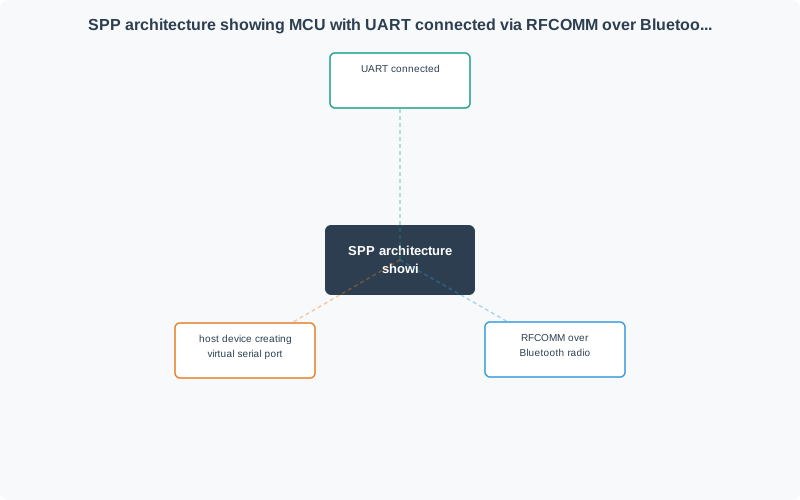
Read Figure 6.2 from the MCU’s UART into RFCOMM, through the Bluetooth link, and out to the host’s virtual serial port. Application bytes retain stream semantics, while pairing, framing, retransmission, supervision, and reconnect behavior sit underneath. That ordered path explains both SPP’s value for legacy equipment and the need to test disconnection, buffering, and timeout behavior before approving it.
Use Cases:
- Serial debugging
- Sensor data transmission
- Wireless UART for embedded systems
- Legacy device communication
6.5.2 Implementation
SPP uses RFCOMM (Radio Frequency Communication) to create virtual serial ports:
The useful mental model is still a cable replacement, but the review should remember the layers. RFCOMM emulates EIA-232 style control and binary data transport over the Bluetooth baseband through L2CAP, so a terminal sees a simple reliable stream while the controller still handles hopping, framing, retransmission, and link supervision. That makes SPP a good fit for powered debug consoles and legacy UART bridges, but a weak fit for coin-cell sensors that only need occasional structured values.
Android Bluetooth examples use the same role split. A receiver service listens with a BluetoothServerSocket, accepts a connection, then reads framed messages from the resulting BluetoothSocket; a remote app scans or selects the peer, opens its own BluetoothSocket, and writes the command bytes. For an IoT remote-control demo, keep the proof at the application boundary: which button produced which message, how the receiver parsed it, which GPIO or actuator action followed, and what timeout or disconnect rule leaves the device in a known state.
# Python example using PyBluez
import bluetooth

# Server (peripheral device)
server_sock = bluetooth.BluetoothSocket(bluetooth.RFCOMM)
server_sock.bind(("", bluetooth.PORT_ANY))
server_sock.listen(1)

# Advertise SPP service
uuid = "00001101-0000-1000-8000-00805F9B34FB"  # SPP UUID
bluetooth.advertise_service(server_sock, "SensorData",
                           service_id=uuid,
                           service_classes=[uuid, bluetooth.SERIAL_PORT_CLASS],
                           profiles=[bluetooth.SERIAL_PORT_PROFILE])

print("Waiting for connection...")
client_sock, client_info = server_sock.accept()
print(f"Connected: {client_info}")

# Send/receive data like a serial port
while True:
    data = read_sensor()
    client_sock.send(f"{data}\n")
6.5.3 Arduino Example
#include <SoftwareSerial.h>

// HC-05 Bluetooth module on pins 10, 11
SoftwareSerial bluetooth(10, 11);  // RX, TX

void setup() {
    Serial.begin(9600);
    bluetooth.begin(9600);
    Serial.println("Bluetooth SPP Ready");
}

void loop() {
    // Send sensor data over Bluetooth
    int sensorValue = analogRead(A0);
    bluetooth.println(sensorValue);

    // Receive commands from phone
    if (bluetooth.available()) {
        char cmd = bluetooth.read();
        processCommand(cmd);
    }

    delay(100);
}
6.5.4 SPP Limitations
- No BLE support: SPP will not work with BLE-only devices; use a BLE UART-style GATT service instead.
- Discovery required: Users normally pair manually; NFC or QR-assisted pairing can reduce setup friction.
- Power consumption: Classic Bluetooth draws more current than BLE; reserve SPP for continuous streams or powered devices.
- No standard data format: SPP transports bytes, not semantics; define a simple application protocol.
This section:
Checkpoint: Serial Evidence
At this point, an SPP design needs more than a paired-device screenshot. Record the RFCOMM role, host application, message framing, disconnect behavior, and power fit.
SPP handles bytes; HID handles human input reports. The next section changes the question from “Can I stream data?” to “Can every target operating system interpret this report descriptor correctly?”
6.6 Human Interface Device (HID)
This section: Human Interface Device (HID) — HID profile enables input devices like keyboards, mice, and game controllers.
HID profile enables input devices like keyboards, mice, and game controllers.
6.6.1 HID over Classic Bluetooth
Used by most wireless keyboards and mice:
Characteristics:
- Low latency (8-11 ms typical)
- Report-based data structure
- Boot protocol for BIOS compatibility
- Encryption required
For a keyboard, the practical path is: key press becomes a HID scan code, the profile wraps it into a report carried by the Bluetooth stack, and the host converts the recovered scan code back into an operating-system input event. That is why HID interoperability depends on the report descriptor and security state, not only on a successful Bluetooth connection.
6.6.2 HID over GATT (BLE)
BLE version for lower power devices:
Service UUID: 0x1812
Inspect Figure 6.3 to see how a BLE keyboard or mouse exposes more than one “input value.” Inspecting the service structure first makes the later UUID list meaningful and shows which metadata lets a host interpret reports correctly.
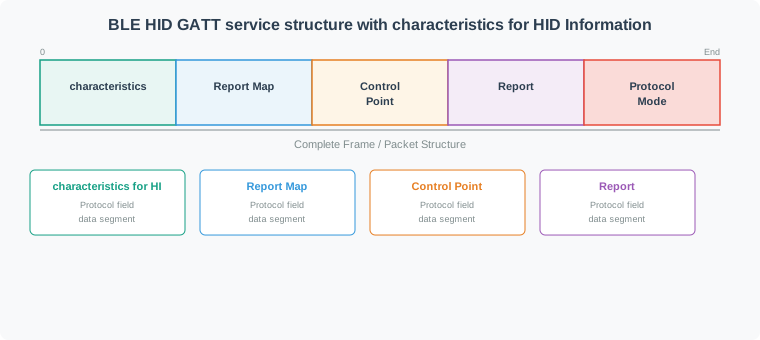
Read Figure 6.3 from the HID service into HID Information and the Report Map, which establish device metadata and report format. Then follow Control Point and Protocol Mode for host control before reaching the Report characteristics that carry input, output, or feature data. The hierarchy connects GATT discovery to actual operating-system events: a link can be connected yet unusable if its report map, permissions, or subscriptions are wrong.
Characteristics:
- 0x2A4A - HID Information: Read-only metadata about the HID device.
- 0x2A4B - Report Map: Read-only descriptor that tells the host how to interpret reports.
- 0x2A4C - HID Control Point: Write Without Response for suspend/exit-suspend commands.
- 0x2A4D - Report: Read, Write, and Notify for input, output, and feature reports.
- 0x2A4E - Protocol Mode: Read and Write Without Response for Boot vs Report protocol selection.
The Report characteristic (0x2A4D) uses a Client Characteristic Configuration Descriptor (CCCD, UUID 0x2902) — a central writes 0x0001 to this descriptor to enable Input Report notifications from the peripheral.
6.6.3 HID Report Types
- Input reports: Device to host; keystrokes, button presses, mouse movement, joystick axes.
- Output reports: Host to device; LED state such as Caps Lock or controller rumble commands.
- Feature reports: Bidirectional; configuration and device-specific settings.
6.6.4 Example: BLE Keyboard
#include <BleKeyboard.h>

BleKeyboard bleKeyboard("ESP32 Keyboard");

void setup() {
    bleKeyboard.begin();
}

void loop() {
    if (bleKeyboard.isConnected()) {
        // Type a message
        bleKeyboard.print("Hello from ESP32!");

        // Special keys
        bleKeyboard.press(KEY_LEFT_CTRL);
        bleKeyboard.press('c');
        bleKeyboard.releaseAll();

        delay(1000);
    }
}
6.6.5 Game Controller Support
Modern game controllers use HID:
- Xbox Series controllers: Bluetooth HID, typically around 8 ms.
- PlayStation 5 controllers: Bluetooth HID, typically around 10 ms.
- Nintendo Switch controllers: Bluetooth HID, typically around 15 ms.
Before continuing to audio profiles, confirm your understanding of how BLE GATT services operate — the foundation for all BLE-based profiles covered in the rest of this chapter.
6.7 Advanced Audio Distribution Profile (A2DP)
This section: Advanced Audio Distribution Profile (A2DP) — A2DP enables high-quality stereo audio streaming.
A2DP enables high-quality stereo audio streaming.
6.7.1 Architecture
Before comparing codecs, inspect Figure 6.4 to identify which endpoint produces the encoded stream and which one receives and plays it.
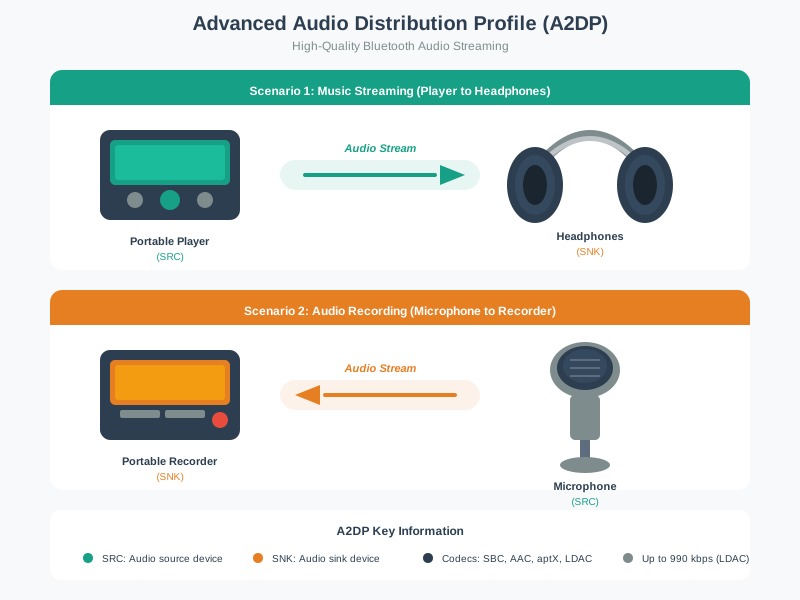
Follow Figure 6.4 from the source app to the audio output. The source encodes the sound and sends it on the Bluetooth media path. The sink then decodes and plays it. Before that stream can start, the control path lets both ends agree on a format they support. This makes the role names useful: the source owns the send side, while the sink owns the play side. Sound quality and delay depend on both devices, not just the codec name.
6.7.2 Audio Codecs
The bitrates and delays below are illustrative device configurations, not codec requirements or guaranteed end-to-end latency. Buffering, retransmissions, phone software, and headphones can dominate delay; measure the complete audio path.
- SBC: 328 kbps, around 200 ms latency, good quality, mandatory and free for A2DP.
- AAC: 256 kbps, around 100 ms latency, very good quality, licensed and widely used by Apple devices.
- aptX: 352 kbps, around 70 ms latency, excellent quality, licensed and useful for video sync.
- aptX HD: 576 kbps, around 100 ms latency, near-CD quality, licensed.
- LDAC: 990 kbps, around 200 ms latency, high-resolution audio, licensed and power-hungry.
- LC3: Variable bitrate, around 20 ms latency, excellent quality, used by BLE Audio rather than classic A2DP.
6.7.3 Codec Selection
During A2DP setup, the source and sink exchange supported codec capabilities and select a mutually supported option. Expect SBC fallback because it is mandatory; for video or gaming, measure latency on the actual source and headphones rather than ranking codec names alone.
6.7.4 A2DP Latency Considerations
Audio latency affects user experience:
- Music listening: Less than 200 ms is usually acceptable; any supported codec can work.
- Video watching: Aim below 100 ms; aptX is preferred, with AAC often acceptable.
- Gaming: Aim below 50 ms; aptX Low Latency is the classic Bluetooth target.
- Live performance: Aim below 20 ms; use wired audio or LE Audio with LC3 rather than classic A2DP.
6.8 Audio/Video Remote Control Profile (AVRCP)
This section: Audio/Video Remote Control Profile (AVRCP)
AVRCP provides media playback control alongside A2DP:
Supported Commands:
- Play/Pause/Stop: Control the active media session.
- Next/Previous: Skip between tracks or chapters.
- Fast Forward/Rewind: Move within the current track.
- Volume Up/Down: Adjust playback level from the remote controller.
Metadata (AVRCP 1.3+):
- Track title
- Artist name
- Album name
- Track duration
- Playback position
6.9 Hands-Free Profile (HFP)
This section: Hands-Free Profile (HFP)
HFP enables voice calls through Bluetooth devices:
Features:
- Voice call audio routing
- Call control (answer, reject, hold)
- Voice dialing
- Caller ID display
- Volume control
Use Cases:
- Car hands-free systems
- Bluetooth headsets
- Smart speakers
6.9.1 HFP vs HSP
- Call control: HFP supports full call control; HSP only supports basic headset behavior.
- Voice dial: HFP supports voice dialing; HSP does not.
- Caller ID: HFP can expose caller ID; HSP does not include it.
- Three-way calling: HFP supports it; HSP does not.
- Audio codec: HFP supports CVSD and mSBC; HSP is limited to CVSD.
- Use case: Choose HFP for modern devices and HSP only for legacy compatibility.
6.9.2 Voice Call Audio Quality
Hands-free calling is bidirectional, so inspect Figure 6.5 to inspect both the downlink heard by the user and the microphone return path before judging quality. The processing blocks reveal why a connected call may still suffer echo, noise, or intelligibility failures.
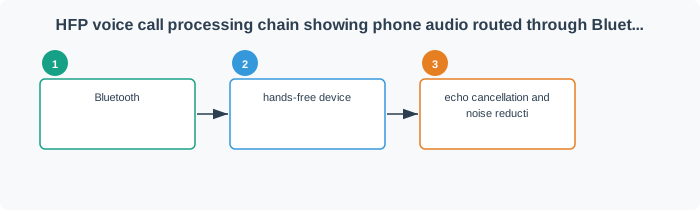
Read Figure 6.5 first from the phone across the Bluetooth link to the hands-free loudspeaker. Then trace the microphone path back, paying attention to echo cancellation and noise reduction before the signal returns to the phone network. That loop connects HFP’s call-control features to acoustic performance: codec support, microphone placement, cabin noise, and echo processing must be tested together in the intended environment.
This section:
Checkpoint: Classic Profile Fit
Before leaving the Classic-profile section, check that the use case matches the profile contract:
- HID proves input compatibility through report descriptors and host interpretation.
- A2DP proves audio streaming through codec negotiation and SBC fallback.
- AVRCP proves media-control behavior alongside A2DP.
- HFP proves call control and bidirectional voice behavior.
If the proof is really a private packet format, it belongs in SPP or custom GATT.
This section: — The selection guide now ties those contracts to product requirements.
The selection guide now ties those contracts to product requirements. Use it to choose the smallest profile set that satisfies data rate, latency, battery, and interoperability together.
6.10 Continue to Part 2
This section: Continue to Part 2 — Continue with Bluetooth Profiles: Selection and Implementation.
Continue with Bluetooth Profiles: Selection and Implementation.
Find help
3 reviewed answers.
Where should I start in a module?
Open the module page from the sidebar to see its chapters in order. Use the module map to return to a topic you need.
Modules and pathsReviewed
What can I try when a project does not work?
Check the symptom, then work through the diagnostic steps. Keep the error message and the smallest example that reproduces it.
When you are stuckReviewed
How do interactive examples work?
Use the interactive guide to check how examples and simulations work before changing your project.
Interactive examples guideReviewed