7 Bluetooth Profiles: Selection and Implementation
More
Depth: Practitioner
Progress saves as you read. Mark sections complete as you go; your progress appears in the sidebar.
7.1 Start With the Situation
This section: Start With the Situation — The profile families are understood, but a product still needs one interoperable choice.
The profile families are understood, but a product still needs one interoperable choice. The team must compare use cases, test both ends, and record discovery and recovery behavior before release.
7.2 Overview
This section: Overview — This route turns profile knowledge into a tested selection and implementation record.
This route turns profile knowledge into a tested selection and implementation record.
This is part 2 of 2. Review Bluetooth Profiles: Classic and GATT when you need the first route.
7.3 Learning Objectives
This section: Learning Objectives
By the end of this chapter, you will be able to:
- compare Bluetooth profiles by use case
- select a compatible profile set
- test discovery, interoperability, and recovery
7.4 Technology Comparison
This section: Technology Comparison — Choosing the right profile starts by inspecting Figure 7.1 for the workload split: sustained streams belong on the Classic side, while small structured values and duty-cycled exchanges belong on the BLE GATT side.
Choosing the right profile starts by inspecting Figure 7.1 for the workload split: sustained streams belong on the Classic side, while small structured values and duty-cycled exchanges belong on the BLE GATT side.
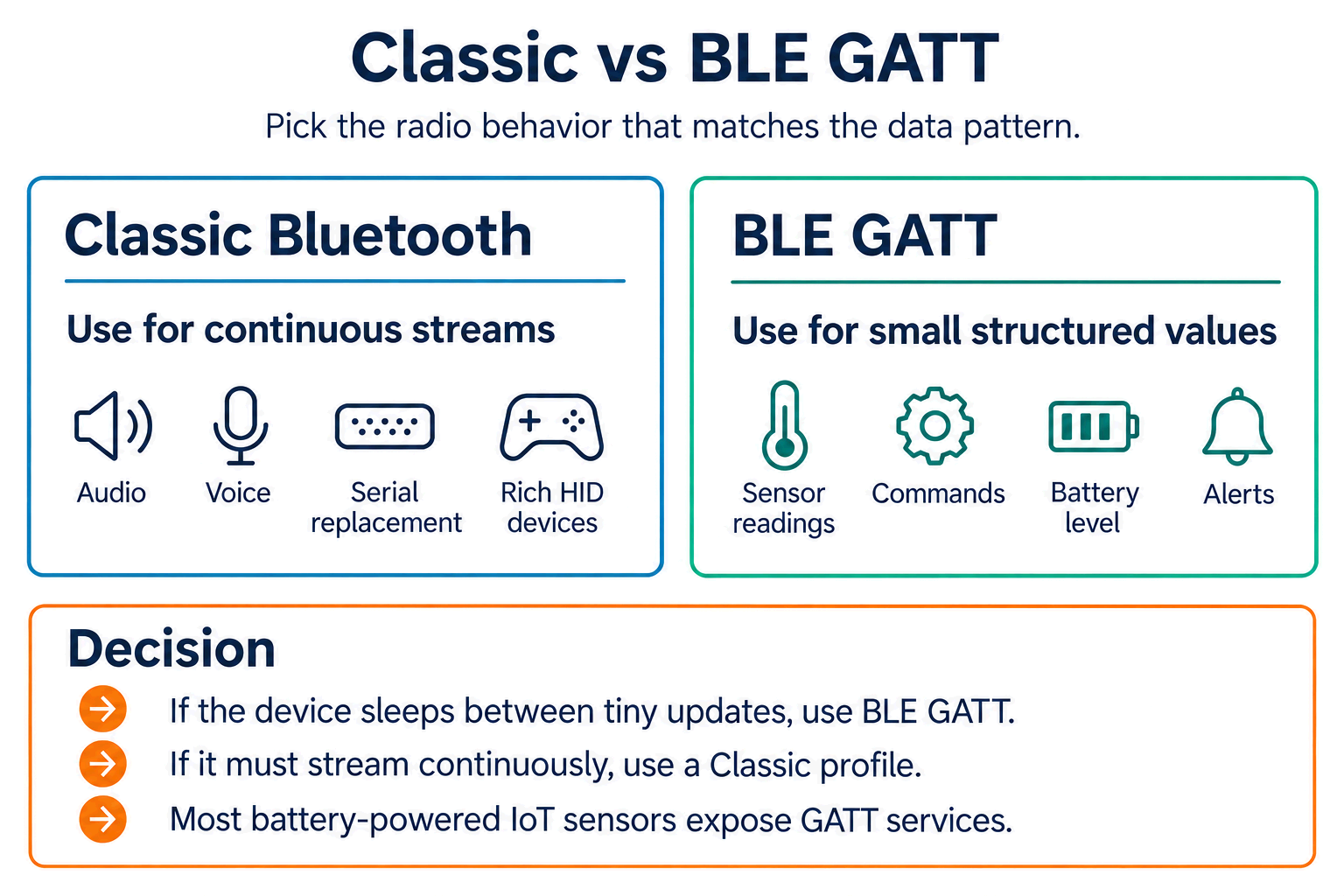
Read Figure 7.1 from Classic audio, voice, serial replacement, and richer continuous HID traffic to BLE sensor readings, commands, battery levels, and alerts. Then apply the decision rule to the product’s actual data shape, latency, power, and peer ecosystem. Mesh remains a separate many-node control choice. The comparison guides selection; its example ranges and rates still require device and site measurement rather than being treated as acceptance guarantees.
- Classic Bluetooth: Around 100 m range, 1-3 Mbps data rate, medium power, about 100 ms typical latency, 7 active devices per piconet, pairing-based setup, best for audio and file-style streams.
- BLE: Around 50 m range, 125 kbps to 2 Mbps data rate, very low power, 7.5 ms minimum connection interval, many devices over time, advertising-based discovery, best for sensors.
- BLE Mesh: Multi-hop range, low data rate, mains-powered relays and low-power sleeping endpoints, variable latency, an address space with 32,767 unicast element addresses, provisioning-based setup, best for building-wide control. The element-address limit is not a guaranteed node capacity.
7.4.1 Profile Selection Guide
- Wireless earbuds: A2DP + AVRCP + HFP for music, media controls, and calls.
- Fitness tracker: BLE HRS + GATT for low-power phone synchronization.
- Game controller: HID over Classic or BLE for low-latency input.
- Smart lock: BLE custom GATT for secure, battery-powered access control.
- Industrial sensor: BLE or Mesh for power-efficient telemetry and site coverage.
- Debug console: SPP for serial-terminal compatibility.
- Car audio: A2DP + HFP for music playback and phone calls.
7.5 Case Study: Wireless Earbuds
This section: Case Study: Wireless Earbuds — Modern earbuds use Classic Bluetooth for A2DP audio streaming and BLE for low-power status updates (battery level, configuration).
Modern wireless earbuds demonstrate multi-profile integration:
Profiles Used:
- A2DP - Stereo music streaming
- AVRCP - Play/pause/skip control
- HFP - Voice calls
- BLE GATT - Battery level, custom settings
Dual-Mode Operation:
Modern earbuds use Classic Bluetooth for A2DP audio streaming and BLE for low-power status updates (battery level, configuration). The dual-mode radio switches between protocols automatically based on the active profile.
Power Optimization:
- A2DP codec selection affects battery life
- BLE for low-power status updates
- Sleep mode when not playing
- Active noise cancellation power budget
For Embedded Developers:
- Start with proven libraries - Use ESP32’s Bluedroid stack or nRF Connect SDK rather than implementing profiles from scratch
- Test on multiple devices - iOS, Android, Windows, and macOS all have subtle profile implementation differences
- Monitor memory usage - Classic Bluetooth profiles require significantly more RAM than BLE
- Handle reconnection gracefully - Users expect paired devices to reconnect automatically
For Product Designers:
- Prioritize profiles - Not all platforms support all profiles equally (iOS limits SPP access)
- Consider companion apps - Custom GATT services require app development; standard profiles work natively
- Plan for certification - Bluetooth SIG qualification is required for commercial products
- Document codec support - Clearly list supported audio codecs (SBC, AAC, aptX, LDAC) in specifications
This section:
 Checkpoint: Selection Evidence
A profile-selection record should name the device role, selected profile or service, platform risk, and one measurable reason for rejecting close alternatives.
This section: — After the selection record, review the failure modes and interactive GATT activities.
After the selection record, review the failure modes and interactive GATT activities. They turn the profile choice into testable evidence.
This section:
1. Using Classic Bluetooth for Battery-Powered Sensors
- Mistake: Implementing SPP or A2DP on coin-cell powered devices
- Impact: Battery life measured in hours instead of months
- Solution: Use BLE GATT profiles for battery-critical applications
2. Expecting Low Latency from SBC Codec
- Mistake: Using SBC for gaming or video applications
- Impact: 150-200 ms audio delay causes noticeable lip-sync issues
- Solution: Use aptX Low Latency (~40 ms) or aptX (~70 ms) for time-sensitive audio
3. Implementing Custom Protocols Instead of Standard Profiles
- Mistake: Creating proprietary communication schemes instead of using HID, SPP, or GATT
- Impact: Incompatibility with operating systems and need for custom apps
- Solution: Use standardized profiles whenever possible for plug-and-play compatibility
4. Ignoring Profile Compatibility
- Mistake: Assuming all Bluetooth devices support the same profiles
- Impact: Connection failures between devices (e.g., BLE-only phone can’t use SPP)
- Solution: Check profile support in datasheets; implement dual-mode for maximum compatibility
5. Forgetting About Security Requirements
- Mistake: Implementing HID without encryption on classic Bluetooth
- Impact: Keystroke injection attacks possible
- Solution: HID requires authentication and encryption; always enable security features
This section:
BLE’s GATT (Generic Attribute Profile) and CoAP share a strikingly similar resource-oriented architecture. Both organize functionality into hierarchical resources: GATT uses Services > Characteristics > Descriptors, while CoAP uses URI paths like /sensors/temperature/current. Both support read/write/notify operations, and both use UUIDs or URIs as resource identifiers. If you understand GATT’s model of exposing sensor data as readable characteristics with notifications on change, you already understand CoAP’s GET with Observe. The key difference: GATT operates at the link layer (single-hop BLE), while CoAP operates at the application layer (multi-hop IP). See CoAP Fundamentals for the CoAP resource model.
7.6 Start With the Story
This section: Start With the Story — Two Bluetooth devices can pair and still fail to understand each other.
Two Bluetooth devices can pair and still fail to understand each other. A profile is the shared agreement that says which services exist, what the data means, and how a standard client should behave.
Use this chapter from interoperability backward. Ask what another device must already know, which profile supplies that contract, where a custom service is justified, and how the implementation will prove it did not invent a private dialect by accident.
7.7 Deep Dive: Attribute Tables, Handles, and UUID Evidence
This section: Deep Dive: Attribute Tables, Handles, and UUID Evidence — BLE profile conformance is proved by the discovered attribute table, not by a screenshot of one value arriving.
BLE profile conformance is proved by the discovered attribute table, not by a screenshot of one value arriving. Inspect Figure 7.2 to establish the service-to-characteristic hierarchy before following individual handles. The table should expose access properties, notification descriptors, and the boundary between a standard profile and product-specific semantics.
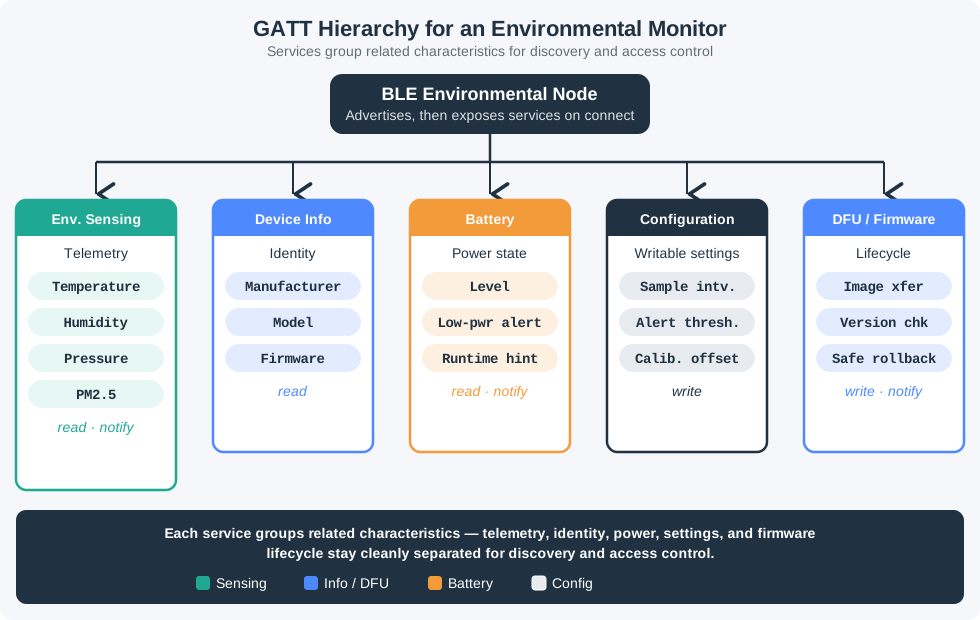
Read Figure 7.2 from the BLE node into each service, then descend to the characteristic values and their access contracts. Standard services give generic clients shared meaning; configuration and firmware branches can use vendor UUIDs. That hierarchy is the map for the handle, CCCD, caching, and reconnect evidence below.
When a client connects, it performs service discovery by walking the server’s attributes by handle and reading the UUIDs that live at those handles. A standard Heart Rate profile server has an attribute sequence like this:
| Handle | Attribute (UUID) | Evidence meaning |
|---|---|---|
0x0028 | Primary Service (0x2800) = 0x180D | Start of the Heart Rate Service |
0x0029 | Characteristic Declaration (0x2803) | Declares the measurement: properties = Notify, value at 0x002A |
0x002A | Heart Rate Measurement (0x2A37) | Characteristic value that carries the measurement |
0x002B | CCCD (0x2902) | Client writes here to enable notifications |
Because this measurement is Notify, the client cannot simply read it once and be done. It must write 0x0001 to the CCCD at handle 0x002B; after that, the server pushes each new reading from the value handle. A good profile test records the UUID discovered, the handle used for the CCCD write, whether the characteristic property is Notify or Indicate, and what happens after reconnect.
The client uses handles as local addresses and UUIDs as meaning. Handles are 16-bit addresses in this server’s attribute table; the same Heart Rate Measurement can sit at handle 0x002A on one device and 0x0015 on another. The UUID 0x2A37, by contrast, is the universal identifier for Heart Rate Measurement. Reusing 16-bit SIG UUIDs for standard data and 128-bit UUIDs for private vendor data keeps generic profile clients interoperable while still leaving space for product-specific features.
Bonded devices may cache handles to avoid rediscovery on every connection, but that cache is conditional evidence, not a portable contract. If firmware changes the attribute database or the server exposes the Service Changed characteristic, the client must invalidate stale handles and rediscover. This is why profile tests should include a reconnect after firmware update or database change: it proves the client relies on UUID meaning and cache invalidation, not on a lucky handle layout from one development board.
7.8 Summary
This section: Summary — The remaining sections put numbers behind two common decisions: whether a sensor stream should use SPP or BLE GATT, and how an A2DP codec choice affects battery life and latency.
This chapter covered Bluetooth profiles for different applications:
- SPP enables wireless UART for embedded systems and debugging
- HID provides standardized input device communication (keyboards, mice, controllers)
- A2DP streams high-quality stereo audio with various codecs
- AVRCP adds media playback control to audio streaming
- HFP enables hands-free voice calls for headsets and car systems
- Profile selection depends on data rate, power, latency, and device compatibility
- Modern devices often combine multiple profiles (A2DP + HFP + BLE GATT)
- Profiles = Interoperability - They ensure devices from different manufacturers can communicate
- Classic for Streaming - Audio (A2DP) and high-throughput data (SPP) use Classic Bluetooth
- BLE for Battery Life - Sensors, health devices, and beacons use BLE GATT profiles
- Codec Matters - For audio applications, codec choice affects latency and quality (aptX for video sync, LDAC for audiophiles)
- Dual-Mode is Common - Modern devices (earbuds, smart hubs) combine Classic + BLE for best of both worlds
Checkpoint: Deep-Dive Readiness
Before using the worked examples, confirm that the evidence loop is complete: profile family selected, standard UUIDs separated from custom UUIDs, CCCD behavior understood, and platform risks listed.
The remaining sections put numbers behind two common decisions: whether a sensor stream should use SPP or BLE GATT, and how an A2DP codec choice affects battery life and latency.
7.9 Worked Example: SPP Throughput vs BLE GATT for Sensor Data Streaming
This section: Worked Example: SPP Throughput vs BLE GATT for Sensor Data Streaming
Scenario: Compare SPP (Serial Port Profile, Classic Bluetooth) versus BLE GATT for streaming accelerometer data from a motion sensor to a data logger.
Given requirements:
- Accelerometer: 3-axis, 16-bit per axis = 6 bytes per sample
- Sample rate: 100 Hz (100 samples/second for vibration analysis)
- Data rate: 6 bytes × 100 Hz = 600 bytes/second = 4,800 bps
Option 1: Classic Bluetooth SPP
- Protocol: RFCOMM over L2CAP, stream-based like a serial port.
- Illustrative RFCOMM payload: 990 bytes per frame if negotiated and supported; batching reduces overhead but adds buffering delay.
- Practical throughput: 1-2 Mbps, compared with a theoretical 3 Mbps radio rate.
- Latency: 10-50 ms, depending on buffering.
- Active power: 30-50 mA continuously because the connection is maintained.
- Idle power: 5-10 mA with sniff mode around every 40 ms.
Transmission efficiency:
- Samples per full frame: 990 bytes ÷ 6 bytes = 165 samples
- Full frames per second: 100 samples/sec ÷ 165 = 0.606 frames/sec, requiring 1.65 s of batching; a 10-50 ms latency target needs smaller, more frequent frames.
- Illustrative framing budget: RFCOMM (5 bytes) + L2CAP (4 bytes) + assumed baseband overhead (18 bytes) = 27 bytes; actual packet framing and retransmissions vary.
- Efficiency under that assumption: 990 ÷ (990 + 27) = 97.3%
Battery impact (1000 mAh battery, 8 hours/day use, powered off for the other 16 hours):
- Daily current: 40 mA × 8 hours = 320 mAh
- Battery life: 1000 ÷ 320 = 3.1 days
Option 2: BLE GATT with Notify
- Protocol: ATT over L2CAP, attribute-based rather than stream-based.
- MTU: 23 bytes by default, commonly negotiated to 185 bytes for larger notifications.
- Throughput: 5-10 kbps in this conservative connection schedule, not a BLE GATT maximum.
- Connection interval: 7.5 ms minimum, allowing about 133 connection events per second; an event may carry multiple packets.
- Latency: 7.5-30 ms, often lower than SPP for small updates.
- Active power: 8-12 mA during short radio events.
- Sleep power: 1-3 µA between events.
Transmission with 23-byte MTU (default):
- Payload per notification: 23 - 3 (ATT header) = 20 bytes
- Samples per notification: 20 ÷ 6 = 3 samples (18 bytes, 2 bytes wasted)
- Notifications per second: 100 samples ÷ 3 = 34 notifications/sec
- Check: 34 notifications/sec < about 133 events/sec at a 7.5 ms interval, so this is feasible under the stated schedule; verify the controller and receiver on hardware.
Transmission with 185-byte MTU (negotiated):
- Payload: 185 - 3 = 182 bytes
- Maximum samples fitting in a notification: 182 ÷ 6 = 30, but filling 30 samples at 100 samples/sec takes 300 ms, violating a 30 ms update target.
- For a ≤30 ms batching target, send at most 3 samples (18 bytes) per notification, or send partially filled frames sooner; 100 ÷ 3 rounds up to 34 notifications/sec. Add timestamps or sequence numbers when missing updates matter.
Battery impact (185-byte MTU with at most 3 samples per notification, 7.5 ms interval, conservatively one 2 ms radio event at every interval, powered off for the other 16 hours):
- Radio active time: 2 ms per event (TX + RX window)
- Duty cycle: 2 ms / 7.5 ms = 26.7%
- Recomputed average current for the 34-notification/sec plan: assume the radio remains active for every scheduled event, including events without a notification; 10 mA × 0.267 + 2 µA × 0.733 = 2.67 mA
- Daily use: 2.67 mA × 8 hours = 21.36 mAh
- Battery life: 1000 ÷ 21.36 = 46.8 days
Comparison summary:
- Throughput: Both meet the 4,800 bps requirement, but SPP has much more margin (around 1 Mbps practical vs 10 kbps BLE GATT in this conservative example).
- Latency: BLE wins for small updates at 7.5-30 ms versus 10-50 ms for SPP.
- Battery life under the stated active-use and powered-off assumptions: 46.8 days versus 3.1 days.
- Setup complexity: SPP is simpler because it behaves like a serial port; BLE requires GATT service design.
Verdict: For this application (100 Hz streaming), BLE can carry the samples even at the default MTU. Choose SPP or BLE based on measured latency, power, receiver support, and data framing:
- Mains-powered (battery not a concern) → SPP for simplicity
- Battery-powered with <1 kHz sample rate → BLE with 185-byte MTU
- Battery-powered at higher sample rates → measure BLE throughput and event power first; a larger MTU, multiple packets per event, or LE 2M may still make BLE feasible
Hardware boundary: Bosch BNO055 is an IMU with I2C, UART, and HID-I2C interfaces, not an SPP or BLE radio. A separate microcontroller and Bluetooth stack would implement either transport.
7.10 Putting Numbers to It
This section: Putting Numbers to It
Quantifying the battery life difference: SPP vs BLE GATT for 100 Hz accelerometer streaming
Using the worked example data (100 Hz, 6 bytes/sample), calculate the battery life under its stated current assumptions, with the devices powered off outside the 8-hour use period:
Classic Bluetooth SPP (continuous connection):
Average current during 8 hours/day streaming:
I_avg = 40 mA active × 1.0 duty cycle = 40 mA
Daily energy consumption:
E_daily = 40 mA × 8 hours = 320 mAh/day
Battery life with 1000 mAh battery:
Life_SPP = 1000 mAh / 320 mAh/day = 3.125 days
BLE GATT with 185-byte MTU, at most 3 samples per notification (CI = 7.5 ms):
Conservative radio duty cycle for the recomputed 34-notification/sec plan: 2 ms active at every 7.5 ms event, including events without a notification:
Duty = 2 / 7.5 = 0.267 = 26.7%
Average current:
I_avg = (10 mA × 0.267) + (2 µA × 0.733) = 2.67 + 0.0015 ≈ 2.67 mA
Daily consumption (8 hours active):
E_daily = 2.67 × 8 = 21.36 mAh/day
Battery life:
Life_BLE = 1000 / 21.36 = 46.8 days
Battery life improvement:
46.8 / 3.125 = 15.0× longer with BLE
This 15× improvement shows that even for relatively high data rates (100 Hz = 4,800 bps), BLE’s duty-cycled operation provides dramatic power savings compared to SPP’s continuous connection. The key enabler is the 73.3% sleep time (1 - 0.267) between connection events.
This section:
This section:
7.11 Decision Framework: Choosing A2DP Codec for Wireless Earbuds
This section: Decision Framework: Choosing A2DP Codec for Wireless Earbuds
- Casual music listening: SBC is supported for A2DP interoperability; bitrate and end-to-end latency depend on the devices and should be measured.
- Audiophile music listening: LDAC at 990 kbps, about 200 ms latency, high battery impact, best for hi-res audio or mains-powered products.
- Movie watching: aptX at an illustrative 352 kbps is an option when both endpoints support it; measure end-to-end lip-sync because the codec does not guarantee 70 ms.
- Competitive gaming: aptX Low Latency is designed for lower delay when both endpoints support it; treat about 40 ms as a product target to verify, not a codec guarantee.
- Phone calls: mSBC through HFP at about 60 kbps and 50 ms latency, low battery impact, optimized for voice rather than music.
- Podcasts and audiobooks: SBC at 328 kbps, about 200 ms latency, low battery impact, best when runtime matters more than audiophile quality.
Codec negotiation flow:
When earbuds connect to a phone, they exchange supported codec lists and select a mutually supported codec according to device policy:
Phone: "I support SBC, AAC, aptX, LDAC"
Earbuds: "I support SBC, AAC, aptX"
Possible result: Connection uses aptX (if both devices select it)
Real-world trade-off example:
Sony lists SBC, AAC, and LDAC support for the WH-1000XM4 and rates battery life up to 30 hours with noise canceling on. It does not establish the codec-specific runtime below. For an illustrative comparison, suppose a test device lasts:
- With LDAC (990 kbps): 20 hours battery life
- With SBC (328 kbps): 30 hours battery life
The assumed 10-hour difference (50% more runtime) is an input to the example, not a measured codec effect; ANC, amplifier, buffering, and settings also affect real runtime.
Decision rule for product designers:
- Always include SBC (mandatory for A2DP certification)
- Add AAC if targeting iOS users (Apple prioritizes AAC > SBC)
- Add aptX if targeting video/gaming use cases (<100 ms latency needed)
- Add LDAC only if battery is large or product is mains-powered (audiophile market)
- Skip aptX HD unless targeting niche audiophile market (licensing cost not justified for mass market)
7.12 Putting Numbers to It
This section: Putting Numbers to It
How much does codec choice affect wireless earbud battery life?
The hypothetical 20h versus 30h battery-life comparison can be explored with a simplified radio airtime calculation. Dividing by a 3 Mbps peak PHY rate gives a lower bound on data airtime before headers, retransmissions, and other traffic:
SBC codec (328 kbps bitrate):
For CD-quality stereo (44.1 kHz, 16-bit), uncompressed rate is:
Uncompressed = 44,100 × 16 × 2 = 1,411,200 bps = 1.41 Mbps
SBC compresses to 328 kbps, so Bluetooth must transmit:
Radio time per second = 328,000 bits / 3,000,000 bps = 0.109 s = 10.9% duty cycle
Average current (10 mA active, 2 mA idle):
I_SBC = (10 × 0.109) + (2 × 0.891) = 1.09 + 1.78 = 2.87 mA
LDAC codec (990 kbps bitrate):
Radio duty cycle:
Radio time = 990,000 / 3,000,000 = 0.33 = 33% duty cycle
Average current:
I_LDAC = (10 × 0.33) + (2 × 0.67) = 3.3 + 1.34 = 4.64 mA
Battery life ratio (800 mAh battery):
SBC battery life:
Life_SBC = 800 / 2.87 = 279 hours (toy radio-and-idle model; it omits DAC, amplifier, ANC, and protocol overhead)
LDAC battery life:
Life_LDAC = 800 / 4.64 = 172 hours (same toy model; not a product battery-life prediction)
Power cost of higher quality:
4.64 / 2.87 = 1.62× more power for LDAC
The toy radio-and-idle model yields 4.64/2.87 = 1.62× current for 990/328 ≈ 3.0× bitrate. The assumed 20h and 30h figures are not derived from it. Adding the same non-radio current to both modes would reduce the runtime ratio, so a codec-specific battery claim needs measurements on one device with matched settings.
7.13 Common Mistake: Using BLE HID Without Understanding Report Descriptor Complexity
This section: Common Mistake: Using BLE HID Without Understanding Report Descriptor Complexity
The error: A developer building a custom BLE game controller implements HID over GATT (HOGP) but hardcodes a simple report descriptor, assuming “it’s just button states and joystick positions.”
What actually happens:
HID report descriptors are binary structures that define data layout, units, ranges, and mappings. A minimal game controller descriptor is 60-100 bytes of carefully structured data.
Simplified descriptor structure (actual binary is complex):
Usage Page (Generic Desktop)
Usage (Gamepad)
Collection (Application)
  Usage Page (Button)
  Usage Minimum (Button 1)
  Usage Maximum (Button 12)
  Logical Minimum (0)
  Logical Maximum (1)
  Report Count (12)
  Report Size (1)
  Input (Data, Variable, Absolute)  ← 12 bits for buttons

  Report Count (4)
  Report Size (1)
  Input (Constant)  ← 4 bits padding

  Usage Page (Generic Desktop)
  Usage (X)
  Usage (Y)
  Logical Minimum (-127)
  Logical Maximum (127)
  Report Size (8)
  Report Count (2)
  Input (Data, Variable, Absolute)  ← 2 bytes for joystick
End Collection
What the developer got wrong:
They copied a keyboard descriptor and changed “keyboard” to “gamepad” but didn’t update the usage codes. Result:
- Windows recognized the device as a keyboard (not a gamepad)
- Button presses sent as letter keys instead of gamepad buttons
- Joystick axes were interpreted as mouse movements
Debugging nightmare:
- Tested on Android: Worked (Android is lenient with HID descriptors)
- Tested on iOS: Worked (iOS auto-detects based on UUIDs)
- Tested on Windows 10: Failed (strict descriptor parsing)
- Took 3 weeks to debug because Windows HID parser errors are cryptic
The fix:
Use a validated HID descriptor from a reference implementation:
- USB-IF has sample descriptors for game controllers, keyboards, mice
- Nordic Semiconductor’s nRF52 SDK includes working BLE HID examples
- TI’s CC2640 SDK has template descriptors
Production impact:
A Kickstarter-funded BLE game controller (5,000 units manufactured) shipped with a broken HID descriptor. Windows users couldn’t use it. The company had to:
- Release a firmware update (required users to use a smartphone app to reflash)
- Provide full refunds to users who couldn’t update firmware
- Lost an estimated 120,000 USD (refunds + support + reputation damage)
Lesson: HID descriptors are deceptively complex. Always test on all target platforms (Windows, macOS, Linux, Android, iOS) before mass production. Use existing validated descriptors as templates, not keyboard examples copied blindly.
7.14 What’s Next
This section: What’s Next — You have now seen how Bluetooth profiles define interoperability across audio, input, data, and health use cases.
You have now seen how Bluetooth profiles define interoperability across audio, input, data, and health use cases. The following chapters build on this foundation by putting profiles into practice and extending your understanding to the full BLE stack.
- Bluetooth Hands-On Lab - Build a BLE sensor beacon from scratch using GATT services, notifications, and connection handling in Wokwi.
- BLE GATT Services and Characteristics - Implement standardized GATT services (HRS, BAS, ESS) and design custom service schemas.
- Bluetooth Security - Configure pairing modes, LE Secure Connections, and encryption to protect BLE profile data.
- Classic Bluetooth vs BLE - Compare protocol stacks, power models, and profile availability to justify technology selection.
- Bluetooth Protocol Stack - Analyze the full stack from PHY to ATT/GATT to understand how profiles are built on lower layers.
Find help
3 reviewed answers.
Where should I start in a module?
Open the module page from the sidebar to see its chapters in order. Use the module map to return to a topic you need.
Modules and pathsReviewed
What can I try when a project does not work?
Check the symptom, then work through the diagnostic steps. Keep the error message and the smallest example that reproduces it.
When you are stuckReviewed
How do interactive examples work?
Use the interactive guide to check how examples and simulations work before changing your project.
Interactive examples guideReviewed