14 BLE Encryption: Secure Pairing

More
Depth: Practitioner
Progress saves as you read. Mark sections complete as you go; your progress appears in the sidebar.
14.1 Start With the Decision
This section: Start With the Decision — A sensor with no screen still needs safe pairing, the step that connects it to an approved app.
A sensor with no screen still needs safe pairing, the step that connects it to an approved app. A device-specific QR code is a printed scan code; NFC is a close-range tap link. Either can carry pairing data through a protected out-of-band path. A short button window limits when pairing can start, but does not by itself prove who the peer is.
14.2 Route Overview
This section: Route Overview — This is part 2 of 2.
This is part 2 of 2. Review BLE Encryption: Key Management for the preceding evidence.
14.3 Learning Objectives
This section: Learning Objectives
- Test pitfall: using “just works” pairing because the device has no display with a concrete scenario and pass criteria.
- Validate deep dive: key lifecycle, privacy addresses, and signed data evidence with a concrete scenario and pass criteria.
14.4 Chapter Roadmap
This section: Chapter Roadmap
- Pitfall: Using “Just Works” Pairing Because the Device Has No Display
- Pitfall: Assuming Bonded Keys Are Secure Forever After Initial Pairing
- Knowledge Check
- Knowledge Check: Smart Lock Security Breach
- Knowledge Check: Bonding vs. Pairing Trade-offs
- Knowledge Check: Weak PIN Attack Vector
- Worked Example: Quantifying BLE Pairing Attack Surfaces
- Concept Relationships:
- Practice Activities
- Interactive Quiz: Match BLE Encryption Key Types
- Interactive Quiz: Sequence LE Secure Connections Key Generation
- See Also
- Diagram and Code Practice
- Label the Diagram
- Code Challenge
- Start With the Story
- Deep Dive: Key Lifecycle, Privacy Addresses, and Signed Data Evidence
- Summary
- What’s Next
- Key Takeaway
The Mistake: Implementing “Just Works” pairing for displayless IoT devices (sensors, beacons, smart plugs) because “there’s no way to show a PIN,” leaving devices permanently vulnerable to MITM attacks during every pairing attempt.
Why It Happens: Developers assume display-based verification (Numeric Comparison, Passkey) is the only option for secure pairing.
The Fix: Use Out-of-Band (OOB) pairing data carried over a protected physical channel, such as NFC or a device-specific QR code that the commissioning app passes to the BLE pairing stack. A button-press commissioning window limits when pairing can start but does not by itself authenticate the peer or provide OOB pairing data.
-

Wrong: One strong pairing stays safe forever. Protect stored keys and ask again before sensitive actions.
The Mistake: Pairing a BLE device once with strong security (Numeric Comparison or OOB), then assuming the bonded connection is permanently secure - without protecting stored keys or implementing re-authentication for sensitive operations.
Why It Happens: Developers focus security effort on the initial pairing ceremony, but forget that Long Term Keys (LTK) stored in flash memory can be extracted, cloned, or used by anyone with physical access to either device.
The Fix: Implement defense-in-depth beyond pairing: protect key storage, add application-layer authorization, and consider periodic re-authentication:
- Secure key storage: Use a hardware-backed keystore or secure element when available. Avoid storing LTK, IRK, or CSRK in ordinary application flash without access controls.
- Command authorization: Treat low-risk reads differently from high-risk actions. A sensor read may only require an encrypted BLE link, while an unlock, dose, reset, or firmware update should require recent user authorization or a physical confirmation.
- Time-bounded trust: Require re-authentication for sensitive commands after a short timeout rather than trusting an old bonded session indefinitely.
- Revocation: Implement “forget this device” so both sides delete bonded keys. For managed fleets, support admin revocation when phones, tablets, or gateways are lost.
- Auditability: Log pairing, bonding, revocation, and sensitive-command events so security incidents can be investigated.
14.5 Knowledge Check
This section: Knowledge Check
Scenario: A startup launches a Bluetooth smart lock for Airbnb hosts. During beta testing, security researchers demonstrate they can unlock any door during the initial pairing process by sitting in a car 20 meters away with a laptop. The lock uses “Just Works” pairing for “convenience” - no PIN entry required.
Think about:
- How can an attacker unlock the door without physical access?
- What specific vulnerability in “Just Works” pairing enables this attack?
- The lock has AES-128 encryption AFTER pairing - why doesn’t that prevent the attack?
- How would you redesign the lock’s security?
Key Insight: Authentication happens BEFORE encryption. “Just Works” provides:
- No user-authenticated verification step during pairing
- No protection against active MITM or pairing hijack during setup
- Link encryption does not help if the attacker becomes the paired/bonded device
Secure redesign options:
- Numeric Comparison: require the installer to confirm a code shown by the lock and the phone
- OOB commissioning: use an internal QR code / NFC tap so physical access is required to enroll
- Application-layer authorization: even after pairing, require explicit authorization for “unlock” commands
Scenario: You’re managing a fleet of 100 Bluetooth-connected medical devices (insulin pumps) in a hospital. Nurses complain that re-pairing tablets to pumps every shift change (3x/day) wastes 5 minutes per device. IT Security insists that bonding is disabled because “stored keys are a security risk if tablets are lost or stolen.”
Think about:
Work through Knowledge Check: Bonding vs. Pairing Trade-offs as a connected sequence. Start with What’s the actual security difference between pairing-only and bonding?. Next, How much time is wasted without bonding? (100 devices x 3 shifts x 5 min). Then, Can you implement bonding securely with proper key management?. Finally, What’s the risk if a bonded tablet is stolen?.
Key Insight: Bonding = convenience vs. security trade-off, but can be mitigated:
With Bonding (SECURE implementation):
Work through Knowledge Check: Bonding vs. Pairing Trade-offs as a connected sequence. Start with Pair once, but store keys using a hardware/OS-backed keystore (when available). Next, Require user authentication (PIN/biometric) before high-risk actions. Then, Support revocation (remove bonds when a tablet is lost) and remote wipe. Then, Consider a periodic re-authentication policy based on your risk model. Finally, Log pairing/connection events for auditability.
Scenario: A device uses LE Legacy pairing and relies on a short, printed passkey/PIN (“unique per device”) for security. The team assumes “it’s encrypted, so it’s safe.”
Think about:
- Why does low-entropy user input (e.g., a 4-6 digit passkey) matter?
- Why can Legacy pairing be risky if an attacker records the pairing transcript?
- What changes when you use LE Secure Connections?
- Beyond pairing, what authorization checks should still exist for safety-critical commands?
Key Insight: Strong ciphers don’t help if key agreement/authentication is weak.
Risk framing (order-of-magnitude):
- 4-digit PIN: 10,000 guesses
- 6-digit passkey: 1,000,000 guesses (approximately 20 bits)
Safer alternatives:
- Prefer LE Secure Connections with Numeric Comparison or OOB when possible
- Avoid static/shared passkeys; treat printed codes as a usability step, not a long-term secret
- Add application-layer authorization (e.g., signed “unlock” commands, role checks) even after pairing
- Plan for revocation (remove bonds when devices are replaced/lost)
14.6 Worked Example: Quantifying BLE Pairing Attack Surfaces
This section: Worked Example: Quantifying BLE Pairing Attack Surfaces
A medical device manufacturer is designing a BLE-connected insulin pump. The pump communicates with a companion smartphone app to receive bolus dose commands. The design team must choose the appropriate BLE security level.
Threat Analysis — What Happens If Pairing is Compromised?
An attacker who performs a MITM during pairing becomes the bonded device. They can then issue insulin dose commands. This is a life-safety risk.
Quantifying Attack Windows by Pairing Method:
- Just Works: The risk is active MITM or pairing hijack during the setup window because there is no user-authenticated check.
- Passkey with Legacy pairing: The risk is a captured pairing exchange combined with low-entropy passkey material.
- Numeric Comparison: The risk shifts from cryptographic guessing to user verification failure or social engineering.
- OOB using NFC or QR: The attacker must compromise the out-of-band channel as well as the BLE exchange, which materially raises the bar.
Why OOB + Application-Layer Auth is the Right Answer:
-
OOB pairing via NFC: The nurse taps the pump to the phone. The short-range tap makes remote interception harder, but staff must still protect against relay devices and unauthorized physical access.
-
Application-layer dose verification: Even after pairing, the app authenticates the clinician and attaches a cryptographic message authentication code to each dose command using a protected device-specific key. The pump verifies the code and an anti-replay value before executing. A PIN alone is not a signing key.
-
Key revocation: The pump can revoke a lost or compromised bond and require a new, authorized commissioning ceremony. Rotation only limits exposure if the old key is actually removed.
Cost of Each Security Layer:
- OOB pairing: Adds hardware or provisioning-flow complexity, but removes the remote pairing MITM path.
- Application-layer PIN or role check: Adds a small user step for high-risk commands, but blocks unauthorized commands even if a bond is misused.
- Periodic re-authentication: Adds occasional friction, but limits how long a compromised bond remains useful.
- Combined result: Pairing protects the link, authorization protects the action, and revocation limits persistence.
Key Insight: OOB pairing removes the primary remote MITM path, while application-layer authorization adds an independent barrier for dose commands. Neither layer alone is sufficient for a life-safety device, but together they provide defense-in-depth with manageable user friction.
This section:
- Key hierarchy and bonding: Session keys and stored keys determine whether reconnection can happen securely without re-pairing.
- Pairing methods and key generation: Authentication strength during pairing determines whether encryption protects the right peer.
- IRK and privacy: Identity resolving keys allow bonded devices to recognize private rotating addresses without exposing a stable public address.
- CSRK and data integrity: Signature keys verify authenticity on unencrypted LE links, but they are not a substitute for encryption where confidentiality matters.
- AES-CCM-128 and link encryption: Link encryption protects post-pairing traffic once trusted keys are available.
- P-256 ECDH and LE Secure Connections: Elliptic curve key exchange protects the pairing exchange against passive eavesdropping.
This section:
14.7 Practice Activities
This section: Practice Activities
14.8 See Also
This section: See Also
- Bluetooth Security: Labs and Defense-in-Depth - Hands-on security demonstrations
- Bluetooth Security: Pairing Methods - Choosing appropriate pairing for threat model
- Cryptography Fundamentals for IoT - AES and key exchange basics
14.9 Diagram and Code Practice
This section: Diagram and Code Practice
14.10 Start With the Story
This section: Start With the Story — Pairing is only the start of trust.
Pairing is only the start of trust. The long-term behavior depends on which keys are created, where they are stored, how identity is resolved, what gets encrypted, and what happens when a device is lost or reset.
Read this chapter as a key lifecycle record. Follow LTK, IRK, CSRK, ECDH, bonding, privacy, and revocation from first pairing through reconnection so the security design has an audit trail.
14.11 Deep Dive: Key Lifecycle, Privacy Addresses, and Signed Data Evidence
This section: Deep Dive: Key Lifecycle, Privacy Addresses, and Signed Data Evidence — Encryption is only part of the BLE security record.
Encryption is only part of the BLE security record. When pairing includes bonding, the devices persist a small key hierarchy, and each key supports a different claim:
| Key | What it proves | Common review failure |
|---|---|---|
| LTK | The bonded peer can re-enable AES-CCM link encryption on reconnection. | The device reconnects but refuses to encrypt, or stale LTK material survives a reset. |
| IRK | A bonded peer can resolve a rotating private address back to the known identity. | A restored gateway cannot recognize a tag after address rotation because its bond table lost the IRK. |
| CSRK | A receiver can verify signed data and reject replayed signed writes without encrypting the whole link. | A signed command counter is not checked, or stale CSRKs remain trusted after device removal. |
The table names individual key roles; inspect Figure 14.1 to ask who owns each secret, what single job it performs, and how its trust ends.
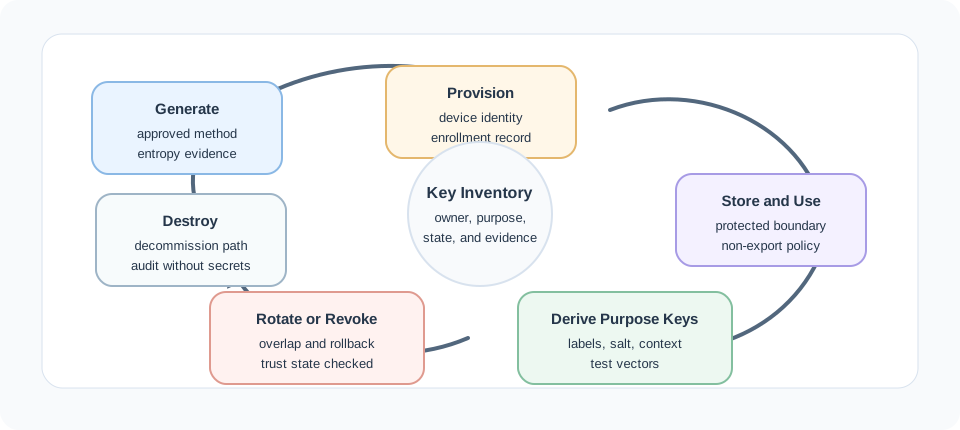
Follow Figure 14.1 from key creation to setup, the key list, and safe use. A new key for each job limits what one lost key can allow. Key change or trust removal then leads to a checked delete and an audit record. A new owner or risk starts the loop again. For BLE bonds, the list should name the owner, job, state, store, and removal path for each LTK, IRK, and CSRK. Reset, sale, and support faults often come from old bond data, not from the AES cipher itself.
Resolvable Private Addresses make the IRK role concrete. A sensor can rotate its over-the-air address periodically so a passive scanner sees unrelated-looking identifiers, while a bonded gateway uses the stored IRK to resolve those addresses as the same trusted device. If the gateway database is restored without the bond table, increasing transmit power or changing the LTK will not help; the fix is restoring or re-establishing the IRK-bearing bond.
CSRK signed data is a different tradeoff. A peripheral can accept a write over an unencrypted link when the packet includes a signature computed with the CSRK and a monotonically increasing counter. The receiver checks the signature and rejects stale counters, which gives authenticity and replay protection, but not confidentiality. Use this only when the profile supports signed data and the command is not secret; medical readings, credentials, ownership changes, and other sensitive operations should bring up an encrypted LTK-protected link and still apply application authorization.
Bond deletion must remove all relevant keys. Keeping a stale LTK can preserve unwanted encrypted access, keeping a stale IRK can keep an old device recognizable, and keeping a stale CSRK can keep old signed commands trusted after the user thought the bond was gone.
14.12 Summary
This section: Summary
This chapter covered BLE encryption and key management:
- Encryption Architecture: AES-CCM-128 with 128-bit keys for LE links; compare LE Legacy and LE Secure Connections with the separate BR/EDR security path
- Key Hierarchy: In LE Legacy pairing, TK -> STK -> LTK, plus IRK for privacy and CSRK for signatures; legacy pairing uses EDIV+Rand to identify the LTK on reconnection. LE Secure Connections derives the LTK from ECDH
- LE Secure Connections: Introduced in BLE 4.2, uses P-256 ECDH to prevent passive eavesdropping of the pairing exchange; LTK and MacKey derived via the f5 function
- Security Decision Framework: Match pairing method to data sensitivity and device capabilities
- Best Practices: Use secure key storage, implement authorization layers, plan for revocation
- Common Pitfalls: OOB alternatives for displayless devices, defense-in-depth beyond initial pairing
14.13 What’s Next
This section: What’s Next
Prioritize these follow-up chapters based on the security question you need to answer next:
- Hands-on BLE security labs: bt-security-labs-defense-review.html to apply key concepts in ESP32 BLE security demonstrations and attack/defense scenarios.
- Pairing methods in depth: bt-security-pairing-methods.html to compare Just Works, Passkey, Numeric Comparison, and OOB with threat-model analysis.
- Cryptography foundations: ../cryptography/encryption-principles-and-crypto-basics.html to review AES-CCM, ECDH, and the primitives underlying BLE key generation.
- IoT authentication patterns: ../authentication/authentication-access-control-index.html to extend BLE pairing security with application-layer identity and authorization.
- IoT threat landscape: ../security-threats/threats-introduction.html to place BLE attack vectors in the broader context of IoT security risks.
14.14 Key Takeaway
This section: Key Takeaway — Bluetooth encryption is only as strong as key generation, pairing method, storage, and renewal behavior.
Bluetooth encryption is only as strong as key generation, pairing method, storage, and renewal behavior. Protect long-term keys and choose pairing modes that match the threat model and device interface.
14.15 Continue Your Route
This section: Continue Your Route — This is the last part of this chapter.
This is the last part of this chapter. Return to BLE Encryption: Key Management or continue from the bluetooth-ble module index.
Find help
3 reviewed answers.
Where should I start in a module?
Open the module page from the sidebar to see its chapters in order. Use the module map to return to a topic you need.
Modules and pathsReviewed
What can I try when a project does not work?
Check the symptom, then work through the diagnostic steps. Keep the error message and the smallest example that reproduces it.
When you are stuckReviewed
How do interactive examples work?
Use the interactive guide to check how examples and simulations work before changing your project.
Interactive examples guideReviewed