
Flow scope
Name the telemetry, command, transfer, gateway, or control path being optimized. Do not borrow evidence from unrelated flows.
Progress saves as you read. Mark sections complete as you go; your progress appears in the sidebar.
This section: Start With One Message Scenario — Picture a greenhouse that sends a room reading each minute and a frost warning only when danger appears.
Choose From the Harm of a Missed Message
Picture a greenhouse that sends a room reading each minute and a frost warning only when danger appears. Losing one routine reading may be harmless because the next one replaces it. Losing the warning may ruin a crop.

A greenhouse sends a room reading each minute and rare frost warnings.

One missed reading may pass, but a missed warning may ruin the crop.
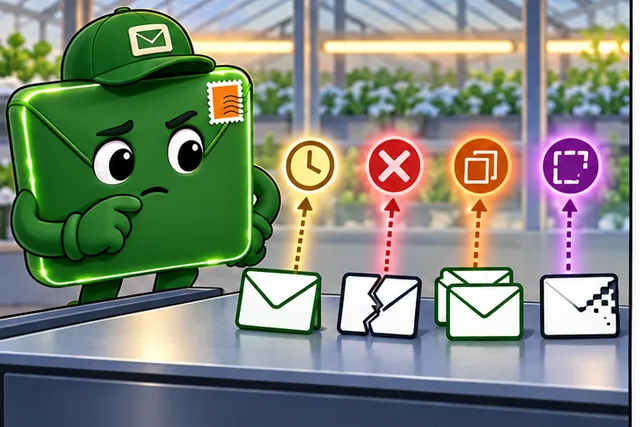
Name the harm from delay, loss, repeats, or a cut message.
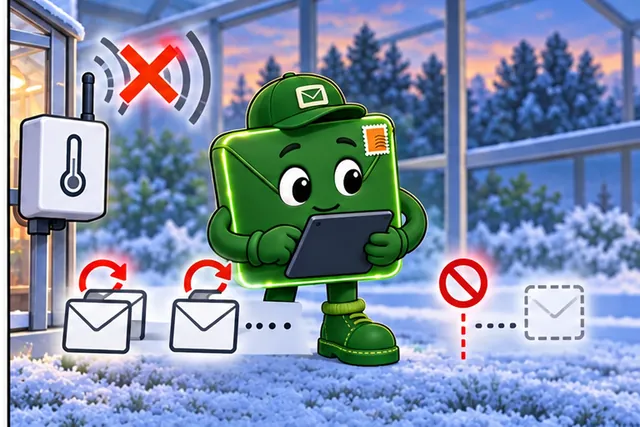
Break the link and keep clear proof of who retries or stops.
A transport rule controls how messages move between programs. The network designer should not choose one rule for the whole greenhouse. First name each message and the harm if it is late, lost, repeated, or cut short. Then decide what proof the sender and receiver must keep.
Test the choice by breaking the link. Check whether a newer reading replaces an old one, whether a warning is confirmed, and whether a repeated command leaves the final device in the right state. Record who retries and who stops.
Write the receiver’s proof before writing code. For a warning, it may be a visible active state with a time and owner. For a command, it is the final device state, not only a reply that says bytes arrived. For a file, it is identity, full length, and a checked result.
Repeat the test after restart and after a long gap. Check both ends against the same message name. If the sender and receiver disagree, preserve both records and make the gap visible rather than choosing the more convenient story.
This simple split does not predict every network condition. Practitioner compares common message rules. Under the Hood examines order, connection state, protection, and recovery in detail.
A transport scenario becomes clearer when it is reduced to one message with a job. Is the message a periodic measurement, an alarm, a firmware chunk, a configuration command, or a review log? That job determines the cost of loss, delay, duplication, and connection state before the protocol decision is made.
This section: Overview: Select Transport Per Message Flow — Transport selection starts with message purpose, not protocol names.
Transport selection starts with message purpose, not protocol names. One IoT product can have replaceable telemetry, confirmed commands, buffered uploads, file-like transfers, discovery messages, and alerts. Each flow can fail in a different way, so each flow needs its own transport decision.
A good scenario review asks what happens if a message is missing, late, duplicated, stale, reordered, or partial. Only then should the review compare stream behavior, datagram behavior, protected datagrams, application acknowledgements, buffering, retries, and receiver state.
Consider a greenhouse controller that reports humidity, raises a frost alarm, accepts a valve command, forwards a buffered gateway upload, and occasionally receives a firmware bundle. A missing humidity sample may be harmless when a newer sample replaces it and the dashboard marks the age of the reading. A missing frost alarm has a different meaning because the receiver may need a visible alarm state, a retry owner, and an escalation path. A duplicate valve command can be dangerous if "open" and "close" are treated as actions instead of desired final states. A partial firmware bundle can leave the device unable to boot unless the receiver verifies identity, length, integrity, version, and rollback behavior.
The review therefore starts by naming the flow and its consequence. If the flow is replaceable telemetry, the evidence may be freshness and accepted loss. If it is a command, the evidence is identity, authorization, duplicate suppression, acknowledgement ownership, and final device state. If it is an upload or transfer, the evidence shifts toward item-level results, parser errors, completeness, and recovery after interruption. The same radio path and same gateway can still produce different transport answers because the message meanings are different.
Choosing one transport for an entire product hides the different consequences of losing telemetry, commands, and uploads. Figure 7.1 shows why the scenario must be split into message flows before candidates are compared.
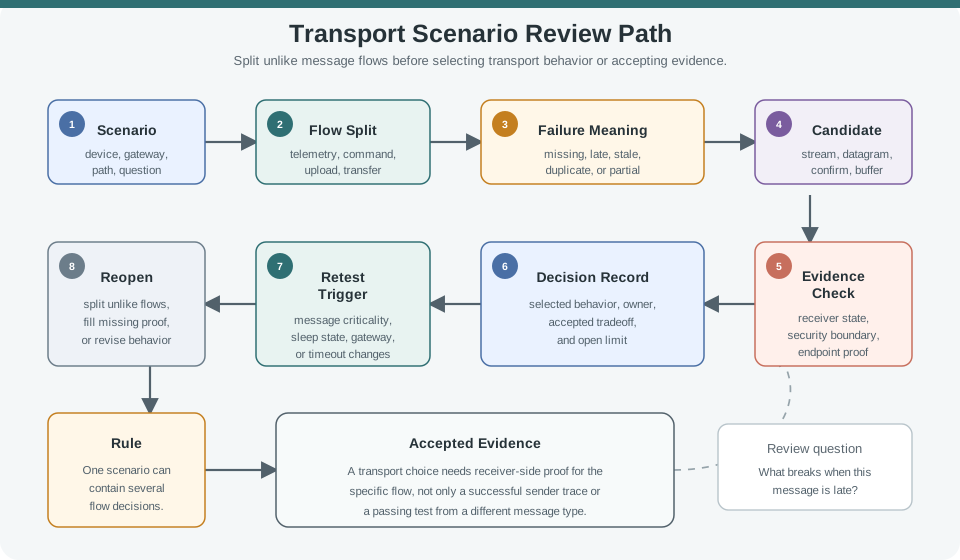
Follow Figure 7.1 from the scenario scope into the flow split, then read each flow’s failure meaning before considering candidate behavior. Continue through receiver evidence to the decision and retest trigger. This order makes transport selection a per-message claim and connects the chapter’s opening scenario to evidence the deployed receiver can actually provide.
Often judged by freshness and replacement behavior instead of complete delivery of every reading.
Need identity, duplicate handling, acknowledgement ownership, and final device-state evidence.
Need batch rules, item identity, retry ownership, parser evidence, and receiver error behavior.
Need length, integrity, completion, partial-transfer behavior, resume rules, and security context.
This section: Practitioner: Preserve the Decision Record — A transport decision record should name the sender, receiver, path segment, failure meaning, reliability owner, security boundary, evidence used, accepted tradeoff, owner, and retest trigger.
A transport decision record should name the sender, receiver, path segment, failure meaning, reliability owner, security boundary, evidence used, accepted tradeoff, owner, and retest trigger. Another engineer should be able to replay why the selected behavior fits that specific flow.
The selected behavior can differ across flows. Replaceable telemetry may tolerate missing readings if the receiver enforces freshness. Confirmed commands may need application-level identity and final-state evidence. Buffered gateway uploads may need item-level results. File-like transfers need completeness and integrity evidence.
For the greenhouse example, the telemetry record might say that the gateway publishes the newest humidity value, the cloud drops stale values, and operations accepts gaps when the age marker remains visible. The valve-command record would be separate: it should name the command identifier, desired final state, duplicate rule, authentication boundary, actuator acknowledgement, timeout behavior, and the log that proves whether the device applied or rejected the change. The buffered-upload record would name the batch identity, item identity, gateway storage limit, retry owner, parser result, and how the receiver reports malformed or duplicate items. Keeping those rows separate prevents a successful upload test from being misread as proof that commands are safe.
The per-flow choice needs to remain auditable after the design review ends. Inspect Figure 7.2 to see which ownership and boundary fields must stay beside the selected behavior.
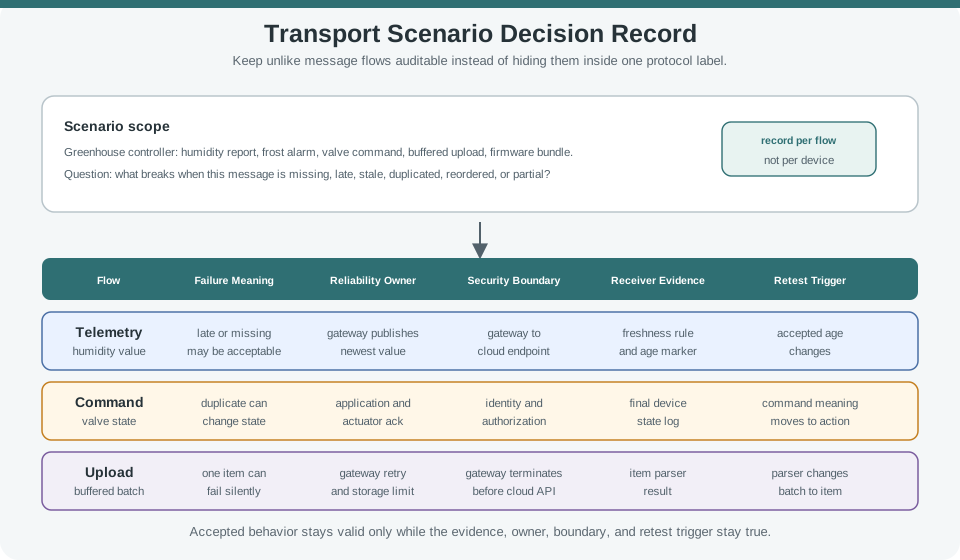
In Figure 7.2, compare telemetry, command, and upload rows by failure meaning rather than by protocol label. For each row, follow reliability ownership and the security boundary into receiver evidence, then finish at the decision and retest trigger. The record preserves why unlike flows can legitimately choose different transports and what change should reopen each choice.
Working rule: a scenario can use one transport behavior everywhere, but only if the record proves that one behavior fits every message flow and receiver rule.
This section: Under the Hood: Ownership and Boundaries Change the Answer — Transport behavior is only one part of the decision.
Transport behavior is only one part of the decision. Reliability can be owned by the transport stack, the application protocol, the gateway, the receiver, operations, or by no retry at all. Security can terminate at a device, gateway, broker, cloud endpoint, or local controller. These ownership boundaries determine whether the selected transport preserves the message meaning.
Endpoint constraints also matter. Sleep behavior, memory, connection limits, path loss, gateway buffering, replay handling, and receiver parser behavior can change a reasonable choice. A bounded record should say what must be retested when those assumptions change.
For example, a gateway might terminate TLS from the cloud, speak a lighter downstream transport to sleepy devices, and hold records while the wide-area link is unavailable. That design can be valid, but it moves trust and reliability into the gateway. The scenario record must say whether the gateway authenticates the device, whether downstream messages are protected against replay, whether queued commands expire, and whether a cloud acknowledgement means "gateway stored it" or "device applied it." Without that boundary note, a transport success metric can exaggerate the evidence seen by the physical endpoint.
Parser and buffer ownership create similar traps. A batch upload over a reliable stream can still lose item meaning if the receiver accepts the connection but rejects one malformed item silently. A datagram command can be acceptable when the payload carries an idempotent desired state, the receiver ignores duplicates, and the controller displays a final-state timeout. A firmware transfer can use a stream, blocks, or resumable chunks, but the transport choice is incomplete until the bootloader verifies artifact identity, length, integrity, version policy, and rollback state. The under-the-hood question is not "which protocol is reliable"; it is "which layer proves the message meaning we promised."
Retest triggers should be concrete. Reopen the decision if the gateway starts terminating security in a new place, if device sleep windows change, if a broker introduces store-and-forward behavior, if the receiver parser changes from batch-level to item-level results, if command semantics move from desired state to action, or if operations changes the acceptable age of telemetry. Those changes can invalidate a previously reasonable transport selection even when the protocol name stays the same.
Name who retries, who suppresses duplicates, who records failure, and who decides a flow is complete.
Name the protected segment, peer identity expectations, replay behavior, and termination point.
Record sleep, memory, connection, buffer, and parser limits that can invalidate the selection.
Reopen the decision when message meaning, endpoint, gateway, path, policy, or receiver rules change.
This prevents scenario records from becoming protocol folklore. A statement such as "use UDP for telemetry" or "use TCP for uploads" is only useful after the flow, evidence, and ownership boundaries are named. Otherwise the record hides the assumptions that make the choice valid.
This section: TCP Optimizations and QUIC for IoT
Picture a cold-store controller that sends one command every few minutes. The team wants each command to arrive sooner. A new transport feature sounds promising. Yet the team has not measured the current path. It cannot show what is slow.
Begin with one flow. A flow is one kind of message moving between named ends. Record when it starts and finishes. Count the sends and repeats. Note the energy used. Check what the receiver accepted. This is the baseline.
Change one thing next. The device might keep a connection open. It might group small messages. It might use a different way to recover after a break. Measure the same facts again. A gain is real only when the receiver sees the right result.
Faster is not the only goal. The change may use more memory. It may keep the radio awake. It may make recovery less clear. It may also move a security duty. Write a stop rule and a way back before the trial.
This first view treats one change as separate from the rest of the system. Real paths share links and react to other traffic. The Practitioner layer compares candidates with receiver evidence. Under the Hood explains connection state, stream behavior, congestion, and the limits that can turn a local gain into a wider fault.
Optimization only helps when the current transport behavior is measured first. Capture the baseline path, including connection reuse, packet count, retry behavior, latency, energy cost, and security boundary. Then each optimization can be judged as a bounded change rather than a generic upgrade.
TCP optimization and QUIC review should start from a named IoT flow, not from a transport feature list. A useful record says what path changed, what baseline was observed, which mechanism is proposed, what the receiver proved, and what would pause or reopen the decision.
For example, a freezer controller that sends one compressor command every few minutes has a different optimization question from a gateway that transfers firmware chunks for twenty devices. The command flow may care most about stale connection state, duplicate action, authorization, and rollback. The firmware flow may care more about repeat setup cost, stream separation, congestion behavior, and recovery after a path change. Mixing those records makes the conclusion too broad to review.
A bounded review therefore names one flow and one candidate claim. "Reuse the existing TCP session for compressor command messages" is reviewable because the baseline, receiver parser, command state, timeout rule, and rollback owner can be checked. "QUIC is faster" is not reviewable until it is rewritten as a scoped claim, such as "use QUIC for gateway firmware transfer on this backhaul, with endpoint logs proving stream mapping, identity continuity, retry behavior, and fallback to the current TCP path."
Before comparing tuning methods, inspect Figure 7.3 to ask how each change stays tied to a base run, receiver result, owner, and rollback rule.
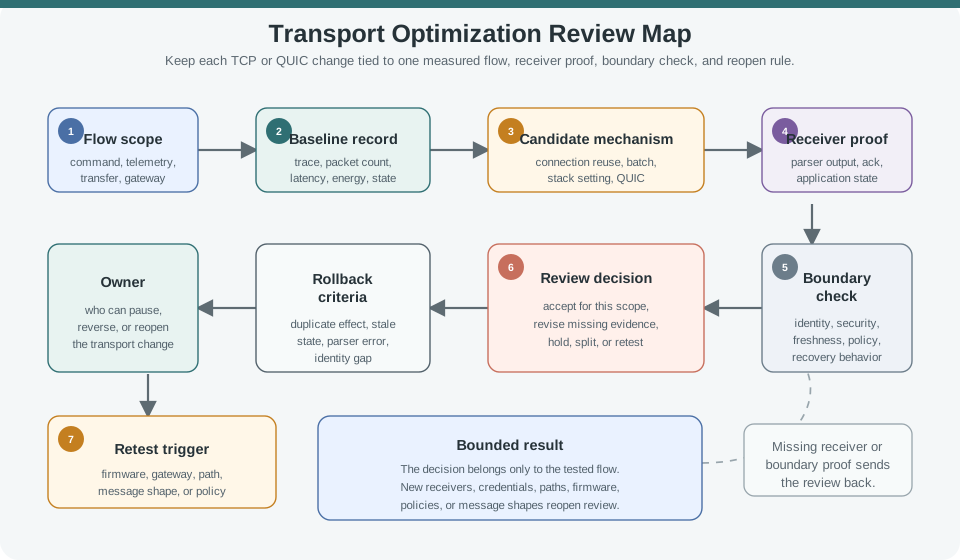
Trace Figure 7.3 from the named flow and base run to the trial change. Then check what the receiver saw. Read the fault or trust line before the pass choice, rollback rule, owner, and new-test trigger. This order stops a lower delay or byte count from becoming a broad claim. Each gain stays tied to the same flow and units used for the base run. A new receiver, key, path, or message shape sends the choice back through the map.
Name the telemetry, command, transfer, gateway, or control path being optimized. Do not borrow evidence from unrelated flows.
Keep a trace, log, state record, or missing-evidence note that shows behavior before the transport change.
State the proposed mechanism: connection reuse, batching, small-message handling, stack setting, session handling, or QUIC fit.
Record whether the answer is accept for scope, revise, hold, or retest, and define what would reverse it.
An optimization is not accepted because it is newer, faster in a lab, or smaller in one packet capture. It is accepted only when the named flow still meets application, reliability, security, and operations expectations under the tested conditions.
Connection reuse, small-message handling, batching, and stack settings can reduce setup cost, traffic, latency, or energy. They also change state, timing, parsing, freshness, and recovery behavior. The review should pair every sender-side improvement with receiver-side proof.
Work from the smallest decision that changes operations. If an actuator command path disables Nagle-style buffering or changes a small-message setting, the sender trace should show when each command was written, but the receiver record still has to show frame boundaries, command identity, duplicate suppression, acknowledgement meaning, and final actuator state. If the only artifact is lower apparent latency at the sender, the review is incomplete because it does not prove the command was handled once at the application boundary.
For connection reuse, keep the stale-state test close to the change. A useful run might force a gateway reconnect, send command C-17 twice across the reused session, and then compare packet trace, receiver parser log, authorization result, retry counter, and final device state. That record can support a scoped accept, revise, hold, or rollback decision. It cannot support a blanket "reuse is safe" claim across new message shapes, firmware builds, gateways, or credential policies.
| Candidate | Receiver Evidence | Hold Or Revise When |
|---|---|---|
| Connection reuse | Peer identity, message parsing, stale-state handling, reset behavior, and final application state. | The record only says that the socket stayed open. |
| Small-message handling | Sender trace, receiver parser output, acknowledgement timing, close behavior, and retry interaction. | The setting changes timing but no parser or duplicate evidence is captured. |
| Batching | Batch rule, per-item parsing, malformed-item behavior, freshness limit, and security boundary. | The batch is smaller on the wire but hides stale, failed, or unauthorized items. |
| Stack setting | Old and new traces, queue behavior, partial-message handling, ownership, and rollback plan. | The change is described as a tuning default with no artifact or owner. |
Once a candidate is measured, preserve enough context to decide whether the result survives a later path or firmware change. Figure 7.4 shows the fields that make that comparison durable.
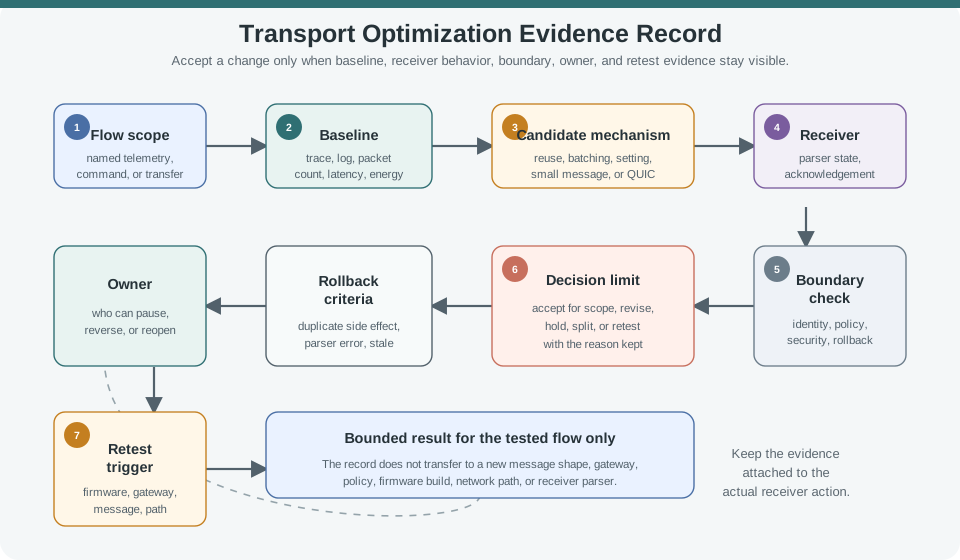
Read Figure 7.4 from the named flow and base result to the trial change. Check what the receiver saw, then read the safety line and pass limit. End with the rollback rule, owner, and cause for a new test. The order links a speed or size gain to safe use. A change stays valid only while the message, receiver, keys, gateway, and rules still match the test. Save the base run so the next review can use the same units and load.
A gateway keeps a TCP session open for repeated command messages. The sender trace shows fewer setup events, but the receiver log only shows that bytes arrived. The record should be revised to add command parser output, duplicate behavior after reconnect, stale-session handling, final application state, rollback criteria, and a timeout or command-shape retest trigger.
QUIC can be a candidate when a flow needs encrypted transport, stream separation, connection identity across path changes, or faster repeat setup. Those features still need endpoint evidence because some transport details are intentionally protected from passive traces.
The evidence shift matters most for repeat setup and path changes. With TCP, a passive trace may show connection setup, close, reset, retransmission, and visible timing. With QUIC, the reviewer may see less payload and stream detail on the wire, so the record must rely more on endpoint logs, negotiated identity, stream identifiers, application acknowledgements, replay handling, and rollback telemetry. Reduced passive visibility is not a reason to reject QUIC by itself, but it is a reason to demand stronger endpoint evidence.
0-RTT and session resumption need especially narrow claims. A telemetry upload may tolerate replay protection at the application layer, while a command path may need idempotency keys, authorization freshness, and explicit rejection of repeated side effects before repeat setup is accepted. A review that skips those fields can accidentally turn a performance optimization into a security or safety regression.
Show stream handling, duplicate behavior, retry outcome, final application state, and close behavior for the tested flow.
Record peer identity review, session resumption behavior, key or policy ownership, and any replay or authorization evidence.
State which facts remain visible in packet traces and which move into endpoint logs, broker records, or application state.
Pause or reverse the decision when duplicate side effects, stale acknowledgements, parser errors, replay warnings, or identity gaps appear.
| Question | Evidence To Keep | Retest Trigger |
|---|---|---|
| Why QUIC instead of TCP with protected sessions or UDP with selected reliability? | Flow goal, stream boundary, repeat-setup cost, path-change need, and security requirement. | Gateway role, network path, or security policy changes. |
| How does the receiver prove correctness? | Endpoint logs, stream state, parser output, duplicate handling, and application state. | Message shape, stream mapping, retry policy, or parser version changes. |
| What replaces passive trace evidence? | Endpoint counters, broker records, structured logs, release notes, and test artifacts. | Logging, telemetry, firmware, or gateway observability changes. |
A gateway team proposes QUIC for telemetry and control over one remote connection. The client record shows stream separation, but the server record lacks message state, session-resumption identity checks, and the observability plan for protected transport elements. Hold the decision until endpoint logs, application state, duplicate and retry behavior, peer identity review, rollback criteria, and retest ownership are included.
TCP optimization and QUIC choices should be accepted only for a bounded flow with visible evidence. The strongest records name the baseline, candidate mechanism, receiver behavior, reliability and security boundaries, rollback criteria, owner, and retest trigger.
Connection reuse, small-message handling, batching, stack settings, and QUIC stream use can all be valid. None of them replaces receiver evidence, application-state evidence, or security-boundary review.
Transport optimization should preserve correctness while reducing packet count, handshake cost, latency, or energy use for one reviewed flow.
Use these chapters to verify the assumption an optimization depends on. Fundamentals re-establish the baseline behavior, selection checks whether the protocol choice still fits, implementation guidance expands mechanism-specific evidence, and retry-sequencing tests duplicate and state consequences. Carry the same flow scope, receiver proof, rollback rule, and retest trigger into the linked review so a faster candidate is not evaluated against a different problem.
This section: Summary — Transport selection scenarios are practice in flow separation.
Transport selection scenarios are practice in flow separation. A useful record does not force one protocol answer across the whole system unless the evidence supports that simplification. It maps each message flow to purpose, failure meaning, reliability owner, security boundary, receiver evidence, accepted tradeoff, and retest trigger.
This section: Key Takeaway
Choose transport behavior per message flow, then preserve the reliability owner, security boundary, receiver evidence, accepted tradeoff, and change condition that would reopen the choice.
This section: See Also
TCP vs UDP: How to Choose compares the core transport behaviors used in these scenarios.
Matching Transport to Message Purpose frames transport as a flow-specific decision.
TCP Optimizations and QUIC for IoT explains when transport behavior changes after the baseline choice.
Retries and Sequence Numbers deepens the reliability ownership questions used in scenario records.
3 reviewed answers.
Open the module page from the sidebar to see its chapters in order. Use the module map to return to a topic you need.
Modules and pathsReviewed
Check the symptom, then work through the diagnostic steps. Keep the error message and the smallest example that reproduces it.
When you are stuckReviewed
Use the interactive guide to check how examples and simulations work before changing your project.
Interactive examples guideReviewed