5 Topology Selection Records
More
Depth: Practitioner
Progress saves as you read. Mark sections complete as you go; your progress appears in the sidebar.
A farm needs links for soil probes spread across fields, while a factory needs bounded paths around metal machines. Selecting a topology starts with those site facts and failure consequences. The resulting record explains why one shape fits instead of declaring mesh, star, or tree universally best.
Latency means the travel time across the selected network. A payload is the sensor data carried on its links.
5.1 Select the Route Shape From Scenario Evidence
This section: Select the Route Shape From Scenario Evidence — Begin at Figure 5.2.
Begin at Figure 5.2. Follow the scenario through coverage, power, traffic, latency, failure, and maintenance gates. A candidate that misses a hard constraint leaves the path even if it scores well elsewhere. This prevents a familiar topology from winning before the physical problem is described.
Figure 5.1 turns the surviving choice into expected paths. Read from each device through any parent or relay to the sink, marking shared links and single points of failure. Figure 5.3 then binds those routes to assumptions, measures, exceptions, and owner. The record is what can be reviewed when the site changes.
Use Figure 5.4 as the field test. Place the small number of real nodes shown, run the intended traffic, create the labelled faults, and compare observed paths with the route plan. A desk simulation can narrow candidates, but the pilot exposes walls, terrain, interference, installation limits, and battery behavior.
Consider 24 orchard probes in four rows. A direct star may require every probe to reach one mast. A tree can place one relay per row, but failure of a row relay removes six probes. A mesh may route around one relay, yet forwarding increases energy use at selected nodes. If each probe sends 80 bytes every five minutes, the application payload is (24\times80=1{,}920) bytes per reporting round before overhead; shared relay links must carry several probes’ records.
Write two hard gates: all 24 identities must report within ten minutes, and loss of one ordinary probe must not hide another row. Add preferences such as low installation cost and long battery life. Pilot at the farthest row, during wet and dry conditions if they affect radio propagation, and with one relay removed.
Predict results for each candidate. The star should fail visibly if the farthest probe cannot reach the mast. The tree should show exactly six lost routes when one row relay is disabled unless a backup exists. The mesh should produce named alternate parents and measured forwarding cost. Choose from those observations, then retain the rejected reasons so later changes do not restart the argument from memory.
Revisit the selected record when device count, traffic, site layout, or failure limit changes. A topology choice is valid for its stated scenario, not for every future expansion.
5.2 Start With the Story
This section: Start With the Story — An actuator is a part that turns a control signal into physical action.
Let One Hard Fact Reject a Pretty Diagram
An actuator is a part that turns a control signal into physical action. A gateway is a device or service that joins different system parts. Telemetry is a time-linked record from a device. Picture a greenhouse with battery sensors, powered vents, one office link, and staff who must keep local control during an outage.
Write the main flows and must-pass facts first. Mark which devices can relay, where power exists, who owns each boundary, and what must still work when a link fails. Remove any network shape that breaks one of those hard rules before comparing ease or cost.
Pilot the smallest remaining choice at the hardest location. Load it with routine readings and urgent commands. Remove the centre or a relay, then record who detects the fault, which path remains, and how service returns.
A chosen shape fits only the facts that were tested. The deeper sections compare candidates and evidence records so new rooms, traffic, owners, or power limits reopen the decision instead of inheriting it blindly.
Think of topology selection as a design review, not a shopping list. A team brings a scenario with devices, traffic, coverage, power limits, ownership boundaries, and recovery expectations. Your job is to narrow the possible shapes, reject the ones that fail a must-pass gate, pilot the remaining candidate, and leave behind a record that says when the choice must be revisited.
5.3 Overview: Start With Scenario Facts
This section: Overview: Start With Scenario Facts — Topology selection is the process of choosing a network shape from scenario facts.
Topology selection is the process of choosing a network shape from scenario facts. It starts with device roles, traffic direction, placement, power, ownership, and failure expectations. The topology name comes after those facts, not before them.
The practical goal is a bounded decision. A selection answer should say which pattern fits now, which candidates were rejected, what records support the choice, what remains unproven, and what future change should reopen the decision.
A good selection packet therefore looks more like a design review note than a diagram caption. It names the primary flow first: sensor-to-gateway telemetry, gateway-to-cloud reporting, controller-to-actuator commands, peer-to-peer alarms, or local fallback. It then separates must-pass facts from preferences. If a battery node cannot relay, mesh is not viable just because it appears resilient. If one gateway cannot cover the placement, a simple star is not proven just because it is easy to draw. If ownership changes at a gateway, broker, parent, or relay boundary, the topology record must say who observes and repairs that boundary.
This keeps the choice portable. A future reviewer can reuse the record only when the same facts, gates, limits, and recheck trigger still hold.
If you only need the intuition, this layer is enough: extract the scenario facts, apply must-pass gates, shortlist plausible patterns, test the riskiest assumption, and leave a selection record that can be rechecked.
Choosing a topology too early hides which requirement actually eliminated the alternatives. Figure 5.1 lays out the evidence sequence before the greenhouse example applies it.
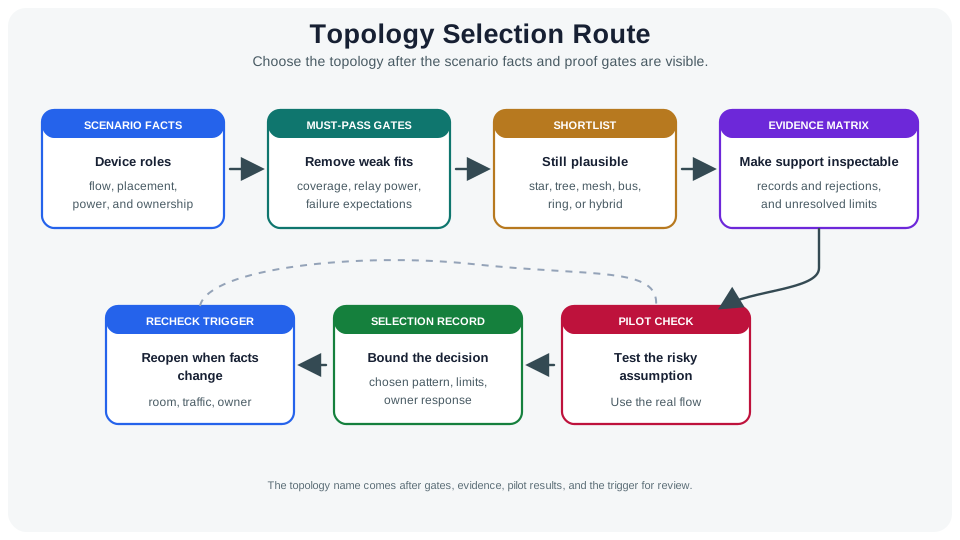
The route in Figure 5.1 starts with SCENARIO FACTS—flow, placement, power, and ownership—before MUST-PASS GATES remove weak fits for coverage, relay power, or failure expectations. The SHORTLIST retains plausible star, tree, mesh, bus, ring, or hybrid candidates, and the EVIDENCE MATRIX makes support inspectable. PILOT CHECK tests the risky assumption, SELECTION RECORD binds the chosen pattern to limits and unresolved evidence, and RECHECK TRIGGER reopens it when room, traffic, or owner changes. The topology name therefore arrives after the facts and proof, not before them.
Scenario Facts
Device roles, primary flow, placement, power state, gateway options, and operations ownership.
Decision Gates
Must-pass requirements that remove candidates before preference can take over.
Shortlist
A small set of star, tree, mesh, bus, ring, or hybrid options that still match the facts.
Recheck Trigger
The future change that makes the old decision unsafe to reuse without rechecking.
Overview Knowledge Check
5.4 Practitioner: Build the Selection Record
This section: Practitioner: Build the Selection Record — A topology selection record should be short enough to maintain and specific enough to defend.
A topology selection record should be short enough to maintain and specific enough to defend. It should help a reviewer understand why one pattern fits the current evidence and why other plausible patterns were not selected.
The selection record needs rejection criteria that are specific enough to defend. The gate diagram Figure 5.2 turns six scenario facts into must-pass questions before preference can influence the shortlist.
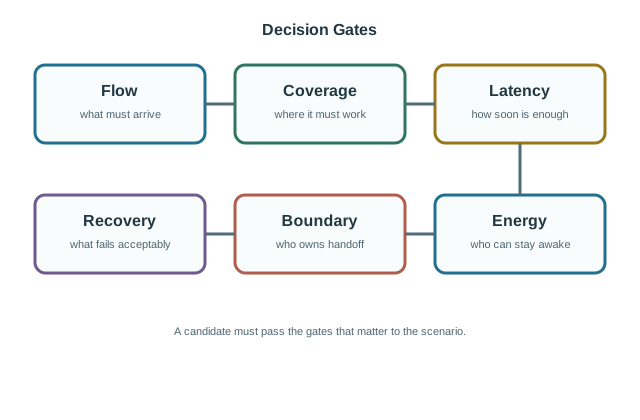
Across Figure 5.2, Flow asks what must arrive and Coverage asks where it must work. Latency defines how soon is enough, while Energy exposes who can stay awake or relay. Boundary names who owns the handoff, and Recovery asks what may fail acceptably. A candidate that misses any mandatory gate leaves the shortlist regardless of how familiar its shape is. These questions turn the greenhouse choice into a traceable record: two room-level stars may fit powered gateways and battery sensors where a full mesh fails the relay-energy gate.
Worked Selection Record
A greenhouse monitoring scenario has battery sensors in two rooms, one mains-powered gateway per room, and cloud reporting every few minutes. A bounded selection can choose a hybrid pattern: room-level star collection to each gateway, then gateway-to-cloud reporting upstream.
The record should reject full mesh unless the sensors have relay budget and a reason to relay. It should reject one large star unless the evidence shows one gateway can cover both rooms. The pilot should disable or isolate one gateway and record buffering, alert ownership, and recovery behavior.
Practitioner Knowledge Check
5.5 Under the Hood: Handoffs, Pilots, and Recheck Logic
This section: Under the Hood: Handoffs, Pilots, and Recheck Logic — Topology selection fails when the answer treats a topology family as a guarantee.
Topology selection fails when the answer treats a topology family as a guarantee. Star, tree, mesh, bus, ring, and hybrid patterns describe connection structure. They do not prove coverage, latency, route repair, gateway capacity, local control, or operational ownership by themselves.
Check whether tests support the candidate's expected behavior. The pilot should test the assumption most likely to invalidate the selected pattern, not the easiest path that already works.
For example, a mesh candidate often promises alternate paths, but tests must show whether the alternate path reaches the real destination, whether relay nodes have enough power budget, whether route repair converges before the application deadline, and whether all paths still collapse through the same gateway. A tree candidate can match floors, rooms, or zones, but it must expose the parent role as a failure domain. A hybrid candidate can fit when local collection and upstream reporting have different constraints, yet the handoff between them must be visible rather than hidden inside the word "hybrid."
In the two-room greenhouse example, adding a third room reopens the coverage and gateway assumptions before the room-level star pattern is reused. Reopen selection when a new room, a change in gateway responsibility, traffic class, firmware duty cycle, device count, or service dependency changes the assumptions that made the old choice valid.
Passing the gates still leaves assumptions and rejected alternatives that a future engineer must see. Keep these limits beside the chosen pattern.
See Figure 5.3 in the figure below.
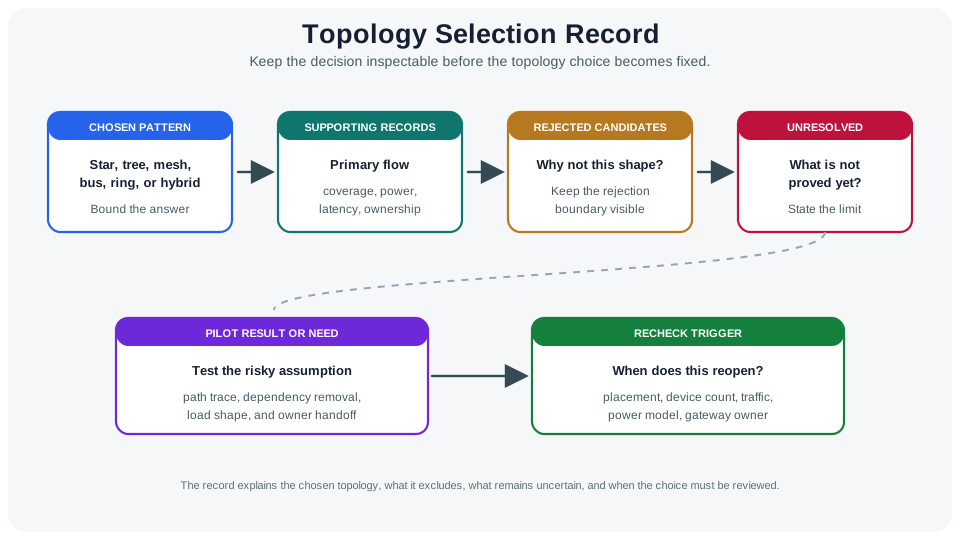
Name the chosen star, tree, mesh, bus, ring, or hybrid pattern. Keep the primary flow, coverage, power, latency, and responsibilities alongside it. Explain why other shapes failed and what still lacks confirmation. Describe pilot results or needed tests of paths, dependency removal, traffic load, and handoff responsibilities. Reconsider the recommendation when placement, count, traffic, power model, or responsibility for a gateway changes.
Star Checks
Prove center capacity, coverage, handoff ownership, and behavior when the center fails or buffers traffic.
Tree Checks
Prove parent roles, branch failure domains, route repair behavior, and whether tier ownership is explicit.
Mesh Checks
Prove relay budget, path diversity, route stability, duty-cycle impact, and gateway dependency.
Hybrid Checks
Test which segment uses which behavior, where handoffs occur, and what data crosses between them.
Pilot And Recheck Rules
- Trace the primary flow through the selected pattern before testing secondary flows.
- Remove one shared dependency and note who is affected.
- Match the pilot traffic shape to the real flow: periodic, bursty, command, diagnostic, or local control.
- Name the person responsible for each gateway, parent, broker, relay, or shared service.
- Reopen the choice when placement, device count, traffic direction, power budget, or ownership changes.
The pilot should test the assumption most likely to overturn the choice. Trace the real flow, remove a dependency, apply realistic traffic, and check who restores service.
See Figure 5.4 in the figure below.
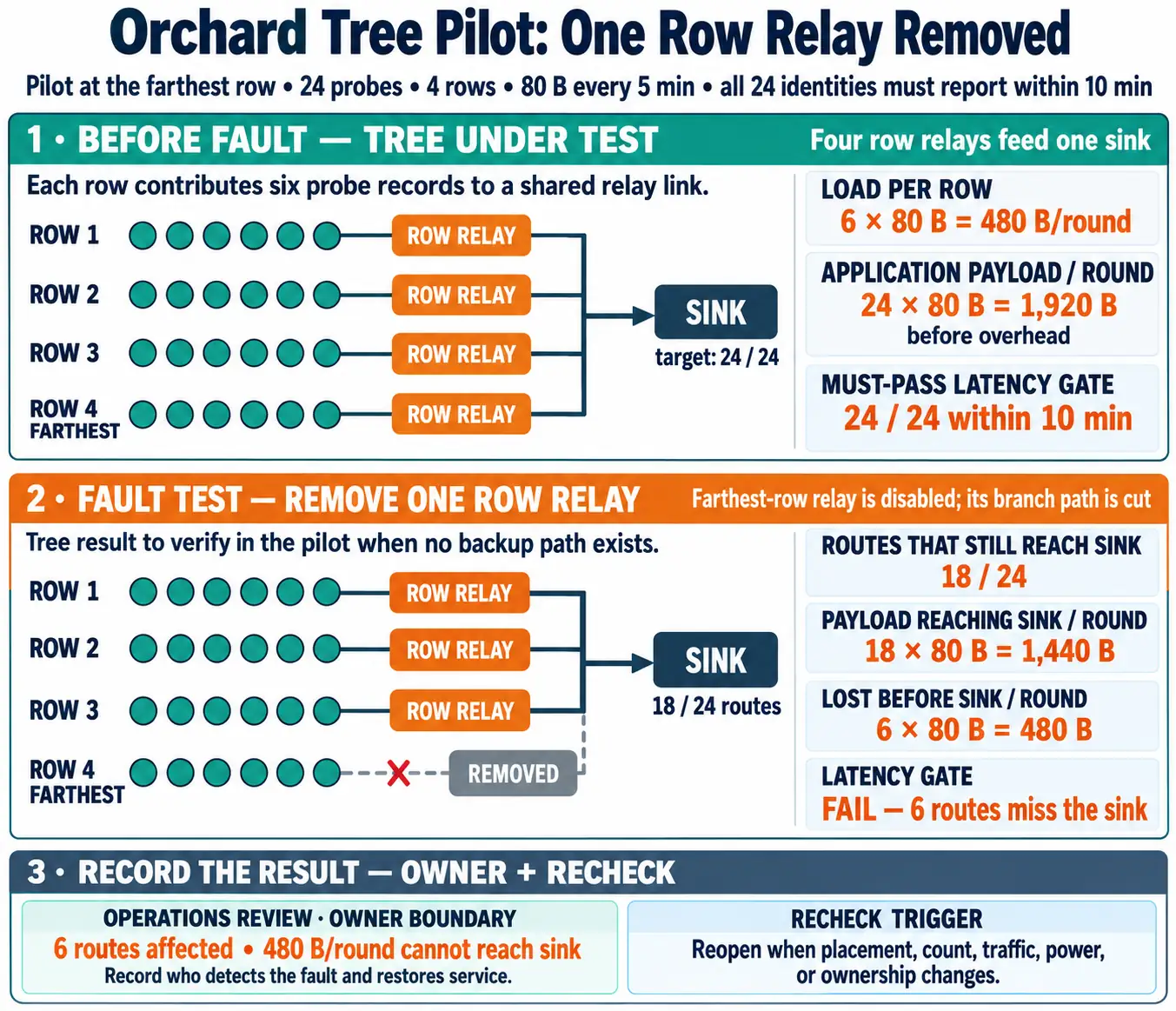
Trace the primary flow from source to gateway, service, or peer. Remove a gateway, parent, relay, or broker while applying periodic, bursty, command, or local-control traffic. Check who observes and restores service. Note the lost path, queued command, changed responsibility, or absence of effect. Reconsider acceptance when placement, count, traffic, power, or responsibilities change. These tests can reverse the topology choice.
Under-the-Hood Knowledge Check
5.6 Summary
This section: Summary — Topology selection starts with scenario facts, not a preferred shape.
Topology selection starts with scenario facts, not a preferred shape. Decision gates remove candidates that cannot satisfy primary flow, coverage, energy, ownership, or recovery requirements, leaving a shortlist supported by the scenario record. A pilot tests the riskiest assumption before commitment. The final record names the chosen pattern, rejected candidates, unresolved assumptions, limits, and recheck trigger because a topology name alone cannot prove resilience, latency, route repair, or operational fit.
5.7 Key Takeaway
This section: Key Takeaway
Choose topologies as bounded records: facts first, gates second, shortlist third, pilot result before commitment, and a clear trigger for reopening the decision.
5.8 See Also
This section: See Also
Network Topologies: Basic Types
Compare the topology families before using them in a selection record.
Topology Analysis and Metrics
Use graph metrics and failure domains to strengthen the selection record.
Topology Failures
Check the failure modes that can invalidate a candidate topology.
Topology Management Techniques
Connect the selected shape to operations, route changes, rollback, and retest triggers.
Find help
3 reviewed answers.
Where should I start in a module?
Open the module page from the sidebar to see its chapters in order. Use the module map to return to a topic you need.
Modules and pathsReviewed
What can I try when a project does not work?
Check the symptom, then work through the diagnostic steps. Keep the error message and the smallest example that reproduces it.
When you are stuckReviewed
How do interactive examples work?
Use the interactive guide to check how examples and simulations work before changing your project.
Interactive examples guideReviewed