2 Core Topology Shapes and Trade-offs
More
Depth: Practitioner
Progress saves as you read. Mark sections complete as you go; your progress appears in the sidebar.
Six temperature sensors can share one gateway, relay through neighbours, or connect along a common bus. Those physical links determine which break disconnects which device and how traffic travels. Core topology shapes are maps of dependency, not decorative layouts.
A gateway is the node joining the sensor network to another system. A protocol is the rule nodes use to exchange messages.
2.1 Walk the Failure Paths in Each Shape
This section: Walk the Failure Paths in Each Shape — Follow the links from an end device toward its destination.
Follow the links from an end device toward its destination. In a star, every device depends on the central node but not on a neighbour. A line or bus shares a path, so cable or relay position matters. A ring provides another direction only when protocol behavior can use it. A mesh offers alternate paths at the cost of routing, power, and management complexity. A tree concentrates dependence at parent branches.
Use six cold-room sensors and one gateway. A star needs six device-to-gateway links. If sensor S3 fails, the other five remain connected; if the gateway fails, all six lose their route. In a simple line S1-S2-S3-S4-S5-S6-G, a break between S4 and S5 isolates four sensors from the gateway side. Naming the exact cut reveals more than calling one shape “reliable.”
Check how the planned shape meets the building. Follow plan, measure, compare, adjust placement or channel, and measure again. Walls, metal shelves, interference, and antenna orientation can erase a drawn wireless topology link. The loop closes only when the revised topology is checked in the real site.
Topology also changes traffic. In a star, the gateway sees six direct streams. In the line, the topology link near G may carry records forwarded for every upstream sensor. If each sensor sends one 100-byte payload per minute, that final topology link carries six payloads, or 600 bytes per minute before overhead. Its energy and capacity burden differs from the far-end topology link carrying only S1.
Predict physical checks. Power off S3 in the star and expect one missing stream. Disable the star gateway and expect six. Break the line between S4 and S5 and list the sensor identities expected on each side before observing them. Then repeat the wireless site survey with a cold-room door open and closed. The measured dependencies decide whether the chosen shape meets the service need.
Choose the shape after naming the service it must support. A star may have one central topology network node but redundant power and two upstream links. A mesh may offer alternate radio neighbours while every route still ends at one gateway. Count physical, power, and service dependencies separately before deciding how resilient the topology is.
Bus wiring needs checks of termination, length, taps, and faults. A short circuit can affect the shared segment, while an open circuit may divide devices by position. Ring behavior depends on whether equipment and protocol can reverse traffic after a break. Tree branches concentrate both traffic and failure below their parent. Each drawn edge should therefore state what carries it and what happens when it opens.
Installation and maintenance can outweigh an elegant route. Star cabling uses more runs but can make one device fault easy to isolate. A wireless mesh reduces cable but asks battery nodes to forward, retain neighbour state, and accept changing paths. A line reaches along a corridor cheaply, yet work near the gateway can interrupt every upstream device. Connect these trade-offs to who can reach the hardware and how quickly service must recover.
Compare growth. Adding sensor S7 to a star requires a gateway port or radio capacity and a direct topology link. Adding it at the end of the line lengthens the shared path and can increase forwarding near G. Adding it to a mesh needs suitable neighbours and a measured route; proximity on a floor plan is not enough. Save the topology version after each addition so the failure map stays current.
Use identity-aware monitoring. If the gateway receives five readings, compare the five sensor identifiers with the expected six. A duplicate from S2 must not conceal missing S6. Watch path or parent changes where the topology permits them, and alert when the observed shape crosses a tested capacity or failure limit.
End with a recovery drill. Replace a failed star sensor without changing another identity. Repair the line break and confirm that queued samples retain their times. Remove a mesh relay, measure convergence, and check its battery burden after the alternate path forms. The strongest topology is the one whose measured failure and repair behavior matches the actual service requirement.
Capacity changes with direction and concentration. A central star node receives every stream and may also send acknowledgements or commands. A tree parent forwards traffic for descendants. A mesh relay selected by many neighbours can drain before leaf nodes. Measure per-link and per-node traffic during a synchronized reporting burst, then repeat with a chosen path removed.
Topology diagrams should also show where permissions change. A direct physical topology link does not imply that either endpoint may issue every operation. Keep management, telemetry, and control reachability explicit, especially at the central gateway. Test one allowed sensor report and one denied peer command after each shape change.
Keep the final shape, test conditions, and observed cut effects together to support the topology’s release.
2.2 Start With the Story
This section: Start With the Story — Telemetry is a time-linked record from a device.
Name What Fails Together
Telemetry is a time-linked record from a device. Picture twelve room sensors sending such records through one powered hub. The devices may be spread across a building, yet their message path still forms a simple star around that shared centre.
Trace the building sensors by who talks to whom and what fails together.
-
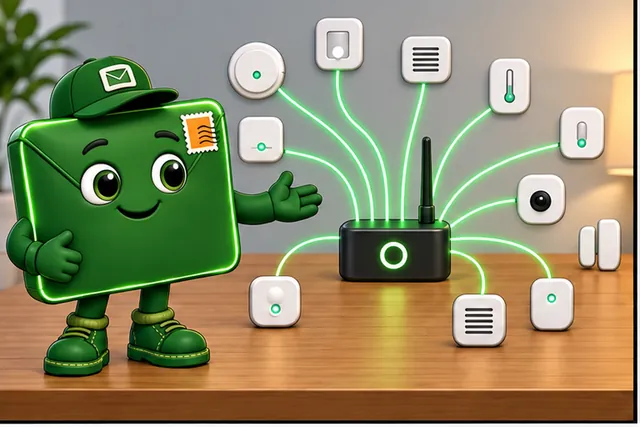
Twelve room sensors send records through one powered hub.
-
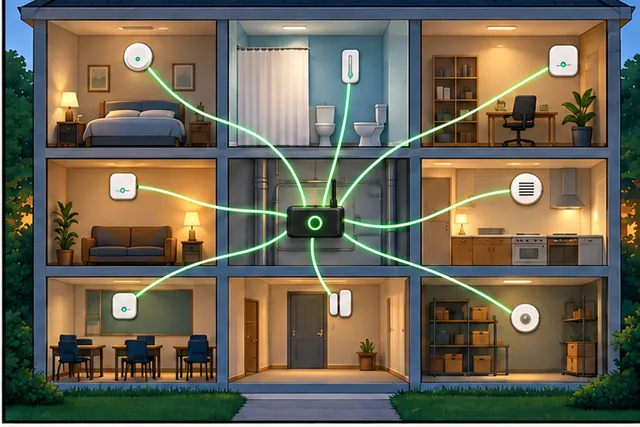
Their spread-out rooms do not remove that shared point of failure.
-
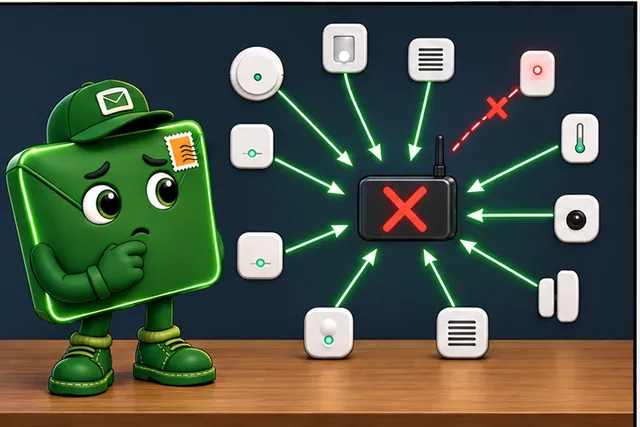
Draw the true message paths, then break one link and the hub.
-
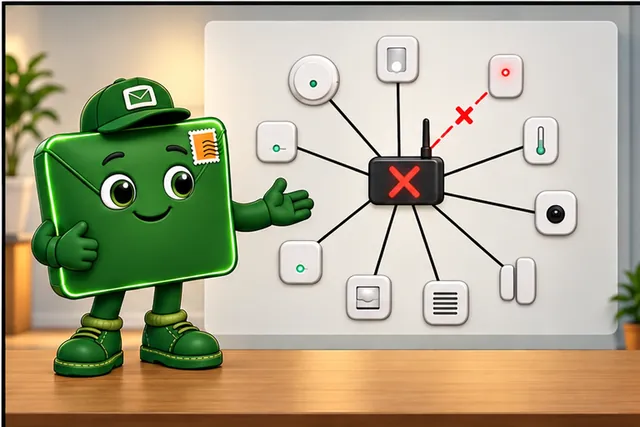
The topology name now matches the paths and failures the team observed.
Draw who talks to whom before naming the shape. Mark every shared hub, cable, loop, branch, relay, and exit to another system. Then trace normal data, an urgent command, and a reply. The drawing should show both the physical placement and the true message path.
Break one link and one shared point. Check which devices lose service, which can use another path, and who notices the change. A mesh label does not prove a spare route, and a ring label does not prove that a break will heal.
One product can use several shapes at different boundaries. The deeper sections compare star, bus, ring, tree, mesh, and mixed forms so each name stays tied to an observed path and a tested dependency.
Imagine a technician sketching a small building full of sensors before any protocol is chosen. The first question is not “which acronym is best?” but “what shape does the conversation need?” Star, bus, ring, tree, mesh, and hybrid topologies are names for everyday dependency patterns: who concentrates traffic, who relays, who shares a path, and who keeps working when a link fails.
2.3 Overview: Topology Names Describe Paths and Dependencies
This section: Overview: Topology Names Describe Paths and Dependencies — A network topology is the structure of devices, links, gateways, and traffic paths.
A network topology is the structure of devices, links, gateways, and traffic paths. The names star, bus, ring, tree, mesh, and hybrid are not rankings. They are vocabulary for describing how messages move and what fails together.
The most useful first question is not "Which topology is best?" The better question is "Which connection shape matches the device roles, traffic pattern, placement, power limits, and failure impact?"
For example, a classroom monitor with twelve battery sensors and one powered gateway is probably a star for normal telemetry because every reading travels to the same center. A building controller system may be closer to a tree because floor controllers aggregate room devices before reporting upstream. A lighting system may use a partial mesh only where powered luminaires can relay for one another. The useful beginner habit is to name the observed path, then name the dependency: hub, backbone, loop, branch, relay, gateway, or cloud boundary.
The reference below separates shape from assumption. For each family, read the path first, then the shared dependency, then the failure question; do not infer a protocol, media-access method, or resilience guarantee from the topology name.
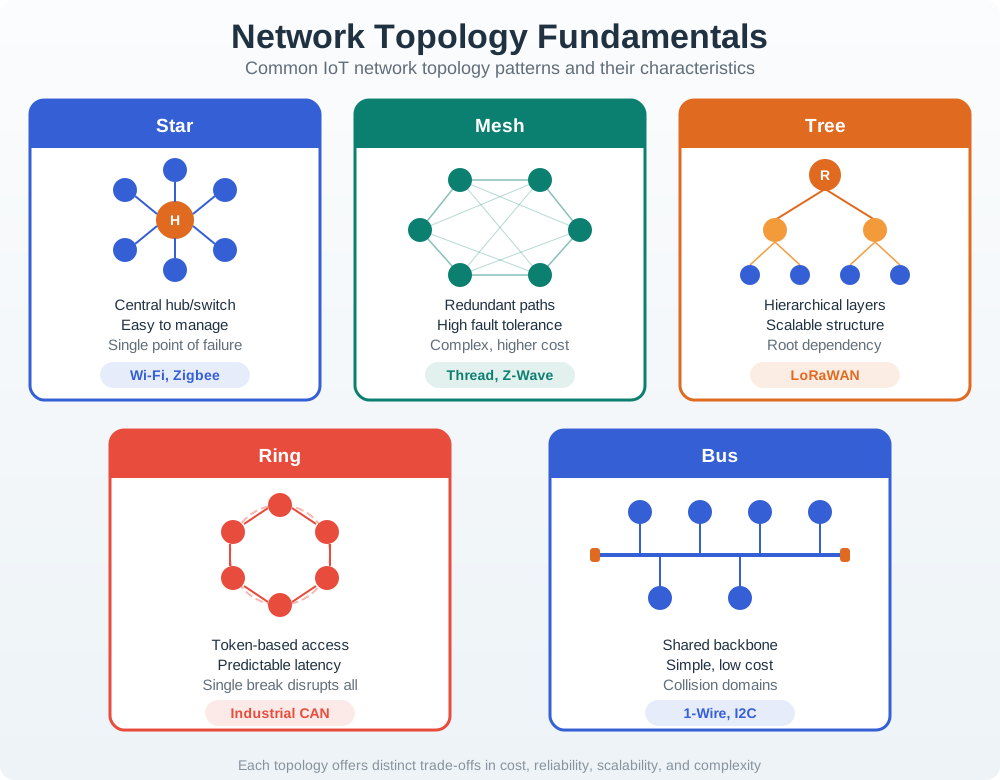
Use a family name only when the observed communication path matches it. A physically scattered wireless deployment can still behave as a logical star, while a mesh claim is credible only where relay roles and alternate paths are real. The cards below deepen those first dependency questions.
If you only need the intuition, this layer is enough: a star is simple but depends on its center; a bus shares a backbone; a ring needs break-handling; a tree scales through roots and branches; a mesh adds alternate paths only when the relays are real; a hybrid mixes patterns for different device groups.
Star
Devices talk through a hub, switch, access point, controller, or gateway. It is easy to observe, but the center is a shared dependency.
Bus
Devices share a backbone or medium. It can be compact for fixed systems, but contention and backbone failure matter.
Ring
Devices form a loop. Ordered paths can be useful, but node or link breaks need explicit recovery behavior.
Mesh
Router-capable devices maintain multiple neighbor paths. Resilience depends on powered relay roles, link quality, and route repair evidence.
The animation below shows one possible ring implementation: token passing. Token access is a media-access choice, not a requirement of ring topology.
Ring topology narrated tour
Play silently with captions on provisional storyboard timing; narration audio is pending. Production pacing is not sensor, query, or protocol time. Choose Reduced motion for a complete still at each beat.
Trace token permission, a complete frame journey, and a stopped token at a broken link. Token passing is this example’s access method; timings are classroom estimates. Play the tour to open the workbench. Pause, replay a beat, or read the full transcript below. Unsupported situations keep the existing frame and provide captions only.
Full transcript — Ring topology (8 beats)
B1 — Building sensor planning
You are the technician planning a building's connected sensors. A broken connection could leave devices without service. Before choosing a ring for those sensor messages, you need to understand how messages travel around its loop, and what happens when that loop breaks.
Model caption: Imagine planning connected building sensors. Which devices lose service if a connection breaks? Trace the loop and its failure behavior.
B2 — Loop and token permission
A ring topology means devices form a loop of communication paths. Our example uses token passing to decide who may send. A token is permission to transmit. Token passing is one possible access method for a ring; the loop describes the topology.
Model caption: A ring is a loop of communication paths. This example uses a token to grant permission to send; token passing is an access method.
B3 — Token capture and send
Start with six nodes, numbered zero through five. Node one has data for node four. The free token starts at node zero and passes to node one. Node one captures it, then sends a data frame, a message carrying its data. Other nodes forward while the sender transmits.
Model caption: Six nodes: 0–5. Sender 1 waits for the token from 0, captures it, and starts a data frame for destination 4. Other nodes forward.
B4 — Copy, forward, remove
The frame passes through node two and node three before reaching node four. Node four copies the data and forwards the frame. It continues through node five and node zero, returning to node one. The sender removes it and releases a free token.
Model caption: Frame route: 1 → 2 → 3 → 4 → 5 → 0 → 1. Node 4 copies and forwards; Node 1 removes the returning frame and releases a token.
B5 — Other nodes’ holding time
Permission also means waiting. Use a token holding limit of two milliseconds for each of the six nodes. To estimate the longest access wait, first subtract one from six. That leaves five other nodes. Five times two milliseconds gives ten milliseconds of holding time.
Model caption: Six nodes minus the waiting sender leaves five other nodes. 6 − 1 = 5; 5 × 2 ms = 10 ms of holding time.
B6 — Travel allowance
Then include the model's allowance for travel time around the ring. Six times zero point zero eight milliseconds gives zero point four eight milliseconds. Add that to ten milliseconds: the estimated worst access wait is ten point four eight milliseconds. These are simplified classroom timings.
Model caption: Travel allowance: 6 × 0.08 ms = 0.48 ms. Estimated worst access wait: 10 ms + 0.48 ms = 10.48 ms. Simplified classroom estimate.
B7 — Single link break
The misconception is that a loop automatically sends traffic the other way after a break. Try a separate seven node case, with the link between node four and node five broken. The token advances from node one to node four, then stops. The single ring model uses no alternate path. Recovery requires rules that can use another direction.
Model caption: Separate seven-node case. Token: 1 → 2 → 3 → 4, then stopped at the broken 4–5 link. This single-ring model uses no alternate path; another direction requires recovery behavior.
B8 — Recovery takeaway
For your building's sensors, remember: a ring supplies a loop; recovery behavior determines whether traffic can survive a break.
Model caption: A ring supplies a loop; recovery behavior determines whether traffic can survive a break.
Physical topology and logical topology can differ. A set of wireless sensors can be scattered across a building yet still behave like a logical star if every message goes to one gateway. A local mesh can become a star at the cloud boundary because all upstream traffic leaves through one gateway.
When reading a logical topology diagram, separate four pieces before trusting the picture: the symbols, the flow lines, the layout, and the labels. Router, switch, gateway, server, phone, printer, sensor, and access-point icons are conventions, not universal standards, so the legend or caption defines the device role. Lines may show wired Ethernet, fibre, WAN backhaul, wireless or RF links, or simply intended message flow. A hierarchical drawing often places core or aggregating devices near the top or centre, distribution devices in the middle, and access devices or endpoints near the edge; labels and addresses are the evidence that turns those shapes into a reviewable path.
Topology labels should make operation reviewable without overcrowding the drawing. Device names may encode role, location, sequence, MAC address, vendor serial, or asset-record identity. Address notes may show one device address, a network prefix, or a first-to-last address range when many similar endpoints share the same segment. In a large IoT drawing, a separate table can carry labels, address ranges, owners, and device classes while the diagram keeps only the paths needed to understand the flow.
A physical topology record answers a different question: where the equipment, cables, data points, wireless access points, sensors, actuators, racks, rooms, obstacles, and coverage areas actually are. It may be a measured floor plan, a CAD export, a hand-marked construction drawing, or a planning screenshot, but it should preserve the evidence an installer or support engineer needs: cable route, cable type, data outlet, switch or patch point, access-point placement, wireless coverage assumption, and any length or construction constraint that limits the design.
For IoT sites, one topology view is often not enough. A wired-only view, a wireless-only view, an environmental-sensor view, an alarm and security view, and a traffic or parking view may all describe the same deployment from different operational angles. That separation is useful when the record keeps the shared gateways, owners, labels, and recheck triggers aligned.
2.4 Practitioner: Build the Topology Selection Record
This section: Practitioner: Build the Topology Selection Record — Read the three-panel story to see how Pete turns a planned network shape into a field-tested topology record.
Read the three-panel story to see how Pete turns a planned network shape into a field-tested topology record.
-

Record device roles, traffic, placement, power, and shared failures.
-

Measure the real site instead of trusting the drawn links.
-

Revise the network shape and save the trigger for another review.
Before accepting a planned wireless shape for the clinic, inspect Figure 2.1 to ask how wall materials, radio settings, predicted coverage, and field measurements expose weak areas and show whether a placement or channel change truly improves the service under real operating conditions.

In Figure 2.1, start with the clinic floor plan, where concrete, glass, and drywall turn drawn links into different radio losses. The plan also records antenna height, band, channel, and candidate access-point placement, so the prediction has stated inputs. Move to the signal contours and compare them with the measured points. The pharmacy area below −75 dBm is a warning that the planned shape has not met its coverage goal. Follow the five-step loop down the right: measure the site, compare prediction with field readings, adjust placement or channel, and measure again. Only the repeated field check can support roaming, uplink, capacity, and interference acceptance.
A topology selection record turns a diagram into review evidence. It should say what device roles exist, how traffic moves, where dependencies concentrate, what becomes unreachable during failures, and what field evidence should reopen review.
Use the record to keep the selection bounded. A facility may use star paths for cameras, leaf-to-gateway reporting for small sensors, a tree of building controllers, and a partial mesh only where powered relay roles and route evidence support it. That is a hybrid topology, not a failure to choose.
Accept a pattern
The device role, traffic path, failure behavior, and operations evidence all fit the chosen shape.
Constrain a pattern
Use star, tree, or mesh only for the device group and site area where its assumptions are true.
Retest a pattern
Reopen review after gateway movement, room layout changes, added devices, new streaming traffic, or relay role changes.
Reject a pattern
Do not rely on a shape when relay roles, shared dependencies, capacity, coverage, or failure behavior are undocumented.
For example, a site with sleepy room sensors, high-throughput cameras, and local door controllers should not force one topology on every device. Sensors may report through gateway-star paths, cameras may use direct managed paths, and door controllers may need local branch control that keeps working through short cloud outages.
2.5 Under the Hood: Logical Paths, Failure Domains, and Scale
This section: Under the Hood: Logical Paths, Failure Domains, and Scale — Under the hood, a topology is a graph of nodes and links plus the rules that decide which nodes forward traffic.
Under the hood, a topology is a graph of nodes and links plus the rules that decide which nodes forward traffic. A physical drawing shows placement, but the logical graph shows who depends on whom. That logical graph is what determines congestion points, failure domains, routing work, and maintenance risk.
Topology names become useful when they expose failure domains. In a star, the center is the obvious domain. In a tree, roots and branches define domains. In a bus, the shared medium is the domain. In a mesh, the domain depends on which alternate paths are real, powered, and maintained.
Centralization
Star and gateway-centered paths simplify management but concentrate capacity, power, coverage, and backhaul dependency.
Shared Media
Bus-like paths require access control, contention checks, termination or media integrity where relevant, and clear responsibility for repairs.
Hierarchy
Tree structures organize large sites, but root and branch placement determines what becomes isolated after a failure.
Redundancy
Mesh paths improve resilience only when alternate routes are measured, powered, routable, and observable during repair.
Scale changes the trade-off. A full mesh requires every node to connect to every other node, so link and neighbor management grow quickly as the node count rises. With the six sensors from the opening example, that means 6 × 5 / 2 = 15 sensor-to-sensor links; each pair is counted once. A partial mesh limits that work by selecting useful relay paths. A tree limits connection count through hierarchy, but it creates branch-level failure domains. A star limits endpoint complexity, but it raises the importance of the central device and its backhaul.
The Internet of Things (IoT) also has role asymmetry. A camera, a sleepy sensor, a powered relay, a controller, and a gateway do not have the same power, traffic, or maintenance profile. Counting all of them as equal graph nodes hides the real design risk. The topology description should name which nodes can relay, which nodes are leaves, and which paths are required only for cloud reporting versus local operation.
Keep design descriptions specific: "this room-sensor group uses a gateway-star path for periodic telemetry," "this lighting segment uses powered relays for a partial mesh," or "this controller branch keeps local door behavior independent of cloud reporting." Those descriptions can be tested and rechecked.
2.6 Summary
This section: Summary — Basic topology types are the vocabulary for Internet of Things (IoT) network structure.
Basic topology types are the vocabulary for Internet of Things (IoT) network structure. A star is simple and centralized. A bus shares a medium. A ring depends on loop recovery. A tree organizes hierarchy. A mesh adds alternate paths only when relays actually provide them. A hybrid combines patterns when device groups have different traffic, power, placement, and failure requirements.
Document the physical view, logical view, and failure view. Name the device roles, traffic paths, concentration points, failure domains, field checks, and changes that require another test before trusting a topology label.
2.7 Key Takeaway
This section: Key Takeaway
Choose topology types from evidence: device roles, message paths, relay capability, shared dependencies, failure domains, and the field test that would make the record stale.
2.8 See Also
This section: See Also
Topology Analysis and Metrics
Move from topology names into scale, failure-domain, and graph-metric evidence.
Topology Failures
Study central dependencies, partitions, bottlenecks, cascading effects, and recovery paths.
Topology Selection
Convert scenario facts into bounded topology choices, pilot checks, and selection records.
Topology Management Techniques
Review active sets, node roles, route changes, rollback choices, and retest triggers.
Find help
3 reviewed answers.
Where should I start in a module?
Open the module page from the sidebar to see its chapters in order. Use the module map to return to a topic you need.
Modules and pathsReviewed
What can I try when a project does not work?
Check the symptom, then work through the diagnostic steps. Keep the error message and the smallest example that reproduces it.
When you are stuckReviewed
How do interactive examples work?
Use the interactive guide to check how examples and simulations work before changing your project.
Interactive examples guideReviewed