11 Topology Failures
11.2 Learning Objectives
By the end of this section, you will be able to:
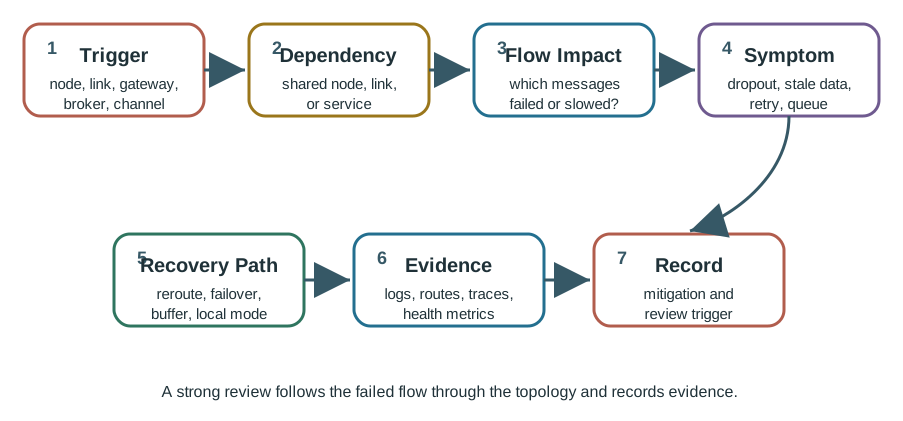
- Analyze Failure Scenarios: Predict how each topology degrades when components fail
- Identify Common Mistakes: Detect and avoid typical topology deployment errors before they cause outages
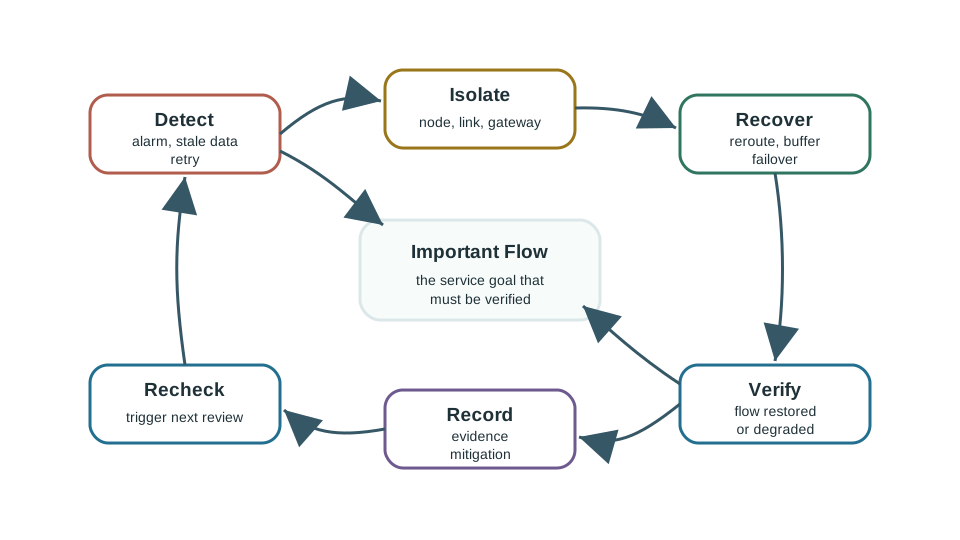
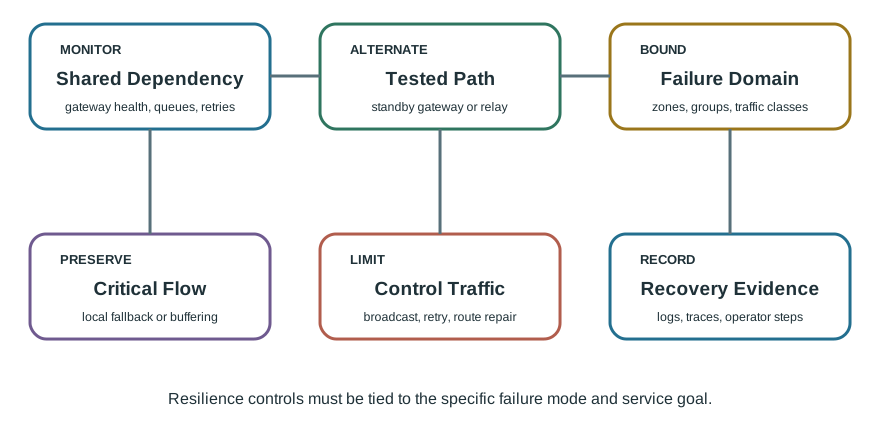
- Design for Resilience: Apply specific mitigation strategies to address topology vulnerabilities
- Evaluate Hybrid Options: Justify real-world smart home and IoT topology designs based on failure analysis
For Beginners: Topology Failures
What happens when a device in your network stops working? The answer depends on how your network is arranged. In a star topology, losing the center hub breaks everything. In a mesh network, data can route around the broken device. Understanding failure patterns helps you design networks that keep working even when things go wrong.
Sensor Squad: When Things Go Wrong!
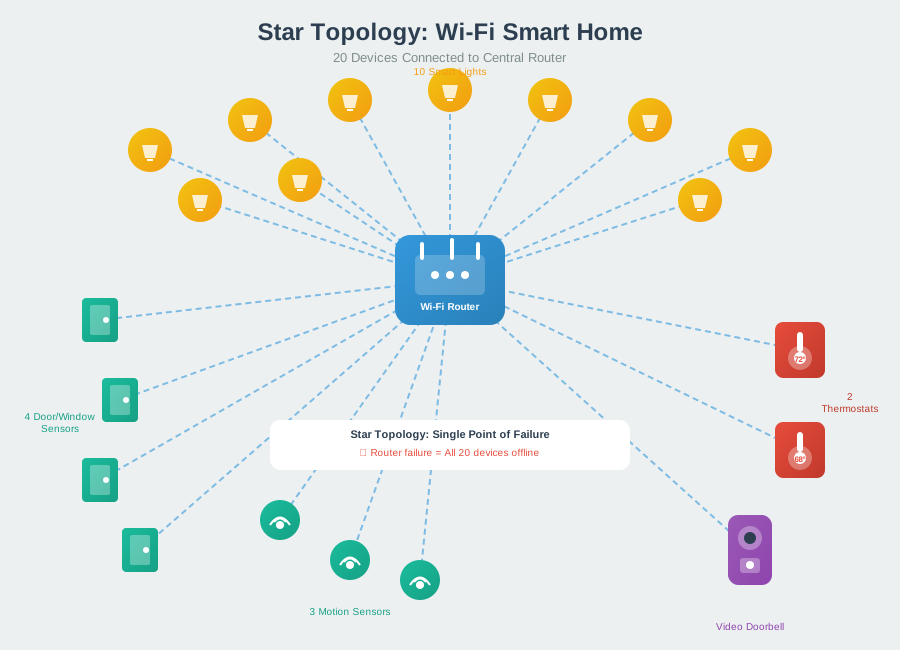
“Let me tell you about the Great Hub Failure of 2025,” said Max the Microcontroller dramatically. “We had 20 smart home devices on a star network. The Wi-Fi router died, and EVERY single device went offline. All lights, sensors, thermostats – all dark. One failure, total disaster.”
“That is the star topology’s weakness,” nodded Sammy the Sensor. “But in my Zigbee mesh network, when one device fails, the others just route around it! My temperature reading takes a different path to reach the gateway. The network heals itself.”
Lila the LED brought up the ring problem. “In a ring, data passes from device to device around the loop. If even ONE device in the chain fails, the whole ring breaks. That is why most modern networks avoid simple rings.”
“The lesson,” said Bella the Battery, “is to think about failure BEFORE it happens. A star is fine if you have a backup hub. A mesh is naturally resilient but more complex. A tree with redundant backbone links gives you the best of both worlds. Always ask: what happens when this device fails? If the answer is ‘everything stops,’ you need a better design.”
11.3 Prerequisites
- Topologies Introduction: Physical vs logical topology concepts
- Topology Types: Understanding of star, mesh, ring, bus, tree characteristics
11.4 Real-World Example: Smart Home with 20 Devices
Scenario: You’re setting up a smart home with 20 IoT devices: - 10 smart lights (living room, bedrooms, kitchen, bathrooms) - 4 door/window sensors (front door, back door, 2 windows) - 3 motion sensors (hallway, garage, basement) - 2 thermostats (upstairs, downstairs) - 1 smart doorbell
Which topology should you choose? Let’s compare:
11.4.1 Option 1: Star Topology (Wi-Fi-based)
Pros:
- Simple setup—just connect each device to Wi-Fi
- Fast—Wi-Fi provides high bandwidth for video doorbell
- Leverages existing router (no new hub needed)
- Easy troubleshooting—check router first
Cons:
- Wi-Fi consumes lots of power (sensors need frequent battery changes)
- Router failure = entire smart home offline
- Range issues in large homes (dead zones in basement)
- 20 devices saturate Wi-Fi bandwidth
Verdict: Good for video doorbell and thermostats (high bandwidth), poor for battery-powered sensors (power consumption).
11.4.2 Option 2: Mesh Topology (Zigbee-based)
Pros:
- Self-healing—if Light 3 fails, messages route through Light 2 instead
- Extended range—each light acts as repeater (no dead zones!)
- Low power—battery sensors last 2-5 years
- No Wi-Fi congestion—uses separate 2.4 GHz channel
Cons:
- Needs Zigbee hub ($40-80)
- More complex—mesh takes time to organize
- Lower bandwidth (no video doorbell support)
Verdict: BEST for battery-powered sensors and lights. Use Wi-Fi for doorbell separately.
11.4.3 Option 3: Hybrid Topology (Best of Both Worlds)
Smart Strategy: Combine Star (Wi-Fi) for high-bandwidth devices with Mesh (Zigbee) for sensors/lights:
| Device Type | Technology | Topology | Why? |
|---|---|---|---|
| Doorbell | Wi-Fi | Star | Needs video bandwidth |
| Thermostats | Wi-Fi | Star | Always powered, needs fast response |
| Lights (10) | Zigbee | Mesh | Act as mesh repeaters |
| Sensors (7) | Zigbee | Mesh | Battery-powered, low power needed |
Benefits:
- Wi-Fi failure doesn’t break lights/sensors (only doorbell affected)
- Lights create robust mesh for sensor messages
- Battery sensors last years (not days)
- Doorbell gets full Wi-Fi bandwidth
Cost: Wi-Fi router (existing) + Zigbee hub ($50) + Zigbee devices (~$15-30 each)
11.4.4 Decision Matrix: 20-Device Smart Home
| Factor | Star (Wi-Fi Only) | Mesh (Zigbee Only) | Hybrid (Wi-Fi + Zigbee) |
|---|---|---|---|
| Setup complexity | Simple | Moderate | Moderate |
| Battery life | Days-weeks | Years | Years |
| Reliability | Hub failure = down | Self-healing | Partial resilience |
| Range | Wi-Fi dead zones | Mesh extends range | Best coverage |
| Cost | Low | Moderate | Moderate |
| Video support | Yes | No | Yes |
Recommendation: Hybrid topology provides best balance for typical smart homes—use Zigbee mesh for 90% of devices, Wi-Fi star for bandwidth-hungry devices like doorbell cameras.
11.5 What Would Happen If… Topology Failure Scenarios
Understanding failure modes helps you design resilient IoT systems. Let’s explore “what if” scenarios:
11.5.1 Scenario 1: Star Topology Hub Failure
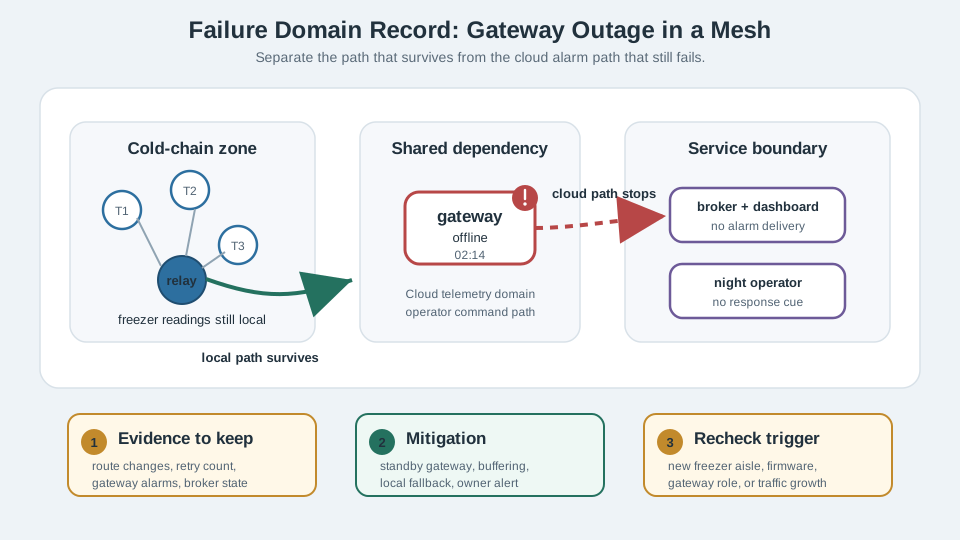
Setup: 50 factory sensors in star topology, all connected to central gateway
What happens if the gateway fails?
Impact:
- Total network failure: All 50 sensors isolated
- Data loss: Sensors can’t report to cloud/database
- No inter-sensor communication: Sensor 1 can’t talk to Sensor 2
Mitigation strategies:
- Redundant gateway: Add backup gateway with automatic failover
- Local storage: Sensors buffer data locally, upload when gateway recovers
- Watchdog monitoring: Alert system detects gateway failure within seconds
Recovery time: Minutes (restart gateway) to hours (replace failed hardware)
11.5.2 Scenario 2: Mesh Topology Node Failures
Setup: 30-node Zigbee mesh network with 5 nodes failing simultaneously
What happens if 5 random mesh nodes fail?
Impact:
- Network continues operating: Self-healing routing finds alternate paths
- Increased latency: Messages take longer routes (more hops)
- Reduced redundancy: Fewer backup paths available
- Possible orphans: Edge nodes with only 1 connection may lose connectivity
Self-healing process:
1. Node 3 tries to send to Node 4
2. No response after timeout (3 seconds)
3. Mesh routing discovers new path: Node 3 → Node 5 → Node 6
4. Route table updated
5. Communication restored (10-30 seconds total)
Degradation point: Mesh networks typically survive up to 30-40% node failure before fragmentation.
Recovery: Automatic—no manual intervention needed!
11.5.3 Scenario 3: Ring Topology Break
Setup: 8-device token ring network, cable cut between Node 3 and Node 4
What happens if the ring breaks?
Impact:
- Total network failure: Token can’t circulate
- No communication: All nodes isolated despite only 1 break
Why so catastrophic?
Ring requires continuous path:
N1 → N2 → N3 → [BREAK] → N4 → N5 → N6 → N7 → N8 → N1
↑
Token stops here!
Result: All 8 nodes down from 1 cable cut
Mitigation: Dual ring (counter-rotating rings)
Primary ring: N1 → N2 → N3 → [BREAK] → N4 → N5 → ...
Secondary ring: N1 ← N2 ← N3 ← [BREAK] ← N4 ← N5 ← ...
Break detected:
- Traffic reroutes to secondary ring
- Network continues operating
- Downtime: ~50-200ms (nearly instant!)
Cost: 2× cabling, more complex switches
11.5.4 Scenario 4: Bus Topology Terminator Loss
Setup: 10-device bus network, terminator falls off one end
What happens if a bus terminator is removed?
Impact:
- Signal reflections: Electrical signals bounce back from unterminated end
- Data corruption: Reflected signals interfere with new transmissions
- Intermittent failures: Network works sometimes, fails unpredictably
Symptom timeline:
T+0 seconds: Terminator falls off
T+10 seconds: First packet collisions detected
T+1 minute: 50% packet loss
T+5 minutes: Network unusable (90%+ errors)
Debugging difficulty: Very hard—symptoms look like many other issues
Fix: Reattach terminator (120-ohm resistor for CAN bus, 50-ohm for Ethernet coax)
11.5.5 Key Lessons from Failure Scenarios
| Topology | Weakest Link | Failure Impact | Recovery |
|---|---|---|---|
| Star | Central hub | Total outage | Manual repair/replace |
| Mesh | Individual nodes | Graceful degradation | Automatic rerouting |
| Ring | Any single link | Total outage (single ring) | Dual ring auto-switches |
| Bus | Bus cable or terminator | Total outage | Manual repair |
| Tree | Root or branch node | Subtree isolation | Manual failover |
Design Principle: Match topology to failure tolerance requirements - Mission-critical → Mesh or dual ring - Cost-sensitive → Star with cold standby - Legacy compatibility → Bus/ring with monitoring
11.6 Common Mistakes: Topology Selection Pitfalls
Avoid these 7 common topology mistakes that cause IoT deployments to fail:
11.6.1 Mistake 1: “More Connections = Always Better”
The Trap: Assuming full mesh is always superior because of redundancy
Why It Fails:
5 nodes: n(n-1)/2 = 10 connections
10 nodes: n(n-1)/2 = 45 connections
50 nodes: n(n-1)/2 = 1,225 connections (!)
100 nodes: n(n-1)/2 = 4,950 connections (!!)
Reality Check:
- Each mesh radio costs $5-15 more than star-only device
- Routing table maintenance consumes memory/CPU
- 100-node full mesh = $500-1,500 extra cost
- Mesh algorithms scale poorly beyond 100-200 nodes
Better Approach: Use partial mesh or hierarchical mesh - Connect critical devices fully - Edge devices connect to nearest 2-3 neighbors - Reduces connections from O(n²) to O(n)
Example: Zigbee networks use partial mesh—max 3-4 hops typical, not full mesh
11.6.2 Mistake 2: “Topology = Physical Layout”
The Trap: Thinking logical topology must match physical placement
Why It Fails:
Physical reality:
Building A [Sensors 1-10] ----50m cable---- Building B [Gateway]
Logical reality:
All sensors in star topology (direct to gateway)
These don't contradict! Physical shows WHERE, logical shows HOW.
Consequences:
- Installers confused about cable routing
- Network engineers can’t troubleshoot without physical diagram
- Both views needed for complete documentation
Better Approach: Maintain BOTH diagrams - Physical topology: For installation, RF planning, maintenance - Logical topology: For configuration, troubleshooting, monitoring
11.6.3 Mistake 3: “Wi-Fi Works Everywhere in My Home, So It’ll Work for IoT”
The Trap: Assuming your laptop’s Wi-Fi experience applies to battery IoT sensors
Why It Fails:
| Device | Power Budget | Range Strategy | Topology Needs |
|---|---|---|---|
| Laptop | Unlimited (plugged in) | High-power TX (100mW) | Star to router OK |
| IoT Sensor | 2 AA batteries (2-5 years) | Low-power TX (1mW) | Needs mesh or closer APs |
Real-world example:
Your laptop reaches Wi-Fi from basement:
- Laptop: 20 dBm transmit power
- Range: 50-100m indoors
Battery sensor in basement:
- Sensor: 0 dBm transmit power (1mW—100× less!)
- Range: 10-30m indoors
- Wi-Fi star topology FAILS for sensor
Better Approach:
- High-power devices (cameras, thermostats) → Wi-Fi star
- Battery sensors → Zigbee/Thread mesh (extends range via relaying)
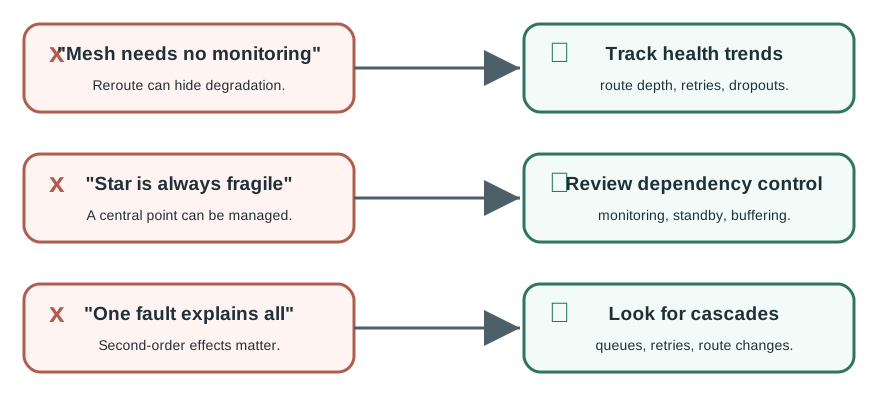
11.6.4 Mistake 4: “Star Topology Has No Redundancy, So It’s Bad”
The Trap: Dismissing star topology because central hub is single point of failure
Why This Oversimplifies:
Star topology advantages often overlooked:
- Simplicity = fewer configuration errors
- Predictable performance = no routing variability
- Easy troubleshooting = check hub first
- Lower cost = simple radios in end devices
When star is BETTER than mesh:
- Small deployments (<30 devices in single room)
- Cost-critical projects (low-margin devices)
- High-bandwidth needs (Wi-Fi direct to router)
- Troubleshooting-hostile environments (no skilled staff)
Redundancy solution: Dual hub failover
Primary hub (active) + Backup hub (standby)
Devices configured with both hub addresses
Automatic failover in 30-60 seconds
Cost: +$200 vs. $2,000 for full mesh upgrade
11.6.5 Mistake 5: “Ring Topology Distributes Load Better Than Star”
The Trap: Thinking ring topology prevents congestion at central hub
Why It Fails:
Token ring operation:
Only ONE device transmits at a time (token holder)
N1 (has token) → transmits → passes token → N2 (has token) → ...
Effective bandwidth:
Star: All devices share hub bandwidth (Ethernet switch can be full duplex!)
Ring: Devices wait for token (serialized access)
Result: Ring is SLOWER for bursty IoT traffic!
When Ring Made Sense (1980s-1990s): - Ethernet hubs (not switches) had collision problems - Token Ring guaranteed fair access - BUT: Modern switches eliminate collisions (full duplex!)
Modern Reality: Ring topology offers NO advantages over star for IoT - Worse failure mode (single break = total failure) - Slower (token passing overhead) - Complex (add/remove nodes disrupts ring)
Only Use Ring If: Legacy industrial system requires it (some Profibus, FDDI systems)
11.6.6 Mistake 6: “Mesh Networks Are Self-Healing, So I Don’t Need Monitoring”
The Trap: Trusting mesh topology to magically fix all problems
Why It Fails:
Mesh can’t fix:
- Power failures: Dead battery = dead node (mesh routes AROUND it, but device still offline)
- Interference: Wi-Fi interference affects all routes, not just one
- Configuration errors: Wrong network key = node never joins mesh
- Physical damage: Crushed sensor can’t self-heal
Mesh degrades silently:
Day 1: 30 nodes, 4 hops max
Day 180: 25 nodes (5 failed), 7 hops max
Day 365: 20 nodes (10 failed), 12 hops max (!!)
Performance degrades 3× but no alerts!
Better Approach: Monitor mesh health - Track hop count per device (increasing = degrading mesh) - Alert on node dropouts - Monitor RSSI (signal strength) trends - Automated “are you alive?” pings
Tool recommendation: Zigbee networks support LQI (Link Quality Indicator)—monitor this!
11.6.7 Mistake 7: “I Can Mix Topologies Freely”
The Trap: Combining incompatible topology types in a single network
Why It Fails:
Example failure:
"I'll use Wi-Fi (star) for some sensors and Zigbee (mesh) for others,
all controlled by one app!"
Problem: Wi-Fi and Zigbee can't talk directly!
- Different protocols
- Different frequencies (Wi-Fi 2.4/5 GHz, Zigbee 2.4 GHz only)
- Need gateway between them
Correct hybrid approach:
Internet ← Wi-Fi Router (star) ← [Some devices]
↓
Smart Hub (gateway)
↓
Zigbee Mesh ← [Other devices]
Hub bridges Wi-Fi star ↔ Zigbee mesh
Compatibility matrix:
| Topology A | Topology B | Can Mix? | Bridge Required |
|---|---|---|---|
| Wi-Fi Star | Zigbee Mesh | Yes | Smart hub (e.g., Home Assistant) |
| Zigbee Mesh | Thread Mesh | Indirect | Matter controller bridges both |
| Ethernet Star | Wi-Fi Star | Yes | Wi-Fi router (built-in bridge) |
| BLE Mesh | Zigbee Mesh | Indirect | Separate gateways, unified app only |
Key Lesson: Mixing topologies requires gateways/bridges—plan for this!
11.7 Common Pitfalls
Common Pitfall: Mesh Broadcast Storm
The mistake: Deploying a dense mesh network without broadcast traffic controls, causing a single broadcast packet to exponentially multiply and saturate the entire network.
Symptoms:
- Network becomes unresponsive when a new device joins or a broadcast message is sent
- Sensor data stops flowing for 10-60 seconds periodically
- Battery-powered mesh nodes drain 5-10x faster than expected
- Devices show “network busy” or “congestion” errors in logs
Why it happens: In mesh networks, every node can relay packets. A broadcast packet (like a device discovery or network-wide command) is forwarded by each receiving node to all its neighbors. In a dense mesh with N nodes, a single broadcast can generate O(N^2) transmissions: - Node A broadcasts: 5 neighbors receive and rebroadcast - Each neighbor rebroadcasts: 5 x 5 = 25 more transmissions - Without TTL limits: Storm continues until network saturates
Zigbee mitigates this with hop limits (default 30), but poorly configured Thread, BLE mesh, or custom mesh protocols can suffer catastrophic broadcast storms.
The fix:
- Set appropriate TTL (hop limit): Maximum 7-10 hops for most deployments; rarely need 30
- Use multicast instead of broadcast: Target specific device groups rather than all devices
- Implement broadcast rate limiting: No more than 1 broadcast per device per 10 seconds
- Enable duplicate suppression: Each node tracks recent broadcast IDs, drops duplicates
- Reduce mesh density: Not every device needs to be a router; designate some as end devices
Prevention: Simulate broadcast behavior before deployment. In a 100-node mesh with each node having 10 neighbors, one broadcast = 1,000 transmissions. Design application protocols to minimize broadcasts; use unicast or multicast for normal operation.
Common Pitfall: Star Hub Bottleneck
The mistake: Deploying a star topology hub (Wi-Fi router, Zigbee coordinator, LoRaWAN gateway) undersized for the number of devices or traffic volume, creating a single point of congestion.
Symptoms:
- Device response time degrades as more devices are added (100ms at 10 devices, 2 seconds at 50)
- Packet loss increases during peak usage times (morning when all thermostats report)
- Hub CPU/memory usage at 90%+ causing watchdog resets
- Some devices consistently fail to connect while others work fine
Why it happens: Star topology concentrates all traffic through one central point. Capacity limits include: - Concurrent connections: Consumer Wi-Fi routers handle 30-50 clients; IoT loads often exceed this - Channel access time: Only one device transmits at a time; 100 devices x 10ms each = 1 second minimum cycle - Processing overhead: Hub must route every packet; embedded hubs (Zigbee coordinators) have limited CPU - Memory limits: Each connected device requires state (100 devices x 1 KB = 100 KB; some hubs have only 64 KB RAM)
The fix:
- Size for 2x peak capacity: If you expect 50 devices, use a hub rated for 100+
- Distribute across multiple hubs: Split devices geographically (one hub per floor/zone)
- Stagger reporting intervals: Randomize sensor transmit times to avoid synchronized bursts
- Upgrade to enterprise-grade hubs: Enterprise APs handle 200-500 clients vs 50 for consumer
- Monitor hub health: Alert on CPU >70%, memory >80%, or connection queue depth
Prevention: Calculate hub load = (devices x packets_per_second x bytes_per_packet) + (connection_overhead x devices). Choose hubs with 3-5x headroom. For Zigbee, use multiple coordinators with PAN ID separation rather than one massive network.
11.8 Summary: Topology Selection Checklist
Before choosing a topology, ask:
| Question | Guides You Toward |
|---|---|
| How many devices? | <20: Star, 20-100: Mesh, >100: Hierarchical |
| Battery or powered? | Battery: Mesh (low power), Powered: Star (simplicity) |
| How critical is uptime? | Mission-critical: Mesh/Dual-ring, Normal: Star |
| Indoor or outdoor? | Outdoor/large area: Mesh (range), Indoor/small: Star |
| Do I have skilled staff? | No: Star (simple), Yes: Mesh acceptable |
| What’s my budget? | Low: Star, Moderate: Partial mesh, High: Full mesh |
| Bandwidth needs? | High (video): Wi-Fi star, Low (sensors): Zigbee mesh |
Golden Rule: Choose the SIMPLEST topology that meets your requirements—complexity is the enemy of reliability!
11.9 Quantitative Reliability Comparison: MTBF, MTTR, and Availability
Understanding failure rates and recovery times lets you calculate expected system availability for each topology. These numbers come from real-world industrial deployments, not theoretical models.
11.9.1 Component Failure Rates
| Component | MTBF (Mean Time Between Failures) | MTTR (Mean Time To Repair) | Source |
|---|---|---|---|
| Consumer Wi-Fi router | 35,000 hours (~4 years) | 30 min (reboot/replace) | Cisco reliability reports |
| Enterprise switch | 200,000 hours (~23 years) | 15 min (hot standby swap) | Aruba/HPE datasheets |
| Zigbee coordinator | 50,000 hours (~5.7 years) | 45 min (reflash + rejoin) | Silicon Labs field data |
| BLE sensor (battery) | 17,500 hours (~2 years battery) | 20 min (battery swap) | Nordic Semi estimates |
| Ethernet cable | 500,000 hours (~57 years) | 60 min (trace + replace) | TIA-568 expected lifetimes |
| Outdoor antenna/cable | 50,000 hours (~5.7 years) | 120 min (tower climb) | LPWAN operator data |
11.9.2 System Availability by Topology
Star with single hub (no redundancy):
Hub MTBF: 35,000 hours
Hub MTTR: 0.5 hours
Hub availability = MTBF / (MTBF + MTTR) = 35,000 / 35,000.5 ≈ 99.9986%
Annual downtime = 0.25 failures/year × 0.5 hours/failure = 0.125 hours = 7.5 minutes/year
But hub failure = TOTAL network outage (all devices offline)
Expected annual incidents: 8,760 / 35,000 = 0.25 (one outage every 4 years)
Impact per incident: 100% of devices offline for 30 minutes
Star with hot standby hub:
Both hubs must fail simultaneously for outage
System MTBF = Hub_MTBF^2 / (2 x Hub_MTTR) = 35,000^2 / (2 x 0.5) = 1,225,000,000 hours
System availability = 99.9999996% (~nine nines)
Annual downtime: ~0.013 seconds/year (≈ 0.03 seconds including repair overhead)
Cost: +$200 for backup router + failover script
30-node Zigbee mesh (partial mesh, average 4 neighbors per node):
Individual node MTBF: 17,500 hours (battery-powered)
Expected node failures per year: 30 x 8,760/17,500 = 15 failures/year
Network survives up to 30-40% node loss = 9-12 simultaneous failures
Probability of >12 simultaneous failures (network fragmentation):
Using Poisson model with lambda = 15 failures x (20 min MTTR / 8760 hrs)
Probability of >12 concurrent failures: < 0.001%
Effective availability: >99.999% for network connectivity
But: degraded performance (increased latency) after each failure
5 failures: +50% latency (from 2 to 3 average hops)
10 failures: +150% latency (from 2 to 5 average hops)
Putting Numbers to It
For systems with independent component failures, dual redundancy dramatically improves MTBF.
Single hub MTBF = 35,000 hours. For dual-hub failover where both must fail: \[\text{MTBF}_{dual} = \frac{\text{MTBF}^2}{2 \times \text{MTTR}}\]
\[\text{MTBF}_{dual} = \frac{35,000^2}{2 \times 0.5} = \frac{1,225,000,000}{1} = 1.225 \times 10^9 \text{ hours}\]
This is 139,954 years! Converting to availability with MTTR = 0.5 hours: \[A = \frac{1.225 \times 10^9}{1.225 \times 10^9 + 0.5} \approx 0.999999996\]
That’s 99.9999996% availability, or approximately 9 nines. Annual downtime drops from 7.5 minutes (single hub) to well under 0.1 seconds (dual hub). The $200 investment in a backup hub buys you over 14,000× improvement in reliability.
11.9.3 Cost of Downtime by Application
| Application | Downtime Cost | Topology Recommendation | Justification |
|---|---|---|---|
| Smart home lights | $0/hour (inconvenience) | Star (simple, cheap) | Downtime is annoying, not costly |
| Building HVAC | $50-200/hour (energy waste) | Star + standby hub | Moderate cost justifies $200 backup |
| Factory floor sensors | $1,000-10,000/hour (production loss) | Mesh or dual-star | Production loss far exceeds redundancy cost |
| Medical monitoring | $10,000+/hour (liability) | Mesh + wired backbone | Human safety demands maximum redundancy |
| Oil/gas pipeline | $50,000+/hour (safety/regulatory) | Triple-redundant mesh | Regulatory requirements mandate redundancy |
Design decision rule: If the annual cost of expected downtime exceeds 3x the cost of adding redundancy, add the redundancy. For the factory floor example: 0.25 incidents/year x 0.5 hours x $5,000/hour = $625/year expected loss. A $250 redundancy investment (backup hub + failover script) pays for itself in 5 months.
Worked Example: Calculating ROI for Dual-Hub Redundancy in Factory Floor Sensors
A factory operates 50 sensors in star topology reporting to one gateway. Production downtime costs $5,000/hour. Current gateway (consumer Wi-Fi router) has MTBF of 35,000 hours (4 years). Should they add a $200 backup gateway with automatic failover?
Step 1: Calculate expected annual downtime without redundancy
- Gateway MTBF: 35,000 hours
- Expected failures per year: 8,760 hours/year ÷ 35,000 hours/failure = 0.25 failures/year
- MTTR (mean time to repair): 30 minutes to reboot or replace gateway
- Annual downtime: 0.25 failures × 0.5 hours = 0.125 hours/year = 7.5 minutes/year
- Cost of downtime: 0.125 hours × $5,000/hour = $625/year expected cost
Step 2: Calculate redundancy benefit
- Dual-hub system MTBF: Hub_MTBF² / (2 × MTTR) = 35,000² / (2 × 0.5) = 1,225,000,000 hours
- This means both hubs must fail simultaneously for network outage
- Expected annual downtime: MTTR / MTBF_dual × 8,760 hrs = 0.5 / 1,225,000,000 × 8,760 = 0.0000036 hours = ~0.013 seconds/year
- Expected cost: 0.0000036 hours × $5,000/hour ≈ $0.018/year
Step 3: ROI calculation
- Redundancy cost: $200 backup gateway + $50 failover script (one-time) = $250 investment
- Annual downtime reduction: $625 - $0.02 ≈ $625/year
- Payback period: $250 / $625 = 0.4 years = 5 months
- 5-year ROI: ($625 × 5) - $250 = $2,875 net benefit
Decision: Implement dual-hub redundancy. The $250 investment pays for itself in 5 months, prevents one expected $312 production outage per event (0.25 failures × 0.5 hours × $5,000 = $625/year average), and reduces risk of rare but catastrophic multi-hour outage if replacement gateway is delayed. The math strongly favors redundancy when downtime costs exceed $1,000/hour.
Decision Framework: Should You Implement Topology Redundancy?
Use this framework to determine if adding redundancy is justified for your deployment:
| Annual Downtime Cost | Single Hub MTBF | Redundancy Investment | Decision | Payback Period |
|---|---|---|---|---|
| $50,000+/hour (hospital, pipeline) | Any | Any reasonable cost | Always add redundancy | Immediate (first prevented outage) |
| $5,000-50,000/hour (factory, data center) | <50,000 hours | <$1,000 | Add redundancy | 0.5-2 years |
| $500-5,000/hour (building HVAC, retail) | <35,000 hours | <$500 | Add redundancy | 1-3 years |
| $50-500/hour (smart home, office) | <35,000 hours | <$200 | Maybe — calculate payback | 2-5 years |
| $0-50/hour (hobby, non-critical monitoring) | Any | Any | Do not add | Never pays back |
Calculation method:
- Expected annual failures = 8,760 hours/year ÷ Hub_MTBF_hours
- Expected annual downtime = Expected_failures × MTTR_hours
- Expected annual cost = Annual_downtime × Downtime_cost_per_hour
- Redundancy benefit = Expected_cost × 0.999 (dual-hub reduces outages by 99.9%)
- Payback period = Redundancy_investment / Redundancy_benefit_per_year
Additional factors to consider:
- Critical infrastructure (power, water, safety): Add redundancy regardless of payback math — regulatory and liability reasons
- Remote locations: Redundancy is more valuable when MTTR is long (e.g., offshore platform with 24-hour technician travel)
- Low-margin operations: Even at $500/hour downtime, if profit margins are thin, redundancy may not be justified
- Warranty coverage: If hub failures are covered by warranty with 4-hour replacement, MTTR drops and redundancy value decreases
Common Mistake: Deploying Full Mesh for Reliability Without Calculating Cost-Per-Nine
What they do wrong: An engineer reads that mesh networks are “self-healing” and “fault-tolerant,” decides a critical sensor network needs “maximum reliability,” and specifies full mesh topology for 100 sensors. Procurement requests quotes: $45 per mesh-capable sensor vs $15 for star-only sensors. Total cost difference: $45 × 100 - $15 × 100 = $3,000 extra for mesh capability. Engineer approves, believing “you cannot put a price on reliability.”
Why it fails — calculating cost per nine of availability:
Full mesh (no central point of failure): - Individual sensor MTBF: 17,500 hours (battery-powered) - Network survives 30-40% node loss before fragmentation - Effective availability: 99.999% (five nines) — network operational even with 30 failed nodes - Cost: $4,500 total ($45 × 100 sensors)
Star with hot-standby dual hub: - Hub MTBF (dual): 1,225,000,000 hours (see worked example calculation above) - Availability: 99.9999996% (~nine nines) — better than mesh! - Cost: $1,500 sensors ($15 × 100) + $400 dual hubs = $1,900 total
Cost per nine comparison:
- Mesh: $4,500 for five nines = $900 per nine
- Dual-hub star: $1,900 for ~nine nines = $211 per nine
- Mesh is over 4× more expensive per nine of availability despite being marketed as “the reliable solution”
Correct approach: Mesh topology excels at range extension and self-healing ROUTING, not overall system reliability. For reliability, analyze the MTBF math: - If central hub MTBF with redundancy (1.2B hours) exceeds mesh MTBF (17,500 hours limited by battery sensors), star is MORE reliable - Mesh helps when you cannot provide redundant infrastructure (e.g., outdoor sensors with no power) - For fixed infrastructure (smart building), dual-hub star beats mesh on both cost AND reliability
Real-world consequence: A smart building deployed 500 Zigbee mesh sensors for $45 each ($22,500 total) because “mesh is more reliable.” After 2 years, 80 sensors had battery failures (expected given MTBF). The mesh degraded to 3-hop average from 2-hop initially, increasing latency by 50% but network remained operational. However, a comparable star system with dual gateways would have cost $7,500 + $800 = $8,300 total and had higher availability (~nine nines vs five nines). The building overpaid $14,200 for the mesh marketing claim without running the reliability math.
11.10 Summary
- Star hub failure causes total network outage but is easy to diagnose and repair
- Mesh networks self-heal around failures but degrade silently without monitoring
- Ring topology is catastrophically vulnerable to single breaks unless dual-ring is used
- Bus termination issues cause intermittent, hard-to-debug failures
- Seven common mistakes include over-meshing, confusing physical/logical, and ignoring Wi-Fi power limitations
- Hybrid topologies require gateway bridges between different protocol networks
- Monitoring is essential even for self-healing mesh networks
- Cost-justify redundancy by comparing expected downtime cost against redundancy investment
11.11 Knowledge Check
11.12 What’s Next
| Direction | Chapter | Focus |
|---|---|---|
| Next | Topology Interactive Tools and Labs | Topology visualizers, ESP32 simulations, hands-on design |
| Previous | Communication Patterns | Unicast, multicast, many-to-one data flows |
| Review | Comprehensive Review | Graph theory calculations and design scenarios |