8 Transport Protocols by Analogy

More
Depth: Practitioner
Progress saves as you read. Mark sections complete as you go; your progress appears in the sidebar.
8.1 Start With the Analogy Boundary
This section: Start With the Analogy Boundary — Packet loss means that a sent message does not arrive.
Packet loss means that a sent message does not arrive. A protocol is a shared set of message rules. TCP is a transport that keeps an ordered connection. UDP means User Datagram Protocol. It sends separate messages without that built-in ordered connection.
Picture sending a numbered set of cards and making a phone call. The cards help explain separate messages. The call helps explain shared state and order. Start by naming the one behavior each story is meant to show.
Then point back to what can be seen. Check order, missing messages, repeated messages, waiting time, and the final application state. A friendly story can hide retries, security, message limits, or work that the application must still do.
These two stories cannot prove that one transport is always safer or faster. They do not choose time limits, retry rules, or failure action. Real traffic and product risk must set those choices.
Use the Practitioner sections to turn each story into a review record. Use Under the Hood for connection state, delivery limits, and application duties. The deeper work marks where the analogy stops; it does not remove its teaching value.
Test the card story. Send cards one to five. Drop card three. Send card two twice. Swap cards four and five. Ask what the reader sees. Now add a reply card. Add a wait time. Add a retry. Mark which rule does each job. Test the call story. Start the call. Lose the line. Call back. Ask what state survived. Ask who knows the last good step. Now return to real messages. Capture each send. Capture each receive. Mark order. Mark gaps. Mark repeats. Mark delay. Check the final device state. Check the final service state. Add safe identity. Add safe keys. Do not let the story claim those parts. Keep the analogy small. Keep the evidence real.
An analogy is useful only when it points back to evidence. Before comparing UDP to postcards or TCP to a phone call, decide which part of the transport behavior the comparison explains and where it stops. Learners should leave with sharper review questions, not with a story that hides packet loss, ordering, security, or application responsibility.
8.2 In 60 Seconds
This section: In 60 Seconds — Analogies are useful when they help reviewers ask better questions.
Analogies are useful when they help reviewers ask better questions. TCP can be compared to a conversation with ordered turns, while UDP can be compared to individual notes sent without a conversation. Those comparisons are only starting points.
A strong transport analogy must translate back into evidence: connection state, message boundaries, acknowledgements, timeouts, retries, duplicate handling, final state, and retest triggers. If an analogy hides what the application still must prove, it is too loose for review.
8.3 Learning Objectives
This section: Learning Objectives
By the end of this chapter, you will be able to:
- explain TCP and UDP using careful everyday language
- identify where an analogy stops matching protocol behavior
- translate analogy terms into observable review evidence
- separate transport behavior from application responsibility
- use analogies to discuss risks without unsupported claims
8.4 Minimum Viable Understanding
This section: Minimum Viable Understanding — TCP is a byte-stream transport with connection state, ordering, acknowledgement, retransmission, and close behavior.
TCP is a byte-stream transport with connection state, ordering, acknowledgement, retransmission, and close behavior. UDP sends independent datagrams with minimal connection state at the transport layer. Neither protocol proves that the application interpreted the message correctly.
Plain-English explanations are acceptable only when they preserve that boundary. A reviewer should be able to move from the analogy to a record: what was sent, what was observed, what was accepted or rejected, what limit stopped repeated action, and what change requires retest.
8.5 Prerequisites
This section: Prerequisites
This chapter builds on:
- Transport Practical Apps, which connects transport choices to application flows.
- Transmission Control Protocol (TCP), which explains stream and connection evidence.
- User Datagram Protocol (UDP), which explains datagram evidence and application responsibility.
8.6 Why Use Analogies Carefully
This section: Why Use Analogies Carefully — Analogies help teams discuss transport choices with mixed technical backgrounds.
Analogies help teams discuss transport choices with mixed technical backgrounds. They can also create false confidence. Saying that TCP is like a signed conversation can help explain acknowledgement and ordering, but it must not imply that the application command was safe, authorized, or applied to the right state.
Saying that UDP is like sending individual notes can help explain datagrams, but it must not imply that UDP is always careless. Applications can add identity, acknowledgements, retries, freshness rules, and duplicate handling above UDP.
The review question is simple: does the analogy lead to better evidence, or does it hide missing evidence?
8.7 Useful Analogy Patterns
This section: Useful Analogy Patterns
8.7.1 Conversation for TCP
A conversation analogy fits TCP when it explains setup, ordered exchange, and close behavior. The evidence version is connection attempt, accepted connection, byte stream framing, acknowledgement behavior, timeout, reset, close, and final state.
The limit is important: TCP does not know whether the application message inside the stream is complete unless the application records framing and interpretation.
8.7.2 Individual Notes for UDP
An individual-note analogy fits UDP when it explains datagrams. Each datagram has its own boundary and may arrive without a long-lived transport conversation.
The limit is also important: a UDP application still needs evidence for message identity, freshness, duplicate handling, timeout behavior, and accept or reject decisions when those matter.
8.7.3 Receipt for Acknowledgement
A receipt analogy helps explain acknowledgement when its meaning is tied to a specific layer. A transport acknowledgement may confirm bytes or packets at that layer, but it does not automatically confirm that the application interpreted a message or completed the requested action. The review record should identify what was acknowledged and where that acknowledgement was observed.
For a command-response flow, connect this transport evidence to the request identity, expected response, state before the command, and final application state. Response matching, timeout, and retry behavior need their own evidence. This keeps the receipt’s meaning bounded: transport progress supports one claim, while application acceptance and completion require further records. Revisit the analogy when message, timeout, retry, or state rules change.
8.7.4 Queue for Flow Control
A queue analogy can explain backpressure by connecting receiver capacity to observable sending behavior. Its value comes from showing what happens to buffered data and transmission while the receiver is under pressure. A review should record buffer state, whether sending pauses, when sending resumes, and whether data is discarded.
Continue the observation after pressure clears, because resumed transmission alone does not establish the final application state. Connect the buffer and sending records to what the application accepted or rejected and the state it reached. Keep the analogy tied to the named flow and the behavior actually observed. Changes to the flow, timeout, retry policy, or receiver state require the translation to be reviewed again.
8.8 Worked Review: Measurement Note
This section: Worked Review: Measurement Note — A team describes a periodic measurement flow as “just a quick note.” That analogy may fit if the next measurement replaces the previous one, but the review still needs evidence.
A team describes a periodic measurement flow as “just a quick note.” That analogy may fit if the next measurement replaces the previous one, but the review still needs evidence.
A reviewable record includes:
- the measurement flow and observation point
- the datagram or message boundary
- freshness rule for late values
- missing-sample behavior
- duplicate handling if repeated values can arrive
- retest trigger for message identity, interval, or receiver-state changes
The analogy is accepted only if it leads to those records. It should not become a shortcut for ignoring stale or duplicate measurements.
8.9 Worked Review: Command Conversation
This section: Worked Review: Command Conversation — A team describes a command-response flow as “a conversation.” That analogy may fit when the flow uses a connection and ordered exchange, but it still needs application evidence.
A team describes a command-response flow as “a conversation.” That analogy may fit when the flow uses a connection and ordered exchange, but it still needs application evidence.
A reviewable record includes:
- request identity and expected response identity
- state before the command
- response matching behavior
- timeout and retry behavior
- final state after accept, reject, hold, or cancel
- retest trigger for command format, timeout policy, or state transition changes
The analogy is useful when it reminds reviewers to check turns in the exchange. It is weak if it implies that connection success proves command success.
8.10 Common Findings
This section: Common Findings — Review these findings as failures of translation, not as forbidden words.
Review these findings as failures of translation, not as forbidden words. Start with the everyday phrase, map it to the exact transport behavior and observation, then state the application responsibility the phrase leaves out. A finding is resolved only when the analogy’s limit and retest condition are explicit, so a conversation, receipt, note, or queue cannot quietly expand into an unsupported delivery or acceptance claim.
- The analogy describes a protocol but not the application flow.
- TCP is described as proof that a command succeeded.
- UDP is described as disposable without checking freshness or duplicate rules.
- A receipt analogy fails to say what layer is being acknowledged.
- A queue analogy names congestion or backpressure without buffer-state evidence.
- The same analogy is reused after flow, timeout, retry, or state rules change.
8.11 Review Checklist
This section: Review Checklist — Walk the checklist from meaning to decision.
Before accepting analogy-based transport evidence, confirm that the record includes:
Walk the checklist from meaning to decision. First bind the phrase to one application flow and observable behavior; next state what the analogy cannot prove; finally record the bounded action and the change that requires a new translation. This order makes the list a review sequence rather than a collection of reassuring terms.
- analogy phrase and the protocol behavior it represents
- application flow being explained
- observable evidence that supports the analogy
- application responsibility that the analogy does not cover
- limit of the analogy
- accept, reject, retry, hold, or cancel decision when relevant
- retest trigger for later protocol, message, timeout, retry, or state changes
8.12 Knowledge Check
This section: Knowledge Check
8.13 Matching Quiz
This section: Matching Quiz
8.14 Ordering Quiz
This section: Ordering Quiz
8.15 Overview: Analogy Is A Bridge Back To Evidence
This section: Overview: Analogy Is A Bridge Back To Evidence — A good transport analogy helps a mixed team talk about behavior without pretending the comparison is proof.
A good transport analogy helps a mixed team talk about behavior without pretending the comparison is proof. "Conversation" can introduce connection state and ordering. "Individual note" can introduce datagram boundaries. "Receipt" can introduce acknowledgement. "Queue" can introduce backpressure. Each phrase is useful only when the review maps it back to observable evidence.
The boundary matters because transport behavior and application behavior are different claims. A TCP connection can carry bytes without proving the command was authorized or applied. A UDP datagram can arrive without proving that the receiver accepted a fresh measurement. The analogy should make those limits easier to see, not easier to skip.
For example, a freezer-monitoring team may say that TCP is like a conversation between the cloud and a gateway. That is acceptable for connection setup, ordered bytes, acknowledgement context, timeout, reset, and close evidence. It is not enough for the claim "compressor setpoint changed." The review still needs a command identifier, parser result, authorization decision, actuator-side state, and rollback or retry rule. A parking sensor team may say that UDP is like dropping individual notes. That is acceptable for a datagram boundary, but it still needs a note number, freshness window, duplicate rule, and receiver decision.
The safest shortcut is to ask what would change the review decision. If a late value is harmless because the next sample replaces it, the note analogy may be enough after the freshness rule is attached. If a late value can trigger a pump, alarm, or billing event, the analogy must expand into evidence about identity, age, duplicate suppression, accept or reject behavior, and final state. A good analogy therefore reduces confusion while making the evidence list more explicit.
Conversation
Use it for setup, ordered stream behavior, acknowledgement context, timeout, reset, and close evidence.
Individual Note
Use it for datagram boundary, message identity, freshness, duplicate handling, and receiver-state evidence.
Receipt
Use it only after naming what layer acknowledged which event, and what the receipt does not prove.
Queue
Use it for buffer state, backpressure, discard policy, resumed sending, and final-state checks.
Everyday language is useful only if it can be translated back into inspectable protocol behavior. Figure 8.1 provides that translation before the chapter asks anyone to rely on a conversation, note, receipt, or queue metaphor.
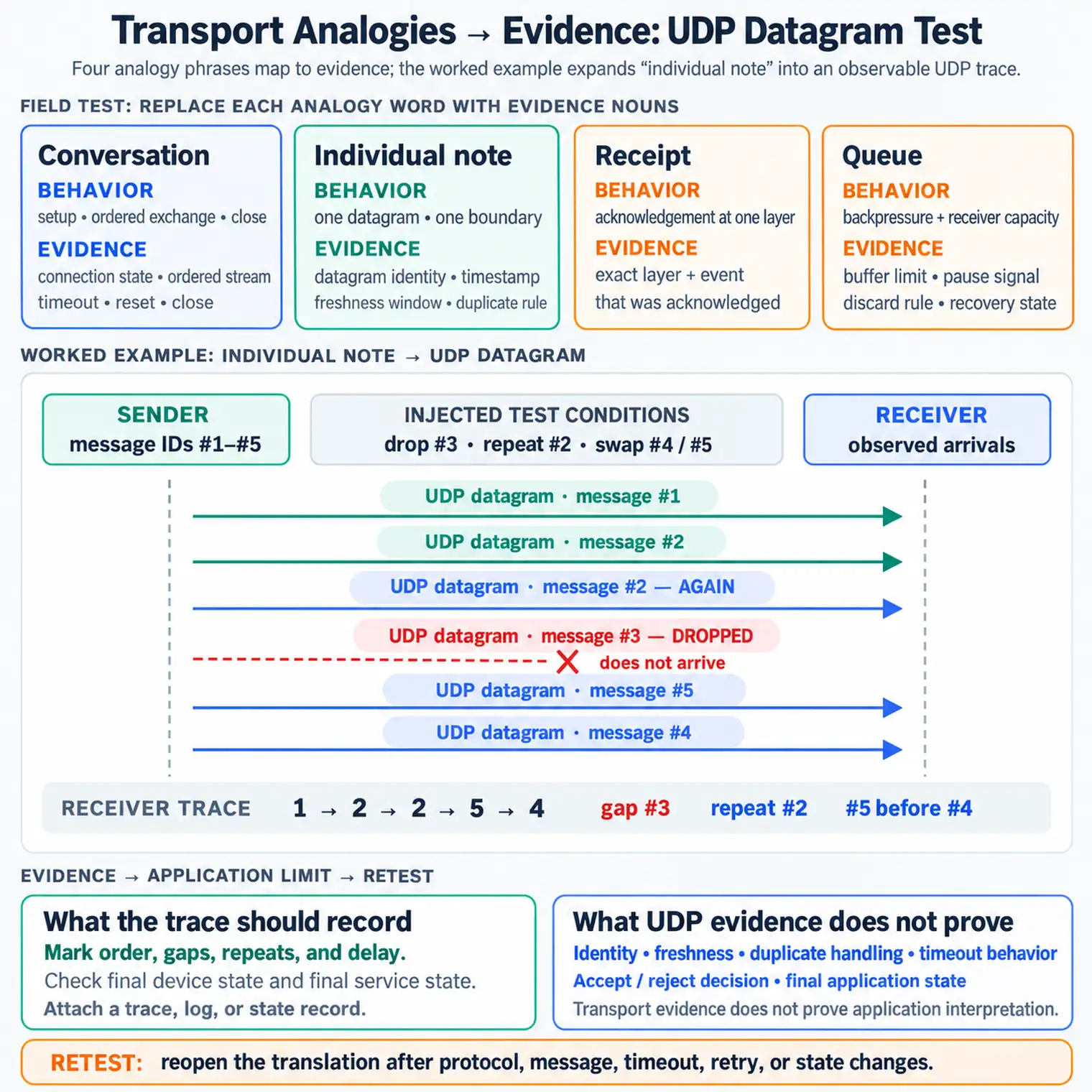
Read Figure 8.1 from each everyday phrase into the transport behavior it is meant to introduce. Continue to the observable evidence, then check the decision limit and retest boundary. The order keeps “conversation” from implying application success and “receipt” from implying the wrong acknowledgement layer, connecting accessible language to the chapter’s evidence-first review.
If the analogy cannot be translated into protocol behavior, observable evidence, application responsibility, and a limit, rewrite it before using it in a decision record.
That translation step is what keeps analogies useful for review. It lets a non-specialist ask, "what did the receipt acknowledge?" or "where does the queue overflow?" without converting the analogy into a false guarantee. The evidence trail stays concrete: a packet trace, gateway log, application acknowledgement, buffer counter, state transition, or timed retry record. If the record cannot name the event and the boundary, the analogy is only explanatory prose and should not support an accept decision.
A quick field test is to replace each analogy word with an evidence noun. Conversation becomes connection state, ordered stream, timeout, reset, and close. Note becomes datagram identity, timestamp, freshness window, and duplicate rule. Receipt becomes the exact layer and event acknowledged. Queue becomes buffer limit, pause signal, discard rule, and recovery state. If that substitution is impossible, the analogy needs rewriting before it teaches the review.
8.16 Practitioner: Write The Analogy Boundary Record
This section: Practitioner: Write The Analogy Boundary Record — The boundary record keeps plain-language explanation useful without letting it overclaim.
The boundary record keeps plain-language explanation useful without letting it overclaim. It starts with the flow being explained, names the analogy, maps that analogy to transport evidence, then records the application behavior still outside the analogy. Treat it as a small review artifact, not as a narrative paragraph. A reviewer should be able to compare the analogy, trace, log, state record, decision, and retest trigger without guessing what the team meant.
Suppose a greenhouse controller describes soil-moisture telemetry as "leaving notes at the office door." The record should say which endpoint sends the note, which datagram or application message carries it, how the receiver identifies the sample, how old a sample can be before it is stale, and what happens if two notes with the same identifier arrive. If the same project later adds a valve command over the same network path, the old telemetry analogy cannot be reused unchanged. Commands need response identity, authorization, final valve state, and timeout or rollback evidence.
After the translation is agreed, the team needs a record that keeps the metaphor tied to one actual flow. Inspect Figure 8.2 before writing the bounded analogy conclusion.
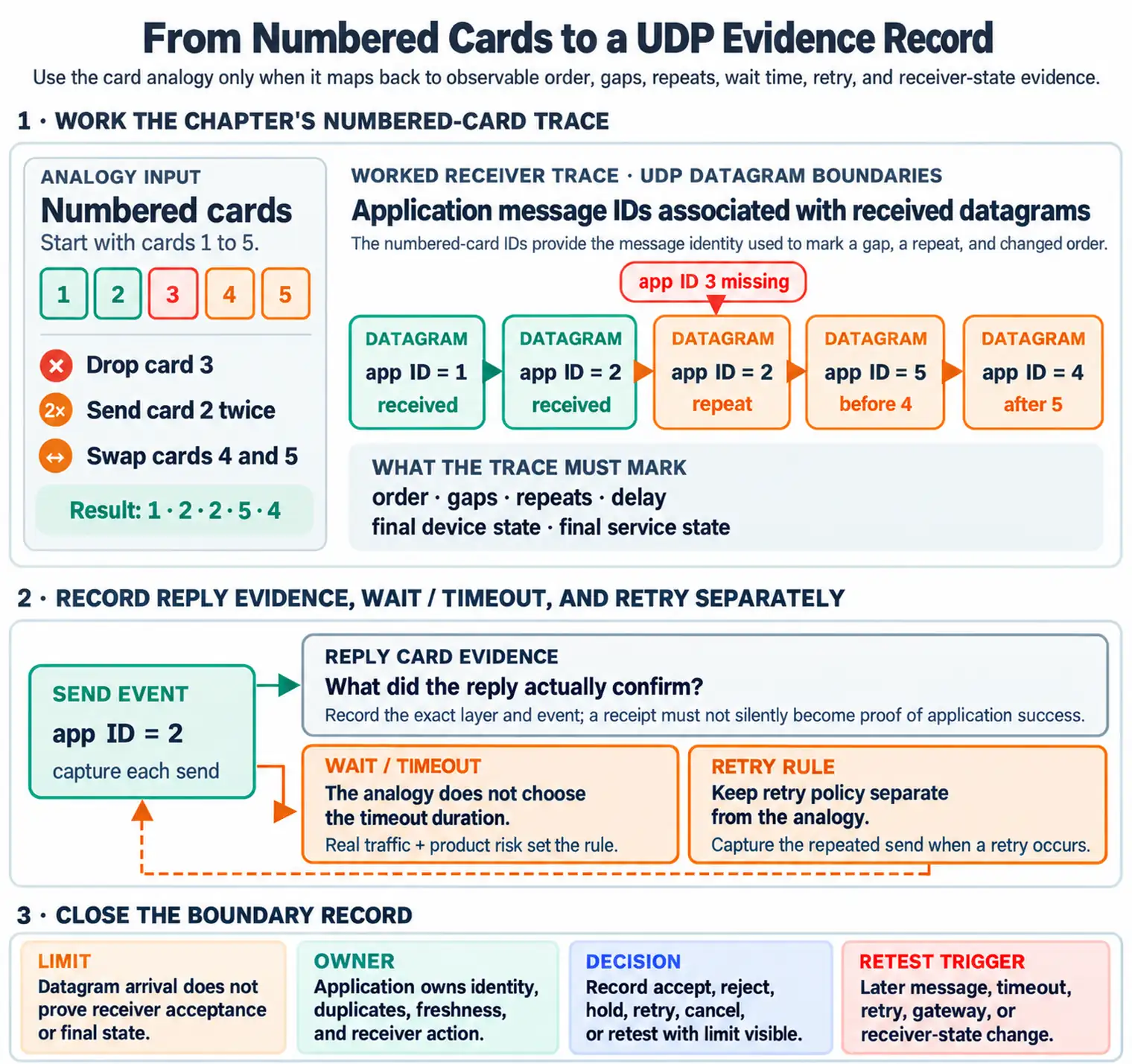
In Figure 8.2, begin with the named flow and analogy phrase, then move through transport evidence and the application responsibility that remains. Finish with the comparison limit, decision, owner, and retest trigger. This sequence turns the analogy into a temporary teaching bridge and returns the running narrative to observable states, messages, and boundaries.
Use one message path at a time, not the whole product or protocol family.
Write the transport behavior and trace, log, or state record it points to.
Name the receiver behavior that remains outside the transport comparison.
Record accept, reject, hold, retry, cancel, or retest with the evidence limit visible.
The practical payoff is consistency. Two reviewers can disagree about whether "conversation" is a friendly phrase, but they should agree on whether the record contains connection state, message framing, acknowledgement scope, receiver decision, and final state. The same discipline catches gateway splits: the cloud-to-gateway path may be a TCP conversation while the gateway-to-device path is a queued radio exchange. The boundary record prevents one analogy from silently covering both segments.
8.17 Under the Hood: Transport Metaphors Break At Layer Boundaries
This section: Under the Hood: Transport Metaphors Break At Layer Boundaries — Transport analogies break when they cross a layer boundary without evidence.
Transport analogies break when they cross a layer boundary without evidence. TCP manages a byte stream, but it does not know where every application command starts and ends unless the application framing is recorded. UDP preserves datagram boundaries, but it does not decide freshness, duplicate suppression, retry policy, or final state. Acknowledgements exist at several layers, and each one confirms a different event.
The deeper review habit is to ask "what event did this evidence actually confirm?" A SYN-ACK, an application ACK, a device state change, and a dashboard update are not interchangeable receipts. They can all be part of one flow, but each sits at a different boundary and needs its own observation point. A trace can show bytes were retransmitted and delivered to a gateway socket. It cannot, by itself, show that a downstream sleepy sensor woke, parsed the command, checked policy, changed state, and reported the result.
Layer boundaries are also where analogies become misleading during debugging. If a receiver buffer fills, the queue analogy may explain backpressure at the TCP window or application queue, but the evidence must say which queue filled, what limit was reached, what sender behavior changed, and which messages were discarded, delayed, or retried. If a UDP receiver drops an old measurement, the individual-note analogy may explain that each message stands alone, but the evidence still needs a timestamp rule and a duplicate or stale-sample decision.
Another common boundary is the gateway. It may terminate TLS, translate an application message, store the request, and forward it later over a radio link. The cloud conversation proves only the first segment. The deferred delivery needs its own queue lifetime, expiry rule, downstream acknowledgement, receiver decision, and final-state observation before the user-facing claim is complete.
Stream Boundary
TCP orders bytes. The application must still record framing, parsing, command identity, and final state.
Datagram Boundary
UDP preserves message boundary. The application must still own loss, duplicates, stale data, and receiver action.
Acknowledgement Boundary
A receipt must name whether it confirms bytes, records, messages, commands, storage, or state change.
Gateway Boundary
A gateway can end one transport conversation and start another, so analogies must split the flow into segments.
When an analogy makes a flow sound proven, identify the layer boundary it crossed and require evidence at the receiver side of that boundary.
A useful review can therefore have several receipts for one user-facing action. The first confirms connection setup, the second confirms data reached an application process, the third confirms the receiver accepted the command, and the fourth confirms the physical or digital state changed. Missing one receipt does not always mean the design is wrong, but it does mean the analogy cannot support a final claim. For every receipt, record the narrow event it proves, the event it does not prove, and the transport or receiver change that reopens the check.
This is why gateways deserve special attention. A cloud service may use TCP to a gateway, the gateway may store a command in a queue, and a constrained node may receive it later over a different link. One "phone call" analogy cannot span all three behaviors. The review should split the path into transport segments, name the queue lifetime, record expiry and retry rules, and verify the final receiver state after the deferred delivery occurs.
8.18 Summary
This section: Summary — Transport analogies are useful when they improve review evidence.
Transport analogies are useful when they improve review evidence. Conversation, note, receipt, and queue comparisons can explain TCP, UDP, acknowledgements, and flow control, but each comparison has limits.
The safest habit is to translate every analogy back into observable records: flow, protocol behavior, evidence, application responsibility, limit, decision, and retest trigger.
8.19 Key Takeaway
This section: Key Takeaway — Analogies are useful only when they lead back to real transport properties: ordering, reliability, connection state, congestion, and security.
Analogies are useful only when they lead back to real transport properties: ordering, reliability, connection state, congestion, and security.
8.20 Concept Relationships
This section: Concept Relationships
The concepts in this chapter form a loop: an analogy introduces a transport idea, evidence tests the translation, the application boundary limits the claim, and the decision record says whether the phrase may remain in use. A later message, timeout, retry, gateway, or receiver-state change returns the team to the start. Keeping that relationship visible is what makes simple language useful without allowing it to replace protocol proof.
- Transport Practical Apps shows how practical flows become transport review records.
- Transmission Control Protocol (TCP) provides the TCP behavior behind conversation and receipt analogies.
- User Datagram Protocol (UDP) provides the datagram behavior behind note and message-boundary analogies.
- Transport Scenarios & Pitfalls applies these explanations to common review mistakes.
8.21 What’s Next
This section: What’s Next — Next, read Transport Protocols: Hands-On Lab to turn analogy-based explanations into observable lab records for message boundaries, timeouts, retries, and final state.
Next, read Transport Protocols: Hands-On Lab to turn analogy-based explanations into observable lab records for message boundaries, timeouts, retries, and final state.
Find help
3 reviewed answers.
Where should I start in a module?
Open the module page from the sidebar to see its chapters in order. Use the module map to return to a topic you need.
Modules and pathsReviewed
What can I try when a project does not work?
Check the symptom, then work through the diagnostic steps. Keep the error message and the smallest example that reproduces it.
When you are stuckReviewed
How do interactive examples work?
Use the interactive guide to check how examples and simulations work before changing your project.
Interactive examples guideReviewed