49  Modbus Protocol

In 60 Seconds

Modbus is a 45+ year-old, vendor-neutral serial communication protocol that remains the most widely used industrial protocol, using a simple master-slave architecture with four data types (coils, discrete inputs, holding registers, input registers) to read and write device data over RS-485 (RTU) or TCP/IP networks.

49.1 Modbus: The Industrial Workhorse

Learning Objectives

By the end of this section, you will be able to:

  • Distinguish between the four Modbus data types (coils, discrete inputs, input registers, holding registers) and select the correct type for a given I/O requirement
  • Implement Modbus RTU communication over RS-485 by configuring baud rate, parity, device addresses, and termination resistors
  • Configure Modbus TCP/IP client connections including MBAP header fields and the standard port 502
  • Design Modbus network topologies for industrial applications, applying bus length and device count constraints
  • Calculate the minimum polling interval for a given bus configuration using RS-485 transmission timing formulas
  • Diagnose common Modbus communication failures by analysing symptoms such as CRC errors, timeouts, and bus collisions
  • Evaluate the trade-offs between Modbus RTU, Modbus TCP, and OPC-UA and justify which variant best suits a deployment scenario
  • Apply gateway integration patterns to connect legacy Modbus installations to modern cloud and MQTT-based IoT platforms

49.2 Prerequisites

Before diving into this chapter, you should be familiar with:

  • Modbus RTU: The serial binary variant of Modbus communicating over RS-232/RS-485; uses CRC-16 error checking and supports up to 247 devices on a single RS-485 bus.
  • Modbus TCP/IP: Modbus encapsulated in TCP/IP packets for Ethernet communication; uses port 502, removes the CRC (TCP handles error detection), and allows direct IP addressing.
  • Function Code: A one-byte Modbus field specifying the operation: 0x01 (Read Coils), 0x03 (Read Holding Registers), 0x06 (Write Single Register), 0x10 (Write Multiple Registers).
  • Coil: A Modbus discrete output register (1-bit, read/write); typically represents relay outputs, digital I/O, or binary actuator states.
  • Holding Register: A Modbus 16-bit read/write register used to store setpoints, configuration values, and numeric sensor readings.
  • Input Register: A Modbus 16-bit read-only register containing measurement values from sensors; cannot be written by the master.

49.4 For Beginners: Understanding Modbus

Modbus is 45+ years old and still the most common industrial protocol. Why?

  1. Simplicity: A few pages of specification vs hundreds for modern protocols
  2. Vendor-neutral: Open standard, no licensing fees
  3. Proven: Decades of real-world testing
  4. Cheap: Simple hardware requirements

Analogy: Modbus is like the telephone: - Everyone knows how to use it - It works everywhere - New technologies (Zoom, Teams) are better but not always necessary - When something needs to “just work,” people reach for the phone

How Modbus Works (Simple Version):

  1. Master asks a question: “Device 5, what’s your temperature reading?”
  2. Slave answers: “25.5 degrees”
  3. That’s it. Request → Response. Simple.

“Modbus was invented in 1979? That’s ancient!” said Sammy the Sensor.

Max the Microcontroller smiled. “And it STILL runs millions of industrial devices today! Modbus is the simplest protocol you’ll ever meet. One master asks a question, one slave answers. No subscriptions, no brokers, no exchanges. Just ‘what’s register 40001?’ and the answer comes back.”

“It uses numbered addresses instead of names,” explained Lila the LED. “Register 30001 might be a temperature sensor, register 30002 might be a pressure sensor. The master has a map that says what each number means. Simple but effective – factory workers have been using it for over 40 years.”

Bella the Battery appreciated the simplicity: “Modbus RTU uses a serial cable (RS-485) and barely any processing power. Modbus TCP runs over Ethernet. Both are so lightweight that even the tiniest microcontroller can implement them. Sometimes the oldest solution is still the most practical one!”
49.5 Modbus Architecture

49.5.1 Master-Slave Model

Modbus master-slave polling architecture showing a single PLC Master in teal connected to multiple Slave devices (addresses 1 through 247) in orange over an RS-485 bus. Arrows indicate master-initiated request and slave response pattern. Address 0 is reserved for broadcast with no response required.
Figure 49.1: Modbus master-slave polling architecture with up to 247 devices

Modbus master-slave architecture: Single Master (PLC/SCADA) in teal sends requests to multiple Slaves (addresses 1, 2, 3, up to 247) in orange, each slave responds back to master. Shows polling-based communication where master initiates all transactions.

Mermaid diagram

This sequence diagram shows Modbus polling timing: master queries each slave in turn, waits for response, handles timeouts for offline devices.

Key Characteristics:

  • Only master initiates communication
  • Slaves respond only when addressed
  • Maximum 247 slaves (addresses 1-247)
  • Address 0 = broadcast (no response)

49.6 Modbus Data Model

Understanding Modbus Addressing

Core Concept: Modbus uses a simple memory-mapped addressing scheme with four distinct register types—coils (1-bit R/W), discrete inputs (1-bit R), input registers (16-bit R), and holding registers (16-bit R/W)—each accessed by a numeric address from 0 to 65535.

Why It Matters: The beauty of Modbus is its simplicity: every device presents its data as a flat array of addresses. However, this simplicity comes with a catch—address assignments are vendor-specific. Address 40001 might be temperature on one device and pressure on another. Always consult the device’s register map documentation before integration.

Key Takeaway: When documenting a Modbus integration, create a register map table showing address, data type, scaling factor, and engineering units. This becomes your single source of truth for the entire project lifecycle.

49.6.1 Register Types

Type Address Range Size Access Typical Use
Coils 0-65535 1 bit R/W Digital outputs, relay control
Discrete Inputs 0-65535 1 bit R Digital inputs, switches
Input Registers 0-65535 16 bit R Analog inputs, sensor readings
Holding Registers 0-65535 16 bit R/W Configuration, setpoints
Modbus device memory map showing four register areas: Coils in teal (Pump ON/OFF, Valve OPEN/CLOSE, Alarm ACK), Discrete Inputs in gray (Emergency Stop, High Level, Low Level), Input Registers in orange (Temperature, Pressure, Flow Rate with scaling factors), and Holding Registers in navy (Setpoint Temp, Alarm Threshold, Device ID).
Figure 49.2: Modbus device memory map with coils, inputs, and registers

49.6.2 Data Representation

16-bit Register Encoding for Common Data Types:

Data Type Registers Encoding Example
16-bit Integer 1 0x1234 = 4660
32-bit Integer 2 Registers 0-1, Big-endian
32-bit Float 2 IEEE 754, word order varies
String N 2 chars per register
Scaled Integer 1 255 × 10 = 25.5°C
Quick Check: Modbus Register Types

49.7 Modbus RTU (Serial)

49.7.1 Physical Layer

Modbus RTU RS-485 physical topology: PLC Master in teal connects through 120-ohm termination resistor to daisy-chained Slaves (1, 2, 3) in orange via A+/B- twisted pair, ending with second 120-ohm termination. Shows proper bus topology for multi-drop RS-485.
Figure 49.3: Modbus RTU RS-485 daisy-chain bus topology with termination

RS-485 Specifications:

Parameter Value Notes
Max Distance 1200 m (4000 ft) With proper cabling
Max Devices 32 unit loads 247 with repeaters
Baud Rate 9600-115200 9600 most common
Wiring Twisted pair Shielded recommended
Termination 120Ω Both ends of bus

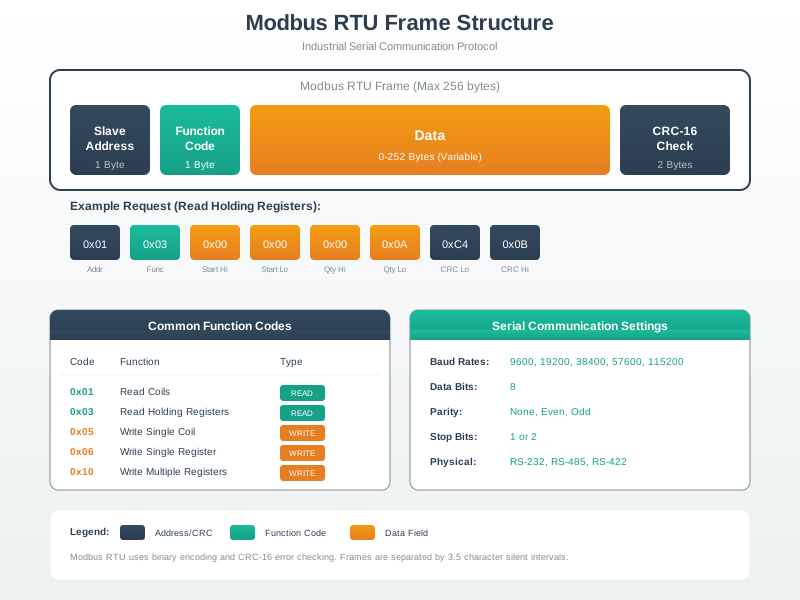
Modbus RTU frame structure showing four fields: Address (1 byte, slave ID 1-247), Function Code (1 byte, e.g. 0x03 for Read Holding Registers), Data (variable length, contains start address and register count in request or byte count and values in response), and CRC-16 (2 bytes for error detection). Frame boundaries are defined by a silent interval of at least 3.5 character times on the RS-485 bus.

Modbus RTU Frame Format
Figure 49.4: Modbus RTU frame format with address, function code, data, and CRC-16 error checking. The silent interval of 3.5 character times delimits frame boundaries in the half-duplex RS-485 communication.

49.7.2 RTU Frame Format

| Address | Function | Data     | CRC-16 |
| 1 byte  | 1 byte   | N bytes  | 2 bytes|

Example: Read Holding Registers (Function 03)

Request:

| 01 | 03 | 00 00 | 00 02 | C4 0B |
| ID | Fn | Start | Count | CRC   |

Response:

| 01 | 03 | 04 | 01 F4 | 00 64 | B8 44 |
| ID | Fn | Bytes| Reg 0 | Reg 1 | CRC   |
  • Reg 0 = 0x01F4 = 500 (e.g., 50.0°C if scaled by 10)
  • Reg 1 = 0x0064 = 100

49.7.3 Common Function Codes

Code Name Description
01 Read Coils Read 1-2000 coil statuses
02 Read Discrete Inputs Read 1-2000 input statuses
03 Read Holding Registers Read 1-125 registers
04 Read Input Registers Read 1-125 registers
05 Write Single Coil Write one coil
06 Write Single Register Write one register
15 Write Multiple Coils Write 1-1968 coils
16 Write Multiple Registers Write 1-123 registers
Interactive: Modbus RTU Polling Cycle Calculator

Configure your RS-485 bus parameters to see the minimum safe polling interval and maximum update rate before bus collisions occur.

49.8 Modbus TCP/IP

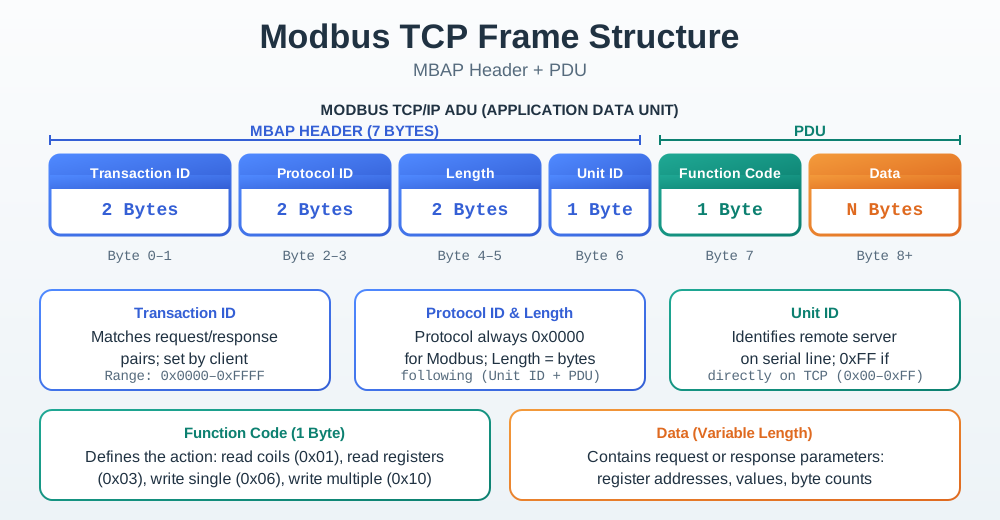
Modbus TCP frame structure showing the 7-byte MBAP header followed by the PDU. MBAP header fields: Transaction ID (2 bytes) for matching requests to responses, Protocol Identifier (2 bytes, always 0x0000 for Modbus), Length (2 bytes) indicating number of remaining bytes, Unit Identifier (1 byte) for gateway routing to RTU slaves. PDU contains Function Code and Data. No CRC field — TCP layer provides error detection. All Modbus TCP communication uses port 502.

Modbus TCP Frame Format
Figure 49.5: Modbus TCP replaces RTU’s CRC with TCP’s built-in error detection. The MBAP header adds transaction matching and gateway routing capabilities for Ethernet-based industrial networks.

49.8.1 Protocol Stack

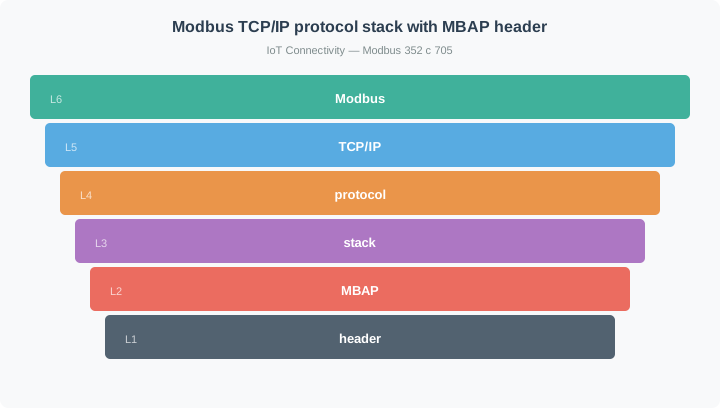
Modbus TCP protocol stack showing five layers: Modbus Application (Function Codes, Data) in teal, MBAP Header (Transaction ID, Protocol ID, Length, Unit ID) in orange, TCP on port 502, IP for addressing/routing in navy, Ethernet 802.3 at bottom in gray.
Figure 49.6: Modbus TCP/IP protocol stack with MBAP header

49.8.2 MBAP Header

| Transaction ID | Protocol ID | Length    | Unit ID |
| 2 bytes        | 2 bytes     | 2 bytes   | 1 byte  |
| Client-set     | 0x0000      | Remaining | RTU addr|

Key Differences from RTU:

  • No CRC (TCP handles error detection)
  • Transaction ID for matching requests/responses
  • Unit ID for gateway routing to RTU slaves

49.8.3 Network Topology

Modbus TCP/IP network topology: SCADA TCP Client in teal connects through Industrial Switch to Ethernet devices (PLC 1 at 192.168.1.10, PLC 2 at 192.168.1.11, Modbus Gateway at 192.168.1.20) in orange. Gateway bridges to RS-485 RTU Slaves in navy, providing TCP-to-RTU protocol conversion.
Figure 49.7: Modbus TCP network with gateway bridging to RTU slaves

49.9 Implementation Examples

49.9.1 Python Modbus TCP Client

from pymodbus.client import ModbusTcpClient

# Connect to Modbus TCP server
client = ModbusTcpClient('192.168.1.10', port=502)
client.connect()

# Read holding registers (address 0, count 10)
result = client.read_holding_registers(address=0, count=10, slave=1)
if not result.isError():
    print(f"Registers: {result.registers}")
    # [500, 100, 255, 0, 1234, ...]

# Read temperature (register 0, scaled by 10)
temp_raw = client.read_holding_registers(0, 1, slave=1).registers[0]
temperature = temp_raw / 10.0  # 500 → 50.0°C

# Write setpoint (register 100 = 60.0°C)
client.write_register(100, 600, slave=1)

# Read coils (digital outputs)
coils = client.read_coils(0, 8, slave=1)
print(f"Pump status: {'ON' if coils.bits[0] else 'OFF'}")

# Write coil (turn on pump)
client.write_coil(0, True, slave=1)

client.close()

49.9.2 Modbus RTU with Arduino

#include <ModbusMaster.h>
ModbusMaster node;

void setup() {
    Serial.begin(9600);
    Serial1.begin(9600);                    // RS-485 bus
    node.begin(1, Serial1);                 // Slave ID 1
    node.preTransmission(preTransmission);  // RS-485 direction control
    node.postTransmission(postTransmission);
}

void loop() {
    uint8_t result = node.readHoldingRegisters(0, 2);  // Read 2 registers
    if (result == node.ku8MBSuccess) {
        float temperature = node.getResponseBuffer(0) / 10.0;
        Serial.print("Temperature: ");
        Serial.println(temperature);
    }
    delay(1000);
}

void preTransmission()  { digitalWrite(DE_PIN, HIGH); }  // Enable TX
void postTransmission() { digitalWrite(DE_PIN, LOW);  }  // Enable RX

49.10 Troubleshooting Guide

49.10.1 Common Issues

Symptom Likely Cause Solution
No response Wrong address, baud rate Verify slave ID and serial settings
CRC errors Noise, termination Add termination, use shielded cable
Timeout Polling too fast Increase delay between requests
Wrong data Byte order Check endianness (big/little)
Intermittent Ground loop Use isolated RS-485 converter

49.10.2 Debugging Checklist

Modbus troubleshooting flowchart starting with No Response problem: Check correct slave address, then baud rate, then wiring (A+/B- polarity and termination), then power, then device configuration. If all checks pass, use oscilloscope to verify signals. Shows systematic debugging approach.
Figure 49.8: Modbus communication troubleshooting decision flowchart

49.11 Security Considerations

49.11.1 Modbus Security Vulnerabilities

Vulnerability Risk Mitigation
No authentication Anyone can send commands Network segmentation
No encryption Data visible on wire VPN for remote access
No authorization All clients equal Firewall rules
Broadcast abuse DoS via address 0 Block broadcasts

49.11.2 Secure Architecture

Secure Modbus network architecture with three zones: IT Network in navy (SCADA, Historian), DMZ in orange (Firewall, Jump Server), and OT Network in teal (Industrial Firewall, Modbus Devices). Traffic flows through multiple firewalls and jump server for defense in depth.
Figure 49.9: Secure Modbus network with IT/OT segmentation and DMZ

49.12 Understanding Check

:

49.13 Summary

  1. Modbus is simple by design—request/response with 4 register types

  2. RTU uses RS-485 (serial, up to 1200m, 247 devices)

  3. TCP uses Ethernet (port 502, unlimited devices, faster)

  4. Register addressing varies by vendor—always check documentation

  5. No built-in security—use network segmentation and firewalls

  6. Still the most common industrial protocol for simple I/O

  7. Modernize by adding gateways alongside existing SCADA rather than replacing proven installations

49.14 Concept Relationships

How This Topic Connects

Builds on:

Enables:

  • OPC-UA Fundamentals - Modern integration layer often bridges Modbus to IT systems
  • SCADA Systems - Modbus is the most common SCADA field protocol

Related Concepts:

  • RS-485 Physical Layer - Understanding Modbus RTU electrical characteristics
  • Gateway Architectures - Modbus-to-cloud integration patterns

49.15 See Also

Additional Resources

Within This Module:

  • Industrial Ethernet - High-speed alternatives to Modbus RTU
  • Protocol Integration Patterns - Bridging Modbus to modern systems

Implementation Resources:

Security Guidance:

49.16 What’s Next

Chapter Focus Why Read It
OPC-UA Fundamentals Modern industrial information model with built-in security, pub/sub, and cloud integration Learn how OPC-UA solves the security and scalability gaps that Modbus leaves open
Industrial Protocols Overview Side-by-side comparison of Modbus, PROFINET, EtherNet/IP, EtherCAT, and OPC-UA Develop the decision framework to select the right protocol for any industrial deployment
Industrial Ethernet — PROFINET & EtherNet/IP Deterministic Ethernet protocols for real-time motion control and high-speed I/O Understand when Modbus RTU bandwidth limits make a migration to industrial Ethernet worthwhile
Application Protocols Overview MQTT, AMQP, CoAP, and REST for IoT messaging above the transport layer Connect Modbus gateway data to cloud platforms using the messaging protocols that cloud services speak natively
Networking Basics TCP/IP stack, subnetting, and Ethernet fundamentals Strengthen the network-layer knowledge required to design and troubleshoot Modbus TCP deployments
Gateway Architectures Edge gateway design patterns for bridging OT field buses to IT cloud systems Apply the Modbus-to-MQTT gateway pattern at scale within a reference IoT system architecture