The link budget – the difference between transmitted power and receiver sensitivity – determines your LPWAN range. LoRa SF12 achieves -137 dBm sensitivity (10-15 km rural), while Wi-Fi at -90 dBm reaches only ~100 m. Real-world deployments must account for building penetration loss (10-20 dB), fade margin (6-10 dB), and cable losses that can halve your theoretical range. Use the interactive calculators here to plan before deploying.
16.1 Learning Objectives
By the end of this chapter, you will be able to:
Calculate link budgets for LPWAN deployments using transmit power, antenna gains, and receiver sensitivity
Apply path loss models to estimate real-world range for LoRa, Sigfox, NB-IoT, and other technologies
Analyze the impact of building penetration loss and fade margin on deployment planning
Evaluate different LPWAN configurations using interactive range calculators to justify design trade-offs
Distinguish between coverage-limited and capacity-limited deployment scenarios
Design a gateway density plan that satisfies both link budget and airtime constraints
Demonstrate the log-distance path loss formula by solving for maximum range given a set of deployment parameters
Justify spreading factor selection decisions by comparing the energy, range, and airtime trade-offs of SF7 through SF12
Diagnose battery life failures by identifying mismatches between message frequency, payload size, and LPWAN capacity limits
For Beginners: LPWAN Link Budget
A link budget calculates whether a wireless signal will be strong enough to travel from sender to receiver. For LPWAN, which covers distances of several kilometers, this calculation is critical. It is like planning a road trip – you need to know if you have enough fuel (signal strength) to reach your destination.
Sensor Squad: Can You Hear Me Now?
“I’m sending my signal from a field 10 km away, but the gateway isn’t receiving it!” Sammy the Sensor called out (barely).
Max the Microcontroller grabbed a calculator. “Let’s do a link budget! Your transmitter puts out 14 dBm. The antenna adds 2 dBi. That’s 16 dBm total. But the signal loses strength over distance – at 10 km on 868 MHz, free-space path loss is about 130 dB. Your receiver sensitivity is -137 dBm. So 16 - 130 = -114 dBm, which is above -137. You have a 23 dB margin – you should be fine!”
“Then why isn’t it working?” asked Lila the LED. “Because the formula assumes a clear line of sight!” said Bella the Battery. “There are trees, hills, and buildings in the way. Each obstacle adds extra loss. A forest can add 10-20 dB of loss, wiping out your margin.”
Max concluded: “That’s why link budgets matter. You don’t guess if a signal will reach – you CALCULATE it. Add up transmit power, subtract path loss and obstacles, and check if there’s enough margin left. No margin means no connection!”
16.2 Interactive Range Calculator
~10 min | Intermediate | P09.C02.U04
Understanding wireless range requires calculating the link budget - the difference between transmitted power and receiver sensitivity. This interactive tool helps you estimate range for different LPWAN technologies based on real-world parameters.
How to Use This Calculator
Select a technology: Choose from LoRa, Sigfox, NB-IoT, Wi-Fi, BLE, or Zigbee
Set TX power: Transmit power in dBm (typically 0-30 dBm)
Adjust antenna gain: Additional gain from antenna (0-10 dBi)
Choose environment: Different environments have different path loss exponents
The calculator uses a simplified path loss model to estimate range. Real-world range varies based on terrain, obstacles, weather, and interference.
Interactive Tool Coming Soon
An LPWAN range calculator animation is planned for this section. Use the interactive OJS calculators below to explore link budget parameters.
Interactive: LoRa Link Budget Calculator
This advanced calculator provides detailed LoRa link budget analysis including receiver sensitivity for each spreading factor, free-space path loss, and maximum range estimates across different environments. Use it to understand the trade-offs between data rate, range, and link margin in LoRa deployments.
16.3 Understanding the Link Budget
The link budget calculation determines maximum communication range:
Link Budget (dB) = TX Power (dBm) + TX Antenna Gain (dBi) + RX Antenna Gain (dBi) - RX Sensitivity (dBm)
Maximum Allowable Path Loss (dB) = Link Budget - Fade Margin - Building Penetration Loss - Cable Losses
Key Factors:
Receiver Sensitivity: Minimum signal strength the receiver can detect
LoRa SF12: -137 dBm (excellent sensitivity)
NB-IoT: -141 dBm (best cellular LPWAN)
Wi-Fi: -90 dBm (poor sensitivity)
Path Loss Exponent (n): Environment-dependent signal attenuation
Free space: n = 2.0 (ideal conditions)
Rural: n = 2.5 (light obstacles)
Suburban: n = 3.0 (moderate obstacles)
Urban: n = 3.5 (heavy obstacles, buildings)
Indoor: n = 4.0 (walls, multiple reflections)
Frequency: Higher frequencies have greater path loss
Sub-GHz (868/915 MHz): Better penetration, longer range
2.4 GHz: More attenuation, shorter range
Try These Experiments:
Compare LoRa spreading factors: SF12 vs SF7 shows sensitivity vs data rate trade-off
Urban vs Rural: Same technology has vastly different range in different environments
LPWAN vs Wi-Fi: See why LPWAN achieves 10-100x better range
Antenna gain impact: +3 dBi doubles effective radiated power, extending range by ~41%
Calculator: Link Budget and Maximum Range
Show code
viewof txPower = Inputs.range([-10,30], {value:14,step:1,label:"TX Power (dBm)"})viewof txAntenna = Inputs.range([0,10], {value:2,step:0.5,label:"TX Antenna Gain (dBi)"})viewof rxAntenna = Inputs.range([0,10], {value:2,step:0.5,label:"RX Antenna Gain (dBi)"})viewof rxSensitivity = Inputs.select([-90,-100,-117,-120,-125,-130,-137,-141], {value:-137,label:"RX Sensitivity (dBm)",format: d =>`${d} dBm`})viewof fadeMargin = Inputs.range([0,20], {value:10,step:1,label:"Fade Margin (dB)"})viewof buildingLoss = Inputs.range([0,25], {value:0,step:1,label:"Building Penetration Loss (dB)"})viewof cableLoss = Inputs.range([0,5], {value:0,step:0.5,label:"Cable Losses (dB)"})viewof pathLossExp = Inputs.select([2.0,2.5,3.0,3.5,4.0], {value:2.5,label:"Environment",format: d => ({2.0:"Free space (n=2.0)",2.5:"Rural (n=2.5)",3.0:"Suburban (n=3.0)",3.5:"Urban (n=3.5)",4.0:"Indoor (n=4.0)"}[d])})viewof freq = Inputs.select([433,868,915,2400], {value:868,label:"Frequency (MHz)",format: d =>`${d} MHz`}){const linkBudget = txPower + txAntenna + rxAntenna - rxSensitivity;const allowableLoss = linkBudget - fadeMargin - buildingLoss - cableLoss;// Log-distance model: Loss = 32.44 + 20*log10(f) + 10*n*log10(d_km)const fsplBase =32.44+20*Math.log10(freq);// Solve for d: 10*n*log10(d) = allowableLoss - fsplBaseconst logD = (allowableLoss - fsplBase) / (10* pathLossExp);const rangeKm =Math.max(0,Math.pow(10, logD));const div = htl.html`<div style="background:#f8f9fa;border-left:4px solid #16A085;padding:16px;border-radius:4px;font-family:Arial,sans-serif"> <h4 style="color:#2C3E50;margin:0 0 12px">Link Budget Results</h4> <table style="border-collapse:collapse;width:100%"> <tr><td style="padding:4px 8px;color:#7F8C8D">Total Link Budget</td><td style="padding:4px 8px;font-weight:bold;color:#2C3E50">${linkBudget.toFixed(1)} dB</td></tr> <tr><td style="padding:4px 8px;color:#7F8C8D">Allowable Path Loss</td><td style="padding:4px 8px;font-weight:bold;color:#2C3E50">${allowableLoss.toFixed(1)} dB</td></tr> <tr><td style="padding:4px 8px;color:#7F8C8D">Estimated Range</td><td style="padding:4px 8px;font-weight:bold;color:${rangeKm >5?'#16A085': rangeKm >1?'#E67E22':'#E74C3C'}">${rangeKm <0.1? (rangeKm *1000).toFixed(0) +' m': rangeKm.toFixed(2) +' km'}</td></tr> </table> <p style="margin:8px 0 0;font-size:0.85em;color:#7F8C8D">Based on log-distance path loss model. Real range varies with terrain, antenna height, and local obstructions.</p> </div>`;return div;}
Knowledge Check: Maximum Allowable Path Loss
A LoRa device transmits at 14 dBm with a 2 dBi TX antenna. The gateway has a 6 dBi antenna. The receiver sensitivity is -130 dBm. The fade margin is 10 dB and building penetration loss is 15 dB. There are no cable losses. What is the maximum allowable path loss?
Key Concepts
Link Budget: An accounting of all signal gains and losses from transmitter to receiver to verify adequate coverage margin.
Friis Transmission Equation: The fundamental equation for free-space path loss: FSPL = (4πd/λ)² where d = distance and λ = wavelength; the basis for all link budget calculations.
Fresnel Zone: An ellipsoid region around the direct path between transmitter and receiver; 60% clearance of the first Fresnel zone is required for optimal propagation.
Rain Fade: Signal attenuation caused by rain, primarily affecting frequencies above 10 GHz; negligible for LPWAN frequencies below 1 GHz.
Shadowing Margin: Extra signal budget beyond median path loss to account for random signal variations (obstacles, terrain) not captured by the deterministic path loss model; typically 8-10 dB.
16.4 Cross-Hub Connections
This chapter connects to multiple learning resources across the module:
Interactive Tools:
Simulations Hub - Use the Interactive Range Calculator to experiment with link budget calculations for LoRa, Sigfox, and NB-IoT, exploring how TX power, antenna gain, and environment affect range estimates
Network Topology Visualizer - Explore how LPWAN gateways create star topology networks connecting thousands of end devices
Knowledge Checks:
Quiz Navigator - Test your LPWAN knowledge with technology selection scenarios, cost analysis problems, and deployment decision quizzes
Knowledge Gaps - Common misconceptions about LPWAN range, battery life, and reliability
Video Learning:
Videos Hub - Watch LoRaWAN architecture tutorials, Sigfox vs NB-IoT comparisons, and real-world smart city deployments
Knowledge Map:
Knowledge Map - See how LPWAN fundamentals connect to specific technologies (LoRaWAN, Sigfox, NB-IoT), WSN architectures, and IoT application domains
Common Misconception: “LPWAN Always Means Years of Battery Life”
The Misconception: Many assume all LPWAN devices automatically achieve 5-10 year battery life regardless of configuration.
The Reality: Battery life depends critically on message frequency and payload size. Here’s quantified data:
LoRaWAN Battery Life Calculator (2,000 mAh battery, 3.6V):
Messages/Day
Payload
SF
Battery Life
Why?
1 msg/day
12 bytes
SF12
10+ years
Optimal: infrequent, efficient
24 msgs/day (hourly)
50 bytes
SF7
5-7 years
Still good: reasonable frequency
288 msgs/day (5 min)
100 bytes
SF7
6-12 months
Power-hungry: constant TX
1440 msgs/day (1 min)
200 bytes
SF7
2-4 months
Unsustainable: LPWAN misuse
Real-World Example - Smart Water Meter Project Failure:
A utility company deployed 10,000 LoRaWAN water meters expecting 10-year battery life. After 8 months, 30% of devices went offline.
Root cause analysis:
Expected configuration:
- 1 reading/day (365 msgs/year)
- 12-byte payload (meter ID + reading)
- SF12 for maximum range
- Predicted battery life: 10 years

Actual configuration (implementation bug):
- 24 readings/day (8,760 msgs/year) - 24x more frequent!
- 243-byte payload (full JSON with metadata) - 20x larger!
- SF7 (weak signal forced SF12 retries)
- Actual battery life: 8-10 months

Cost impact:
- Battery replacement: €25/device x 10,000 = €250,000
- Truck roll costs: €50/site x 10,000 = €500,000
- Total unplanned cost: €750,000
Key Lessons:
Message frequency is exponential: 24x more messages = 20x shorter battery life due to radio warmup overhead
Payload efficiency matters: Sending 243 bytes vs 12 bytes quadruples energy per transmission
Spreading Factor impacts energy: SF12 uses 6x more energy than SF7 (longer TX time)
Real range vs theoretical range: Poor gateway placement forced devices to use SF12, further draining batteries
How to Achieve Advertised Battery Life:
Do:
Send 10 messages/day or less for 5+ year life
Use smallest payload possible (12-50 bytes)
Optimize gateway placement for SF7-SF9
Measure actual current consumption in pilot
Don’t:
Send messages every minute (LPWAN is not for real-time!)
Send JSON when binary encoding works
Assume poor coverage will be “fine”
Skip battery life calculations before deployment
Formula (simplified):
Battery Life (years) = (Battery Capacity × 0.8) / (TX Current × TX Time × Messages/Day × 365 / 3600)

Note: TX Current in mA, TX Time in seconds; divide by 3600 to convert mAs to mAh.

Example (good design):
= (2000 mAh × 0.8) / (40 mA × 2 s × 1 msg/day × 365 / 3600)
= 1600 mAh / 8.1 mAh/year
= ~197 years (capped by battery shelf life ~10 years)

Example (bad design - 5 min intervals, 288 msgs/day):
= (2000 mAh × 0.8) / (40 mA × 2 s × 288 msgs/day × 365 / 3600)
= 1600 mAh / 2,336 mAh/year
= 0.69 years = ~8 months
Putting Numbers to It
The energy model above simplifies to show how message frequency dominates battery life. Here’s the detailed breakdown for a LoRaWAN device at SF10:
For 1 message/day (12-byte payload, SF10): - TX: 40 mA × 0.37 s = 14.8 mAs - RX windows: 15 mA × 0.1 s = 1.5 mAs - Sleep (23h 59min): 0.005 mA × 86,399 s = 432 mAs - Total: 448 mAs/day × 365 ÷ 3600 = 45.4 mAh/year
With 2000 mAh battery (80% usable = 1600 mAh): Battery life = 1600 / 45.4 = 35 years (capped by shelf life)
For 288 messages/day (every 5 min): - TX: 40 mA × 0.37 s × 288 = 4,262 mAs - RX: 15 mA × 0.1 s × 288 = 432 mAs - Sleep (fragments): negligible gain - Total: 4,694 mAs/day × 365 ÷ 3600 = 476 mAh/year → 1600 / 476 = 3.4 years
The takeaway: Message frequency multiplies energy consumption linearly while sleep current becomes negligible when awake time dominates. Even at 288 msgs/day, battery life drops from 35 years to 3.4 years — a 10× reduction.
Takeaway: LPWAN’s multi-year battery life is conditional, not guaranteed. Always validate your application’s message pattern against actual power consumption measurements.
Knowledge Check: Link Budget Concepts
Which parameter most directly determines the maximum communication range in an LPWAN link budget calculation?
Incorrect. CPU clock speed affects processing but has no bearing on radio link range. Range is governed by the radio-layer link budget: transmit power, antenna gains, path loss, and receiver sensitivity.
Correct! Receiver sensitivity (e.g., -137 dBm for LoRa SF12) sets the floor for the weakest detectable signal. A lower (more negative) sensitivity value means the radio can detect weaker signals, directly extending the achievable range.
Incorrect. Flash memory size is a firmware constraint, not a radio parameter. It affects what code you can store, not how far your signal travels.
Incorrect. Payload size affects airtime and energy consumption but does not change the fundamental link budget. A 1-byte and a 50-byte message travel the same maximum distance given the same radio settings.
16.5 Visual Reference Gallery
Explore these AI-generated diagrams that visualize LPWAN fundamental concepts:
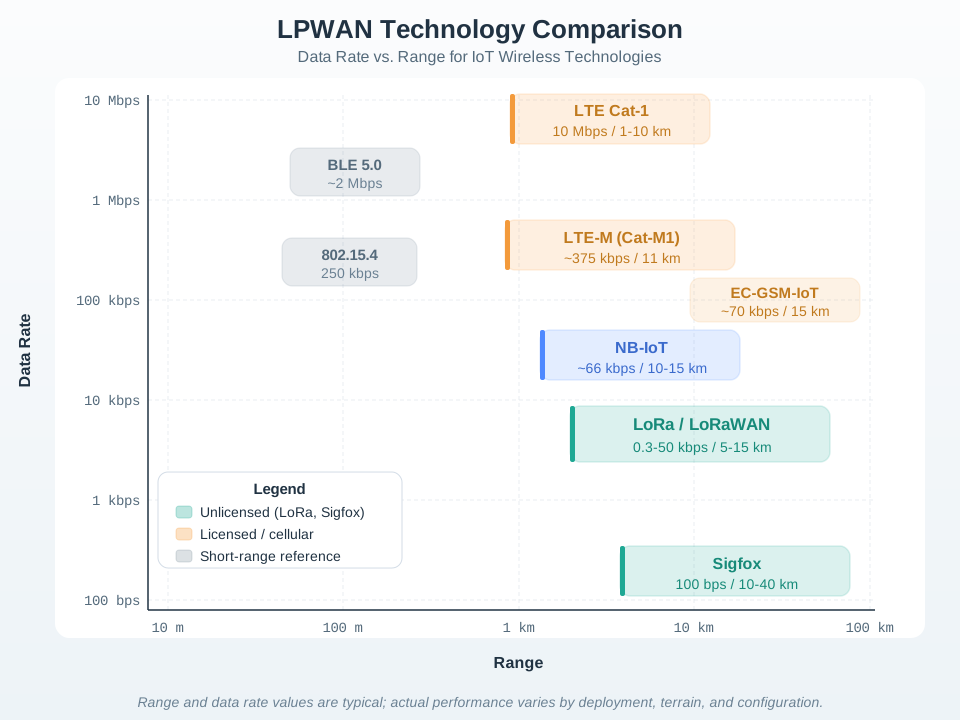
Visual: LPWAN Technology Landscape
LPWAN technology landscape
This diagram illustrates how different LPWAN technologies position themselves in the IoT connectivity spectrum, filling the gap between short-range Wi-Fi/Bluetooth and traditional cellular networks.
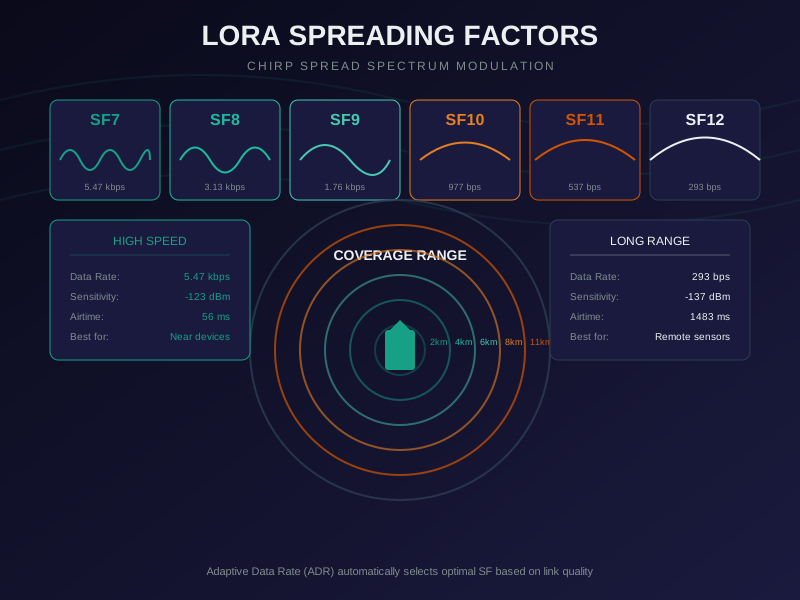
Visual: LoRa Spreading Factor Trade-offs
LoRa spreading factor comparison
Understanding spreading factors is key to LoRaWAN deployment: higher SF provides longer range but slower data rates and increased power consumption.
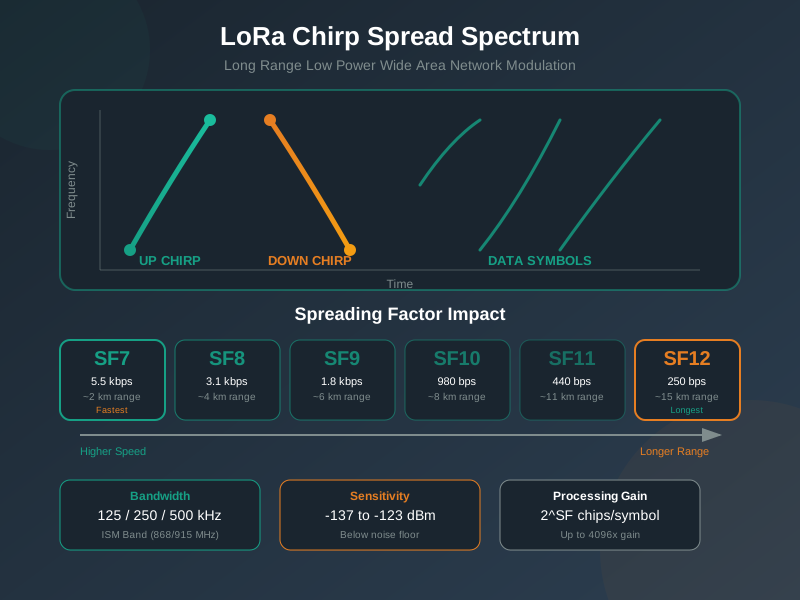
Visual: LoRa Modulation Principles
LoRa chirp spread spectrum modulation
LoRa uses Chirp Spread Spectrum (CSS) modulation to achieve remarkable receiver sensitivity (-137 dBm), enabling long-range communication in the unlicensed ISM bands.
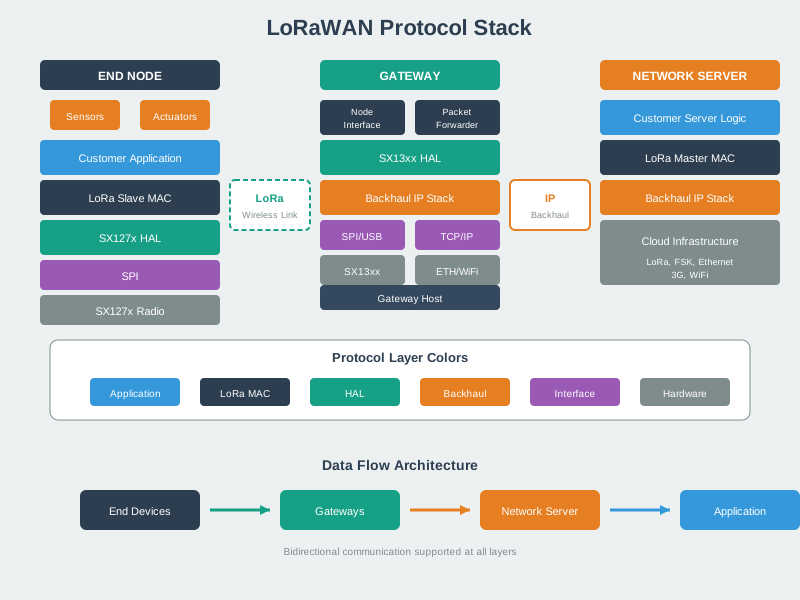
Reference: Protocol Architecture Diagrams
16.5.1 LoRaWAN Protocol Stack
LoRaWAN protocol stack architecture
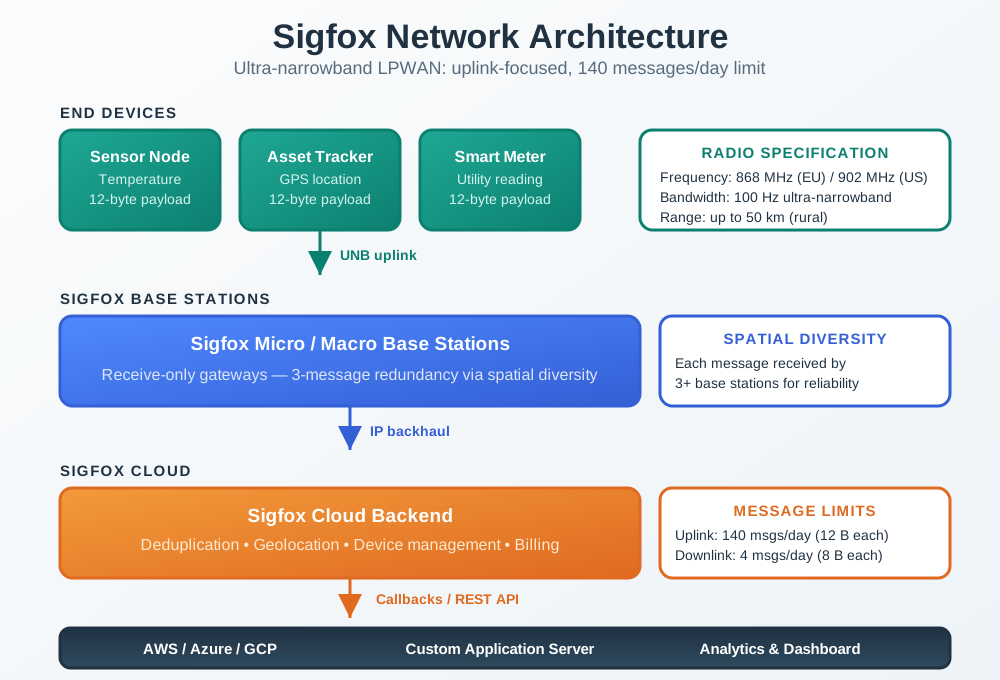
16.5.2 Sigfox Architecture
Sigfox network architecture
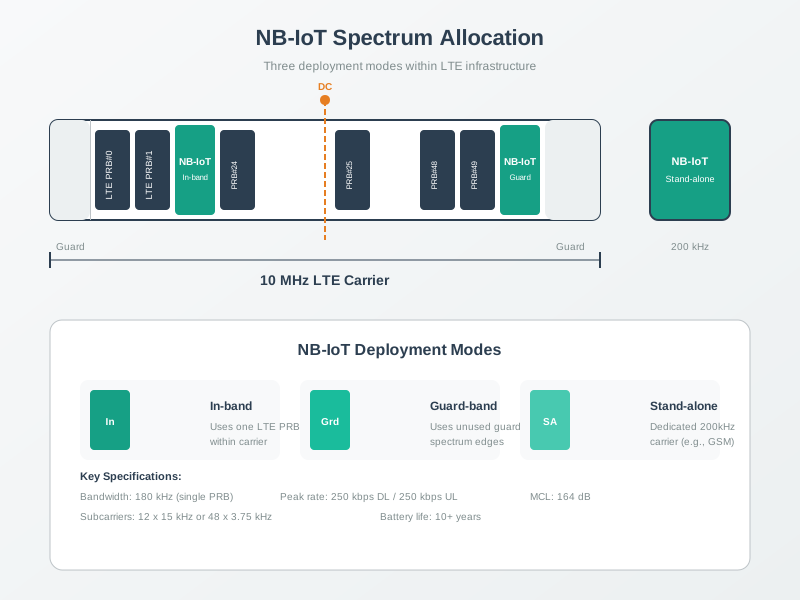
16.5.3 NB-IoT Paradigm
NB-IoT architecture paradigm
16.6 Worked Example: Gateway Density Planning for Urban LoRaWAN
A smart city plans to deploy 15,000 LoRaWAN waste bin sensors across a 25 km2 urban core. Each sensor reports fill level every 4 hours (6 messages/day) with a 12-byte payload. This worked example demonstrates how link budget calculations drive gateway density decisions.
Step 1: Determine Required Coverage Parameters
Environment: Dense urban (path loss exponent n = 3.5)
Frequency: 868 MHz (EU)
TX power: 14 dBm (EIRP limit)
Antenna gain: 2 dBi (device), 6 dBi (gateway)
Required reliability: 95% message delivery
Fade margin: 10 dB (for 95% reliability in urban)
Building penetration: 15 dB (bin in alley near walls)
Step 2: Calculate Maximum Cell Radius
Link budget:
  TX power + TX antenna: 14 + 2 = 16 dBm
  RX sensitivity (SF10): -130 dBm
  RX antenna gain: +6 dBi
  Maximum allowable path loss: 16 - (-130) + 6 = 152 dB
  Subtract fade margin: 152 - 10 = 142 dB
  Subtract building penetration: 142 - 15 = 127 dB

Log-distance path loss model at 868 MHz (n=3.5, dense urban exponent):
  PL(d) = 32.44 + 20*log10(f_MHz) + 10*n*log10(d_km)
  127 = 32.44 + 20*log10(868) + 10*3.5*log10(d)
  127 = 32.44 + 58.77 + 35*log10(d)
  35*log10(d) = 35.79
  log10(d) = 1.023
  d = 10^1.023 ≈ 10.5 km (log-distance model maximum)

Note: n=3.5 is a statistical average for urban propagation. The log-distance
model does not capture shadowing variance (typically σ = 8-10 dB in urban),
street canyon effects, or below-rooftop gateway placement. Applying an
additional 12 dB shadowing margin for 95% area coverage:
  Effective allowable path loss: 127 - 12 = 115 dB
  Recalculate: 35*log10(d) = 23.79 → log10(d) = 0.68 → d ≈ 4.8 km
  Maximum cell radius: ~4.8 km (95% area coverage, dense urban)
  Using 80% coverage reliability: design radius = 2.0 km
Step 3: Calculate Gateway Count
Cell area (hexagonal coverage): pi * r^2 = 3.14 * 2.0^2 = 12.6 km^2
Service area: 25 km^2
Minimum gateways: ceil(25 / 12.6) = 2 gateways (coverage only)

But capacity check required:
  Devices per gateway at design radius: 15,000 / 2 = 7,500
  Messages per gateway per day: 7,500 * 6 = 45,000
  Messages per hour: 45,000 / 24 = 1,875
  At SF10 (370 ms per 12-byte message):
    Airtime per hour: 1,875 * 370 ms = 693,750 ms = 694 seconds
    Available airtime (8 channels, 1% duty cycle): 8 * 36 s = 288 seconds
    Gateway utilization: 694 / 288 = 241% -- OVERLOADED!

Capacity-driven gateway count:
  Safe utilization target: 50% (for collision margin)
  Required gateway airtime: 694 seconds / 0.5 = 1,388 seconds
  Gateways needed: ceil(1,388 / 288) = 5 gateways
  Adding 20% redundancy: 6 gateways
Step 4: Validate with ADR Optimization
With 6 gateways, average device-to-gateway distance decreases:
  New cell radius: sqrt(25 / (6 * pi)) = 1.15 km
  At 1.15 km, ADR optimizes most devices to SF7-SF8:
    SF7 airtime: 56 ms (vs 370 ms at SF10)
    Messages per hour: 1,875 * 56 ms = 105,000 ms = 105 seconds
    Utilization with 6 gateways: 105 / (6 * 288) = 6.1% -- EXCELLENT

Final design: 6 gateways provides both coverage AND capacity headroom
  Infrastructure cost: 6 * $1,500 = $9,000
  Per-device connectivity cost: $9,000 / 15,000 = $0.60 one-time
Key Insight: Coverage calculations alone suggested 2 gateways, but capacity analysis revealed the network would be 2.4x overloaded. Gateway density decisions must always account for both link budget (range) and airtime capacity (number of devices x message rate x time-on-air). In this case, tripling the gateway count from the coverage minimum to 6 gateways also enabled ADR to optimize spreading factors, reducing per-message airtime by 85% and creating massive capacity headroom for future growth.
Interactive Quiz: Match Link Budget Concepts
🏷️ Label the Diagram
💻 Code Challenge
📝 Order the Steps
:
16.7 Summary
This chapter covered LPWAN link budget and range calculations:
Range calculator: Interactive tool for estimating range across technologies and environments
Link budget fundamentals: TX power, antenna gain, receiver sensitivity, path loss
Spreading factor trade-offs: SF7-SF12 range vs data rate comparison
Battery life reality: Why advertised battery life requires proper configuration
Practical considerations: Building penetration, fade margin, cable losses