4 Sensor Node Classification
4.1 Learning Objectives
By the end of this chapter, you will be able to:
- Classify node behaviors: Categorize sensor nodes as normal, failed, or badly failed based on observable operational characteristics and diagnostic evidence
- Analyze failure modes: Examine hardware failures, battery depletion patterns, and firmware crash signatures to determine root causes
- Implement recovery mechanisms: Deploy watchdog timers and redundancy strategies to restore node function after transient failures
- Detect data integrity issues: Identify nodes producing corrupted or erroneous data using range checks, rate-of-change limits, and neighbor correlation
- Design validation pipelines: Construct multi-stage data validation systems that detect badly failed nodes with under 0.1% undetected bad data
- Calculate failure impact: Estimate network coverage degradation and data quality loss from different failure modes in production deployments
4.2 Prerequisites
Before diving into this chapter, you should be familiar with:
- Wireless Sensor Networks: Understanding WSN fundamentals, network topologies, and energy constraints is essential for analyzing node behavior patterns
- Node Behavior Taxonomy Overview: The introduction to sensor node misbehavior categories and detection strategies
If you are short on time, focus on these three essentials:
- Three behavior categories: Normal nodes work correctly; Failed nodes stop entirely; Badly failed nodes send wrong data while appearing functional
- Badly failed nodes are the most dangerous because they silently corrupt analytics, unlike failed nodes which are detected by silence
- Multi-layer validation (range checks, rate-of-change checks, neighbor correlation) is required to detect badly failed nodes – no single check is sufficient
Everything else in this chapter deepens these core concepts with detection algorithms, code examples, and worked scenarios.
4.3 Introduction: Node Behavior Categories
- Duty Cycling: Alternating between active sensing/communication and low-power sleep states to conserve energy in battery-powered sensor nodes
- Sleep Scheduling: Coordinating sleep/wake cycles across sensor nodes to maintain coverage and connectivity while minimizing energy consumption
- Normal Operation: Nodes performing all expected functions correctly under current environmental conditions
- Failed State: Nodes unable to perform operations due to hardware/software faults or resource exhaustion
- Badly Failed State: Nodes that fail hardware-wise but continue sending erroneous or corrupted data
- Byzantine Failure: A node that behaves arbitrarily (correct sometimes, incorrect others), making detection particularly challenging
In an ideal world, every sensor in a network works perfectly 24/7. Reality is different: sensors fail, batteries die, and hardware malfunctions.
The problem: Deploy 1,000 sensors across a farm. After 6 months, some are dead (battery), some give wrong readings (hardware failure). How do you detect and handle this?
Basic behavior categories:
- Normal: Works perfectly, follows all rules
- Failed: Battery dead or hardware broken - stops working entirely
- Badly Failed: Can sense but gives wrong/corrupted data
| Term | Simple Explanation |
|---|---|
| Battery Depletion | Sensor ran out of power - like a phone that needs charging |
| Hardware Failure | Physical component broke - sensor is permanently damaged |
| Firmware Crash | Software bug caused the sensor to freeze |
| Watchdog Timer | Safety mechanism that resets a frozen sensor automatically |
| Redundant Sensing | Multiple sensors measure the same thing to catch errors |
| Byzantine Failure | Sensor gives wrong data some of the time, making it hard to catch |
Real example: Temperature sensor in a greenhouse stops reporting. Is it dead (battery), broken (hardware), or just temporarily disconnected? The network needs to figure this out and respond appropriately.
Meet the Sensor Squad:
- Sammy (Temperature Sensor) - Measures how hot or cold things are
- Lila (Light Sensor) - Detects brightness levels
- Max (Motion Sensor) - Spots when things move
- Bella (Smart Gateway) - The team’s coordinator and detective
The Mystery of the Missing Data
Bella was checking the morning reports from the greenhouse when she noticed three problems:
Problem 1: Silent Sammy (Failed Node)
“Sammy? Your section has no temperature readings since midnight!” Bella called out.
No reply. Complete silence.
Sammy’s battery died during the cold night. He cannot sense, cannot talk, cannot do anything. He is like a phone with 0% battery.
Bella says: “Sammy is FAILED. Easy to spot because he stopped talking entirely. I will mark his zone as uncovered and send a technician to replace his battery.”
Problem 2: Confused Charlie (Badly Failed Node)
Charlie the humidity sensor IS sending data – but his readings say the greenhouse humidity is -500%. That is physically impossible!
Charlie’s sensor element got water damaged last week. His radio still works perfectly, so he keeps transmitting. But the numbers are completely wrong.
Bella says: “Charlie is BADLY FAILED – and he is the most dangerous kind! Because he is still talking, the computer thinks the data is real. If I did not check, the watering system would have flooded the plants!”
Problem 3: Happy Lila (Normal Node)
Lila reports: “Light level: 450 lux. Sunshine is coming through the glass roof. All systems normal!”
Bella smiles: “Lila is NORMAL. Her readings match what I expect for a sunny morning, and they match her neighbors too.”
Bella’s Detective Method:
| Check | Silent Sammy | Confused Charlie | Happy Lila |
|---|---|---|---|
| Sending data? | No | Yes | Yes |
| Data makes sense? | N/A | No (-500%) | Yes (450 lux) |
| Matches neighbors? | N/A | No | Yes |
| Verdict | FAILED | BADLY FAILED | NORMAL |
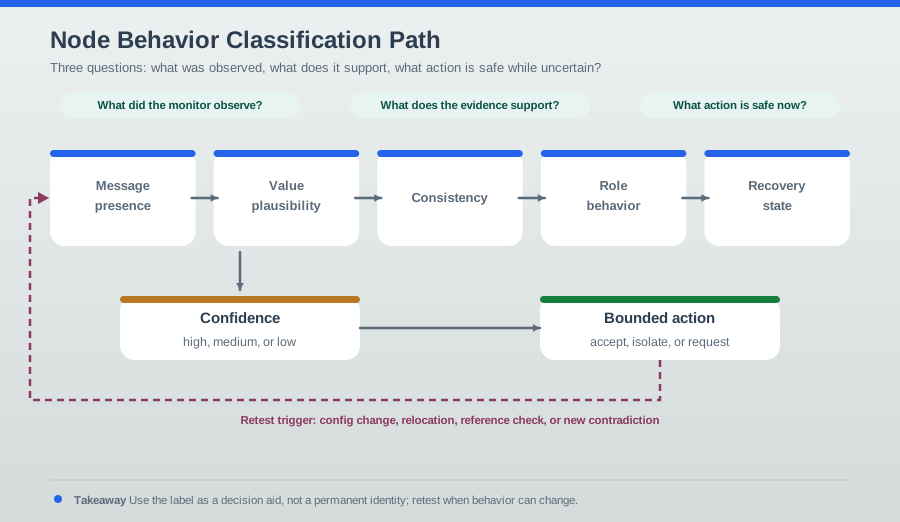
The lesson: Failed sensors are easy to find (they go quiet). Badly failed sensors are sneaky (they keep talking but lie). That is why Bella always checks if the numbers make sense AND if they match what nearby sensors say!
Idealized textbook diagrams show sensor networks as perfect grids of cooperative, always-functional nodes. Reality is messier:
- Environmental challenges: Temperature extremes, rain, fog, dust
- Hardware failures: Battery depletion, component damage, manufacturing defects
- Software bugs: Firmware crashes, memory leaks, race conditions
- Resource constraints: Energy, memory, processing limitations
These factors create a spectrum of node behaviors that system architects must anticipate and handle.
This alternative diagram shows how to diagnose which category a node belongs to using observable symptoms:
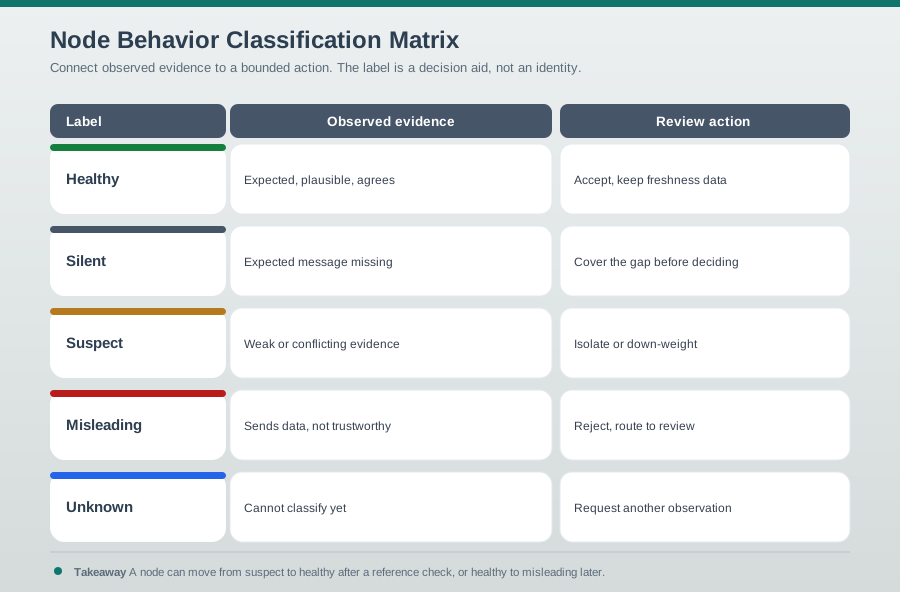
Quick Reference: Behavior Categories at a Glance
| Category | Sends Data? | Data Valid? | Network Impact | Detection Difficulty |
|---|---|---|---|---|
| Normal | Yes | Yes | Positive | N/A (baseline) |
| Failed | No | N/A | Coverage gap | Easy (silence) |
| Badly Failed | Yes | No | Data corruption | Hard (active deception) |
4.4 Normal Nodes
- Definition:
- Nodes that perform all expected functions correctly under current environmental conditions
Behavior:
- Accurate sensing within specified tolerance
- Reliable packet forwarding as per routing protocol
- Honest participation in neighbor discovery and route maintenance
- Proper resource management (power, memory)
- Compliance with MAC protocol (backoff, collision avoidance)
Expectations:
| Metric | Target | Typical Measurement |
|---|---|---|
| Sensing accuracy | Plus or minus 2-5% of actual value | Sensor-dependent calibration |
| Packet delivery rate | Greater than 95% to neighbors | Measured over 24-hour window |
| Protocol compliance | 100% adherence to specs | Verified via packet inspection |
| Energy consumption | Within predicted model bounds | Compared to energy model |
| Heartbeat regularity | Within 10% of configured interval | Monitored by gateway |
Example IoT Scenario:
Normal Node Code Example (ESP32):
// Normal cooperative sensor node behavior
#include <Arduino.h>
#include <LoRa.h>
const int TEMP_SENSOR_PIN = 34;
const int SENSE_INTERVAL = 900000; // 15 minutes
const int LORA_FREQUENCY = 915E6; // 915 MHz
struct SensorData {
uint32_t node_id;
float temperature;
uint16_t battery_mv;
uint32_t timestamp;
};
void setup() {
Serial.begin(115200);
// Initialize LoRa
if (!LoRa.begin(LORA_FREQUENCY)) {
Serial.println("LoRa initialization failed!");
while (1);
}
Serial.println("Normal sensor node initialized");
}
void loop() {
// 1. Sense environment
float temperature = readTemperature();
uint16_t battery = readBattery();
// 2. Package data
SensorData data = {
.node_id = ESP.getEfuseMac(),
.temperature = temperature,
.battery_mv = battery,
.timestamp = millis()
};
// 3. Transmit (cooperative behavior)
transmitData(&data);
// 4. Check for relay requests
if (LoRa.parsePacket()) {
handleRelayRequest(); // Help forward others' packets
}
// 5. Sleep to conserve energy
esp_sleep_enable_timer_wakeup(SENSE_INTERVAL * 1000);
esp_light_sleep_start();
}
float readTemperature() {
int adcValue = analogRead(TEMP_SENSOR_PIN);
// Convert ADC to temperature (sensor-specific)
float voltage = adcValue * (3.3 / 4095.0);
float temperature = (voltage - 0.5) * 100.0; // TMP36 formula
return temperature;
}
uint16_t readBattery() {
// Read battery voltage via voltage divider
return analogRead(35) * 2; // Simplified
}
void transmitData(SensorData* data) {
LoRa.beginPacket();
LoRa.write((uint8_t*)data, sizeof(SensorData));
LoRa.endPacket();
Serial.printf("Transmitted: %.2f C, Battery: %dmV\n",
data->temperature, data->battery_mv);
}
void handleRelayRequest() {
// Cooperative forwarding for multi-hop network
uint8_t buffer[256];
int packetSize = LoRa.readBytes(buffer, sizeof(buffer));
// Check if we should forward (not our data, within hop limit)
if (shouldForward(buffer, packetSize)) {
LoRa.beginPacket();
LoRa.write(buffer, packetSize);
LoRa.endPacket();
Serial.println("Relayed packet for neighbor");
}
}
bool shouldForward(uint8_t* packet, int size) {
// Simplified forwarding logic
// Real implementation: check routing table, hop count, etc.
return true; // Cooperative: always forward
}4.5 Failed Nodes
- Definition:
- Nodes unable to perform operations due to hardware/software faults or resource exhaustion
Misconception: Since failed nodes simply go silent, they are not a real problem – just replace them.
Reality: Failed nodes create cascading effects that are far more disruptive than a single missing data point:
- Routing collapse: If the failed node was a relay for 10 other nodes, all 10 lose connectivity until routes reconverge (can take minutes to hours in RPL/AODV)
- Coverage blind spots: Critical events (fire, flood, intrusion) in the failed node’s sensing area go undetected
- Energy drain on neighbors: Neighboring nodes increase transmission power or routing load to compensate, accelerating their own battery depletion
- Correlated failures: Battery-powered nodes deployed at the same time often fail in clusters, creating large coverage gaps simultaneously
Key insight: Network design must account for failed nodes proactively through redundant coverage (k-coverage) and multi-path routing, not just reactive replacement.
4.5.1 Scenario 1: Battery Depletion
Battery depletion is the most common failure mode in WSNs. It is predictable but not always preventable.
Impact:
- Node stops transmitting data (sensing unavailable to network)
- Multi-hop routes through this node break
- Coverage gaps in monitored area
- Need replacement or recharging
Detection:
- Neighbors notice missing periodic updates
- Routing protocols declare route timeout (typically 3-5 missed heartbeats)
- Network management detects loss of connectivity
- Proactive: low-battery warnings before complete failure
4.5.2 Scenario 2: Sensor Hardware Failure
Hardware failures can occur in multiple components, each with different symptoms:
| Component | Failure Mode | Symptom | Recovery |
|---|---|---|---|
| Transceiver | Radio module stops | Node goes silent despite battery | Physical replacement |
| Sensor element | Sensing element damage | Stuck or erratic readings | Becomes “badly failed” |
| Memory (Flash) | Wear-out or corruption | Boot loops, data loss | Firmware reflash |
| Memory (RAM) | Bit flip or degradation | Random crashes | Watchdog reset |
| Voltage regulator | Output drift or failure | Brownout resets or full stop | Board replacement |
Not all hardware failures cause complete node death. A damaged sensor element may cause the node to transition to a badly failed state instead: the radio works, the processor runs, but the sensor readings are wrong. This is why hardware failures are harder to classify than battery depletion.
4.5.3 Scenario 3: Firmware Crash
// Watchdog timer to detect and recover from firmware crashes
#include <esp_task_wdt.h>
const int WDT_TIMEOUT = 30; // 30 seconds
void setup() {
Serial.begin(115200);
// Configure watchdog timer
esp_task_wdt_init(WDT_TIMEOUT, true); // Enable panic so ESP32 restarts
esp_task_wdt_add(NULL); // Add current thread to WDT watch
Serial.println("Watchdog configured - node will reset if hung");
}
void loop() {
// Reset watchdog timer (feed the dog)
esp_task_wdt_reset();
// Normal operations
senseAndTransmit();
delay(5000);
// Simulate firmware crash (for testing)
// while(1); // Infinite loop - WDT will reset ESP32 after 30s
}
void senseAndTransmit() {
// ... sensor reading and transmission ...
Serial.println("Normal operation");
}Benefits of Watchdog:
- Automatic recovery from firmware hangs
- Node self-heals without human intervention
- Improves network reliability in remote deployments
Watchdog timeout calculation for ESP32:
If your main sensing loop should complete every 10 seconds, set the watchdog timeout to 3× this duration as a safety margin:
\[ T_{\text{watchdog}} = 3 \times T_{\text{loop}} = 3 \times 10\text{s} = 30\text{s} \]
If the firmware hangs (infinite loop, deadlock), the watchdog expires after 30s and triggers a hardware reset. Recovery time calculation:
\[ T_{\text{recovery}} = T_{\text{watchdog}} + T_{\text{boot}} = 30\text{s} + 5\text{s} = 35\text{s} \]
For a node reporting every 15 minutes, this 35-second recovery window means only 3.89% downtime per crash:
\[ \text{Downtime ratio} = \frac{35\text{s}}{15 \times 60\text{s}} = \frac{35}{900} = 0.0389 = 3.89\% \]
Without a watchdog, the node stays hung until manual intervention (hours to days).
4.6 Badly Failed Nodes
- Definition:
- Nodes that fail hardware-wise but continue sending erroneous or corrupted data, threatening network integrity
Characteristics:
- Faulty sensor readings: Stuck-at values, random noise, out-of-range readings
- Corrupted packet transmission: Bit errors, malformed headers
- False routing information: Advertising non-existent routes, incorrect costs
- Timing violations: Missing deadlines, desynchronized clocks
- Byzantine behavior: Intermittently correct readings mixed with faulty ones
4.7 Why Badly Failed Nodes Are Dangerous
Unlike completely failed nodes (which are detected by silence), badly failed nodes actively contribute bad data that can:
- Corrupt analytics and decision-making – a badly failed temperature sensor reporting 200 degrees Celsius can skew a field average by 15+ degrees
- Trigger false alarms in monitoring systems – causing expensive emergency responses to non-existent threats
- Pollute training data for ML models – models trained on corrupted data will produce incorrect predictions indefinitely
- Cause control systems to make incorrect actuations – an irrigation system responding to false soil moisture data wastes water or kills crops
- Erode trust in the entire system – operators who experience repeated false alarms may begin ignoring genuine alerts
4.7.1 Types of Badly Failed Behavior
Understanding the specific failure pattern helps select the right detection method:
| Failure Type | Example | Detection Method | Detection Difficulty |
|---|---|---|---|
| Stuck-at | Always reads 25.0 degrees Celsius | Variance check (zero variance over time) | Easy |
| Drift | Reads 2 degrees high, then 4, then 8… | Trend analysis against neighbors | Medium |
| Random noise | Reads 25, 150, -30, 72 in sequence | Range and rate-of-change checks | Easy |
| Byzantine | Reads correctly 80% of the time | Statistical consistency over long windows | Hard |
4.7.2 Multi-Layer Validation Pipeline
No single detection method catches all types of badly failed behavior. A robust system applies three layers of validation:
Layer 1: Range Checking (catches random noise and obvious stuck-at)
def validate_temperature(reading):
"""Reject physically impossible readings"""
if reading < -50 or reading > 150: # Celsius
return False, "Out of physical range"
return True, "Valid"Layer 2: Rate of Change Checking (catches sudden jumps and some drift)
def validate_change_rate(current, previous, max_rate=5.0):
"""Reject unrealistic sudden changes"""
change = abs(current - previous)
if change > max_rate: # Max 5 degrees per minute
return False, f"Change too rapid: {change}"
return True, "Valid"Layer 3: Neighbor Correlation (catches drift and byzantine behavior)
def validate_with_neighbors(reading, neighbor_readings, tolerance=3.0):
"""Compare with nearby sensors"""
if len(neighbor_readings) == 0:
return True, "No neighbors to compare"
neighbor_avg = sum(neighbor_readings) / len(neighbor_readings)
deviation = abs(reading - neighbor_avg)
if deviation > tolerance:
return False, f"Deviates from neighbors by {deviation}"
return True, "Consistent with neighbors"Combined Validation Pipeline:
def validate_reading(reading, previous, neighbors, config):
"""Three-layer validation for badly failed node detection"""
# Layer 1: Physical range
valid, msg = validate_temperature(reading)
if not valid:
return "REJECTED", msg, "range_check"
# Layer 2: Rate of change
if previous is not None:
valid, msg = validate_change_rate(reading, previous,
config.max_rate)
if not valid:
return "SUSPICIOUS", msg, "rate_check"
# Layer 3: Neighbor correlation
valid, msg = validate_with_neighbors(reading, neighbors,
config.tolerance)
if not valid:
return "SUSPICIOUS", msg, "neighbor_check"
return "ACCEPTED", "All checks passed", "validated"4.7.3 Mitigation Strategies
- Redundant sensing: Deploy multiple sensors for critical parameters (k-coverage with k >= 2)
- Outlier detection: Statistical filtering at aggregation points using median rather than mean
- Consistency checking: Cross-validation with neighbor readings (spatial correlation)
- Reputation systems: Track node reliability over time with exponentially weighted scores
- Graceful degradation: Mark suspicious data with confidence scores rather than binary accept/reject
4.8 Knowledge Check
Common Pitfalls
Theoretical WSN performance assumes nodes follow protocols exactly. In real deployments, nodes exhibit non-designed behaviors: intermittent power supply causing partial transmissions, firmware bugs causing infinite loops, radio interference causing apparent silence. Design protocols to detect and isolate misbehaving nodes rather than assuming protocol compliance – anomaly detection at the network layer prevents one faulty node from degrading the entire network.
A node that sends no data may be correctly sleeping (duty cycle), experiencing a transient connectivity loss, or permanently failed. Classifying it as ‘failed’ after one missed transmission triggers unnecessary recovery actions. Use temporal behavioral models: classify based on behavioral patterns over time windows (expected duty cycle + network conditions), not single-observation snapshots.
Recovery strategies differ fundamentally between unintentional misbehavior (faulty hardware, firmware bug – fix or replace) and intentional misbehavior (malicious compromise – isolate and investigate). A node that selectively drops packets due to hardware failure needs replacement; a node selectively dropping packets due to compromise needs forensic analysis and security response. Classification must inform the appropriate response action, not just detection.
4.9 Summary
4.9.1 Key Takeaways
This chapter covered the classification of sensor node behaviors focusing on operational status:
- Normal Nodes: Fully functional nodes performing accurate sensing (plus or minus 2-5%), reliable packet forwarding (above 95% delivery), and proper protocol compliance. Verified through heartbeat monitoring and performance metrics.
- Failed Nodes: Nodes that have stopped operating due to battery depletion, hardware failure, or firmware crashes. Detected through missing heartbeats and route timeouts. Cascading effects (broken multi-hop routes, coverage gaps, neighbor energy drain) make failures more impactful than the single lost node.
- Badly Failed Nodes: The most dangerous category – nodes that continue transmitting corrupted or erroneous data while appearing functional. Four failure sub-types exist: stuck-at, drift, random noise, and byzantine.
- Multi-Layer Validation: A three-layer pipeline (range checking, rate-of-change checking, neighbor correlation) is required because no single detection method catches all failure types.
- Recovery Mechanisms: Watchdog timers enable automatic firmware crash recovery, enabling self-healing in remote deployments without human intervention.
4.9.2 Design Principles
| Principle | Implementation |
|---|---|
| Assume failures will happen | Design k-coverage and multi-path routing from the start |
| Detect early | Monitor heartbeats, battery levels, and data consistency continuously |
| Validate data at every hop | Apply range + rate + neighbor checks at aggregation points |
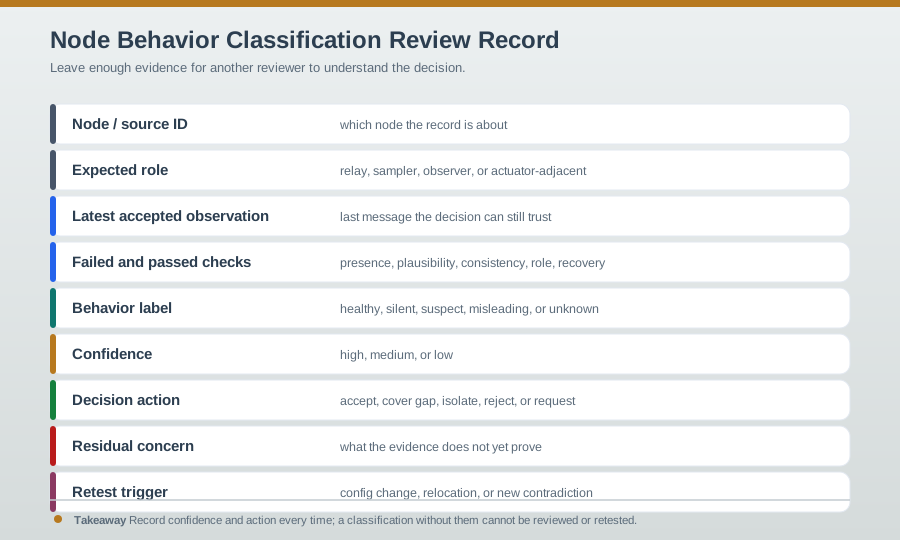
| Fail gracefully | Use confidence scores rather than binary accept/reject |
| Plan for replacement | Budget for 5-15% annual node replacement in outdoor deployments |
Continue the Series:
- Selfish and Malicious Node Behaviors – Intentional misbehavior and attack detection
- Dumb Nodes and Connectivity Recovery – Environmental failures and mobile relay schemes
- Node Behavior Taxonomy Overview – Complete behavior taxonomy reference
Foundational Topics:
- Wireless Sensor Networks – WSN deployment fundamentals
- WSN Coverage Fundamentals – Maintaining coverage despite failures
- WSN Energy and Duty Cycling – Battery management strategies
Applied Topics:
- Sensor Calibration Lab – Hands-on sensor validation
- Anomaly Detection – Statistical methods for outlier detection
- Testing and Validation – End-to-end system testing
Learning Resources:
- Simulations Hub – WSN behavior simulators
- Quizzes Hub – Test your WSN knowledge
4.10 Concept Relationships
Prerequisites:
- Wireless Sensor Networks - Network fundamentals
- Node Behavior Taxonomy - Misbehavior overview
Builds Upon:
- Hardware failure modes and their symptoms
- Multi-layer data validation pipelines
- Battery depletion lifecycle and prediction
Enables:
- Selfish and Malicious Nodes - Intentional misbehavior
- Dumb Nodes and Recovery - Environmental failures
- Robust network design with k-coverage and redundancy
Related Concepts:
- Watchdog timers for firmware crash recovery
- Neighbor correlation for badly failed node detection
- Reputation systems for tracking node reliability
4.11 See Also
Hands-On Practice:
- Sensor Calibration Lab - Validate sensor accuracy
- Simulations Hub - WSN failure simulators
Deep Dives:
- WSN Coverage Fundamentals - Maintaining coverage despite failures
- Anomaly Detection - Statistical outlier detection
Testing:
- Testing and Validation - End-to-end system testing
- Quizzes Hub - Test your WSN knowledge
4.13 What’s Next
| If you want to… | Read this |
|---|---|
| Understand selfish and malicious node behaviors in WSNs | Selfish and Malicious Node Behaviors |
| Learn taxonomy of WSN node behaviors and classifications | Node Behavior Taxonomy |
| Understand dumb node recovery and network resilience | Dumb Recovery Strategies |
| Apply node behavior knowledge to sensor production frameworks | Sensor Production Framework |
| Study duty cycle fundamentals for power-based behavior analysis | Duty Cycle Fundamentals |