17 Device Power: Sources and Boundaries
More
Depth: Practitioner
Progress saves as you read. Mark sections complete as you go; your progress appears in the sidebar.
17.1 Start With the Decision
This section: Start With the Decision — Name the primary power source and any backup.
Name the primary power source and any backup. Then mark the measured device boundary: what counts as part of the device when you check power use.
17.2 Route Overview
This section: Route Overview — This is part 2 of 2.
This is part 2 of 2. Review Device Power: Energy Budgets for the preceding evidence.
17.3 Learning Objectives
This section: Learning Objectives
- Measure power source and boundary from current, time, and transition evidence.
- Validate worked review: interactive device with a concrete scenario and pass criteria.
17.4 Chapter Roadmap
This section: Chapter Roadmap
- Power Source And Boundary
- Measured Power States
- Duty Cycle Review
- Connectivity Energy
- Battery, Charging, And Service
- Power And User Experience
- Update-Energy Gate
- Power Readiness Record
- Worked Review: Battery Sensor Endpoint
- Worked Review: Interactive Device
- Common Findings
- Review Checklist
- Knowledge Check
- Matching Quiz
- Ordering Quiz
- Summary
- Key Takeaway
- Concept Relationships
- What’s Next
17.5 Power Source And Boundary
This section: Power Source And Boundary — Start with the power boundary.
Start with the power boundary. A device may look battery powered but depend on a gateway, phone, charger, solar panel, vehicle bus, or maintenance visit.
Review:
the primary power source and any backup source. what is inside the measured device boundary. whether cables, chargers, gateways, batteries, or replaceable packs are part of the product. whether a user, installer, technician, or operator can reach the power source. what state survives battery removal, brownout, reset, or charger loss. what must be shown to users or operators before the device becomes unreliable.
If the power boundary is unclear, battery-life claims and service claims will also be unclear.
Use Figure 17.1 to compare feasible power sources against site constraints.
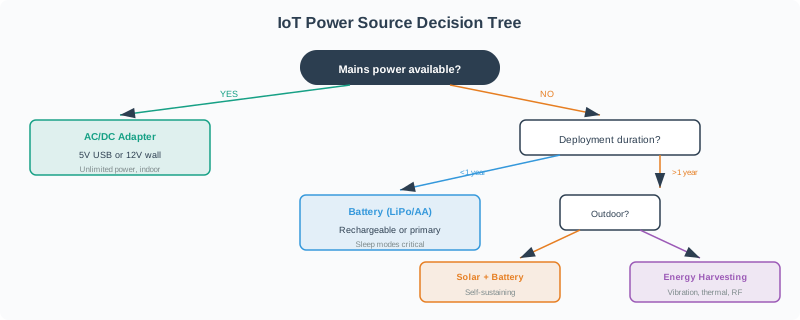
The first branch asks whether mains power is available. A USB or wall supply may fit that route, but size and installation still need review. When mains is absent, the diagram moves through deployment duration, average current, solar exposure, and the practical fit of a battery, solar source, or harvesting. The source is chosen only after those conditions are named. A sunny site, for example, is not enough evidence by itself; the panel and storage still have to meet the measured load and service plan.
Energy harvesting is not only solar. A kinetic switch converts the mechanical energy of a button press into the small burst of charge a radio needs to send one or more packets, which is why some wireless light switches have no battery to replace at all: pressing the switch is what powers the transmission. The tradeoff is the mirror image of a battery device’s low-power sleep budget — instead of budgeting average current against a stored charge, the design has to budget the energy from one actuation against all planned radio transmissions, including any redundant telegrams. Reviewing a kinetic-harvested device should confirm what happens when a press is too light or too fast to generate a full charge, whether the device gives feedback when a command silently failed to send, and whether the product still needs a battery-backed receiver on the other end of the link.
17.6 Measured Power States
This section: Measured Power States — A power budget should be based on measured states, not only datasheet values.
A power budget should be based on measured states, not only datasheet values.
Common states to measure:
Deep sleep: timer, interrupt, retention memory, leak paths, and powered peripherals. Idle connected: radio association, keepalive, receive windows, status lights, and background tasks. Sensing: sensor warm-up, sampling, filtering, calibration, and stabilization time. Compute: processing, local decisions, encryption, compression, and inference. Transmit and receive: connection setup, payload send, acknowledgement, retry, and disconnect. Actuation: motors, relays, locks, valves, haptics, lights, and safety interlocks. Display and feedback: screen, LEDs, audio, vibration, and user-facing status. Update: download, verify, write, reboot, rollback, and post-update health check.
Record the measurement setup. The same board can draw different current depending on firmware build, pull-ups, regulator choice, sensor mode, antenna placement, debug headers, and sleep configuration.
The state trace in Figure 17.2 shows what a power measurement must include.
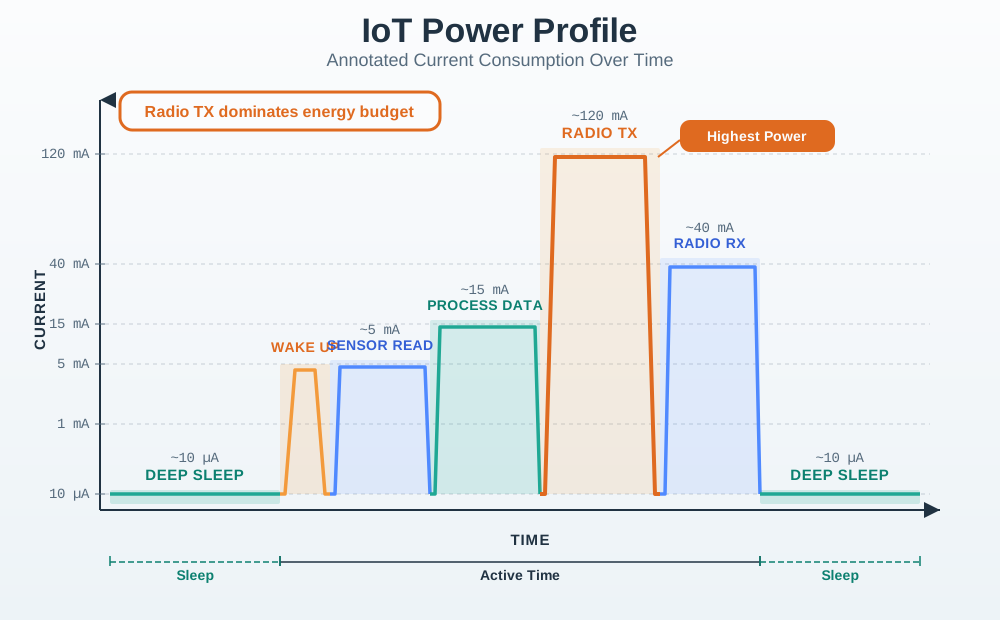
Follow the unit from deep sleep through wake, sensing, processing, radio transmit, receive, and return to sleep. Each state needs both current and duration before its charge can be counted. The comparison of radio and sleep makes a common trap visible: a short high current burst can use more charge than a long low current period. Measure the whole sequence on the intended hardware, including retries if they occur. The result supports a duty cycle estimate grounded in observed behavior rather than a single data sheet value.
17.7 Duty Cycle Review
This section: Duty Cycle Review — Duty cycle is the schedule of how long the device spends in each state.
Duty cycle is the schedule of how long the device spends in each state.
Review:
wake source: timer, event, user input, interrupt, gateway command, or schedule. active work: measure, compute, store, transmit, listen, display, or actuate. sleep or idle duration between active periods. retry rules after failure. heartbeat or last-seen reporting. behavior when readings are unchanged. behavior when readings are urgent.
The average current is a time-weighted result. A short high-power state may matter less than a long idle state, while a small sleep leak may dominate a device that sleeps almost all the time.
Use a simple evidence statement:
measured current for each state. duration of each state. expected frequency. deployment derating. service interval target. change condition.
Use Figure 17.3 to relate active time to the full device cycle.
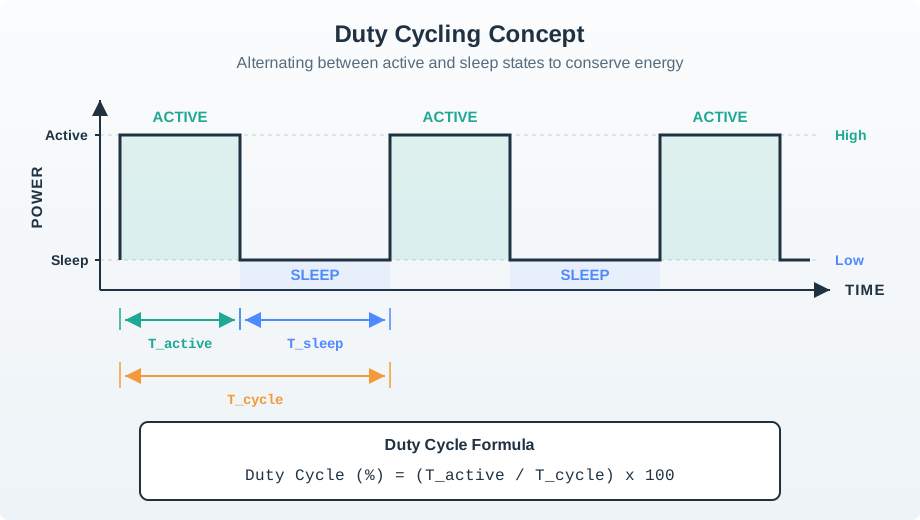
The power trace rises during the active interval and falls during sleep. The labelled active, sleep, and total cycle spans make the duty cycle formula readable: active time is only one part of the repeated interval. A low duty cycle can reduce average demand, but it does not erase the peak power needed while the radio or actuator is on. For a service estimate, pair the timing in this diagram with measured current in each state and the behavior required when the device wakes.
17.8 Connectivity Energy
This section: Connectivity Energy — Radio power cannot be reviewed from protocol labels alone.
Radio power cannot be reviewed from protocol labels alone.
Review:
- whether the device must scan, join, associate, authenticate, or reconnect
- how long it listens before or after sending
- how retries and acknowledgements work
- whether the gateway buffers or wakes the endpoint
- payload size and send frequency
- link behavior after installation, not only on the bench
- fallback behavior when the link is weak
Do not accept broad claims such as “low-power protocol” or “Wi-Fi is too power hungry” without the actual workload, installed signal path, and measured state evidence. The same radio can be reasonable or unreasonable depending on connection schedule, payload, retry policy, and power source.
17.9 Battery, Charging, And Service
This section: Battery, Charging, And Service — Battery and charging decisions are also UX and maintenance decisions.
Battery and charging decisions are also UX and maintenance decisions.
Review:
capacity, usable energy, voltage range, cutoff behavior, and aging assumption. temperature effect in the intended environment. self-discharge or standby drain over the expected storage and deployment period. charger availability, charging time, connector access, and indicator behavior. replacement path, tool requirements, sealing, labels, and safe disposal. service interval and what happens when service is missed. how low-power states are communicated before failure.
Power management should prevent surprise failure. A device that dies silently creates more support burden than a device that warns early, preserves core function, and records why it degraded.
The budget in Figure 17.4 separates the raw energy need from what a source can deliver.
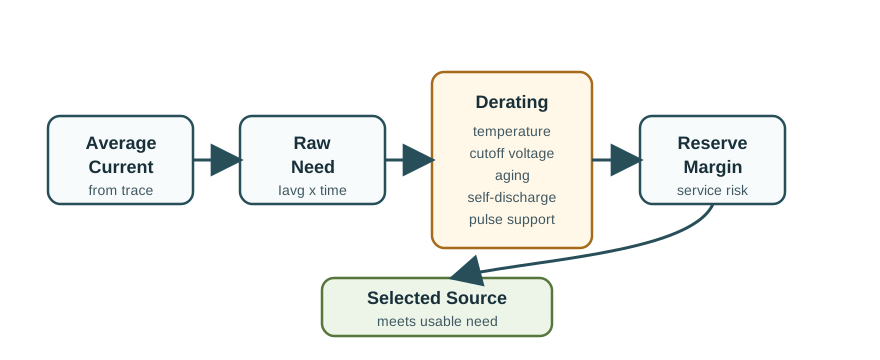
Average current from the measured trace sets the starting need over the intended interval. Temperature, cutoff voltage, aging, self discharge, and pulse support then reduce the usable part of a battery or other source. A reserve covers uncertainty and service risk. The selected source must meet the need after those adjustments, not just on its label. This order helps the review expose the weak assumption: the estimate may fail because the load was missed, the environment was harsher, or a burst exceeds pulse support.
17.10 Power And User Experience
This section: Power And User Experience — Power behavior is part of the product experience.
Power behavior is part of the product experience.
Review:
whether users can understand charge, battery, or service state. whether low-power behavior degrades gracefully. which function remains available when power is limited. whether notifications are timely and actionable. whether frequent charging or replacement conflicts with the deployment context. whether power-saving settings change data quality, safety, or reliability. whether the device recovers cleanly after charging, replacement, or brownout.
The review should distinguish hidden power savings from user-visible tradeoffs. Reducing sample frequency, disabling live status, delaying uploads, or limiting actuation can be valid, but those changes must be visible in the power record.
17.11 Update-Energy Gate
This section: Update-Energy Gate — OTA and configuration changes require extra power evidence.
OTA and configuration changes require extra power evidence.
Before an update, review:
current battery, charging, or external power state. expected energy for download, verify, write, reboot, and rollback. storage available for package and fallback state. whether the device can defer updates during low-power or critical operation. whether a failed update leaves the previous firmware usable. post-update health evidence.
An update path that works on a charger may not be acceptable for a sealed field device. The update gate should make the difference explicit.
17.12 Power Readiness Record
This section: Power Readiness Record — Use Figure 17.5 to review a battery sensor service claim against measured states.
Use Figure 17.5 to review a battery sensor service claim against measured states.
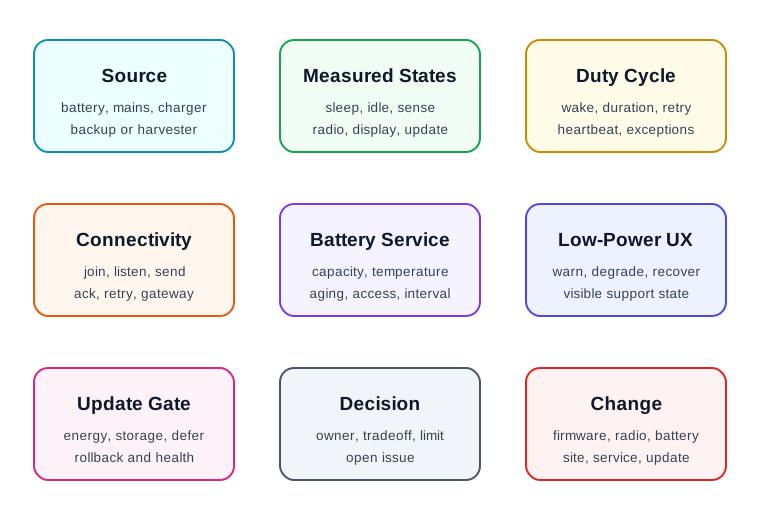
The record lists sleep, sensing, compute, and transmit rather than hiding them in one average. Sleep and transmit have current and charge values that allow a timing check; the other states still need durations before the full budget is known. The table keeps that gap visible alongside the proposed two year service interval. A reviewer can compare the burst with the long sleep period, then ask for the missing measurements and environmental derating. The service claim remains conditional until those fields are filled and tested.
Power source: battery, mains, charging, harvesting, backup, or mixed source. Measured states: current and duration for sleep, idle, sensing, compute, transmit, receive, display, actuation, and update. Duty cycle: wake sources, frequency, duration, retry rules, heartbeat, and exception behavior. Connectivity energy: join, listen, send, acknowledge, retry, gateway, and installed signal evidence. Battery and service: usable capacity, temperature, aging, self-discharge, charge or replacement, and access. Low-power UX: warning, degraded function, user control, support state, and recovery. Update gate: energy, storage, compatibility, rollback, deferral, and post-update health. Decision and change condition: accepted tradeoff, owner, known limit, open issue, and condition requiring another review.
The record should remain short enough to update when firmware, schedule, radio, enclosure, or deployment changes.
17.13 Worked Review: Battery Sensor Endpoint
This section: Worked Review: Battery Sensor Endpoint — A battery endpoint measures a slowly changing condition and reports through a gateway.
A battery endpoint measures a slowly changing condition and reports through a gateway.
Power evidence to request
- Measured sleep current with the final firmware and peripheral configuration.
- Measured wake, sensor, compute, transmit, receive, and return-to-sleep durations.
- Reporting schedule, heartbeat rule, and retry behavior.
- Gateway dependence and installed link evidence.
- Battery usable-capacity assumption in the intended temperature range.
- Low-battery notification and service path.
- Update deferral rule when battery is low.
- Change condition after sensor, radio, battery, firmware, enclosure, or gateway changes.
Likely review action
Hold the decision if the record says “multi-year battery life” but shows only a nominal battery capacity and a datasheet sleep value. The design needs measured state evidence and a service assumption.
Change condition
Rerun the review when wake frequency, radio retry policy, gateway distance, sensor mode, firmware build, battery chemistry, enclosure temperature, service interval, or update policy changes.
17.14 Worked Review: Interactive Device
This section: Worked Review: Interactive Device — An interactive connected device has a display, local controls, and an actuator.
An interactive connected device has a display, local controls, and an actuator.
Power evidence to request
- Idle connected behavior and display or indicator policy.
- User interaction frequency and time spent in high-power states.
- Actuator load, safe-state behavior, and brownout recovery.
- Charging or replacement workflow that users can complete.
- Low-power behavior that preserves the most important function.
- Logs that distinguish low power from network failure or mechanical failure.
- Update gate that avoids disrupting critical use.
Likely review action
Ask for a user-facing power record if the device depends on frequent charging, warning banners, reduced features, or manual recovery. Those are UX decisions, not only engineering details.
Change condition
Rerun the review when display behavior, actuator load, notification policy, charging hardware, user workflow, firmware update policy, or low-power threshold changes.
17.15 Common Findings
This section: Common Findings — Battery life is claimed from nominal capacity instead of measured state evidence.
Battery life is claimed from nominal capacity instead of measured state evidence. The power boundary ignores a gateway, charger, battery pack, cable, or maintenance dependency. Sleep current was not measured with the final firmware and peripherals. Connectivity energy ignores join time, listening, acknowledgements, retries, or weak-signal behavior. The power budget excludes displays, indicators, actuators, sensors, regulators, or debug hardware. Low-battery behavior is not visible to users or support staff. OTA updates can start without enough energy or a rollback path. Service interval depends on access, tools, or user behavior that is not recorded. Temperature, storage, aging, or self-discharge assumptions are missing. The record lacks an owner, known limit, open issue, or change condition.
17.16 Review Checklist
This section: Review Checklist — power source, backup source, power boundary, and service access.
Before accepting a connected-device power decision, confirm that the record includes:
power source, backup source, power boundary, and service access. measured current and duration for all relevant power states. duty cycle, wake source, heartbeat, retry, and exception behavior. radio or wired connectivity energy in the installed context. battery, charging, temperature, aging, storage, and self-discharge assumptions. display, indicator, actuator, sensor, regulator, and peripheral loads. low-power user experience, degraded function, support state, and recovery. update-energy gate, deferral rule, rollback, and post-update health check. accepted tradeoff, owner, known limit, open issue, and change condition.
17.17 Knowledge Check
This section: Knowledge Check
17.18 Matching Quiz
This section: Matching Quiz
17.19 Ordering Quiz
This section: Ordering Quiz
17.20 Summary
This section: Summary — Connected-device power management is an evidence problem.
Connected-device power management is an evidence problem. The review ties measured power states, duty cycle, connectivity energy, battery or charging assumptions, service access, low-power UX, and update gates to the claimed service interval.
The strongest power records avoid generic claims. They show what was measured, what was assumed, what users or technicians must do, what happens at low power, who owns the tradeoff, and what change requires another review.
17.21 Key Takeaway
This section: Key Takeaway — Power management is a UX constraint: battery life, charging, sleep behavior, and low-power feedback shape whether users trust the device.
Power management is a UX constraint: battery life, charging, sleep behavior, and low-power feedback shape whether users trust the device.
17.22 Concept Relationships
This section: Concept Relationships — Connected Device Fundamentals defines the device role and boundary that power evidence must match.
Connected Device Fundamentals defines the device role and boundary that power evidence must match. Device Form Factors constrains battery volume, charging access, heat, sealing, and serviceability. Device Lifecycle Management connects power evidence to updates, maintenance, transfer, and retirement. Energy Aware Considerations expands power review into system-level energy design.
17.23 What’s Next
This section: What’s Next — Continue to Connecting Together to review how connected devices join networks, gateways, and ecosystems without hiding power, setup, or maintenance tradeoffs.
Continue to Connecting Together to review how connected devices join networks, gateways, and ecosystems without hiding power, setup, or maintenance tradeoffs.
17.24 Continue Your Route
This section: Continue Your Route — This is the last part of this chapter.
This is the last part of this chapter. Return to Device Power: Energy Budgets. See ux-design module index.
Find help
3 reviewed answers.
Where should I start in a module?
Open the module page from the sidebar to see its chapters in order. Use the module map to return to a topic you need.
Modules and pathsReviewed
What can I try when a project does not work?
Check the symptom, then work through the diagnostic steps. Keep the error message and the smallest example that reproduces it.
When you are stuckReviewed
How do interactive examples work?
Use the interactive guide to check how examples and simulations work before changing your project.
Interactive examples guideReviewed