15 Device Lifecycle Management: Review Stages
More
Depth: Practitioner
Progress saves as you read. Mark sections complete as you go; your progress appears in the sidebar.
15.1 Start With the Decision
This section: Start With the Decision — A connected product needs evidence from setup through retirement.
A connected product needs evidence from setup through retirement. Record who can deploy, update, repair, and erase it.
15.2 Route Overview
This section: Route Overview — This is part 2 of 2.
This is part 2 of 2. Review Device Lifecycle Management: LwM2M Workbench for the preceding evidence.
15.3 Learning Objectives
This section: Learning Objectives
- Trace lifecycle review path across its components and failure boundaries.
- Validate worked review: shared building device with a concrete scenario and pass criteria.
15.4 Chapter Roadmap
This section: Chapter Roadmap
- Lifecycle Review Path
- Lifecycle Stages
- Environmental And Durability Evidence
- Provisioning Review
- OTA Update Review
- Lifecycle Readiness Record
- Worked Review: Outdoor Battery Sensor
- Worked Review: Shared Building Device
- Common Findings
- Review Checklist
- Knowledge Check
- Matching Quiz
- Ordering Quiz
- Summary
- Key Takeaway
- Concept Relationships
- What’s Next
15.5 Lifecycle Review Path
This section: Lifecycle Review Path — Use Figure 15.1 to follow the evidence needed from deployment through retirement.
Use Figure 15.1 to follow the evidence needed from deployment through retirement.
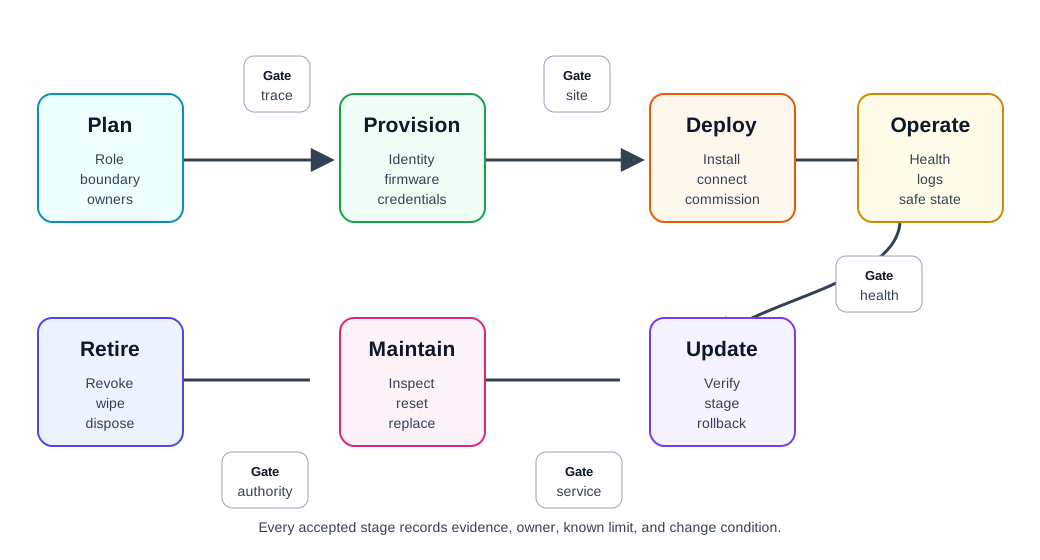
Plan and provision establish the device role, owner, identity, and firmware baseline before anyone installs it. Deploy then adds site conditions and connectivity evidence; operate adds health, freshness, and power signals. Update needs a verified package and rollback path, while maintenance records the field service action. Transfer and retire close the authority and data paths that deployment opened. This sequence matters because a device can work today yet still be unfit for a later ownership change or safe end of life.
Plan: define role, boundary, deployment assumptions, owners, support period, and replacement model. Provision: create device identity, firmware baseline, certificates or keys, configuration limits, and traceability. Deploy: install the device in the intended context, confirm connectivity, verify physical fit, and record site assumptions. Operate: monitor health, freshness, battery or power state, local logs, failure modes, and user-visible status. Update: deliver firmware or configuration changes through signed packages, staged rollout, compatibility checks, and rollback. Maintain: inspect, clean, calibrate, reset, repair, replace parts, recover credentials, and handle field support. Transfer: support ownership changes, account unlinking, reset, re-provisioning, and data-boundary review. Retire: revoke credentials, wipe local data, remove cloud records, recycle or dispose, and close the asset record.
The review is incomplete if any stage depends on informal knowledge that is not recorded.
15.6 Lifecycle Stages
This section: Lifecycle Stages — The state model in Figure 15.2 separates routine device activity from recovery and retirement.
The state model in Figure 15.2 separates routine device activity from recovery and retirement.
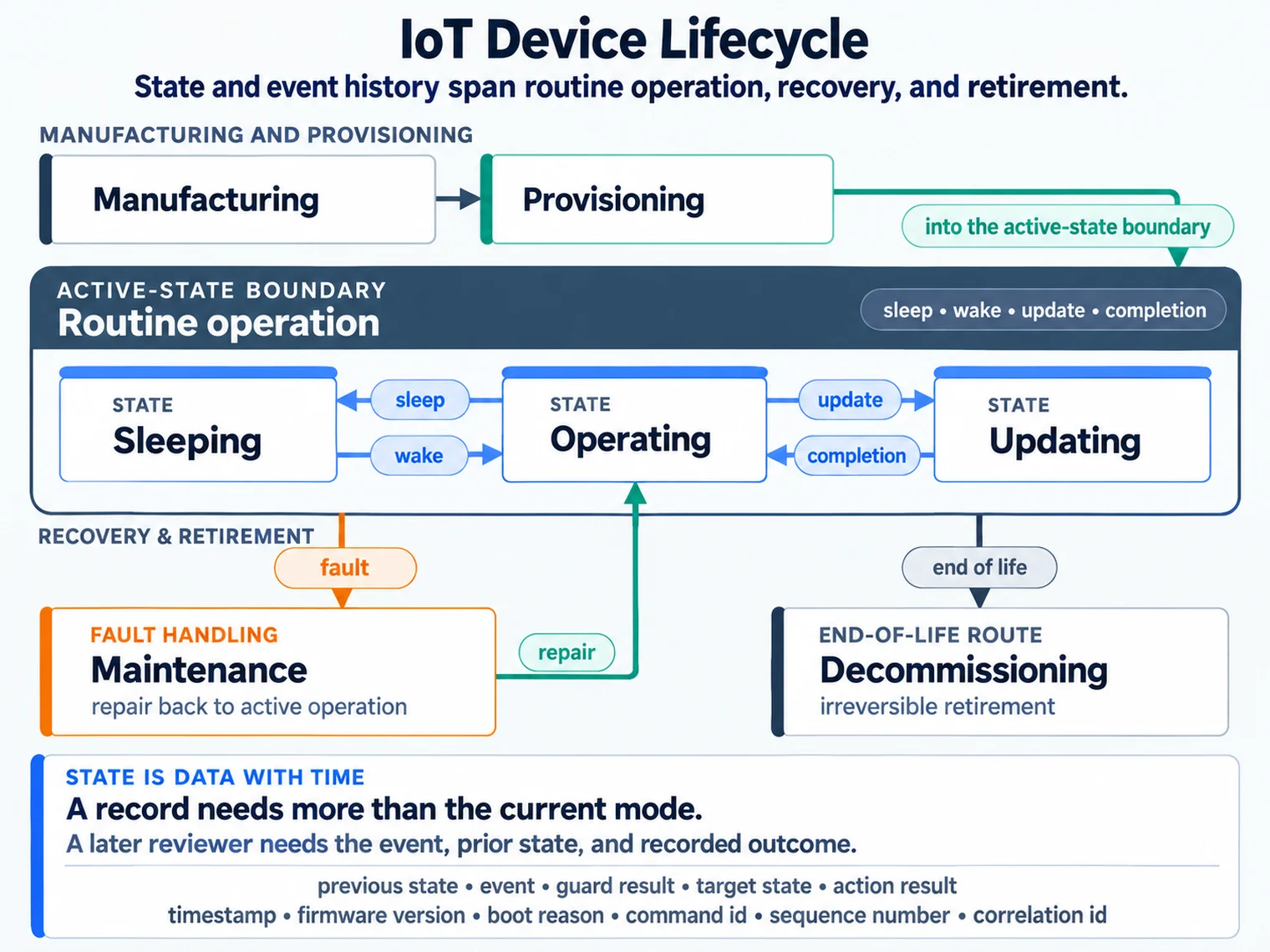
Manufacturing and provisioning lead to the active state. Inside it, sleep and wake move the unit between sleeping and operating, while an update is another controlled transition. A fault leads toward maintenance rather than being treated as normal operation; an end of life event leads toward decommissioning. Read those routes with the event history beside them. A reviewer needs to know which transition occurred, what evidence confirmed it, and whether the unit can safely return to service.
15.6.1 Planning And Readiness
Planning creates the lifecycle contract for the device.
Review:
device role, boundary, users, maintainers, and affected systems. expected support period and minimum update path. deployment assumptions such as weather, mounting, access, signal path, and power source. installation and recovery responsibilities. required logs, health signals, and fault indicators. replacement, transfer, and retirement expectations. acceptance gate before pilot, limited release, or production release.
The strongest planning output is not a long document. It is a record that lets another reviewer understand what the device is expected to survive and who owns each lifecycle decision.
15.6.2 Manufacturing And Provisioning
Provisioning prepares a physical unit to become a trusted system participant.
Review:
unique device identity and asset identifier. firmware baseline, hardware revision, and configuration version. credentials, certificates, keys, or enrollment tokens. secure storage and reset behavior for secrets. factory test result or intake test result. claim that the device can be traced after shipment or installation. recovery path when provisioning fails.
Avoid treating provisioning as only “connect to Wi-Fi.” Network setup is one part of provisioning. Identity, ownership, firmware baseline, cloud or gateway enrollment, and reset behavior are also part of the lifecycle record.
Use Figure 15.3 to check what must be recorded before a new unit becomes active.
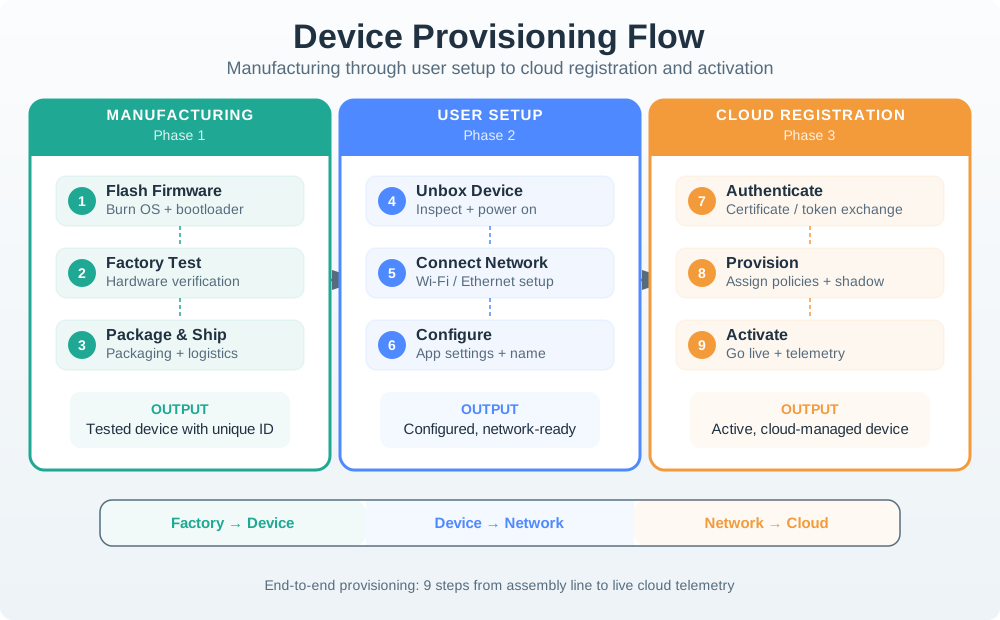
Manufacturing gives the unit an identifier, hardware revision, firmware baseline, and test history. User setup then binds credentials and the intended network or account context. Cloud registration checks that the device can be authenticated and associated with the right owner before activation. The phase labels make the handoff visible: a factory test is not proof that field enrollment succeeded. Keep the identity and credential boundary traceable across each phase so a failed setup can be diagnosed without guessing which step ran.
Keep the sensor identity usable
Narrated audio tour. The full transcript is below. These are schematic teaching states, not measured protocol or elapsed lifecycle time. Choose Reduced motion for a complete still at each beat. Explanations beyond the model remain in captions.
Full transcript — certificate-lifecycle (8 beats)
B1 — Outdoor sensor identity
You are the engineer responsible for an outdoor sensor that connects through a local gateway. Its certificate identifies the device to the service. If the certificate expires while the sensor is offline, the sensor can lose its ability to connect. Keeping that identity usable is your job.
Model caption: You maintain an outdoor sensor. Certificate expiry can interrupt its authenticated connection.
B2 — Issuer trust chain
A certificate links a device's name and public key to an issuer's signature. The issuer signs it. Trust follows a chain through an intermediate issuer to a trust anchor, a trusted starting point. The device's certificate belongs at the end of that chain.
Model caption: The issuer signs the device certificate. Its trust chain leads through an intermediate issuer to a trusted starting point.
B3 — Renew before expiry
Validity means the certificate has a start time and an end time. Renewal means obtaining a replacement before the current certificate expires. For your sensor, the renewal window leaves time to obtain that replacement, including time for another attempt if renewal fails.
Model caption: Validity has a start and an end. Obtain a replacement before expiry, allowing time for retries.
B4 — Renewal buffer
Use the model's certificate validity of one hundred eighty days and renewal at thirty percent remaining. Multiply one hundred eighty by thirty to get five thousand four hundred. Divide by one hundred to get fifty-four days. Rounding leaves fifty-four. The model takes the larger of three days and that result, so the renewal buffer is fifty-four days.
Model caption: 180 × 30 = 5400; 5400 ÷ 100 = 54; rounding gives 54; max(3, 54) = 54 days before expiry.
B5 — Derived calendar example
To find when renewal begins, subtract fifty-four from one hundred eighty. That gives one hundred twenty-six days after validity begins. The example therefore starts renewal with fifty-four days left before expiry. That time allows for retries and offline devices.
Model caption: Derived calendar example: 180 − 54 = 126 days after validity begins; 54 days remain for renewal.
B6 — Offline through expiry
Suppose your sensor stays offline throughout that renewal window and receives no replacement before expiry. Its current certificate expires, and authenticated connections can fail. The fifty-four-day buffer only helps if renewal succeeds in time. An offline sensor needs a renewal window that accounts for its absence.
Model caption: Suppose the sensor remains offline through the renewal window and expiry, with no replacement. Authenticated connections can fail.
B7 — Revocation status paths
The misconception is that a future expiry date guarantees acceptance. Revocation can invalidate a certificate before that date. A client can receive a signed list of revoked certificates, or query the status of a particular certificate. Both paths depend on clients checking fresh status information, so revocation can end trust while time remains.
Model caption: A future expiry date does not guarantee acceptance. Revocation may end trust sooner. Clients use a signed revocation list or a certificate-status query and need fresh status information.
B8 — Renew and end trust
Keep the sensor's identity usable by renewing before time runs out and ending trust when authority ends.
Model caption: Keep the sensor's identity usable by renewing before time runs out and ending trust when authority ends.
15.6.3 Deployment And Commissioning
Commissioning checks whether the device works in its real context.
Review:
installed location, orientation, enclosure condition, and mounting method. radio or wired path after installation, not only on the bench. sensor or actuator behavior in the installed position. power source, charging, battery, or service access. local indicators, setup feedback, and installer instructions. first health report and first successful data path. record of deviations from the planned deployment assumptions.
A device that passes bench testing can still fail after it is placed near metal, water, concrete, heat sources, moving machinery, human bodies, or sealed cabinets. Commissioning evidence belongs in the installed context.
15.6.4 Operation And Monitoring
Operation evidence shows whether the device can be trusted after deployment.
Review:
heartbeat, last-seen time, clock source, and stale-data rule. battery, power, thermal, enclosure, or sensor health signals. local buffering and retry behavior during network loss. visible status for users, installers, or operators. recoverable error states and safe states. log retention, privacy boundary, and diagnostic access. support escalation path when the device is silent or inconsistent.
Monitoring should distinguish healthy silence from a failure. A low-rate sensor may report rarely by design, but the system still needs a way to tell whether the device is asleep, offline, misconfigured, blocked, or retired.
15.6.5 Updates And Change Control
OTA and configuration updates change a deployed device. They need their own lifecycle gate.
Review:
- signed update package or authenticated configuration change
- compatibility check for hardware revision, bootloader, memory, and dependencies
- available power, storage, network, and maintenance window
- staged rollout plan with stop conditions
- rollback path and boot-success confirmation
- user or operator notice for disruptive changes
- post-update health check and record of changed behavior
Safe update design separates “can download a file” from “can survive a failed change.” A robust lifecycle record explains how the device avoids becoming unrecoverable when power fails, the network drops, a package is corrupt, or the new firmware cannot boot successfully.
15.6.6 Maintenance And Service
Maintenance covers the recurring work needed to keep the device useful.
Review:
inspection, cleaning, calibration, consumable replacement, and battery or power checks. tool, access, permission, and training requirements. spare unit or replacement part availability. service interval and service-start conditions. reset and recovery behavior. impact of service on data continuity and user trust. evidence that maintenance is practical in the deployment context.
Do not accept “maintenance-free” as a design claim unless the record shows what changes would prove otherwise. A sealed device can still need cleaning, reset, update, replacement, or retirement.
15.6.7 Transfer And Reuse
Connected devices often change owners, accounts, sites, gateways, or tenants.
Review:
unlinking from the previous account or tenant. local data wipe and credential rotation. reset mode that does not expose previous user data. re-provisioning workflow for the new owner or site. transfer history for replacement, returned units, and owner or tenant changes. data-retention boundary between device, gateway, app, and cloud service.
Ownership transfer is a lifecycle stage, not an edge case. Devices that cannot be safely transferred can create privacy, support, and security risks.
15.6.8 Decommissioning
Decommissioning removes a device from service without leaving active trust relationships behind.
Review:
credential revocation and certificate or key retirement. local data wipe or documented data destruction. cloud, gateway, dashboard, and inventory removal. disposal, recycling, return, or refurbishment path. final status recorded in the asset system. support behavior if the retired device tries to reconnect.
The decommissioning record should make it clear that the device no longer has authority in the system.
Use Figure 15.4 to review the sensor’s credential from setup through retirement.
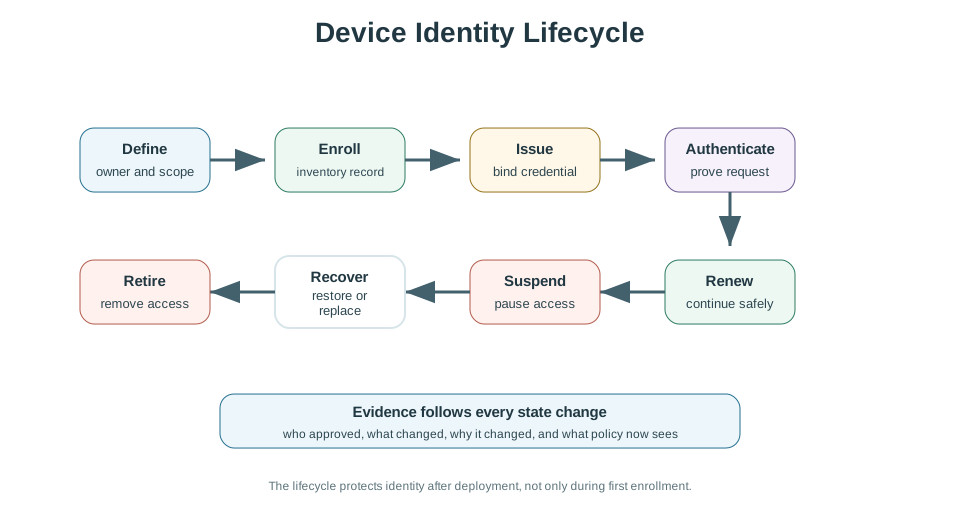
The outdoor sensor record begins with its unit ID, firmware baseline, key type, storage place, and local gateway path. It also marks the key source and expiry date as fields to check. The middle path shows key creation, issue, use, renewal, pause, recovery, and revocation. The last panel makes retirement a real event: revoke the key and remove the unit from gateway and cloud lists. Read these parts together to see which change was confirmed, who can still reach the unit, and what proof is still missing.
15.7 Environmental And Durability Evidence
This section: Environmental And Durability Evidence — Environmental testing should match the intended deployment.
Environmental testing should match the intended deployment. The review should not list every possible standard or test. It should explain which conditions matter for this device and what evidence supports the claim.
Common evidence areas:
Temperature: expected operating range, storage range, self-heating, thermal cycling, and battery effect. Moisture and dust: ingress path, seal, venting, condensation, cleaning, and enclosure rating evidence. Mechanical stress: vibration, shock, mounting load, connector strain, wear, and service handling. Chemical and UV exposure: cleaning agents, sunlight, oils, corrosion, and material compatibility. Electromagnetic environment: radio coexistence, emissions, susceptibility, grounding, shielding, and cable routing. Human contact: skin contact, heat, edges, fasteners, cleaning, comfort, and accessibility for users or technicians.
The lifecycle question is simple: will the evidence still be credible after the device has been installed, updated, cleaned, serviced, and exposed to its expected environment?
15.8 Provisioning Review
This section: Provisioning Review — Provisioning should create a device that is unique, traceable, recoverable, and associated with the correct system owner.
Provisioning should create a device that is unique, traceable, recoverable, and associated with the correct system owner.
Strong provisioning records usually include:
- unit identifier and hardware or assembly revision
- firmware, bootloader, and configuration baseline
- credential source and storage boundary
- network or gateway enrollment method
- owner, tenant, site, or account association
- reset and re-provisioning behavior
- failure path when setup cannot finish
Provisioning methods such as QR code association, cable-based setup, SoftAP, BLE-assisted setup, gateway-assisted join, or factory enrollment can all be valid. The review should focus on fit: what the method assumes, what can fail, how the user or installer recovers, and how credentials remain protected.
15.9 OTA Update Review
This section: OTA Update Review — OTA update readiness is an evidence gate, not just a feature.
OTA update readiness is an evidence gate, not just a feature.
Review before accepting OTA readiness:
update package integrity and authenticity checks. hardware, firmware, bootloader, and configuration compatibility checks. enough storage for the package, metadata, and rollback state. enough energy or external power for download, write, verification, and reboot. staged rollout plan with health gates and halt conditions. automatic rollback or recovery path. post-update confirmation and monitoring. explicit rule for devices that are offline, low power, or in critical operation.
The update record should answer: what happens if the update is interrupted, rejected, delayed, partially applied, or causes repeated boot failure?
Use Figure 15.5 to review an OTA update as a sequence of gates and outcomes.
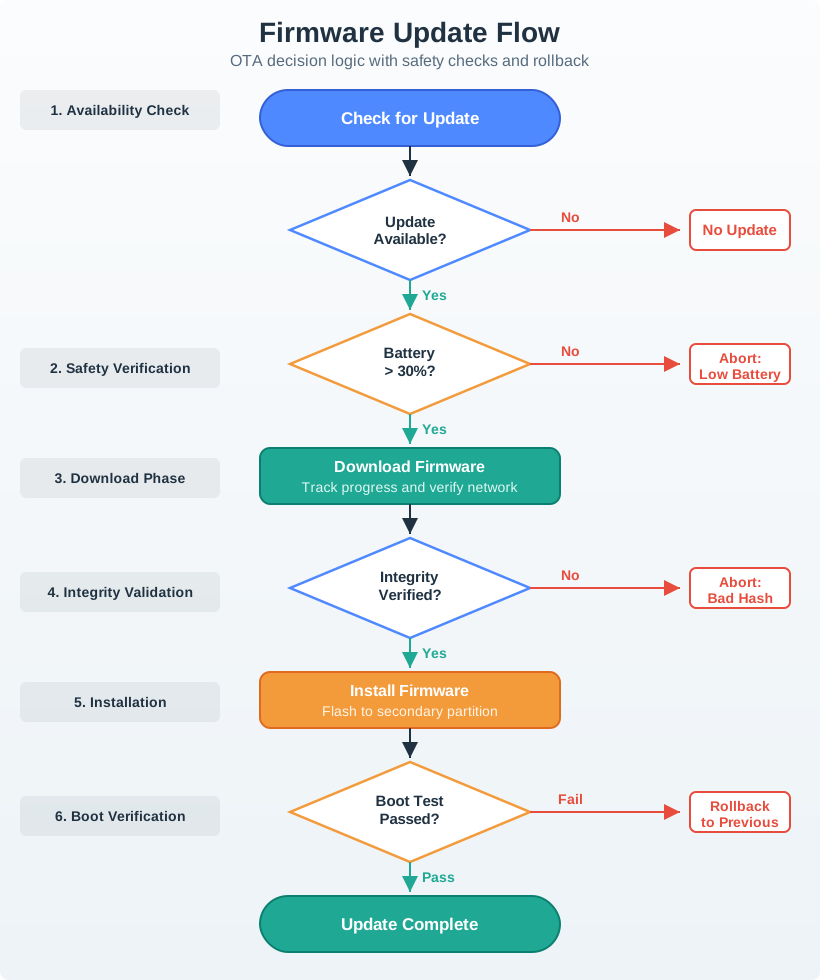
Availability is only the first gate. The preflight step checks compatibility, storage, energy or external power, network conditions, and the maintenance window before download. Verification then checks the package before installation, and a boot test decides whether the new version can remain active. The rollback and deferral branches are as important as the success route: each leaves the device in a known state when a gate fails. A staged rollout adds health checks so the team can halt a wider update after a small group.
15.10 Lifecycle Readiness Record
This section: Lifecycle Readiness Record — The fields in Figure 15.6 keep lifecycle decisions attached to a specific physical unit.
The fields in Figure 15.6 keep lifecycle decisions attached to a specific physical unit.
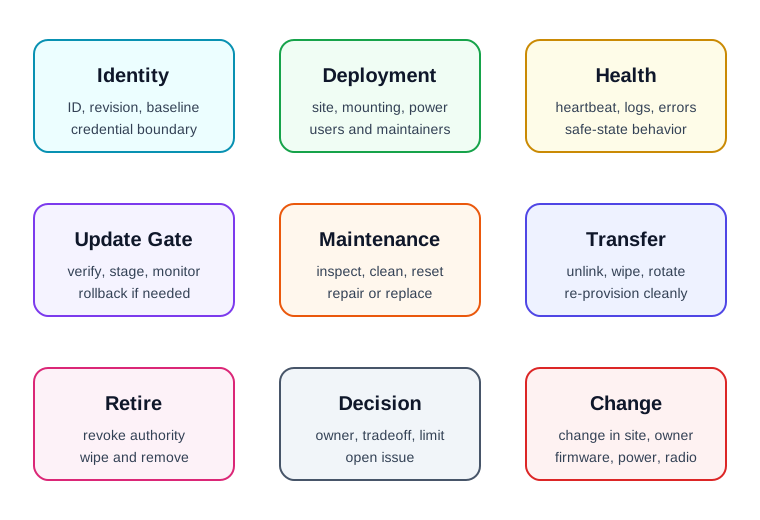
Identity and deployment context establish which unit is installed, where it sits, and who maintains it. Health signals show whether it is still operating as expected, while the update gate records package checks and rollback confirmation. Maintenance and transfer fields cover service access, account unlinking, and new ownership; decommissioning closes credentials and data. Read the fields as one history rather than separate checklists. A later reviewer can then tell which evidence still applies and what change would require a fresh decision.
Identity and baseline: device ID, hardware revision, firmware baseline, configuration version, and credential boundary. Deployment context: intended environment, mounting, network path, power source, users, and maintainers. Health signals: heartbeat, last-seen rule, battery or power state, local logs, error states, and safe-state behavior. Update gate: package verification, compatibility, energy, storage, staged rollout, rollback, and post-update checks. Maintenance path: inspection, cleaning, calibration, reset, repair, replacement, and service access. Transfer path: unlink, wipe, re-provision, owner change, returned unit, and data boundary. Decommissioning path: revoke, wipe, remove from inventory, recycle, refurbish, or dispose. Decision and change condition: accepted tradeoff, owner, known limit, open issue, and condition requiring another review.
The record should be short enough to maintain and specific enough to audit.
15.11 Worked Review: Outdoor Battery Sensor
This section: Worked Review: Outdoor Battery Sensor — A battery-powered outdoor sensor reports site conditions through a local gateway.
A battery-powered outdoor sensor reports site conditions through a local gateway.
Lifecycle evidence to request
Unit identity and firmware baseline are recorded before installation. The installation record includes mounting, enclosure orientation, signal path, and service access. Commissioning confirms sensor behavior and gateway connectivity after installation. Heartbeat and stale-data rules distinguish sleep from failure. Battery level is checked before any update attempt. OTA update path includes compatibility, staged rollout, verification, and rollback. Maintenance includes cleaning, battery replacement, seal inspection, and reset. Decommissioning revokes credentials and removes the unit from gateway and cloud inventory.
Likely review action
Hold the lifecycle decision if the record proves only first-day connectivity. A field sensor also needs evidence for update, maintenance, failure recovery, transfer, and retirement.
Change condition
Rerun the review when the enclosure, mounting, antenna path, battery, gateway, firmware, update policy, reporting interval, maintenance access, or deployment environment changes.
15.13 Common Findings
This section: Common Findings — The lifecycle record stops at installation and ignores operation, update, transfer, or retirement.
The lifecycle record stops at installation and ignores operation, update, transfer, or retirement. Provisioning is treated as Wi-Fi setup only, with no identity or ownership evidence. The device has no clear way to distinguish sleeping, offline, failed, reset, and retired states. OTA readiness is claimed without power, storage, compatibility, staging, rollback, or post-update evidence. Maintenance depends on physical access, tools, accounts, or permissions that are not recorded. Ownership transfer does not wipe local data or rotate credentials. Decommissioned devices can still reconnect or appear active in dashboards. Environmental evidence was collected on the bench instead of in representative deployment conditions. The record lacks an owner, known limit, open issue, or change condition.
15.14 Review Checklist
This section: Review Checklist — device identity, hardware revision, firmware baseline, and configuration version.
Before accepting a connected-device lifecycle decision, confirm that the record includes:
device identity, hardware revision, firmware baseline, and configuration version. deployment assumptions, commissioning checks, and installed-context evidence. provisioning, ownership, credential, reset, and recovery paths. health signals, stale-data rules, local logs, and safe-state behavior. update verification, compatibility, power, storage, rollout, rollback, and post-update checks. maintenance tasks, service access, replacement path, and support escalation. transfer, returned-unit, re-provisioning, and data-boundary handling. decommissioning steps for revocation, wiping, inventory removal, and disposal or reuse. accepted tradeoff, owner, known limit, open issue, and change condition.
15.15 Knowledge Check
This section: Knowledge Check
15.16 Matching Quiz
This section: Matching Quiz
15.17 Ordering Quiz
This section: Ordering Quiz
15.18 Summary
This section: Summary — Device lifecycle management is the practice of keeping connected devices trustworthy after they leave the bench.
Device lifecycle management is the practice of keeping connected devices trustworthy after they leave the bench. The review follows the device through planning, provisioning, deployment, operation, update, maintenance, transfer, and retirement.
The strongest lifecycle records are bounded, testable, and revisable. They show identity, deployment assumptions, health signals, update gates, maintenance paths, ownership-transfer behavior, decommissioning steps, decision owners, known limits, and change conditions.
15.19 Key Takeaway
This section: Key Takeaway — Device lifecycle design must plan onboarding, operation, maintenance, updates, retirement, ownership transfer, and support evidence before deployment.
Device lifecycle design must plan onboarding, operation, maintenance, updates, retirement, ownership transfer, and support evidence before deployment.
15.20 Concept Relationships
This section: Concept Relationships — Connected Device Fundamentals defines the device role and boundary that lifecycle records preserve over time.
Connected Device Fundamentals defines the device role and boundary that lifecycle records preserve over time. Device Form Factors supplies the physical evidence for deployment, service, durability, and environmental exposure. Power Management expands the power-state evidence needed for operation, update deferral, and maintenance. Security and Privacy Overview connects provisioning, credentials, reset, and decommissioning to trust boundaries.
15.21 What’s Next
This section: What’s Next — Continue to Power Management to review battery, power-state, and update-energy evidence in more detail.
Continue to Power Management to review battery, power-state, and update-energy evidence in more detail.
15.22 Continue Your Route
This section: Continue Your Route — This is the last part of this chapter.
This is the last part of this chapter. Return to Device Lifecycle Management: LwM2M Workbench. See ux-design module index.
Find help
3 reviewed answers.
Where should I start in a module?
Open the module page from the sidebar to see its chapters in order. Use the module map to return to a topic you need.
Modules and pathsReviewed
What can I try when a project does not work?
Check the symptom, then work through the diagnostic steps. Keep the error message and the smallest example that reproduces it.
When you are stuckReviewed
How do interactive examples work?
Use the interactive guide to check how examples and simulations work before changing your project.
Interactive examples guideReviewed