10 IoT Design Patterns: Gateways, Twins, and Commands
More
Depth: Practitioner
Progress saves as you read. Mark sections complete as you go; your progress appears in the sidebar.
10.1 Start With the Decision
This section: Start With the Decision — A gateway can translate a link, but it can also hide stale state or failed commands.
A gateway can translate a link, but it can also hide stale state or failed commands. Its exact duty must be bounded.
10.2 Route Overview
This section: Route Overview — This is part 2 of 2.
This is part 2 of 2. Review IoT Design Patterns: Responsibility Boundaries for the preceding evidence.
10.3 Learning Objectives
This section: Learning Objectives
- Compare gateway, digital twin, command, and observer patterns.
- Combine patterns without duplicating state ownership.
10.4 Chapter Roadmap
This section: Chapter Roadmap
- Gateway Pattern
- Digital Twin Pattern
- Command Pattern
- Observer Pattern
- Combining Patterns Without Drift
- Shared Building Controls Pattern Check
- Model-Driven Design
- Pattern And Component Record
- Incremental Examples
- Worked Review: Shared Building Controls
- Worked Review: Replaceable Field Device
- Common Findings
- Review Checklist
- Try It Now
- Micro-Exercise: Find the Pattern Drift
- Concept Check: Pattern Readiness
- Match Patterns to Duties
- Concept Check: Order the Pattern Review
- Summary
- Key Takeaway
- See Also
- What’s Next
10.5 Gateway Pattern
This section: Gateway Pattern — Use the Gateway pattern when a boundary must translate, filter, buffer, secure, or locally decide on behalf of constrained or heterogeneous devices.
Use the Gateway pattern when a boundary must translate, filter, buffer, secure, or locally decide on behalf of constrained or heterogeneous devices.
Common Gateway responsibilities include:
translating between device-side and application-side protocols. normalizing payloads from devices with different formats. buffering readings when upstream paths are unavailable. performing local checks that should not wait for a remote service. enforcing a boundary between local device networks and remote services. exposing support evidence about local connectivity, queue state, and last successful sync.
The Gateway pattern is weak when it becomes an unnamed pass-through. If all real responsibility remains hidden in remote services, the design still needs to say what happens when connectivity fails, state is stale, or a device reports data the gateway cannot interpret.
Use Figure 10.1 to locate the boundary between constrained devices and cloud services.
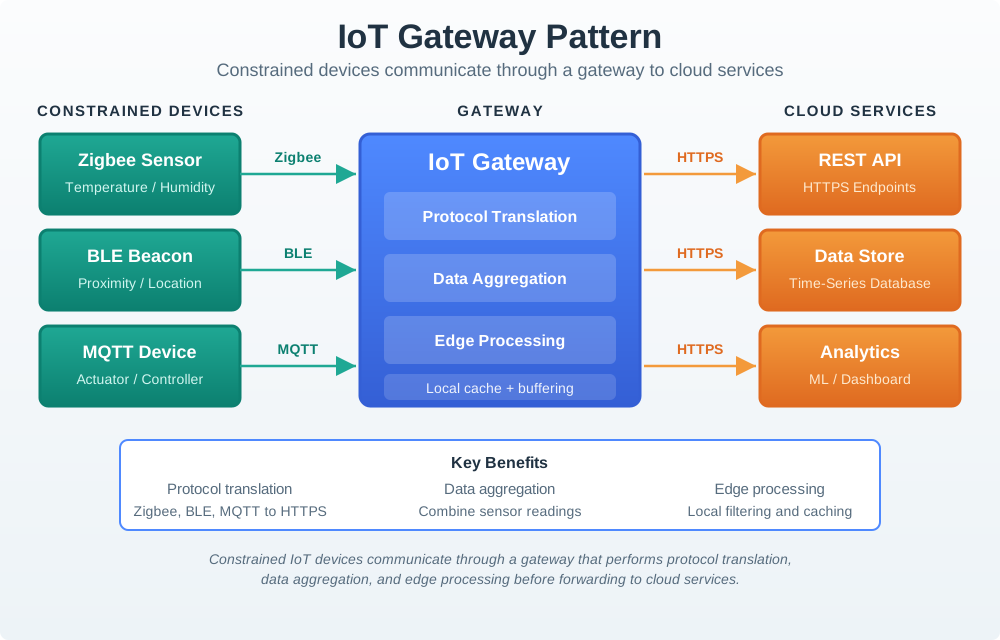
Zigbee sensors, BLE beacons, and an MQTT device reach the gateway through different links. Inside the gateway, protocol translation, data aggregation, edge processing, and local buffering turn those inputs into a path cloud services can use. The HTTPS route then reaches endpoints, storage, and analytics. That boundary matters when connectivity drops: the review must say what the gateway can still do locally and what must wait for the cloud. The diagram helps assign that responsibility rather than treating the gateway as a generic relay.
10.6 Digital Twin Pattern
This section: Digital Twin Pattern — Use the Digital Twin pattern when the system needs an explicit representation of a physical thing, space, asset, or process that multiple services can read, compare, simulate, or reason about.
Use the Digital Twin pattern when the system needs an explicit representation of a physical thing, space, asset, or process that multiple services can read, compare, simulate, or reason about.
A useful digital twin records:
identity of the represented thing. current known state and freshness. source of each state update. confidence or validation status where needed. relationship to commands and physical outcomes. stale-state and conflict behavior. owner of the model and schema changes.
Do not use a digital twin as a label for any database row. The pattern matters when the representation changes how the system reasons about the real world. If a simple state record is enough, the added twin model may create extra synchronization and support work without improving the design.
Use Figure 10.2 to determine whether telemetry, model state, analysis, and commands remain traceable between a physical asset and its digital representation.
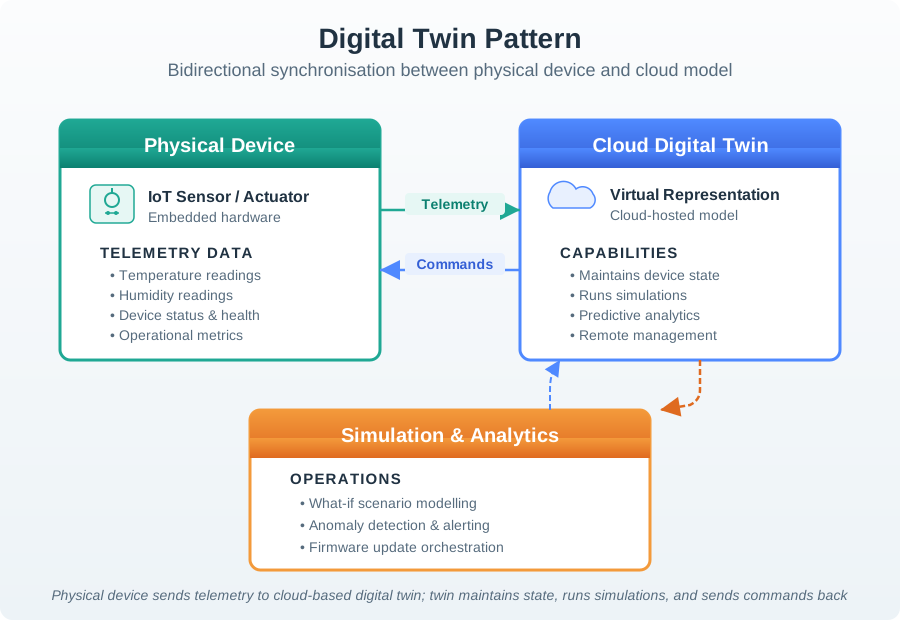
Trace data toward the twin. Trace commands back to reality. Read Figure 10.2 from the physical sensor or actuator along telemetry into the cloud twin. The representation has value when it preserves identity, observation time, quality, and model version well enough for simulation or analytics to reason about the real asset. Follow the command path back separately: a proposed change must be authorised, correlated, delivered, applied, and confirmed by new physical evidence. That round trip exposes stale or conflicting state. If the application needs only a current-value record and no model-led decision, the added synchronisation and support burden may not justify a twin.
10.7 Command Pattern
This section: Command Pattern — Use the Command pattern when actions must be represented as explicit requests that can be validated, authorized, queued, retried, canceled, rejected, audited, or explained.
Use the Command pattern when actions must be represented as explicit requests that can be validated, authorized, queued, retried, canceled, rejected, audited, or explained.
Command decisions should make these fields visible:
requested action. target component or physical effect. issuer and permission. precondition for acceptance. execution state. acknowledgement rule. retry, cancellation, and timeout behavior. reason for rejection or partial completion. record needed for support and review.
This is especially important when a command crosses a physical boundary. A user-facing “turn off” action, a maintenance reset, or a scheduled actuator change should not disappear into a direct method call unless the system can still explain whether the request was accepted, executed, delayed, or rejected.
The command path in Figure 10.3 separates a request from the device that carries it out.
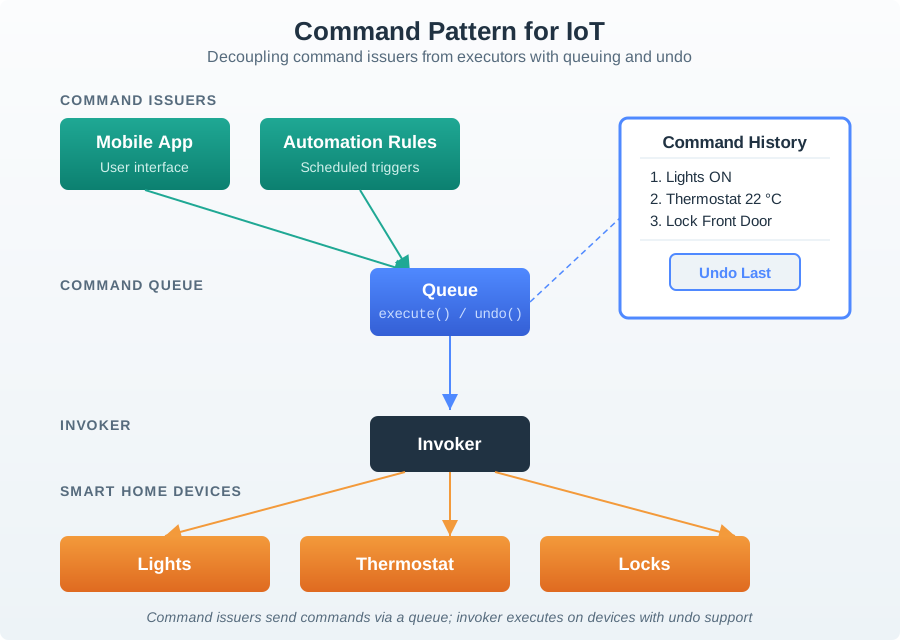
A mobile app or automation rule issues a command into the queue. The invoker executes it on lights, a thermostat, or a lock, while command history records what was requested. Undo is shown as another supported action, not as a guarantee that every physical effect can be reversed. This separation helps the review name who accepted the request, what state the device reported, and whether an undo is valid for that command. Those answers matter when a queued action arrives late.
10.8 Observer Pattern
This section: Observer Pattern — Use the Observer pattern when one event needs to reach multiple subscribers without making the publisher know every subscriber’s implementation.
Use the Observer pattern when one event needs to reach multiple subscribers without making the publisher know every subscriber’s implementation.
Observer reviews should define:
event name and meaning. publisher responsibility. subscriber responsibility. delivery expectation. duplicate, late, or missing event behavior. event ordering assumptions. unsubscribe or permission rules. support evidence for event delivery.
The Observer pattern does not remove responsibility. It moves responsibility into event contracts. If subscribers interpret the same event differently, the event needs a clearer definition, a versioned schema, or a more specific event type.
Use Figure 10.4 to follow one motion event to several subscribed responses.
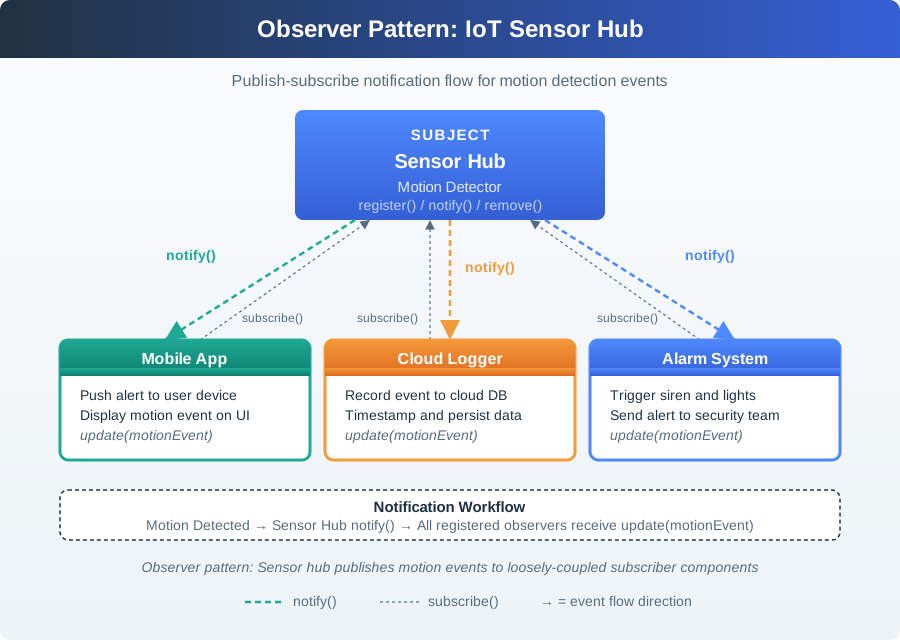
The sensor hub is the subject that registers observers and sends a notification when motion is detected. A mobile app displays the event, a cloud logger stores a timestamped record, and an alarm system can trigger an alert. These destinations have different jobs even though they receive the same source event. The figure makes the subscription boundary visible: a reviewer should check which observers are registered, what each update contains, and how a missing or delayed notification would appear in the product.
10.9 Combining Patterns Without Drift
This section: Combining Patterns Without Drift — IoT systems often combine patterns.
IoT systems often combine patterns. A building-control system might use a gateway for local device translation, a digital twin for room state, commands for actuator requests, and observers for events consumed by apps, dashboards, logs, or support tools.
Combine patterns only when each one owns a different responsibility:
Gateway owns boundary translation, buffering, or local fallback. Digital Twin owns state representation and freshness. Command owns physical action requests and execution records. Observer owns event distribution and subscriber decoupling. Components own replaceable interfaces. Models own consistent generation across similar deployments.
Pattern drift appears when the same responsibility is claimed in several places. Examples include a gateway and cloud service both claiming state authority, a command queue and direct API both controlling the same actuator, or subscribers silently treating events as commands.
Combining patterns is safe only when each one owns a distinct problem. Figure 10.5 provides the responsibility test needed to prevent a gateway, twin, command path, or component boundary from becoming a vague all-purpose abstraction.
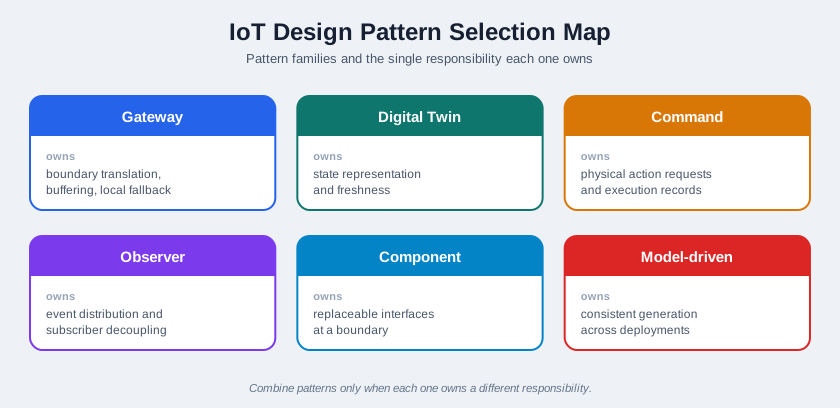
The cards in Figure 10.5 assign Gateway to boundary translation, buffering, and local fallback, while Digital Twin owns state representation and freshness. Command is narrower still: it owns physical action requests and execution records; Observer distributes events without taking over command semantics. Component protects replaceable interfaces at a boundary, and Model-driven generation maintains consistency across deployments. A combined design remains reviewable only if those ownership statements stay non-overlapping, which is the chapter’s test for pattern drift.
For shared IoT controls such as lighting, access, booking, or comfort systems, test the pattern combination with these questions:
Gateway: who can still act when the internet path is unavailable? Digital twin: which displayed state is authoritative, and how stale can it be before it must be marked? Command: which commands need confirmation, undo, timeout, or escalation? Observer: who is notified about routine state, conflict, maintenance, and safety events? Model-driven design: which shared rules live in the model rather than in one screen or device?
The design is weak if it works only for the first user and not for residents, visitors, facilities staff, and support teams.
10.10 Model-Driven Design
This section: Model-Driven Design — Model-driven design uses a shared model to generate consistent artifacts.
Model-driven design uses a shared model to generate consistent artifacts. It can fit IoT work when many deployments share structure but vary by device type, location, permission, topic, threshold, interface, or support workflow.
Good model-driven design has:
a reviewed source model. generated artifacts with clear ownership. traceability from generated output back to model fields. validation that catches invalid model combinations. a manual override policy. change conditions when the model, generator, or target environment changes.
Avoid model-driven design when the model is less clear than the generated output. The model should reduce drift, not hide design decisions behind a generator.
The generation path in Figure 10.6 shows what remains shared across platform outputs.
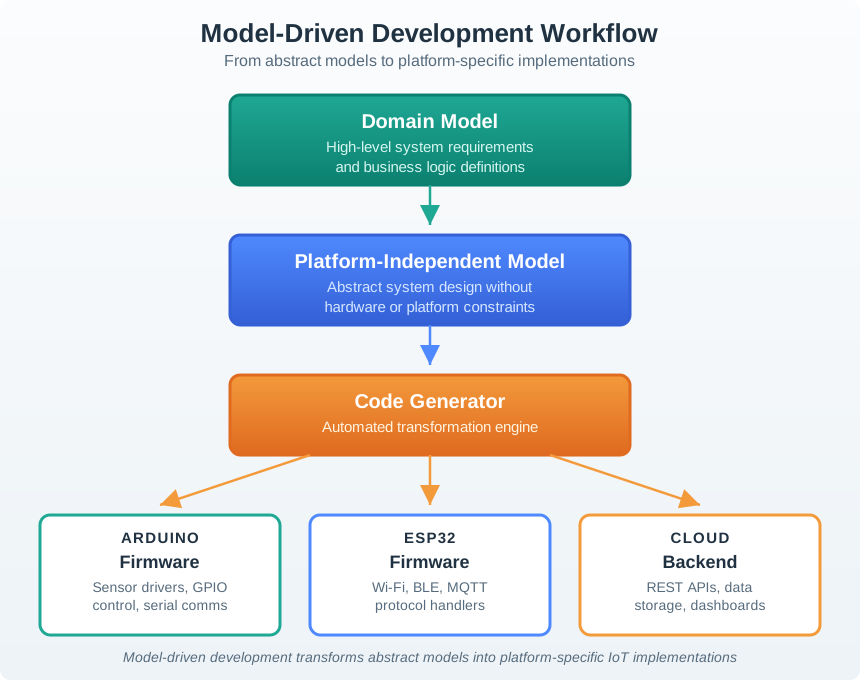
The domain model is the reviewed source for a family of deployments. A platform independent model carries that structure forward before the code generator checks combinations and produces target artifacts. Platform specific implementations sit at the end of the path, where hardware or runtime differences become concrete. The decision is whether a change belongs in the shared model or in one target output. Keeping that boundary clear lets reviewers trace an unexpected implementation back to the model and generation step that produced it.
10.11 Pattern And Component Record
This section: Pattern And Component Record — Use Figure 10.7 to explain why a component pattern fits a building control case.
Use Figure 10.7 to explain why a component pattern fits a building control case.
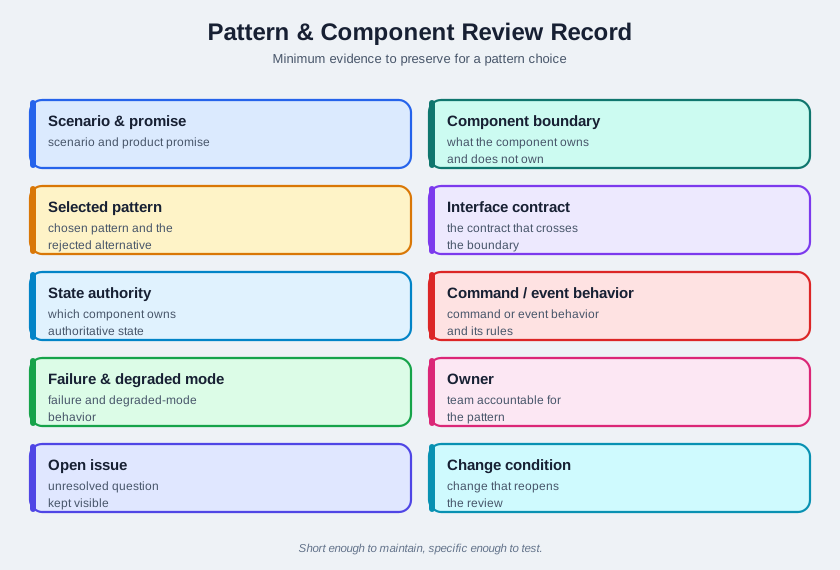
The record begins with the product promise, such as local operation during a connectivity loss, then names the component boundary and selected pattern. An interface contract makes MQTT topics or a JSON payload explicit instead of relying on an informal link between teams. State authority and freshness fields say who owns desired and reported values. Those entries let a reviewer test the chosen pattern against a rejected alternative. If the state owner or failure result is missing, the pattern name alone cannot support the decision.
scenario and product promise. component boundary. selected pattern and rejected alternative. interface contract. state authority. command or event behavior. failure and degraded-mode behavior. owner. open issue. change condition.
This record should be short enough to maintain and specific enough to test. If the record becomes vague, the pattern choice is not ready.
10.12 Incremental Examples
This section: Incremental Examples
10.12.1 Split Device and App Duties
A beginner review can use a single smart plug with one relay, one mobile control, and one status card. The component boundary should say whether the device firmware, mobile app, MQTT retained topic, or cloud service owns on/off state, pending command state, offline state, and last-seen time. The pattern choice may be simple: a command record for relay changes and an observer event for state updates.
10.12.2 Gateway and Twin Boundaries
A shared room-control system may use a gateway to translate Zigbee or BLE device reports into MQTT topics and a digital twin to represent room occupancy, freshness, confidence, and actuator relationships. The review should name which service owns desired versus reported state, what happens when the gateway buffers messages during internet loss, how duplicate observer events are handled, and which support view can explain stale or conflicting room state.
10.12.3 Generate Contracts from Models
A campus deployment may use model-driven design to generate AsyncAPI channels, JSON Schema payloads, OpenAPI paths, dashboard labels, support checklist fields, and hardware-in-loop test fixtures from one source model. This only helps if model owners, schema versions, rollout cohorts, field overrides, gateway firmware versions, and support diagnostics are explicit. The advanced review should reject hand-edited generated output when it breaks traceability.
10.14 Worked Review: Replaceable Field Device
This section: Worked Review: Replaceable Field Device — Scenario: a field maintenance team needs to replace a sensor device without rewriting the app, support guide, and cloud data model.
Scenario: a field maintenance team needs to replace a sensor device without rewriting the app, support guide, and cloud data model. The replacement device measures the same phenomenon but reports additional diagnostics.
A pattern review might accept:
- a component boundary around the field device interface
- a gateway adapter that normalizes the replacement device payload
- a digital twin field for diagnostic state only if support workflows use it
- command records for calibration or reset actions
- observer events for replacement, calibration, diagnostic change, and rejected command outcomes
- a model-driven template if the same replacement process repeats across deployments
The design should reject any pattern that hides compatibility. If the replacement needs a new payload, permission, diagnostic state, or support action, that change must appear in the interface record and change condition.
10.15 Common Findings
This section: Common Findings — The design names a pattern but does not assign a responsibility.
During review, pattern chapters often reveal these defects:
The design names a pattern but does not assign a responsibility. The component boundary hides state ownership. A gateway translates data but has no documented offline behavior. A digital twin exists but the stale-state rule is missing. Commands can be sent but not clearly accepted, rejected, retried, or audited. Observers receive events without schema, ordering, or duplicate-event rules. The same physical action can be triggered through both direct calls and queued commands. The generated model output cannot be traced back to the source model. Support teams cannot tell whether the issue is device, gateway, app, cloud, or user-context related.
10.16 Review Checklist
This section: Review Checklist — Is the pattern solving a reviewed problem rather than adding vocabulary?
Use this checklist before accepting a pattern design:
Is the pattern solving a reviewed problem rather than adding vocabulary? Is the component boundary small enough to test and replace? Is the interface contract explicit? Is state authority visible? Are command acceptance and rejection visible? Are event meanings and subscribers visible? Is stale, duplicate, offline, and degraded behavior documented? Is the tradeoff recorded? Does a named owner maintain the interface and pattern decision? Is there a change condition for new devices, new states, new subscribers, new commands, or new product promises?
10.17 Try It Now
This section: Try It Now
Choose one IoT pattern choice and write a one-row responsibility review:
| Field | Your answer |
|---|---|
| Product promise | What user, support, or operations promise depends on this pattern? |
| Boundary | Which device, gateway, service, model, app, or support surface owns the responsibility? |
| Interface contract | MQTT topic, REST path, AsyncAPI channel, JSON Schema payload, command field, or event schema. |
| Failure behavior | Stale state, rejected command, duplicate event, queue overflow, offline fallback, or degraded mode. |
| Change condition | New device type, subscriber, command, schema, deployment model, or product promise that reopens the choice. |
10.18 Micro-Exercise: Find the Pattern Drift
This section: Micro-Exercise: Find the Pattern Drift — The gateway and cloud service both rewrite reported device state.
For each symptom, name the likely drift:
The gateway and cloud service both rewrite reported device state. A dashboard treats a digital-twin desired value as measured state. Two subscribers interpret the same observer event as different commands.
10.19 Concept Check: Pattern Readiness
This section: Concept Check: Pattern Readiness
10.20 Match Patterns to Duties
This section: Match Patterns to Duties
10.21 Concept Check: Order the Pattern Review
This section: Concept Check: Order the Pattern Review
10.22 Summary
This section: Summary — IoT design patterns and components help teams assign responsibility in systems that cross devices, gateways, apps, services, people, and physical environments.
IoT design patterns and components help teams assign responsibility in systems that cross devices, gateways, apps, services, people, and physical environments. Gateway, Digital Twin, Command, Observer, component-based design, and model-driven design are useful when they make interfaces, state, commands, events, generated artifacts, failure behavior, owners, and change conditions easier to inspect.
Do not approve a pattern because it sounds established. Approve it when the boundary, evidence, tradeoff, owner, and failure behavior are visible.
10.23 Key Takeaway
This section: Key Takeaway — Component patterns should clarify boundaries, state ownership, command paths, event flows, and user-visible recovery behavior.
Component patterns should clarify boundaries, state ownership, command paths, event flows, and user-visible recovery behavior.
10.24 See Also
This section: See Also — IoT Pattern Selection Assessment shows how to assess pattern fit before implementation.
IoT Pattern Selection Assessment shows how to assess pattern fit before implementation. IoT Architecture Model Selection defines the boundary that pattern choices must respect. Calm Technology Attention Policy keeps attention, service, product, and platform effects visible. Connected Device Fundamentals explains device roles that become component boundaries. Reference Architecture Responsibility Record provides broader architecture vocabulary for the next review.
10.25 What’s Next
This section: What’s Next — Continue to Reference Architecture Responsibility Record to review the larger architecture models that pattern and component choices must fit.
Continue to Reference Architecture Responsibility Record to review the larger architecture models that pattern and component choices must fit.
10.26 Continue Your Route
This section: Continue Your Route — This is the last part of this chapter.
This is the last part of this chapter. Return to IoT Design Patterns: Responsibility Boundaries. See ux-design module index.
Find help
3 reviewed answers.
Where should I start in a module?
Open the module page from the sidebar to see its chapters in order. Use the module map to return to a topic you need.
Modules and pathsReviewed
What can I try when a project does not work?
Check the symptom, then work through the diagnostic steps. Keep the error message and the smallest example that reproduces it.
When you are stuckReviewed
How do interactive examples work?
Use the interactive guide to check how examples and simulations work before changing your project.
Interactive examples guideReviewed