13 Device Form Factors: Context and Review Evidence
More
Depth: Practitioner
Progress saves as you read. Mark sections complete as you go; your progress appears in the sidebar.
13.1 Start With the Decision
This section: Start With the Decision — A device may fit the bench and still fail in a wet, gloved, or shared space.
A device may fit the bench and still fail in a wet, gloved, or shared space. The review must test the form against its real setting.
13.2 Route Overview
This section: Route Overview — This is part 2 of 2.
This is part 2 of 2. Review Device Form Factors: Physical Constraints and Enclosures for the preceding evidence.
13.3 Learning Objectives
This section: Learning Objectives
- Build a form-factor review from deployment evidence.
- Test access, mounting, and handling needs in context.
13.4 Chapter Roadmap
This section: Chapter Roadmap
- Form Factor Review Path
- What Counts As Form Factor Evidence
- Deployment Context First
- Component Envelope
- Materials And RF Boundaries
- Ingress And Environmental Protection
- Mounting And Maintenance
- Interaction Surfaces
- Worked Review: Outdoor Sensor
- Worked Review: Wearable Tag
- Form Factor Record
- Common Findings
- Review Checklist
- Knowledge Check
- Matching Quiz
- Ordering Quiz
- Summary
- Key Takeaway
- Concept Relationships
- What’s Next
13.5 Form Factor Review Path
This section: Form Factor Review Path — Use Figure 13.1 to inspect the outdoor sensor as a physical assembly.
Use Figure 13.1 to inspect the outdoor sensor as a physical assembly.
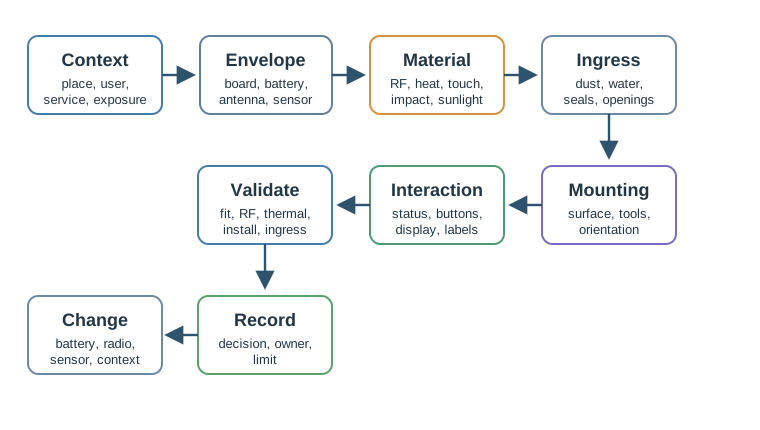
The cross section puts the antenna keepout beside the board and battery space, so radio needs cannot be assessed apart from enclosure size. The sensor opening and ingress path show where rain, dust, condensation, or cleaning may reach the unit. A service opening and mount then determine how an installer can replace a battery without undoing the protection. These visible constraints lead to validation: check the assembled unit in the expected exposure and record which physical change would require a new test.
Deployment context: indoor, outdoor, mobile, body-worn, public, industrial, sheltered, exposed, serviced, or inaccessible. Component envelope: board size, battery volume, connector clearance, antenna keepout, sensor window, thermal path, and fasteners. Material and RF constraints: radio path, metal shielding, impact, UV exposure, surface finish, cleaning, and user touch. Ingress protection: dust, water, condensation, drainage, seal compression, cable entry, and service openings. Mounting and maintenance: adhesive, screws, strap, clip, rail, magnet, orientation, tamper resistance, and replacement access. Interaction surfaces: buttons, LEDs, display, haptics, labels, companion app handoff, and installation feedback. Validation checks: fit check, RF check, thermal check, ingress check, drop or vibration check, and installation trial. Decision and change condition: accepted tradeoff, owner, evidence limit, and condition that requires another form factor review.
13.6 What Counts As Form Factor Evidence
This section: What Counts As Form Factor Evidence — Useful evidence can be inspected.
Useful evidence can be inspected. A review record can include:
installation photos or annotated placement notes. component-envelope drawings or mechanical constraints. antenna and sensor keepout notes. material samples or prototype observations. ingress, temperature, drop, vibration, or cleaning test results. user installation observations. maintenance, battery-replacement, or reset-access checks. field issue notes tied to a specific enclosure or mounting revision.
Avoid accepting a form factor because it “looks good” or “matches the product style.” Appearance can matter, but it does not replace physical evidence.
13.7 Deployment Context First
This section: Deployment Context First — Is the device handheld, wall-mounted, worn, hidden, exposed, or moved between sites?
Start by naming the place and use pattern:
Is the device handheld, wall-mounted, worn, hidden, exposed, or moved between sites? Who installs it, and what tools or permissions do they have? Can the device be reached for battery replacement, reset, cleaning, calibration, or inspection? What orientation does the sensor require? What happens if the device falls, rotates, is covered, gets wet, or is moved? Does the enclosure need to communicate status without a phone nearby?
The form factor should fit the actual deployment, not a simplified lab placement.
13.8 Component Envelope
This section: Component Envelope — The component envelope is the physical space that the design must protect without breaking the device behavior.
The component envelope is the physical space that the design must protect without breaking the device behavior.
Review the enclosure against:
Board footprint: connectors, test pads, mounting holes, cable bend radius, and manufacturing tolerances. Battery volume: cell shape, replacement access, swelling allowance where applicable, and safe retention. Antenna keepout: distance from metal, batteries, ground planes, wet surfaces, body contact, and cable routing. Sensor exposure: airflow, light path, acoustic opening, motion view, liquid contact, or isolation from heat sources. Thermal path: heat source, air gap, conductive path, enclosure surface temperature, and duty-cycle assumptions. Assembly access: screw bosses, clips, seals, adhesives, labels, and service sequence.
If the enclosure drawing cannot show these constraints, the form factor decision is not ready.
13.9 Materials And RF Boundaries
This section: Materials And RF Boundaries — Material choice affects durability, radio performance, heat, weight, feel, sealing, and serviceability.
Material choice affects durability, radio performance, heat, weight, feel, sealing, and serviceability.
Review material choice with these questions:
Does the material allow the intended radio path, or does it require an external antenna or RF window? Does the material survive expected sunlight, cleaning, chemicals, touch, impact, and temperature range? Does the material help or hurt thermal behavior? Does the surface finish support grip, cleaning, labeling, and inspection? Does the material choice change sealing, fasteners, or service access? Has the same material been checked in the actual mounting orientation?
Metal may be useful for heat or strength, but it can block wireless signals if the antenna is inside the metal boundary. Soft materials may help wearables or impact protection, but they can create cleaning, aging, or tolerance issues. The record should show which tradeoff was accepted.
13.10 Ingress And Environmental Protection
This section: Ingress And Environmental Protection — Ingress protection is a design decision, not a decorative rating label.
Ingress protection is a design decision, not a decorative rating label. The reviewer should connect the rating or protection strategy to the actual exposure.
Check:
dust, splash, rain, spray, immersion, condensation, and cleaning exposure. cable glands, buttons, seams, sensor openings, and battery doors. drainage path and orientation. seal compression after assembly and service. effect of temperature cycling on seals and condensation. whether the protection strategy still works after maintenance.
Do not infer field readiness from one short lab exposure. The evidence should match the exposure that the device is expected to face.
Use Figure 13.2 to decide which temperature, moisture, mechanical, electromagnetic, and exposure tests reproduce the device’s actual field boundary.
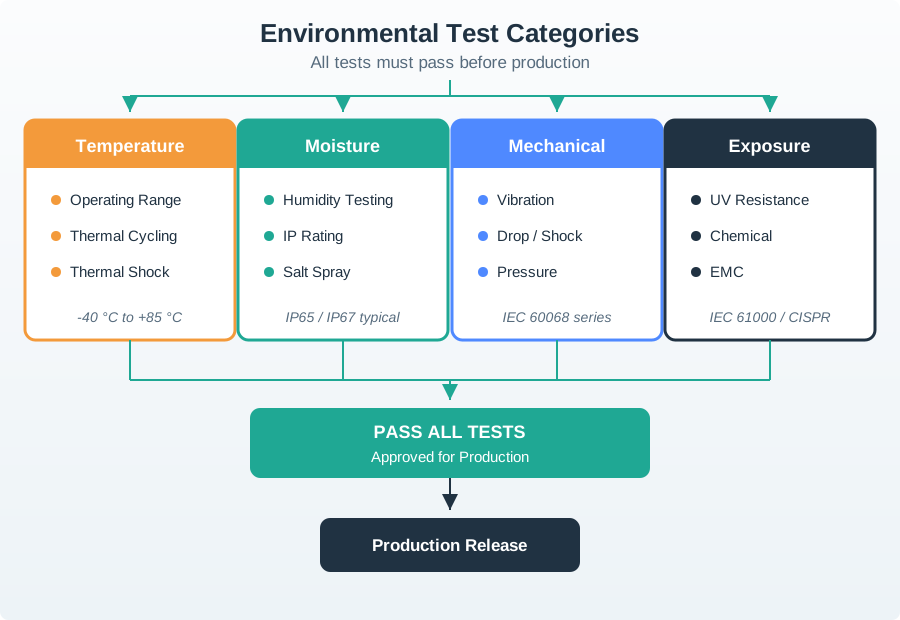
Move from lab stress to field use. Keep the evidence linked. Read Figure 13.2 from temperature and moisture through mechanical stress to EMC and exposure. Thermal cycling and shock test material, seal, and connection changes across transitions; humidity and ingress checks test water paths over the required duration. Vibration, impact, and mounting loads reproduce physical service, while electromagnetic tests cover both emissions and immunity. UV, chemicals, dust, salt, or cleaning agents may add the final exposure boundary. The release record should select severities and durations from the installed context, then retain setup, result, failure, corrective action, and retest trigger.
13.11 Mounting And Maintenance
This section: Mounting And Maintenance — Mounting is part of the user experience.
Mounting is part of the user experience. A device that requires the wrong tool, surface, angle, or permission can fail before it starts collecting data.
Review the mounting method against:
surface type and condition. installation skill and required tools. allowed damage to walls, machines, vehicles, clothing, or assets. vibration, impact, tamper, cleaning, and removal. orientation needed by the sensor or antenna. access for battery replacement, reset, pairing, inspection, or disposal.
Common mounting choices include adhesive, screw, clip, strap, rail, magnetic, and integrated bracket designs. The correct choice depends on the deployment and maintenance evidence, not on which method is easiest to draw.
The comparison in Figure 13.3 tests each mount against installation and later service.
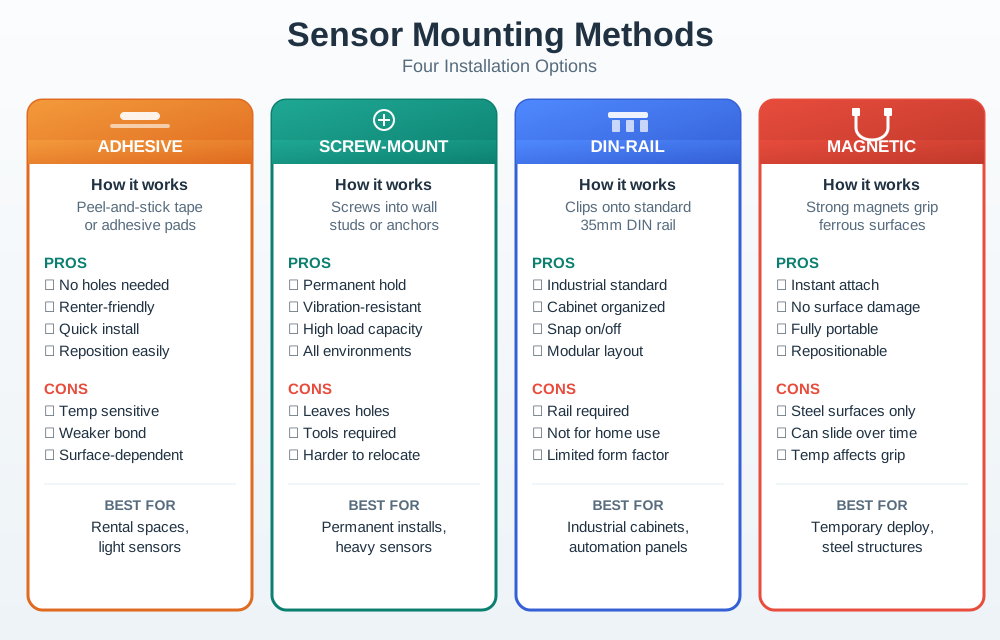
Adhesive, screws, DIN rail, and magnetic mounts place different demands on the surface and installer. The figure asks the same questions of each: what tools are needed, what damage is allowed, and how vibration, tampering, or cleaning affects the attachment. Orientation also matters when the sensor or antenna must face a particular way. Include removal and battery access in the decision. A mount that is quick on day one can still block inspection or safe replacement in the field.
13.12 Interaction Surfaces
This section: Interaction Surfaces — Physical interaction should be simple enough for installation and routine use.
Physical interaction should be simple enough for installation and routine use.
Review:
what status must be visible without opening an app. whether LED colors and blink patterns are limited and memorable. whether buttons can be used with wet hands, gloves, or limited visibility. whether a display is necessary or just adds size, sealing, and power burden. whether labels remain visible after installation. whether reset, pairing, calibration, or service actions are protected from accidental use.
The device should communicate enough state for the person at the device to know what to do next.
Use Figure 13.4 to choose local feedback from the information a person needs at the device.
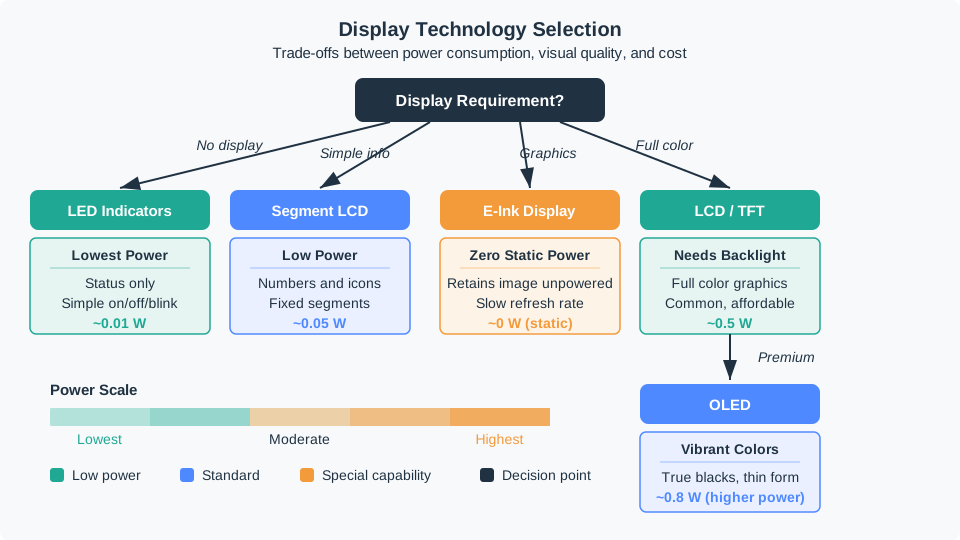
A status only task may need a simple LED, while fixed numbers or icons may suit a segment display. Static updates and full color graphics ask for different surfaces and power budgets. The figure starts with the local outcome rather than the display technology: can someone tell what happened and what to do next without opening an app? Check the power behavior and limits of each option against that task. Colors, blink codes, or dense graphics need to remain understandable in the installed setting.
13.13 Worked Review: Outdoor Sensor
This section: Worked Review: Outdoor Sensor — A soil or weather sensor is planned for an exposed outdoor location.
A soil or weather sensor is planned for an exposed outdoor location.
Review evidence
- The sensor opening and orientation are defined.
- Battery replacement or service access is documented.
- The antenna path is not blocked by the enclosure, mounting post, soil, or nearby metal.
- The protection strategy covers rain, dust, condensation, cleaning, and expected mounting angle.
- The material choice accounts for sunlight, impact, and temperature cycling.
- The validation record includes both bench checks and a placement trial.
Likely review action
Hold the decision if the record only says “outdoor enclosure” without showing the sensor window, antenna path, seal strategy, mounting orientation, and service plan.
Change condition
Rerun the form factor review if the battery size, radio, sensor opening, enclosure seam, installation orientation, service interval, or field exposure changes.
13.14 Worked Review: Wearable Tag
This section: Worked Review: Wearable Tag — A wearable tag is planned for repeated body contact and daily movement.
A wearable tag is planned for repeated body contact and daily movement.
Before assessing attachment and comfort, inspect Figure 13.5 to see how the device actually sits on its wearer. The black sensor enclosure and the clothing neckline make placement, orientation, and body contact visible rather than hypothetical.

In Figure 13.5, begin at the circular sensor aperture on the black enclosure, then notice the narrow clip against the dark shirt and its position beside the blue jacket zipper. That arrangement shows why a bench-sized enclosure is not enough evidence: the form-factor record must also cover stable attachment, sensor exposure, pressure, clothing movement, and a service path the wearer can manage.
Photo: Katarzyna Sila-Nowicka and Piyushimita Thakuriah, CC BY 4.0.

Review evidence
The enclosure does not create sharp pressure points. Strap, clip, or attachment method fits the body location and use duration. The antenna and sensors still work near the body and clothing. Cleaning and sweat exposure are included in the material and seal review. Status feedback is visible or felt without forcing frequent phone checks. Charging or battery replacement does not make routine use impractical.
Likely review action
Ask for a wear and interaction trial if the design only proves electronics fit inside the case. Comfort, attachment, cleaning, and status feedback are part of the form factor evidence.
Change condition
Rerun when the attachment method, battery, charging method, sensor position, material, body location, or intended wear duration changes.
13.15 Form Factor Record
This section: Form Factor Record — The record in Figure 13.6 connects enclosure choices to tests and future changes.
The record in Figure 13.6 connects enclosure choices to tests and future changes.
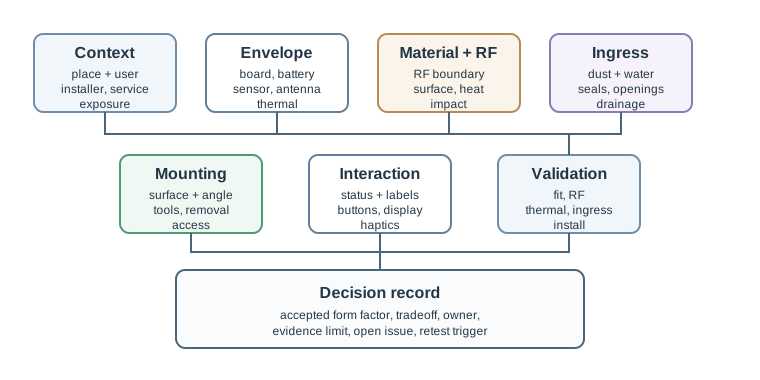
Context names the deployment place, installer, user, service path, and exposure. Envelope and material fields then make room for the board, battery, antenna, sensor, and thermal limits. Ingress and mounting fields ask how seals, openings, surface conditions, and removal will work after installation. Interaction covers the status or controls a person can reach. Keep validation evidence beside these choices so a new material, mounting point, or service opening can be checked against the original constraint rather than approved by appearance alone.
Context: deployment place, installer, user, service path, and exposure. Envelope: board, battery, antenna, sensor, thermal, connector, and assembly constraints. Material and RF: material choice, radio boundary, surface behavior, and accepted tradeoff. Ingress: dust, water, condensation, seal, opening, drainage, and maintenance effect. Mounting: method, surface, tool, orientation, removal, tamper, and service access. Interaction: status, button, display, label, haptic, app handoff, and reset or pairing flow. Validation: fit, RF, thermal, ingress, impact, cleaning, and installation evidence. Decision and change condition: accepted design, owner, known limit, open issue, and condition that requires another review.
13.16 Common Findings
This section: Common Findings — The enclosure is selected before battery, antenna, sensor, and connector constraints are visible.
The enclosure is selected before battery, antenna, sensor, and connector constraints are visible. A metal or dense mounting environment blocks the radio path. Sensor openings are placed where heat, airflow, light, or liquid exposure changes the measurement. The mounting method assumes tools, surface quality, or permissions that installers do not have. The design requires status interpretation that users cannot remember. A battery door, button, cable entry, or sensor opening weakens the protection strategy. Maintenance access is missing from the physical design. Validation evidence comes only from a lab bench, not from the intended orientation or location.
13.17 Review Checklist
This section: Review Checklist — deployment context and user or installer assumptions.
Before accepting a form factor decision, confirm that the record includes:
deployment context and user or installer assumptions. component envelope and physical constraints. antenna, sensor, thermal, connector, and battery evidence. material choice and RF boundary. ingress and environmental protection strategy. mounting method and maintenance access. interaction surfaces and status feedback. validation evidence and known limits. owner, open issue, and change condition.
13.18 Knowledge Check
This section: Knowledge Check
13.19 Matching Quiz
This section: Matching Quiz
13.20 Ordering Quiz
This section: Ordering Quiz
13.21 Summary
This section: Summary — Device form factor is a functional design decision.
Device form factor is a functional design decision. The enclosure, mounting method, material, seals, buttons, LEDs, displays, labels, and service access determine whether the connected device can be installed, can communicate, can survive, and can be maintained.
A strong form factor record connects the physical design to deployment context, component envelope, RF boundary, ingress protection, mounting, interaction, validation evidence, and change conditions.
13.22 Key Takeaway
This section: Key Takeaway — Form factors are UX and reliability decisions: design enclosure, controls, mounting, RF exposure, service access, and validation around the actual deployment context.
Form factors are UX and reliability decisions: design enclosure, controls, mounting, RF exposure, service access, and validation around the actual deployment context.
13.23 Concept Relationships
This section: Concept Relationships — Connected Devices Fundamentals provides the connected-device constraints that shape the form factor.
Connected Devices Fundamentals provides the connected-device constraints that shape the form factor. Power Management explains why battery volume can dominate enclosure size. Connected Devices Lifecycle connects enclosure and mounting decisions to maintenance and field updates. Sensor Fundamentals and Types explains why sensor placement and exposure are part of the physical design record.
13.24 What’s Next
This section: What’s Next — Continue to Connected Devices Fundamentals to review the broader connected-device architecture and constraints behind the form factor decision.
Continue to Connected Devices Fundamentals to review the broader connected-device architecture and constraints behind the form factor decision.
13.25 Continue Your Route
This section: Continue Your Route — This is the last part of this chapter.
This is the last part of this chapter. Return to Device Form Factors: Physical Constraints and Enclosures. See ux-design module index.
Find help
3 reviewed answers.
Where should I start in a module?
Open the module page from the sidebar to see its chapters in order. Use the module map to return to a topic you need.
Modules and pathsReviewed
What can I try when a project does not work?
Check the symptom, then work through the diagnostic steps. Keep the error message and the smallest example that reproduces it.
When you are stuckReviewed
How do interactive examples work?
Use the interactive guide to check how examples and simulations work before changing your project.
Interactive examples guideReviewed