8 IoT Design Facets: Service and Platform
More
Depth: Practitioner
Progress saves as you read. Mark sections complete as you go; your progress appears in the sidebar.
8.1 Start With the Situation
This section: Start With the Situation — Each device surface looks usable alone, but the service crosses screens, people, support records, and hidden platform state.
Each device surface looks usable alone, but the service crosses screens, people, support records, and hidden platform state. The team must test whether those parts agree and whether attention escalates only when action is needed.
8.2 Overview
This section: Overview — This route connects cross-device use to conceptual, service, product, platform, and calm-technology decisions.
This route connects cross-device use to conceptual, service, product, platform, and calm-technology decisions.
This is part 2 of 2. Review IoT Design Facets: Surfaces and Interaction when you need the first route.
8.3 Learning Objectives
This section: Learning Objectives
By the end of this chapter, you will be able to:
- evaluate interusability across surfaces
- test conceptual, service, and platform responsibilities
- apply a calm attention policy
8.4 Interusability
This section: Interusability — Interusability is the experience of moving across connected surfaces.
Interusability is the experience of moving across connected surfaces. A device, phone, web dashboard, gateway, voice interface, installer screen, and support tool should feel like one coherent system where relevant.
Review:
whether the same state has the same name across surfaces. whether changes made on one surface appear on other surfaces clearly enough. whether permissions, ownership, and shared access are understandable. whether each surface has a clear role instead of duplicating everything. whether support can explain what happened without exposing unnecessary private data. whether handoff between user, installer, operator, and support is documented.
Interusability problems often appear as user confusion: “The device says one thing, but the app says another.” That is a design issue, not only a synchronization issue.
Use Figure 8.1 to ask whether one session remains understandable across device surfaces.

The TV offers room scale display, the tablet supports review, the phone gives a quick glance, and the laptop has space for detail. Those surfaces are useful only if status, position, and identity still refer to the same session as the person moves between them. The figure places synced session state above the devices to make that dependency visible. For this facet, review what each surface can show and how a person can tell that the state has followed them.
8.5 Conceptual Model
This section: Conceptual Model — The conceptual model is the product’s explanation of itself.
The conceptual model is the product’s explanation of itself. Users need a reliable way to understand what the system senses, what it infers, what it controls, and when they can intervene.
Review:
- whether the model separates measured state from inferred state
- whether automation is explained in user terms
- whether users can predict likely system behavior
- whether stale, missing, or uncertain data is shown honestly
- whether the model covers shared users, permissions, and ownership
- whether support and documentation use the same explanation as the interface
Weak model: “The device is smart.” Stronger model: “The device estimates room use from recent motion and door events; the estimate may be stale when the link is weak; users can override the status locally.”
8.6 Service Design
This section: Service Design — Service design covers the journey around the product.
Service design covers the journey around the product. For IoT, the service often determines whether the device remains useful after the first setup.
Review:
how users choose, install, pair, and authorize the device. what happens when the product changes owner or location. how maintenance is scheduled, explained, and confirmed. how support diagnoses device, account, permission, connectivity, and update issues. how users recover from lost access or failed setup. how replacement, reuse, transfer, and decommissioning are handled.
Service design should be reviewed before launch, not after support tickets reveal missing flows.
8.7 Productization
This section: Productization — Productization connects the design to a market, audience, promise, and operating model.
Productization connects the design to a market, audience, promise, and operating model. In this review process, product claims should stay evidence-bound and avoid unsupported numbers.
Review:
who the product is for. what problem it promises to solve. what use cases are out of scope. what operating burden the user or organization accepts. what privacy, safety, accessibility, and maintenance assumptions shape the promise. what evidence supports the claim. what tradeoff was accepted and who approved it.
If the product promise depends on platform behavior, service support, or data quality, those dependencies must be visible in the design record.
The path in Figure 8.2 connects a product promise to the way people encounter it.

A value proposition states the benefit; the conceptual model is how a user pictures that benefit; the interaction model is what they do each day to obtain it. The figure then crosses market familiarity with how different the offer is, producing low cost, niche, new type, and new product positions. These are separate checks. A strong price position cannot repair an unclear interaction, and a clear interface cannot prove demand for a new market. Keep the promise, model, and proposed position aligned in the review.
8.8 Platform Design
This section: Platform Design — Platform design is hidden but decisive.
Platform design is hidden but decisive. It includes identity, local behavior, cloud dependency, permissions, telemetry, updates, observability, integrations, security controls, and recovery.
Review:
what works locally and what requires a remote service. who owns device identity, user identity, group access, and reset. what data is collected and why. how updates are staged, verified, explained, and recoverable. what telemetry support needs and what should not be exposed. what happens during weak connectivity, expired credentials, low battery, unavailable cloud, failed update, or stale data. whether platform constraints contradict the product promise.
Platform design should be reviewed as a UX dependency. A platform failure that leaves users confused is still a user experience failure.
8.9 Facet Review Record
This section: Facet Review Record — Use Figure 8.3 to preserve the reason for each design facet decision.
Use Figure 8.3 to preserve the reason for each design facet decision.
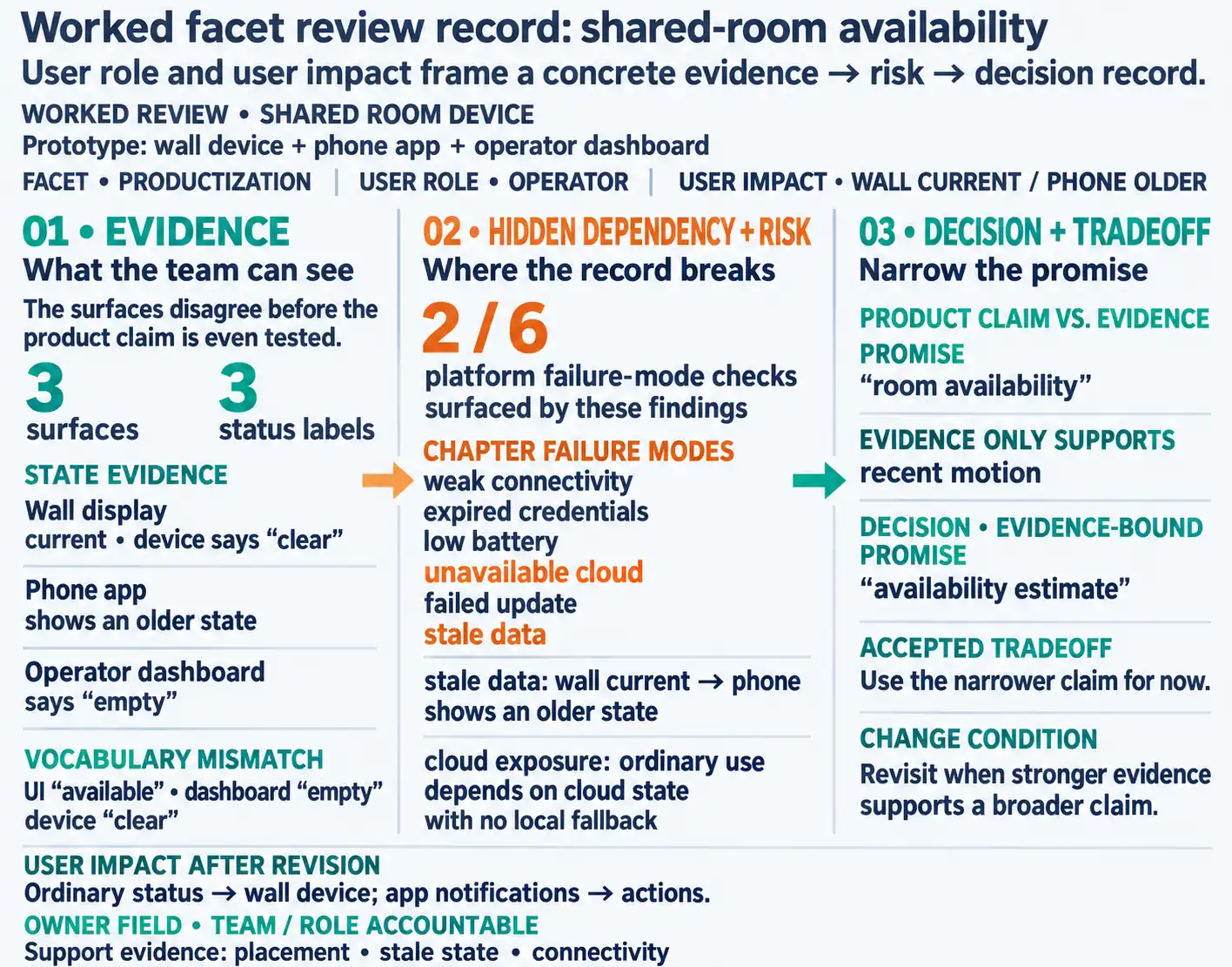
The first fields name the facet, user role, evidence source, and decision. The middle fields ask how that choice affects the user and the rest of the service, so a screen change is not reviewed in isolation from installation or support. The last fields keep the owner and next check visible. Read across the record before accepting a change: if the affected role or evidence is missing, the team cannot tell whether the choice solves the stated problem or merely moves it to another touchpoint.
Facet: which design facet is affected. User role: owner, shared user, installer, operator, maintainer, or support. Evidence: observation, test, pilot, support record, technical validation, or design review. Decision: what will be kept, changed, removed, simplified, or checked again. User impact: what the user sees, does, trusts, or recovers from. Hidden dependency: service, platform, data, update, permission, or support dependency. Risk: privacy, safety, accessibility, security, support, maintenance, reliability, or lifecycle risk. Owner: team or role accountable for the decision. Accepted tradeoff: known limit and reason it is acceptable. Change condition: context, role, platform, service, or product-promise change that reopens the decision.
Calm technology is not minimal UI. It is disciplined attention management:
Peripheral first: routine state should be available at a glance, through ambient cues, summaries, or predictable placement. Interrupt only for action: alerts should interrupt only when the user can or must do something now. Escalate by risk: maintenance, safety, comfort, privacy, and automation failures need different urgency levels. Return to calm: after recovery, the system should explain the result and then reduce attention demand again. Respect shared spaces: sound, light, screen, and mobile notifications should fit the room, role, time, and accessibility need.
Review every facet through this question: does the design ask for the right amount of attention at the right time, from the right person?
Amber Case’s eight principles of calm technology build on Weiser and Brown’s original writing and offer a citable, product-agnostic checklist alongside the five review rules above:
Requires minimal attention to use. Informs without overburdening — state is available, not forced into view. Makes use of periphery — ambient cues such as light, sound, or subtle motion carry routine information. Amplifies the best of technology and humanity without replacing human judgment. Can communicate without speaking — ambient visual or other nonverbal cues can convey status. Works even when it fails — a failed dependency should leave a usable fallback. Uses the minimum technology needed — avoid adding features beyond the problem. Respects social norms — its behavior fits the room, the time, and the people who did not opt in.
A Philips Hue-style ambient cue is a concrete test of the checklist: lights that shift color to reflect outdoor weather satisfy points 1, 3, and 5 because the information sits at the edge of attention instead of arriving as a push notification the user must dismiss. A dismissible phone alert for the same routine weather change interrupts the user and conflicts with points 1, 2, and 3, even though the underlying data is identical — the failure is the needless interruption, not what was sensed.
Use Figure 8.4 to test whether context, system state, and ownership justify the attention level chosen for each product notification.
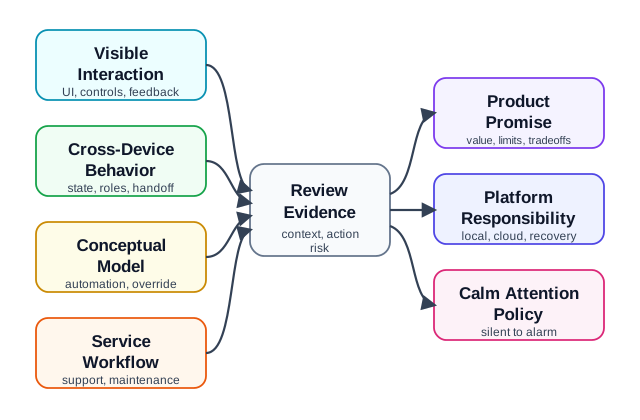
Read Figure 8.4 from user context and system state to the attention rule. These facts decide whether a cue stays at the edge of notice, grows more clear, or stops the user. The cue then crosses product, service, and platform lines. One owner must handle delay, repeats, and loss. The evidence path checks how easy the cue is to notice, when it arrives, who can use it, and how it recovers. A new context rule, risk level, device form, service route, or platform rule reopens the review. The same fact can feel calm on one surface and harsh on another.
8.11 Worked Review: Maintenance Device
This section: Worked Review: Maintenance Device — A maintenance sensor monitors a replaceable part and reports status to a building operator.
A maintenance sensor monitors a replaceable part and reports status to a building operator. The team focuses on a clean dashboard but has not reviewed installation, replacement, or ownership transfer.
Facet findings
UI is clear for normal state but vague during sensor failure. Interaction design lacks a confirmation flow after replacement. Industrial design makes the battery hard to reach after mounting. Interusability differs between operator dashboard and installer tool. Conceptual model does not explain whether status is measured, inferred, or manually scheduled. Service design misses replacement confirmation and failed-maintenance escalation. Productization promises reduced manual checks without evidence of maintenance workflow fit. Platform design lacks clear owner for device reset and update failure.
Revision direction
Add replacement confirmation and stale-state language. Test physical access with the mounted device. Align dashboard and installer labels. Record who owns reset, maintenance confirmation, and support escalation. Review again when the device form, operator workflow, or platform update process changes.
8.12 Common Findings
This section: Common Findings — The team polishes UI while ignoring service and platform dependencies.
The team polishes UI while ignoring service and platform dependencies. The device, app, and dashboard use different labels for the same state. Automation is presented as certainty even when the evidence is inferred or stale. The physical product hides important sensing, privacy, power, or maintenance constraints. Product claims are broader than the evidence. Support cannot diagnose what the user experienced. Ownership transfer, reset, update failure, and decommissioning are missing. Risk checks happen after the design is already framed as complete.
8.13 Review Checklist
This section: Review Checklist — visible state, controls, and physical affordances fit the real context.
Use this checklist before accepting an 8-facet design record:
visible state, controls, and physical affordances fit the real context. user tasks, errors, confirmations, overrides, and recovery are represented. device, app, dashboard, installer, and support surfaces use consistent labels. the conceptual model explains sensing, inference, freshness, permissions, and automation. service workflows cover setup, maintenance, support, transfer, and decommissioning. product promise is evidence-bound and includes non-goals. platform dependencies and local fallback behavior are explicit. privacy, safety, accessibility, support, security, and lifecycle risks are reviewed. owner, accepted tradeoff, open issue, and change condition are recorded.
8.14 Incremental Examples
This section: Incremental Examples
8.14.1 Label Visible Facets
A beginner review can start with a simple leak sensor that has one LED, one mobile card, and one push notification. UI review checks whether “dry,” “wet,” “offline,” and “battery low” are readable and not color-only. Interaction review checks what happens after the user acknowledges an alert. Industrial design checks placement near a pipe, battery-door reach, reset access, and whether water exposure is obvious. This pass does not yet prove support workflow, cloud outage behavior, or lifecycle ownership.
8.14.2 Keep Room State in Sync
A shared-room availability product needs interusability and conceptual-model review. The wall display, mobile app, operator dashboard, installer tool, and support console should use the same state vocabulary for occupied, available, reserved, stale, offline, and manual override. MQTT retained state, device-shadow reported state, last-seen timestamps, room assignment, gateway id, and support correlation id should explain why one surface shows a different state. If the system only observes motion, the product promise should say “availability estimate” until door, reservation, or manual-confirmation evidence supports a stronger claim.
8.14.3 Review Service Ownership
A campus deployment needs service, productization, and platform evidence before the visible design can be accepted. BLE or QR onboarding, Matter or Home Assistant integration, account roles, SSO/SCIM provisioning, installer permissions, firmware OTA state, device transfer, decommissioning, support logs, telemetry retention, and local fallback all affect the user experience. The review should name who owns the product promise, who can change notification policy, who sees support evidence, and what platform condition reopens the design decision.
8.15 Try It Now
This section: Try It Now
Choose an IoT product you know and write a one-row facet review:
| Field | Your answer |
|---|---|
| User role and task | Owner, shared user, installer, operator, maintainer, or support action. |
| Visible facets | UI, interaction, and physical design issue that affects the task. |
| Bridge facets | Interusability or conceptual-model issue across device, app, dashboard, or support. |
| Hidden facets | Service, productization, or platform responsibility that makes the experience succeed or fail. |
| Change condition | New context, product promise, platform behavior, or support signal that should reopen the decision. |
8.17 Concept Check: Eight-Facet Approval
This section: Concept Check: Eight-Facet Approval
8.18 Concept Check: Match Facets to Evidence
This section: Concept Check: Match Facets to Evidence
8.19 Concept Check: Order the Facet Review
This section: Concept Check: Order the Facet Review
8.20 Summary
This section: Summary — The 8 facets of IoT design keep review work broad enough to catch problems that a screen-only or hardware-only review misses.
The 8 facets of IoT design keep review work broad enough to catch problems that a screen-only or hardware-only review misses. UI, interaction, and industrial design shape first use, while interusability, conceptual model, service design, productization, and platform design determine whether the product remains understandable and supportable.
Use the facet record to make each decision traceable to evidence. The review should preserve user role, evidence, decision, user impact, hidden dependency, risk, owner, accepted tradeoff, and change condition.
8.21 Key Takeaway
This section: Key Takeaway — IoT design facets should be reviewed together because attention, context, autonomy, feedback, privacy, and maintenance trade off in use.
IoT design facets should be reviewed together because attention, context, autonomy, feedback, privacy, and maintenance trade off in use.
8.22 See Also
This section: See Also — Calm Technology Attention Policy applies attention policy and calm behavior across the facet stack.
Calm Technology Attention Policy applies attention policy and calm behavior across the facet stack. Design Thinking for IoT supplies the field evidence and testing cycles that validate facet decisions. IoT Architecture Model Selection helps align platform responsibilities with architecture boundaries. IoT Design Patterns and Components provides implementation options after the facet risks and responsibilities are known. Understanding People and Context supplies the user context needed to review service and conceptual-model decisions.
8.23 What’s Next
This section: What’s Next — Continue to Design Model for IoT to review how architecture, facets, design thinking, and implementation patterns fit together across the design-model chapter series.
Continue to Design Model for IoT to review how architecture, facets, design thinking, and implementation patterns fit together across the design-model chapter series.
Find help
3 reviewed answers.
Where should I start in a module?
Open the module page from the sidebar to see its chapters in order. Use the module map to return to a topic you need.
Modules and pathsReviewed
What can I try when a project does not work?
Check the symptom, then work through the diagnostic steps. Keep the error message and the smallest example that reproduces it.
When you are stuckReviewed
How do interactive examples work?
Use the interactive guide to check how examples and simulations work before changing your project.
Interactive examples guideReviewed