21 Device Communication: Direct Links
More
Depth: Practitioner
Progress saves as you read. Mark sections complete as you go; your progress appears in the sidebar.
21.1 Start With the Decision
This section: Start With the Decision — If a product needs a nearby phone, tell users when it needs that phone.
If a product needs a nearby phone, tell users when it needs that phone. Also say what still works when the phone is gone.
21.2 Route Overview
This section: Route Overview — This is part 2 of 2.
This is part 2 of 2. Review Device Communication: Pattern Selection for the preceding evidence.
21.3 Learning Objectives
This section: Learning Objectives
- Test direct communication with a concrete scenario and pass criteria.
- Trace try it: audit a communication path claim across its components and failure boundaries.
21.4 Chapter Roadmap
This section: Chapter Roadmap
- Direct Communication
- Hub-And-Spoke Communication
- Mesh Communication
- Cloud-Mediated Communication
- Hybrid Topologies
- Failure Modes And User Feedback
- Setup And Mental Model
- Communication Pattern Readiness Record
- Connected System Review Gate
- Worked Review: Apartment Door Sensor
- Building Lighting Retrofit
- Common Findings
- Review Checklist
- Knowledge Check
- Matching Quiz
- Ordering Quiz
- Try It: Audit a Communication Path Claim
- Summary
- Key Takeaway
- Concept Relationships
- What’s Next
21.5 Direct Communication
This section: Direct Communication — Direct communication links two nearby participants without a central coordinator in the primary command path.
Direct communication links two nearby participants without a central coordinator in the primary command path. Examples include a phone commissioning a device over a local link, a sensor reporting to a nearby controller, or a device accepting a local maintenance command.
Review:
whether the direct link is for setup, everyday control, diagnostics, emergency recovery, or data transfer. whether both participants must be awake, nearby, paired, authorized, and using compatible versions. what the user sees while discovery, pairing, authentication, and command acknowledgement happen. what happens when the phone leaves, a device sleeps, the link is weak, or credentials expire. whether the direct path bypasses cloud policy, logging, support visibility, or access controls. whether the direct path is a fallback or the main product experience.
Direct communication can feel immediate when it works, but it can also create setup friction and unclear responsibility. A product that depends on a nearby phone should explain when the phone is required and what continues without it.
The paths in Figure 21.1 show what a direct device link can and cannot promise.
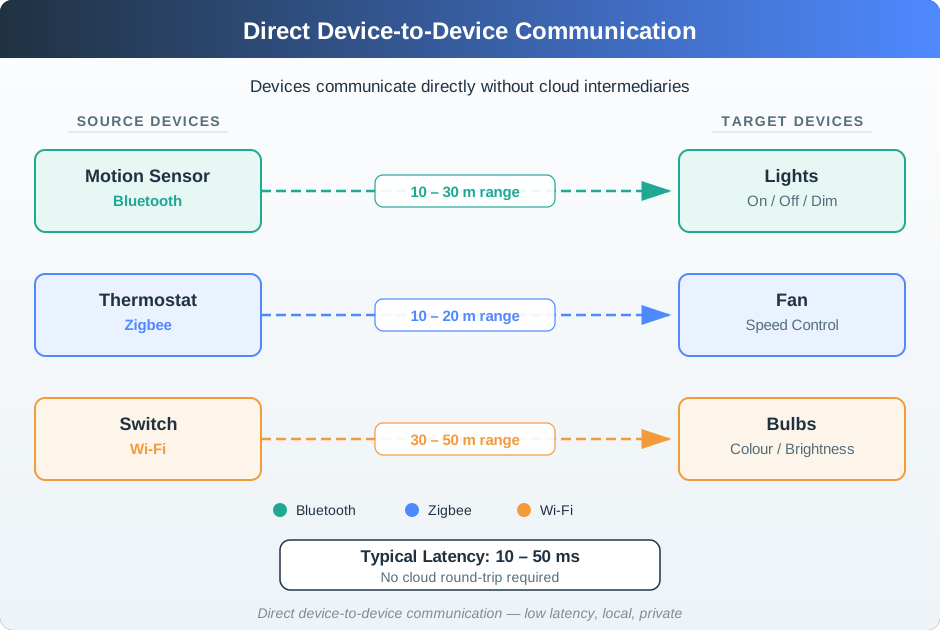
A motion sensor can reach lights, a thermostat can reach a fan, and a switch can reach bulbs without a cloud round trip. The radio labels and ranges make each link a separate installed context check, not one universal distance guarantee. Local control can reduce delay and keep a simple action near its source. The review still needs to name who owns the resulting state and what the person sees when the direct link is out of range or the target cannot act.
21.6 Hub-And-Spoke Communication
This section: Hub-And-Spoke Communication — A hub-and-spoke pattern routes devices through a local hub, gateway, bridge, or controller.
A hub-and-spoke pattern routes devices through a local hub, gateway, bridge, or controller. The hub can coordinate automation, translate protocols, keep local state, and offer a single control point.
Review:
which devices depend on the hub for commands, state, automation, logging, or updates. whether automation rules run locally, in the cloud, or in a mixed path. whether the hub stores enough state to operate during internet loss. what device behavior remains available if the hub is offline, rebooting, updating, or full. whether setup creates a clear relationship between room, device, hub, account, and user role. whether support can distinguish device failure from hub failure, network failure, and cloud failure.
Hub-and-spoke is often easier for users to understand because there is a visible coordinator. It also concentrates risk. The review should name the single point of failure and the intended fallback before deployment.
Use Figure 21.2 to locate the hub’s control and state responsibilities.
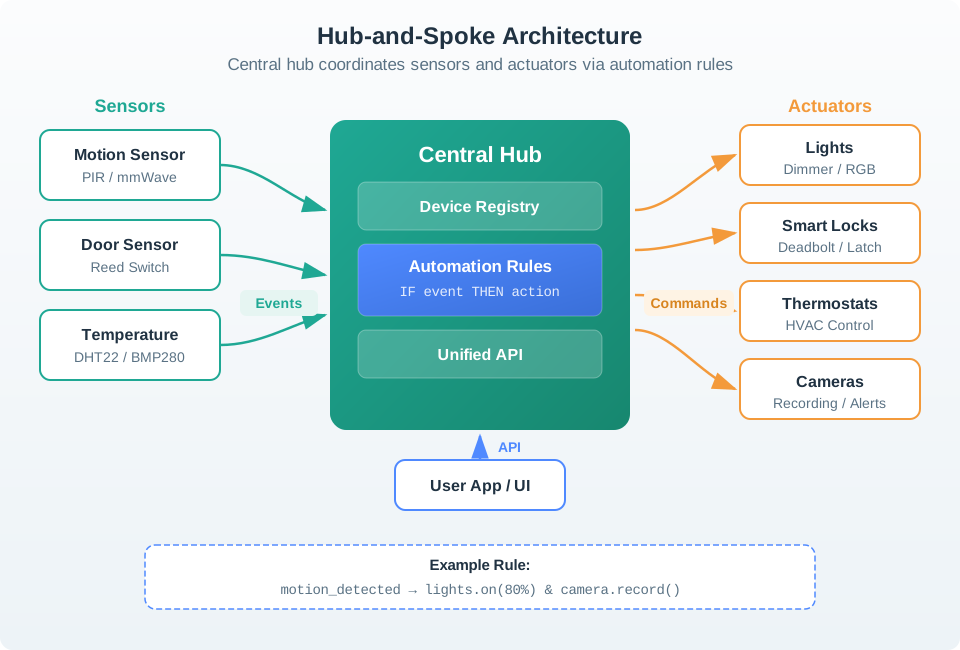
Sensors send events to the central hub, where the device registry and automation rules decide which action to request. Commands then go to lights, locks, thermostats, or cameras, while the app reaches the hub through its API. This layout can give several device types one rule path, but it also places a decision boundary at the hub. Check how the rule reports success, what state the app shows, and what happens if a sensor, target, or hub is unavailable.
21.7 Mesh Communication
This section: Mesh Communication — A mesh pattern allows some nodes to relay messages for others.
A mesh pattern allows some nodes to relay messages for others. It is useful when range, obstruction, or coverage would make every endpoint communicating directly to one gateway unreliable.
Review:
which nodes are allowed to route traffic and whether they have stable power. whether endpoints can sleep without being expected to relay messages. how the system chooses a route, detects a failed route, and recovers. what users see while the network heals, rejoins, or rebuilds routes. whether installers can see weak links, isolated nodes, crowded channels, and repeated retries. whether a physical change, such as moving a router node, invalidates the previous coverage evidence.
Mesh networking should not be treated as automatic reliability. A mesh is only as useful as its installed routing nodes, commissioning process, monitoring, and maintenance practice.
Range claims are easy to make from a node count and hard to defend after a router fails. Figure 21.3 gives a concrete failure path to inspect before treating a mesh as self-healing.
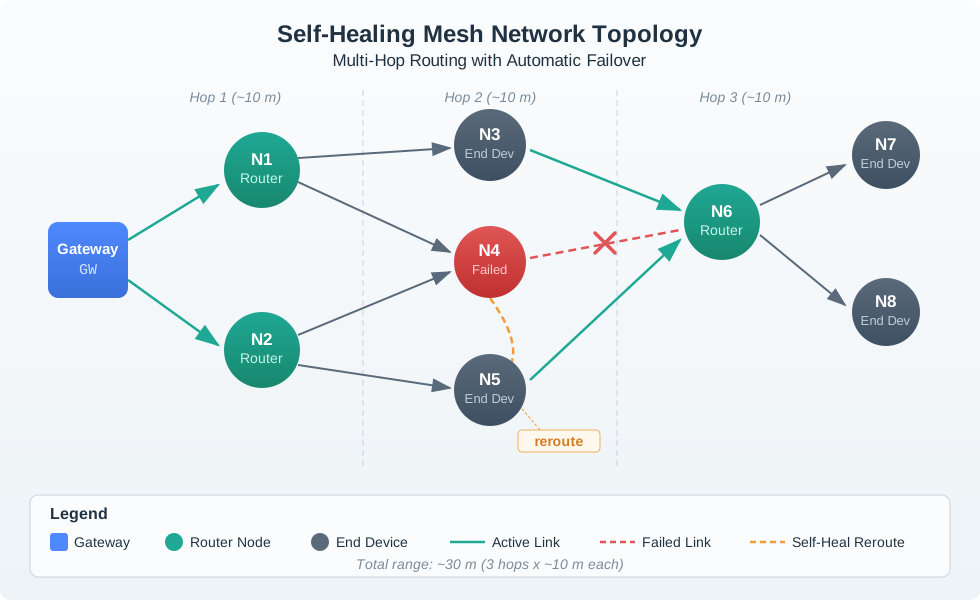
In Figure 21.3, the ordinary three-hop route leaves Gateway GW through router N1 and reaches end devices beyond N3. The red N4 Failed node breaks one link, but the dashed reroute bends through powered router N6 instead of asking sleeping end device N5 to relay. The stated total range of about 30 m therefore depends on router placement and an alternate path, which is exactly why commissioning evidence must include failure recovery rather than coverage alone.
21.8 Cloud-Mediated Communication
This section: Cloud-Mediated Communication — Some products route commands, state, and automation through a cloud service even when devices are physically nearby.
Some products route commands, state, and automation through a cloud service even when devices are physically nearby. Cloud mediation can support remote access, account policy, fleet monitoring, integration, and cross-site management.
Review:
which actions require internet connectivity and which work locally. whether cloud round trips affect controls that users expect to feel immediate. how credentials, account ownership, sharing, and revocation affect local devices. what state is cached locally and what state is authoritative in the cloud. whether outage messages tell users what is unavailable and what still works. whether logs support support teams without exposing unnecessary data.
Cloud mediation is not wrong, but hidden cloud dependency creates poor UX. Local controls, safety functions, and recovery paths should be explicit when they exist.
21.9 Hybrid Topologies
This section: Hybrid Topologies — Most real IoT systems are hybrid.
Most real IoT systems are hybrid. A battery sensor may send to a nearby router, routers may form a mesh, a gateway may run local automations, and the gateway may synchronize with the cloud for remote access and fleet management.
Review each layer separately:
- Endpoint to nearby infrastructure: power budget, wake schedule, acknowledgements, retry behavior, and user-visible status.
- Local infrastructure: hub, router, bridge, gateway, automation engine, local logs, and local fallback.
- Remote services: account, backup, sharing, analytics, update service, remote control, and support tools.
- Human workflow: installer setup, user control, technician replacement, ownership transfer, and decommissioning.
A hybrid system needs a plain-language operating model. Users and support staff should know which parts work locally, which parts need the cloud, and what to do when a path is degraded.
21.10 Failure Modes And User Feedback
This section: Failure Modes And User Feedback — Communication failures become UX failures when the product hides the cause or suggests the wrong action.
Communication failures become UX failures when the product hides the cause or suggests the wrong action.
Common failure modes:
command sent but not acknowledged. device online in the app but unreachable locally. local automation works but remote control does not. remote control works but local manual control is delayed. mesh route heals slowly after a router node is unplugged. endpoint sleeps while the user expects immediate status. hub is online but its protocol bridge is offline. cloud state disagrees with the device’s actual state. account transfer leaves a device paired to the wrong owner.
Review the message shown to users, the log shown to support, and the recovery path. “Device offline” is often too vague. Better evidence distinguishes power, local link, hub, gateway, internet, cloud service, account permission, and device firmware state when that distinction is available.
21.11 Setup And Mental Model
This section: Setup And Mental Model — The communication pattern shapes onboarding.
The communication pattern shapes onboarding. A user may think they are adding “a light,” while the system is actually commissioning a radio endpoint, binding it to a hub, assigning it to a room, authorizing account access, and creating automations.
Review:
whether setup uses terms the user can verify in the physical world: room, device name, indicator, button, label, or QR code. whether the app explains when a hub, phone, account, or internet connection is required. whether discovery results avoid duplicate, stale, or ambiguous devices. whether the product verifies that the right device was added. whether the user can recover from failed pairing without factory reset as the first answer. whether ownership transfer removes old credentials and preserves appropriate local function.
A good setup flow hides unnecessary protocol detail but does not hide required dependencies.
21.12 Communication Pattern Readiness Record
This section: Communication Pattern Readiness Record — The mesh example in Figure 21.4 asks for failure evidence before accepting coverage.
The mesh example in Figure 21.4 asks for failure evidence before accepting coverage.
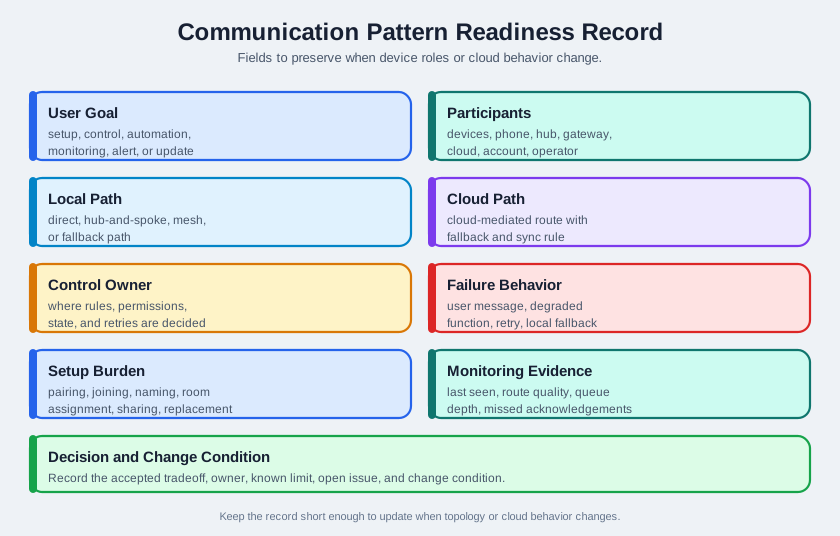
The normal route reaches an end device through several hops, but an average hop distance is not a measurement of every radio link. The failed N4 route is the stronger check: N6 must be a powered router that can carry the reroute, while a sleeping end device cannot take that job. Compare the measured path before and after the fault. The record should say which link failed, whether the command or telemetry still arrived, and what the user or operator observed during recovery.
User goal: setup, control, automation, monitoring, alert, update, diagnosis, or recovery. Participants: devices, phone, hub, router, gateway, cloud, dashboard, account, operator, and third-party systems. Paths: direct, hub-and-spoke, mesh, cloud-mediated, and fallback paths. Control owner: where rules, permissions, state, logs, and retries are decided. Failure behavior: user message, degraded function, retry rule, local fallback, manual action, and support evidence. Setup burden: pairing, joining, naming, room assignment, account ownership, sharing, and replacement. Monitoring evidence: last seen, route quality, queue depth, missed acknowledgements, error class, and recovery record. Decision and change condition: accepted tradeoff, owner, known limit, open issue, and change condition.
The record should remain short enough to update when device roles, gateway firmware, account policy, topology, installation layout, protocol bridge, or cloud behavior changes.
Before choosing a communication pattern, review the whole connected experience:
Outcome: what user or operator outcome requires devices to be connected? Coupling: which devices, apps, services, and people must coordinate, and which should stay independent? Connection contract: what is paired, discovered, authenticated, authorized, and remembered? Decision ownership: which layer makes the local, hub, cloud, or user-facing decision when data conflicts? Recovery path: what does the user see, do, and trust when setup, connectivity, consent, or support fails?
The pattern is ready for implementation only when the communication path, decision owner, failure feedback, and support owner are all visible.
21.13 Worked Review: Apartment Door Sensor
This section: Worked Review: Apartment Door Sensor — A battery door sensor reports open and closed state to a phone app through a local hub.
A battery door sensor reports open and closed state to a phone app through a local hub. The user expects status to be accurate, alerts to arrive promptly, and manual inspection to remain possible.
Communication evidence to request
- sensor wake, report, acknowledgement, retry, and sleep behavior
- hub dependency for local automation and remote notifications
- behavior during internet loss, hub reboot, low battery, and weak link
- user-facing messages for stale state, missed acknowledgement, and low battery
- support evidence that separates sensor power, local radio, hub, internet, cloud, and account issues
- replacement and re-pairing path that preserves the room and automation record
Likely review action
Hold the decision if the app shows only “closed” without age, confidence, or last-seen evidence. A stale door state can be more harmful than no state because it encourages false confidence.
Change condition
Repeat the review when the hub model, firmware, radio placement, battery type, alert policy, sleep schedule, ownership flow, or cloud notification path changes.
21.14 Building Lighting Retrofit
This section: Building Lighting Retrofit — A retrofit project adds connected switches and occupancy sensors across many rooms.
A retrofit project adds connected switches and occupancy sensors across many rooms. Users expect wall controls to work immediately, facility staff expect central schedules, and support needs a way to locate weak rooms.
Communication evidence to request
- which controls work locally if the internet connection is down
- whether automations run in the hub, gateway, controller, or cloud
- which powered nodes act as routers and which battery nodes are endpoints only
- route-health evidence after installation, not only in a bench test
- behavior when a router switch is removed, replaced, or moved
- installer workflow for naming rooms and verifying the correct physical device
- support workflow for identifying weak links, duplicate devices, and stale state
Likely review action
Approve a hybrid pattern only if local wall control remains responsive, central scheduling has a clear fallback, and support can see whether failures are route, device, gateway, or cloud problems.
Change condition
Repeat the review when rooms are reconfigured, powered nodes are replaced, firmware changes routing behavior, schedules move between local and cloud execution, or monitoring evidence changes.
21.15 Common Findings
This section: Common Findings — The pattern is named by protocol instead of by actual command and state paths.
The pattern is named by protocol instead of by actual command and state paths. Local control is claimed but automation rules depend on the cloud. A hub is required but the setup flow presents it as optional. A mesh expects battery endpoints to relay traffic. Device state in the app has no age, confidence, or last-seen evidence. A direct setup path bypasses ownership, logging, or support records. The support view cannot distinguish power, radio, hub, internet, cloud, and account failures. Retrying hidden commands creates duplicate actions or confusing delayed behavior. Replacing a hub or router node breaks automations because identity and room mapping are not preserved. The record lacks an owner, known limit, open issue, or change condition.
21.16 Review Checklist
This section: Review Checklist — user goal, participants, paths, and control owner.
Before accepting a communication pattern, confirm that the record includes:
user goal, participants, paths, and control owner. what works locally and what requires a phone, hub, account, internet connection, or cloud service. direct, hub-and-spoke, mesh, cloud, and fallback paths when each applies. route, acknowledgement, retry, queueing, sleep, and recovery behavior. user-facing status for pending, failed, stale, degraded, and recovered states. setup, replacement, ownership transfer, and decommissioning workflows. support evidence for power, local link, hub, gateway, internet, cloud, account, and firmware failures. accepted tradeoff, owner, known limit, open issue, and change condition.
21.17 Knowledge Check
This section: Knowledge Check
21.18 Matching Quiz
This section: Matching Quiz
21.19 Ordering Quiz
This section: Ordering Quiz
Choose one connected product claim such as “works locally,” “uses mesh,” or “keeps automations running during outages.” Build a six-line audit record before accepting the claim:
User outcome: the command, status, alert, automation, or maintenance action the pattern must support. Participants and paths: the device, app, hub, router, gateway, cloud, account, and fallback path involved. Decision owner: where rules, permissions, authoritative state, acknowledgements, retries, and logs are decided. Outage behavior: what still works if the phone leaves, the hub restarts, the internet fails, or the cloud is delayed. Support evidence: the signal that separates power, radio, hub, gateway, internet, cloud, account, and firmware failures. Change condition: the topology, firmware, account-policy, installation, or ownership change that would invalidate the record.
Finish with one sentence: “Accept,” “accept with known limit,” or “hold,” and name the missing evidence if the decision is not ready.
21.20 Summary
This section: Summary — Device communication patterns are product decisions, not only network diagrams.
Device communication patterns are product decisions, not only network diagrams. Direct, hub-and-spoke, mesh, cloud-mediated, and hybrid paths each change setup effort, responsiveness, power use, privacy, failure behavior, and support evidence.
The strongest reviews avoid generic protocol claims. They show who talks to whom, where decisions run, what works locally, what requires the cloud, how users recover, how support diagnoses failures, and what change requires review.
21.21 Key Takeaway
This section: Key Takeaway — Communication patterns should match user intent, data timing, reliability needs, failure recovery, privacy, and cross-device visibility.
Communication patterns should match user intent, data timing, reliability needs, failure recovery, privacy, and cross-device visibility.
21.22 Concept Relationships
This section: Concept Relationships — The Connected System Review Gate frames communication as part of the user’s connected-device experience.
The Connected System Review Gate frames communication as part of the user’s connected-device experience. Device Discovery and Pairing expands the setup and trust-establishment part of the pattern. Ecosystem Integration reviews multi-vendor and account-level integration after communication paths are clear. Connected Devices - Power Management reviews power effects created by awake windows, retries, routing, and cloud synchronization. Layered Network Models explains the lower-level network layers behind these product choices.
21.23 What’s Next
This section: What’s Next — Continue to Ecosystem Integration to review how multi-vendor services, account models, and ecosystem rules build on the communication paths accepted here.
Continue to Ecosystem Integration to review how multi-vendor services, account models, and ecosystem rules build on the communication paths accepted here.
21.24 Continue Your Route
This section: Continue Your Route — This is the last part of this chapter.
This is the last part of this chapter. Return to Device Communication: Pattern Selection. See ux-design module index.
Find help
3 reviewed answers.
Where should I start in a module?
Open the module page from the sidebar to see its chapters in order. Use the module map to return to a topic you need.
Modules and pathsReviewed
What can I try when a project does not work?
Check the symptom, then work through the diagnostic steps. Keep the error message and the smallest example that reproduces it.
When you are stuckReviewed
How do interactive examples work?
Use the interactive guide to check how examples and simulations work before changing your project.
Interactive examples guideReviewed