18 Device Pairing: Discovery Decisions
More
Depth: Practitioner
Progress saves as you read. Mark sections complete as you go; your progress appears in the sidebar.
18.1 Start With the Decision
This section: Start With the Decision
18.2 Route Overview
This section: Route Overview — This is part 1 of 2.
This is part 1 of 2. Continue with Device Pairing: Trust and Recovery.
18.3 Part Objectives
This section: Part Objectives
- Choose a defensible design using check your pairing decision.
- Validate discovery, authority, credentials with a concrete scenario and pass criteria.
18.4 Chapter Roadmap
This section: Chapter Roadmap
- Pair the Right Door Lock
- Start Simple
- In 60 Seconds
- Check Your Pairing Decision
- Minimum Viable Understanding
- Prerequisites
- Overview: Pairing Is a Chain of Trust
- Review Installed Setup Paths
- Discovery, Authority, Credentials
18.5 Pair the Right Door Lock
This section: Pair the Right Door Lock — Imagine a tired person must add the right door lock to a shared home at night.
Imagine a tired person must add the right door lock to a shared home at night. The setup must prove the device, the person, the grant, and the way back after a mistake. Pairing the lock is a claim about identity and permission, not just a successful radio exchange. The resident must select the correct physical lock, prove the setup request, grant only the intended home access, and have a way to recover from a mistaken or interrupted setup.
18.5.1 Check Identity and Permission
- How does the resident distinguish this lock from nearby candidates?
- What fresh step proves the lock and the resident are present?
- Which account and rights will the setup grant?
- What receipt or reset path handles a wrong or failed bind?
Keep the physical label or code, setup window, account role, granted rights, and completion receipt together. A discovered radio identifier alone is not proof that the right household has taken ownership.
18.5.2 When Discovery Is Not Proof
Finding a device establishes a candidate for setup, rather than confirming identity, ownership or permission. A protocol name therefore provides limited evidence about the installed experience. Review what the person can verify at the device: its physical mark or code, the active setup window, and the account and rights that pairing will create.
Test how the chosen product handles wrong-device selection, interrupted setup, retries and delegated installation. If contact is lost halfway through, the interface should reveal whether ownership changed before presenting a recovery action. After completion, show the owning household and available controls. Keep discovery, possession checks, credential binding and role assignment distinguishable in the records, so users and support can locate an incomplete step and understand the recovery path.
18.5.3 Before Confirming the Pairing
Before confirming the lock, compare the on-device mark with the candidate shown in the app. After setup, show which household owns it and which controls are available. If the app loses contact halfway through, reveal whether ownership changed before offering retry or reset.
18.5.4 Use a Calm Review at the Hard Moment
A sound design still has to work on a bad day. The user may be tired. The room may be loud or dark. A device may be low on power. A link may come and go. Two records may reach the screen in the wrong order. The first view should show what happened, when it happened, and what is known now. It should not make the user decode a long list before taking a safe step.
Use a short review. Is this the right device? Is this the right place? Is the time clear? Is the source healthy? Is the result within its stated range? Is a key input absent? Did an old rule shape the result? Can the user ask for help? Can the system fall back to a safe state? Will the record help a later review? Each answer should be easy to find.
18.5.5 Keep Trust Tied to Proof
Trust grows when the system admits its bounds. Show when a value is old. Show when a source is weak. Show when the system has changed modes. Keep raw proof long enough for the right review. Give people a way to correct a bad state. Test the hard path as well as the happy path. Retest after a change to the device, site, rule, link, or owner.
The simple story is not a claim that the work is simple. It is a way to place each hard fact in the right order. Start with the human need. Move through the source and the check. End with an owned act and a clear limit. Then use the deeper sections for the maths, rare faults, and design detail that the case needs.
18.6 Start Simple
This section: Start Simple — Discovery and pairing are the first trust ceremony for many IoT products.
Discovery and pairing are the first trust ceremony for many IoT products. Start with the person holding the device, the proof that identifies the right thing, the credential boundary, the permission being granted, and the recovery path when setup fails or ownership changes.

UX Uma
“If a tired person at 2am can’t use it, the feature doesn’t exist yet — design for the worst moment, not the demo.”
Through this chapter, Uma tests each proof step at 2am: can a tired, gloved person still tell which device is theirs, and recover when it fails?
18.7 In 60 Seconds
This section: In 60 Seconds — Discovery is how a product finds candidate devices.
Discovery is how a product finds candidate devices. Pairing is how it proves the selected device is the right one, binds credentials, assigns permissions, and remembers the relationship for later use.
The UX review question is not “which discovery protocol is implemented?” The useful question is whether the setup flow helps a user identify the correct physical device, confirm authority, recover from failure, and understand what account, network, hub, or cloud dependency was created.
18.8 Learning Objectives
This section: Learning Objectives
By the end of this chapter, you will be able to:
- separate discovery, identification, proof of possession, credential binding, authorization, and recovery
- review discovery results for ambiguity, stale devices, privacy exposure, and setup burden
- explain how pairing methods affect security, accessibility, support, and ownership transfer
- identify what users and support teams need when pairing fails or a device is already owned
- write a discovery-and-pairing record with accepted limits, owners, and change conditions
18.9 Minimum Viable Understanding
This section: Minimum Viable Understanding — Avoid treating discovery as a purely technical scan.
A setup flow is reviewable only when it names what is being discovered, how the user confirms the right physical device, how the device proves possession, what credentials are created, what permissions are granted, and how failed, duplicate, or transferred devices recover.
Avoid treating discovery as a purely technical scan. A scan result that lists several similar devices can still be a poor experience if the user cannot tell which one is in their hand, room, machine, vehicle, or customer site.
Use Figure 18.1 to separate finding a nearby device from trusting it.
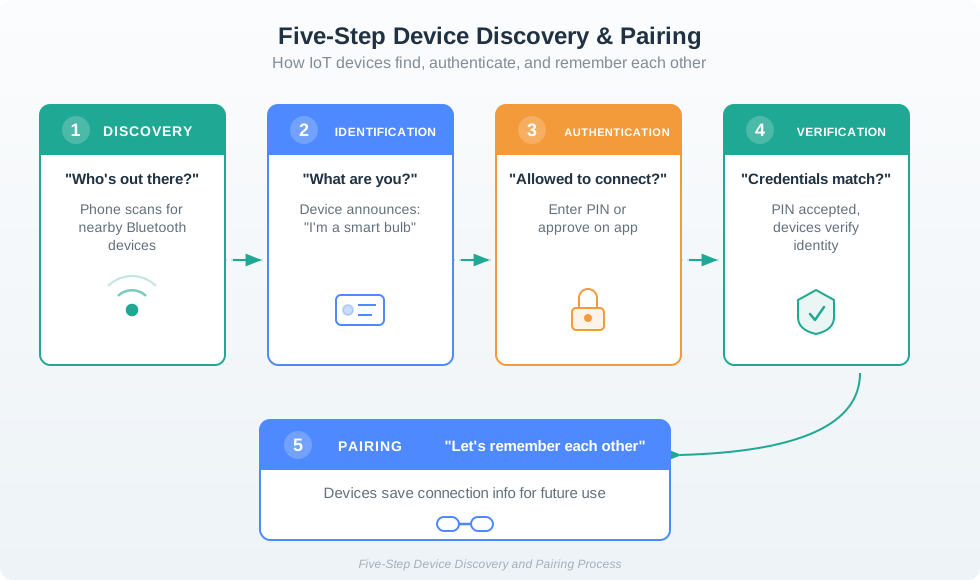
Discovery lets the phone notice a nearby Bluetooth candidate. Identification gives the candidate a claimed type, such as a smart bulb, but that announcement does not grant control. Authentication asks whether the person is allowed to connect, and verification checks the PIN or other proof before the devices save connection details. Pairing is the last step, not the first. The sequence helps reviewers locate a failure: a device can be visible in a scan yet still fail the proof or credential step.
18.10 Prerequisites
This section: Prerequisites
This chapter builds on:
- Device Communication Patterns, which explains the paths devices use after they are connected.
- Connected Device Fundamentals, which defines device role, boundary, and evidence.
- Device Lifecycle Management, which reviews provisioning, transfer, update, maintenance, and decommissioning.
- Privacy and User Consent, which reviews permission, notice, and user control.
18.11 Overview: Pairing Is a Chain of Trust
This section: Overview: Pairing Is a Chain of Trust — Discovery and pairing are not one step.
Discovery and pairing are not one step. A product first discovers candidates, then helps the user identify the correct physical device, proves possession or authority, creates credentials, assigns permissions, and stores enough state to recover later. A smooth setup screen is weak if any link in that chain is ambiguous.
That chain matters because discovery evidence is often weaker than users assume. A BLE advertisement, Wi-Fi SoftAP name, mDNS service record, hub inventory item, or cloud registry entry can show that a candidate exists, but it does not prove the person selected the right device or has authority to bind it. The review should ask what the user can see, touch, scan, hear, or verify at the installed location.
Good pairing UX makes the hidden relationship visible. It explains when the device is only nearby, when possession has been checked, when a credential has been created, when a role has been granted, and when the setup can be safely retried or transferred. Without that separation, users can end up with duplicate devices, old owners retaining access, cloud records without local joins, or local joins that support cannot diagnose.
Discovery: the scan finds candidates through BLE, Wi-Fi, mDNS/DNS-SD, a hub inventory, a cloud registry, or a typed code. Proof: the flow uses a QR label, setup PIN, button press, NFC tap, display code, work order, or ownership release to avoid binding the wrong device. Binding: the system stores keys, tokens, certificates, network credentials, hub membership, account links, roles, and revocation paths. Recovery: the product records enough state to retry, roll back, transfer ownership, revoke stale access, or escalate with useful support evidence.
18.12 Review Installed Setup Paths
This section: Review Installed Setup Paths — Review the deployed pairing path, not only the protocol name.
Review the deployed pairing path, not only the protocol name. Matter, Thread, Zigbee, BLE, Wi-Fi, LoRaWAN, and cellular products can all have strong or weak setup experiences depending on labels, ownership checks, retries, account rules, and support visibility.
Start with one installed workflow and trace it as the person in the field experiences it. A resident scanning a smart lock, a maintenance worker replacing a thermostat, a technician commissioning a LoRaWAN sensor, and a lab student adding a gateway all need different proof, delegation, and recovery paths. The review should include the physical label, setup window, account role, network credential path, gateway or cloud dependency, and what the UI says when any one of those pieces fails.
- Map how candidates appear. Record whether candidate discovery uses BLE advertisements, Wi-Fi SoftAP, Wi-Fi Easy Connect/DPP, mDNS/DNS-SD, Matter setup payloads, observed Zigbee join attempts, LoRaWAN join requests carrying DevEUI/JoinEUI, a gateway list, or a fleet registry. Record Zigbee install codes and LoRaWAN AppKey separately as joining credentials, not discovery signals.
- Map how the user selects the right device. Check QR placement, serial labels, NFC tags, blink or sound confirmation, display codes, signal-strength hints, site asset tags, room names, and duplicate handling.
- Map how the relationship can change. Test expired setup windows, failed joins, wrong-device selection, app permission denial, offline gateways, factory reset, ownership transfer, credential rotation, and old-owner revocation.
The strongest review evidence comes from failure cases. Ask support to show the logs or screens that distinguish “not found,” “nearby but not authorized,” “already owned,” “pairing window closed,” “network join failed,” “account bind failed,” and “credential revoked.”
Also check the recovery burden on the person doing setup. If the flow asks for a factory reset, confirm what credentials, calibration, history, automation membership, and warranty state are lost. If it supports transfer, confirm whether old access is revoked before or after the new owner binds the device. If it supports installer delegation, confirm whether the installer receives a temporary role instead of permanent owner authority. The accepted record should name the owner of each unresolved tradeoff.
Document the support evidence while testing, not after launch. Useful records include candidate id, visible label, setup-code type, app permission state, gateway id, account id, role assigned, firmware version, join result, rollback result, revocation result, and a correlation id that links app, hub, device, and cloud logs.
18.13 Discovery, Authority, Credentials
This section: Discovery, Authority, Credentials — Discovery can suggest proximity, but proximity is not ownership.
Discovery can suggest proximity, but proximity is not ownership. BLE advertising, mDNS service discovery, Wi-Fi SoftAP names, Zigbee permit-join mode, and LoRaWAN join attempts can reveal that a device is nearby or ready, but a product still needs a separate authority check before it grants durable access.
Modern commissioning flows separate transport setup from trust setup. Matter uses setup payloads and commissioning windows, then establishes session security and fabric membership. Thread devices authenticate with a commissioner and receive network credentials during joining; on-mesh commissioning does not require a border router. Zigbee products may use install codes or touchlink-style flows. LoRaWAN OTAA uses device and join identities with keys managed outside the phone UI. These details shape what can be recovered, transferred, revoked, or inspected.
Use Figure 18.2 to separate the Matter states that a single “pairing” spinner can hide. The graphic lists discovery, PASE, device information, network configuration, certificate installation, and access-control topics around a QR scan; use the prose below to check the actual order and missing attestation step.
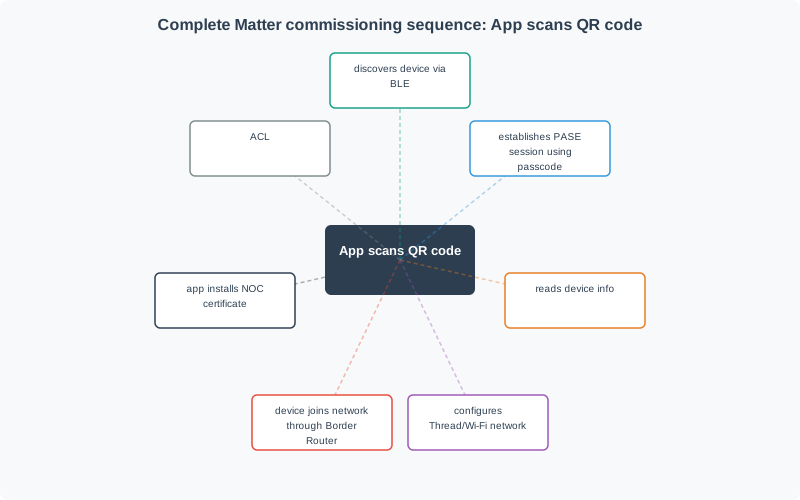
Discovery alone does not establish operational membership or access rights; the pictured topics need a separate ordered commissioning trace to show those transitions. A device can therefore be found without being authorized, or joined without the intended role being complete. The implementation should preserve those intermediate states, just as the Thread path in Figure 18.3 preserves distinct infrastructure responsibilities.
Before reading the Thread sequence, use Figure 18.3 to identify which joiner, commissioner, and border-router actions authorise entry and which merely provide network connectivity.
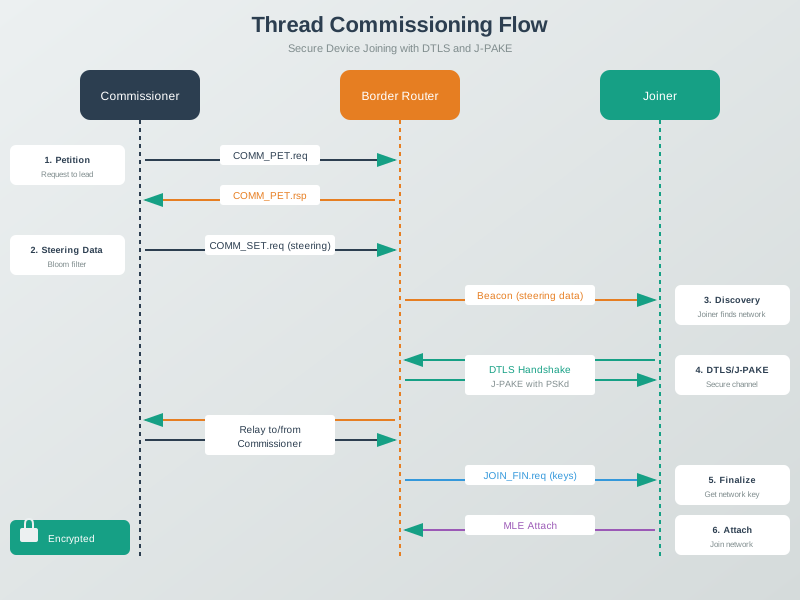
Read Figure 18.3 to its final network attach. That state does not prove that each cloud account or app role is correct. The commissioner controls entry. The secure exchange carries keys and other join data. The border router supplies the network path. These are different trust jobs. Keep network membership, key binding, and user rights in separate records. A repair can then target the failed layer instead of resetting every part of the product.
Credential storage and revocation need the same separation. Phones, hubs, gateways, devices, and cloud services may each hold pairing tokens, Wi-Fi credentials, network keys, certificates, refresh tokens, or role grants. A clean unpairing flow must know which stores to delete or rotate, which audit records to preserve, and which old owner, installer, tenant, or support credential should stop working. A partial failure should not leave a device locally joined but invisible to the account, or visible in the cloud but still controlled by an old hub.
- Setup state: store enough progress state to roll back partial local joins, cloud records, hub memberships, and role assignments.
- Secret storage: protect Wi-Fi passwords, network keys, device certificates, pairing tokens, and account refresh tokens on the phone, hub, device, and cloud.
- Support diagnosis: log candidate id, setup code type, commissioning window state, join result, account role, firmware version, gateway id, correlation id, and revocation result.
- Change control: repeat the review when setup payloads, labels, firmware, account policy, gateway model, cloud registry fields, transfer rules, or support logging changes.
18.14 Continue to the Next Part
This section: Continue to the Next Part — Carry this evidence into Device Pairing: Trust and Recovery, which begins with Discovery And Pairing Review Path.
Carry this evidence into Device Pairing: Trust and Recovery, which begins with Discovery And Pairing Review Path.
Find help
3 reviewed answers.
Where should I start in a module?
Open the module page from the sidebar to see its chapters in order. Use the module map to return to a topic you need.
Modules and pathsReviewed
What can I try when a project does not work?
Check the symptom, then work through the diagnostic steps. Keep the error message and the smallest example that reproduces it.
When you are stuckReviewed
How do interactive examples work?
Use the interactive guide to check how examples and simulations work before changing your project.
Interactive examples guideReviewed