19 Device Pairing: Trust and Recovery
More
Depth: Practitioner
Progress saves as you read. Mark sections complete as you go; your progress appears in the sidebar.
19.1 Start With the Decision
This section: Start With the Decision — A shared door lock must find the right device and bind the right owner.
A shared door lock must find the right device and bind the right owner. Test each trust step and its recovery path.
19.2 Route Overview
This section: Route Overview — This is part 2 of 2.
This is part 2 of 2. Review Device Pairing: Discovery Decisions for the preceding evidence.
19.3 Learning Objectives
This section: Learning Objectives
- Trace discovery and pairing review path across its components and failure boundaries.
- Validate field gateway commissioning with a concrete scenario and pass criteria.
19.4 Chapter Roadmap
This section: Chapter Roadmap
- Discovery And Pairing Review Path
- Discovery Scope
- Candidate Identity
- Pairing Proof
- Credential And Permission Boundary
- Setup Flow And Recovery
- Accessibility And Shared Context
- Discovery And Pairing Record
- Worked Review: Shared Door Lock Setup
- Field Gateway Commissioning
- Common Findings
- Review Checklist
- Knowledge Check
- Matching Quiz
- Ordering Quiz
- Summary
- Key Takeaway
- Concept Relationships
- What’s Next
19.5 Discovery And Pairing Review Path
This section: Discovery And Pairing Review Path — Use Figure 19.1 to verify the trust chain from bounded discovery and physical confirmation through credentials, permissions, recovery, and change-triggered review.
Use Figure 19.1 to verify the trust chain from bounded discovery and physical confirmation through credentials, permissions, recovery, and change-triggered review.
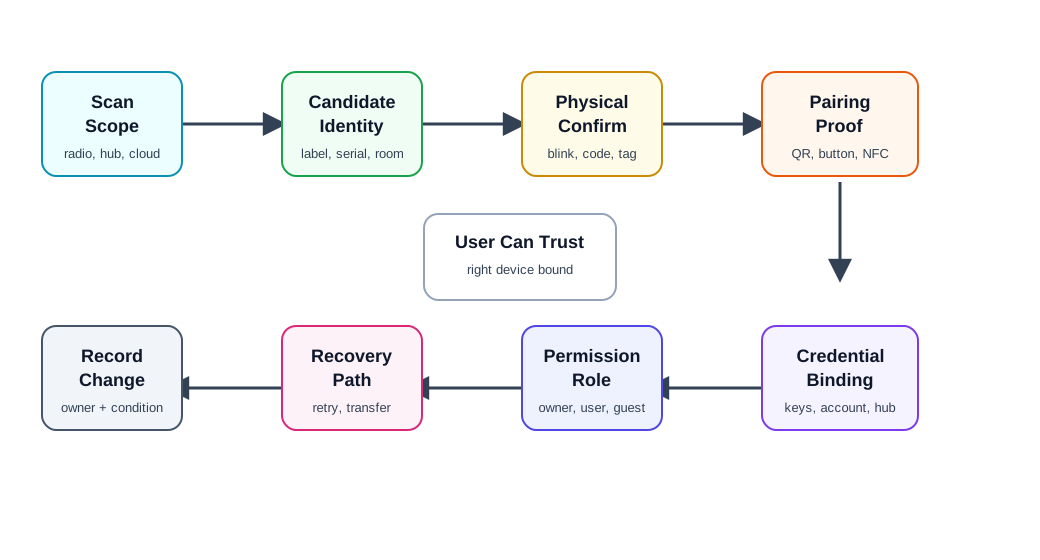
Follow one new device. Keep trust visible at each step. Read Figure 19.1 from scan scope and candidate identity to physical confirmation and proof of possession. Discovery only finds a candidate; the user or installer still needs evidence that it is the intended physical device. Credential binding then establishes durable membership, while permission assignment defines what that identity may do. Follow recovery as a separate route that removes or rotates stale credentials across device, hub, account, and cloud stores. Ownership transfer, reset, firmware, label, gateway, or policy changes must reopen the review so a successful first pairing does not conceal later trust drift.
Scan scope: local radio, local network, hub inventory, cloud account, fleet registry, manual code, or installer list. Candidate identity: product type, serial, room, label, signal clue, indicator, ownership state, and last-seen evidence. Physical confirmation: blink, sound, button press, code, QR label, NFC tap, installer tag, or service record. Proof of possession: evidence that the person pairing has physical or administrative control. Credential binding: keys, tokens, certificates, hub membership, account link, role, and revocation path. Permission assignment: owner, installer, resident, operator, guest, maintenance, or viewer. Recovery: retry, reset, transfer, replace, support escalation, and stale state cleanup. Change condition: firmware, app, hub, identity label, account policy, installation context, or support evidence changes.
19.6 Discovery Scope
This section: Discovery Scope — Start by naming where discovery is allowed to look.
Start by naming where discovery is allowed to look.
Review:
whether discovery searches nearby radios, the local IP network, a hub, the cloud account, a fleet registry, or a typed code. whether the user expects the device to be nearby, already powered, in pairing mode, assigned to an account, or installed by someone else. whether the scan exposes device names, locations, addresses, serials, or ownership state to people who should not see them. whether discovery times out in a way the user can understand. whether the system distinguishes “not found” from “found but not allowed,” “already owned,” “asleep,” “out of range,” and “unsupported”. whether support can see the scan path used and the reason discovery failed.
Discovery should narrow the user’s choices. If it only returns a long list of similar names, the design has moved the hard work from the system to the user.
19.7 Candidate Identity
This section: Candidate Identity — A candidate device must be identifiable enough for a user or installer to select the correct physical object.
A candidate device must be identifiable enough for a user or installer to select the correct physical object.
Review:
visible label, serial, QR code, short code, device name, model, room, or asset tag. local physical signal such as blink, sound, vibration, display code, relay click, or temporary indicator. whether the same device can appear twice through different discovery paths. whether stale records are hidden, labeled, or removed. whether signal strength or proximity clues are used only as hints, not proof. whether the app avoids exposing sensitive location or ownership details before authorization.
Identity evidence should match the deployment. A consumer setup flow may rely on a QR label and blinking LED. An industrial setup may require asset tag, work order, cabinet location, installer role, and commissioning log.
19.8 Pairing Proof
This section: Pairing Proof — Pairing proof shows that the person pairing the device is allowed to do so.
Pairing proof shows that the person pairing the device is allowed to do so.
Common proof patterns:
QR or short code: the user scans or enters a code printed on the device, packaging, service label, or installation sheet. Button press: physical access is proved by pressing a device button during a short pairing window. Display confirmation: the same code appears in the app and on the device display. NFC tap: close physical proximity exchanges setup information. Installer authorization: a signed work order, fleet token, or admin role authorizes pairing for a site. Account transfer: previous ownership is released, delegated, or revoked before a new owner can bind the device.
Review whether the proof fits the risk. A temporary button press may be enough for a low-risk sensor in a private room. A lock, payment device, medical accessory, shared building device, or industrial controller needs stronger evidence, clearer ownership, and a supportable revocation path.
19.9 Credential And Permission Boundary
This section: Credential And Permission Boundary — Pairing usually creates more than a connection.
Pairing usually creates more than a connection. It may create keys, cloud links, hub membership, room assignment, notification permissions, data-sharing permissions, and user roles.
Review:
what credential is stored on the device, app, hub, gateway, cloud service, and account. whether credentials can be rotated, revoked, transferred, or recovered. whether the device remembers the relationship after power loss, battery replacement, factory reset, app reinstall, or hub replacement. whether setup grants the minimum role needed for the user. whether users can share access without sharing the owner credential. whether logs distinguish pairing, unpairing, transfer, reset, and failed authorization.
The strongest pairing design makes the relationship inspectable. A user or support agent should be able to answer who owns the device, who can use it, what hub or account it belongs to, and how that relationship can be changed.
19.10 Setup Flow And Recovery
This section: Setup Flow And Recovery — Pairing failures are normal.
Pairing failures are normal. The quality bar is whether the user can recover without guessing.
Review:
what progress states are visible: scanning, found, verifying, joining, binding, updating, assigned, complete, failed, or rolled back. whether retries preserve useful work without duplicating devices. whether setup can resume after app close, low battery, network loss, hub reboot, or permission denial. whether failure messages name an actionable cause when one is known. whether factory reset is treated as a last resort rather than the default recovery step. whether support can correlate app events, device logs, hub logs, and cloud records.
A useful setup flow should not strand users between worlds: device paired locally but missing from the account, account linked but local join failed, cloud record created but physical device unbound, or old owner still attached.
19.12 Discovery And Pairing Record
This section: Discovery And Pairing Record — The shared door lock record in Figure 19.2 makes each trust step auditable.
The shared door lock record in Figure 19.2 makes each trust step auditable.
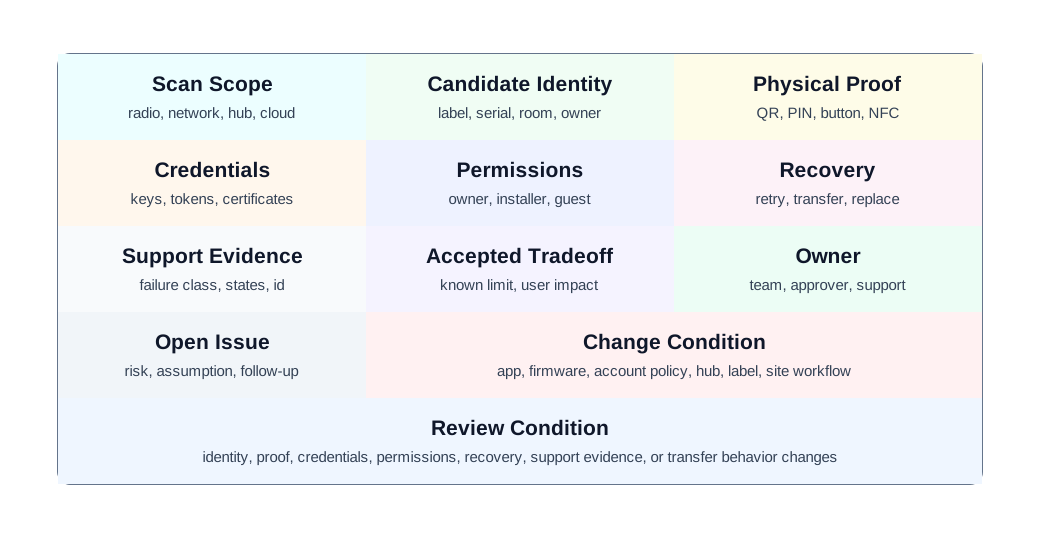
A local scan first finds a candidate by label, serial, and indicator; it does not prove that the candidate is the intended lock. Physical proof and credential binding then establish which unit can join. Role assignment decides who may use it, while the recovery field asks what happens when a prior grant or credential becomes stale. Read these entries as one commissioning trace. If a later user cannot unlock the door, the record can show whether discovery, proof, authority, or recovery needs attention.
Scan scope: local radio, local network, hub, cloud account, fleet registry, manual code, or installer list. Candidate identity: label, serial, indicator, room, asset tag, ownership state, duplicate handling, and last-seen evidence. Physical proof: QR, PIN, button, display, NFC, admin approval, installer token, or ownership release. Credential binding: key, token, certificate, hub membership, account link, role, rotation, and revocation. Permissions: owner, installer, resident, operator, guest, maintenance, viewer, and expiration. Recovery: retry, resume, reset, transfer, replace, support escalation, and stale record cleanup. Support evidence: event log, failure class, device state, hub state, cloud state, account state, and correlation id. Decision and change condition: accepted tradeoff, owner, known limit, open issue, and change condition.
The record should remain short enough to update whenever the setup flow, account policy, firmware, hub behavior, label, installation workflow, or support tooling changes.
19.13 Worked Review: Shared Door Lock Setup
This section: Worked Review: Shared Door Lock Setup — A shared building uses connected locks for residents, guests, maintenance, and property managers.
A shared building uses connected locks for residents, guests, maintenance, and property managers.
Discovery and pairing evidence to request
how the installer identifies the correct physical lock during commissioning. proof that the installer has authority for the unit and building. how owner, resident, guest, and maintenance roles are created and revoked. what happens when a lock is already paired to a previous owner or old hub. how pairing failure avoids leaving the lock in an unsafe or unusable state. how support distinguishes device power, local link, account permission, and cloud state problems. how access logs preserve accountability without exposing unnecessary resident data.
Likely review action
Hold the decision if the flow creates one shared credential for all users or requires factory reset to change residents. Shared locks need individual credentials, role boundaries, revocation, transfer, and support evidence.
Change condition
Repeat the review when the account model, resident workflow, lock firmware, installer app, hub model, credential policy, access-log retention, or transfer process changes.
 Uma’s Worst-Moment Test
- Moment: a lock is already paired to a previous owner or old hub, and residents, guests, maintenance, and property managers all need their own access.
- Fails when: the flow creates one shared credential for all users or requires factory reset just to change residents.
- Fix: individual credentials, role boundaries, revocation, transfer, and support evidence — shared locks hold the decision until all five exist.
19.14 Field Gateway Commissioning
This section: Field Gateway Commissioning — A technician commissions a gateway and several sensors at a remote utility site.
A technician commissions a gateway and several sensors at a remote utility site.
Discovery and pairing evidence to request
work order, site id, asset tags, and physical labels used to identify the correct devices. whether commissioning works when internet access is intermittent. how sensor identities are bound to the gateway and later synchronized to the fleet record. whether retries create duplicate sensors in the cloud or hub inventory. how the app reports “found but not authorized,” “already assigned,” “out of range,” and “awaiting sync”. how a replacement gateway imports or rebuilds device relationships. what support evidence is available after the technician leaves the site.
Likely review action
Approve only if the flow has an offline-tolerant record, duplicate prevention, clear site identity, and a supportable recovery path after partial setup.
Change condition
Repeat the review when offline support, gateway firmware, fleet registry fields, installer roles, asset labels, sensor replacement, or sync behavior changes.
19.15 Common Findings
This section: Common Findings — Discovery returns many similar devices without a physical confirmation step.
Discovery returns many similar devices without a physical confirmation step. The app says “device not found” when the real issue is permission, ownership, sleep state, or unsupported firmware. Pairing creates a cloud record before local binding succeeds, leaving stale duplicates. Factory reset is the first recovery step instead of a last resort. A device can be paired by someone nearby without enough ownership proof. Setup grants owner permission when installer or guest permission would be enough. QR codes, labels, or buttons are unreachable after installation. Transfer between owners preserves old access or destroys needed service history. Support cannot correlate app setup errors with device, hub, account, and cloud logs. The record lacks an owner, known limit, open issue, or change condition.
Uma’s Worst-Moment Test
- Moment: the app says “device not found” when the real issue is permission, ownership, sleep state, or unsupported firmware.
- Fails when: pairing creates a cloud record before local binding succeeds, leaving stale duplicates, or factory reset becomes the first recovery step instead of the last resort.
- Fix: support that correlates app setup errors with device, hub, account, and cloud logs, tied to an owner, known limit, and change condition.
19.16 Review Checklist
This section: Review Checklist — discovery scope and the scan paths used.
Before accepting a discovery-and-pairing design, confirm that the record includes:
discovery scope and the scan paths used. candidate identity evidence and duplicate/stale handling. physical confirmation and proof-of-possession method. credential binding, rotation, revocation, and storage locations. permissions, role boundaries, sharing, expiration, and transfer behavior. progress states, failure classes, retry behavior, and setup resume path. accessibility alternatives for camera, NFC, display, sound, color, reach, and labels. support evidence across app, device, hub, gateway, cloud, and account records. accepted tradeoff, owner, known limit, open issue, and change condition.
19.17 Knowledge Check
This section: Knowledge Check
19.18 Matching Quiz
This section: Matching Quiz
19.19 Ordering Quiz
This section: Ordering Quiz
19.20 Summary
This section: Summary — Device discovery and pairing are trust-building workflows.
Device discovery and pairing are trust-building workflows. They help a user find the right physical device, prove authority, create credentials, assign permissions, and recover when setup fails or ownership changes.
The strongest reviews avoid protocol-only claims. They show scan scope, identity evidence, physical proof, credential binding, role boundaries, accessibility alternatives, recovery paths, support evidence, and change conditions.
19.21 Key Takeaway
This section: Key Takeaway — Pairing should be clear, recoverable, secure, and observable so users know which device joined which account or ecosystem.
Pairing should be clear, recoverable, secure, and observable so users know which device joined which account or ecosystem.
19.22 Concept Relationships
This section: Concept Relationships — Device Communication Patterns explains the paths devices use after discovery and pairing.
Device Communication Patterns explains the paths devices use after discovery and pairing. Ecosystem Integration reviews multi-vendor behavior after devices are bound into accounts and ecosystems. Device Lifecycle Management connects pairing to provisioning, maintenance, ownership transfer, and retirement. Privacy and User Consent reviews permission, notice, data sharing, and user control created during setup. Security and Privacy Overview expands identity, authentication, authorization, and key-management concerns.
19.23 What’s Next
This section: What’s Next — Continue to Ecosystem Integration to review how paired devices work across hubs, accounts, platforms, and vendor ecosystems without hiding ownership or support boundaries.
Continue to Ecosystem Integration to review how paired devices work across hubs, accounts, platforms, and vendor ecosystems without hiding ownership or support boundaries.
19.24 Continue Your Route
This section: Continue Your Route — This is the last part of this chapter.
This is the last part of this chapter. Return to Device Pairing: Discovery Decisions. See ux-design module index.
Find help
3 reviewed answers.
Where should I start in a module?
Open the module page from the sidebar to see its chapters in order. Use the module map to return to a topic you need.
Modules and pathsReviewed
What can I try when a project does not work?
Check the symptom, then work through the diagnostic steps. Keep the error message and the smallest example that reproduces it.
When you are stuckReviewed
How do interactive examples work?
Use the interactive guide to check how examples and simulations work before changing your project.
Interactive examples guideReviewed