6 IoT Architectures: Selection Methods
More
Depth: Practitioner
Progress saves as you read. Mark sections complete as you go; your progress appears in the sidebar.
6.1 Start With the Decision
This section: Start With the Decision — After choosing a model family, the team still needs a repeatable way to justify that choice.
After choosing a model family, the team still needs a repeatable way to justify that choice.
6.2 Route Overview
This section: Route Overview — This is part 2 of 2.
This is part 2 of 2. Review IoT Architectures: Model Evidence for the preceding evidence.
6.3 Learning Objectives
This section: Learning Objectives
- Trace architecture selection map across its components and failure boundaries.
- Validate worked review: shared facility platform with a concrete scenario and pass criteria.
6.4 Chapter Roadmap
This section: Chapter Roadmap
- Architecture Selection Map
- Start With Architecture Work To Be Done
- Simple Layered Model
- Expanded Layered Model
- Multi-View Reference Thinking
- Layer Boundary Review
- Cross-Cutting Concerns
- Architecture Fit Checks
- Architecture Fit Summary
- Architecture Responsibility Record
- Worked Review: Room Monitoring Product
- Worked Review: Shared Facility Platform
- Common Findings
- Review Checklist
- Knowledge Check
- Matching Quiz
- Ordering Quiz
- Summary
- Key Takeaway
- Concept Relationships
- What’s Next
6.5 Architecture Selection Map
This section: Architecture Selection Map — After choosing a model family, the team still needs a repeatable way to justify that choice.
After choosing a model family, the team still needs a repeatable way to justify that choice. Figure 6.1 turns the chapter’s architecture questions into a decision chain that can be reviewed when the system changes.
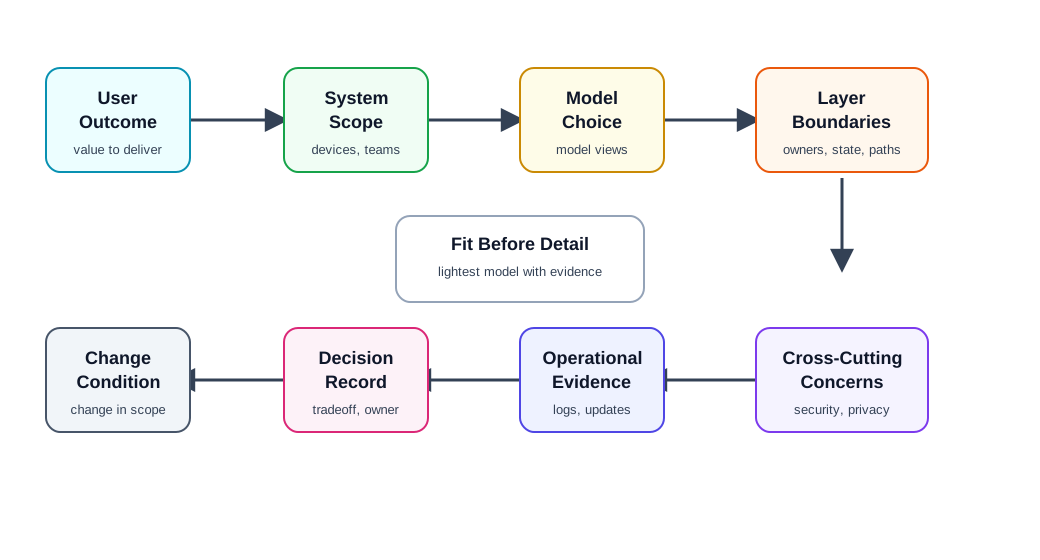
Begin Figure 6.1 with User Outcome and System Scope; they define the value and estate that the model must explain. Model Choice then leads to Layer Boundaries, where owners, state, and paths become explicit, while Cross-Cutting Concerns prevents security and privacy from being trapped in one box. The chain finishes with Operational Evidence, a Decision Record, and a Change Condition, so the selected architecture remains a revisable argument rather than a permanent drawing.
User outcome: what the architecture must help deliver, protect, explain, or recover. System scope: devices, gateways, apps, sites, services, users, teams, and external systems. Model choice: simple layered model, expanded layered model, multi-view reference model, or a documented hybrid. Layer boundaries: what each layer owns, passes through, stores, transforms, and exposes. Cross-cutting concerns: security, privacy, identity, safety, reliability, accessibility, compliance, and support. Operational evidence: monitoring, logs, update path, replacement path, ownership transfer, and incident workflow. Record and change conditions: accepted limits, owners, open issues, and conditions after system or organization change.
6.6 Start With Architecture Work To Be Done
This section: Start With Architecture Work To Be Done — Architecture is not a decoration for a document.
Architecture is not a decoration for a document. It is a tool for coordinating decisions.
Review:
what decisions the model is supposed to support. which teams, roles, or stakeholders need the model. what user-facing behavior depends on architectural boundaries. whether the model separates real responsibilities or invents artificial handoffs. whether the model can explain failure, support, update, replacement, and decommissioning behavior. whether the model is short enough to stay current as the system changes.
If a diagram cannot help a team answer “who owns this behavior?” or “what happens when this boundary fails?”, it is not yet useful enough for acceptance.
6.7 Simple Layered Model
This section: Simple Layered Model — A simple layered model is often enough when the system has a clear physical-device layer, a clear communication or gateway layer, and a clear application layer.
A simple layered model is often enough when the system has a clear physical-device layer, a clear communication or gateway layer, and a clear application layer.
Review:
what belongs in the physical device boundary: sensing, actuation, firmware, power state, local control, and physical safety. what belongs in the communication boundary: local links, gateway behavior, buffering, translation, routing, and connectivity state. what belongs in the application boundary: user interface, rules, dashboards, reports, account policy, and data presentation. what crosses each boundary and in which format. which behavior continues locally if the application or cloud path is unavailable. whether support can separate device, gateway, network, account, and application causes.
A simple model is not a weak model. It is strong when the responsibility boundaries match the actual product and are easy for developers, users, installers, and support teams to understand.
6.8 Expanded Layered Model
This section: Expanded Layered Model — why the extra layer exists and which decisions it owns.
An expanded layered model adds explicit responsibilities such as middleware, device management, business policy, analytics, integration, or operations when those responsibilities are large enough to need separate ownership.
Review:
why the extra layer exists and which decisions it owns. whether the layer performs work or only repeats another layer’s responsibility. whether device management, identity, data processing, rules, analytics, reporting, and business policy have clear owners. how errors move between layers without losing cause. how update, rollback, provisioning, and replacement workflows cross layers. whether adding the layer improves maintainability more than it increases coordination burden.
Extra layers should be earned by real complexity: multiple teams, multiple user roles, multi-site operation, heterogeneous device fleets, regulated records, enterprise integration, or operational workflows that would otherwise be mixed into one unclear application layer.
6.9 Multi-View Reference Thinking
This section: Multi-View Reference Thinking — Some systems cannot be reviewed well from one stack diagram.
Some systems cannot be reviewed well from one stack diagram. They need several views of the same system.
Useful views include:
- Functional view: services, commands, workflows, rules, user actions, and operator actions.
- Information view: data model, units, timestamps, quality, retention, lineage, and meaning.
- Deployment view: devices, gateways, networks, regions, sites, redundancy, and physical constraints.
- Operational view: monitoring, incident response, update workflow, support workflow, replacement, and decommissioning.
- Risk view: security, privacy, safety, accessibility, compliance, and misuse boundaries.
Multi-view thinking is useful when one team talks about services, another about data meaning, another about hardware placement, and another about operations. It is excessive when the views repeat the same information without improving a decision.
6.10 Layer Boundary Review
This section: Layer Boundary Review — Layer names are only useful when the boundary is testable.
Layer names are only useful when the boundary is testable.
Review each boundary with these questions:
What enters this boundary? What leaves this boundary? What state is stored here? What decision is made here? What is intentionally not owned here? What evidence proves the boundary behaved correctly? What failure message or support signal appears when it does not? What change requires reviewing this boundary again?
Ambiguous boundaries create duplicated logic, inconsistent state, and confusing support paths. A clear boundary should make implementation and support simpler, not only the diagram cleaner.
6.11 Cross-Cutting Concerns
This section: Cross-Cutting Concerns — Security, privacy, identity, safety, accessibility, reliability, observability, and lifecycle management do not fit neatly into one layer.
Security, privacy, identity, safety, accessibility, reliability, observability, and lifecycle management do not fit neatly into one layer. They must be reviewed across the model.
Review:
where identity is created, checked, stored, rotated, and revoked. where privacy notice, consent, retention, sharing, and deletion are enforced. where safety or critical local behavior remains available during outages. where accessibility requirements affect device setup, app feedback, physical controls, and alerts. where monitoring, logs, and support evidence are generated and correlated. where firmware, configuration, model, or policy updates are staged and rolled back.
A model that places “security” or “privacy” in one box is usually incomplete. Cross-cutting concerns need owners at every boundary they cross.
6.12 Architecture Fit Checks
This section: Architecture Fit Checks — Use fit checks to avoid both under-engineering and over-engineering.
Use fit checks to avoid both under-engineering and over-engineering.
A simple model may be too thin when:
device provisioning, updates, support, and replacement have no owner. many users, sites, teams, or external systems need different views of the same data. data quality, lineage, retention, or compliance rules are unclear. application code is absorbing device management, business policy, and operations all at once. support cannot tell which layer caused a user-visible issue.
An expanded or multi-view model may be too heavy when:
extra layers have no unique decisions. every change requires several teams to coordinate without a user-facing benefit. documents describe ideal layers but implementation bypasses them. teams debate box ownership more than tested behavior. the model cannot be updated after real design changes.
The right model is the lightest one that still assigns responsibility, preserves evidence, and supports recovery.
6.13 Architecture Fit Summary
This section: Architecture Fit Summary — Use Figure 6.2 to test whether the proposed architecture for a shared facility can be reviewed by its future operators.
Use Figure 6.2 to test whether the proposed architecture for a shared facility can be reviewed by its future operators.
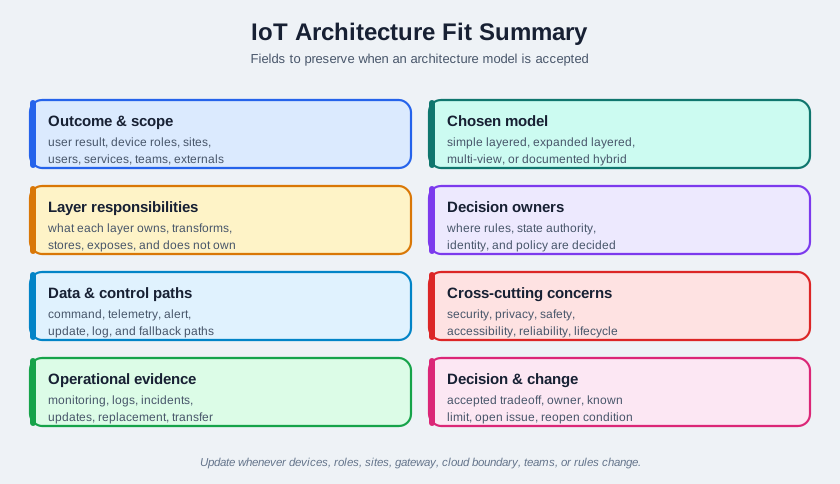
The record starts with sensors, controllers, gateways, dashboards, and maintenance tools, so the chosen model has to account for more than the device path. Follow the command, telemetry, alert, log, and update routes across the named boundaries. The monitoring, logs, and incidents field then shows what evidence an operator will have when one route fails. A model is ready for this case only when its path, owner, known limit, and change condition can be entered in the same record.
Outcome and scope: user result, device roles, sites, users, services, teams, and external systems. Chosen model: simple layered, expanded layered, multi-view, or documented hybrid. Layer responsibilities: what each layer owns, transforms, stores, exposes, and explicitly does not own. Decision owners: where rules, state authority, identity, policy, and support decisions are made. Data and control paths: command, telemetry, alert, update, log, and fallback paths. Cross-cutting concerns: security, privacy, identity, safety, accessibility, reliability, and lifecycle ownership. Operational evidence: monitoring, logs, incidents, updates, replacement, transfer, and decommissioning evidence. Decision and change condition: accepted tradeoff, owner, known limit, open issue, and condition that reopens review.
The record should be concise enough to update whenever the device mix, user role, deployment site, gateway behavior, cloud boundary, team ownership, support workflow, or regulatory expectation changes.
6.14 Architecture Responsibility Record
Use reference architectures as explanation tools, not templates to copy:
Three-layer view: device, network, and application layers are enough when the review question is basic responsibility split. Five-layer view: perception, transport, processing, application, and business layers help when analytics, operations, and governance are part of the decision. Multi-view model: user journey, data flow, trust boundary, operations, and support views expose different failures in the same system. Cross-cutting concerns: security, privacy, accessibility, reliability, observability, and lifecycle ownership should appear across layers, not in one isolated box.
The architecture summary should name which view answered the question, which view was intentionally skipped, and what evidence would require a richer architecture model.
6.15 Worked Review: Room Monitoring Product
This section: Worked Review: Room Monitoring Product — A small product monitors conditions in rooms and shows status in a mobile app.
A small product monitors conditions in rooms and shows status in a mobile app. It has sensors, a gateway, a cloud service, and one user-facing app.
Architecture evidence to request
- the user outcome and the minimum device, gateway, and app behavior needed to support it
- what runs on the sensor, what runs on the gateway, and what runs in the application
- what happens if the gateway is offline, the app is unavailable, or the cloud path is delayed
- where state age, device health, alert rules, and user permissions are owned
- how support separates sensor power, local link, gateway, internet, cloud, and account issues
- how sensor replacement preserves room meaning and alert history
Likely review action
Approve a simple layered model if the sensor, gateway, and application responsibilities are explicit and the gateway/app outage behavior is visible. Hold the decision if alert rules or support evidence are hidden behind the generic word “cloud.”
Change condition
Rerun the review when alert rules move between gateway and cloud, device roles change, room assignment changes, user roles expand, or support evidence changes.
6.17 Common Findings
This section: Common Findings — The model is chosen because it is familiar, not because it fits the decisions the team must make.
The model is chosen because it is familiar, not because it fits the decisions the team must make. Layer names are clear, but ownership, state authority, and failure behavior are not. Device management is hidden inside the application layer without operational evidence. Business reporting depends on data whose meaning, quality, or retention is not owned. Security and privacy appear as one box instead of responsibilities across every boundary. The diagram shows data flow but not command, update, alert, log, or fallback paths. Support cannot distinguish device, gateway, cloud, account, policy, and application causes. Extra layers create handoffs without reducing implementation or support complexity. The architecture record lacks an owner, known limit, open issue, or change condition.
6.18 Review Checklist
This section: Review Checklist — user outcome, system scope, device roles, user roles, team roles, and external systems.
Before accepting an architecture model, confirm that the record includes:
user outcome, system scope, device roles, user roles, team roles, and external systems. selected model and why simpler or richer alternatives were rejected. layer responsibilities, non-responsibilities, state ownership, and decision ownership. command, telemetry, alert, update, log, local, cloud, and fallback paths. cross-cutting responsibilities for security, privacy, identity, safety, accessibility, reliability, observability, and lifecycle. operational evidence for monitoring, support, incidents, updates, replacement, transfer, and decommissioning. user-facing failure and recovery behavior at each important boundary. accepted tradeoff, owner, known limit, open issue, and change condition.
6.19 Knowledge Check
This section: Knowledge Check
6.20 Matching Quiz
This section: Matching Quiz
6.21 Ordering Quiz
This section: Ordering Quiz
6.22 Summary
This section: Summary — IoT architecture models help teams assign responsibility for devices, gateways, applications, data, policy, operations, security, privacy, support, and lifecycle behavior.
IoT architecture models help teams assign responsibility for devices, gateways, applications, data, policy, operations, security, privacy, support, and lifecycle behavior. The right model is not the most detailed one. It is the lightest model that still makes important decisions explicit and reviewable.
Strong architecture records show why a model fits the current system, what each layer or view owns, how commands and data cross boundaries, what works locally, how failures are diagnosed, and what change requires another review.
6.23 Key Takeaway
This section: Key Takeaway — Architecture choices should connect users, devices, services, data flows, failure modes, and support responsibilities in one reviewed model.
Architecture choices should connect users, devices, services, data flows, failure modes, and support responsibilities in one reviewed model.
6.24 Concept Relationships
This section: Concept Relationships — Design Model Introduction explains why design models should guide decisions before implementation.
Design Model Introduction explains why design models should guide decisions before implementation. Reference Architecture Responsibility Record expands reusable architecture views and templates after model selection is clear. 8 Facets of IoT Design reviews user-visible and platform-visible design dimensions that span architecture layers. Design Thinking for IoT validates whether architecture decisions support real user needs. IoT Design Patterns and Components applies implementation patterns inside the chosen architecture. Edge, Fog, and Cloud Computing explains deployment options that often shape architecture boundaries.
6.25 What’s Next
This section: What’s Next — Continue to Reference Architecture Responsibility Record to review reusable architecture templates and reference views in more detail.
Continue to Reference Architecture Responsibility Record to review reusable architecture templates and reference views in more detail.
6.26 Continue Your Route
This section: Continue Your Route — This is the last part of this chapter.
This is the last part of this chapter. Return to IoT Architectures: Model Evidence. See ux-design module index.
Find help
3 reviewed answers.
Where should I start in a module?
Open the module page from the sidebar to see its chapters in order. Use the module map to return to a topic you need.
Modules and pathsReviewed
What can I try when a project does not work?
Check the symptom, then work through the diagnostic steps. Keep the error message and the smallest example that reproduces it.
When you are stuckReviewed
How do interactive examples work?
Use the interactive guide to check how examples and simulations work before changing your project.
Interactive examples guideReviewed