35 Braitenberg Vehicles: Sensing to Action
More
Depth: Practitioner
Progress saves as you read. Mark sections complete as you go; your progress appears in the sidebar.
35.1 Start With the Measurement Story
This section: Start With the Measurement Story — Picture a two-sensor robot that turns toward a lamp with one wiring rule and away with another.
Change One Connection and Watch the Motion
Picture a two-sensor robot that turns toward a lamp with one wiring rule and away with another. No planner changed; the direct connection changed the behavior.
-
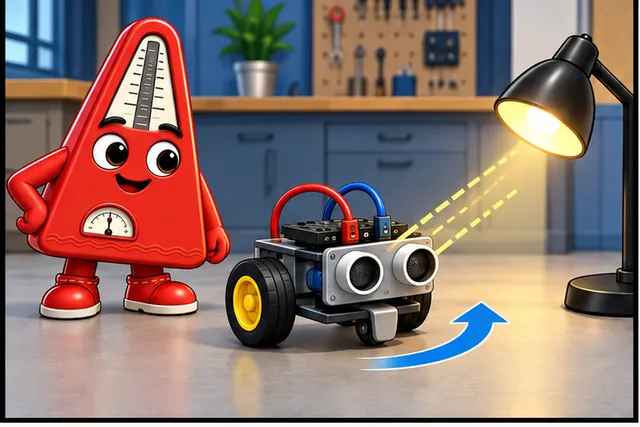
A two-sensor robot turns toward a lamp with one wiring rule.
-
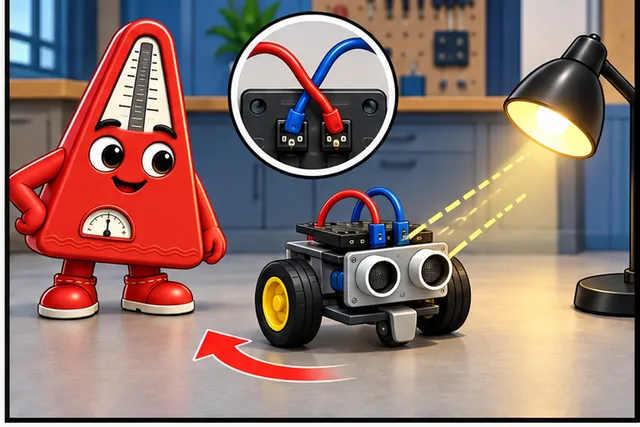
Changing the connections can make the same robot turn away.
-
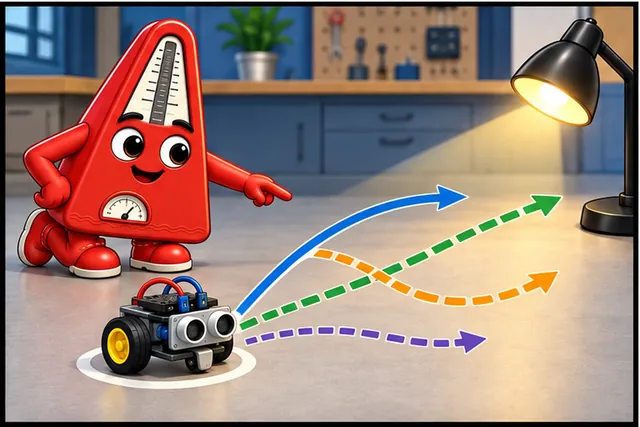
Test direct, crossed, strong, and weak links from one start point.
-
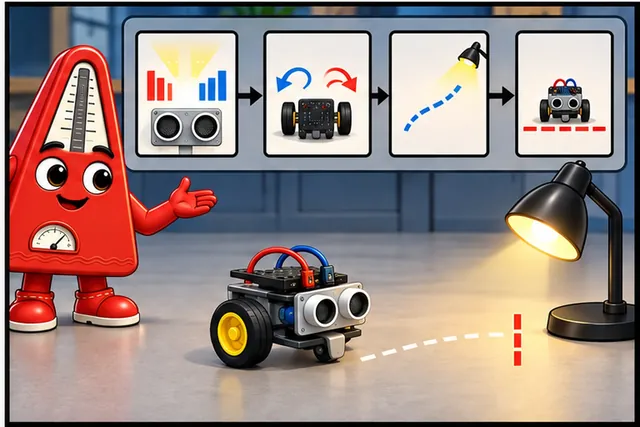
Keep the sensor values, motor commands, path, and stop rule.
Illustrated scene: A two-sensor robot turns toward a lamp with one wiring rule.
An actuator means a part that turns an electrical command into physical action. Duty cycle means the share of time a repeating control signal stays active. Both can shape how quickly each motor responds.
Mark a start point, use one light position, and test direct, crossed, stronger, and weaker connections. Record sensor values, motor commands, path, stop condition, and repeatability.
This runway does not prove intelligence or safe autonomy. The deeper sections explain excitatory and inhibitory coupling, direct and crossed wiring, emergent paths, calibration, and behavior limits.
A tiny robot can appear purposeful when two sensors directly shape two motor outputs. Start with that reflex story: the sensor reading changes, the wiring rule changes motion, and the behavior emerges before any planner is added.
35.2 In 60 Seconds
This section: In 60 Seconds — Braitenberg vehicles demonstrate that surprisingly intelligent-seeming behavior emerges from simple sensor-to-actuator connections.
Braitenberg vehicles demonstrate that surprisingly intelligent-seeming behavior emerges from simple sensor-to-actuator connections. Same-side excitatory wiring creates avoidance (“fear”), cross-wired excitatory creates approach at speed (“aggression”), same-side inhibitory creates gentle approach and stop (“love”), and cross-wired inhibitory creates exploration. Many real IoT systems — thermostats, motion-activated lights, fan controllers — are essentially Braitenberg vehicles. Start simple before reaching for complex AI.
The mathematical gist. The chapter’s bright-light divider draws 0.320 mA. Left on continuously, it adds mAh/day to the 23.3 mAh/day motor and 0.24 mAh/day sleep budget, raising the total to 31.2 mAh/day and cutting the 2,500 mAh battery estimate from about 107 days to 80.1 days. At a 0.1% sampling duty cycle it instead adds only 0.00768 mAh/day.

35.3 Key Concepts
This section: Key Concepts
- Braitenberg Vehicle: sensors drive motors directly, creating approach, avoidance, attraction, or exploration without a planner.
- Ipsilateral Coupling: same-side wiring; left sensor to left motor and right sensor to right motor.
- Contralateral Coupling: crossed wiring; each sensor drives the opposite motor.
- Excitatory/Inhibitory Coupling: stimulus can increase or reduce motor speed.
- Reactive Architecture: fixed sensor-to-actuator rules with no memory or planning.
- Phototaxis: motion toward or away from light.
- Embodied Intelligence: behavior emerges from body, sensors, actuators, and environment together.
35.4 A Tiny Robot With Only Reflexes
This section: A Tiny Robot With Only Reflexes — Imagine a toy car with two light sensors as eyes and two motors as wheels.
Imagine a toy car with two light sensors as eyes and two motors as wheels. Same-side wiring can turn it away from light; crossed wiring can turn it toward light; inhibitory wiring can make it slow and stop near the stimulus.
That is the promise of Braitenberg vehicles: behavior can come from a reflex loop, not from a planner. For IoT, many useful devices can start with thresholds, gains, and wiring rules. The hard part is choosing the right reflex, then proving where it stops being enough.
This chapter has five stops:
- First you read the four Braitenberg wiring patterns and predict how each one turns.
- Then you translate the same reflex idea into thermostats, lighting, fans, and plant watering.
- Next you compare reactive control with AI/ML so the simple baseline stays visible.
- After that you build and tune a light-following plant pot, including the 280 mA battery-life tradeoff.
- Finally you use quizzes and mode-switching practice to prove the sensor-to-actuator chain.
Checkpoints recap the wiring decisions; interactive blocks let you test the rule before memorizing it.
Learning Objectives
This section: Learning Objectives
- Explain how Braitenberg vehicles map sensor inputs to actuator outputs using wiring topology and polarity
- Design simple reactive systems using direct sensor-to-actuator connections
- Predict emergent behaviors from different sensor-actuator coupling configurations
- Evaluate when Braitenberg-style reactive control is sufficient versus when AI/ML is required
35.5 Prerequisites
This section: Prerequisites — Before treating an LDR reading as light intensity, inspect Figure 35.1 to see the sensor’s direction and nonlinearity.
- Sensor Classification: Types of sensors
- Signal Processing: Sensor data handling
Before treating an LDR reading as light intensity, inspect Figure 35.1 to see the sensor’s direction and nonlinearity. The curve provides the physical relationship that the vehicle wiring will transform into motor commands.
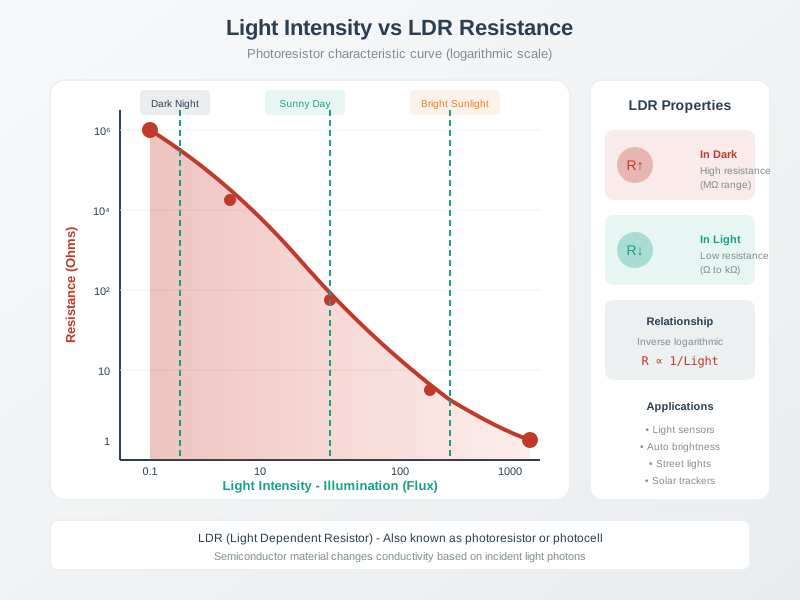
An LDR curve plots resistance against illumination on a logarithmic scale. Dark conditions give high resistance; light gives low resistance, supporting brightness and light-sensor uses.
Read Figure 35.1, start in darkness at high resistance and follow the curve toward brighter light and lower resistance. Because equal light increments do not create equal resistance changes, the divider and motor mapping shape behaviour; this is the prerequisite for interpreting the later reflex diagrams.
35.6 Sensor Readings to Behavior
This section: Sensor Readings to Behavior — Valentino Braitenberg’s thought experiments showed that a vehicle with only sensors and motors can appear to have fear, aggression, attraction, or exploration.
Valentino Braitenberg’s thought experiments showed that a vehicle with only sensors and motors can appear to have fear, aggression, attraction, or exploration. The trick is not a hidden mind; it is the mapping from each sensor to each motor.
35.6.1 Four Reflexes From Two Wiring Choices
Braitenberg imagined simple vehicles with sensors connected directly to motors. The simplest, Vehicle 1, has a single sensor driving a single motor: more stimulus means more speed. The more interesting behaviors emerge with two sensors and two motors, where the connection type determines the behavior:
Before coding a controller, inspect Figure 35.2 to see how wiring alone can create distinct behaviours. The comparison isolates two choices: whether each sensor drives the same-side or opposite-side motor, and whether light excites or inhibits speed.
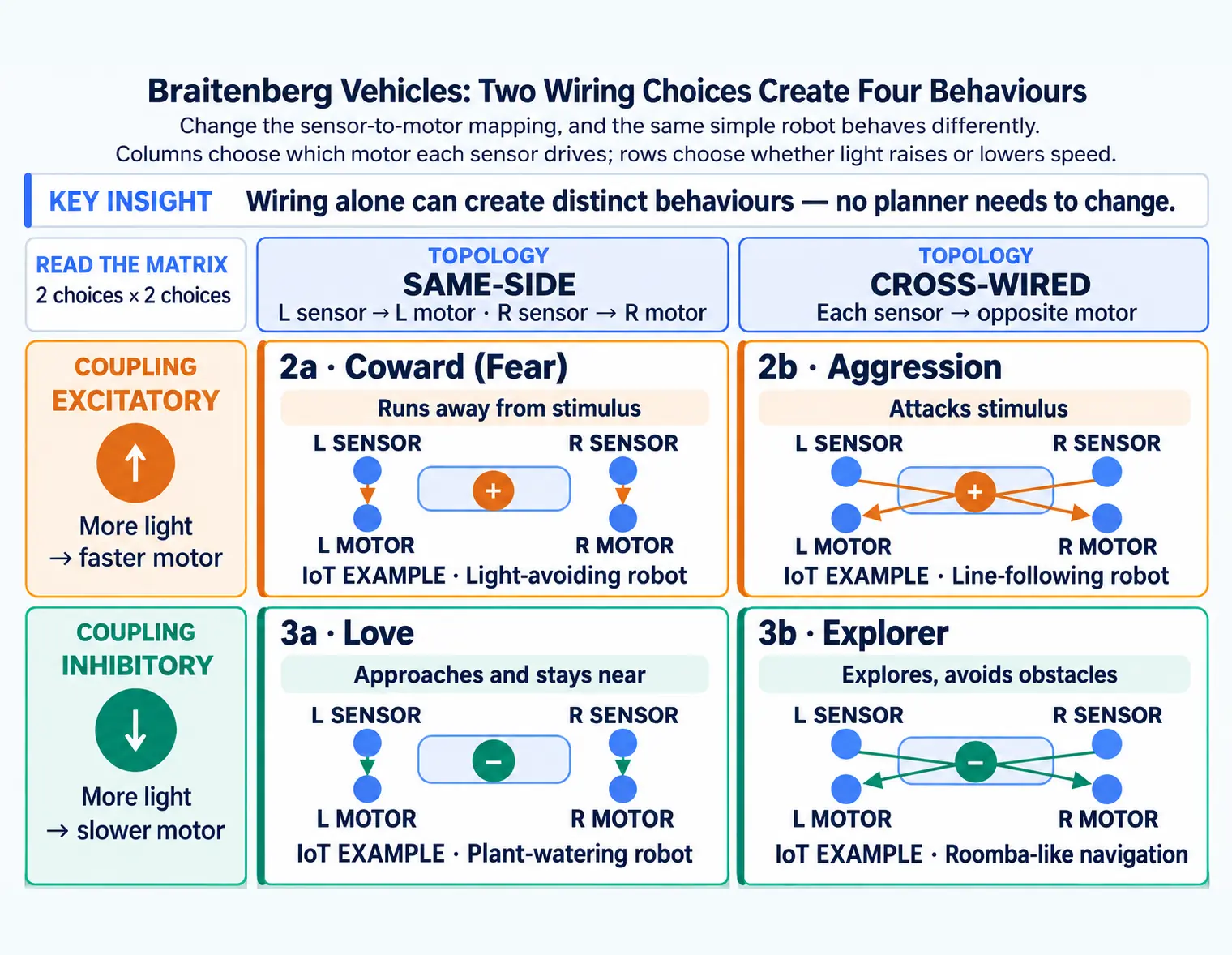
Four Braitenberg two-sensor vehicle wiring patterns. Same-side excitatory wiring makes a vehicle turn away from light. Cross-wired excitatory wiring makes it turn toward a light source. Cross-wired inhibitory wiring supports exploratory obstacle avoidance. Same-side inhibitory wiring makes the vehicle approach and stay near a stimulus.
Read Figure 35.2, compare same-side with cross-wired paths first, then compare excitatory with inhibitory coupling. Those two binary choices produce avoidance, attack, approach, or exploration without a world model, linking the visual directly to the chapter’s argument for testing the simplest embodied feedback rule first.
35.6.2 Read the Wiring Before the Personality
| Vehicle | Connection | Behavior | IoT Example |
|---|---|---|---|
| 2a: Coward (Fear) | Same-side, excitatory | Runs away from stimulus | Light-avoiding robot |
| 2b: Aggression | Cross-wired, excitatory | Attacks stimulus | Line-following robot |
| 3a: Love | Same-side, inhibitory | Approaches and stays near | Plant-watering robot |
| 3b: Explorer | Cross-wired, inhibitory | Explores, avoids obstacles | Roomba-like navigation |
35.6.3 Try the Motor-Speed Rule
Adjust the sensor readings and wiring configuration to see how different Braitenberg vehicles respond. Observe how the same sensor values produce completely different motor speeds and turning behavior depending on wiring topology and polarity.
35.6.4 Model vs Plant-Pot Motor
The calculator above uses a pure Braitenberg model for excitatory modes (motor = sensor ** gain, no base speed), matching the original theoretical formulation. The worked example later in this chapter adds a base speed offset (motor = base_speed + sensor * gain) to overcome real motor friction. Both are valid — the base speed is a practical engineering addition, not a change to the Braitenberg wiring logic. Inhibitory modes use base speed in both the calculator and examples.
This section:
Checkpoint: Wiring Creates Behavior
You now know:
- Same-side excitatory wiring turns away from the brighter side; cross-wired excitatory wiring turns toward it.
- Same-side inhibitory wiring can approach and stop near a stimulus instead of charging into it.
- The calculator uses 0-4095 sensor readings, a 0.15 gain, and a 0-500 base-speed range to make the rule visible.
35.6.5 Why Fear Turns Away
Fear uses same-side excitatory mapping:
Start by left light sensor controls the left motor. Then right light sensor controls the right motor. Next more light means more motor speed. Finally the brighter side moves faster, so the vehicle turns away from the light.
35.6.6 Why Aggression Turns Toward
Aggression uses cross-wired excitatory mapping:
Start by left light sensor controls the right motor. Then right light sensor controls the left motor. Next more light means more motor speed. Finally the opposite motor speeds up, so the vehicle turns toward the light and approaches quickly.
35.6.7 Trace Vehicle 2b Step by Step
The aggressive light-seeking vehicle uses cross-wired excitatory connections:
- Left light sensor detects brightness on left side
- Signal crosses to right motor (cross-wired)
- Right motor speeds up when left sensor sees light (excitatory)
- Vehicle turns left toward the light source
- Process repeats continuously, creating approach behavior
Why it works: When light is on the left, the right motor spins faster than the left motor, causing a differential drive turn toward the stimulus. The brighter the light, the faster the turn (excitatory connection). Result: vehicle “attacks” the light source.
Real IoT example: A line-following robot uses the same cross-wired principle — if the left IR sensor sees the dark line, the right motor speeds up to steer the robot left back onto the line, and vice versa. The stronger the deviation, the harder the correction (excitatory connection).
35.6.8 Same Light, Different Turns
Watch a top-down SVG vehicle respond to a light source in real time. Drag the light position slider to see how different wiring configurations cause the vehicle to turn toward or away from the stimulus.
35.7 Everyday IoT Devices Use the Same Reflex
This section: Everyday IoT Devices Use the Same Reflex — Once you can read a vehicle’s wiring, the same idea shows up in ordinary IoT products: a sensor value crosses a threshold, changes an actuator output, and the device appears responsive without planning.
Once you can read a vehicle’s wiring, the same idea shows up in ordinary IoT products: a sensor value crosses a threshold, changes an actuator output, and the device appears responsive without planning.
35.7.1 Smart Lighting System
Use a cross-wired inhibitory rule:
Start by left ambient-light sensor controls the right LED. Then right ambient-light sensor controls the left LED. Next lower ambient light produces higher LED brightness. Finally the room evens itself out without an optimization algorithm.
35.7.2 Temperature-Seeking Robot
Use a same-side inhibitory rule:
Start by left thermistor slows the left motor as temperature rises. Then right thermistor slows the right motor as temperature rises. Next a warmer side slows down, causing the vehicle to turn toward that side. Finally when both sides are warm, both motors slow and the robot stops near the heat source.
35.7.3 Try Sensor-Actuator Mapping in IoT Terms
Choose a real-world IoT application and adjust the sensor reading to see how different Braitenberg wiring types translate into actuator output. This demonstrates that many everyday IoT devices use simple reactive mappings.
35.8 Start Simple, Then Prove You Need More
This section: Start Simple, Then Prove You Need More — You have now seen the same rule in moving robots and everyday IoT devices.
You have now seen the same rule in moving robots and everyday IoT devices. The next decision is architectural: when is a direct reflex enough, and when does the product need memory, mapping, or recognition?
Reactive control is not always enough, but it is often the correct first design. The next question is how long a simple reflex can carry a product before memory, mapping, or pattern recognition becomes necessary.
To judge when a simple reflex is sufficient, inspect Figure 35.3 as a closed loop rather than a one-way pipeline. The environment changes what the sensor sees after every actuator command.
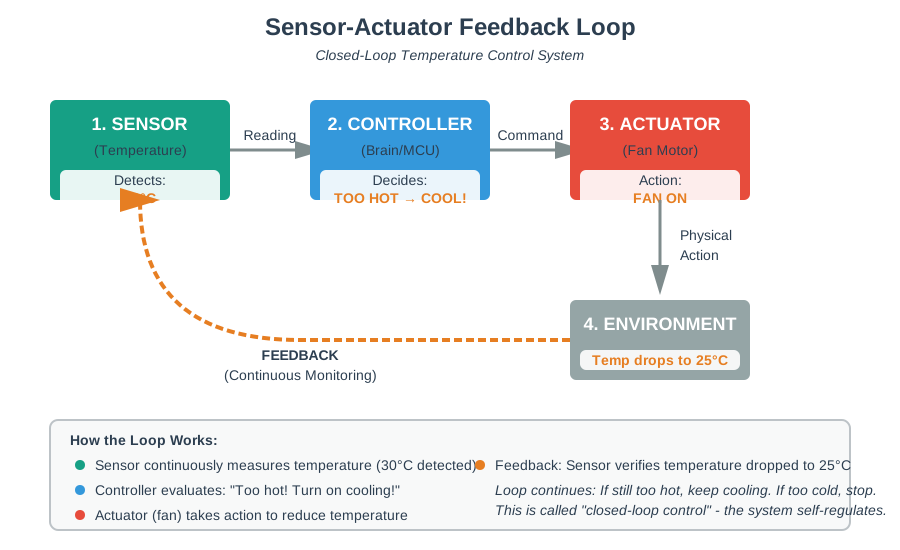
Greenhouse temperature feeds a controller that powers a fan, then checks the temperature response.
Read Figure 35.3, follow sensing into the controller, then the actuator’s effect on the environment, and finally the changed measurement returning as feedback. This loop connects minimal wiring rules to observable behaviour and explains why field testing should precede adding state estimation or more complex control.
This section:
Checkpoint: Reflexes in Products
You now know:
- Smart lighting, thermostats, fan controllers, and plant watering all fit the same sensor-to-actuator template.
- Early Roomba behavior combined local loops: spiral, wall follow, bumper reverse, and random turn.
- Random bounce is useful but limited; missed spaces and repeated paths are evidence for adding memory or mapping.
35.8.2 Sensor Squad Walkthrough
Temperature Terry built a tiny robot car with two light sensors and two motors. Same-side excitatory wiring made the bright-side wheel spin faster, so the car turned away from a flashlight. Cross the wires and the same flashlight made the car turn toward it.
Then Sammy kept the same-side wiring but reversed the effect: more light slowed the motor instead of speeding it up. The car approached gently and stopped near the light. Max summed it up: changing the mapping changed the behavior, even though the robot still had no AI.
35.9 Build a Light-Following Plant Pot
This section: Build a Light-Following Plant Pot — Scenario: create an IoT plant pot that rotates toward the nearest window.
Scenario: create an IoT plant pot that rotates toward the nearest window. Two LDRs sense light direction, two small DC motors rotate the base, and the controller should maximize sunlight without camera vision or cloud logic.
Before driving the plant-pot motors, inspect Figure 35.4 to connect controller outputs with current direction and motor state.
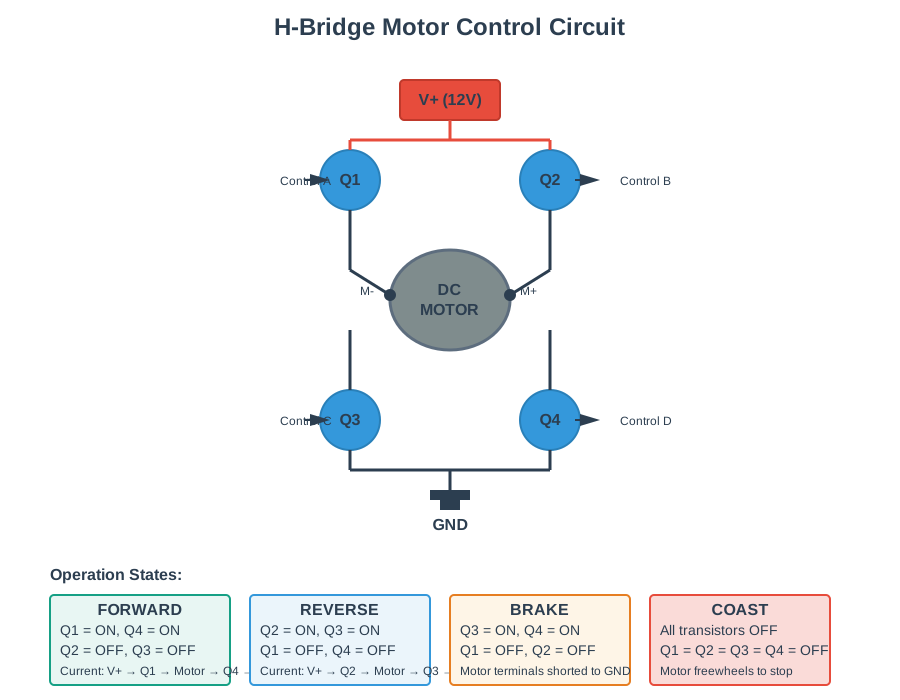
Four H-bridge states compare forward, reverse, brake and coast. Opposed pairs reverse current, low-side switching brakes, and all switches off allows coasting; feedback must prove the outcome.
Read Figure 35.4 across the four switching states: forward, reverse, brake, and coast. The transistor combinations determine motor voltage and current, connecting the vehicle’s simple sensor rule to safe, observable actuator behaviour.
Choose the topology: the pot should approach and orient toward light, so use cross-wired excitatory mapping. The left LDR drives the right motor, the right LDR drives the left motor, and stronger light means more motor speed. If light is on the left, the right motor speeds up and the pot turns left.
Implement the controller loop:
The controller loop only needs four steps:
- Read the left and right LDR values.
- Use cross-wiring: left light drives the right motor; right light drives the left motor.
- Add a small base speed so the motors overcome friction.
- Update motor PWM about 10 times per second.
Rule of thumb: right_speed = base + left_light * gain, and left_speed = base + right_light * gain.
Measured behavior should match the wiring: far-left light makes the right motor faster so the pot turns left; centered light gives equal motor speeds; far-right light makes the left motor faster.
When the pot is nearly centered, sensor noise can make it jitter. Add a dead zone:
Use a simple dead-zone rule:
- Stop both motors when the two light readings differ by less than about 100 ADC counts.
- Otherwise apply the cross-wired Braitenberg motor rule.
Result: the pot rotates toward the brightest light source and stops when aligned. If the motors and ESP32 draw about 280 mA during rotation, duty cycle dominates battery life.
35.9.1 Battery Life Math Behind the Plant Pot
Battery life depends on duty cycle. For 5 minutes of 280 mA rotation per day:
With 2500 mAh AA batteries (4x in series = 6V, regulated to 5V):
Sleep current is tiny by comparison: 10 uA for 23.92 hours is about 0.24 mAh/day, so motor energy still dominates.
35.9.2 Try the Battery-Life Tradeoff
Key insight: this reactive system is simpler than using a camera, vision pipeline, servo controller, and compass for the same task.
35.10 Choose Reactive Control or AI/ML
This section: Choose Reactive Control or AI/ML — Decision shortcut: start reactive when the rule is “sensor X crosses threshold Y, so actuator Z changes.” Add AI/ML for recognition, prediction, adaptation, or planning.
-

Use a direct rule when one sensor limit should change one action.
-

Add a learning model only for recognition, prediction, adaptation, or planning.
-

Keep the fast safe rule in control even when the learning model is added.
A red thermometer-shaped character points upward beneath a simple diagram of a distance sensor, a controller and a motor. A horizontal threshold scale and dotted vertical marker sit between the sensor and controller, showing one direct control route.
| System Requirement | Reactive (Braitenberg-style) | AI/ML Required |
|---|---|---|
| Response to immediate stimulus | Yes: thermostat turns on heater when T < setpoint | Not needed |
| Pattern recognition | No: cannot detect “person” vs “dog” in camera feed | Yes: requires ML image classification |
| Memory of past events | Yes: a rule controller can retain a timestamp or state such as “cleaned 1 hour ago”. | Only if the past record must support learned recognition or prediction. |
| Fail-safe behavior | Yes: loss of control sends actuators to safe default state | AI failure modes are unpredictable |
Decision shortcut: start reactive when the rule is “sensor X crosses threshold Y, so actuator Z changes.” Add AI/ML for recognition, prediction, adaptation, or planning. For fail-safe or sub-100 ms behavior, keep the reactive path in control even when ML is added.
Worked examples:
| IoT System | Correct Approach | Why |
|---|---|---|
| Smart thermostat | Reactive | If T < setpoint-1°C → turn ON heater. If T > setpoint+1°C → turn OFF. No ML needed. |
| Person detection for security camera | AI (computer vision) | Must distinguish “person” from “cat” or “tree shadow” → requires ML image classification |
| Emergency stop button | Reactive | Button press → IMMEDIATELY cut power to motor. No latency tolerance for AI. |
On an ESP32-class system, the reactive path usually has smaller code, shorter active windows, less training work, and more predictable failure modes. Key recommendation: prototype it first, then add AI/ML only for genuine recognition, prediction, or adaptation problems.
The mistake: a team builds an “AI-powered smart fan” before testing whether temperature can directly drive fan speed. The simple baseline is a Braitenberg-style mapping.
The core rule is direct: below 22°C the fan is off, from 22°C to 26°C speed increases linearly, and above 26°C the fan runs at maximum. That mapping is predictable, fast, and easy to test.
A quick bench test exposes why the reflex should be the baseline: at 28°C the model may underestimate fan speed, at 20°C it may false-activate, and after a sudden temperature spike it may wait for a prediction window. The Braitenberg rule has no hidden state, updates immediately, and remains easy to test.
When ML genuinely improves the system: add it after the reactive controller works, and let it refine edge cases without owning safety.
Use ML only as a refinement layer:
- Always compute a safe reactive fan speed first.
- Let ML adjust the speed only when its confidence is high.
- Fall back to the reactive speed whenever the model is uncertain.
This keeps deterministic safety while allowing later optimization.
Key takeaway: prototype the reactive controller first. Add ML only when it gives a measured user benefit.
This section:
Checkpoint: Reactive Before AI
You now know:
- Reactive control is right when the rule is “sensor X crosses threshold Y, so actuator Z changes.”
- AI/ML is justified for recognition, prediction, adaptation, or planning, not for a basic threshold response.
- Safety-critical and sub-100 ms paths should keep a deterministic reactive fallback even when ML is added.
This section:
Checkpoint: Practice Evidence
You now know:
- The label quiz follows the chain from sensor detection to wiring, coupling type, and emergent behavior.
- The code quiz checks the cross-wired rule: left sensor drives the right motor, and right sensor drives the left motor.
- Mode switching should preserve the same sensor readings while changing only the wiring rule.
35.12 Transfer Functions and Tuning
This section: Transfer Functions and Tuning — The core chapter above shows how wiring topology and polarity produce reactive behaviors.
The core chapter above shows how wiring topology and polarity produce reactive behaviors. The companion page goes one layer deeper: sensor transfer functions, photoresistor compression, saturation, lag, and tuning evidence decide whether that simple wiring behaves predictably on real hardware.
35.12.1 Next Reactive Design Practice
Continue with Transfer Functions and Reactive Tuning to bench-test LDR curves, motor scaling, state-machine modes, matching/order practice, and common implementation pitfalls.
35.13 Summary
This section: Summary
Key takeaways from Braitenberg vehicles:
- Simple sensor-actuator links create emergent behavior — wiring topology and polarity alone produce fear, aggression, love, and exploration.
- Connection type determines behavior — same-side vs cross-wired sets direction; excitatory vs inhibitory sets intensity.
- Many IoT systems are essentially Braitenberg vehicles — thermostats, motion lights, and fan controllers use direct sensor-actuator mapping.
- Consider reactive design before complex AI — the majority of commercial IoT products use purely reactive logic for their core function.
35.14 What’s Next
This section: What’s Next
Now that you can map sensor inputs to actuator outputs using Braitenberg principles:
Find help
3 reviewed answers.
Where should I start in a module?
Open the module page from the sidebar to see its chapters in order. Use the module map to return to a topic you need.
Modules and pathsReviewed
What can I try when a project does not work?
Check the symptom, then work through the diagnostic steps. Keep the error message and the smallest example that reproduces it.
When you are stuckReviewed
How do interactive examples work?
Use the interactive guide to check how examples and simulations work before changing your project.
Interactive examples guideReviewed