15 Sensor Interfacing Protocols
More
Depth: Practitioner
Progress saves as you read. Mark sections complete as you go; your progress appears in the sidebar.
Prove One Reading Across the Wires
Picture a room sensor connected to a small controller. The sensor may use one pin, two shared wires, a clocked link, or a simple serial line. The best choice is the one that keeps the reading and its failure state clear.
-
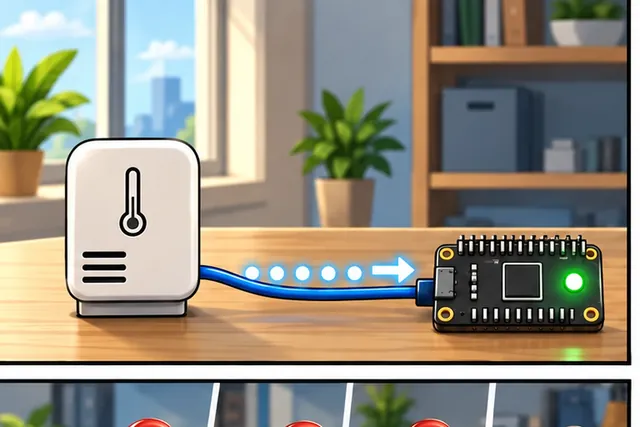
A room sensor sends one reading to a small controller.
-
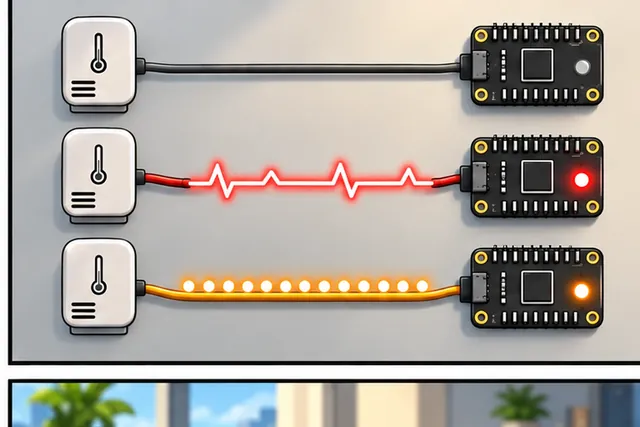
Different wire rules can hide silence, bad timing, or a stuck line.
-
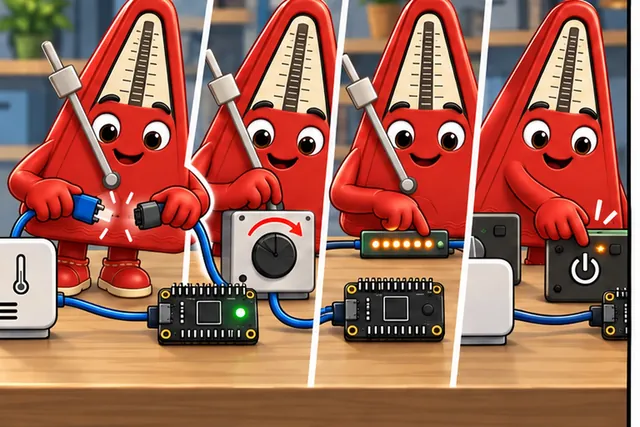
Disconnect a wire, change timing, repeat a value, and restart.
-
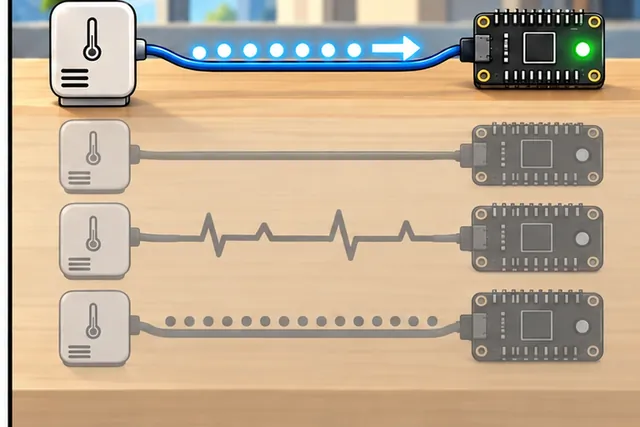
Choose the link that keeps both the reading and its failure clear.
Illustrated scene: A room sensor sends one reading to a small controller.
A protocol means shared rules for an exchange. GPIO means general purpose input and output pins. Inter-integrated circuit (I2C) means a short shared wired link between chips. Serial Peripheral Interface (SPI) means a clocked wired link with separate data paths. Universal asynchronous receiver-transmitter (UART) means a serial link that agrees on timing without a shared clock.
Read one value, then disconnect a wire, hold the line, change the timing, repeat the value, and restart the controller. Record the raw result, time, device identity, and error at each step. Silence must not become a valid zero.
This runway does not prove cable length, noise margin, or power use. The deeper sections compare wiring, addressing, speed, error behaviour, and the tests needed before choosing an interface.
A sensor bus is a conversation with timing, addressing, voltage, and error rules. Before wiring I2C, SPI, or UART, decide who talks, who listens, how conflicts are avoided, and how a failed read will be detected.
15.1 In 60 Seconds
This section: In 60 Seconds — Sensor communication protocols (I2C, SPI, UART) are the “languages” sensors and microcontrollers use to exchange data.
Sensor communication protocols (I2C, SPI, UART) are the “languages” sensors and microcontrollers use to exchange data. I2C uses just two wires and supports dozens of sensors on one bus, while SPI trades extra wires for much faster data transfer. Choosing the right protocol depends on your speed needs, available GPIO pins, and how many sensors you are connecting.
The mathematical gist. I2C rise time is . With the chapter’s 4.7 kΩ pull-up and 400 pF ceiling, s and s, too slow even for the 1,000 ns Standard-mode limit. At the 60 pF chapter case, ns and ns, inside the 300 ns Fast-mode limit. At 400 pF, Fast mode needs for rise time, while a 3.3 V, 3 mA sink with V needs ; that combination has no passive pull-up value meeting both limits.

- I2C (Inter-Integrated Circuit): A two-wire serial protocol (SDA data, SCL clock) supporting multiple devices on one bus using 7-bit addresses; standard speed 100 kHz, fast mode 400 kHz, fast-plus 1 MHz.
- SPI (Serial Peripheral Interface): A four-wire full-duplex protocol (MOSI, MISO, SCK, CS) offering higher speed than I2C (up to tens of MHz) but requiring a dedicated chip-select line per device.
- UART (Universal Asynchronous Receiver/Transmitter): An asynchronous two-wire protocol (TX, RX) using agreed baud rates; simple and universal but limited to point-to-point connections with no inherent bus topology.
- 1-Wire: A single-wire protocol (plus ground) supporting multiple addressable devices; commonly used by DS18B20 temperature sensors; slow but minimal wiring.
- Pull-Up Resistors on I2C: I2C SDA and SCL lines use open-drain signaling and require external pull-up resistors (typically 4.7 kohm at 100 kHz) to define the HIGH state between transactions.
- Address Conflicts: Two I2C devices with the same address on the same bus cause data corruption. Check all sensor addresses before designing a multi-sensor board; some sensors offer address-select pins.
- Clock Stretching: An I2C feature where a slow slave holds SCL low to pause the master while preparing data; not all masters support it — check the microcontroller documentation before relying on this feature.
- Logic Level Compatibility: Mixing 3.3 V and 5 V devices on the same I2C or SPI bus can damage 3.3 V inputs. Use bidirectional level shifters or verified series-resistor approaches when mixing voltage domains.
15.2 Learning Objectives
This section: Learning Objectives
By the end of this chapter, you will be able to:
- Differentiate between I2C, SPI, and UART communication protocols based on wiring, speed, and topology
- Configure an I2C bus with correct pull-up resistors and address assignments for multi-sensor applications
- Implement SPI communication with proper mode selection for high-speed sensor data transfer
- Diagnose common protocol issues including address conflicts, missing pull-ups, and SPI mode mismatches
- Evaluate and justify the appropriate protocol for specific sensor requirements and constraints
15.3 Introduction
This section: Introduction — Sensor communication protocols are the foundation of IoT data acquisition.
Sensor communication protocols are the foundation of IoT data acquisition. Every sensor reading must travel from the physical sensor to your microcontroller through a defined communication interface. Understanding these protocols enables you to design reliable, efficient sensor networks.
Think of communication protocols like different languages. Just as people need to speak the same language to understand each other, sensors and microcontrollers need to “speak” the same protocol to exchange data. The most common “languages” are I2C (pronounced “eye-squared-see” or “eye-two-see”), SPI (“spy”), and UART (“you-art”). Each has different rules about how many wires to use, how fast to talk, and how to address specific devices.
15.4 I2C Communication Protocol
This section: I2C Communication Protocol — I2C (Inter-Integrated Circuit) is a two-wire synchronous protocol perfect for connecting multiple sensors using minimal GPIO pins.
I2C (Inter-Integrated Circuit) is a two-wire synchronous protocol perfect for connecting multiple sensors using minimal GPIO pins. It uses:
- SDA (Serial Data): Bidirectional data line.
- SCL (Serial Clock): Clock signal from master.
- 7-bit addressing: Up to 112 usable device addresses (128 total, 16 reserved).
- Pull-up resistors: Required on both lines.
15.4.1 I2C Protocol Sequence
Before writing bus code, separate transaction order from physical topology. Start with Figure 15.1 and trace the exact control sequence used to read a register, paying particular attention to who drives each phase and where the direction changes.
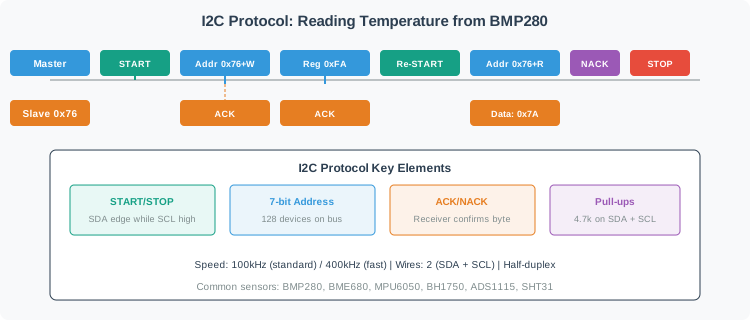
I2C master selects a sensor register, restarts to read from the slave, then receives data before NACK and STOP.
Read Figure 15.1 from START to STOP. The controller addresses the sensor for writing, selects a register, issues a repeated START, addresses it for reading, accepts the returned byte, and ends the transfer with NACK and STOP. The repeated START preserves one logical transaction while reversing direction; this sequence is the protocol meaning behind the API calls used later.
Now use Figure 15.2 to place that transaction on the wires. Look first at the shared SDA and SCL rails, then the pull-ups, and finally the uniquely addressed devices attached in parallel.
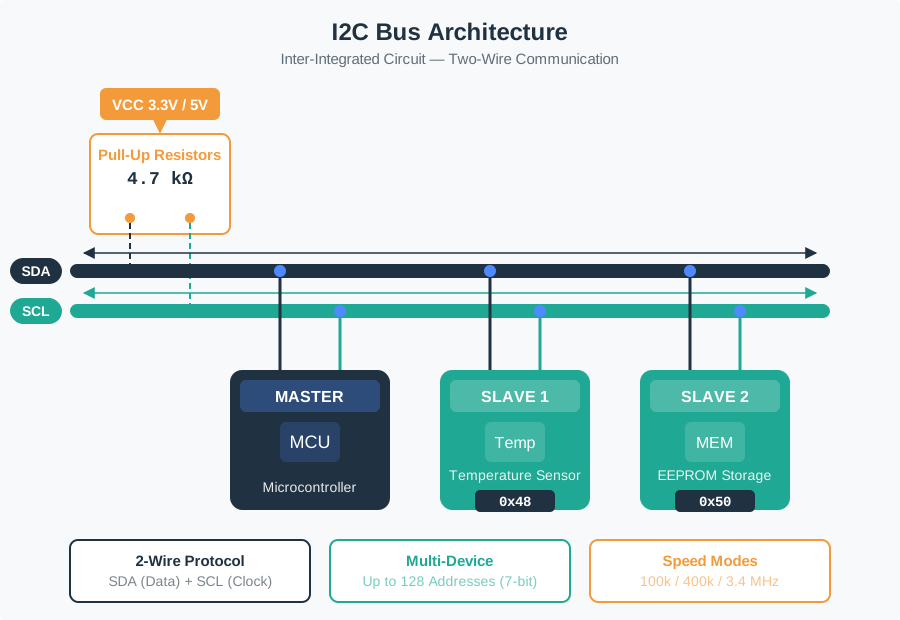
Master controller shares data and clock rails with temperature and memory slaves; both rails use pull-up resistors.
Read Figure 15.2 across the shared conductors: every device uses both, so identity comes from the address rather than a dedicated chip-select wire. The pull-ups establish the idle-high state because participants pull the open-drain lines low rather than driving them high. That shared electrical boundary explains why duplicate addresses, excessive bus capacitance, or missing pull-ups can defeat an otherwise correct transaction sequence.
15.4.2 Key I2C Protocol Elements
- START Condition: SDA goes LOW while SCL is HIGH (signals transaction start).
- STOP Condition: SDA goes HIGH while SCL is HIGH (signals transaction end).
- ACK (Acknowledge): Receiver pulls SDA LOW during 9th clock pulse (data received successfully).
- NACK (Not Acknowledge): Receiver leaves SDA HIGH (last byte or error).
- Repeated START: START without preceding STOP (direction change from write to read).
15.4.3 I2C Implementation Example
Reading sensor data over I2C follows a two-phase pattern: first write the register address you want to read, then request the data bytes. The endTransmission(false) sends a Repeated START instead of a STOP, keeping the bus locked for the subsequent read.
For learning, trace the transaction before reading code:
Start by Send START. Then Send the sensor address with the write bit. Next Send the register address you want to read. After that Send REPEATED START. Continue by Send the sensor address with the read bit. Continue by Read the data bytes. Finally Send STOP.
15.4.4 Optional C++ Pattern
#include <Wire.h>

#define I2C_SDA 21
#define I2C_SCL 22
#define BMP280_ADDR 0x76
#define BMP280_CHIP_ID_REG 0xD0

void setup() {
  Serial.begin(115200);
  Wire.begin(I2C_SDA, I2C_SCL);

  // Read chip ID register to verify communication
  uint8_t chipId;
  readI2CRegister(BMP280_ADDR, BMP280_CHIP_ID_REG, &chipId, 1);
  Serial.print("BMP280 Chip ID: 0x");
  Serial.println(chipId, HEX);  // Should print 0x58 for BMP280
}

void readI2CRegister(uint8_t addr, uint8_t reg, uint8_t* data, uint8_t len) {
  Wire.beginTransmission(addr);
  Wire.write(reg);                // Phase 1: Write register address
  Wire.endTransmission(false);    // Repeated START (no STOP)

  Wire.requestFrom(addr, len);    // Phase 2: Read data bytes
  for(int i = 0; i < len; i++) {
    if(Wire.available()) {
      data[i] = Wire.read();
    }
  }
}

void loop() { }This section:
Estimate total bus capacitance to determine if your I2C bus will work reliably. The I2C specification limits bus capacitance to 400 pF for standard mode and fast mode.
This section:
This simulation demonstrates how I2C bus scanning works. Add devices to the bus, then click “Scan Bus” to see the master controller query each address and detect ACK/NACK responses.
15.5 SPI Communication Protocol
This section: SPI Communication Protocol — SPI (Serial Peripheral Interface) is a synchronous, full-duplex communication protocol using four lines: MISO (Master In Slave Out), MOSI (Master Out Slave In), SCK (Serial Clock), and CS (Chip Select).
SPI (Serial Peripheral Interface) is a synchronous, full-duplex communication protocol using four lines: MISO (Master In Slave Out), MOSI (Master Out Slave In), SCK (Serial Clock), and CS (Chip Select). Unlike I2C, SPI supports simultaneous bidirectional data transfer.
Before comparing SPI with I2C, inspect Figure 15.3 to assign every wire a direction and timing role. The transaction is easiest to understand when chip selection and clocking are separated from the two data paths.
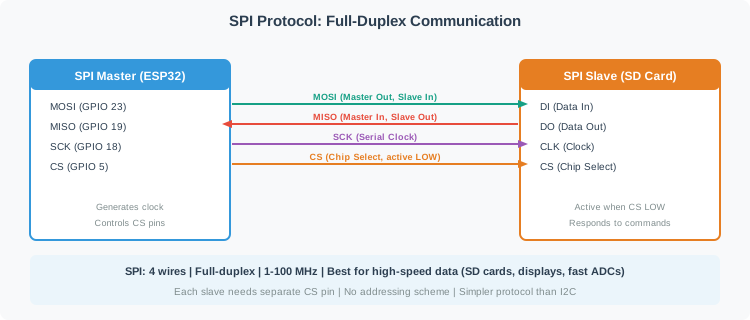
An ESP32 SPI master connects MOSI, MISO, SCK, and CS to an SD card slave. The master generates the clock; the slave is active when CS is low.
Read Figure 15.3, begin with chip select, follow the clock edges, then trace MOSI from controller to peripheral and MISO in the reverse direction. Their simultaneous directions explain full-duplex transfer, while the dedicated select line connects the bus diagram to firmware transaction boundaries.
SPI bits narrated tour
Narrated audio tour. The full transcript is below.
Play the tour to open the simulator. Pause, replay a beat, or read the full transcript below.
Some beats explain situations this teaching model cannot show; those beats keep the existing frame and provide captions only.
Full transcript — SPI bits (8 beats)
B1 — Sensor exchange
You are bringing a room sensor into service for an Internet of Things project. Your job is to get its reading into a small controller and keep a failed exchange from passing as a valid reading. Start with the conversation that carries those bits.
Model caption: You are connecting a room sensor to a controller. Keep the reading and a failed exchange distinguishable.
B2 — Full duplex
Serial Peripheral Interface, or SPI, is a clocked wired link between a controller and a peripheral, such as your sensor. It uses four signal lines. Two carry data in opposite directions. Full duplex means the controller can send data while receiving data at the same time.
Model caption: Serial Peripheral Interface, SPI, uses four signal lines. Full duplex means sending and receiving at the same time.
B3 — Clock and chip select
The other two lines are the clock and chip select. The controller generates the clock. Chip select becomes low to activate the sensor for the exchange. Selection identifies the participant; clocking provides the timing. The outgoing and incoming data use their own separate paths while the sensor is selected.
Model caption: The controller supplies the clock. Low chip select activates the sensor; separate data paths carry outgoing and incoming bits.
B4 — Sampling edges
A clock edge is a change between low and high. Sampling means reading a bit at the chosen edge. In the animation's mode zero, the clock rests low, sampling happens when it rises, and data changes when it falls. The mode determines which edge is used for sampling.
Model caption: A clock edge changes between low and high. Sampling reads a bit. Mode zero rests low, samples rising, and changes data falling.
B5 — Four microseconds
For a worked sensor example, use mode zero and an eight bit frame at two megahertz: two million clock cycles per second. The model calculates frame time by dividing bits by clock rate. Eight bits divided by two million cycles per second gives four microseconds, or four millionths of a second, for that frame.
Model caption: Eight bits divided by two million cycles per second gives four microseconds, or four millionths of a second.
B6 — Eight bits each way
With the most significant bit sent first, the example begins with the controller sending one while receiving zero. At the next bit position, it sends zero while receiving one. Each clock carries one bit in each direction. Eight clocks therefore move eight bits each way during the same four microseconds.
Model caption: Most significant bit first: b7 sends one and receives zero; b6 sends zero and receives one. Eight clocks move eight bits each way in four microseconds.
B7 — Mode mismatch
The misconception is that matching the clock rate is enough. Keep two megahertz but change the controller to mode one. The model's sensor expects mode zero. The controller now samples on falling edges instead of rising edges, so data may be sampled at the wrong moment despite the unchanged rate.
Model caption: The rate is still two megahertz. The sensor expects mode zero, but mode one samples falling instead of rising. Matching rate alone is insufficient.
B8 — Matched modes
With the sensor selected and clock modes matched, every clock carries one bit each way.
Model caption: With the sensor selected and clock modes matched, every clock carries one bit each way.
15.5.1 SPI vs I2C Comparison
| Feature | I2C | SPI |
|---|---|---|
| Wires | 2 (SDA, SCL) | 4+ (MISO, MOSI, SCK, CS per device) |
| Speed | 100 kHz - 3.4 MHz (standard/fast/high-speed) | 1-100 MHz |
| Topology | Multi-master, multi-slave | Single master (typical), multi-slave |
| Addressing | 7-bit addresses (112 usable) | Hardware CS pins (limited by GPIO) |
| Data Transfer | Half-duplex (sequential) | Full-duplex (simultaneous) |
| Protocol Overhead | START, STOP, ACK/NACK | Minimal (just CS selection) |
| Typical Use | Multiple sensors, displays | High-speed: SD cards, displays, ADCs |
| GPIO Efficiency | High (2 pins for many devices) | Low (3 shared + 1 CS per device) |
Calculate the effective data throughput for your SPI configuration based on clock speed and transaction overhead.
15.5.2 When to Choose Each Protocol
Choose I2C when:
Start by Multiple sensors needed (temperature, pressure, IMU, light). Then Limited GPIO pins available. Next Moderate data rates sufficient (<50 kB/s). Finally Moderate cable length (limited by 400 pF bus capacitance; typically 0.5-2 meters depending on number of devices and wire type).
Choose SPI when:
Start by High-speed data transfer required (>1 MB/s). Then Large data blocks (SD cards, displays). Next Real-time requirements (<1 ms latency). Finally Plenty of GPIO pins available.
Option A: I2C bus (BME280 + BH1750 + MPU6050): Wire count 2 (SDA, SCL shared), GPIO usage 2 pins total for 3+ sensors, max speed 400kHz (~44kB/s), read latency ~100-200us per sensor at 400kHz (address + register overhead), power during transfer ~1mA, cable length up to 1-3 meters with 4.7k pull-ups
Option B: SPI bus (BME280 + SD card + TFT display): Wire count 3 shared + 1 CS per device = 6 pins for 3 devices, max speed 10-40MHz (1-5MB/s), read latency ~10us per sensor (direct register access), power during transfer ~5-10mA (higher clock), cable length 10-30cm max at high speeds
Decision Factors: For battery-powered environmental monitoring nodes with 3-5 slow sensors, I2C can save pins; verify timing and total bus capacitance for the chosen 400 kHz design. For data logging to an SD card at 500 kB/s, a display, or a fast ADC, choose an interface that meets the device’s throughput and timing requirements. SPI is one option, but SD cards also have SD bus modes, and ADCs and displays can expose other interfaces. A hybrid design can use I2C for slow sensors and SPI or SD bus for storage. Watch for I2C address conflicts: BME280 offers 0x76 or 0x77, so two can share a bus without an address translator or multiplexer.
15.6 UART Serial Communication
This section: UART Serial Communication — UART (Universal Asynchronous Receiver/Transmitter) frames asynchronous serial bytes without a shared clock.
UART (Universal Asynchronous Receiver/Transmitter) frames asynchronous serial bytes without a shared clock. A direct TX/RX link commonly connects two devices, but a multidrop physical layer and an addressing protocol can connect more. Both sides of each link must use compatible baud and frame settings.
15.6.1 UART Key Characteristics
- TX (Transmit) and RX (Receive): Two unidirectional signals in a direct link.
- Asynchronous: No shared clock; endpoints need compatible baud rates.
- No inherent address field: The basic UART frame does not select among multiple devices; multidrop needs added transceivers and protocol rules.
- Common baud rates: 9600, 19200, 38400, 57600, 115200 bps.
- Frame format: Start bit + data bits (typically 8, though other widths exist) + optional parity + typically 1–2 stop bits, configured consistently at both ends.
15.6.2 When to Use UART
UART is commonly used for GPS modules (NMEA sentences at 9600 bps), Bluetooth modules (HC-05 AT commands), GSM/cellular modems, and debug/logging output. Many sensors provide UART as a simpler alternative to I2C/SPI, though at lower data rates.
15.6.3 Optional ESP32 UART Example
Open this only after you understand the wiring rule: sensor TX connects to MCU RX, sensor RX connects to MCU TX, and both devices must use the same baud rate.
// Reading GPS data over UART (Serial2 on ESP32)
#define GPS_RX 16
#define GPS_TX 17

void setup() {
  Serial.begin(115200);           // USB debug output
  Serial2.begin(9600, SERIAL_8N1, GPS_RX, GPS_TX);  // GPS at 9600 baud
}

void loop() {
  while (Serial2.available()) {
    char c = Serial2.read();
    Serial.print(c);  // Forward GPS NMEA sentences to USB
  }
}
This section:
Calculate the effective data throughput for a UART connection based on baud rate and frame configuration.
15.6.4 I2C vs SPI vs UART Quick Reference
| Feature | I2C | SPI | UART |
|---|---|---|---|
| Wires | 2 | 3 + 1/device | 2 |
| Topology | Bus (multi-device) | Bus (multi-device) | Point-to-point |
| Clock | Synchronous (shared) | Synchronous (shared) | Asynchronous (agreed) |
| Speed | 100 kHz - 3.4 MHz | 1-100 MHz | 9600 - 921600 bps |
| Duplex | Half-duplex | Full-duplex | Full-duplex |
| Best For | Many slow sensors | High-speed data | Simple serial devices |
This section:
This section:
15.7 Bus Protocol Diagnostics
This section: Bus Protocol Diagnostics — The troubleshooting, bus-budget, and worked-example material is now a focused child chapter instead of a second treatment inside this page.
The troubleshooting, bus-budget, and worked-example material is now a focused child chapter instead of a second treatment inside this page.
- Protocol diagnostics and bus design: I2C pull-ups, SPI timing, address conflicts, multi-sensor bus design, and practice activities.
15.8 Summary
This section: Summary
Key protocol takeaways:
- I2C saves pins - Use it when many low-to-moderate-speed sensors can share SDA and SCL.
- SPI buys speed and determinism - Use it when bandwidth, full-duplex transfer, or device-specific chip-select timing matters.
- A direct UART link is simple - Use it for modules that stream text or binary frames over TX/RX; multidrop needs a suitable physical layer and protocol.
- Diagnostics deserve their own pass - Move to the child chapter when the design depends on pull-up sizing, bus capacitance, SPI modes, or address conflicts.
15.9 What’s Next
This section: What’s Next
Find help
3 reviewed answers.
Where should I start in a module?
Open the module page from the sidebar to see its chapters in order. Use the module map to return to a topic you need.
Modules and pathsReviewed
What can I try when a project does not work?
Check the symptom, then work through the diagnostic steps. Keep the error message and the smallest example that reproduces it.
When you are stuckReviewed
How do interactive examples work?
Use the interactive guide to check how examples and simulations work before changing your project.
Interactive examples guideReviewed