Design Methodology Module Guide
More
Depth: Practitioner
Progress saves as you read. Mark sections complete as you go; your progress appears in the sidebar.

Your guide: Blueprint Bina
“Draw the boundary before you draw the parts — every interface you name now is a bug you don’t chase later.”
Worked Example: The Decision to Prove
This section: Worked Example: The Decision to Prove — Firmware means software stored on a device.
Firmware means software stored on a device.
Picture a team that wants to build a connected product but has not yet proved the problem, the network assumptions, the component choice, or the release evidence. This module is the route for turning that uncertainty into a sequence of decisions: understand the user, plan the smallest credible slice, test the network and hardware claims, read the datasheet rows that matter, and keep a record that explains why the next build step is justified.
Follow Blueprint Bina as a product idea still needs proof of the problem, network, part, and next build step.
-

Our product idea still rests on guesses.
-

First, learn what the user truly needs.
-

Test the network and the chosen parts.
-

Keep proof before the next build step.
Read the four story panels from the unproved product idea to the recorded next step. The first panel exposes four independent uncertainties rather than treating the product concept as one large bet. User research addresses the problem claim, while a small network path and a component bench check address technical feasibility. The last panel files those results before more work begins. That order previews the module’s method: isolate the decision, choose evidence appropriate to it, preserve what the test did and did not establish, and allow the result to redirect the build. Progress is a better-supported commitment, not merely another completed artifact.
Learning Objectives
This section: Learning Objectives
By the end of this module, you will be able to:
- Use design thinking to turn user evidence into problem statements, prototypes, validation gates, and release decisions.
- Plan IoT projects with scope boundaries, assumption maps, risk registers, decision logs, and lifecycle ownership.
- Design and simulate IoT networks before physical deployment decisions become expensive.
- Read specification sheets and select sensors using evidence from the application context.
- Validate hardware, firmware, data, and field operations before scaling a system.
Worked Example: Design Work Is Evidence Work
This section: Worked Example: Design Work Is Evidence Work — Design methodology is the discipline that keeps an IoT team from mistaking a plausible idea for a field-ready system.
Design methodology is the discipline that keeps an IoT team from mistaking a plausible idea for a field-ready system. The first question is not which board, radio, dashboard, or cloud service looks attractive. The first question is what evidence would prove that a connected system improves a real workflow enough to justify the hardware, maintenance, privacy, security, and operational cost. In this module, design thinking supplies user evidence, project planning turns that evidence into boundaries, network design tests connectivity assumptions, specification sheets constrain hardware choices, and validation checks whether the system is ready for a pilot or release.
A beginner can use the module as a decision route. Start with the user and problem when the need is unclear. Move to planning when the team needs scope, owners, and risk controls. Use network simulation when topology, traffic, or coverage assumptions are still guesses. Use specification-sheet chapters when a sensor or component must survive a real environment. Use testing chapters when firmware, data, and operations need acceptance evidence. The common thread is a traceable decision record: what was believed, what was tested, what changed, and what the next gate requires.
Inspect Figure 1 and ask which artifact can support the decision at the current gate.
| Gate | Evidence Artifact | Decision It Supports |
|---|---|---|
| Need | Interview notes, observation logs, journey maps, and problem statements | Whether the team is solving the right problem |
| Feasibility | Prototype notes, network simulation runs, datasheet extracts, and risk register entries | Whether the idea can be built within constraints |
| Readiness | Test matrix, pilot acceptance criteria, telemetry plan, and handoff record | Whether to pilot, release, narrow scope, or stop |
Read Figure 1 down its three gates. Need is supported by observations and problem evidence that can show whether the team is solving the right problem. Feasibility uses prototypes, network runs, datasheet extracts, and risk records to test whether the idea fits its constraints. Readiness brings together acceptance criteria, telemetry, and handoff evidence for a pilot, release, narrowed scope, or stop decision. The right-hand column prevents artifact collection from becoming the goal: every item must support a named decision. This keeps the guide usable for learners, project teams, and reviewers because each audience can see what proof should exist before the commitment grows.
Inspect Figure 2 and ask which evidence source should constrain the next build decision.

Read Figure 2 from trade-offs into four proof areas. Software practice makes code, work flow, and human-system claims open to review. A model tests clear assumptions. A hardware trial bounds claims about parts and bench use. Testing checks readiness across device, network, data, and user work. No area can make the choice alone. Their results meet in the record at the bottom. It keeps the claim, source, open risk, and next gate. Cost, battery, delay, range, link strength, and data quality remain trade-offs until that record shows what the use case can support.
Practitioner: Build A Decision Ledger Before Building The System
This section: Practitioner: Build A Decision Ledger Before Building The System — A working IoT design process needs a small set of durable artifacts.
A working IoT design process needs a small set of durable artifacts. Use ISO 9241-210 to keep human-system evidence visible, Scrum or Kanban to make work inspectable, a risk register or FMEA-style review to keep failure modes owned, and a decision log such as an architecture decision record to preserve why a path was chosen. For network evidence, record what was simulated or captured, not just the conclusion. A Wireshark or tshark capture, an ns-3, Cooja, or OMNeT++ scenario, a Wokwi firmware simulation, or a datasheet comparison only helps if the assumptions and limits are written beside it.
For each design choice, write four fields before implementation expands: the claim, the evidence source, the unresolved risk, and the next gate. A claim might be “BLE advertising is enough for discovery,” “LoRaWAN uplink rate is acceptable for soil sensing,” or “the accelerometer can detect the vibration band of interest.” Evidence might be a user test, a packet capture, a simulator output, a vendor datasheet table, a bench measurement, or a field observation. The unresolved risk names what could still invalidate the choice: enclosure attenuation, battery temperature, clinic workflow, gateway placement, privacy consent, or maintenance access. The next gate names the smallest test that would change the decision.
This ledger keeps the module practical. It prevents design thinking from becoming vague empathy work, prevents agile boards from hiding hardware risk, prevents network simulation from becoming decorative graphs, and prevents specification sheets from being treated as marketing summaries. When a learner finishes this module, they should be able to explain not only what they would build, but why the evidence supports building it now.
Keep the ledger small enough to maintain during real work: one row per decision, one owner, one evidence link, and one next gate. If the row cannot be updated after a test, capture, interview, or simulation run, the artifact is too heavy for the project.
Under The Hood: Methodology Controls Coupled Failure Modes
This section: Under The Hood: Methodology Controls Coupled Failure Modes — IoT design is difficult because failures cross boundaries.
IoT design is difficult because failures cross boundaries. A sensor selected from a clean datasheet can fail after enclosure thermal drift. A network design that passes a lab throughput test can fail when duty-cycle limits, gateway placement, retry storms, or interference change the traffic shape. A dashboard can be accessible in isolation but unsafe in use if alarms reach the wrong role or if latency hides stale device state. Methodology is the control layer for those coupled failures: it forces the team to name boundaries, assumptions, owners, evidence quality, and rollback conditions before a prototype becomes a product.
The deeper chapters expose that control layer at different grains. Design thinking chapters protect problem framing and consent. Planning chapters protect scope, risk, sprint flow, and handoff. Network chapters protect topology, capacity, simulation validity, and packet-level behavior. Specification-sheet chapters protect electrical, timing, range, accuracy, and environmental assumptions. Simulation and validation chapters protect the chain from firmware behavior to pilot readiness. Standards and references do not remove judgment, but they give the judgment a structure: ISO 9241-210 for human-centred design, NISTIR 8259A for baseline IoT device cybersecurity capabilities, Scrum or Kanban for visible work, and packet or simulator evidence for network claims.
The most useful under-the-hood habit is fail-closed design review. If a requirement has no evidence, mark it as an assumption. If a simulation cannot be reproduced, do not use it as release evidence. If a datasheet condition does not match the field environment, record the gap. If a pilot metric has no owner, the release is not ready. This is how methodology prevents a connected prototype from becoming an unsupported field liability.
That habit also makes maintenance cheaper: later teams can see which claims came from standards, which came from tests, which came from field observation, and which still need a stronger proof before the system scales.
Module Purpose
This section: Module Purpose — IoT projects fail when teams lock into hardware, connectivity, cloud architecture, or product scope before the evidence is strong enough.
IoT projects fail when teams lock into hardware, connectivity, cloud architecture, or product scope before the evidence is strong enough. This module gives learners a repeatable way to slow down the risky decisions, ask better questions, and document what changed as evidence improved.
Inspect Figure 3 and ask which gate currently lacks enough evidence for the project to proceed.
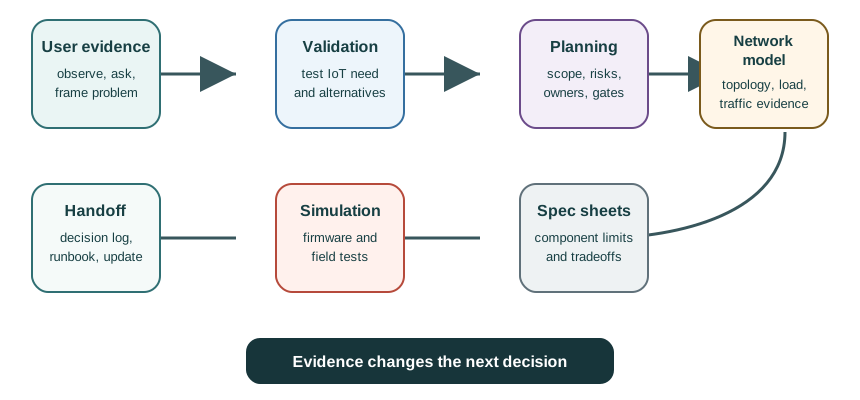
Read Figure 3 from the need to release readiness. The first gate uses field notes and a problem claim to ask if the team chose the right need. The next gate bounds scope. It joins the risk list with network cases, test notes, data-sheet limits, and sensor checks. The last gate asks if models, bench tests, and the ready list support a pilot, a smaller release, or a stop. The ledger keeps each claim, source, open risk, and next gate. An idea may start a build, but only the proof at each gate can support the next cost.
How to Use This Module
This section: How to Use This Module — Choose the entry point that matches the decision you need to make.
Choose the entry point that matches the decision you need to make.
Start with users
Use the design-thinking chapters when the problem, users, outcomes, or IoT necessity are still uncertain.
Control scope and risk
Use planning and agile-risk chapters when the team needs owners, gates, release controls, and decision records.
Model before deployment
Use network design and simulation chapters when topology, capacity, protocol, or traffic assumptions need evidence.
Read the component evidence
Use specification-sheet chapters when sensor choice, limits, operating conditions, and tradeoffs matter.
Learning Path Map
This section: Learning Path Map — Inspect Figure 4 and choose the entry point that matches the decision currently blocking the project.
Inspect Figure 4 and choose the entry point that matches the decision currently blocking the project.
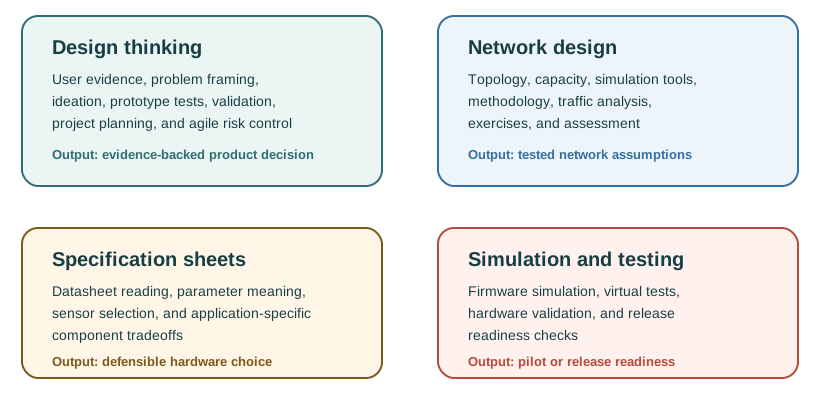
Read Figure 4 from the first question into four branches. Use design thinking when the doubt is about people, outcomes, or the need for IoT. Use network design and models for topology, load, protocol, and traffic claims. Use data sheets to test sensor limits and site conditions. Use hardware trials for firmware, data, field use, and release checks. These branches are not fixed levels. A project can move between them when proof reveals a new risk. Choose the chapter that can test today’s doubt, then let its result set the next action.
Part I: Design Thinking for IoT
This section: Part I: Design Thinking for IoT — Use this sequence when the team is deciding what problem to solve, whether IoT is appropriate, and how to plan a responsible release.
Use this sequence when the team is deciding what problem to solve, whether IoT is appropriate, and how to plan a responsible release.
Part II: Network Design and Simulation
This section: Part II: Network Design and Simulation — Use these chapters when connectivity choices, topology, capacity, traffic, and simulation evidence must be settled before field deployment.
Use these chapters when connectivity choices, topology, capacity, traffic, and simulation evidence must be settled before field deployment.
Part III: Reading Specification Sheets
This section: Part III: Reading Specification Sheets — Use these chapters when sensor or component selection must be justified from technical evidence rather than vendor summary pages alone.
Use these chapters when sensor or component selection must be justified from technical evidence rather than vendor summary pages alone.
Part IV: Hardware Simulation and Testing
This section: Part IV: Hardware Simulation and Testing — Use this sequence when firmware, simulated hardware, and validation strategy must be checked before or alongside physical prototypes.
Use this sequence when firmware, simulated hardware, and validation strategy must be checked before or alongside physical prototypes.
Common Module Workflows
This section: Common Module Workflows
What Good Work Looks Like
This section: What Good Work Looks Like
Quick Check: Method Before Build
This section: Quick Check: Method Before Build
Keep the Hub Easy to Maintain
This section: Keep the Hub Easy to Maintain — Use this page as navigation and decision support.
Use this page as navigation and decision support. Put detailed formulas, long case studies, tool-specific instructions, and changing platform details in the focused chapters so the hub does not need constant editing when a single chapter changes.
Prerequisites
This section: Prerequisites
Before starting this module, learners should be comfortable with:
- Basic IoT system structure: device, network, application, data, and operations.
- Introductory programming concepts such as variables, loops, functions, and simple data structures.
- Basic electronics vocabulary such as voltage, current, sensors, actuators, and power source.
- Reading short technical tables and comparing alternatives.
Useful supporting modules:
- IoT Applications and Use Cases for application context and stakeholder needs.
- IoT Reference Architectures for system structure and deployment patterns.
- Human Factors and Interaction for usability, accessibility, and workflow evidence.
What’s Next
This section: What’s Next — Start with Design Thinking Introduction if you are learning the module in order.
Start with Design Thinking Introduction if you are learning the module in order. If you are already reviewing a project idea, start with IoT Validation Framework and then use Project Planning to turn the decision into a maintained plan.
Find help
3 reviewed answers.
Where should I start in a module?
Open the module page from the sidebar to see its chapters in order. Use the module map to return to a topic you need.
Modules and pathsReviewed
What can I try when a project does not work?
Check the symptom, then work through the diagnostic steps. Keep the error message and the smallest example that reproduces it.
When you are stuckReviewed
How do interactive examples work?
Use the interactive guide to check how examples and simulations work before changing your project.
Interactive examples guideReviewed