5 AMQP Core Architecture: Exchange Types
More
Depth: Practitioner
Progress saves as you read. Mark sections complete as you go; your progress appears in the sidebar.
Start with the story: AMQP routes messages like a sorting office. A sender gives a message to an exchange, the part that chooses its route. A binding is a rule for matching messages to destinations. Queues hold the matched copies, and consumers, the programs that handle them, receive deliveries from the queues they subscribe to.
5.1 Start With the Decision
This section: Start With the Decision — An AMQP exchange decides which queue gets each message.
An AMQP exchange decides which queue gets each message. Direct, topic, fanout, and header rules fit different routes.
5.2 Route Overview
This section: Route Overview — This is part 2 of 2.
This is part 2 of 2. Review AMQP Core Architecture: Brokers and Routing for the preceding evidence.
5.3 Learning Objectives
This section: Learning Objectives
- Compare direct, fanout, topic, and headers exchanges for named routing needs.
- Debug topic routing keys and queue bindings for industrial telemetry.
5.4 Chapter Roadmap
This section: Chapter Roadmap
- Exchange Types
- Quick Check: Exchange Type Fundamentals
- Try It: Exchange Type Selector
- Checkpoint: Choosing Exchange Types
- IoT Sensor Data Routing Example
- Try It: Topic Pattern Matcher
- Interactive: AMQP Exchange Types Animation
- Real-World Case Study: Industrial IoT with AMQP Exchange Routing
- Interactive Calculator: Exchange Type Bandwidth Comparison
- Worked Example: Industrial IoT Message Routing with Topic Exchange
- Decision Framework: Choosing the Right AMQP Exchange Type
- Common Mistake: Publishing to the Default Exchange Without Understanding Routing
- Checkpoint: Industrial Routing Tradeoffs
- Common Pitfalls
- 1. Declaring Exchanges and Queues in Application Code
- 2. Using Default Exchange for All Routing
- 3. Opening One Channel Per Thread Without Pooling
- Label the Diagram
- Code Challenge
- Order the Steps
- Match the Concepts
- Design Contract: AMQP Connections and Channels
- Summary
- Concept Relationships
- Try It: Queue Configuration Builder
- Concept Check
- Quick Check: Exchange Type Selection
- See Also
- Knowledge Check
- Quiz: AMQP Exchange Routing
- Try It Yourself
- Try It: Routing Key Debugger
- What’s Next
- Key Takeaway
5.5 Exchange Types
This section: Exchange Types — Different exchange types provide flexible routing patterns for various messaging scenarios.
Different exchange types provide flexible routing patterns for various messaging scenarios.
5.5.1 Direct Exchange
Direct exchanges route messages based on exact routing key matches.
Inspect Figure 5.1 to verify both the successful exact match and the policy for a publish that matches no binding.
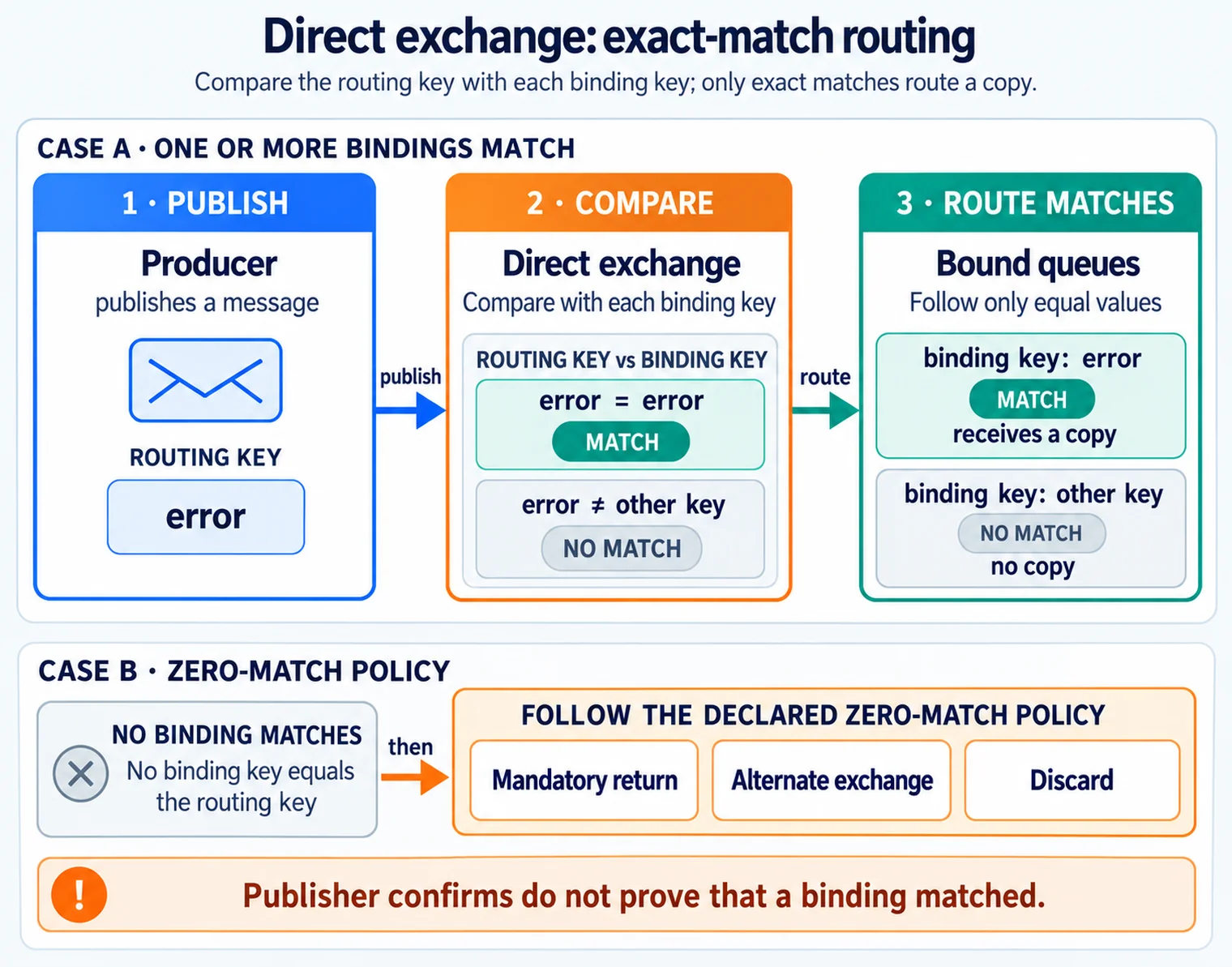
In Figure 5.1, start with the routing key carried by the published message and compare it with each queue’s binding key. Follow only equal values: every exact match receives a copy, while a different key receives none. Then move to the zero-match policy below the routing case. The application must choose a mandatory return, an alternate exchange, or discard; the exchange cannot infer the desired business response. A publisher confirm proves that the broker accepted the publish at its configured boundary, not that any binding matched. That distinction keeps broker receipt from being mistaken for successful routing.
Characteristics:
- Routes based on exact routing key match
- Simple, efficient routing
- Message goes to queue with binding key matching routing key exactly
Use cases:
- Task assignment by type
- Direct message delivery
- Priority routing
5.5.2 Fanout Exchange
Fanout exchanges broadcast messages to all bound queues, ignoring routing keys.
Inspect Figure 5.2 to test the defining fanout rule: queue bindings matter, but the publisher’s routing key does not.
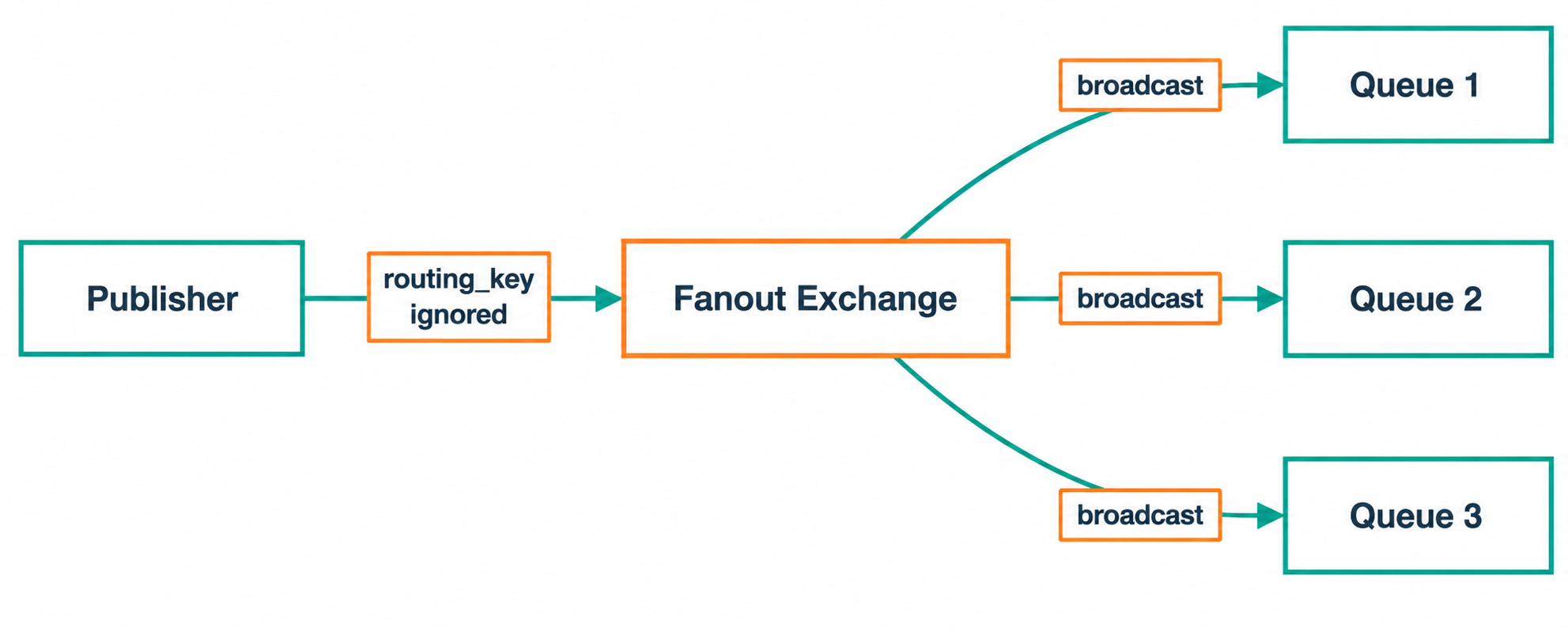
Trace Figure 5.2 from the single publish into the fanout exchange and then across every binding. Each bound queue receives its own copy, allowing independent consumers to progress at different rates. That broadcast behavior supports notifications and audit copies, while also making subscriber count part of capacity planning.
Characteristics:
- Broadcasts to all bound queues
- Ignores routing key completely
- One-to-many delivery pattern
Use cases:
- Notifications and announcements
- System-wide events
- Audit logging (copy to multiple destinations)
5.5.3 Topic Exchange
Topic exchanges route messages based on pattern matching with wildcards.
Inspect Figure 5.3 to practise matching a dotted routing key against every topic binding independently.
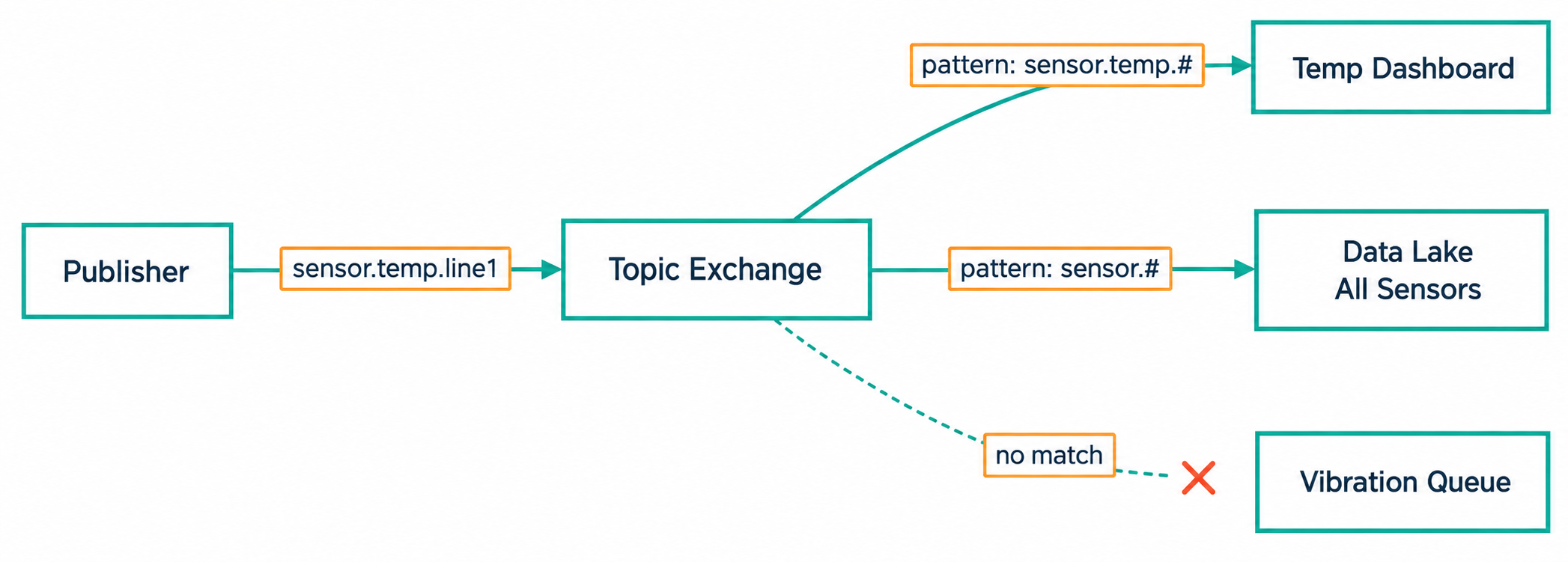
Read Figure 5.3 from the sensor routing key into the topic exchange, then compare words against * and remaining depth against #. Follow every successful binding to its queue and retain the non-matches as test evidence. This is how a flexible topology avoids silent wildcard gaps.
Characteristics:
- Routes based on pattern matching
- Wildcards:
*(exactly one word),#(zero or more words) - Routing key is dot-separated (e.g., “sensor.temperature.zone1”)
Use cases:
- Flexible subscription patterns
- IoT sensor data routing
- Geographic or hierarchical routing
Pattern examples:
| Pattern | Matches | Does NOT Match |
|---|---|---|
sensor.# | sensor, sensor.temp, sensor.temp.zone1 | other.temp |
sensor.* | sensor.temp, sensor.humidity | sensor.temp.zone1 |
*.temperature.* | sensor.temperature.zone1 | sensor.temp, zone.temperature |
5.5.4 Headers Exchange
Headers exchanges route based on message header attributes rather than routing keys.
Characteristics:
- Routes based on message header attributes
- More flexible than routing key
- Can match any header (x-match: all or any)
Use cases:
-
Complex routing logic
-
Routing based on message metadata
-
Content-based routing
-
Direct: Exact routing key match. Best for task queues and RPC; fastest routing path.
-
Fanout: Broadcasts every message to every bound queue. Best for announcements and audit copies; ignores the routing key.
-
Topic: Matches wildcard patterns such as
sensor.*.zone1orsensor.#. Best for IoT hierarchies; flexible subscription model. -
Headers: Routes on message metadata instead of the routing key. Best for multi-attribute rules; supports
x-match: allorx-match: any.
AMQP exchange types at a glance: direct = exact match, fanout = broadcast, topic = wildcard patterns, headers = attribute matching.
This section:
 Checkpoint: Choosing Exchange Types
You now know:
- Direct means exact routing-key match, fanout means broadcast, topic means wildcard pattern matching, and headers means metadata matching.
- Topic wildcards have precise meanings:
*matches exactly one dot-separated word, while#matches zero or more words. - For hierarchical IoT keys like
sensor.temperature.zone1, topic exchange patterns provide server-side filtering without producer changes.
5.6 IoT Sensor Data Routing Example
This section: IoT Sensor Data Routing Example — The exchange-type rules become useful when the routing key carries operational meaning, such as sensor type and zone.
The exchange-type rules become useful when the routing key carries operational meaning, such as sensor type and zone.
Routing analysis:
| Sensor | Routing Key | Temperature Queue | Zone 1 Queue | Archive Queue |
|---|---|---|---|---|
| Temperature (zone1) | sensor.temp.zone1 | Yes (sensor.temp.#) | Yes (sensor.*.zone1) | Yes (sensor.#) |
| Humidity (zone2) | sensor.humidity.zone2 | No | No | Yes (sensor.#) |
| Pressure (zone1) | sensor.pressure.zone1 | No | Yes (sensor.*.zone1) | Yes (sensor.#) |
This demonstrates how a single message can be routed to multiple queues based on pattern matching, enabling efficient data distribution without producer knowledge of consumers.
First: Producers publish one message with a business-friendly routing key such as sensor.temp.zone1.
Next: Exchange evaluates direct, fanout, topic, or headers rules without changing producer code.
Then: Bindings and Queues create copies only for the queues whose patterns match.
Example bindings: sensor.temp.#, sensor.*.zone1, and sensor.#.
After that: Consumers read only the queues they need and acknowledge successful processing.
A complete AMQP routing topology separates message production, routing, storage, and consumption so producers stay decoupled from queue details.
5.7 Real-World Case Study: Industrial IoT with AMQP Exchange Routing
This section: Real-World Case Study: Industrial IoT with AMQP Exchange Routing — The same routing logic scales from a three-sensor example to a production plant; the numbers below show where the architecture saves work.
The same routing logic scales from a three-sensor example to a production plant; the numbers below show where the architecture saves work.
Illustrative scenario: An automotive assembly plant monitors 1,200 robots across 6 production lines. Each robot publishes diagnostic data including vibration, temperature, motor current, and error codes. Three backend systems consume this data differently. The rates and latency goals below are planning assumptions, not measured plant results.
Message volume:
- 1,200 robots x 4 sensor types x 1 reading/second = 4,800 messages/second
- Peak during shift change: 7,200 msg/s (1.5x burst factor)
- Average message size: 200 bytes
Consumer requirements:
| System | Needs | Latency Requirement |
|---|---|---|
| Real-time dashboard | All data from all robots | < 500 ms |
| Predictive maintenance | Only vibration + motor current | < 5 seconds |
| Quality compliance | Only error codes + temperature | < 30 seconds |
Exchange design decision:
Option A: Three direct exchanges (one per consumer)
- In this deliberately replicated-publish design, producers publish each message 3 times; direct exchanges can also route one publish to multiple queues when bindings share an exact key
- Network load: 4,800 x 3 = 14,400 publishes/second
- Producer sends 3 publish operations per reading; serialization work depends on whether it reuses the encoded body
Option B: One topic exchange with pattern matching
- Routing keys:
line{N}.robot{ID}.{sensor_type}(e.g.,line3.robot42.vibration) - Dashboard queue binding:
#(all messages) - Maintenance queue binding:
*.*.vibration,*.*.motor_current - Compliance queue binding:
*.*.error_code,*.*.temperature - Network load: 4,800 publishes/second (each message published once)
- Broker routes each message to 2 queues (dashboard + one specialist)
Option C: One fanout exchange
- All three queues receive all 4,800 messages/second
- Simple, but each consumer filters locally, wasting bandwidth
- Each filtered consumer receives 4,800 msg/s but discards 50%; the dashboard uses all messages
Bandwidth comparison:
| Approach | Publish Bandwidth | Total Queue Bandwidth | Wasted Processing |
|---|---|---|---|
| Direct (3x publish assumption) | 2.88 MB/s | 960 kB/s per queue | Filtered consumers discard 50% |
| Topic (1x) | 960 kB/s | 960 kB/s (dashboard), 480 kB/s (each filtered) | None |
| Fanout (1x) | 960 kB/s | 960 kB/s x 3 = 2.88 MB/s | 50% per filtered consumer |
Decision: Topic exchange. Producers publish once and the broker handles routing; each queue receives only relevant messages. Measure broker latency under the actual bindings and load before claiming the stated latency goals.
Channel multiplexing benefit: Each of the 1,200 robots uses a single TCP connection with 4 channels (one per sensor type). Without multiplexing, this example would need 4,800 TCP connections instead of 1,200; four channels per connection leave one quarter as many broker sockets.
Scenario: A factory floor has 50 CNC machines publishing status updates to an AMQP broker. Three backend systems need different subsets of this data:
- Maintenance system: Only machine errors and warnings (routing key pattern:
factory.*.*.error,factory.*.*.warning) - Production dashboard: All status updates from all machines (routing key pattern:
factory.#) - Machine learning analytics: Only operational metrics from Line 3 machines (routing key pattern:
factory.line3.*.metrics)
Each CNC machine publishes to routing keys like:
factory.line1.cnc001.metricsfactory.line3.cnc042.errorfactory.line2.cnc015.warning
Calculating message distribution:
Publisher sends 1 message with routing key factory.line3.cnc042.error:
| Queue | Binding Pattern | Match? | Reason |
|---|---|---|---|
| Maintenance Queue | factory.*.*.error | Yes | The two * words match line3 and cnc042; .error matches exactly |
| Maintenance Queue | factory.*.*.warning | No | .error != .warning |
| Dashboard Queue | factory.# | Yes | # matches all remaining words |
| Analytics Queue | factory.line3.*.metrics | No | .error != .metrics |
Result: This single PUBLISH reaches 2 queues (Maintenance + Dashboard), one fewer than fanout’s 3 deliveries for this message (a 33% reduction).
Traffic calculation (hourly):
- 50 machines × 120 messages/hour = 6,000 publishes/hour
- With topic exchange: 6,000 publishes routed to 8,400 queue deliveries (average 1.4 queues per message)
- With fanout exchange: 6,000 publishes × 3 queues = 18,000 deliveries (about 114% more than topic routing)
- Bandwidth savings: 53% reduction in broker-to-consumer traffic
Use this table to select the optimal exchange type for your messaging pattern:
| Requirement | Direct | Fanout | Topic | Headers |
|---|---|---|---|---|
| One routing key → one queue | Best | Not a fit | Overkill | Not a fit |
| Broadcast to all queues | Not a fit | Best | Possible with # | Complex |
| Pattern matching (wildcards) | No | No | Best | Possible |
| Multi-attribute routing | No | No | Limited | Best |
| Performance at a given load | Typically fastest (exact-key lookup) | Typically fastest (no matching) | Depends on binding count and wildcards | Usually slowest (header comparisons) — benchmark at your load |
| Routing complexity | Lowest | Lowest | Medium | Highest |
Decision flowchart:
- Do all consumers need every message? → Yes: Fanout exchange
- Is routing based on a single exact key? → Yes: Direct exchange
- Do you need wildcard patterns (e.g.,
sensor.*.zone1)? → Yes: Topic exchange - Does routing depend on multiple message properties? → Yes: Headers exchange
Example decisions:
| Scenario | Exchange Type | Reasoning |
|---|---|---|
| Task queue for image processing | Direct | Each task type (thumbnail, resize, filter) routes to dedicated queue |
| System-wide audit logging | Fanout | All log aggregators receive every message |
IoT sensor data (e.g., sensor.temp.floor3) | Topic | Dashboard subscribes to sensor.temp.#, HVAC to sensor.*.floor3 |
| Email routing (priority=high AND region=us-west) | Headers | Multiple attributes, complex AND/OR logic |
Design note: If every binding uses exact keys, a direct exchange expresses the intent simply. Measure throughput before claiming a speed ratio; no 3× result follows from the protocol.
The Error: Developers new to AMQP use exchange='' (the default exchange) thinking it simplifies publishing, but they create messages that route directly to a queue by name instead of using exchange-based routing logic.
Why It Happens: Every AMQP broker provides a nameless default exchange that routes messages directly to queues when routing_key=queue_name. This appears to work initially, tightly coupling the publisher to specific queue names.
Illustrative impact: Suppose a logistics company has 200 publisher services using the default exchange. To add a second destination queue for analytics, that design could require it to:
- Modify 200 publishers to publish twice (once to original queue, once to analytics queue)
- Deploy updated code to 200 services
- Review and deploy the changed publishers; rollout time and incident count depend on the deployment
The Fix:
Bad (default exchange, tight coupling):
# Publisher knows queue name -- violates decoupling principle
channel.basic_publish(
    exchange='',  # Default exchange
    routing_key='shipment_events_queue',  # Direct queue name
    body=json.dumps({"shipment_id": "SH-42", "status": "delivered"})
)
Good (topic exchange, decoupled):
# Publisher only knows routing key semantic meaning
channel.basic_publish(
    exchange='logistics_exchange',
    routing_key='shipment.delivered',  # Business event, not infrastructure
    body=json.dumps({"shipment_id": "SH-42", "status": "delivered"})
)

# Add new consumer with zero publisher changes:
channel.queue_bind(
    exchange='logistics_exchange',
    queue='analytics_queue',
    routing_key='shipment.#'  # Receives all shipment events
)
Key Numbers:
- With default exchange in this scenario: Modifying 200 publishers at an assumed 2 hours each is 400 developer hours before shared testing
- With topic exchange: A new queue and binding can be added without changing those publishers; deployment and validation still take time
Prevention: Use a named exchange when destinations may grow independently. The default exchange remains useful for deliberate publishing to a known queue.
Checkpoint: Industrial Routing Tradeoffs
You now know:
- In the plant case, 1,200 robots publish 4 sensor types at 1 reading per second, or 4,800 messages per second before the 7,200 msg/s burst case.
- Publishing three times for three consumers creates 14,400 publishes per second; a topic exchange keeps producer traffic at 4,800 publishes per second.
- Fanout is simple but pushes filtering to consumers; topic exchange keeps each backend focused on the messages it actually needs.
Common Pitfalls
This section: Common Pitfalls
Publishing before the required queue and binding exist can leave a message unroutable even when the exchange exists. Declare or verify topology before publishing, whether application startup or deployment automation owns that step; use mandatory returns or an alternate exchange to detect misses.
The default (nameless) AMQP exchange only supports exact queue-name routing — every producer must know every consumer’s queue name, creating tight coupling. Use named exchanges with appropriate types (topic for IoT telemetry) to enable dynamic routing without producer changes.
AMQP channels are lightweight compared with connections, but rapid channel churn still consumes broker resources. Reuse channels for long-lived workers and give concurrent publishing threads separate channels; size any pool from measured concurrency and broker limits.
5.8 Design Contract: AMQP Connections and Channels
This section: Design Contract: AMQP Connections and Channels — The exchange, queue, and binding model only works safely when the connection/channel contract is clear.
The exchange, queue, and binding model only works safely when the connection/channel contract is clear. The deeper treatment now lives in AMQP Connection and Channel Contracts, covering one TCP connection with many channels, broker-side topology state, idempotent declarations, prefetch scope, channel-tagged frames, heartbeats, and why each publishing thread needs its own channel.
5.9 Summary
This section: Summary
This chapter covered the core architecture of AMQP messaging:
First: Core Components: Explained producer, broker, and consumer roles with message routing through exchanges to queues
Next: Channel Multiplexing: Demonstrated how multiple logical channels share a single TCP connection for efficiency
Then: AMQP 0-9-1 Model: Described the exchange-binding-queue architecture that enables flexible routing
After that: Exchange Types: Configured direct (exact match), fanout (broadcast), topic (pattern matching), and headers (attribute-based) exchanges
Also inspect: Binding Rules: Designed routing rules connecting exchanges to queues with routing keys and patterns
Finally: IoT Application: Applied topic exchange patterns for sensor data routing scenarios
5.10 Concept Relationships
This section: Concept Relationships — First: Exchange depends on bindings and enables message routing to queues.
Understanding how AMQP concepts interconnect helps you design effective messaging topologies:
Hierarchical Dependencies:
Connection (TCP)
  └─ Channel (virtual connection)
       └─ Exchange (routing logic)
            └─ Binding (routing rule)
                 └─ Queue (message buffer)
                      └─ Consumer (message processor)
Key Relationships:
First: Exchange depends on bindings and enables message routing to queues.
Example: topic exchange with pattern sensor.#.
Next: Binding depends on an exchange and a queue and enables routing rule specification.
Example: sensor.temp.* routes to temperature_queue.
Then: Queue depends on bindings (to receive messages) and enables message storage and ordering.
Example: Enqueue order is usually preserved for one consumer without priorities or requeueing.
After that: Consumer depends on a queue and enables message processing.
Example: dashboard subscribes to a queue.
Also inspect: Channel depends on a connection and enables multiplexed operations.
Example: 10 channels over one TCP connection.
Topic Exchange Pattern Matching Hierarchy:
Finally: sensor.temperature.zone1.machine3 (specific)
Finally: sensor.temperature.zone1.* (matches all machines in zone1)
Finally: sensor.temperature.# (matches all temperature sensors)
Finally: sensor.# (matches all sensor types)
Finally: # (matches everything)
Exchange Type Selection Decision Tree:
Need to route to all consumers? → Fanout
Need pattern-based filtering? → Topic
Need exact routing key matching? → Direct
Need header attribute matching? → Headers
Contrast with MQTT:
Finally: AMQP: Client publishes to exchange → exchange routes to queues → consumer reads from queue (3-step, server-side routing)
Finally: MQTT: Client publishes to topic → broker matches subscriptions server-side → broker forwards to subscribed clients
This section:
This section:
5.11 Concept Check
This section: Concept Check
5.12 See Also
This section: See Also
Related AMQP Concepts:
First: AMQP Messages and Delivery - Message structure, delivery guarantees, publisher confirms
Next: AMQP Frames and Reliability - Protocol-level frame types and flow control
Then: AMQP Reliability Patterns - Durable queues, acknowledgments, dead-letter handling
Alternative Protocols:
After that: MQTT Architecture - Compare topic-based pub/sub vs exchange routing
Also inspect: CoAP Fundamentals - RESTful request/response vs message queuing
Finally: Application Protocols Overview - When to choose AMQP over HTTP/MQTT/CoAP
Implementation Guides:
Finally: AMQP Implementations and Labs - RabbitMQ setup with Python/Java code
Finally: Protocol Selection Guide - Choose based on constraints
Architecture Patterns:
Finally: Event-Driven Architecture - AMQP as event bus
Finally: Edge Computing - Distributed message processing
5.13 Knowledge Check
This section: Knowledge Check
5.14 Try It Yourself
This section: Try It Yourself
Hands-on exercises to practice AMQP exchange routing concepts:
5.14.1 Exercise 1: Design Topic Exchange Routing
Scenario: Smart building with 50 rooms across 5 floors, each room has 3 sensor types (temperature, humidity, occupancy).
Task: Design routing keys and binding patterns for:
First: HVAC system needs all temperature sensors
Next: Security system needs all occupancy sensors
Then: Floor 3 manager needs all sensors on floor 3
After that: Energy dashboard needs everything
Solution Template:
# Routing key format: building.floor{N}.room{ID}.{sensor_type}
# Example: building.floor3.room15.temperature

# HVAC binding:
channel.queue_bind(
    queue='hvac_queue',
    exchange='building_sensors',
    routing_key='building.*.*.temperature'  # Your pattern here
)

# Security binding:
# Exercise: Write binding for occupancy sensors

# Floor 3 manager binding:
# Exercise: Write binding for floor 3 only

# Energy dashboard binding:
# Exercise: Write binding for all sensors
Expected Result:
Also inspect: Message building.floor3.room15.temperature should route to HVAC, Floor 3 manager, and Energy dashboard (3 queues)
Finally: Message building.floor1.room05.occupancy should route to Security and Energy dashboard (2 queues)
5.14.2 Exercise 2: Calculate Message Distribution
Given:
First: 50 rooms × 3 sensors = 150 publishers
Next: Each sensor publishes 1 msg/minute
Then: 4 consumers with different binding patterns (from Exercise 1)
Tasks:
After that: Calculate messages/hour for each queue
Also inspect: Estimate queue memory with 200-byte average message size
Finally: Determine if fanout exchange would waste bandwidth (compare to topic)
5.14.3 Exercise 3: Debug Routing Problem
Symptom: Temperature dashboard receives no messages, but messages are being published.
Given Config:
# Publisher
channel.basic_publish(
    exchange='sensors',
    routing_key='sensor.temperature.zone1',
    body='22.5C'
)

# Consumer
channel.queue_bind(
    queue='temp_dashboard',
    exchange='sensors',
    routing_key='sensor.temp.#'  # Binding pattern
)
Question: Why doesn’t the message reach the queue?
Hint: Compare routing key structure to binding pattern carefully.
5.14.4 Exercise 4: Implement Competing Consumers
Objective: Set up 3 worker processes that share a single queue for load distribution.
Requirements:
First: Each worker processes messages independently
Next: If one worker crashes, others continue processing
Then: Ensure fair distribution (no worker hoarding)
Code skeleton:
# Exercise: Set prefetch count for fair distribution
channel.basic_qos(prefetch_count=???)

def process_order(ch, method, properties, body):
    # Exercise: Process order
    # Exercise: Send acknowledgment only after success
    pass

channel.basic_consume(
    queue='orders',
    on_message_callback=process_order,
    auto_ack=???  # True or False?
)
Questions:
After that: Should you use auto_ack=True or False? Why?
Also inspect: What prefetch count ensures fair distribution?
Finally: What happens if a worker crashes mid-processing with auto_ack=True?
Next Steps: Try these exercises with a local RabbitMQ instance. See AMQP Implementations and Labs for broker setup instructions.
5.15 What’s Next
This section: What’s Next — Continue according to the decision you need to make.
Continue according to the decision you need to make. Start with AMQP Messages and Delivery to connect message structure, delivery guarantees, publisher confirms, and consumer acknowledgments; that chapter explains which evidence shows that a message survived a failure and completed processing.
Next, use AMQP Frames and Reliability when the wire format, flow control, or broker performance is the open question. Follow with AMQP Reliability Patterns when the design needs durable queues, dead-letter exchanges, and bounded retry behavior across consumer or broker failures.
For a protocol placement decision, compare the trade-offs in AMQP vs MQTT. When the topology is ready to run, move to AMQP Implementations and Labs for RabbitMQ setup and client examples. Finally, use the Application Protocols Overview to place AMQP beside MQTT, CoAP, and HTTP before committing the wider stack.
5.16 Key Takeaway
This section: Key Takeaway — AMQP routing works best when exchanges, queues, bindings, and routing keys are treated as separate design choices.
AMQP routing works best when exchanges, queues, bindings, and routing keys are treated as separate design choices. Start with the message flow you need, then choose the simplest exchange and binding pattern that preserves reliability and operational visibility.
5.17 Continue Your Route
This section: Continue Your Route — This is the last part of this chapter.
This is the last part of this chapter. Return to AMQP Core Architecture: Brokers and Routing or continue from the AMQP Module Guide.
Find help
3 reviewed answers.
Where should I start in a module?
Open the module page from the sidebar to see its chapters in order. Use the module map to return to a topic you need.
Modules and pathsReviewed
What can I try when a project does not work?
Check the symptom, then work through the diagnostic steps. Keep the error message and the smallest example that reproduces it.
When you are stuckReviewed
How do interactive examples work?
Use the interactive guide to check how examples and simulations work before changing your project.
Interactive examples guideReviewed