3 AMQP Core: Consumers and Topology Contracts
More
Depth: Practitioner
Progress saves as you read. Mark sections complete as you go; your progress appears in the sidebar.
Start with the story: AMQP puts a sorting desk between senders and receivers. A consumer is a program that handles a received message. An exchange is the broker’s sorting desk; it reads a routing key, a label on the message. A binding is the rule that matches that label to a queue. The broker then creates the queue copies that the backend needs, so each device need not know every consumer.
3.1 Start With the Decision
This section: Start With the Decision — Competing consumers share work, while fan-out gives each group a copy.
Competing consumers share work, while fan-out gives each group a copy. The wrong choice either drops a need or repeats work.
3.2 Route Overview
This section: Route Overview — This is part 2 of 2.
This is part 2 of 2. Review AMQP Core: Routing and Message Lifecycle for the preceding evidence.
3.3 Learning Objectives
This section: Learning Objectives
- Calculate competing-consumer and fan-out capacity.
- Design and test a multi-tier topic routing contract.
3.4 Chapter Roadmap
This section: Chapter Roadmap
- Interactive Calculator: Competing Consumers vs Fan-Out Performance
- Checkpoint: Consumer Topology
- Real-World IoT Example
- Knowledge Check
- Interactive: AMQP Flow Animation
- Worked Example: Designing Multi-Tier Alert Routing with AMQP Topic Exchange
- Checkpoint: Factory Alert Routing
- Label the Diagram
- Order the Steps
- Match the Concepts
- Design Contract: Routing Topology
- AMQP Routing Topology Contracts
- Summary
- Knowledge Check
- Quiz: AMQP Core Concepts
- What’s Next
3.5 Interactive Calculator: Competing Consumers vs Fan-Out Performance
This section: Interactive Calculator: Competing Consumers vs Fan-Out Performance
This section:
 Checkpoint: Consumer Topology
You now know:
- Competing consumers share one queue so each message is handled once by one worker.
- Fan-out gives each consumer its own queue, so every consumer sees every event and broker memory grows with copies.
- Prefetch matters most for competing consumers because high prefetch lets one worker hold messages that other workers could process.
This section: — Now we can put exchanges and queues together into a complete IoT routing design.
Now we can put exchanges and queues together into a complete IoT routing design.
3.6 Real-World IoT Example
This section: Real-World IoT Example
Smart Factory Scenario:
Temperature sensors publish to: "sensor.temperature.line1"
Vibration sensors publish to:   "sensor.vibration.line2"

Topic Exchange routes messages:
  "sensor.temperature.#" → Temperature Dashboard Queue
  "sensor.vibration.#"   → Predictive Maintenance Queue
  "sensor.#"             → Data Lake Queue (gets everything)
3.7 Knowledge Check
This section: Knowledge Check — Question: What does an exchange do in AMQP?
Question: What does an exchange do in AMQP?
Reveal answer
Routes messages to queues based on rules
Question: What’s the difference between * and # wildcards?
Reveal answer
* matches exactly one word; # matches zero or more words
Question: When would you use fanout exchange?
Reveal answer
When every subscriber needs to receive every message (like broadcast)
3.8 Interactive: AMQP Flow Animation
This section: Interactive: AMQP Flow Animation
3.9 Worked Example: Designing Multi-Tier Alert Routing with AMQP Topic Exchange
This section: Worked Example: Designing Multi-Tier Alert Routing with AMQP Topic Exchange
Scenario: Manufacturing facility needs to route machine alerts to appropriate teams based on severity and location. The system has 100 machines across 4 production lines, and 3 alert levels (info, warning, critical).
Requirements:
1. Critical alerts → Operations team (all lines) + Line supervisor (specific line)
2. Warning alerts → Line supervisor only
3. Info alerts → Maintenance log only
4. Operations dashboard → All critical alerts
5. Line 1 supervisor → All alerts from Line 1
6. Maintenance → All alerts (for historical analysis)
Step 1: Design Routing Key Hierarchy
Structure: "alert.{severity}.{line}.{machine}"

Examples:
  alert.critical.line1.machine03
  alert.warning.line2.machine47
  alert.info.line4.machine98
Why this structure:
- Most specific info last (machine ID)
- Allows filtering by severity independently of line
- Enables hierarchical subscriptions with wildcards
Step 2: Configure Exchange and Queues
import pika

connection = pika.BlockingConnection(pika.ConnectionParameters('localhost'))
channel = connection.channel()

# Create topic exchange
channel.exchange_declare(
    exchange='factory-alerts',
    exchange_type='topic',
    durable=True
)

# Create queues with dead-letter handling
queues = {
    'operations-critical': {'x-max-length': 1000, 'x-message-ttl': 3600000},
    'line1-supervisor': {'x-max-length': 500, 'x-message-ttl': 86400000},
    'line2-supervisor': {'x-max-length': 500, 'x-message-ttl': 86400000},
    'line3-supervisor': {'x-max-length': 500, 'x-message-ttl': 86400000},
    'line4-supervisor': {'x-max-length': 500, 'x-message-ttl': 86400000},
    'maintenance-log': {'x-max-length': 10000, 'x-message-ttl': 2592000000}  # 30 days
}

for queue_name, args in queues.items():
    channel.queue_declare(queue=queue_name, durable=True, arguments=args)
Step 3: Create Bindings
# Operations team: ALL critical alerts from ALL lines
channel.queue_bind(
    exchange='factory-alerts',
    queue='operations-critical',
    routing_key='alert.critical.#'
)
# Matches: alert.critical.line1.machine03
#          alert.critical.line2.machine47
#          alert.critical.line3.machine10

# Line 1 supervisor: ALL alerts from Line 1
channel.queue_bind(
    exchange='factory-alerts',
    queue='line1-supervisor',
    routing_key='alert.*.line1.#'
)
# Matches: alert.critical.line1.machine03
#          alert.warning.line1.machine15
#          alert.info.line1.machine20

# Line 2 supervisor: ALL alerts from Line 2
channel.queue_bind(
    exchange='factory-alerts',
    queue='line2-supervisor',
    routing_key='alert.*.line2.#'
)

# (Similar bindings for line 3 and 4 supervisors)

# Maintenance log: Everything for historical analysis
channel.queue_bind(
    exchange='factory-alerts',
    queue='maintenance-log',
    routing_key='alert.#'
)
# Matches: EVERYTHING
Step 4: Publisher Code (Machine Sensors)
def send_alert(severity, line, machine_id, message):
    """Send alert with proper routing key"""
    routing_key = f"alert.{severity}.line{line}.machine{machine_id:02d}"

    alert_data = {
        "timestamp": time.time(),
        "severity": severity,
        "line": line,
        "machine": machine_id,
        "message": message
    }

    # Publish with confirmation
    channel.basic_publish(
        exchange='factory-alerts',
        routing_key=routing_key,
        body=json.dumps(alert_data),
        properties=pika.BasicProperties(
            delivery_mode=2,  # Persistent
            content_type='application/json'
        ),
        mandatory=True  # Fail if no queue matches
    )
    print(f"Sent: {routing_key}")

# Examples
send_alert('critical', 1, 3, "Bearing temperature exceeded 95°C")
send_alert('warning', 2, 47, "Vibration threshold 80% reached")
send_alert('info', 4, 98, "Routine maintenance completed")
Step 5: Trace Message Flow
Example 1: Critical alert from Line 1, Machine 3
Publisher sends:
  routing_key = "alert.critical.line1.machine03"

Broker evaluates bindings:
  ✓ operations-critical: "alert.critical.#" → MATCH (critical wildcard)
  ✓ line1-supervisor: "alert.*.line1.#" → MATCH (line1 wildcard)
  ✗ line2-supervisor: "alert.*.line2.#" → NO MATCH (line2 != line1)
  ✓ maintenance-log: "alert.#" → MATCH (catch-all)

Result: Message delivered to 3 queues
  - Operations team sees critical alert immediately
  - Line 1 supervisor sees it (their line)
  - Maintenance log archives it
  - Line 2/3/4 supervisors do NOT see it
Example 2: Info alert from Line 2, Machine 47
Publisher sends:
  routing_key = "alert.info.line2.machine47"

Broker evaluates bindings:
  ✗ operations-critical: "alert.critical.#" → NO MATCH (info != critical)
  ✗ line1-supervisor: "alert.*.line1.#" → NO MATCH (line2 != line1)
  ✓ line2-supervisor: "alert.*.line2.#" → MATCH (line2 wildcard)
  ✓ maintenance-log: "alert.#" → MATCH (catch-all)

Result: Message delivered to 2 queues
  - Line 2 supervisor sees it
  - Maintenance log archives it
  - Operations and other supervisors do NOT see it
Step 6: Verify Routing Efficiency
Daily alert volume:
  100 machines × 10 alerts/day = 1,000 alerts total

Without AMQP (broadcast approach):
  - 6 subscribers × 1,000 alerts = 6,000 message deliveries
  - Each subscriber filters locally
  - Network waste: 5× unnecessary deliveries

With AMQP Topic Exchange:
  - Critical alerts (5%): 50 × 3 queues = 150 deliveries
  - Warning alerts (20%): 200 × 2 queues = 400 deliveries
  - Info alerts (75%): 750 × 2 queues = 1,500 deliveries
  - Total: 2,050 deliveries (vs 6,000 broadcast)
  - Network savings: 66% reduction
The total deliveries with AMQP topic routing are:
The broadcast approach would deliver every message to all 6 subscribers:
The network bandwidth savings ratio is:
This means AMQP’s server-side routing eliminates nearly two-thirds of unnecessary network traffic.
Broker routing overhead:
  - 1,000 alerts × 6 binding evaluations = 6,000 pattern matches/day
  - Average match time: <1ms
  - Total broker CPU: <6 seconds/day (negligible)
Step 7: Handle Edge Cases
What if no queue matches? (Unroutable message)
# Configure alternate exchange to catch unroutable messages
channel.exchange_declare(
    exchange='factory-alerts',
    exchange_type='topic',
    arguments={'alternate-exchange': 'unrouted-alerts'}
)

channel.exchange_declare(
    exchange='unrouted-alerts',
    exchange_type='fanout'
)

channel.queue_declare(queue='alert-deadletter')
channel.queue_bind(exchange='unrouted-alerts', queue='alert-deadletter')

# Now if someone sends alert.unknown.line99.machine00, it goes to deadletter
Key Insights:
- Hierarchical routing keys enable flexible multi-level subscriptions (critical only, line-specific, everything)
- Wildcards reduce binding complexity from 6×100 machine-specific bindings to 6 pattern bindings
- Server-side filtering reduces network traffic by 66% vs broadcast-and-filter approach
- Adding new subscribers requires only 1 binding, not 100 per-machine configurations
- Pattern-based routing scales to 1,000 machines with no binding changes (wildcards handle new machines automatically)
Lesson Learned: AMQP topic exchanges provide sophisticated routing that would require complex application-layer filtering with MQTT. The broker’s pattern matching offloads work from consumers and reduces network bandwidth, making it ideal for enterprise IoT with multiple subscriber tiers needing selective message delivery.
Checkpoint: Factory Alert Routing
You now know:
- A routing key hierarchy such as
alert.{severity}.{line}.{machine}lets teams subscribe by severity, line, or catch-all history without producer rewrites. - The worked example reduces broadcast delivery waste because broker-side pattern matching sends critical, warning, and info alerts only to the queues that need them.
- Alternate exchanges and dead-letter queues are the safety net when a message has no matching route.
3.10 Label the Diagram
This section: Label the Diagram
3.11 Order the Steps
This section: Order the Steps
3.12 Match the Concepts
This section: Match the Concepts
3.13 Design Contract: Routing Topology
This section: Design Contract: Routing Topology — AMQP routing correctness comes from topology, not producer intent alone.
AMQP routing correctness comes from topology, not producer intent alone. The deeper treatment now lives in AMQP Routing Topology Contracts, covering the producer -> exchange -> binding -> queue -> consumer path, exchange matching rules, the default exchange, competing consumers, and fan-out queue layout.
3.14 AMQP Routing Topology Contracts
This section: AMQP Routing Topology Contracts — Start with the story: A producer should not need to know every team that wants a copy of a message.
Start with the story: A producer should not need to know every team that wants a copy of a message. AMQP topology makes that a broker decision: exchanges inspect the routing key, bindings state who qualifies, and queues hold each matched copy.
3.14.1 Learning Objectives
Trace One Publication to Every Intended Queue
Picture a temperature alarm that reaches the archive but not the response service after a binding change. A successful publish does not prove that every required consumer received a copy.
A protocol means an agreed set of message and behavior rules. A broker means the service that receives and routes messages. AMQP means Advanced Message Queuing Protocol, which defines roles and behavior for brokers, producers, queues, and consumers.
Publish one marked message that should match two queues, one that should match none, and one repeated message. Keep AMQP exchange, routing key, bindings, queue names, message identity, publish result, deliveries, rejections, and topology version.
This trace covers one topology and fault set, not every broker failure. The deeper sections explain exchanges, binding rules, default routing, independent copies, shared work, and unrouted-message handling.
After this page, you should be able to:
- Explain why AMQP producers publish to exchanges instead of addressing queues directly.
- Trace the producer -> exchange -> binding -> queue -> consumer path for a routed message.
- Choose direct, topic, fanout, or headers exchanges from the matching rule each one applies.
- Explain how the default exchange makes tutorials look like they publish directly to queues.
- Separate independent service-queue copies from competing-consumer work sharing.
3.14.2 Why This Follows AMQP Core Concepts
AMQP Core Concepts introduces exchanges, queues, bindings, routing keys, exchange types, and consumer patterns. This page tightens the topology contract underneath those terms: a producer sends one message to an exchange, bindings decide which queues get copies, and queue layout decides whether consumers share work or each receive their own event stream.
Use it when a queue is unexpectedly empty, a broadcast workload is accidentally processed by only one service, workers are multiplying event copies, or a RabbitMQ topology review needs to prove that routing semantics match the intended system behavior.
3.14.3 Routing Path Contract
In the normal named-exchange model used by AMQP 0-9-1 and RabbitMQ, producers publish to an exchange rather than addressing service queues. The producer attaches a routing key — a short string such as sensor.line1.temperature. The exchange holds no messages of its own; it evaluates every binding and enqueues one copy in each distinct destination queue reached by at least one match.
The normal path therefore has five named parts: producer -> exchange -> binding -> queue -> consumer. The default exchange is a special pre-declared direct exchange: every queue is automatically bound to it using the queue name as its binding key, which makes queue-name routing look direct even though the publish still goes to an exchange. Changing named-exchange bindings rewires the system without changing producer code. MQTT also decouples publishers from subscribers through broker-side subscription matching; what it does not expose is AMQP 0-9-1’s explicit exchange-binding-queue topology.
Worked example: a temperature device publishes once to exchange iot.events with routing key plant1.line3.temperature. One queue bound with plant1.# receives a site-wide copy, another bound with *.line3.* receives the line-3 copy, and a third bound with #.vibration receives nothing. The producer did not know those queue names and did not send three messages; the exchange evaluated three bindings and made two copies. If operations later adds a billing queue bound with plant1.line3.#, the producer still publishes the same packet, but the topology now creates a third copy.
That makes troubleshooting concrete. When a queue is empty, inspect the exchange name, routing key, and binding keys before blaming the producer. A perfectly published message can still be unrouted if no binding matches, or copied to several distinct queues if several routes match. If several matching bindings or exchange paths converge on the same queue, RabbitMQ enqueues one copy of that publication in that queue.
If you only need the intuition: the exchange is a sorting rule, the binding key is the label on a mailbox slot, and the routing key is the address written on the envelope. A message drops once into every distinct mailbox reached by one or more matching labels.
3.14.4 Exchange Type Matching Rules
The four standard exchange types differ only in how they compare a routing key to a binding key. Choosing one is choosing a matching rule, not a feature set.
Inspect Figure 3.1 before naming an exchange so the chosen type follows the required matching rule.
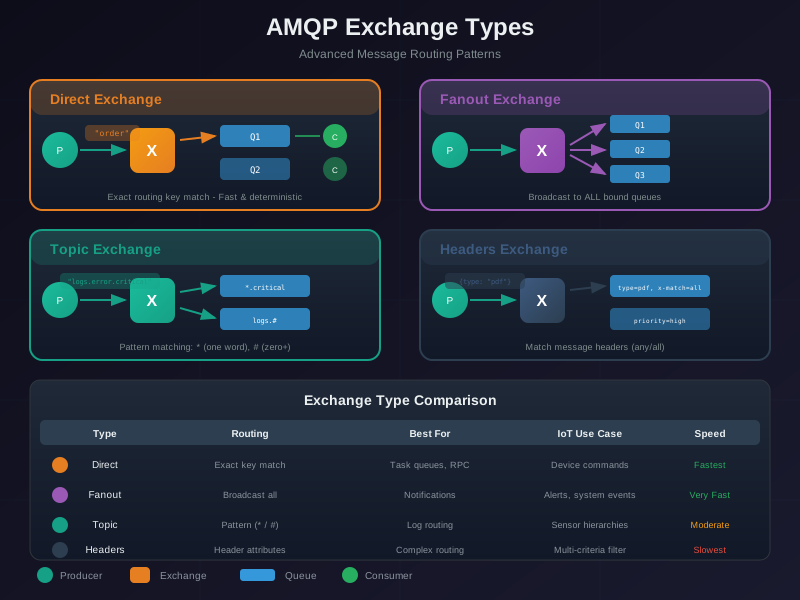
Read Figure 3.1 across exact direct matching, key-ignoring fanout, wildcard topic matching, and attribute-based headers routing. Then ask how a zero-match publish is observed. The comparison connects topology choice to test cases for positive matches, negative matches, and operational handling of unroutable messages. A useful rule of thumb: choose the narrowest matching rule that still lets operations add subscribers without producer changes. Direct is easiest to audit, fanout is easiest to reason about for broadcast, topic is the usual IoT default when keys carry hierarchy, and headers only pays off when routing depends on several independent attributes.
| Exchange type | Matching rule | Use it when |
|---|---|---|
direct | Binding key must equal the routing key exactly. | Fixed categories, e.g. route alarm to one queue and telemetry to another. |
topic | Dot-separated words; * matches exactly one word, # matches zero or more words. | Hierarchical keys like site.floor.device.metric where subscribers want slices. |
fanout | Routing key ignored; copied to every bound queue. | Broadcast, e.g. a config change every service must see. |
headers | Matches on message header attributes, with x-match=all or x-match=any, instead of the routing key. | Routing on several typed properties at once (region + priority). |
There is also a pre-declared nameless default exchange (""). Every queue is automatically bound to it with a binding key equal to the queue’s own name, so publishing to "" with routing key orders lands straight in the queue named orders. That is why beginner tutorials look like they publish “directly to a queue” — they are quietly using the default direct exchange.
Worked example — telemetry with a topic exchange. Sensors publish to exchange iot.telemetry with routing keys shaped site.floor.metric:
- Data-lake queue binds
#-> receives everything. - Temperature-dashboard queue binds
*.*.temperature-> matcheshq.floor1.temperaturebut nothq.floor1.vibration. - HQ-only audit queue binds
hq.#-> matches any depth of key that starts withhq.
A single publish of hq.floor1.temperature is copied into all three distinct queues because each queue is reached by a matching binding; a topic exchange does not choose only the most specific match.
3.14.5 Queue Copies and Worker Pools
The exchange evaluates its bindings, and the resulting set of distinct destination queues determines how many independently buffered copies are created. Consumer count does not change that copy count. Two patterns are constantly confused:
- Competing consumers — scale one service: several consumers subscribe to the same queue. One active consumer receives a given delivery attempt. If an unacknowledged message is requeued and delivered again, the later attempt may go to the same or another consumer. With manual acknowledgements, prefetch bounds outstanding delivery attempts; it does not decide which queues receive copies.
- Independent service queues — distribute between services: each independent service has a distinct queue bound to the exchange. Every distinct matched service queue receives one copy, while the worker instances inside that service compete for deliveries from its queue. Direct, topic, headers, and fanout exchanges can all route one publication to several distinct queues when their matching rules select them.
Inspect Figure 3.2 to separate two counts that are often mixed together. Exchange matching selects a set of distinct destination queues, which determines how many independently buffered service copies exist; consumers attached to one queue determine that service’s in-flight processing capacity.
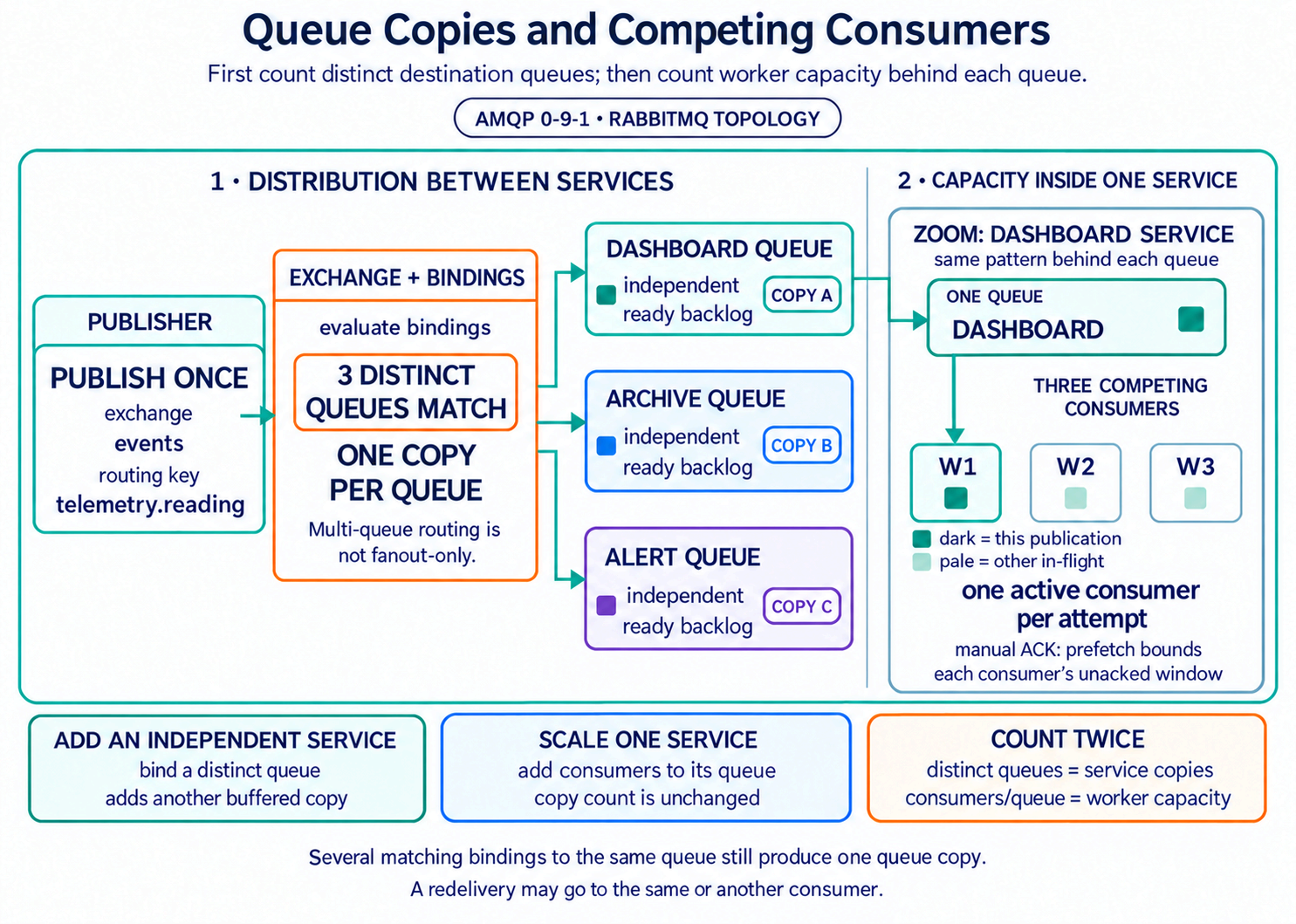
Trace one publication twice in Figure 3.2. First count the distinct queues reached by the matching bindings; RabbitMQ enqueues one copy in each, even if more than one binding to the same queue matches. Then inspect one queue’s worker pool: each delivery attempt goes to one active consumer, while other messages may already be in flight up to the configured prefetch windows. RabbitMQ normally dispatches across active consumers in round-robin order, but prefetch, consumer availability, priorities or single-active-consumer settings, and redelivery can change the observed distribution.
| Scenario | Correct result |
|---|---|
Two matching bindings reach archive; one matching binding reaches dashboard. | 2 queue copies, not 3. |
archive has three RabbitMQ consumers with per-consumer prefetch 10 and no global cap. | Up to 30 unacknowledged deliveries. |
| One worker crashes before acknowledging the traced event. | The message can be requeued; the next attempt may go to the same or another consumer. |
Numbers make the difference visible. Five independent analytics services that must each receive every event require five distinct queues with matching bindings. If each service runs three worker instances, those three workers consume from that service’s one queue. If workers from all five services consume from one shared queue, only one service instance receives each delivery attempt; the other services do not receive independent copies. If all fifteen workers instead have separate queues with identical matching bindings, one publication produces fifteen queue copies — three copies inside each service rather than one. Queue topology, not worker count alone, controls the semantics.
3.14.5.1 Under the Hood: Prefetch Bounds In-Flight Work
In RabbitMQ, basic.qos(prefetch_count=10, global=false) applies the limit separately to each newly registered consumer. Three consumers can therefore hold up to 30 unacknowledged deliveries in total, unless an additional channel-wide limit is configured. In the five-service example, that number changes each service’s outstanding work; it does not change the five-copy routing result.
3.15 Summary
This section: Summary
This chapter covered AMQP core concepts:
First: Post Office Analogy: Exchanges are sorting rooms, queues are mailboxes, publishers drop off messages, consumers pick them up
Next: Four Exchange Types: Direct (exact match), Topic (pattern wildcards), Fanout (broadcast), Headers (metadata-based)
Then: MQTT vs AMQP: MQTT is simpler for IoT sensors; AMQP provides richer routing for enterprise systems
After that: Consumer Patterns: Competing consumers for work distribution, fan-out for event broadcasting
Also inspect: Real-World Application: Smart factory sensor routing using topic exchange patterns
3.16 Knowledge Check
This section: Knowledge Check
3.17 Quiz: AMQP Core Concepts
This section: Quiz: AMQP Core Concepts
3.18 What’s Next
This section: What’s Next — The next chapter covers AMQP Reliability Patterns, including delivery guarantees, acknowledgment strategies, worked examples for order processing and alert routing, and common pitfalls to avoid.
The next chapter covers AMQP Reliability Patterns, including delivery guarantees, acknowledgment strategies, worked examples for order processing and alert routing, and common pitfalls to avoid.
-
AMQP Fundamentals Focus: Overview and module navigation Why read it: Start here if you want the full AMQP learning path with chapter sequencing.
-
AMQP Reliability Patterns Focus: Delivery guarantees, acknowledgment strategies, dead-letter queues Why read it: Learn how to guarantee message delivery and handle failures after mastering routing.
-
AMQP Architecture and Frames Focus: Frame structure, channels, connection lifecycle Why read it: Understand the binary wire protocol and multiplexing model underpinning the routing concepts covered here.
-
AMQP and MQTT Tradeoffs Focus: Side-by-side protocol comparison with decision criteria Why read it: Apply the MQTT vs AMQP comparison from this chapter to concrete IoT deployment scenarios.
-
AMQP Knowledge Assessment Focus: Comprehensive quizzes and visual reference summary Why read it: Test and consolidate everything learned across all AMQP chapters.
3.19 Continue Your Route
This section: Continue Your Route — This is the last part of this chapter.
This is the last part of this chapter. Return to AMQP Core: Routing and Message Lifecycle or continue from the AMQP Module Guide.
Find help
3 reviewed answers.
Where should I start in a module?
Open the module page from the sidebar to see its chapters in order. Use the module map to return to a topic you need.
Modules and pathsReviewed
What can I try when a project does not work?
Check the symptom, then work through the diagnostic steps. Keep the error message and the smallest example that reproduces it.
When you are stuckReviewed
How do interactive examples work?
Use the interactive guide to check how examples and simulations work before changing your project.
Interactive examples guideReviewed