12 AMQP Reliability: Testing and Pitfalls
More
Depth: Practitioner
Progress saves as you read. Mark sections complete as you go; your progress appears in the sidebar.
Start with the story: Some messages are casual status updates, and some are smoke alarms. AMQP carries messages through a broker. A publisher confirm tells the sender that the broker accepted a message; it does not prove a worker handled it. A durable queue keeps its definition after a broker restart, while message persistence is a separate choice. A manual acknowledgment lets a worker report that it handled a delivery. Retries and dead-letter routing give selected failed work a place to be examined.
12.1 Start With the Decision
This section: Start With the Decision — A reliability setting is useful only if a fault test proves its effect.
A reliability setting is useful only if a fault test proves its effect. Queue growth and retry storms can turn protection into failure.
12.2 Route Overview
This section: Route Overview — This is part 2 of 2.
This is part 2 of 2. Review AMQP Reliability: Delivery Controls for the preceding evidence.
12.3 Learning Objectives
This section: Learning Objectives
- Select AMQP controls with the reliability checker.
- Test duplicate, outage, poison-message, and backlog cases.
12.4 Chapter Roadmap
This section: Chapter Roadmap
- Try It: Reliability Mechanism Checker
- Common Pitfalls
- Common Pitfall: Unbounded Queue Growth
- Common Pitfall: Prefetch Starvation
- Try It: Prefetch Starvation Visualizer
- Interactive: Queue Sizing Calculator
- Worked Example: Sizing a Durable Queue for Weekend Batch Processing
- Checkpoint: Bounded Backlogs And Fair Consumers
- Label the Diagram
- Code Challenge
- Order the Steps
- Match the Concepts
- Design Contract: AMQP Prefetch Reliability
- AMQP Prefetch Reliability Contracts
- Summary
- Knowledge Check
- Quiz: AMQP Reliability Patterns
- What’s Next
12.5 Common Pitfalls
This section: Common Pitfalls
This section:
The mistake: Creating queues without length limits or TTL (time-to-live), allowing queues to grow indefinitely when consumers are slow or offline, eventually exhausting broker memory and crashing the entire messaging system.
Symptoms:
First: Broker memory usage grows continuously over days/weeks
Next: RabbitMQ management UI shows queues with millions of messages
Then: Broker becomes unresponsive during garbage collection
After that: All publishers and consumers disconnect when broker OOMs
Also inspect: Disk fills up if persistence is enabled
Finally: Recovery requires manual queue purging (data loss)
Why it happens: Developers declare queues with default settings assuming consumers will always keep up. In production, consumers crash, deployments pause consumption, or processing slows during peak loads. Without limits, messages accumulate silently until the broker fails catastrophically.
The fix: Set capacity limits and failure routing for queues whose backlog can outlive the consumer or exhaust the broker. Choose overflow behavior deliberately:
# BAD: Queue with no limits
channel.queue_declare(queue='sensor-data')
# Queue can grow forever, eventually crashes broker

# GOOD: Queue with multiple safety limits
channel.queue_declare(
    queue='sensor-data',
    arguments={
        # Capacity protection: reject new publishes when full
        'x-max-length': 100000,           # Max 100K messages
        'x-max-length-bytes': 104857600,  # Max 100 MB
        'x-overflow': 'reject-publish',   # Reject vs drop-head

        # Stale message cleanup
        'x-message-ttl': 3600000,         # 1 hour max age

        # Dead-letter for investigation
        'x-dead-letter-exchange': 'sensor-data-dlx',
        'x-dead-letter-routing-key': 'expired'
    }
)

# Declare the DLX before binding the dead-letter queue; reject-publish
# notifies a confirming publisher but does not dead-letter overflow.
channel.exchange_declare(exchange='sensor-data-dlx', exchange_type='direct', durable=True)
# Also declare dead-letter queue for expired/rejected messages
channel.queue_declare(
    queue='sensor-data-expired',
    arguments={
        'x-max-length': 10000,  # Keep last 10K for debugging
        'x-message-ttl': 86400000  # 24 hours then discard
    }
)
channel.queue_bind(
    queue='sensor-data-expired',
    exchange='sensor-data-dlx',
    routing_key='expired'
)Prevention:
Finally: Set x-max-length and x-max-length-bytes on every queue whose backlog can grow without bound.
Finally: Configure x-message-ttl based on data freshness requirements
Finally: Use dead-letter exchanges to capture dropped/expired messages
Finally: Set monitoring alerts at about 50% (warning) and 80% (critical) of the chosen limits, plus an oldest-message-age alert.
Finally: Implement backpressure in publishers (check confirms, pause on reject)
Finally: Use lazy queues for expected high-volume scenarios
This section:
This section:
The mistake: Using high prefetch counts (or unlimited prefetch) with multiple consumers of varying processing speeds, causing fast consumers to starve while slow consumers hoard messages they cannot process quickly.
Symptoms:
- Some consumers idle at 0% CPU while others are overwhelmed
- Queue depth stays high despite many active consumers
- Unacknowledged message count matches prefetch times slow consumers
- Adding more consumers doesn’t improve throughput
- Manual consumer restart temporarily fixes the problem
Why it happens: In RabbitMQ, prefetch (basic.qos) bounds unacknowledged deliveries per consumer. With prefetch=1000, a slow consumer can reserve up to 1000 available messages. While it processes them one by one, those deliveries are unavailable to faster consumers. The queue may have little ready depth even though many messages are unacknowledged on slow consumers.
The fix: Set appropriate prefetch based on processing time:
# BAD: High prefetch with mixed consumer speeds
channel.basic_qos(prefetch_count=1000)  # Grab 1000 messages
# If processing takes 1s each, consumer holds 1000s of work!

# BAD: No prefetch (unlimited)
channel.basic_qos(prefetch_count=0)  # Take everything available
# One slow consumer can grab the entire queue

# GOOD: Size the worker pool first, then bound each worker's reserve
# At 50 ms per sequential job, one worker can process at most 20 msg/s.
# A 100 msg/s target needs at least 100 * 0.05 = 5 fully busy workers.
# Prefetch 2 per worker allows one extra delivery without hoarding 10 each.
channel.basic_qos(prefetch_count=2)

# BETTER: Different prefetch per consumer type
# Fast consumers (10ms processing)
fast_channel.basic_qos(prefetch_count=20)

# Slow consumers (500ms processing - complex analytics)
slow_channel.basic_qos(prefetch_count=2)

# OPTIONAL: Adaptive prefetch, with a configured ceiling and fairness test
class AdaptiveConsumer:
    def __init__(self, channel, target_latency_ms=100):
        self.channel = channel
        self.target_latency = target_latency_ms / 1000
        self.processing_times = []
        self.current_prefetch = 1

    def adjust_prefetch(self, processing_time):
        self.processing_times.append(processing_time)
        if len(self.processing_times) >= 100:
            avg_time = sum(self.processing_times) / len(self.processing_times)
            # This bounds the reserve; it does not increase sequential worker capacity.
            optimal = min(20, max(1, int(self.target_latency / avg_time * 2)))
            if optimal != self.current_prefetch:
                self.channel.basic_qos(prefetch_count=optimal)
                self.current_prefetch = optimal
self.processing_times = []Prevention:
- Start with low prefetch (1-10) and increase based on measurements
- Match prefetch to processing time, not queue depth
- Monitor unacknowledged message distribution across consumers
- Use separate queues for fast vs slow processing paths
- Implement consumer health checks and auto-scaling
- Set
x-cancel-on-ha-failoverto rebalance on consumer issues
This section:
Scenario: A retail analytics system processes in-store sensor data in batches every Monday morning. The warehouse gateway collects data from 200 sensors Friday 6PM through Monday 6AM (60 hours offline). Each sensor publishes 1 message per minute with 150-byte JSON payloads. Design the AMQP queue configuration to buffer the weekend data without data loss.
Given:
- 200 sensors, 1 msg/min each, 60 hours offline
- Message size: 150 bytes (sensor_id, timestamp, customer_count, zone_id)
- Processing starts Monday 6 AM, completes by 9 AM (3 hours)
- RabbitMQ broker with 8 GB RAM, 100 GB disk
Steps:
-
Calculate total messages during offline period:
- Messages per hour: 200 sensors × 60 msg/hr = 12,000 msg/hr
- Total messages: 12,000 × 60 hrs = 720,000 messages
-
Calculate storage requirements:
- Per-message size: 150 B payload + ~80 B broker metadata/index (estimate) = 230 B
- Total: 720,000 × 230 B = 165.6 MB
- Add 20% safety margin: 198.7 MB
-
Configure queue with limits:
channel.exchange_declare(exchange='retail-dlx', exchange_type='direct', durable=True) channel.queue_declare(queue='retail-expired', durable=True) channel.queue_bind(queue='retail-expired', exchange='retail-dlx', routing_key='expired') channel.queue_declare( queue='retail-analytics', durable=True, # Survive broker restart arguments={ 'x-max-length': 1000000, # 1M message capacity (39% headroom) 'x-max-length-bytes': 250000000, # 250 MB (26% headroom) 'x-overflow': 'reject-publish', # NACK confirming publisher when full 'x-message-ttl': 259200000, # 72 hours (safety) 'x-dead-letter-exchange': 'retail-dlx', 'x-dead-letter-routing-key': 'expired' } ) # Publish with persistence channel.basic_publish( exchange='', routing_key='retail-analytics', body=sensor_json, properties=pika.BasicProperties( delivery_mode=2, # Persistent content_type='application/json', expiration='259200000' # 72 hr message TTL ) ) -
Verify processing capacity:
- Processing window: 3 hours (6 AM - 9 AM Monday)
- Required throughput: 720,000 ÷ (3 × 3600) = 67 messages/second
- With 5 consumer workers: 67 ÷ 5 = 13.4 msg/sec per worker (achievable)
-
Monitor queue depth:
- Alert at 70% capacity: 700,000 messages (reached near Monday morning under this load)
- Critical at 90% capacity: 900,000 messages (rare peak)
- Track disk usage: 70% of 250 MB = 175 MB triggers capacity planning review
Result: The queue is planned for 720,000 weekend messages at about 199 MB including the illustrative 20% margin, before measured broker and replication overhead. The configured limits allow about 26% byte headroom and 39% count headroom relative to the estimated load. A 72-hour TTL gives the earliest Friday message about 12 hours after Monday’s 6 AM restart before expiry; the DLX captures expired or consumer-rejected messages. reject-publish instead NACKs new publishes at the limit, so the producer must retain and retry them.
Key Insight: For batch workloads, calculate worst-case accumulation (longest offline period × peak message rate) and add 20–40% headroom for overhead and bursts. Set x-max-length-bytes alongside message-count limits because message sizes vary. Choose TTL from the oldest message’s age at the end of the required processing window, then test expiration and dead-letter behavior.
This section:
 Checkpoint: Bounded Backlogs And Fair Consumers
You now know:
- Queue limits, TTL, dead-letter exchanges, and monitoring thresholds keep slow or offline consumers from turning backlog growth into broker failure.
- Prefetch sizing controls fairness:
prefetch=1is safest when processing time varies, while high prefetch lets slow consumers hoard messages. - Batch sizing starts from worst-case accumulation, as in the weekend example with 720,000 messages, 20% safety margin, and a 72-hour TTL.
This section: — At this point, the chapter has covered the design choices.
At this point, the chapter has covered the design choices. The remaining activities let you label the flow, complete code, order mechanisms, match terms, and connect the prefetch contract to the deeper audit.
12.6 Design Contract: AMQP Prefetch Reliability
This section: Design Contract: AMQP Prefetch Reliability — Manual acknowledgments only stay reliable when the unacked-message window is bounded deliberately.
Manual acknowledgments only stay reliable when the unacked-message window is bounded deliberately. The deeper treatment now lives in AMQP Prefetch Reliability Contracts, covering prefetch sizing, per-consumer unacked counts, starvation, redelivery bursts, and the monitoring evidence that proves consumers are not hoarding work.
12.7 AMQP Prefetch Reliability Contracts
This section: AMQP Prefetch Reliability Contracts — Start with the story: Prefetch is the rule that stops one slow worker from grabbing the whole pile of jobs.
Start with the story: Prefetch is the rule that stops one slow worker from grabbing the whole pile of jobs. It sets how many unacknowledged messages a consumer may hold before the broker gives other workers a chance.
12.7.1 Learning Objectives
Size the Waiting Work With One Slow Consumer
Picture a service that receives sensor alarms faster than it can inspect them. A large waiting set may keep the link busy while old work fills memory and delays the alarm that matters now.
AMQP means Advanced Message Queuing Protocol. A broker is the service that accepts and routes messages. Latency means the elapsed time from a stated start event to a stated finish event.
Send numbered work at a known rate, slow one consumer, stop its acknowledgements, restore it, and restart it. Record in-flight count, age, memory use, completion, and repeat handling. Keep urgent safe action outside a remote queue that may stall.
This runway does not select one prefetch value for every workload. The deeper sections connect service time, round trips, fairness, memory, acknowledgement, and failure recovery to a bounded setting.
After this page, you should be able to:
- Explain how
basic.qos(prefetch_count=N)bounds the unacknowledged work assigned to a consumer. - Size prefetch from handler time, round-trip latency, fairness, and crash-redelivery cost.
- Diagnose prefetch starvation from ready-message and unacked-message metrics.
- Explain why unlimited prefetch can make a broker look idle while work is pinned to a stalled consumer.
- Choose monitoring thresholds that match the intended prefetch policy.
12.7.2 Why This Follows AMQP Reliability Patterns
AMQP Reliability Patterns teaches acknowledgments, persistence, dead-lettering, queue limits, and competing consumers. This page tightens one operational contract inside that reliability model: manual acknowledgments need a deliberate prefetch window, or one stalled worker can hoard unacked messages and cause large redelivery bursts.
Use it when a queue appears to drain but throughput stalls, when competing consumers process at different speeds, when crash redelivery must be bounded, or when a runbook needs a concrete maximum unacked-message count.
12.7.3 Overview: Prefetch Is the Consumer’s Reliability Dial
Durable queues and persistent messages protect the broker side, but the consumer side has its own decisive knob: prefetch, set with basic.qos(prefetch_count=N). Prefetch is the number of messages the broker will hand a consumer before it must acknowledge any of them. It quietly controls three things at once — throughput, fair distribution across workers, and how much work is at risk if a consumer crashes.
The trap is treating it as “bigger is faster”. A prefetch of 1 is the fairest and safest setting but can starve throughput; a very high prefetch can make one worker hoard a burst while others sit idle, and turns a single crash into a large redelivery. Reliability tuning is finding the prefetch that keeps a consumer busy without hoarding.
Concrete example: a queue has 3,000 telemetry enrichment jobs and three consumers. With unlimited prefetch, the first fast TCP connection can receive hundreds or thousands of deliveries before the broker notices other consumers are available. If that consumer then blocks on a database call, those deliveries are invisible to the other workers because they are already assigned and unacknowledged. With prefetch_count=20, the stalled worker can hold only 20 at a time, leaving the broker free to keep feeding the other two consumers.
This is why prefetch belongs in the reliability conversation, not just the performance conversation. It defines the largest batch that can be delayed or redelivered by one consumer failure.
A good first setting is usually based on the worst acceptable redelivery burst. If a handler writes to an idempotent database table, a redelivery window of 20 may be harmless. If each message triggers a physical device action, even five unacked commands may be too many to replay at once. The broker cannot infer that risk from the queue name; the application owner has to set the window deliberately.
12.7.4 Practitioner: Sizing Prefetch to the Round Trip
With prefetch=1, a consumer processes a message, sends basic.ack, and only then receives the next one. During the network round trip it is idle, so throughput is capped at roughly one message per (processing time + round trip). To keep the pipe full you need enough messages in flight to cover the round trip while one is processing:
useful prefetch ≈ ceil((round_trip + processing_time) / processing_time)
| Prefetch | Effect | Best for |
|---|---|---|
| 1 | Perfectly fair; throughput limited by the ack round trip | Slow, uneven, or long tasks where fairness matters most |
| Small (e.g. 10-50) | Hides round-trip latency, still fairly even | Typical fast handlers — the usual sweet spot |
| Very high / unlimited | One consumer hoards bursts; large redelivery on crash; high memory | Almost never; a common misconfiguration |
Worked example. Handlers take 5 ms each; the broker round trip is 20 ms. At prefetch 1, each consumer does about one message per 25 ms (40/s). Raising prefetch to ceil((20+5)/5) = 5 lets five messages overlap the round trip, so the consumer stays busy and approaches 200/s — a 5x gain with no change to durability or acks. Pushing prefetch to 10,000 gains nothing more and risks one worker grabbing the whole backlog.
The same arithmetic flips for slow handlers. If image analysis takes 500 ms and the broker round trip is 20 ms, ceil((20+500)/500) = 2 is already enough to hide network latency. A prefetch of 100 would let one worker reserve 50 seconds of work before anyone else can see it. Choose prefetch from processing time and failure cost, not from a habit of using large round numbers.
Use the measured p95 handler time, not the happy-path average, when sizing production queues. A handler that is normally 5 ms but becomes 100 ms during database compaction should not be given a window that lets it reserve minutes of work. Start with a small value, watch per-consumer unacked counts, and raise it only when consumers are idle because of round-trip latency.
12.7.5 Under the Hood: Unacked Messages and Prefetch Starvation
The broker tracks every delivered-but-unacknowledged message per consumer and counts it against that consumer’s prefetch. Two consequences follow. First, if a consumer reaches its prefetch limit and stops acking — because it deadlocked, is waiting on a slow database, or simply forgot to ack — the broker sends it nothing more. Its share of the queue is frozen even though the queue is full and other consumers may be idle. This is prefetch starvation, and it looks exactly like a broker problem when it is really a missing or delayed ack.
Inspect Figure 12.1 to see why queue depth alone cannot reveal where unfinished work is being held.
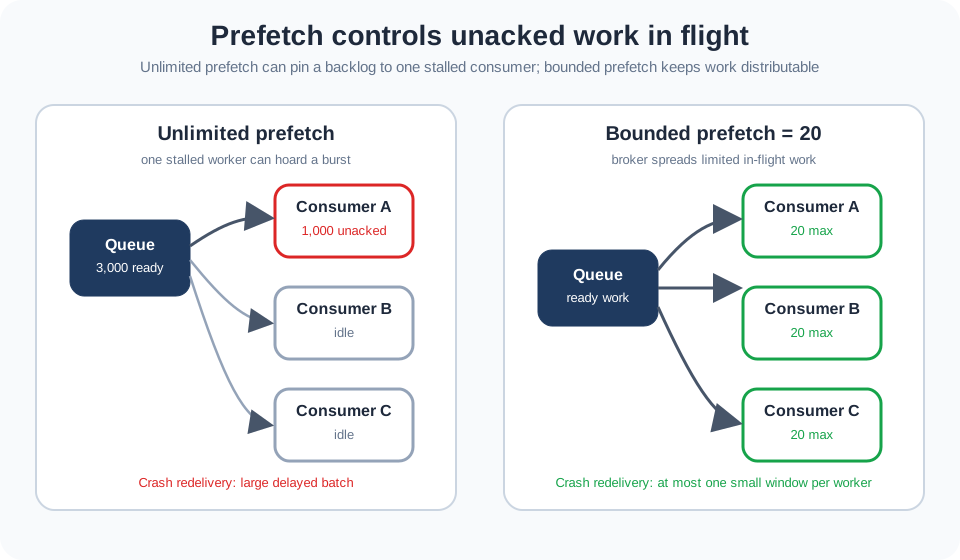
Read the two sides of Figure 12.1: unlimited prefetch lets one stalled consumer retain a large unacknowledged batch, whereas a bounded window distributes in-flight work and limits crash redelivery. The picture connects fair throughput to monitoring both ready and unacked counts, not simply increasing concurrency.
Second, unacked messages are the recovery unit. If the consumer’s channel or connection drops, the broker requeues everything still unacked for that consumer and marks it redelivered=true so the next consumer knows it may be a repeat. A large prefetch therefore means a large redelivery burst on failure. The reliable pattern is manual ack with a modest prefetch: enough in flight to stay fast, few enough that a crash redelivers a small, quickly-reprocessed batch.
Operationally, a prefetch problem shows up as a mismatch between queue depth and worker activity. The queue may appear to drain because messages were delivered, but useful throughput stalls because they are sitting unacked inside one process. Check per-consumer unacked counts, not only ready-message counts. A healthy bounded setup has ready messages falling, unacked messages spread across consumers, and acknowledgements continuing at roughly the handler rate.
The monitoring threshold should match the prefetch policy. With three consumers and prefetch 20, more than 60 unacked messages means the configuration is not what you think, or consumers are using multiple channels. With unlimited prefetch, the same count tells you very little until a stall has already trapped a large batch. This is why reliability runbooks should record both the intended prefetch and the expected maximum unacked total.
12.8 Summary
This section: Summary — Finally: Pitfall Prevention: Set queue limits (x-max-length, x-max-length-bytes, TTL) and a measured prefetch.
This chapter covered AMQP reliability patterns:
First: Acknowledgment Strategies: Auto-ack for speed (risk of loss) vs manual ack for reliability (with NACK strategies)
Next: Message Persistence: Transient for high-throughput telemetry, persistent for critical data
Then: Worked Example 1: Multi-consumer order processing with competing consumers, prefetch=1, and dead-letter handling
After that: Worked Example 2: Multi-tier alert routing with priority queues, quorum queues for HA, and severity-based delivery modes
Also inspect: Common Misconception: AMQP doesn’t guarantee delivery by default - configure publisher confirms, mandatory flag, and alternate exchanges
Finally: Pitfall Prevention: Set queue limits (x-max-length, x-max-length-bytes, TTL) and a measured prefetch.
Finally: Interactive Calculators: Message loss impact, throughput vs latency tradeoff, prefetch optimization, and queue sizing
12.9 Knowledge Check
This section: Knowledge Check
12.10 What’s Next
This section: What’s Next — You have applied AMQP reliability patterns to real-world scenarios.
You have applied AMQP reliability patterns to real-world scenarios. The chapters below extend this foundation into assessment, implementation, and broader protocol context.
First: AMQP Knowledge Assessment: Focus: quizzes and visual reference gallery. Why read it: test and consolidate everything from this chapter with structured self-assessment questions and reference diagrams.
Next: AMQP Core Concepts: Focus: exchange types, routing keys, and bindings. Why read it: deepen your understanding of how messages are routed before reliability mechanisms are applied.
Then: AMQP Architecture and Frames: Focus: wire-level frame structure and channel multiplexing. Why read it: understand how publisher confirms and acknowledgment frames are encoded at the protocol level.
After that: AMQP Implementations and Labs: Focus: hands-on RabbitMQ setup and configuration. Why read it: apply the queue configuration patterns from this chapter in a live broker environment.
Also inspect: AMQP Fundamentals: Focus: overview and learning path navigation. Why read it: return to the module overview to navigate to adjacent protocol comparison chapters.
Finally: MQTT Protocol Fundamentals: Focus: MQTT QoS levels and broker architecture. Why read it: compare AMQP’s explicit acknowledgment model with MQTT’s QoS 0/1/2 delivery guarantees for IoT devices.
12.11 Continue Your Route
This section: Continue Your Route — This is the last part of this chapter.
This is the last part of this chapter. Return to AMQP Reliability: Delivery Controls or continue from the AMQP Module Guide.
Find help
3 reviewed answers.
Where should I start in a module?
Open the module page from the sidebar to see its chapters in order. Use the module map to return to a topic you need.
Modules and pathsReviewed
What can I try when a project does not work?
Check the symptom, then work through the diagnostic steps. Keep the error message and the smallest example that reproduces it.
When you are stuckReviewed
How do interactive examples work?
Use the interactive guide to check how examples and simulations work before changing your project.
Interactive examples guideReviewed