2 Data Visualization & Dashboards
| Chapter | Topic |
|---|---|
| Overview | Introduction to IoT data visualization and the 5-Second Rule |
| Visualization Types | Selecting chart types for different IoT data patterns |
| Dashboard Design | Information hierarchy, audience design, and accessibility |
| Real-Time Visualization | Push vs. pull updates, decimation, and performance |
| Data Encoding & Codecs | Video and audio codecs for IoT media streams |
| Visualization Tools | Grafana, ThingsBoard, Node-RED, and custom development |
| Hands-On Labs | ESP32 dashboards with Chart.js and serial visualization |
2.1 Learning Objectives
By the end of this section, you will be able to:
- Justify the Role of Visualization: Explain why data visualization is critical for IoT systems and defend design decisions with the 5-Second Rule
- Apply the 5-Second Rule: Design dashboards that communicate system status within 5 seconds
- Select Appropriate Chart Types: Choose the right visualization for different IoT data patterns based on the question being asked
- Trace the Visualization Pipeline: Map the complete path from raw sensor data to actionable insights through each transformation stage
- Match Tool to Requirements: Evaluate visualization tools against specific IoT constraints including latency, audience, and data volume
2.3 Prerequisites
Before diving into this chapter, you should be familiar with:
- Time-Series Fundamentals: Understanding time-stamped data is essential since most IoT visualizations display sensor readings over time
- Stream Processing Fundamentals: Real-time dashboards depend on data pipelines that deliver fresh data continuously
- Basic web concepts: Familiarity with HTML, CSS, and JavaScript helps when customizing dashboards or building custom visualizations
This chapter connects to multiple learning hubs for deeper exploration:
Simulations Hub: Try the Grafana Data Flow Animation (included in this chapter) to visualize how data moves from sensors through time-series databases to dashboard panels.
Videos Hub: Watch tutorials on building Grafana dashboards, Node-RED flows, and custom D3.js visualizations for IoT monitoring.
Labs Hub: Complete hands-on labs building ESP32 web dashboards, serial visualization systems, and multi-sensor monitoring displays using the Wokwi simulator.
Knowledge Gaps Hub: Address common visualization mistakes like chart junk, color blindness issues, and dashboard overload that reduce effectiveness.
Core concept: Data visualization transforms IoT’s continuous streams of numbers into pictures humans can instantly understand. The goal is to answer “Is everything OK?” within 5 seconds.
Why it matters: A sensor generating 1,000 readings per second is useless if no one can interpret the data. Good visualization surfaces anomalies, trends, and critical states that would be invisible in raw numbers.
Key takeaway: Choose visualization type based on the question you need to answer: line charts for trends over time, gauges for current values vs. thresholds, heatmaps for pattern discovery, and maps for spatial data. For tools, Grafana handles time-series monitoring, Node-RED enables quick prototypes, and custom code solves unique requirements.
Visualization is the bridge between raw sensor data and human decision-making. IoT systems can generate millions of data points per day, but this information is worthless unless it can be understood and acted upon. Effective dashboards turn data into decisions - alerting operators to problems, revealing optimization opportunities, and proving system value to stakeholders.
Data Visualization is like turning numbers into pictures that tell a story!
2.3.1 The Sensor Squad Adventure: The Great Dashboard Discovery
Temperature Terry, Light Lucy, Motion Marley, Pressure Pete, and Signal Sam were sending LOTS of messages to the smart house computer. Numbers, numbers, and more numbers - all day long!
“I send my temperature every second!” said Terry proudly. “That’s 86,400 numbers per day!”
“I track brightness 10 times per second!” added Light Lucy. “That’s 864,000 numbers daily!”
The smart house computer looked overwhelmed. “I have SO many numbers… but I don’t know what any of them MEAN!”
Enter Dashboard Denise!
Dashboard Denise was a special helper who could turn confusing numbers into beautiful pictures.
“Let me show you,” she said. “Terry, give me your temperatures from today.”
Terry sent over: 20, 21, 22, 24, 28, 32, 35, 33, 28, 22, 20…
“Hmm, just numbers,” said the computer. “I see 20, 21, 22…”
Dashboard Denise waved her magic wand and drew a LINE on a graph!
Temperature Today (in degrees)
35 |           *
30 |         *   *
25 |       *       *
20 | * * *           * *
   +-------------------
     6am  12pm  6pm  10pm
“NOW I see it!” cheered the computer. “It got hot in the afternoon and cooled down at night! That LINE tells the whole story!”
Different Pictures for Different Questions:
Motion Marley asked, “But what about MY movement data?”
Dashboard Denise thought carefully. “What question do you want to answer?”
“I want to know WHEN people walk around the house,” said Marley.
“Perfect! We’ll use a HEATMAP!” Denise created a colored grid:
Activity Heatmap (Red = lots, Blue = none)
             Mon   Tue   Wed   Thu   Fri
Morning      Low   Med   Med   Low   Low
Afternoon    Med   Med   HIGH  HIGH  Med
Evening      HIGH  HIGH  HIGH  HIGH  VERY HIGH!
Night        None  None  None  None  Low
“Ohhh!” said Marley. “I can see people are home more in the evenings and barely move around at night!”
The 5-Second Rule:
“The most important rule,” explained Dashboard Denise, “is the 5-Second Rule. When someone looks at a dashboard, they should understand if everything is OK within 5 seconds!”
She showed them two dashboards:
BAD Dashboard (Too confusing!):
Numbers everywhere! Charts overlapping!
Text too small! Colors random!
"Is everything OK?" = "Umm... I don't know..."
GOOD Dashboard (Clear and simple!):
+---------------------------+
|    ALL SYSTEMS NORMAL     |  <-- Big green banner!
+---------------------------+
|                           |
|   ~~~~Temperature~~~~     |  <-- One clear chart
|                           |
+---------------------------+
“I like the good one!” said Signal Sam. “I can see right away that things are working!”
2.3.2 Key Words for Kids
| Word | What It Means |
|---|---|
| Dashboard | A screen with pictures and charts that show how things are doing |
| Line Chart | A picture that shows how something changes over time (like a squiggly line) |
| Heatmap | A colored grid that shows where things are high (red/hot) or low (blue/cool) |
| Gauge | Like a speedometer that shows if a value is OK, warning, or danger |
| 5-Second Rule | You should understand the main message in just 5 seconds! |
| Real-Time | Updating RIGHT NOW as new data comes in |
2.3.3 Try This at Home!
Make Your Own Dashboard:
Temperature Line Chart: For one week, write down the temperature at breakfast, lunch, and dinner. Then draw a line connecting the dots on graph paper!
Activity Heatmap: Color a grid showing when you’re most active during the day (red = very active, yellow = somewhat active, blue = resting)
The 5-Second Test: Show your drawings to a family member. Can they tell what the picture means in 5 seconds?
Questions to think about:
- What story does your temperature line tell?
- When are you most active during the day?
- How could you make your dashboard clearer?
You just learned why IoT engineers love turning data into pictures!
Think of data visualization like a car dashboard - it shows you everything important at a glance.
When you’re driving, you don’t read a list of numbers like “Speed: 55, RPM: 2500, Fuel: 75%, Engine temp: 195F”. Instead, you glance at gauges and instantly know if everything is normal.
IoT visualization does the same thing for sensor data:
| Raw Data (Hard to Understand) | Visualization (Easy to Understand) |
|---|---|
| Temperature readings: 22.1, 22.3, 22.2, 35.8, 36.2, 36.5… | Line chart with red zone showing sudden spike |
| Motion events: 08:15, 08:22, 12:30, 18:45, 18:52, 19:01… | Timeline showing morning departure, lunch break, evening return |
| Server response times: 45ms, 52ms, 48ms, 890ms, 920ms… | Gauge turning from green to red indicating slowdown |
The Three Key Questions:
Every good IoT dashboard answers these questions:
- Is everything OK right now? (Status indicators, gauges)
- How did we get here? (Time-series charts showing history)
- What needs attention? (Alerts, anomaly highlighting)
Chart Type Cheat Sheet:
| Question You Want to Answer | Best Chart Type | Example |
|---|---|---|
| “How does temperature change throughout the day?” | Line chart | Line going up and down |
| “Is the pressure in the safe zone?” | Gauge | Semicircle with needle |
| “Which hours have most activity?” | Heatmap | Colored grid |
| “Where are all my sensors located?” | Map | Points on a map |
| “What’s the status of each device?” | Status table | Grid of colored dots |
The 5-Second Rule in Action:
Good dashboards are designed so users can understand the key message in 5 seconds or less:
| GOOD Dashboard | BAD Dashboard |
|---|---|
| Big status banner: “All Systems Normal” | 50 tiny numbers |
| One clear trend chart | 10 charts crammed together |
| Small details IF needed | No clear indication of priority |
| Result after 5 seconds: User knows status! | Result after 5 seconds: User is confused |
Real-World Example:
A factory monitors 100 machines. Instead of showing 100 separate displays: - Overview screen: Shows 100 colored dots (green = OK, yellow = warning, red = alert) - Drill-down: Click any dot to see that machine’s detailed charts - Alert panel: Only shows machines that need attention
This layered approach lets operators manage the whole factory with a 5-second glance, while still having access to detailed data when needed.
2.4 Overview
Data visualization transforms IoT’s continuous data streams into actionable intelligence. This chapter series covers the complete visualization journey: from selecting the right chart types to building production dashboards with real-time updates.
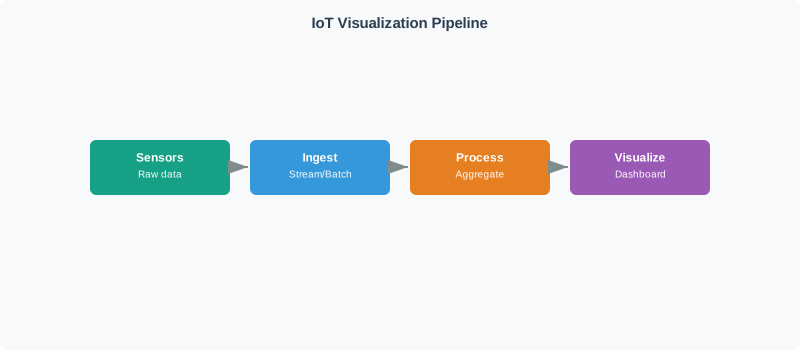
A well-designed dashboard answers “Is everything OK?” within 5 seconds. If users need to think before understanding system status, the design has failed. This principle guides all visualization decisions.
2.5 Chapter Guide
This topic is organized into six focused chapters:
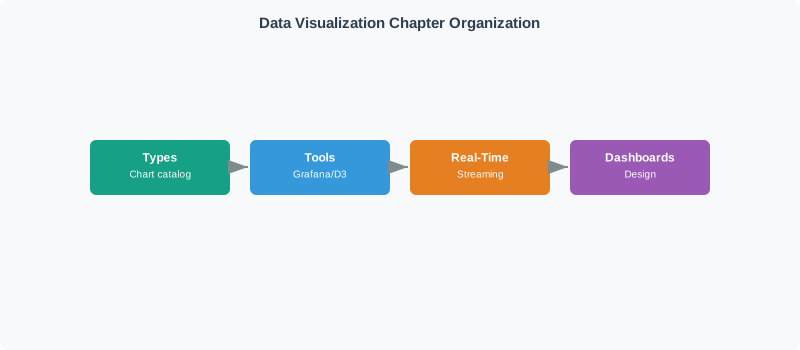
2.5.1 Visualization Types for IoT Data
Learn to select appropriate chart types for different IoT data patterns:
- Time-series charts (line, area, candlestick) for trends over time
- Gauges and meters for current status monitoring
- Heatmaps for pattern discovery across dimensions
- Geographic maps for location-based device data
- Status indicators for binary and categorical states
2.5.2 Dashboard Design Principles
Master the principles that separate effective dashboards from visual clutter:
- Information hierarchy and F-pattern layout
- The 5-second rule for critical communication
- Audience-specific design (operators vs. engineers vs. executives)
- Avoiding common pitfalls: overload, color blindness, chart junk
- Accessibility and WCAG compliance
2.5.3 Real-Time Visualization
Implement high-performance real-time dashboards:
- Push (WebSocket) vs. pull (polling) update strategies
- Data decimation algorithms (LTTB, min-max, averaging)
- Refresh rate optimization for different data types
- Query optimization and caching
- Performance tuning for 60fps rendering
2.5.4 Data Encoding for IoT Media
Understand codecs for IoT video and audio streams:
- Containers vs. codecs distinction
- Waveform vs. parametric encoding approaches
- Video codecs (MJPEG, H.264, H.265, VP9) for surveillance
- Audio codecs (Opus, AAC, G.711) for voice and monitoring
- Bandwidth and storage calculations
2.5.5 Visualization Tools
Choose and configure the right tools for your needs:
- Grafana for time-series monitoring
- ThingsBoard for complete IoT platforms
- Node-RED for rapid prototyping
- Custom development with D3.js, Chart.js, Plotly
- Building Grafana dashboards: data sources, panels, variables, alerting
2.5.6 Hands-On Labs
Build real IoT dashboards with step-by-step labs:
- Lab 1: Web dashboard with ESP32 and Chart.js
- Lab 2: Serial visualization with ASCII bar charts and sparklines
- Lab 3: Multi-sensor monitoring with threshold alerts
All labs use the Wokwi simulator - no physical hardware required.
2.6 The Visualization Decision Tree
Use this decision tree to select the right visualization approach for your IoT data:
2.7 Learning Path
Beginners: Start with Visualization Types to understand chart selection, then try Lab 2: Serial Visualization for hands-on practice.
Intermediate: Read Dashboard Design Principles, then complete Lab 1: Web Dashboard.
Advanced: Focus on Real-Time Visualization and Visualization Tools for production deployment.
2.8 Quick Reference
2.8.1 Chart Type Selection
| Question to Answer | Chart Type |
|---|---|
| How does this value change over time? | Line chart |
| What’s the current value vs. thresholds? | Gauge |
| When are values highest/lowest? | Heatmap |
| Where are my devices located? | Point map |
| What’s the status of my fleet? | Status table |
2.8.2 Refresh Rate Guidelines
| Data Type | Recommended Refresh |
|---|---|
| Safety-critical alerts | 1 second (push) |
| Operational metrics | 5-30 seconds |
| Environmental sensors | 30-60 seconds |
| Trend analysis | 5-15 minutes |
| Historical reports | On-demand |
2.8.3 Tool Selection
| Need | Recommended Tool |
|---|---|
| Quick prototype | Node-RED |
| Time-series monitoring | Grafana |
| Full IoT platform | ThingsBoard |
| Unique requirements | Custom development |
2.9 Real-Time Dashboard Architecture
Understanding how data flows from sensors to dashboards helps you make better design decisions:
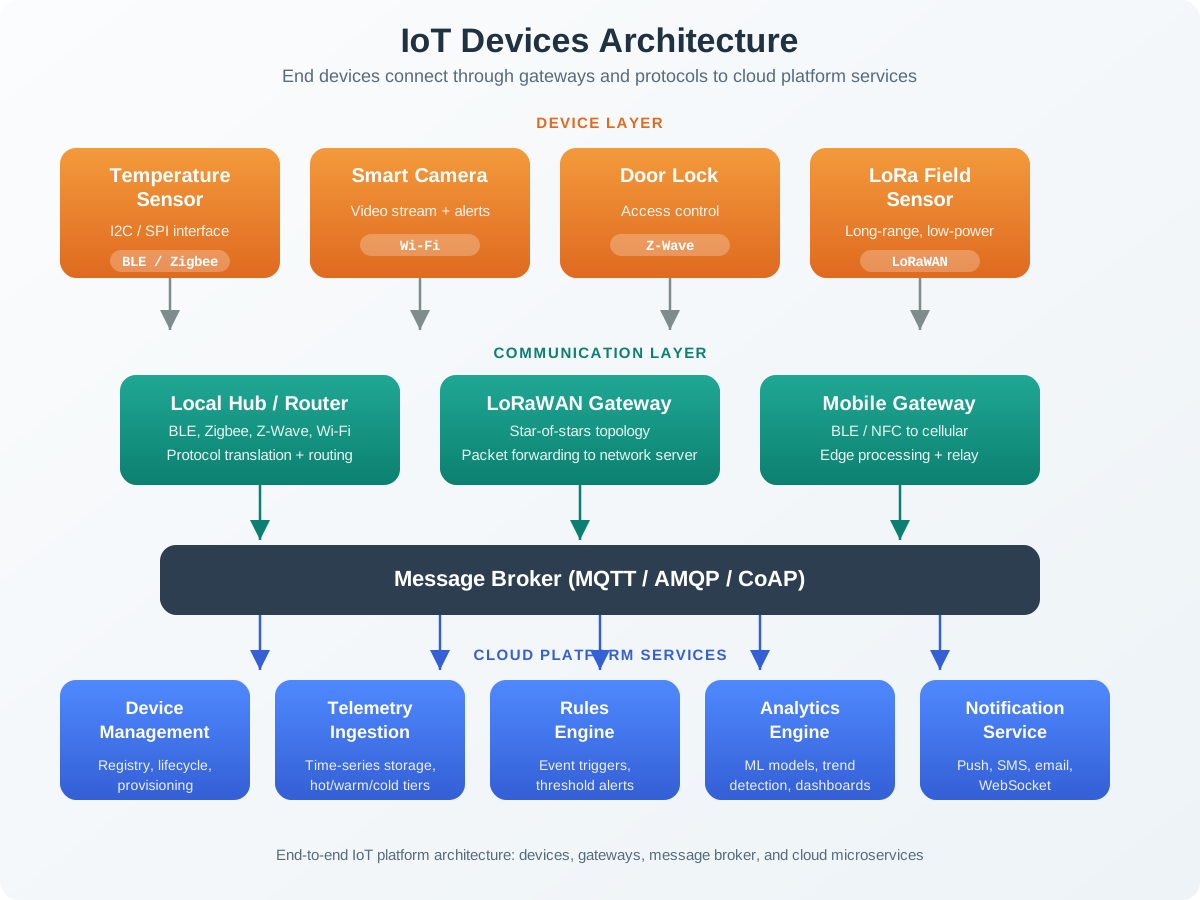
Real-time dashboards use two data paths:
- Push (WebSocket): For live widgets that need instant updates (gauges, alerts, current values)
- Pull (REST API): For historical charts that query data on demand (trends, reports)
The stream processor decides what goes where based on urgency and data type.
2.10 Knowledge Check: IoT Data Visualization Basics
Test your understanding of IoT data visualization concepts with these interactive questions.
How much render overhead are we talking about? With 1,000 sensors at 1 Hz viewing 1-minute history:
$ = 1{,}000 = 60{,}000 $
Browser SVG rendering: ~5ms per 100 points → \(60{,}000 / 100 \times 5\text{ ms} = 3{,}000\text{ ms render time}\) (3 seconds to draw!). With LTTB decimation to 200 points: \(200 / 100 \times 5\text{ ms} = 10\text{ ms}\) (300x faster). User sees same visual pattern, browser stays responsive. Rule of thumb: never render >1,000 points per chart.
2.11 Summary
- Data visualization transforms raw IoT sensor data into actionable insights that humans can quickly understand
- The 5-Second Rule is the key design principle: users should know if everything is OK within 5 seconds of looking at a dashboard
- Chart selection depends on your question: line charts for trends, gauges for thresholds, heatmaps for patterns, maps for location data
- Dashboard design must consider audience (operators vs. engineers vs. executives) and avoid information overload
- Real-time visualization requires strategies like data decimation and push updates to maintain performance
- Tool selection ranges from quick prototyping (Node-RED) to production monitoring (Grafana) to custom development (D3.js)
Scenario: A manufacturing plant with 200 machines needs a control room dashboard for 3 operators monitoring production 24/7. Critical requirement: identify problems within 5 seconds of glancing at the display.
Initial Design (Failed):
- 200 individual line charts (one per machine)
- Real-time updates every second
- All metrics visible simultaneously (temperature, vibration, power, output rate)
Failure Mode:
- Information overload → Operators miss critical alerts
- 200 charts × 4 metrics = 800 visualizations on screen
- No clear indication of system status
- Operators take 30+ seconds to assess “is everything OK?”
Redesign Using 5-Second Rule:
Layer 1: Overview (5-Second Glance)
<!-- Grid of 200 colored status indicators -->
<div class="machine-grid">
    <!-- Each machine = one colored circle -->
    <div class="machine ok" data-id="M001">1</div>
    <div class="machine warning" data-id="M002">2</div>
    <div class="machine critical" data-id="M003">3</div>
    <!-- ... 197 more machines ... -->
</div>

<style>
.machine {
    width: 40px; height: 40px;
    border-radius: 50%;
    display: inline-block;
    margin: 5px;
    text-align: center;
    line-height: 40px;
    font-weight: bold;
}
.machine.ok { background: #4CAF50; color: white; }      /* Green */
.machine.warning { background: #FFC107; color: black; } /* Yellow */
.machine.critical { background: #F44336; color: white; /* Red */
    animation: pulse 1s infinite;  /* Attention-grabbing */
}

@keyframes pulse {
    0%, 100% { transform: scale(1); }
    50% { transform: scale(1.2); }
}
</style>
Layer 2: Summary Statistics (10-Second Understanding)
<div class="summary-panel">
    <div class="stat-box">
        <div class="stat-value" id="machinesOK">185</div>
        <div class="stat-label">OK</div>
    </div>
    <div class="stat-box">
        <div class="stat-value" id="machinesWarning">12</div>
        <div class="stat-label">Warning</div>
    </div>
    <div class="stat-box">
        <div class="stat-value" id="machinesCritical">3</div>
        <div class="stat-label">Critical</div>
    </div>
    <div class="stat-box">
        <div class="stat-value" id="outputRate">89%</div>
        <div class="stat-label">Output Rate</div>
    </div>
</div>
Layer 3: Drill-Down Details (On-Demand)
// Click any machine circle → Show detailed modal
document.querySelectorAll('.machine').forEach(machine => {
    machine.addEventListener('click', () => {
        const machineId = machine.dataset.id;
        showDetailedView(machineId);  // Charts, history, diagnostics
    });
});Results:
| Metric | Old Design | New Design |
|---|---|---|
| Time to identify problem | 30+ sec | <5 sec ✓ |
| Alerts missed per shift | 8-12 | 0-1 |
| Operator cognitive load | Very High | Low |
| Screen utilization | 100% (cluttered) | 15% (focused) |
Key Insight: The 5-Second Rule forced a hierarchical design (overview → summary → details) instead of showing everything at once. Operators now glance at the grid, immediately see red circles (problems), and click for details only when needed.
| Your Question | Chart Type | When to Use | Example |
|---|---|---|---|
| How does this value change over time? | Line chart | Time-series trends, historical patterns | Temperature over 24 hours |
| What’s the current value vs. safe limits? | Gauge/meter | Real-time status with thresholds | Tank fill level (0-100%) |
| When are values highest/lowest? | Heatmap | Pattern discovery across dimensions | Activity by hour & day of week |
| Where are my devices located? | Point map | Geographic distribution | Sensor locations in building |
| What’s the status of each device? | Status table | Multi-device fleet monitoring | 50 sensors: OK/Warning/Error |
| How do values compare? | Bar chart | Comparison across categories | Energy usage by room |
| What’s the distribution? | Histogram | Frequency analysis | Response time distribution |
Anti-Patterns to Avoid:
| Wrong Choice | Why It Fails | Correct Alternative |
|---|---|---|
| Pie chart for >5 categories | Hard to compare slice sizes | Bar chart |
| 3D charts | Distorts values, no benefit | 2D with clear axis |
| Line chart for categorical data | Implies continuous trend | Bar chart or table |
| Multiple Y-axes | Confusing, hard to read | Separate charts |
| Rainbow color scales | Not colorblind-safe | Green→Yellow→Red gradient |
Color-Blind Safe Palette (Required for accessibility):
/* Use these instead of red/green */
.status-ok { color: #0072B2; }      /* Blue */
.status-warning { color: #F0E442; } /* Yellow */
.status-critical { color: #D55E00; } /* Orange */Checklist:
The Mistake: A smart building dashboard displays all 500 sensors’ data simultaneously with real-time updates, causing information paralysis where operators cannot quickly determine system status.
Why It Happens:
- “More data = better decisions” fallacy
- Fear of hiding important information
- No prioritization of what matters most
- Designing for data-rich analysts instead of operators
Real-World Impact:
Dashboard with 500 line charts:
→ Takes 45 seconds to scan
→ Operators miss 3 critical alerts per shift
→ False sense of transparency ("we show everything!")
→ Actual transparency: zero (operators can't process it)
The Fix: Information Hierarchy
Level 1: Executive Summary (5-Second Glance)
<div class="summary-banner">
    <h1 style="color: #4CAF50;">All Systems Normal</h1>
    <!-- OR when problems exist: -->
    <h1 style="color: #F44336;">3 Critical Issues Detected</h1>
</div>
Level 2: Category Rollup (10 Seconds)
<div class="category-grid">
    <div class="category ok">HVAC<br>24/24 OK</div>
    <div class="category warning">Lighting<br>45/48 OK</div>
    <div class="category critical">Security<br>8/12 OK</div>
    <div class="category ok">Power<br>18/18 OK</div>
</div>
Level 3: Drill-Down (On Demand)
// Click "Security" → Show only 12 security sensors
// Click individual sensor → Full detail chart
Before/After Comparison:
| Design | Operator Performance |
|---|---|
| Before (500 charts) | 45 sec to assess status 3 alerts missed/shift Operator stress: High |
| After (hierarchical) | 5 sec to assess status 0.2 alerts missed/shift Operator stress: Low |
Rule of Thumb: If an operator cannot explain the dashboard’s message in 5 seconds, it’s overloaded. Simplify ruthlessly.
Checklist:
Concept Relationships
Data visualization connects to several related concepts across the IoT platform:
- Foundational: Time-Series Fundamentals - Understanding timestamped data structure for visualization
- Parallel: Stream Processing - Real-time data pipelines feeding dashboards
- Infrastructure: Data Storage - Query optimization for visualization performance
- Application: Human Factors - User-centered design for IoT interfaces
Contrast with: Data logging (storing raw data for analysis) vs. visualization (transforming data into actionable insights through visual encoding)
See Also
- Anomaly Detection - Highlighting detected anomalies in visualizations
- Big Data Fundamentals - Handling volume and velocity in visual displays
- MQTT Protocol - Real-time data transport to dashboards
2.12 What’s Next
| If you want to… | Read this |
|---|---|
| Choose the right chart type for your IoT data pattern | Visualization Types for IoT Data |
| Design effective dashboards with information hierarchy | Dashboard Design Principles |
| Implement high-performance real-time live displays | Real-Time Visualization |
| Select and configure Grafana, Node-RED, or custom tools | Visualization Tools |
| Build ESP32 dashboards in hands-on labs | Hands-On Labs |
Deep Dives:
- Dashboard Design Principles - Master effective dashboard layouts
- Real-Time Visualization - Implement high-performance live dashboards
- Visualization Tools - Choose and configure the right tools
Foundational Topics:
- Time-Series Fundamentals - Understanding time-stamped data
- Stream Processing Fundamentals - Real-time data pipelines
Related Topics:
- Big Data Fundamentals - Understanding IoT data volume and velocity
- Data Storage CAP Theorem - Time-series databases for visualization
- Anomaly Detection Types - ML-based anomaly detection visualization