4 Visualizing Data in Real Time
More
Depth: Practitioner
Progress saves as you read. Mark sections complete as you go; your progress appears in the sidebar.
4.1 In 60 Seconds
This section: In 60 Seconds — Picture a freezer screen that still shows a safe temperature after its sensor has stopped reporting.
Show the Age Before Asking for Action
Picture a freezer screen that still shows a safe temperature after its sensor has stopped reporting. The number looks calm, so the night manager keeps working. The risk is not a slow screen. It is an old reading presented as if it were new.
Start with the action the display supports. Name the person who acts, the source of the reading, the time it was created, and the age at which it becomes too old to use. Telemetry is the reported reading and device status that the display presents with a timestamp. Mark missing input, delay, and recovery beside the value instead of hiding them behind smooth motion.
Test one failure at a time. Pause the source, delay a reading, send a short spike, and fill the display buffer. Check that the alert remains visible, the last value gains an age warning, and the screen admits when it has reduced or dropped detail. Record who owns each response.
This small test does not prove every screen or workload. User needs and update rates vary. The deeper sections show how alert, status, trend, and pressure lanes turn this first check into a reviewable display contract.
Real-time IoT visualization is not the goal of showing every raw sample as soon as it arrives. The goal is to show the right state, at the right pace, with enough freshness evidence that a user can act without being misled.
A strong real-time dashboard separates urgent alerts, current status, and recent trends because those lanes have different update rules, evidence needs, and failure modes.
Start simple: decide which signals must never be lost, which values only need the latest usable state, and which histories can be summarized. Then make delay, overload, and recovery visible.
4.2 Time The Display Around Trustworthy Action
This section: Time The Display Around Trustworthy Action — Real-time visualization is a contract between telemetry timing and user action.
Real-time visualization is a contract between telemetry timing and user action. A dashboard is real time only when users can tell whether a displayed value is current, stale, missing, delayed, summarized, or overloaded. Fast repainting without freshness evidence can make old data look live.
The safest starting point is to split the display into update lanes. Alerts need strict preservation and quick visibility. Status values need current state and age. Trends need readable history, often after decimation. Before defining those rules, inspect the lane diagram in Figure 4.1 to see how one telemetry stream becomes three different promises to the dashboard user.
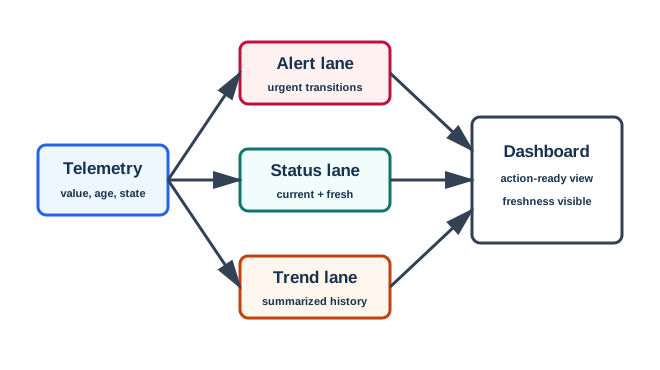
At the left of Figure 4.1, Telemetry arrives with “value, age, state”; those three facts must survive every downstream choice. The upper Alert lane preserves urgent transitions, the Status lane presents what is “current + fresh,” and the Trend lane turns samples into summarized history. Their arrows converge on the Dashboard, whose “action-ready view” and “freshness visible” labels state the outcome. The split is therefore a preservation rule, not just a layout trick: alerts retain threshold crossings and recovery markers, status retains usability evidence, and trends may reduce samples only when gaps, spikes, dips, and state changes remain interpretable.
This separation also prevents a common dashboard error: confusing repaint interval with data freshness. A panel can repaint every second while showing a value that is five minutes old. A trend chart can look smooth while hiding a short alarm spike. A status tile can look green because the last good sample was retained after the device stopped reporting. Real-time design therefore pairs every live-looking element with timing evidence and a recovery behavior.
If you only need the intuition, use this rule: update speed is useful only after the dashboard explains data age, missing updates, and what was summarized or dropped.
4.2.1 Alert Lane
Shows urgent transitions, severity, timestamp, acknowledgement state, and recovery. Alerts must not disappear because the trend chart was downsampled.
4.2.2 Status Lane
Shows the latest usable value, unit, state label, source age, and whether the value is current, stale, missing, invalid, or recovering.
4.2.3 Trend Lane
Shows recent shape and context with a bounded time window, visible thresholds, gap markers, and a declared decimation rule.
4.2.4 Pressure Lane
Shows lag, skipped samples, reconnect state, overload, or reduced refresh behavior when incoming updates exceed display capacity.
4.2.5 Beginner Review Questions
Begin with the user’s decision and ask how lateness, stale data, missing updates, or overload could make that decision worse. Sort each value into the alert, status, or trend lane according to whether the user needs an immediate transition, a trustworthy current state, or historical shape. For every current value, define the age at which it becomes stale and the further condition that makes it missing. Then decide which threshold crossings, alerts, and state changes decimation must preserve, and specify how the interface will announce recovery when updates resume. These questions turn “real time” from a refresh-rate claim into a testable display contract.
4.3 Build The Freshness Review Record
This section: Build The Freshness Review Record — A practical real-time dashboard review record explains what the display should show when telemetry is normal, stale, missing, bursty, delayed, duplicated, or recovered.
A practical real-time dashboard review record explains what the display should show when telemetry is normal, stale, missing, bursty, delayed, duplicated, or recovered. The record should be short enough to use during implementation but precise enough to test after source, threshold, rate, or layout changes.
Start with the user decision and lane assignment. Then define the update path, freshness windows, buffer behavior, decimation rule, drop rule, and evidence cases. A screenshot of normal values is not enough because the dangerous IoT failures are often stale zero, hidden missing data, delayed alarms, and silently overloaded views.
4.3.1 Review Workflow
Write the workflow as a chain of decisions. First name the dashboard user, the action, and why timing can change that action. Next assign every telemetry field to alert, status, trend, or pressure behavior, then define what current, stale, missing, invalid, delayed, and recovered mean on screen. With those semantics fixed, choose pull, push, or hybrid updates and record reconnect and replay behavior. Bound the implementation with a live-buffer size, decimation method, skipped-sample signal, and browser limit. Finally, capture normal, alert, stale, missing, overload, duplicate, and recovery cases so the resulting record proves both the update path and its visible failure behavior.
4.3.2 Worked Review: Pump Monitoring
A pump dashboard receives flow, pressure, and heartbeat telemetry. Operators must distinguish current stopped flow from missing telemetry. The alert lane carries critical pressure, missing heartbeat, and abnormal flow transitions. The status lane shows running, stopped, stale, missing, invalid, or recovering. The trend lane shows recent flow and pressure shape after decimation.
The evidence packet should include normal running, stopped flow with a current heartbeat, stale zero after heartbeat delay, missing telemetry, alert transition, overload indicator, and restored state after updates resume. Without those cases, the dashboard may make missing telemetry look like a safe stopped-flow condition.
4.3.3 Review Record Template
Dashboard decision:
Telemetry sources: Alert lane: Status lane: Trend lane: Freshness windows: Decimation rule: Buffer and drop rule: Reconnect or duplicate rule: Evidence cases: Retest trigger:
4.4 Preserve Events While Reducing Load
This section: Preserve Events While Reducing Load — Under the hood, real-time visualization combines streaming semantics with browser rendering limits.
Under the hood, real-time visualization combines streaming semantics with browser rendering limits. A data pipeline can be healthy while the display is behind, and a display can animate while the underlying data is stale. The implementation needs explicit rules for ordering, decimation, buffering, backpressure, replay, duplicate events, and recovery labels.
The key implementation distinction is preservation versus reduction. Alerts, state transitions, threshold crossings, and recovery markers usually need preservation. Dense normal samples often need reduction. Status panels usually keep the latest usable value plus freshness evidence. Trend panels keep a bounded, interpretable window instead of unlimited raw history.
A robust implementation keeps three clocks visible in the code path even if the user sees only a simple age label: source event time, receive time, and render time. Source time explains when the device says the condition happened. Receive time explains network and broker delay. Render time explains when the browser last applied the update. Sequence numbers or monotonic counters then protect the display from late older messages overwriting newer state.
Backpressure should be designed per lane. A preservation queue can hold alerts and state transitions until they are acknowledged or explicitly expired. A reduction queue can coalesce normal status updates to the latest value and summarize dense trend samples into min, max, average, gap, and threshold-crossing evidence. When either queue falls behind, the dashboard should change state instead of pretending everything is live: show delayed, recovering, replaying, or reduced-refresh labels, and keep enough trace evidence to explain what was skipped.
4.4.1 Bounded Buffers
Each live panel should declare how much recent data it keeps, what it summarizes, what it discards, and whether alert records are stored separately.
4.4.2 Ordering Evidence
Source timestamp, receive time, sequence number, duplicate identity, and replay marker explain why a value changed or arrived late.
4.4.3 Backpressure Rules
When updates exceed display capacity, the dashboard should keep latest status, preserve alerts, reduce chart work, and show delay or overload.
4.4.4 Recovery Labels
After reconnect or source recovery, the display should show restored state and keep short evidence of what was stale, missed, or revised.
4.4.5 Failure Chains To Test
Test failures as chains from cause to user consequence. A late message may arrive after a newer one, overwrite current state, and create a misleading flicker; event-time ordering must prevent that regression. A reduction method may discard a spike, threshold crossing, or state transition, so decimation evidence must show which features survive. An unbounded live panel can retain samples until memory growth slows or breaks the browser, while a bounded queue can still fail if lag grows silently behind an animated display. Recovery needs its own case: when values resume after an outage, the dashboard must say whether intermediate values were missed, replayed, or revised rather than presenting the resumed stream as uninterrupted.
4.4.6 Acceptance Evidence
Acceptance should include event traces as well as screenshots. Use on-time, late, duplicate, burst, dropped-status, preserved-alert, stale, missing, reconnect, and recovery cases. Record expected display state, expected age label, expected trend behavior, skipped or summarized samples, and the user-facing explanation for each case.
4.5 See Also
This section: See Also — Continue with Dashboard Design Principles when the next task is arranging first-screen status, alert hierarchy, and supporting evidence.
Continue with Dashboard Design Principles when the next task is arranging first-screen status, alert hierarchy, and supporting evidence. Use Visualization Types when the timing contract is known but the chart form still needs to match the user’s decision. Move to Visualization Tools only after those choices are explicit, because the implementation stack should be judged against the required freshness, recovery, and action behavior rather than defining them by accident.
4.6 Key Takeaway
This section: Key Takeaway — Real-time visualization is trustworthy when update speed, freshness state, reduction rules, backpressure behavior, and recovery evidence are visible to the user.
Real-time visualization is trustworthy when update speed, freshness state, reduction rules, backpressure behavior, and recovery evidence are visible to the user.
Find help
3 reviewed answers.
Where should I start in a module?
Open the module page from the sidebar to see its chapters in order. Use the module map to return to a topic you need.
Modules and pathsReviewed
What can I try when a project does not work?
Check the symptom, then work through the diagnostic steps. Keep the error message and the smallest example that reproduces it.
When you are stuckReviewed
How do interactive examples work?
Use the interactive guide to check how examples and simulations work before changing your project.
Interactive examples guideReviewed