2 Sensing Across Domains
More
Depth: Practitioner
Progress saves as you read. Mark sections complete as you go; your progress appears in the sidebar.
2.1 Start With the Domain Story
This section: Start With the Domain Story — Picture one temperature part used in a home, a food store, and a machine.
Start With the Decision, Not the Part
Picture one temperature part used in a home, a food store, and a machine. The part measures the same physical property in each place. Yet the people, timing, danger, and useful action are different.
Start with the decision that the temperature reading must support.
-
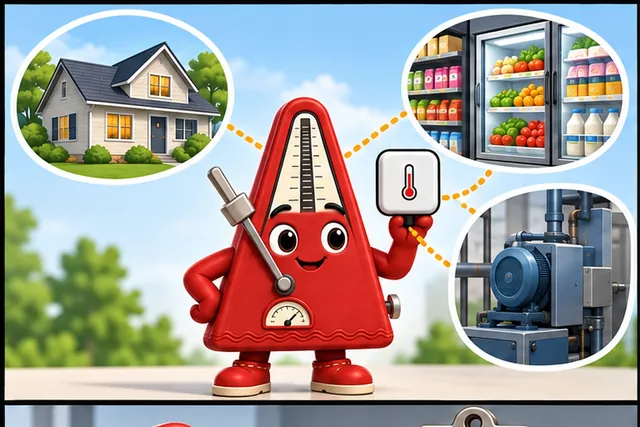
One temperature part serves a home, food store, and machine.
-
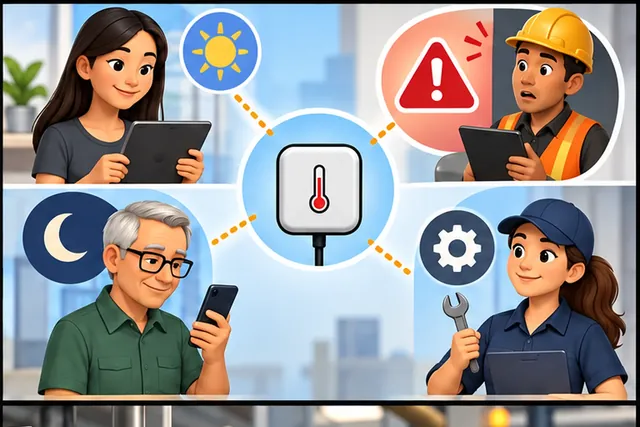
The same reading supports different people, timing, danger, and actions.
-
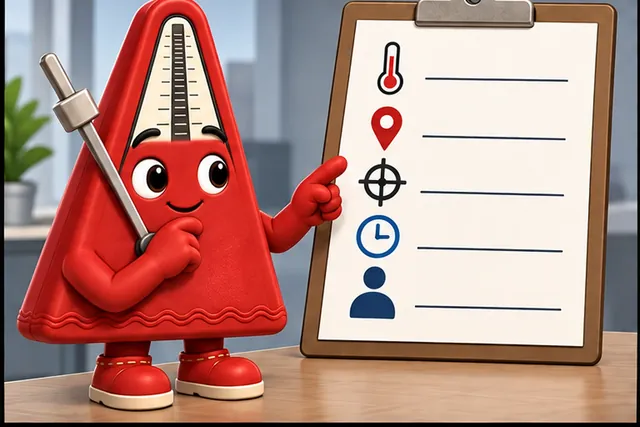
Write the condition, place, allowed error, deadline, and person who acts.
-

A field test ends with the right person completing the known action.
A sensor is a part that turns a real condition into a reading. The application designer should begin with the decision that reading must support. Name the condition, where it is measured, how quickly it can change, what error is acceptable, and who acts.
Next, test the whole installed path. Compare the reading with a trusted check. Move the part to likely hot, cold, wet, or noisy spots. Delay or remove a report. Make sure the display shows old or uncertain data clearly.
Write a one-line claim before choosing hardware. For example: “Warn the store worker before food has been too warm for ten minutes.” This sentence names the person, the condition, and the time. It also gives the test a clear end.
Review the claim with the person who will install and maintain the part. They may spot a door, cleaning spray, cable, dead battery, or hard-to-reach position that a desk review missed. Record what change requires another check.
Choose a display that matches the claim. Do not show extra digits as if they were extra truth. Show the measurement time and a clear old-data state. If the decision uses several readings, explain how each one changes the result.
End the field test with a known action. Trigger a safe high or low condition and watch who receives it. Check the repair record after a part is replaced. The application is ready only when people can complete the full job.
Use a small application card. Name the condition. Name the place. Name the person. State the needed time. State the safe error. State the action. State the last safe value. Add the next check date.
Compare candidate parts with this same card. One may have a wide range. One may use less power. One may resist water. One may be easier to replace. A feature matters only when it supports the stated field job.
Keep the display honest. Show the unit. Show the measurement time. Show a clear gap. Show when a value is outside the checked range. Do not turn a guessed value into a normal reading just to keep the chart smooth.
The same part can therefore need a different range, position, check, and maintenance plan in each use. Practitioner compares application needs. Under the Hood explains the physical effects, error sources, and signal treatment behind the reading.
Picture the same sensor moved between a greenhouse, a cold room, and a machine cabinet. The hardware may look familiar, but the application story changes: the condition, placement, timing, decision, and proof all depend on the domain.
Domains Shape the Measurement Claim
A sensor application is a chain from a real-world condition to a decision. The domain gives the chain its context: a building, tank, machine, greenhouse, vehicle, phone, or field site changes what must be measured, where it is measured, how fast readings matter, how data quality is judged, and what action is allowed. The same sensor family can support different domains, but the evidence record is different each time.
The useful review question is not "which domain are we in?" The useful question is "what claim does this application need to make, and what sensor evidence would make that claim believable here?" A greenhouse humidity reading, a museum archive humidity reading, and a bathroom humidity reading may all use humidity sensors, but they have different placement, alert, maintenance, and validation boundaries.
That is why an overview chapter should keep domain examples tied to review evidence. In a cold-storage room, the application may need evidence that product temperature stayed within a handling rule, not merely that an air sensor reported a comfortable value near the door. In a greenhouse, the useful claim may combine humidity, soil moisture, light, and irrigation state before recommending an action. In equipment monitoring, a vibration reading means little until the record names the machine state, load, mounting point, baseline, and response rule. The domain is the shorthand; the measurement claim is the contract.
If you only need the intuition, start every domain overview with four nouns: condition, context, decision, and evidence. A domain label is helpful only when it sharpens those four items.
Before comparing domain examples, inspect Figure 2.1 to see why the application decision must lead the review. The diagram turns a broad domain label into a sequence of evidence questions that can be checked before hardware claims are trusted.
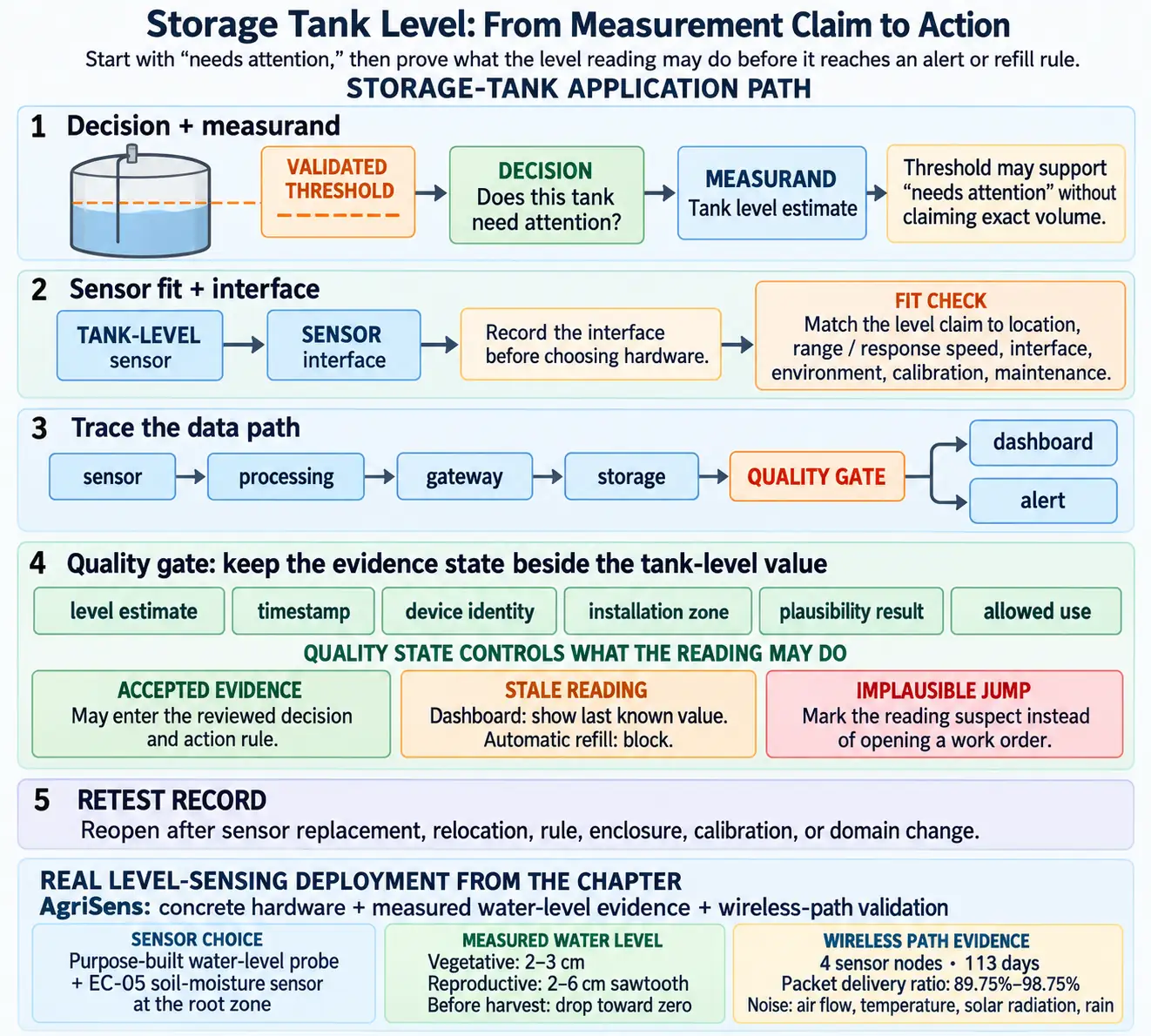
Read Figure 2.1 from the decision question into the measurand and environment, then test sensor fit and the data path. The quality gate decides whether the reading can cross into an action boundary, while the retest record says when that permission expires. That order connects each domain example back to a bounded measurement claim instead of a catalogue of possible sensors.
Common Domain Review Axes
Condition
Name the physical state, resource, equipment behavior, human context, or environmental signal the application needs to observe.
Decision
State whether the reading supports display, alerting, diagnosis, automation, reporting, maintenance, safety review, or model input.
Data Quality
Define freshness, plausibility, range, calibration, missing-data handling, noise tolerance, and context checks before the reading is trusted.
Evidence Record
Keep the sensor choice, placement, environment, data path, validation check, action rule, owner, and retest trigger together.
Beginner Examples
Begin with a room-comfort reading: temperature only becomes useful after placement, airflow, sunlight, occupancy, and the action rule explain what it represents. Apply the same sequence to a tank, where a validated threshold may support “needs attention” without claiming exact volume. Equipment monitoring adds operating mode and trend context before an outlier is interpreted. Mobile sensing adds permission, phone placement, user action, and missing samples. Across all four examples, the domain changes the context and evidence while the review still moves from a decision to a bounded measurement claim.
What Domains Actually Sense
Abstract axes are easier to trust once they are tied to real deployments. A widely used sensor-to-application catalog maps roughly sixty named IoT applications to the specific sensor types each one needs -- the same domain name can require very different sensors depending on the decision:
| Domain | Application | Sensors integrated |
|---|---|---|
| Smart cities | Smart parking | Magnetic field |
| Smart cities | Structural health | Crack detection, crack propagation, accelerometer, linear displacement |
| Smart cities | Smart lighting | Light sensor (LDR), actuator relay |
| Smart environment | Forest fire detection | CO, CO₂, temperature, humidity |
| Smart environment | Air pollution | NOₓ, SOₓ, CO, CO₂, hydrocarbons, methane |
| Smart environment | Earthquake early detection | Accelerometer |
| Smart water | Potable water monitoring | pH, ORP, dissolved oxygen, nitrates, phosphates |
| Smart water | River floods | Level sensor (switch), ultrasound sensor |
| Security and emergencies | Radiation levels | Geiger-Muller tube (beta and gamma), ultraviolet sensor |
| Retail and logistics | Quality of shipment conditions | Light, temperature, humidity, impact, vibration, accelerometer |
Reading down that table is a good check on the review habit above: "structural health" is not one sensor, it is a claim assembled from crack detection plus an accelerometer plus a displacement reading, each answering a different part of the question. A domain name is a filing label for a set of applications; the measurement requirement still has to be assembled application by application.
Overview Knowledge Check
Write the Application Record First
A practical sensor application review starts before hardware selection. The team writes a short application record that explains the domain, decision, measurand, environment, expected data path, action, validation checks, and retest triggers. That record keeps sensor choice tied to the claim the application must support.
The record should also state what the application does not prove. A room sensor may not represent nearby rooms. A tank-level sensor may not prove liquid quality. A phone accelerometer may not prove a person's activity without placement and context. These unsupported claims are not failures; they are boundaries that keep the design honest.
How to Review a Domain Application
Review a domain application in dependency order. State the display, alert, automation, diagnosis, report, or review decision before selecting a sensor. Then name the physical condition, unit, location, expected range, and response speed that support it. Domain context adds installation constraints, environment, privacy expectations, maintenance access, and operating modes. Trace the resulting record through signal processing, gateway, storage, dashboard, model, alert, or actuator. Finally, define how stale, impossible, noisy, missing, and contradictory readings are handled and which changes force the whole claim to be tested again.
Application Review Ledger
Two Domain Records From Real Deployments
AgriSens, a funded smart-irrigation project (IIT Kharagpur, supported by India's Ministry of Human Resource Development), is a concrete example of an application record built before hardware. Its objective was stated as a decision, not a device list: more yield with less water, automatic irrigation, and irrigation treatments that change across a crop's vegetative, reproductive, and maturity phases rather than one fixed schedule. The sensor design followed from that decision -- a purpose-built water-level probe and an EC-05 soil-moisture sensor at the root zone -- and the field trial recorded exactly the kind of evidence this ledger asks for: average water level tracked a clear phase-shaped pattern (a steady 2-3cm through the vegetative phase, a sawtooth 2-6cm as irrigation cycled through the reproductive phase, then a drop toward zero as irrigation stopped before harvest), and the wireless data path was validated separately from the agronomy, with average packet delivery ratio across four sensor nodes over 113 days ranging from 89.75% to 98.75% against named noise sources (air flow, temperature, solar radiation, rain).
AmbuSens, a wireless body-area-network project from the same research group, shows the same discipline applied to a harder decision: ambulatory and emergency healthcare, where physical presence is the default assumption the application has to remove. Its measurand list names exactly what "physiological monitoring" means -- heart rate, a three-lead ECG, temperature, and galvanic skin response -- streamed over a Bluetooth-based body-area network. Rather than trusting the wireless path by assumption, its validation record compared real-time ECG traces from the wireless system directly against a wired hospital reference across both hospital and ambulatory field trials before the system was trusted for the decision it exists to support.
Other funded systems in the same catalog show how far the same review habit travels: an agricultural intrusion-detection prototype (AID) pairs a passive-infrared sensor to detect an object crossing a field's perimeter with an ultrasonic sensor to range its distance, then routes an SMS alert to the farmer's phone through a layered sense-process-route-alert architecture; a coal-mine fire-monitoring and alarm system places temperature sensors at the corners of each Bord-and-Pillar coal panel specifically because that geometry is where early fire risk concentrates. Neither reads as "we added a WSN"; both read as a decision, a measurand chosen to serve it, and a validated path between the two.
Practitioner Knowledge Check
Domain Context Becomes Data Quality Logic
Under the hood, a domain overview becomes software and operations logic. The application must know which sensor produced a reading, when it was sampled, what context was valid, whether the value is plausible, whether the reading is fresh enough, and whether the downstream decision is allowed to use it. Domain context turns into validation rules, metadata, and exception handling.
That logic should distinguish bad data from meaningful states. Missing data is not the same as zero. A stale reading is not the same as a stable condition. An impossible value is not the same as an extreme event. A sensor fault is not the same as an application alarm. Good sensor applications keep those states separate so people and automation do not overreact to weak evidence.
A simple implementation pattern is to carry a quality state beside every value. A tank application can store the level estimate, timestamp, device identity, installation zone, plausibility result, and allowed use. If the level has not updated recently, the dashboard can show the last known value while blocking an automatic refill command. If the value jumps faster than the tank can physically change, the application can mark the reading suspect instead of opening a work order. If maintenance moves the sensor or changes the alert rule, the retest trigger invalidates the old evidence until a new comparison run is recorded.
This separation also helps analytics. A model trained on accepted readings should not silently learn from missing values filled with zeros, stale values copied forward, or fault states mislabeled as real events. The domain overview therefore becomes a schema and policy problem: define the normal state, the uncertain states, the escalation path, and the minimum evidence needed before a reading can influence a user, report, or actuator.
Domain-to-Logic Checks
Identity
Confirm the reading belongs to the expected sensor, location, asset, phone, room, field, tank, or equipment item.
Freshness
Define how old a reading may be before it becomes stale for display, alerting, automation, or review.
Plausibility
Check range, rate of change, missing values, impossible combinations, and disagreement with related sensors or known operating modes.
Action Boundary
Define whether the reading can inform a dashboard, send an alert, open a work order, trigger control, or require manual review.
Failure Patterns
Separate four failure patterns during review. Hidden missing data replaces an unavailable reading with a normal-looking value and then lets it enter reports or alerts. Stale confidence displays an old value without its age or uses it for a decision that requires freshness. Context loss strips location, sensor identity, operating mode, calibration state, or domain notes from the record. Action confusion promotes evidence that is sufficient for display into automation without the stronger validation that action requires. Keeping these states distinct prevents a weak record from looking like a valid extreme condition.
Under-the-Hood Knowledge Check
2.2 From Sensing to Action
This section: From Sensing to Action
2.2.1 Start With the Decision Story
-

Start with one choice: should this plant bed be watered?
-

Check place, units, freshness, and quality before the reading reaches the rule.
-

Reject weak evidence and keep the watering action inside its stated limit.
2.2.1.1 Prove the Whole Path to Action
A cold-room display shows five degrees. The number could support a routine log, a warning, or an automatic shutoff. Those actions do not need the same proof. The service owner must begin with the decision, then work backward to the reading, its context, the rule, and the person or machine that acts.
Name one promise. For a warning, state the room, measured condition, accepted range, sample time, age limit, unit, and quality check. State who receives the warning and what they should do. Keep the source and reason with the action record. A number on a screen is only one link in that chain.
Then break the chain. Move the measuring unit. Delay a reading. Change its unit. Freeze the display. Send a value that fails the quality check. Check that weak evidence cannot silently reach the action rule. Make the rejected state visible and give it an owner. Repeat the test after changing the sample interval or decision limit.
This small application claim does not prove every use of the same reading. A comfort display and a safety action have different limits. The deeper sections compare application types, placement, context, quality, decision rules, evidence records, and the triggers that require the whole claim to be reviewed again.
Start with one ordinary decision, such as whether to water a plant bed, warn about a cold room, or turn on a fan. The sensor reading matters only because it helps that decision stay tied to context, quality checks, and a clear action boundary.
What a Sensor Application Promises
A sensor application is the full path from a physical condition to a useful decision or action. It includes the purpose, measured condition, sensor placement, data record, quality check, decision rule, action, validation evidence, and retest trigger. The useful claim is not "the sensor sends data." The useful claim is that accepted readings can support a named application decision within a bounded context.
This distinction matters because the same sensor reading can support different applications. A temperature reading can be a comfort display, a cold-chain alert, a machine-protection signal, or a model feature. Each purpose changes the acceptable range, freshness, uncertainty, action rule, owner, and evidence record.
For example, suppose a learning greenhouse application uses soil-moisture readings to decide whether to show a watering reminder. The application record should not stop at "moisture value received." It should name the plant bed, probe placement, sample time, accepted range, stale-data rule, and the reminder rule. If the probe is moved, the sample interval changes, or the reminder becomes an automatic pump command, the claim has changed and the review must reopen. That small example shows why the application is the whole sensor-to-action path, not the device alone. A reviewer can then ask whether the reminder was justified by accepted evidence, not merely whether a number appeared.
Before treating a displayed reading as an application result, inspect Figure 2.2 to see the evidence path that must surround it. The diagram starts with purpose because the required action determines how much measurement quality and context the application needs.
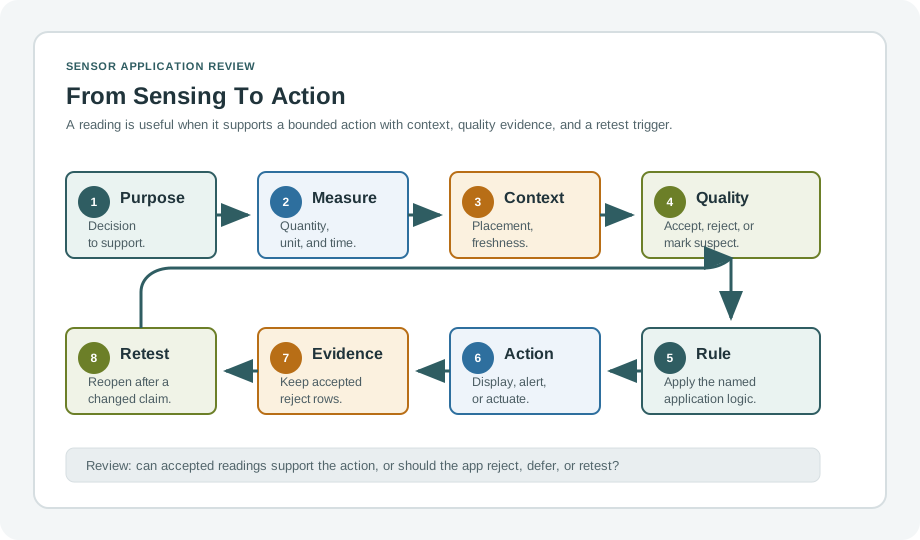
Read Figure 2.2 from purpose into measurement and context, then pause at the quality check: only accepted evidence should reach the decision rule. The action creates an operational outcome, while the evidence record preserves why it occurred. A retest trigger reconnects later changes to the original claim. This ordered chain explains why a dashboard value is one link in the application, not proof that the whole promise is ready.
If you only need the intuition, this layer is enough: start with the decision the application must support, then work backward to the measurement, context, quality checks, action, and retest trigger.
The Sensor-to-Action Chain
Purpose
Name the observation, alert, report, control decision, review task, or model input that the application needs.
Measurement
Define the condition, units, location, sensor, placement, timing, and context that make the reading meaningful.
Quality and decision
State which readings are accepted, rejected, stale, missing, noisy, out of range, or contradictory before any rule uses them.
Action and evidence
Record the display, alert, report, automation, owner response, validation evidence, and retest trigger for the claim.
Beginner Examples
Start with a greenhouse dryness alert: the irrigation decision leads to soil condition, probe placement, quality checks, an alert rule, and retest conditions. A room-occupancy display follows the same path but may accept coarser motion evidence than a safety interlock, whose failure behaviour must be explicit. Mobile-phone sensing adds permission, a user prompt, device context, and data-quality evidence before aggregation. In every example, the dashboard is only the action surface; it still depends on the measurement context, freshness, and quality rules established upstream.
Overview Knowledge Check
Build the Application Evidence Record
A practical sensor application review should produce an evidence record that another person can inspect. The record should be narrow and operational: what the application claims, what data supports the claim, how bad readings are handled, what the application does with accepted readings, and who retests the claim after changes.
The safest workflow is to define the action before choosing the sensor details. Monitoring, alerting, automation, and review decisions have different evidence needs. A trend chart can tolerate more uncertainty than a local shutdown rule. A public aggregate statement needs stronger context controls than a private lab exercise.
Application Review Sequence
Build the review record in order. State the claim as the decision, action, or review the application supports, then bind it to a physical condition, sensor placement, unit, sample interval, context, and expected range. Separate accepted readings from stale, missing, saturated, impossible, noisy, contradictory, and unreviewed states before selecting an action rule. That rule must say whether the application displays, alerts, reports, automates, queues review, or refuses action. Close the record with retest triggers for changes to the sensor, placement, threshold, data path, environment, owner, action, or firmware.
Practitioner Knowledge Check
Handoffs and Claim Boundaries
Under the hood, a sensor application is a chain of handoffs. A physical condition becomes a measurement. A measurement becomes a data record. A data record becomes an accepted or rejected signal. An accepted signal becomes a decision. A decision becomes an action. An action becomes an operational record. Each handoff can fail independently.
Strong applications do not hide those handoffs. They preserve provenance, timestamps, context, quality state, rule version, action owner, and retest reason. That separation prevents a narrow measurement success from being overstated as an application success.
Failure Boundaries to Separate
Trace failures across five boundaries without collapsing them. The measurement boundary covers fit, placement, calibration, range, noise, drift, response time, and local environment. The data boundary preserves units, timestamp, source identity, freshness, missing-data state, storage path, and schema meaning. The decision boundary applies thresholds, rule versions, quality gates, context requirements, confidence limits, and unsupported states. The action boundary governs display, alert, report, actuation, manual review, suppression, escalation, and audit evidence. Operations then assigns ownership, maintenance, calibration intervals, updates, rollback, incident review, and retest. A success at one boundary never proves the next one.
Under-the-Hood Knowledge Check
2.2.2 Summary
A sensor application is a purpose-to-action evidence path, not merely a sensor stream. Begin with the decision or action and work backwards through measurement, context, data quality, validation, and retest conditions. Monitoring, alerting, automation, reporting, and human review demand different evidence strengths, so each reading needs its source, unit, timestamp, context, quality state, rule version, owner, and audit behaviour before it drives an important action. Retest whenever the sensor, placement, data path, quality rule, threshold, owner, action, environment, or firmware changes.
Approve a sensor application only when purpose, measurement context, data quality, decision rule, action owner, validation evidence, and retest boundary are explicit.
2.2.3 See Also
Sensor Applications: Domain Overview
Map physical conditions to measurements, data paths, domain decisions, and validation records.
Sensor Hardware Selection
Select hardware by matching measurement needs, interfaces, environment, calibration, and maintenance evidence.
Sensor Application Architecture
Review sensing nodes, gateways, processing, storage, actions, quality states, and retest triggers.
Mobile Phone as a Sensor
Use phones as bounded sensing platforms with permissions, setup evidence, quality checks, and scoped interpretation.
2.3 Summary
This section: Summary — Sensor application domains help teams organize examples, but they do not replace requirements.
Sensor application domains help teams organize examples, but they do not replace requirements. A useful domain overview names the condition, context, decision, data path, validation checks, and evidence record. The same sensor type can support different applications when the domain changes the placement, action, quality threshold, maintenance rule, or retest trigger.
2.4 Key Takeaway
This section: Key Takeaway
Start sensor applications from the domain decision, not the sensor catalog. The best application record explains what condition is measured, why it matters, how data is validated, and when the evidence must be reviewed again.
2.5 See Also
This section: See Also
Sensor Applications
Review the module entry chapter for the sensor-to-action evidence path.
Sensor Application Architecture
Trace the data path from sensing node through gateway, processing, storage, and action.
Sensor Hardware Selection
Choose hardware that fits the domain requirement, environment, interface, and validation record.
Sensor Lab Workflow
Practice turning a domain application question into setup evidence and reviewable lab records.
Find help
3 reviewed answers.
Where should I start in a module?
Open the module page from the sidebar to see its chapters in order. Use the module map to return to a topic you need.
Modules and pathsReviewed
What can I try when a project does not work?
Check the symptom, then work through the diagnostic steps. Keep the error message and the smallest example that reproduces it.
When you are stuckReviewed
How do interactive examples work?
Use the interactive guide to check how examples and simulations work before changing your project.
Interactive examples guideReviewed